VRRP
R1 - S - PC
R2 ↗
연결 시 pc에서는 R1(라우터)의 IP(게이트웨이)를 사용하는데 이때 R가 고장났다면? 연결이 되지 않을 때 연결할 수 있게 가상 라우터를 선정하는 프로토콜임
한마디로 실제로는 연결이 끊겨도 논리적 연결을 통해 안끊기고 잘 사용되게 한다는뜻?
그래서 R가 망가졌을 때 S에 연결된 또다른 R2가 사용되며 대체되는것을 VRRP라고 함
2중화.
R1 쓰는걸 Active, R2는 stanby 로 평소에는 r1쓰다가 r1 망가지면 r2로 갈아타서 사용하는거. 이중화 백업 라우터?
그래서 게이트웨이의 active, stanby를 설정할 수 있음
사실 효율성으로만 보면 2개 다 active로 사용하면 빠른 처리가 가능함
하지만 망가진다고 가정했을 때 안정적인 것은 active, stanby임
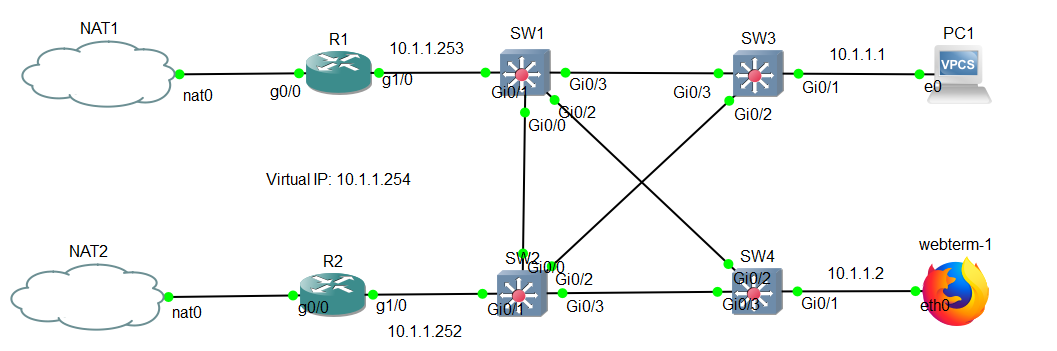
PC1
ip 10.1.1.1/24 10.1.1.253
R1
conf t
int g0/0
no sh
ip add dhcp
ip nat outsideint g1/0
ip add 10.1.1.253 255.255.255.0
no sh
ip nat inside
exit
ip nat inside source list 1 int g0/0
access-list 1 permit any
R2
conf t
int g0/0
no sh
ip add dhcp
ip nat outsideint g1/0
ip add 10.1.1.252 255.255.255.0
no sh
ip nat inside
exit
ip nat inside source list 1 int g0/0
access-list 1 permit any
R1(config)#int g1/0
R1(config-if)#standby 1 ip 10.1.1.254
R1#sh standby br
                     P indicates configured to preempt.
                     |
Interface   Grp  Pri P State   Active          Standby         Virtual IP
Gi1/0       1    100   Active  local           10.1.1.252      10.1.1.254


R2(config)#int g1/0
R2(config-if)#standby 1 ip 10.1.1.254
R2#sh standby br
                     P indicates configured to preempt.
                     |
Interface   Grp  Pri P State   Active          Standby         Virtual IP
Gi1/0       1    100   Standby 10.1.1.253      local           10.1.1.254

R1(config-if)#standby 1 priority 105
R1(config-if)#standby 1 preempt
R1(config-if)#
*Jul  1 01:49:28.575: %HSRP-5-STATECHANGE: GigabitEthernet1/0 Grp 1 state Standby -> Active
R1(config-if)#do sh stand
GigabitEthernet1/0 - Group 1
  State is Active
    5 state changes, last state change 00:01:03
  Virtual IP address is 10.1.1.254
  Active virtual MAC address is 0000.0c07.ac01    ← 가상 맥주소 확인
    Local virtual MAC address is 0000.0c07.ac01 (v1 default)
  Hello time 3 sec, hold time 10 sec
    Next hello sent in 2.320 secs
  Preemption enabled     ← 선점, 비선점 역할 확인
  Active router is local
  Standby router is 10.1.1.252, priority 95 (expires in 8.448 sec)
  Priority 105 (configured 105)
  Group name is "hsrp-Gi1/0-1" (default)

R1(config-if)#no standby 1

R2(config-if)#standby 1 priority 95
R2(config-if)#standby 1 preempt

R2(config-if)#no standby 1   ← 삭제
------------------------------GLBP-------------
GLBP
○ GLBP (Gateway load balancing protocol)
- 이중화 기능을 제공하면서, 별도의 설정 없이 Load Balancing 기능을 지원한다.
- Cisco proprietary
- active / active load balancing across multiple routers.
- Multicast : 224.0.0.102 //HSRP V2와 같음
- Virtual MAC Address : 0007.b400.XXYY (XX = GLBP group number, YY = AVF number)
R1(config-if)#glbp 1 ip 10.1.1.254
R1(config-if)#glbp 1 priority 105
R1(config-if)#glbp 1 preempt

R1(config-if)#do sh glbp br
Interface   Grp  Fwd Pri State    Address         Active router   Standby router
Gi1/0       1    -   100 Active   10.1.1.254      local           unknown
Gi1/0       1    1   -   Active   0007.b400.0101  local           -
Gi1/0       1    2   -   Listen   0007.b400.0102  10.1.1.252      -
R1(config-if)#do sh glbp

R2(config-if)#glbp 1 ip 10.1.1.254

R2(config-if)#do sh glbp br
Interface   Grp  Fwd Pri State    Address         Active router   Standby router
Gi1/0       1    -   100 Standby  10.1.1.254      10.1.1.253      local
Gi1/0       1    1   -   Listen   0007.b400.0101  10.1.1.253      -
Gi1/0       1    2   -   Active   0007.b400.0102  local           -

R2(config-if)#do sh glbp br
Interface   Grp  Fwd Pri State    Address         Active router   Standby router
Gi1/0       1    -   100 Standby  10.1.1.254      10.1.1.253      local
Gi1/0       1    1   -   Listen   0007.b400.0101  10.1.1.253      -
Gi1/0       1    2   -   Active   0007.b400.0102  local           -

R2(config-if)#glbp 1 priority 95
R2(config-if)#glbp 1 preempt
연구과제
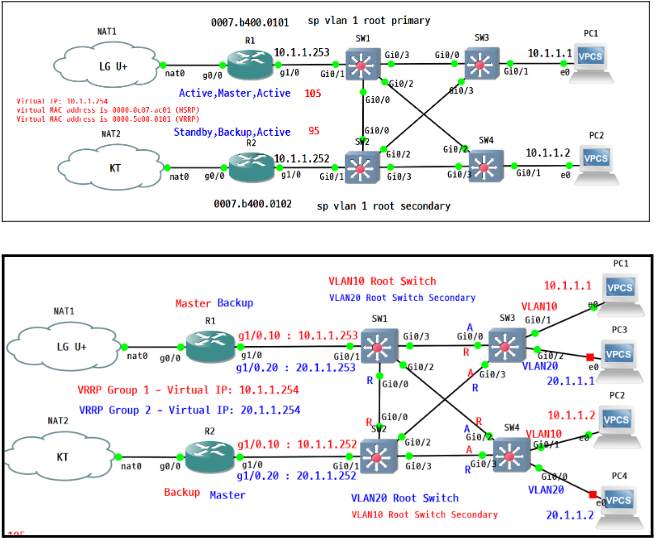
2계층과 3계층의 이중화, Load-balancing을 구현하시오.
VLAN10 - 10.1.1.0/24
VLAN20 - 20.1.1.0/24
- 2계층 설정 : 루트 스위치 조정
- SW1 : VLAN 10 root, VLAN 20 2nd root
- SW2 : VLAN 20 root, VLAN 10 2nd root
3계층 설정 : VRRP 구현, 라우터의 서브인터페이스를 이용해서 설정
- R1 : VRRP 1 Master , VRRP 2 Backup
- R2 : VRRP 2 Master , VRRP 1 Master