yarn workspace
- yarn 설치
npm install -g yarn- 프로젝트 디렉토리 생성
mkdir <MONOREPO_NAME> && cd <MONOREPO_NAME>- yarn 초기화
yarn init -2- IDE config
- VSCode Extension에서 ZipFS 설치
- root에서 아래 명령 실행
yarn add -D typescript
yarn dlx @yarnpkg/sdks vscode- typescript 파일에서
cmd + shift + P- Select Typescript Version
- Use Workspace Version
프로젝트 설정
- packages 디렉토리 생성
프로젝트들이 위치할 packages 디렉토리를 생성한다.
- 프로젝트 추가
packages 디렉토리 안에 프로젝트들을 정의한다. 나는 vue3 프로젝트들이 필요해서 packages 디렉토리에서yarn create vite를 통해 프로젝트를 생성했다.
기본적인 설정은 https://velog.io/@songjj77/Vue3-프로젝트-기본-설정 참고
- root package.json workspaces 추가
root의 package.json에 모노레포로 관리할 프로젝트들을 입력해야 한다. 특정 디렉토리에 포함된 모든 프로젝트를 추가할때는 아래처럼 입력해도 된다.
{
  "name": "yarn-workspaces",
  "packageManager": "yarn@4.0.2",
  "private": true,
  "workspaces": [
    "packages/*"
  ],
  "devDependencies": {
    "typescript": "^5.3.3"
  }
}
tsconfig.json
yarn workspace에서는 프로젝트별 tsconfig.json을 하나의 공통 설정사항을 이용해서 관리할 수 있다.
root tsconfig.json
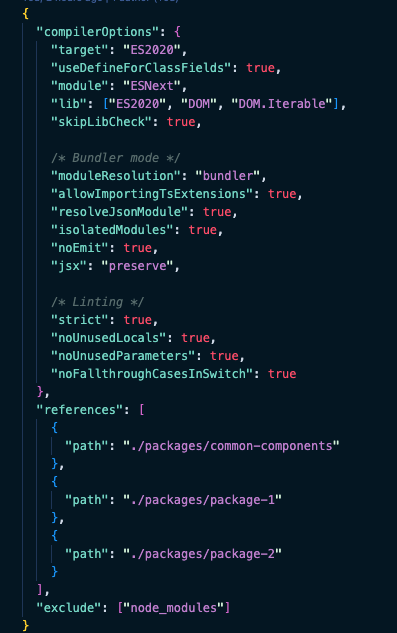
-
compilerOptions
프로젝트들이 공통으로 사용하는 compilerOptions -
references
root의 tsconfig에게 개별 tsconfig 파일이 위치할 경로를 알려주는 역할을 한다. 타입스크립트 컴파일러가 코드를 컴파일 할 때, 개별 tsconfig 파일의 내용을 알아야 하기 때문에 필요하다.
references에서 참조하는 프로젝트의 tsconfig에서 composite: true를 설정해줘야 하고 noEmit 에러때문에 root tsconfig에 files: [] 옵션도 추가해줘야 하는데 이게 레포 2개에서 테스트했는데 상황마다 달라서 좀 더 공부가 필요하다. 저 위에 사진의 레포 기준으로는 아무것도 설정하지 않아도 정상적으로 작동하는데 워낙 뼈대만 있는 레포라서 뭐가 맞는지는 모르겠다.
- exclude
여기에 설정한 값은 타입스크립트 컴파일러가 컴파일 하지 않는다.
프로젝트별 tsconfig.json
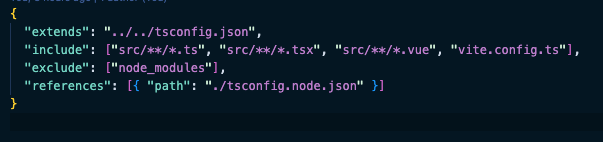
각 프로젝트에서는 위처럼 root의 tsconfig.json을 extends해서 동일한 tsconfig.json 옵션을 사용할 수 있다.
Prettier
prettier는 해보니까 그냥 root에 .prettierrc.json 파일만 있으면 모든 프로젝트에서 사용 가능하다. .vscode/setting.json 해주는거 잊지 말고
yarn init -2
yarn add -D typescript
tsconfig.json 파일 구성
$ yarn add -D eslint
$ npx eslint --init
알아서 .eslintrc.json 파일까지 생성
yarn add -D prettier
yarn add -D eslint-config-prettier eslint-plugin-prettier
.prettierrc 파일 구성
ZipFS 설치 및 에디터 설정
yarn dlx @yarnpkg/sdks vscode
typescript 파일에서 ctrl + shift + p 누르기
"Select TypeScript Version" 선택하기
"Use Workspace Version" 선택하기
프로젝트 생성
yarn create vue@latest
eslint는 전역으로 설정했기 때문에 vue project에서는 필요하지 않음
생성하고 root의 package.json에 등록
참조
https://www.testbank.ai/42b54c4b-2aa7-4bc7-b29b-b7219c700f22
https://techblog.woowahan.com/7976/
https://github.com/kowoohyuk/monorepo-template/tree/main