TIL - 40. JS연습 [230908]
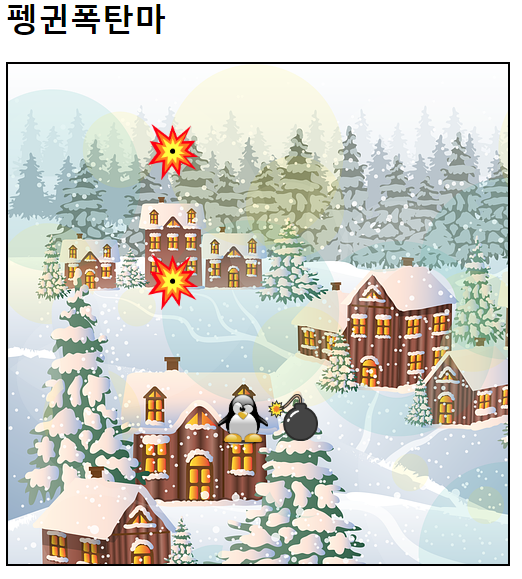
펭귄폭탄마.html
<!DOCTYPE html>
<html lang="en">
<head>
    <meta charset="UTF-8">
    <meta name="viewport" content="width=device-width, initial-scale=1.0">
    <title>펭귄폭탄마</title>

    <style>
        .box {
            width: 500px;
            height: 500px;
            border: 2px solid black;
            background-image: url("/펭귄폭탄마/village.png");
            overflow: hidden;
        }

        img {
            width: 50px;
        }
    </style>
</head>
<body>

    <h1>펭귄폭탄마</h1>
    <div class="box" id="box">
        <img src="/펭귄폭탄마/penguin.png" id="peng">
    </div>

    <script src="js/펭귄폭탄마.js"></script>
</body>
</html>
펭귄폭탄마.js
let xindex = 0;
let yindex = 0;

document.addEventListener("keydown", function(e) {

    console.log("누르는중" + e.key);

    const peng = document.getElementById("peng");
    const boom = document.createElement("img");

    if(e.key == "ArrowRight") {
        xindex += 10;
        peng.style.transform = `translate3d(${xindex}px, ${yindex}px, 0)`;

    } else if(e.key == "ArrowLeft") {
        xindex -= 10;
        peng.style.transform = `translate3d(${xindex}px, ${yindex}px, 0)`;

    } else if(e.key == "ArrowDown") {
        yindex += 10;
        peng.style.transform = `translate3d(${xindex}px, ${yindex}px, 0)`;

    } else if(e.key == "ArrowUp") {
        yindex -= 10;
        peng.style.transform = `translate3d(${xindex}px, ${yindex}px, 0)`;

    } else if(e.key == 'x'){

        const box = document.getElementById("box");
        boom.setAttribute("src", "/펭귄폭탄마/boom.png");
        boom.style.transform = `translate3d(${xindex}px, ${yindex}px, 0)`;
        boom.style.position = "absolute";
        box.append(boom);

    }

    setTimeout(function() {
        boom.setAttribute("src", "/펭귄폭탄마/boom2.png");
    }, 2000);


})
로또.html
<!DOCTYPE html>
<html lang="en">
<head>
    <meta charset="UTF-8">
    <meta name="viewport" content="width=device-width, initial-scale=1.0">
    <title>로또번호생성기</title>
    <style>
        #container{
            display: flex;
            width: 400px;
            justify-content: space-around;

            margin: 100px auto 50px;
        }

        #container > div{
            width: 50px;
            height: 50px;
            border : 1px solid black;
            border-radius: 50%;

            display: flex;
            justify-content: center;
            align-items: center;

            font-size: 24px;
            font-weight: bold;
            font-family: "궁서체";
        }

        #createLotto{
            width: 300px;
            height: 30px;

            display: block;
            margin : auto;
        }

    </style>
</head>
<body>
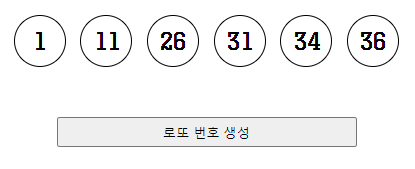
    <div id="container">
        <div></div>
        <div></div>
        <div></div>
        <div></div>
        <div></div>
        <div></div>
    </div>

    <button id="createLotto">로또 번호 생성</button>


    <script>
        document.getElementById("createLotto").addEventListener("click", () => {

            // #container 자식 div 6개 선택
            const numbers = document.querySelectorAll("#container > div");

            // 로또 번호를 저장할 배열 선언
            const lotto = [];

            while(lotto.length < 6) {

                // 1~45 난수 생성
                const random = Math.floor( Math.random() * 45 + 1);

                // 생성된 난수가 배열에 있는지 검사
                if ( lotto.indexOf(random) == -1 ) {
                    lotto.push(random);
                }// 중복X
            }

            // lotto에 저장된 난수 오름차순 정렬
            lotto.sort( function(a,b) {return a-b; } );

            // numbers의 인덱스별로 lotto 인덱스에 저장된 값 출력
            for(let i=0; i<lotto.length; i++) {
                numbers[i].innerText = lotto[i];
            }
        });


    </script>
</body>
</html>
로또.js
document.getElementById("createLotto").addEventListener("click", () => {

    // #container 자식 div 6개 선택
    const numbers = document.querySelectorAll("#container > div");

    //로또 번호를 저장할 배열 선언
    const lotto = [];

    while (lotto.length < 6) {

        // 1~45 난수 생성
        const random = Math.floor(Math.random() * 45) + 1;

        if ( lotto.indexOf(random) == -1 ) {
            lotto.push(random);
        }// 중복 X
    }

    // lotto에 저장된 난수 오름차순 정렬
    lotto.sort((a, b) => a - b);

    // numbers의 인덱스별로 lotto 인덱스에 저장된 값 출력
    for(let i=0; i<lotto.length; i++){
        numbers[i].innerText = lotto[i];
    }
});
회원가입양식.html
<!DOCTYPE html>
<html lang="en">
<head>
    <meta charset="UTF-8">
    <meta http-equiv="X-UA-Compatible" content="IE=edge">
    <meta name="viewport" content="width=device-width, initial-scale=1.0">
    <title>회원 가입 양식</title>
    <style>
        .btn-area{    text-align: right; }
        td{ padding: 5px; }
        fieldset{ width: 430px;}
        span{font-size: 14px;}
        .confirm{ color : green; }
        .error{ color : red; }
    </style>
</head>
<body>
    <form action="main.html" method="post" onsubmit="return validate()">
        <fieldset>
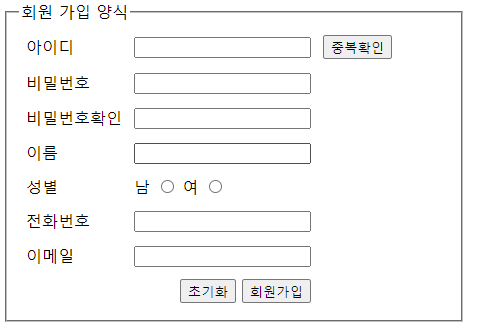
            <legend>회원 가입 양식</legend>

            <table>
                <tr>
                    <td>아이디</td>
                    <td>
                        <input type="text" id="inputId">
                    </td>
                    <td>
                        <button type="button">중복확인</button>
                    </td>
                </tr>
                <tr>
                    <td>비밀번호</td>
                    <td>
                        <input type="password" id="inputPw">
                    </td>
                    <td>
                        <span id="pwMessage"></span>
                    </td>
                </tr>
                <tr>
                    <td>비밀번호확인</td>
                    <td>
                        <input type="password" id="inputPwConfirm">
                    </td>
                    <td></td>
                </tr>
                <tr>
                    <td>이름</td>
                    <td>
                        <input type="text" id="inputName">
                    </td>
                    <td>
                        <span id="nameMessage"></span>
                    </td>
                </tr>
                <tr>
                    <td>성별</td>
                    <td>
                        <label> 남 <input type="radio" name="gender" value="m"></label>
                        <label> 여 <input type="radio" name="gender" value="f"></label>
                    </td>
                    <td></td>
                </tr>
                <tr>
                    <td>전화번호</td>
                    <td>
                        <input type="text" id="inputTel">
                    </td>
                    <td></td>
                </tr>
                <tr>
                    <td>이메일</td>
                    <td>
                        <input type="text" id="inputEmail">
                    </td>
                    <td></td>
                </tr>
                <tr>
                    <td></td>
                    <td class="btn-area">
                        <button type="reset">초기화</button>
                        <button>회원가입</button>
                    </td>
                    <td></td>
                </tr>
            </table>
        </fieldset>
    </form>

    <script src="js/회원가입양식.js"></script>
</body>
</html>
회원가입양식.js
// 유효성 검사 객체
const checkObj = {
    "inputId" : false, // 아이디
    "inputPw" : false, // 비밀번호
    "inputPwConfirm" : false, // 비번확인
    "inputName" : false, // 이름
    "gender" : false, // 성별
    "inputTel" : false // 전화번호
}


/** 아이디 : 값이 변했을 때
 * 영어 소문자로 시작하고,
영어 대/소문자, 숫자, - , _ 로만 이루어진 6~14 글자 사이 문자열인지 검사
아이디 정규표현식 : (각자 작성)
- 형식이 일치할 경우
입력창의 배경색을 springgreen 으로 변경 */

document.getElementById("inputId").addEventListener("change", function() {

    const regExp = /^[a-z][\w-_]{5,13}$/;
                // 소문자시작(1) + 나머지(5~13) = 6~14글자

    if(regExp.test(this.value)) {
        this.style.backgroundColor = "springgreen";
        this.style.color = "black";
        checkObj.inputId = true;
    } else {
        this.style.backgroundColor = "red";
        this.style.color = "white";
        checkObj.inputId = false;
    }


});

/***
 * 비밀번호, 비밀번호 확인 : 키보드가 올라올 때
"비밀번호" 를 미입력한 상태에서 "비밀번호 확인"을 작성할 경우
"비밀번호 확인"에 작성된 내용을 모두 삭제하고
'비밀번호를 입력해주세요' 경고창 출력 후
focus 를 "비밀번호" 입력창으로 이동 */

const inputPw = document.getElementById("inputPw");
const inputPwConfirm = document.getElementById("inputPwConfirm");

inputPwConfirm.addEventListener("keyup", function() {

    if(inputPw.value.length == 0) {
        this.value = "";
        alert("비밀번호를 입력해주세요");
        inputPw.focus();
        checkObj.inputPw = false;
    }
});

/**
 * - 비밀번호가 일치할 경우
"비밀번호" 입력창 오른쪽에 "비밀번호 일치" 글자를 초록색으로 출력.
 *
- 비밀번호가 일치하지 않을 경우
"비밀번호" 입력창 오른쪽에 "비밀번호가 불일치" 글자를 빨간색으로 출력.
 */

const pwMessage = document.getElementById("pwMessage");

inputPw.addEventListener("keyup", function() {

    if( (inputPw.value == inputPwConfirm.value) && inputPw.value.length != 0 ) {
        pwMessage.innerText = "비밀번호 일치";
        pwMessage.classList.add("confirm");
        pwMessage.classList.remove("error");
        checkObj.inputPw = true;
        checkObj.inputPwConfirm = true;
    }else {
        pwMessage.innerText="비밀번호 불일치";
        pwMessage.classList.add("error");
        pwMessage.classList.remove("confirm");
        checkObj.inputPwConfirm = false;
    }
});

inputPwConfirm.addEventListener("keyup", function() {
    if( (inputPw.value == inputPwConfirm.value) && inputPw.value.length != 0 ) {
        pwMessage.innerText = "비밀번호 일치";
        pwMessage.classList.add("confirm");
        pwMessage.classList.remove("error");
        checkObj.inputPw = true;
        checkObj.inputPwConfirm = true;
    }else {
        pwMessage.innerText="비밀번호 불일치";
        pwMessage.classList.add("error");
        pwMessage.classList.remove("confirm");
        checkObj.inputPwConfirm = false;
    }
});

/*
* 이름 : 값이 변화했을 때
한글 2~5 글자 사이 문자열인지 검사.
이름 정규표현식 : /^[가-힣]{2,5}$/
- 형식이 일치할 경우
"이름" 입력창 오른쪽에 "정상입력" 글자를 초록색으로 출력.
- 형식이 일치할 경우
"이름" 입력창 오른쪽에 "한글만 입력하세요" 글자를 빨간색으로 출력.
*/

document.getElementById("inputName").addEventListener("change", function() {
    const regExp = /^[가-힣]{2,5}$/;

    const nameMessage = document.getElementById("nameMessage");

    if(regExp.test(this.value)) {
        nameMessage.innerText = "정상입력";
        nameMessage.classList.add("confirm");
        nameMessage.classList.remove("error");
        checkObj.inputName = true;
    }else {
        nameMessage.innerText = "한글만 입력하세요";
        nameMessage.classList.add("error");
        nameMessage.classList.remove("confirm");
        checkObj.inputName = false;
    }
});


/*
 회원가입 버튼 클릭 시 : validate() 함수를 호출하여
성별이 선택 되었는지, 전화번호가 형식에 알맞게 작성되었는지 검사 */

function validate() {
    /*
    - 성별이 선택되지 않은 경우
    "성별을 선택해주세요." 경고창(==대화상자) 출력 후
    submit 기본 이벤트를 제거하여 회원가입이 진행되지 않게 함.
    */
    const gender = document.getElementsByName("gender");

    if(!gender[0].checked && !gender[1].checked) {
        alert("성별을 선택해주세요.");
        checkObj.gender = false;

        return false;
    }else {
        checkObj.gender = true;
    }

    /*전화번호 정규 표현식 : /^[0][0-9]{1,2}-[0-9]{3,4}-[0-9]{4}/
    - 전화번호 형식이 올바르지 않을 경우
    "전화번호의 형식이 올바르지 않습니다" 경고창(==대화상자) 출력 후
    submit 기본 이벤트를 제거하여 회원가입이 진행되지 않게 함. */

    const inputTel = document.getElementById("inputTel");
    const regExp = /^[0][0-9]{1,2}-[0-9]{3,4}-[0-9]{4}/;

    if(!regExp.test(inputTel.value)) {
        alert("전화번호의 형식이 올바르지 않습니다.");
        checkObj.inputTel = false;
        return false;
    }else {
        checkObj.inputTel = true;
    }


    // checkObj가 전부 true일때 == 모든 유효성검사를 통과했을 때 ==> 회원가입
    for(let key in checkObj) {
        if( !checkObj[key] ) { // 1 ) checkObj["inputTel"] ==> false
            return false;
        }
    }

    alert("회원가입 완료");
    return true;

}

초보자