T-Pot-Sensor 설치하기
Hive와 마찬가지로 clone 후 설치
env에서 ssl을 none으로 변경하고, ./install.sh로 설치한 후, s를 설치한다.
$ sudo su -
root@ip-10-0-10-244:~# su -ubuntu
Try 'su --help' for more information.
root@ip-10-0-10-244:~# su - ubuntu
ubuntu@ip-10-0-10-244:~$ git clone https://github.com/telekom-security/tpotce.git
Cloning into 'tpotce'...
remote: Enumerating objects: 18545, done.
remote: Counting objects: 100% (276/276), done.
remote: Compressing objects: 100% (168/168), done.
remote: Total 18545 (delta 132), reused 111 (delta 108), pack-reused 18269 (from 3)
Receiving objects: 100% (18545/18545), 398.21 MiB | 19.34 MiB/s, done.
Resolving deltas: 100% (10307/10307), done.
ubuntu@ip-10-0-10-244:~$ cd
.ssh/   tpotce/
ubuntu@ip-10-0-10-244:~$ cd
.ssh/   tpotce/
ubuntu@ip-10-0-10-244:~$ cd tpotce/
ubuntu@ip-10-0-10-244:~/tpotce$ ls
CHANGELOG.md  LICENSE    SECURITY.md  deploy.sh  docker              dps.ps1      genuser.sh      install.sh  restore.sh    update.sh
CITATION.cff  README.md  compose      doc        docker-compose.yml  env.example  genuserwin.ps1  installer   uninstall.sh  version
ubuntu@ip-10-0-10-244:~/tpotce$ hostnamectl
  Static hostname: ip-10-0-10-244
        Icon name: computer-vm
          Chassis: vm 🖴
Chassis Asset Tag: Amazon EC2
       Machine ID: ec2dc2df4ae2f0a60d5a35e190fbe92b
          Boot ID: 002a6ec0acb14df291d7f9156d93ff7b
   Virtualization: amazon
 Operating System: Ubuntu 26.04 LTS
           Kernel: Linux 7.0.0-1006-aws
     Architecture: x86-64
  Hardware Vendor: Amazon EC2
   Hardware Model: t3.large
 Firmware Version: 1.0
    Firmware Date: Mon 2017-10-16
     Firmware Age: 5:185m8y 10month 2w
ubuntu@ip-10-0-10-244:~/tpotce$ vi .env
ubuntu@ip-10-0-10-244:~/tpotce$ ./install.sh
 _____     ____       _      ___           _        _ _
|_   _|   |  _ \ ___ | |_   |_ _|_ __  ___| |_ __ _| | | ___ _ __
  | |_____| |_) / _ \| __|   | || '_ \/ __| __/ _` | | |/ _ \ '__|
  | |_____|  __/ (_) | |_    | || | | \__ \ || (_| | | |  __/ |
  |_|     |_|   \___/ \__|  |___|_| |_|___/\__\__,_|_|_|\___|_|


### This script will now install T-Pot and all of its dependencies.
### Source: https://github.com/telekom-security/tpotce at master

### Install? (y/n) y

...

### Install Type? (h/s/l/i/m/t) s

...
### Please review for possible honeypot port conflicts.
### While SSH is taken care of, other services such as
### SMTP, HTTP, etc. might prevent T-Pot from starting.

Active Internet connections (only servers)
Proto Recv-Q Send-Q Local Address           Foreign Address         State       User       Inode      PID/Program name
tcp        0      0 0.0.0.0:64295           0.0.0.0:*               LISTEN      0          36945      11449/sshd: /usr/sb
tcp6       0      0 :::64295                :::*                    LISTEN      0          36953      11449/sshd: /usr/sb
udp        0      0 10.0.10.244:68          0.0.0.0:*                           998        8477       602/systemd-network
udp        0      0 127.0.0.1:323           0.0.0.0:*                           0          10334      842/chronyd
udp6       0      0 ::1:323                 :::*                                0          10335      842/chronyd

### Done. Please reboot and re-connect via SSH on tcp/64295.
### Make sure to deploy SSH keys to this SENSOR and disable SSH password authentication.
### On HIVE run the tpotce/deploy.sh script to join this SENSOR to the HIVE.

ubuntu@ip-10-0-10-244:~/tpotce$
Certificates 키
아까 ssl을 none으로 하지 않으면 다음 작업을 해줘야 한다.
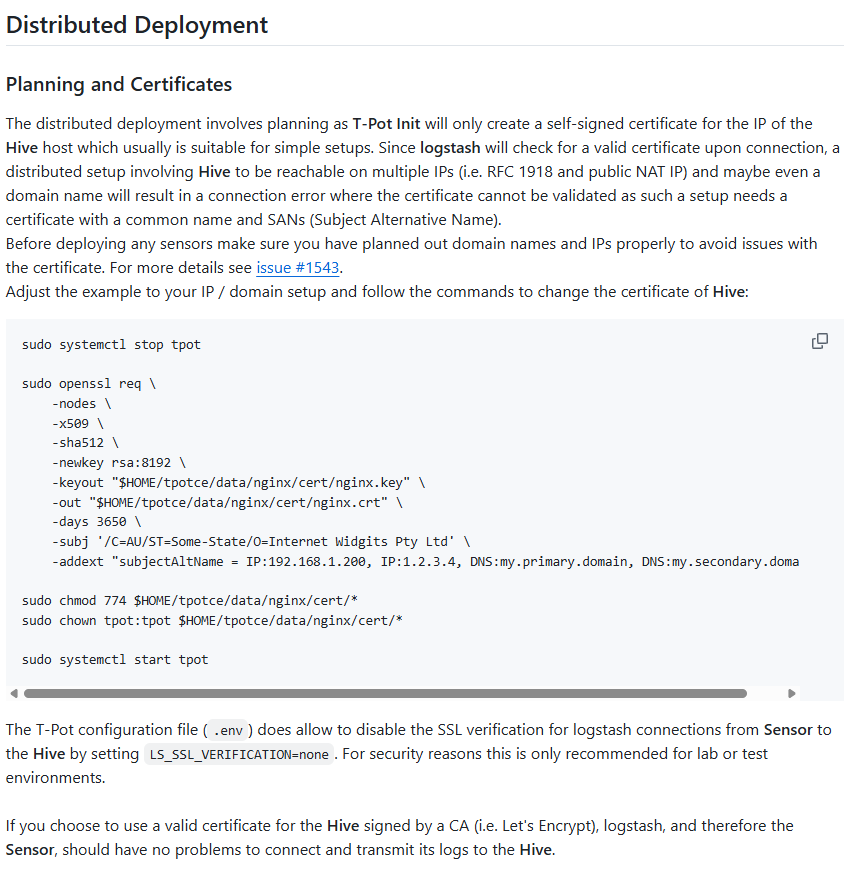
Deploying Sensors
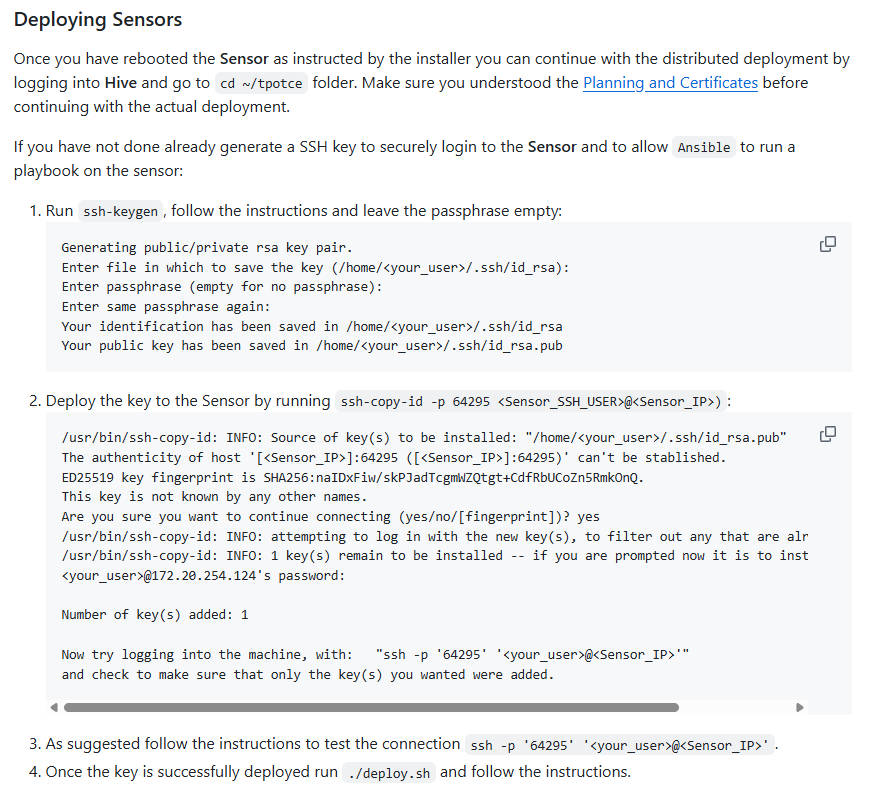
Sensor에서 작업
먼저 우분투 암호를 변경하고, sshd를 변경해줘서 비밀번호 로그인을 허용한다.
Hive에서 작업
Snesor의 사설ip로 키를 전송하고 deploying해준다.
작업은 엔서블 플레이어로 하는 것
$ sudo su -
root@ip-10-0-10-119:~# su - ubuntu
ubuntu@ip-10-0-10-119:~$ hostnamectl
  Static hostname: ip-10-0-10-119
        Icon name: computer-vm
          Chassis: vm 🖴
Chassis Asset Tag: Amazon EC2
       Machine ID: ec213a0d398400b036dabe82d617fa69
          Boot ID: 8a75a0b4d71f498cbbd18120dda27239
   Virtualization: amazon
 Operating System: Ubuntu 26.04 LTS
           Kernel: Linux 7.0.0-1006-aws
     Architecture: x86-64
  Hardware Vendor: Amazon EC2
   Hardware Model: t3.xlarge
 Firmware Version: 1.0
    Firmware Date: Mon 2017-10-16
     Firmware Age: 5:185m8y 10month 2w
ubuntu@ip-10-0-10-119:~$ ssh-keygen
Generating public/private ed25519 key pair.
Enter file in which to save the key (/home/ubuntu/.ssh/id_ed25519):
Enter passphrase for "/home/ubuntu/.ssh/id_ed25519" (empty for no passphrase):
Enter same passphrase again:
Your identification has been saved in /home/ubuntu/.ssh/id_ed25519
Your public key has been saved in /home/ubuntu/.ssh/id_ed25519.pub
The key fingerprint is:
SHA256:OAZ/9zQl/Lkg4YNB2uCzBWiyBMLNJfVBb8t2sCq3A2A ubuntu@ip-10-0-10-119
The key's randomart image is:
+--[ED25519 256]--+
|+.o.o++o.        |
|..oo+..*o  .     |
| . +. +.++. o .  |
|  .E o =o++. + . |
|  . . * S==.+ o  |
|     o oo..= o . |
|     ..o    . .  |
|      o..        |
|       ..        |
+----[SHA256]-----+
ubuntu@ip-10-0-10-119:~$ cat
.ansible/         .bash_history     .bash_logout      .bashrc           .profile          .ssh/             .viminfo          install_tpot.log  tpotce/
ubuntu@ip-10-0-10-119:~$ cat
.ansible/         .bash_history     .bash_logout      .bashrc           .profile          .ssh/             .viminfo          install_tpot.log  tpotce/
ubuntu@ip-10-0-10-119:~$ cat .ssh/
authorized_keys  id_ed25519       id_ed25519.pub
ubuntu@ip-10-0-10-119:~$ cat .ssh/
authorized_keys  id_ed25519       id_ed25519.pub
ubuntu@ip-10-0-10-119:~$ ssh-copy-id -p 64295 ubuntu@10.0.10.244
/usr/bin/ssh-copy-id: INFO: Source of key(s) to be installed: "/home/ubuntu/.ssh/id_ed25519.pub"
The authenticity of host '[10.0.10.244]:64295 ([10.0.10.244]:64295)' can't be established.
ED25519 key fingerprint is: SHA256:RODXh5u7np1QWCcrolonw+6RvwUM71BYVuVpggOTxOg
This key is not known by any other names.
Are you sure you want to continue connecting (yes/no/[fingerprint])? yes
/usr/bin/ssh-copy-id: INFO: attempting to log in with the new key(s), to filter out any that are already installed
/usr/bin/ssh-copy-id: INFO: 1 key(s) remain to be installed -- if you are prompted now it is to install the new keys
ubuntu@10.0.10.244's password:

Number of key(s) added: 1

Now try logging into the machine, with: "ssh -p 64295 'ubuntu@10.0.10.244'"
and check to make sure that only the key(s) you wanted were added.

ubuntu@ip-10-0-10-119:~$ ssh -p 64295 ubuntu@10.0.10.244
Welcome to Ubuntu 26.04 LTS (GNU/Linux 7.0.0-1006-aws x86_64)

 * Documentation:  https://docs.ubuntu.com
 * Management:     https://landscape.canonical.com
 * Support:        https://ubuntu.com/pro

 System information as of Mon Aug 31 01:49:58 UTC 2026

  System load:  1.41              Temperature:           -273.1 C
  Usage of /:   9.1% of 95.85GB   Processes:             132
  Memory usage: 5%                Users logged in:       0
  Swap usage:   0%                IPv4 address for ens5: 10.0.10.244


Expanded Security Maintenance for Applications is not enabled.

114 updates can be applied immediately.
80 of these updates are standard security updates.
To see these additional updates run: apt list --upgradable

Enable ESM Apps to receive additional future security updates.
See https://ubuntu.com/esm or run: sudo pro status


ubuntu@ip-10-0-10-244:~$ exit
logout
Connection to 10.0.10.244 closed.
ubuntu@ip-10-0-10-119:~$ ls -al
total 68
drwxr-x--- 5 ubuntu ubuntu  4096 Aug 31 00:49 .
drwxr-xr-x 4 root   root    4096 Aug 31 00:25 ..
drwxrwxr-x 3 ubuntu ubuntu  4096 Aug 31 00:41 .ansible
-rw------- 1 ubuntu ubuntu   164 Aug 31 00:49 .bash_history
-rw-r--r-- 1 ubuntu ubuntu   220 Feb 13  2026 .bash_logout
-rw-r--r-- 1 ubuntu ubuntu  4190 Aug 31 00:42 .bashrc
-rw-r--r-- 1 ubuntu ubuntu   807 Feb 13  2026 .profile
drwx------ 2 ubuntu ubuntu  4096 Aug 31 01:49 .ssh
-rw------- 1 ubuntu ubuntu   853 Aug 31 00:38 .viminfo
-rw-rw-r-- 1 ubuntu ubuntu 24280 Aug 31 00:42 install_tpot.log
drwxrwxr-x 9 ubuntu ubuntu  4096 Aug 31 00:49 tpotce
ubuntu@ip-10-0-10-119:~$ ls
install_tpot.log  tpotce
ubuntu@ip-10-0-10-119:~$ cd tpotce/
ubuntu@ip-10-0-10-119:~/tpotce$ ./deploy.sh

 ____   [ T-Pot ]                  ____             _
/ ___|  ___ _ __  ___  ___  _ __  |  _ \  ___ _ __ | | ___  _   _
\___ \ / _ \  _ \/ __|/ _ \|  __| | | | |/ _ \  _ \| |/ _ \| | | |
 ___) |  __/ | | \__ \ (_) | |    | |_| |  __/ |_) | | (_) | |_| |
|____/ \___|_| |_|___/\___/|_|    |____/ \___| .__/|_|\___/ \__, |
                                             |_|            |___/

# This script will prepare a T-Pot SENSOR installation to transmit logs into this HIVE.

# Was a T-Pot SENSOR installed? (y/n): y
# Enter the remote username T-Pot SENSOR was installed with: ubuntu
# Enter the IP/domain name of the SENSOR: 10.0.10.244
# Has a SSH key been deployed to the SENSOR? (y/n): y
# Enter the IP/domain name of this HIVE: 10.0.10.119
# The following SENSOR credentials have been created:
# New SENSOR username: sensor-skaldic-inflicter
# New SENSOR passowrd: c6tzMSFChMWqfF0EPj16CTs2RVutiyC3
# New htpasswd encoded credentials: sensor-skaldic-inflicter:$apr1$W8xduY24$nCxzmuRomNdE2ZVNlXEbm/
# New htpasswd credentials base64 encoded: c2Vuc29yLXNrYWxkaWMtaW5mbGljdGVyOiRhcHIxJFc4eGR1WTI0JG5DeHptdVJvbU5kRTJaVk5sWEVibS8=
# New SENSOR credentials base64 encoded: c2Vuc29yLXNrYWxkaWMtaW5mbGljdGVyOmM2dHpNU0ZDaE1XcWZGMEVQajE2Q1RzMlJWdXRpeUMz

# Ansible will ask for the ‘BECOME password‘ which is typically the password you ’sudo’ with on the SENSOR.
# The password will allow Ansible to run a reboot via sudo on the SENSOR.

BECOME password:

PLAY [T-POT Sensor Deployment] ************************************************************************************************************************************************************************************

TASK [Gathering Facts] ********************************************************************************************************************************************************************************************
[WARNING]: Host '10.0.10.244' is using the discovered Python interpreter at '/usr/bin/python3.14', but future installation of another Python interpreter could cause a different interpreter to be discovered. Seehttps://docs.ansible.com/ansible-core/2.20/reference_appendices/interpreter_discovery.html for more information.
ok: [10.0.10.244]

TASK [Ensure the destination directory exists] ********************************************************************************************************************************************************************
ok: [10.0.10.244]

TASK [Copy nginx.crt from local to remote host] *******************************************************************************************************************************************************************
changed: [10.0.10.244]

TASK [Copy sensor.yml to docker-compose.yml on the remote host] ***************************************************************************************************************************************************
changed: [10.0.10.244]

TASK [Update T-POT_HIVE_USER in .env] *****************************************************************************************************************************************************************************
changed: [10.0.10.244]

TASK [Update T-POT_HIVE_IP in .env] *******************************************************************************************************************************************************************************
changed: [10.0.10.244]

TASK [Ensure T-POT_TYPE is set to SENSOR in .env] *****************************************************************************************************************************************************************
changed: [10.0.10.244]

TASK [Ensure WEB_USER is empty in .env] ***************************************************************************************************************************************************************************
ok: [10.0.10.244]

TASK [Ensure LS_WEB_USER is empty in .env] ************************************************************************************************************************************************************************
ok: [10.0.10.244]

TASK [Look for sudo-rs on the sensor] *****************************************************************************************************************************************************************************
ok: [10.0.10.244]

TASK [Use the traditional sudo for become on the sensor] **********************************************************************************************************************************************************
ok: [10.0.10.244]

TASK [Reboot the sensor] ******************************************************************************************************************************************************************************************
changed: [10.0.10.244]

PLAY RECAP ********************************************************************************************************************************************************************************************************
10.0.10.244                : ok=12   changed=6    unreachable=0    failed=0    skipped=0    rescued=0    ignored=0

# Updating SENSOR users on this HIVE and in the T-Pot .env config:
sensor-skaldic-inflicter:$apr1$W8xduY24$nCxzmuRomNdE2ZVNlXEbm/