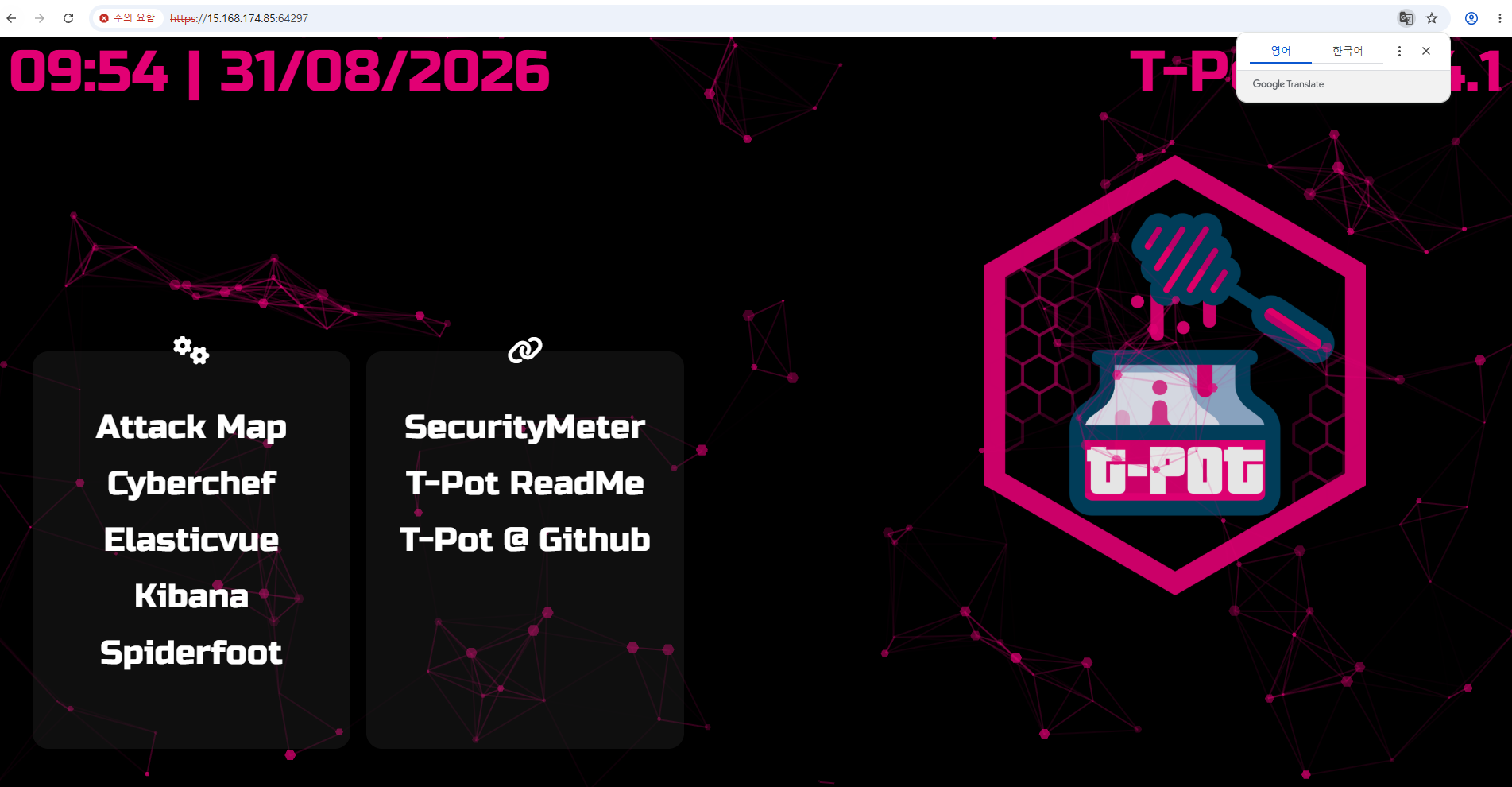
Ubuntu에 Tpot설치하기
SSM 접속 후 계정 변경
$ pwd
/var/snap/amazon-ssm-agent/13372
$ id
uid=1001(ssm-user) gid=1001(ssm-user) groups=1001(ssm-user)
$ sudo su
root@ip-10-0-10-119:/var/snap/amazon-ssm-agent/13372# pwd
/var/snap/amazon-ssm-agent/13372
root@ip-10-0-10-119:/var/snap/amazon-ssm-agent/13372# sudo su -
root@ip-10-0-10-119:~# pwd
/root
root@ip-10-0-10-119:~# su - ubuntu
ubuntu@ip-10-0-10-119:~$ pwd
/home/ubuntu
ubuntu@ip-10-0-10-119:~$ hostnamectl
  Static hostname: ip-10-0-10-119
        Icon name: computer-vm
          Chassis: vm 🖴
Chassis Asset Tag: Amazon EC2
       Machine ID: ec213a0d398400b036dabe82d617fa69
          Boot ID: 425cb50684f743a0a9fb019dac41fdd2
   Virtualization: amazon
 Operating System: Ubuntu 26.04 LTS
           Kernel: Linux 7.0.0-1006-aws
     Architecture: x86-64
  Hardware Vendor: Amazon EC2
   Hardware Model: t3.xlarge
 Firmware Version: 1.0
    Firmware Date: Mon 2017-10-16
     Firmware Age: 5:185m8y 10month 2w
ubuntu@ip-10-0-10-119:~$
T pot clone 후 설치하기
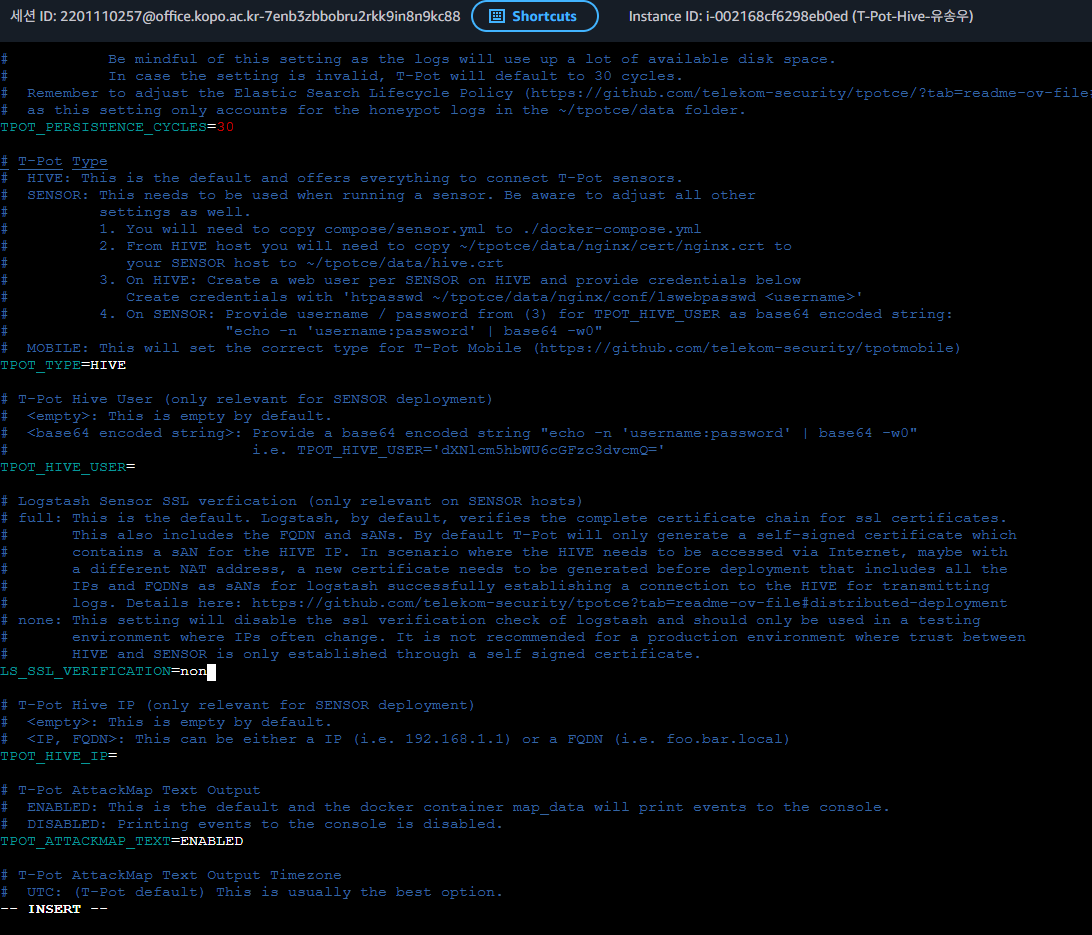
.env 파일에서 LS_SSL_VERIFICATION=none으로 변경한다.
ubuntu@ip-10-0-10-119:~/tpotce$ ./install
-bash: ./install: No such file or directory
ubuntu@ip-10-0-10-119:~/tpotce$ ./install.sh
_____ ____ _ ___ _ _ _
|_ _| | _ \ ___ | |_ |_ _|_ __ ___| |_ __ _| | | ___ _ __
| |_____| |_) / _ \| __| | || '_ \/ __| __/ _` | | |/ _ \ '__|
| |_____| __/ (_) | |_ | || | | \__ \ || (_| | | | __/ |
|_| |_| \___/ \__| |___|_| |_|___/\__\__,_|_|_|\___|_|
### This script will now install T-Pot and all of its dependencies.
### Source: https://github.com/telekom-security/tpotce at master
### Install? (y/n) y
### Now checking for services on ports T-Pot needs ...
### ... no services found on ports T-Pot needs.
### Now installing required packages ...
Hit:1 http://ap-northeast-3.ec2.archive.ubuntu.com/ubuntu resolute InRelease
Hit:2 http://ap-northeast-3.ec2.archive.ubuntu.com/ubuntu resolute-updates InRelease
Hit:3 http://ap-northeast-3.ec2.archive.ubuntu.com/ubuntu resolute-backports InRelease
Hit:4 http://security.ubuntu.com/ubuntu resolute-security InRelease
118 packages can be upgraded. Run 'apt list --upgradable' to see them.
ansible is already the newest version (13.1.0+dfsg-1ubuntu1).
apache2-utils is already the newest version (2.4.66-2ubuntu2.4).
cracklib-runtime is already the newest version (2.9.6-5.2build3).
wget is already the newest version (1.25.0-2ubuntu4.4).
wget set to manually installed.
Summary:
Upgrading: 0, Installing: 0, Removing: 0, Not Upgrading: 118
### Using local T-Pot Ansible Installation Playbook ...
### Passwordless ‘sudo‘ available, setting ansible become option to --become.
### Now running T-Pot Ansible Installation Playbook ...
PLAY [T-Pot - Bootstrapping Python] *******************************************************************************************************************************************************************************
TASK [Get distribution name (All)] ********************************************************************************************************************************************************************************
changed: [127.0.0.1]
TASK [Check if python3 is installed (All)] ************************************************************************************************************************************************************************
changed: [127.0.0.1]
TASK [Add python package (Debian, Raspbian, Ubuntu)] **************************************************************************************************************************************************************
skipping: [127.0.0.1]
PLAY [T-Pot - Abort if run as tpot, root or on unsupported distribution] ******************************************************************************************************************************************
TASK [Gathering Facts] ********************************************************************************************************************************************************************************************
ok: [127.0.0.1]
TASK [Check if running as root (All)] *****************************************************************************************************************************************************************************
ok: [127.0.0.1] => {
"changed": false,
"msg": "Running as user: ubuntu."
}
TASK [Check if running as tpot (All)] *****************************************************************************************************************************************************************************
ok: [127.0.0.1] => {
"changed": false,
"msg": "Running as user: ubuntu."
}
TASK [Check if supported distribution (All)] **********************************************************************************************************************************************************************
ok: [127.0.0.1] => {
"changed": false,
"msg": "T-Pot will now install on Ubuntu."
}
TASK [Check if supported distribution version (All)] **************************************************************************************************************************************************************
ok: [127.0.0.1] => {
"changed": false,
"msg": "T-Pot will now install on Ubuntu 26.04."
}
TASK [Count default routes (All)] *********************************************************************************************************************************************************************************
ok: [127.0.0.1]
TASK [Warn about multiple default routes (All)] *******************************************************************************************************************************************************************
skipping: [127.0.0.1]
PLAY [T-Pot - Install recommended, remove conflicting packages] ***************************************************************************************************************************************************
TASK [Gathering Facts] ********************************************************************************************************************************************************************************************
ok: [127.0.0.1]
TASK [Syncing clocks (All)] ***************************************************************************************************************************************************************************************
changed: [127.0.0.1]
TASK [Install cron without recommends (Debian, Raspbian, Ubuntu)] *************************************************************************************************************************************************
ok: [127.0.0.1]
TASK [Install recommended packages (Debian, Raspbian, Ubuntu)] ****************************************************************************************************************************************************
changed: [127.0.0.1]
PLAY [T-Pot - Prepare for and install Docker Engine] **************************************************************************************************************************************************************
TASK [Gathering Facts] ********************************************************************************************************************************************************************************************
ok: [127.0.0.1]
TASK [Remove distribution based Docker packages and podman-docker (AlmaLinux, Debian, Fedora, Raspbian, RHEL, Rocky, Ubuntu)] *************************************************************************************
ok: [127.0.0.1]
TASK [Remove the one line Docker Engine repository file (Debian, Raspbian, Ubuntu)] *******************************************************************************************************************************
ok: [127.0.0.1]
TASK [Add Docker Engine repository (Debian, Raspbian, Ubuntu)] ****************************************************************************************************************************************************
changed: [127.0.0.1]
TASK [Update apt cache (Debian, Raspbian, Ubuntu)] ****************************************************************************************************************************************************************
changed: [127.0.0.1]
PLAY [T-Pot - Install Docker Engine] ******************************************************************************************************************************************************************************
TASK [Gathering Facts] ********************************************************************************************************************************************************************************************
ok: [127.0.0.1]
TASK [Install Docker Engine packages (AlmaLinux, Debian, Fedora, Raspbian, RHEL, Rocky, Ubuntu)] ******************************************************************************************************************
changed: [127.0.0.1]
TASK [Stop Docker (All)] ******************************************************************************************************************************************************************************************
changed: [127.0.0.1]
PLAY [T-Pot - Adjust configs, add users and groups, etc.] *********************************************************************************************************************************************************
TASK [Gathering Facts] ********************************************************************************************************************************************************************************************
ok: [127.0.0.1]
TASK [Create T-Pot group (All)] ***********************************************************************************************************************************************************************************
changed: [127.0.0.1]
TASK [Create T-Pot user (All)] ************************************************************************************************************************************************************************************
changed: [127.0.0.1]
TASK [Ensure vm.max_map_count is set (All)] ***********************************************************************************************************************************************************************
changed: [127.0.0.1]
TASK [Ensure IPv4 forwarding is enabled (All)] ********************************************************************************************************************************************************************
changed: [127.0.0.1]
TASK [Enable IPv4 forwarding now (All)] ***************************************************************************************************************************************************************************
changed: [127.0.0.1]
TASK [Disable ssh.socket unit (Ubuntu)] ***************************************************************************************************************************************************************************
changed: [127.0.0.1]
TASK [Remove ssh.socket.conf file (Ubuntu)] ***********************************************************************************************************************************************************************
ok: [127.0.0.1]
TASK [Look for the files that configure sshd (All)] ***************************************************************************************************************************************************************
ok: [127.0.0.1]
TASK [Comment out Port(s) other than 64295, they can cause port conflicts on deploy (All)] ************************************************************************************************************************
ok: [127.0.0.1] => (item=/etc/ssh/sshd_config)
ok: [127.0.0.1] => (item=/etc/ssh/sshd_config.d/60-cloudimg-settings.conf)
TASK [Change SSH Port to 64295 (AlmaLinux, Debian, Fedora, Raspbian, RHEL, Rocky, Ubuntu)] ************************************************************************************************************************
changed: [127.0.0.1]
TASK [Look for the xt_addrtype module (All)] **********************************************************************************************************************************************************************
ok: [127.0.0.1]
TASK [Look for the nftables firewall backend in dockerd (All, kernels without xtables)] ***************************************************************************************************************************
skipping: [127.0.0.1]
TASK [Abort if Docker cannot manage the firewall on this kernel (All, kernels without xtables)] *******************************************************************************************************************
skipping: [127.0.0.1]
TASK [Create the Docker configuration directory (All, kernels without xtables)] ***********************************************************************************************************************************
skipping: [127.0.0.1]
TASK [Look for an existing Docker configuration (All, kernels without xtables)] ***********************************************************************************************************************************
skipping: [127.0.0.1]
TASK [Read an existing Docker configuration (All, kernels without xtables)] ***************************************************************************************************************************************
skipping: [127.0.0.1]
TASK [Switch Docker to the nftables firewall backend (All, kernels without xtables)] ******************************************************************************************************************************
skipping: [127.0.0.1]
TASK [Look for the systemd-resolved unit (All)] *******************************************************************************************************************************************************************
ok: [127.0.0.1]
TASK [Remember whether the resolved stub listener can be running (All)] *******************************************************************************************************************************************
ok: [127.0.0.1]
TASK [Stop Resolved (All)] ****************************************************************************************************************************************************************************************
changed: [127.0.0.1]
TASK [Create the resolved drop-in directory (All)] ****************************************************************************************************************************************************************
changed: [127.0.0.1]
TASK [Disable the resolved stub listener (All)] *******************************************************************************************************************************************************************
changed: [127.0.0.1]
PLAY [T-Pot - Restart services] ***********************************************************************************************************************************************************************************
TASK [Gathering Facts] ********************************************************************************************************************************************************************************************
ok: [127.0.0.1]
TASK [Start Resolved (All)] ***************************************************************************************************************************************************************************************
changed: [127.0.0.1]
TASK [Enable Docker Engine upon boot (All)] ***********************************************************************************************************************************************************************
changed: [127.0.0.1]
TASK [Restart SSH (All)] ******************************************************************************************************************************************************************************************
changed: [127.0.0.1]
PLAY [T-Pot - Adjust group users, bashrc, clone / update T-Pot repository] ****************************************************************************************************************************************
TASK [Gathering Facts] ********************************************************************************************************************************************************************************************
ok: [127.0.0.1]
TASK [Check for non-root user id (All)] ***************************************************************************************************************************************************************************
ok: [127.0.0.1] => {
"msg": "Detected user: 'ubuntu'"
}
TASK [Add aliases] ************************************************************************************************************************************************************************************************
changed: [127.0.0.1]
TASK [Report the T-Pot repository and branch (All)] ***************************************************************************************************************************************************************
ok: [127.0.0.1] => {
"msg": "Cloning https://github.com/telekom-security/tpotce at master."
}
TASK [Clone / Update T-Pot repository (All)] **********************************************************************************************************************************************************************
ok: [127.0.0.1]
TASK [Add current user to Docker, T-Pot group (All)] **************************************************************************************************************************************************************
changed: [127.0.0.1]
PLAY [T-Pot - Install service] ************************************************************************************************************************************************************************************
TASK [Gathering Facts] ********************************************************************************************************************************************************************************************
ok: [127.0.0.1]
TASK [Install systemd service (All)] ******************************************************************************************************************************************************************************
changed: [127.0.0.1]
RUNNING HANDLER [Reload systemd and enable service] ***************************************************************************************************************************************************************
changed: [127.0.0.1]
PLAY [T-Pot - Setup a randomized daily reboot] ********************************************************************************************************************************************************************
TASK [Gathering Facts] ********************************************************************************************************************************************************************************************
ok: [127.0.0.1]
TASK [Setup a randomized daily reboot (All)] **********************************************************************************************************************************************************************
changed: [127.0.0.1]
PLAY RECAP ********************************************************************************************************************************************************************************************************
127.0.0.1 : ok=52 changed=26 unreachable=0 failed=0 skipped=8 rescued=0 ignored=0
### Playbook was successful.
### Choose your T-Pot type:
### (H)ive - T-Pot Standard / HIVE installation.
### Includes also everything you need for a distributed setup with sensors.
### (S)ensor - T-Pot Sensor installation.
### Optimized for a distributed installation, without WebUI, Elasticsearch and Kibana.
### (L)LM - T-Pot LLM installation.
### Uses LLM based honeypots Beelzebub & Galah.
### Requires Ollama (recommended) or ChatGPT subscription.
### M(i)ni - T-Pot Mini installation.
### Run 30+ honeypots with just a couple of honeypot daemons.
### (M)obile - T-Pot Mobile installation.
### Includes everything to run T-Pot Mobile (available separately).
### (T)arpit - T-Pot Tarpit installation.
### Feed data endlessly to attackers, bots and scanners.
### Also runs a Denial of Service Honeypot (ddospot).
### Install Type? (h/s/l/i/m/t) h
### Installing T-Pot Standard / HIVE.
### T-Pot User Configuration ...
### Enter your web user name: songwoo
### Your username is: songwoo
### Is this correct? (y/n) y
### Enter password for your web user:
### Repeat password you your web user:
### Keep insecure password? (y/n) y
### Creating base64 encoded htpasswd username and password for T-Pot config file: /home/ubuntu/tpotce/.env
### Now pulling images ...
[+] pull 162/164
✔ Image ghcr.io/telekom-security/conpot:24.04.1 Pulled 94.3s
✔ Image ghcr.io/telekom-security/redis:24.04.1 Pulled 69.5s
✔ Image ghcr.io/telekom-security/honeytrap:24.04.1 Pulled 90.3s
✔ Image ghcr.io/telekom-security/ipphoney:24.04.1 Pulled 79.4s
✔ Image ghcr.io/telekom-security/map:24.04.1 Pulled 78.6s
✔ Image ghcr.io/telekom-security/mailoney:24.04.1 Pulled 70.6s
✔ Image ghcr.io/telekom-security/logstash:24.04.1 Pulled 106.9s
✔ Image ghcr.io/telekom-security/nginx:24.04.1 Pulled 79.7s
✔ Image ghcr.io/telekom-security/heralding:24.04.1 Pulled 82.0s
✔ Image ghcr.io/telekom-security/honeyaml:24.04.1 Pulled 80.0s
✔ Image ghcr.io/telekom-security/rdphoneypot:24.04.1 Pulled 82.6s
✔ Image ghcr.io/telekom-security/dicompot:24.04.1 Pulled 64.7s
✔ Image ghcr.io/telekom-security/spiderfoot:24.04.1 Pulled 98.2s
✔ Image ghcr.io/telekom-security/ewsposter:24.04.1 Pulled 81.3s
✔ Image ghcr.io/telekom-security/sentrypeer:24.04.1 Pulled 76.3s
✔ Image ghcr.io/telekom-security/tpotinit:24.04.1 Pulled 78.7s
✔ Image ghcr.io/telekom-security/h0neytr4p:24.04.1 Pulled 70.5s
✔ Image ghcr.io/telekom-security/adbhoney:24.04.1 Pulled 74.2s
✔ Image ghcr.io/telekom-security/ciscoasa:24.04.1 Pulled 78.2s
✔ Image ghcr.io/telekom-security/kibana:24.04.1 Pulled 127.7s
✔ Image ghcr.io/telekom-security/fatt:24.04.1 Pulled 90.9s
✔ Image ghcr.io/telekom-security/tanner:24.04.1 Pulled 90.1s
✔ Image ghcr.io/telekom-security/phpox:24.04.1 Pulled 77.5s
✔ Image ghcr.io/telekom-security/miniprint:24.04.1 Pulled 74.3s
✔ Image ghcr.io/telekom-security/snare:24.04.1 Pulled 84.4s
✔ Image ghcr.io/telekom-security/elasticsearch:24.04.1 Pulled 110.4s
✔ Image ghcr.io/telekom-security/wordpot:24.04.1 Pulled 74.3s
✔ Image ghcr.io/telekom-security/suricata:24.04.1 Pulled 83.1s
✔ Image ghcr.io/telekom-security/cowrie:24.04.1 Pulled 86.6s
✔ Image ghcr.io/telekom-security/p0f:24.04.1 Pulled 77.6s
✔ Image ghcr.io/telekom-security/redishoneypot:24.04.1 Pulled 74.1s
✔ Image ghcr.io/telekom-security/elasticpot:24.04.1 Pulled 77.7s
✔ Image ghcr.io/telekom-security/medpot:24.04.1 Pulled 73.2s
✔ Image ghcr.io/telekom-security/dionaea:24.04.1 Pulled 89.7s
### Please review for possible honeypot port conflicts.
### While SSH is taken care of, other services such as
### SMTP, HTTP, etc. might prevent T-Pot from starting.
Active Internet connections (only servers)
Proto Recv-Q Send-Q Local Address Foreign Address State User Inode PID/Program name
tcp 0 0 0.0.0.0:64295 0.0.0.0:* LISTEN 0 36670 11946/sshd: /usr/sb
tcp6 0 0 :::64295 :::* LISTEN 0 36672 11946/sshd: /usr/sb
udp 0 0 10.0.10.119:68 0.0.0.0:* 998 6101 621/systemd-network
udp 0 0 127.0.0.1:323 0.0.0.0:* 0 12308 884/chronyd
udp6 0 0 ::1:323 :::* 0 12309 884/chronyd
### Done. Please reboot and re-connect via SSH on tcp/64295.
ubuntu@ip-10-0-10-119:~/tpotce$ sudo cat /etc/ssh/ssh
ssh_config ssh_host_ecdsa_key ssh_host_ed25519_key ssh_host_rsa_key ssh_import_id sshd_config.d/
ssh_config.d/ ssh_host_ecdsa_key.pub ssh_host_ed25519_key.pub ssh_host_rsa_key.pub sshd_config
ubuntu@ip-10-0-10-119:~/tpotce$ sudo cat /etc/ssh/sshd_config
sshd_config sshd_config.d/
ubuntu@ip-10-0-10-119:~/tpotce$ sudo cat /etc/ssh/sshd_config
# This is the sshd server system-wide configuration file. See
# sshd_config(5) for more information.
# This sshd was compiled with PATH=/usr/local/sbin:/usr/local/bin:/usr/sbin:/usr/bin:/sbin:/bin:/usr/games
# The strategy used for options in the default sshd_config shipped with
# OpenSSH is to specify options with their default value where
# possible, but leave them commented. Uncommented options override the
# default value.
# In general, the first uncommented definition of an option takes precedence.
# For options that accept multiple values, like 'Port', subsequent definitions
# are appended to the configuration.
#
# Note that the above implies that configuration options from snippets in
# /etc/ssh/sshd_config.d/*.conf take precedence over those defined in this
# file. In addition, configuration snippet files are processed in lexical
# order, so options defined in files with names that sort earlier take
# precedence.
#
# Such configuration snippets may be present in default installations of
# Ubuntu.
Include /etc/ssh/sshd_config.d/*.conf
# When systemd socket activation is used (the default), the socket
# configuration must be re-generated after changing Port, AddressFamily, or
# ListenAddress.
#
# For changes to take effect, run:
#
# systemctl daemon-reload
# systemctl restart ssh.socket
#
#Port 22
#AddressFamily any
#ListenAddress 0.0.0.0
#ListenAddress ::
#HostKey /etc/ssh/ssh_host_rsa_key
#HostKey /etc/ssh/ssh_host_ecdsa_key
#HostKey /etc/ssh/ssh_host_ed25519_key
# Ciphers and keying
#RekeyLimit default none
# Logging
#SyslogFacility AUTH
#LogLevel INFO
# Authentication:
#LoginGraceTime 2m
#PermitRootLogin prohibit-password
#StrictModes yes
#MaxAuthTries 6
#MaxSessions 10
#PubkeyAuthentication yes
# Expect .ssh/authorized_keys2 to be disregarded by default in future.
#AuthorizedKeysFile .ssh/authorized_keys .ssh/authorized_keys2
#AuthorizedPrincipalsFile none
#AuthorizedKeysCommand none
#AuthorizedKeysCommandUser nobody
# For this to work you will also need host keys in /etc/ssh/ssh_known_hosts
#HostbasedAuthentication no
# Change to yes if you don't trust ~/.ssh/known_hosts for
# HostbasedAuthentication
#IgnoreUserKnownHosts no
# Don't read the user's ~/.rhosts and ~/.shosts files
#IgnoreRhosts yes
# To disable tunneled clear text passwords, change to "no" here!
#PasswordAuthentication yes
#PermitEmptyPasswords no
# Change to "yes" to enable keyboard-interactive authentication. Depending on
# the system's configuration, this may involve passwords, challenge-response,
# one-time passwords or some combination of these and other methods.
# Beware issues with some PAM modules and threads.
KbdInteractiveAuthentication no
# Kerberos options
#KerberosAuthentication no
#KerberosOrLocalPasswd yes
#KerberosTicketCleanup yes
#KerberosGetAFSToken no
# GSSAPI options
#GSSAPIAuthentication no
#GSSAPICleanupCredentials yes
#GSSAPIStrictAcceptorCheck yes
#GSSAPIKeyExchange no
# Set this to 'yes' to enable PAM authentication, account processing,
# and session processing. If this is enabled, PAM authentication will
# be allowed through the KbdInteractiveAuthentication and
# PasswordAuthentication. Depending on your PAM configuration,
# PAM authentication via KbdInteractiveAuthentication may bypass
# the setting of "PermitRootLogin prohibit-password".
# If you just want the PAM account and session checks to run without
# PAM authentication, then enable this but set PasswordAuthentication
# and KbdInteractiveAuthentication to 'no'.
UsePAM yes
#AllowAgentForwarding yes
#AllowTcpForwarding yes
#GatewayPorts no
X11Forwarding yes
#X11DisplayOffset 10
#X11UseLocalhost yes
#PermitTTY yes
PrintMotd no
#PrintLastLog yes
#TCPKeepAlive yes
#PermitUserEnvironment no
#Compression delayed
#ClientAliveInterval 0
#ClientAliveCountMax 3
#UseDNS no
#PidFile /run/sshd.pid
#MaxStartups 10:30:100
#PermitTunnel no
#ChrootDirectory none
#VersionAddendum none
# no default banner path
#Banner none
# Allow client to pass locale and color environment variables
AcceptEnv LANG LC_* COLORTERM NO_COLOR
# override default of no subsystems
Subsystem sftp /usr/lib/openssh/sftp-server
# Example of overriding settings on a per-user basis
#Match User anoncvs
# X11Forwarding no
# AllowTcpForwarding no
# PermitTTY no
# ForceCommand cvs server
Port 64295
ubuntu@ip-10-0-10-119:~/tpotce$ sudo docker ps
CONTAINER ID IMAGE COMMAND CREATED STATUS PORTS NAMES22번 포트가 코이라는 허니팟으로 사용을 하기 때문에 6만번때의 잘 알려지지 않은 포트로 이동을 하게 된다. 따라서 보안 그룹에서 해당 포트를 개방해주어야 ssh 접속이 가능해진다.