그래프 데이터베이스란
- 노드(Node)들과 관계(Relationship)들로 구성된 데이터 베익스
- 노드는 프로퍼티(키-값 쌍)를 가지고 있으며
- 노드는 하나 이상의 레이블을 가질 수 있다
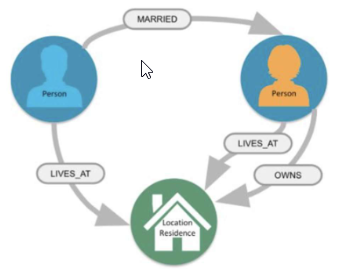
관계형 모델과 다른 점
- 각 열에는 필드 값이 있어야 한다 vs 동일한 레이블을 가진 노드는 동일한 속성 집합을 가질 필요가 없다.
- JOIN 사용 vs 관계가 생성 시 디스크에 저장
- 스키마를 정의한 후 최소로 변경 vs 스키마가 애플리케이션과 함께 진화함
- 모델링할 때 추상화, 객체보다는 클래스에 초점 vs 모델링할 때 실제 데이터 항목 사용
사용예:
추천엔진, 콘텐츠 및 자산관리 시스템, ID 및 엑세스 관리 시스템, 규정 준수 및 위험관리 솔류션, 소셜 네트워크와 같은 관계를 보고자 할 때
설치하기
-
다운로드 페이지(https://neo4j.com/download/) 에서 데스크 탑을 선택한 후 필요한 정보를 입력하여 설치 파일을 다운로드
-
설치 파일을 실행, 옵션 선택시에 "Only for me"를 선택
이유:
**1) Compliance with Developer Licensing**
The Neo4j Desktop license provides a free Enterprise Edition Developer license intended for use by one named user on a single machine. Installing "Only for me" aligns with this per-user licensing model, whereas "For all users" might inadvertently imply shared usage that contradicts these terms.

**2) Isolated Database Instances**
Neo4j Desktop is designed as a client application for local development.

Data Privacy: Databases created in a "Just for me" installation are stored in your user-specific folders (e.g., %APPDATA% on Windows).
Conflict Prevention: Other users on the same machine cannot see or interfere with your graph data, preventing accidental deletions or modifications to your active projects.

**3) Avoiding Plugin & File Permission Conflicts**
Developing with Neo4j often involves installing plugins like APOC or Graph Data Science.

Read/Write Access: A "Just for me" install ensures that the application has the necessary permissions to write to the plugins, logs, and certificates directories within your user profile without needing system-wide sudo or Admin access every time you add a new tool.
Pathing: It simplifies environment variable management (like PATH), as the locations remain within your own user scope rather than requiring global system changes.

**4) Simplified Uninstallation**
If you ever need to perform a "clean" reinstall to troubleshoot issues, removing a user-level installation is far simpler. It doesn't leave behind residual files in protected system directories (C:\Program Files or /usr/bin) that might conflict with future versions. - neo4j desktop 실행
인스턴스 생성
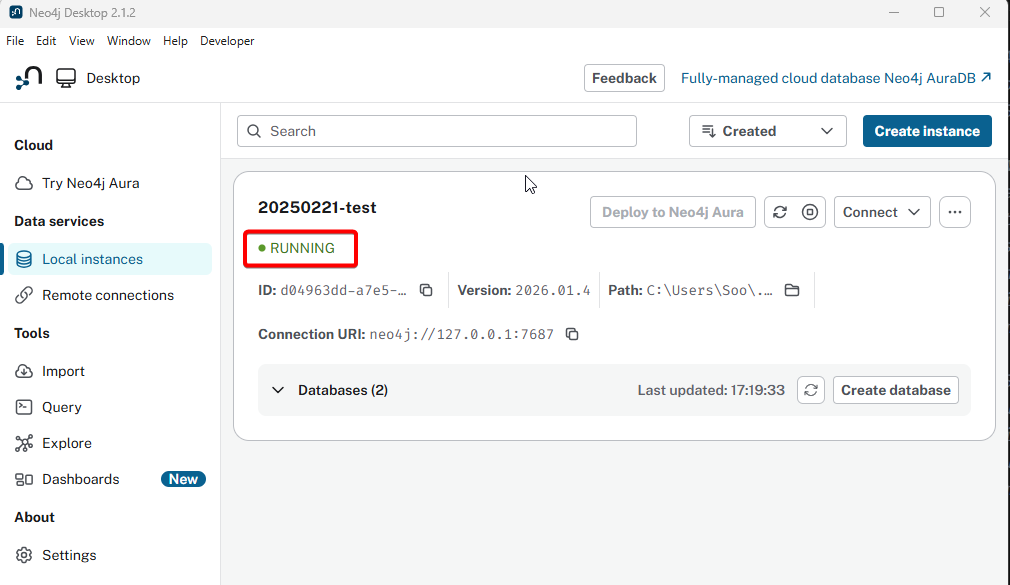
실행 뒤 보이는 화면의 버튼을 눌러 인스턴스를 생성
쿼리를 하기전에 인스턴스가 Running 하고 있는지, 그리고 연결이 되어 있는지 확인 필요

오랜시간 망설였던 코딩을 다시 해보려고 노력하고 있는 사람