Next.js 폰트 최적화
폰트가 어떻게 성능에 영향을 끼치는가?
Largest Contentful Paint (LCP)
- 페이지에서 가장 큰 요소가 텍스트인 경우, 폰트가 늦게 로드되면 텍스트 요소의 렌더링이 지연된다.
Cumulative Layout Shift (CLS)
- 폰트 로딩이 완료되기 전까지 시스템 폰트로 먼저 보여줄 수 있다. 하지만 로딩 완료 후 웹 폰트로 교체되게 되면, 텍스트의 폭이나 줄바꿈이 바뀌면서 화면이 밀리는 현상(layout shift)이 발생할 수 있다.
Next.js의 Font Optimization 사용법
https://nextjs.org/docs/app/getting-started/fonts
Google Font
원하는 구글 폰트를 import하고 실제 사용하는 weight, variable, subsets 등을 명시해주면 된다.
import { Bebas_Neue } from "next/font/google";

export const bebasNeue = Bebas_Neue({
  weight: "400",
  variable: "--font-babas-neue",
  subsets: ["latin"],
});
Local Font
구글 폰트에 없는 폰트는, 직접 다운로드 받은 후 프로젝트 내 public 폴더 또는 src 폴더 내에 저장하여 불러올 수 있다.
import localFont from "next/font/local";

export const freesentation = localFont({
  src: "./fonts/Freesentation-5Medium.ttf",
  variable: "--font-freesentation",
});
어떻게 최적화를 하는가?
1. 셀프 호스팅
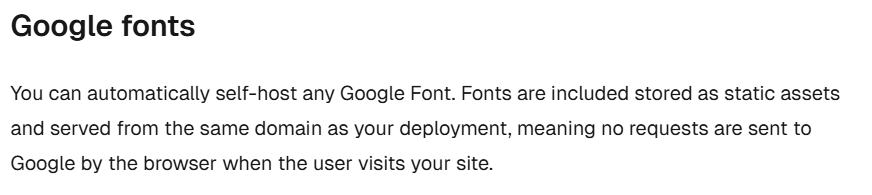
공식 문서를 보면, 구글 폰트들에 대해 배포물과 같은 도메인에 정적 에셋으로서 저장하여(셀프 호스팅) 구글에 요청을 하지 않게 된다고 한다.
실제로 폰트 파일에 대한 요청 경로가 next/static/media 폴더 아래에 있는 폰트 파일인 것을 확인할 수 있었다.
로컬 폰트 >

구글 폰트 >

Next.js는 빌드 시점에 폰트 파일을 가져와서 프로젝트 내부(next/static/media)에 포함시킨다.
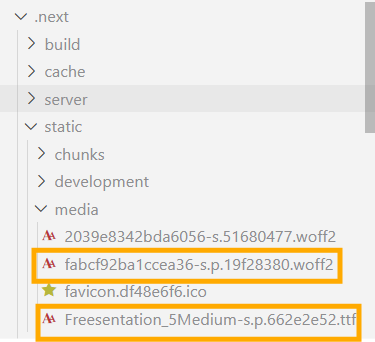
따라서 런타임에 외부 서버에 폰트를 요청하지 않게 되어, 네트워크 지연 문제를 개선할 수 있다.
2. 필요한 subset만 가져오기
Next.js는 사용자가 지정한 문자셋(ex: latin, hangul 등)과 font weight 등 필요한 폰트만 다운받아 용량을 최소화한다.
3. preload
Next.js는 폰트 파일을 <link rel="preload" as="font">로 등록하여 미리 로드한다. 따라서 초기 로드 지연을 최소화할 수 있다.

4. CSS-in-JS 삽입
폰트에 대한 @font-face 규칙을 생성하여, 클래스 이름으로 바로 컴포넌트에 폰트를 적용할 수 있게 한다.
import localFont from "next/font/local";

export const freesentation = localFont({
  src: "./fonts/Freesentation-5Medium.ttf",
  variable: "--font-freesentation",
});

export default function Layout({
  children,
}: Readonly<{
  children: React.ReactNode;
}>) {
  return (
      <body className={freesentation.className}>
      </body>
  );
}
5. FOIT 방지
next/font는 기본적으로 font-display: swap을 적용하여, 폰트가 로드되기 전에는 시스템 폰트로 먼저 표시하고 준비되면 교체한다. 따라서 텍스트가 보이지 않는 현상 FOIT(Flash of Invisible Text)를 방지한다.
6. layout shift 최소화
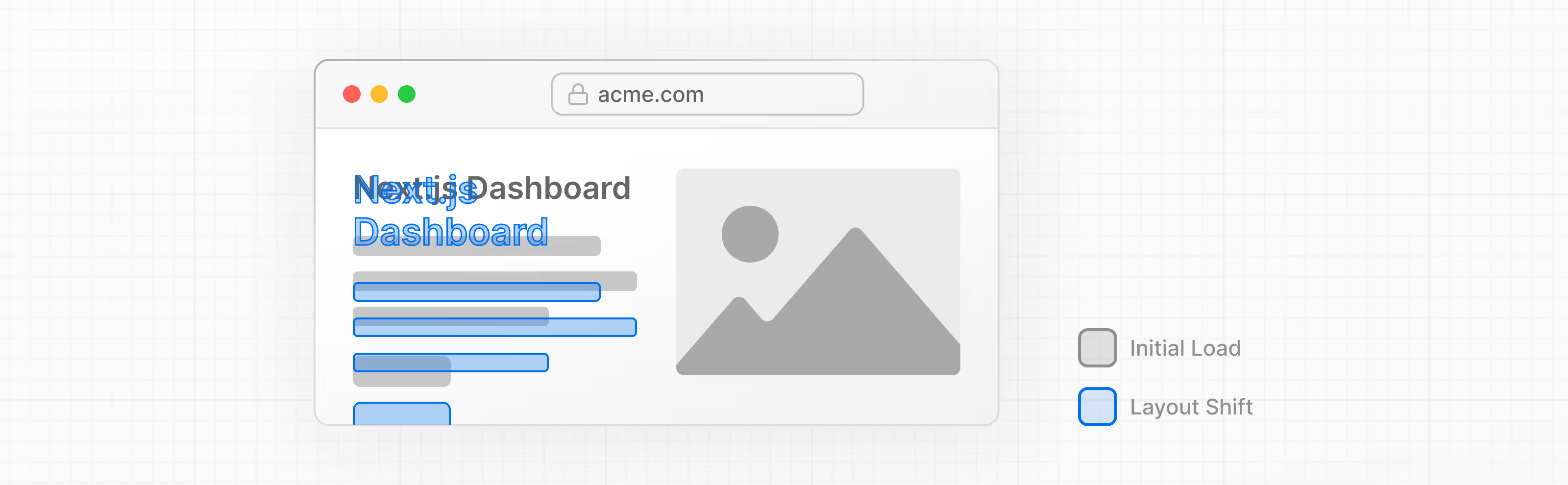
빌드 시점에 폰트의 메트릭 정보(ascent, descent, lineGap, unitsPerEm 등)를 읽어와, fallback 폰트(로드 완료 전에 보여줄 폰트)에 대해 폭/줄바꿈 등을 최대한 원래 폰트와 비슷하게 맞춘다.
결과적으로 원래 폰트로 교체될 때 줄바꿈이 바뀌는 등의 layout shift 현상이 최소화될 수 있다.
코드 살펴보기
실제로 어떤 흐름으로 처리하는지 궁금해져 코드를 살펴보았다.
Google Font의 Loader 코드
https://github.com/vercel/next.js/blob/canary/packages/font/src/google/loader.ts
1) 구글 폰트 요청 url 생성
const url = getGoogleFontsUrl(fontFamily, fontAxes, display)2) fallback 설정
const adjustFontFallbackMetrics: AdjustFontFallback | undefined =
      adjustFontFallback ? getFallbackFontOverrideMetrics(fontFamily) : undefined
2-1) layout shift 최소화를 위한 메트릭 계산
// getFallbackFontOverrideMetrics 함수 코드
export function getFallbackFontOverrideMetrics(fontFamily: string) {
  try {
    const { ascent, descent, lineGap, fallbackFont, sizeAdjust } =
      calculateSizeAdjustValues(fontFamily)
    return {
      fallbackFont,
      ascentOverride: `${ascent}%`,
      descentOverride: `${descent}%`,
      lineGapOverride: `${lineGap}%`,
      sizeAdjust: `${sizeAdjust}%`,
    }
  } catch {
    Log.error(`Failed to find font override values for font \`${fontFamily}\``)
  }
}
3) 구글 폰트 CSS 가져오기
const hasCachedCSS = cssCache.has(url)
let fontFaceDeclarations = hasCachedCSS
  ? cssCache.get(url)
  : await fetchCSSFromGoogleFonts(url, fontFamily, isDev).catch(() => null)

if (!hasCachedCSS) {
  cssCache.set(url, fontFaceDeclarations ?? null)
} else {
  cssCache.delete(url)
}
4) CSS에서 폰트 파일의 url 추출
const fontFiles = findFontFilesInCss(
  fontFaceDeclarations,
  preload ? subsets : undefined
)
// findFontFilesInCss 함수 코드
export function findFontFilesInCss(css: string, subsetsToPreload?: string[]) {
// Find font files to download
const fontFiles: Array<{
googleFontFileUrl: string
preloadFontFile: boolean
}> = []
// Keep track of the current subset
let currentSubset = ''
for (const line of css.split('\n')) {
const newSubset = /\/\* (.+?) \*\//.exec(line)?.[1]
if (newSubset) {
// Found new subset in a comment above the next @font-face declaration
currentSubset = newSubset
} else {
const googleFontFileUrl = /src: url\((.+?)\)/.exec(line)?.[1]
if (
googleFontFileUrl &&
!fontFiles.some(
(foundFile) => foundFile.googleFontFileUrl === googleFontFileUrl
)
) {
// Found the font file in the @font-face declaration.
fontFiles.push({
googleFontFileUrl,
preloadFontFile: !!subsetsToPreload?.includes(currentSubset),
})
}
}
}
return fontFiles
}5) 각 폰트 파일 다운로드 후 셀프 호스팅
const downloadedFiles = await Promise.all(fontFiles.map(async ({ googleFontFileUrl, preloadFontFile }) => {
  const hasCachedFont = fontCache.has(googleFontFileUrl)
  const fontFileBuffer = hasCachedFont
    ? fontCache.get(googleFontFileUrl)
    : await fetchFontFile(googleFontFileUrl, isDev).catch(() => null)

  if (!hasCachedFont) fontCache.set(googleFontFileUrl, fontFileBuffer ?? null)
  else fontCache.delete(googleFontFileUrl)

  if (fontFileBuffer == null) nextFontError(...)

  const ext = /\.(woff|woff2|eot|ttf|otf)$/.exec(googleFontFileUrl)![1]

  // 셀프 호스팅
  const selfHostedFileUrl = emitFontFile(
    fontFileBuffer,
    ext,
    preloadFontFile,
    !!adjustFontFallbackMetrics
  )

  return { googleFontFileUrl, selfHostedFileUrl }
}))
emitFontFile:.next/static/media/로 다운로드한 파일을 내보냄
6) CSS 치환
let updatedCssResponse = fontFaceDeclarations
for (const { googleFontFileUrl, selfHostedFileUrl } of downloadedFiles) {
  updatedCssResponse = updatedCssResponse.replace(
    new RegExp(escapeStringRegexp(googleFontFileUrl), 'g'),
    selfHostedFileUrl
  )
}- 실제 구글 폰트의 url을 셀프 호스팅 url로 치환
Local Font의 Loader 코드
https://github.com/vercel/next.js/blob/canary/packages/font/src/local/loader.ts
1) 폰트 파일 처리
const resolved = await resolve(path)
const fileBuffer = await promisify(loaderContext.fs.readFile)(resolved)
const fontUrl = emitFontFile(
  fileBuffer,
  ext,
  preload,
  typeof adjustFontFallback === 'undefined' || !!adjustFontFallback
)- 파일 읽기 (
fileBuffer) emitFontFile: 읽어온 버퍼를 빌드 산출물로 내보내기
2) 폰트 메타데이터 구하기
let fontMetadata: any
try {
  fontMetadata = fontFromBuffer?.(fileBuffer)
} catch (e) {
  console.error(`Failed to load font file: ${resolved}\n${e}`)
}
3) @font-face 만들기
const hasCustomFontFamily = declarations?.some(({ prop }) => prop === 'font-family')

const fontFaceProperties = [
  ...(declarations ? declarations.map(({ prop, value }) => [prop, value]) : []),
  ...(hasCustomFontFamily ? [] : [['font-family', variableName]]),
  ['src', `url(${fontUrl}) format('${format}')`],
  ['font-display', display],
  ...((weight ?? defaultWeight) ? [['font-weight', weight ?? defaultWeight]] : []),
  ...((style ?? defaultStyle) ? [['font-style', style ?? defaultStyle]] : []),
]

const css = `@font-face {\n${fontFaceProperties
  .map(([property, value]) => `${property}: ${value};`)
  .join('\n')}\n}\n`
4) fallback 보정 값 계산
let adjustFontFallbackMetrics: AdjustFontFallback | undefined
if (adjustFontFallback !== false) {
  const fallbackFontFile = pickFontFileForFallbackGeneration(fontFiles)
  if (fallbackFontFile.fontMetadata) {
    adjustFontFallbackMetrics = getFallbackMetricsFromFontFile(
      fallbackFontFile.fontMetadata,
      adjustFontFallback === 'Times New Roman' ? 'serif' : 'sans-serif'
    )
  }
}
4-1) layout shift 최소화를 위한 메트릭 계산
// getFallbackMetricsFromFontFile 함수
export function getFallbackMetricsFromFontFile(
  font: Font,
  category = 'serif'
): AdjustFontFallback {
  const fallbackFont =
    category === 'serif' ? DEFAULT_SERIF_FONT : DEFAULT_SANS_SERIF_FONT

  const azAvgWidth = calcAverageWidth(font)
  const { ascent, descent, lineGap, unitsPerEm } = font

  const fallbackFontAvgWidth = fallbackFont.azAvgWidth / fallbackFont.unitsPerEm
  let sizeAdjust = azAvgWidth
    ? azAvgWidth / unitsPerEm / fallbackFontAvgWidth
    : 1

  return {
    ascentOverride: formatOverrideValue(ascent / (unitsPerEm * sizeAdjust)),
    descentOverride: formatOverrideValue(descent / (unitsPerEm * sizeAdjust)),
    lineGapOverride: formatOverrideValue(lineGap / (unitsPerEm * sizeAdjust)),
    fallbackFont: fallbackFont.name,
    sizeAdjust: formatOverrideValue(sizeAdjust),
  }
}