
오전문제
달력 만들기, 버튼 게임 만들기
버튼 클릭
<!DOCTYPE html>
<html lang="ko">
<head>
    <meta charset="UTF-8">
    <meta name="viewport" content="width=device-width, initial-scale=1.0">
    <title>Document</title>
    <style>
        button{
            border: 2px solid rgb(116, 115, 115);
            background-color: rgb(205, 202, 202);
            border-radius: 5px;
            width: 100px;
            height: 40px;
        }
    </style>
</head>
<body>
        <button onclick="alert('버튼 눌림')">click me</button>
</body>
</html>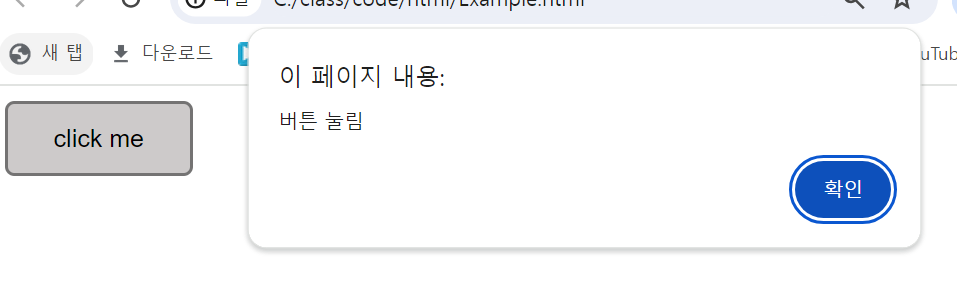
- 괜히 이걸 script안에 넣어가지고 동작이 안됐네..
버튼 누르면 html에서 요소를 가져와 출력
<!DOCTYPE html>
<html lang="ko">
  <head>
    <meta charset="UTF-8">
    <title>getElementsByTagName sample</title>
  </head>
  <body>

    <p>과일 종류</p>

    <div id="summer">
        <p>수박</p>
        <p>사과</p>
    </div>

    <div id="winter">
        <p>바나나</p>
        <p>딸기</p>
    </div>

    <button id="getButton">요소 취득</button>
    <script>
        //버튼 요소 가져오기
        const btn = document.getElementById('getButton');
        //버튼에 클릭 이벤트 리스너
        btn.addEventListener('click', function(){
            //winter id를 가진 div요소 안에 모든 p요소를 가져옴
            const winterFruits = document.getElementById('winter').getElementsByTagName('p');

            //각 p 요소의 텍스트 콘텐츠를 가져와 배열에 저장
            const fruitsArray = [];
            for(let i = 0; i < winterFruits.length; i++){
                fruitsArray.push(winterFruits[i].textContent);
            }
            //배열을 콘솔에 출력 굳이 join사용 안하고 배열만 넣어도 출
            console.log(fruitsArray.join(', '));
        })
    </script>
<script>
</script>
</body>
</html>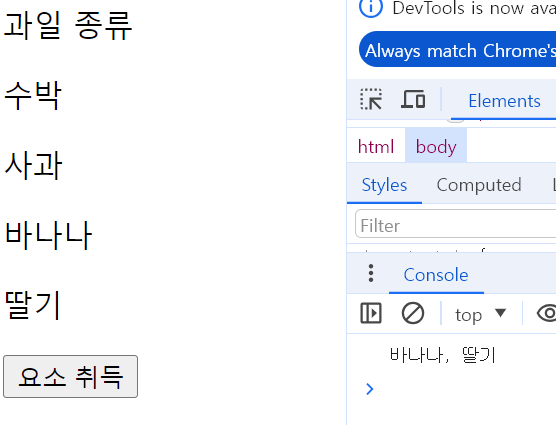
피연산자의 타입 반환
<!DOCTYPE html>
<html lang="ko">
  <head>
    <meta charset="UTF-8">
    <title>getElementsByTagName sample</title>
  </head>
  <body>
    <script>
      let a = 1;
      let b = 'String';
      let c = true;

      console.log(typeof(a));
      console.log(typeof(b));
      console.log(typeof(c));
    </script>
<script>
</script>
</body>
</html>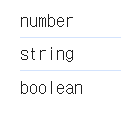
배열 삭제하기 - splice
<!DOCTYPE html>
<html lang="ko">
  <head>
    <meta charset="UTF-8">
    <title>getElementsByTagName sample</title>
  </head>
  <body>
    <script>
      var arr = [1, 2, 3];
    //   delete(arr[1]); delete는 객체의 속성을 삭제할 때 사용 >> 배열을 삭제할 때는 적합 x
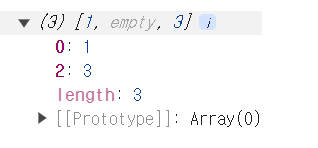
    // 배열 요소를 delete로 삭제하면, 배열의 길이는 변하지 않고 삭제되 요소는 Empty로 남게되고, 배열의 인덱스는 그대로 남아있다.
    arr.splice(1, 1); //splice() 를 이용해 인덱스 1의 요소를 1개 삭제 한다.
    console.log(arr);
    </script>
<script>
</script>
</body>
</html>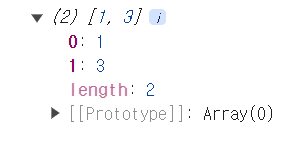
주석 처리한 delete로 삭제하면
for/in
<!DOCTYPE html>
<html lang="ko">
  <head>
    <meta charset="UTF-8">
    <title>getElementsByTagName sample</title>
  </head>
  <body>
    <script>
      var arr = [3, 4, 5];
      //배열의 인덱스를 사용해 반복
      for(let i = 0; i < arr.length; i++){
        document.write(i + " ");
    }
    document.write("<br>");
    //배열의 요소를 직접 반복
    for(let i in arr){
        document.write(i + " ");
    }
    document.write("<br>");
    //객체의 속성을 반복
      let obj = {name : "이순신", age : 20};
      for(let i in obj){
        document.write(i + "<br>");
      }
//       0 1 2
//       0 1 2
//       name
//       age
    </script>

</body>
</html>- 배열에 있는 모든 요소의 인덱스, 객체를 가져옴
For/of + entries()
<!DOCTYPE html>
<html lang="ko">
  <head>
    <meta charset="UTF-8">
    <title>getElementsByTagName sample</title>
  </head>
  <body>
    <script>
     let arr = [3, 4, 5];
     for(let value of arr){
        document.write(value + " ");
     }
     document.write("<br>");
    //인덱스와 값까지 가져오기 - entries()활용
     let arr2 = ['a', 'b', 'c'];
    for (let [index, value] of arr2.entries()) {
    document.write(`Index: ${index}, Value: ${value}` + "<br>");
    }
//     3 4 5
// Index: 0, Value: a
// Index: 1, Value: b
// Index: 2, Value: c
    </script>

</body>
</html>- 개행 할 때 그냥 br만 넣으면 해당 문자열이 그대로 들어감 꺽새 넣어야됌
다음을 구현하시오 : 댕 어려움
- input 상자의 값이 변경되면 alert창으로 'changed'라고 출력.
input 상자에서 키를 누르면 alert 창으로 'key down!' 이라고 출력.
night 라는 버튼을 클릭하면 body 태그의 배경색을 블랙으로 글자색을 흰색으로 하자.
day라는 버튼을 클릭하면 body 태그의 배경색을 흰색으로 글자색을 검은색으로 하자.
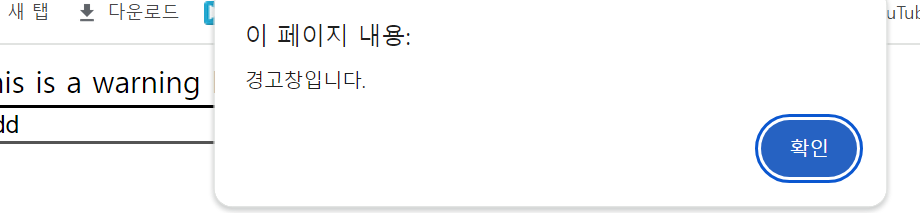
버튼위에 마우스를 올리면 alert창으로 '경고창입니다.'라고 출력.
<!DOCTYPE html>
<html lang="ko">
<head>
    <meta charset="UTF-8">
    <title>Event Handling</title>

</head>
<body>
    <div id = "warningMsg">This is a warning Message Zone</div>
    <input type="text" id = "myInput" >
    <button id = "night">night</button>
    <button id = "day">day</button>
    <script>
        const inputEm = document.getElementById("myInput");
        const nightBtn = document.getElementById("night");
        const dayBtn = document.getElementById("day");
        const warning = document.getElementById("warningMsg");
        const body = document.body;
        const html = document.documentElement;

        inputEm.addEventListener("change", function(){
           alert("changed");
       });

    //      inputEm.addEventListener("keydown",function(){
    //        alert("Key Down!");
    //    }); 이건 뭔소린지 몰라서 주석처리

       nightBtn.addEventListener('click', function(){//night버튼 누르면 다크모드
        body.style.backgroundColor = 'black';
        inputEm.style.backgroundColor = 'black';
        inputEm.style.borderColor = 'white';
        inputEm.style.color = 'white';
        warning.style.color = 'white'
        inputEm.style.caretColor = 'white'; // 텍스트 입력 커서 색상을 변경합니다.
    })
    dayBtn.addEventListener('click', function(){//day버튼 누르면 원래대로
        body.style.backgroundColor = 'white';
        inputEm.style.borderColor = 'black';
        inputEm.style.color = 'black';
        inputEm.style.backgroundColor = 'white';
        warning.style.color = 'black';
        inputEm.style.caretColor = 'black'; // 텍스트 입력 커서 색상을 변경합니다.
       })

       html.addEventListener('mouseleave', function(event){//html 에서 마우스가 밖으로 나가면 경고

                alert("경고창입니다.");
       });

    </script>
</body>
</html>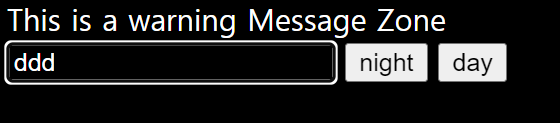

- 다음을 자바스크립트로 구현.
-
0부터 99사이의 난수를 발생하자.
-
넘겨진 두 수 사이의 난수를 발생시켜서 반환하는 함수를 만들자.
(10, 50을 넘겨주면 10포함 50 불포함) -
넘겨진 두 수 사이의 난수를 발생시켜서 반환하는 함수를 만들자.
(10, 50을 넘겨주면 10포함 50 포함)
<!DOCTYPE html>
<html lang="ko">
<head>
    <meta charset="UTF-8">
    <title>Random Number Generator</title>
</head>
<body>
    <div id="output1"></div>
    <div id="output2"></div>
    <div id="output3"></div>

    <script>
        // 결과를 출력할 요소 찾기
        const outputDiv1 = document.getElementById("output1");
        const outputDiv2 = document.getElementById("output2");
        const outputDiv3 = document.getElementById("output3");

        // 0부터 99까지의 난수 발생
        function getRandomNumber() {
            return Math.floor(Math.random() * 100);
        }

        // min(포함)과 max(불포함) 사이의 난수 발생
        function getRandomBetween(min, max) {
            return Math.floor(Math.random() * (max - min) + min);
        }

        // min과 max(모두 포함) 사이의 난수 발생
        function getRandomBetweenInclusive(min, max) {
            return Math.floor(Math.random() * (max - min + 1) + min);
        }

        // 결과를 출력하는 함수
        function displayResult(outputDiv, result) {
            outputDiv.textContent = result;
        }

        // 테스트
        displayResult(outputDiv1, "0부터 99까지의 난수: " + getRandomNumber());
        displayResult(outputDiv2, "10부터 50까지의 난수 (10 포함, 50 미포함): " + getRandomBetween(10, 50));
        displayResult(outputDiv3, "10부터 50까지의 난수 (10 포함, 50 포함): " + getRandomBetweenInclusive(10, 50));
    </script>
</body>
</html>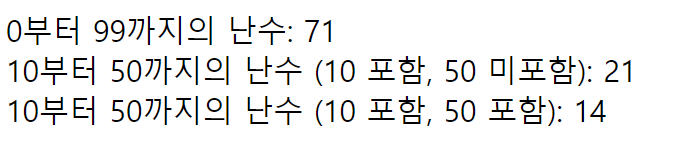
- 다음 객체배열을 year 오름차순으로 정렬
const cars = [
{type:"Volvo", year:2016},
{type:"Saab", year:2001},
{type:"BMW", year:2010}
];
<!DOCTYPE html>
<html lang="ko">
<head>
    <meta charset="UTF-8">
    <title>Cars by Year</title>
</head>
<body>
    <h1>Cars by Year</h1>
    <ul id="carList">
        <!-- 여기에 차량 목록이 추가될 것입니다. -->
    </ul>

    <script>
        const cars = [
            {type: "Volvo", year: 2016},
            {type: "Saab", year: 2001},
            {type: "BMW", year: 2010}
        ];

        const carListElement = document.getElementById("carList");

        // year 속성을 기준으로 오름차순으로 정렬
        cars.sort((a, b) => a.year - b.year);

        // 각 차량의 type 및 year 속성을 화면에 출력
        cars.forEach(function(car) {
            const listItem = document.createElement("li"); // 새 <li> 요소 생성
            listItem.textContent = `${car.type} (${car.year})`; // <li> 요소의 텍스트 내용 설정
            carListElement.appendChild(listItem); // <ul> 요소에 <li> 요소 추가
        });
    </script>
</body>
</html>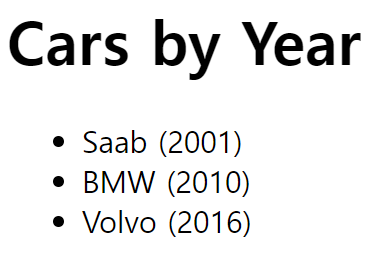
- 다음 객체배열을 type을 기준으로 대소문자 상관없이 알파벳순으로 정렬.
const cars = [
{type:"Volvo", year:2016},
{type:"Saab", year:2001},
{type:"BMW", year:2010}
];
<!DOCTYPE html>
<html lang="ko">
<head>
    <meta charset="UTF-8">
    <title>Car Sorting</title>
</head>
<body>
   <h1>Cars by type</h1>
   <ul id="carList"></ul>

    <script>
        const cars = [
            {type:"Volvo", year:2016},
            {type:"Saab", year:2001},
            {type:"BMW", year:2010}
        ];
        const carListEm = document.getElementById("carList");
        cars.sort((a, b) => {
            if(a.type < b.type) return -1;
            if(a.type > b.type) return 1;
            return 0;
        });
        cars.forEach(function(car){
            const listItem = document.createElement("li");
            listItem.textContent = (`${car.type} ${car.year}`);
            carListEm.appendChild(listItem);
        });


    </script>
</body>
</html>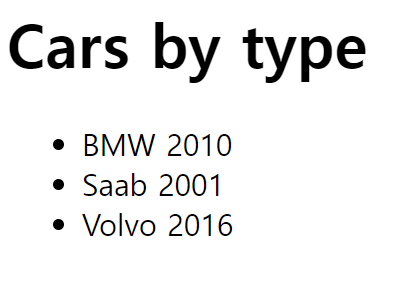
달력 만들기
<!DOCTYPE html>
<html lang="ko">
<head>
    <meta charset="UTF-8">
    <title>Calendar</title>
    <style>
        table, tr, th, td{
            border: 1px solid black;
        }
    </style>
</head>
<body>
    <div id="demo"></div>
   <script>
    const now = new Date();
    const year = now.getFullYear();
    const month = now.getMonth();

    let table = '<table>';
    table += `<caption>${year}년 ${month + 1}월</caption>`;
    const dayOfTheWeek = ["일", "월", "화", "수", "목", "금", "토"];
    table += '<tr>';
    //헤더 셀에 요일 넣기
    for(let i = 0; i < dayOfTheWeek.length; i++){
        table += `<th>${dayOfTheWeek[i]}</th>`
    }
   table += '</tr>';
   //1일의 요일 가져오기 - date객체에서 월은 0부터 시작하기에 원하는 달을 지정할 때는 1을 뺀 값을 넣어야하므로, 1을 더해주지 않아도됌
   let firstDay = new Date(year, month, 1).getDay(); //객체이므로 함수로 호출 불가

   //현재 달의 마지막 날을 가져오기 위해서 +1을 해줘서 현재 달로 지정하는 것이다.
   let daysInMonth = new Date(year, month+1, 0).getDate();


   let date = 1; //현재 달력에 출력되어야 하는 날짜 출력하는 변수
   let tatalCells = Math.ceil(daysInMonth/dayOfTheWeek.length);
   let currentCell = 0;

   //currentCell & 7 을 함으로써 일주일이 끝날 때마다 새로운 주의 시작을 나타냄(이진수로)
   while(date <= daysInMonth || currentCell % 7 !== 0){
    if(currentCell % 7 === 0){
        table += '<tr>';
    }
    if(currentCell < firstDay || date > daysInMonth){
        table += '<td></td>';
    }else{
        table += '<td>' + date + '</td>';
        date++;
    }
    if(currentCell % 7 === 6){//한 주가 끝날 때마다 행을 닫음
        table += '</tr>';
    }
    currentCell++;
   }
   table += '</table>';
   document.getElementById("demo").innerHTML = table;
   </script>
</body>
</html>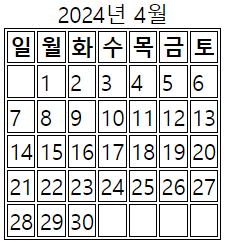
배열에 요소 추가하기
push()
<!DOCTYPE html>
<html lang="ko">
  <head>
    <meta charset="UTF-8">
    <title>getElementsByTagName sample</title>
  </head>
  <body>
    <script>
     var arr = [1, true, "Java"];
    arr.push("Script");
    console.log(arr); // [1, true, "Java", "Script"]

    </script>

</body>
</html>
arr.length를 이용해 추가하기
var arr = [1, true, "Java"];
arr[arr.length] = 100;
console.log(arr); // [1, true, "Java", 100]
배열과 객체
<!DOCTYPE html>
<html lang="ko">

<head>
    <meta charset="UTF-8">
    <title>JavaScript Array</title>
</head>

    <h1>연관 배열</h1>
    <script>
        var arr = [];        // 비어있는 배열을 생성함.
        arr["하나"] = 1;    // 숫자 인덱스 대신에 문자열을 인덱스로 배열 요소를 추가함.
        arr["참"] = true;
        arr["자바스크립트"] = "JavaScript";

        document.write(arr["참"] + "<br>");    //True
        document.write(arr.length + "<br>");//0
        document.write(arr[0]);    //undefined
    </script>
</body>
</html>- 연관 배열을 구현하고 있지만, 연관 배열의 요소는 실제로 배열의 요소로 취급되지 않는다.
- 객체처럼 동작하며 인덱스로 사용되는 문자열은 객체의 속성이 되므로, arr.length는 숫자 인덱스가 아닌 문자열로 추가되어서, 배열의 길이를 제대로 반영하지 않아 0이고, arr[0]은 초기화 되지 않았으므로 Undefined이다.
연관 배열의 인덱스는 정수로만 구성되어야 한다.
배열에서 원하는 요소만 출력하기
<!DOCTYPE html>
<html lang="ko">

<head>
    <meta charset="UTF-8">
    <title>JavaScript Array</title>
</head>

    <h1>연관 배열</h1>
    <script>
        let str = "안녕하세요!"; //하만 출력하기
        document.write(str.charAt(2));
        document.write(str[2]);
        document.write(str.slice(2, 3));
        document.write(str.substring(2, 3));
        document.write(str.substr(2, 1));
    </script>
</body>
</html>-
substring(startIndex, endIndex): 이 메소드는 시작 인덱스부터 종료 인덱스 직전까지의 부분 문자열을 반환한다. 여기서 인덱스는 문자열의 위치를 나타낸다. 시작 인덱스는 포함되고, 종료 인덱스는 포함되지 않는다. -
substr(startIndex, length): 이 메소드는 시작 인덱스부터 지정된 길이만큼의 부분 문자열을 반환한다. 여기서 인덱스는 문자열의 위치를 나타내며, 길이는 반환할 부분 문자열의 길이를 나타낸다.
차이점은 두 번째 인자의 의미와 동작 방식 >>
substring()은 종료 인덱스를 받아 해당 인덱스 직전까지의 문자열을 반환하고,substr()은 시작 인덱스와 부분 문자열의 길이를 받아 시작 인덱스부터 지정된 길이만큼의 문자열을 반환한다.
배열 여부 확인
<!DOCTYPE html>
<html lang="ko">

<head>
    <meta charset="UTF-8">
    <title>JavaScript Array</title>
</head>

    <h1>연관 배열</h1>
    <script>
        var arr = [1, true, "JavaScript"]; // 배열 생성
        document.write(Array.isArray(arr));//true
        document.write(arr instanceof Array);//treu
        if (arr.constructor === Array) {
            document.write("arr는 배열입니다."); //이게 출력
        } else {
             document.write("arr는 배열이 아닙니다.");
        }
        </script>
</body>
</html>
자바 스크립트 연산자
다른 유형 비교

- 문자열 2와 문자열 12의 앞에 1과 비교하기 때문에 2가 더 크게나온다.
age = Number(age);
if (isNaN(age)) {
  voteable = "Input is not a number";
} else {
  voteable = (age < 18) ? "Too young" : "Old enough";
}- isNaN은 is not a number로 age가 숫자가 아니라면 True, 아니라면 false를 반환한다.
선택적 연결 연산자 : ?.
?.: optional chaining 연산자로, 객체와 속성이 존재한다면 속성 값을 반환하고, 그렇지 않으면 undefined를 반환한다.
// Create an object:
const car = {type:"Fiat", model:"500", color:"white"};
// Ask for car name:
document.getElementById("demo").innerHTML = car?.name;- car객체에서 name속성을 찾고자하는데, 현재 없기 때문에 undefined가 반환된다.
array-method 정리
- pop() : 배열의 뒷 부분의 값을 삭제
let arr={1, 2, 3, 4};
arr.pop();
console.log(arr); //{1, 2, 3}- push() : 배열 뒷 부분에 값을 삽입
let arr= {1, 2, 3, 4};
arr.push(5);
console.log(arr); //{1. 2. 3. 4. 5}- unshift() : 배열 앞 부분에 값을 삽입
let arr= {1, 2, 3, 4};
arr.unshift(0);
console.log(arr); //{0, 1, 2, 3, 4}- shift() : 배열 앞 부분의 값을 삭제하고 삭제한 값 반환
let arr= [1, 2, 3, 4];
arr.shift();
console.log(arr;//{2, 3, 4)- splice(index, 제거할 요소, 배열에 추가될 요소) : 배열의 특정 위치에 요소를 추가하거나 삭제
let arr= {[1, 2, 3, 4, 5, 6, 7];
arr.splice(3, 2);
console.log(arr); //{1, 2, 3, 6, 7} //3번째 인덱스부터 2개 제거

//2번째 인덱스에서 1개 제거 후 추가
let arr= [1, 2, 3, 4, 5, 6, 7];
arr.splice(2, 1, "a", "b");
console.log(arr); //[1, 2, "a", "b", 4, 5, 6, 7] - slice(startIndex, endIndex) : 배열의 첫 인덱스부터 마지막 인덱스 직전까지에 대한 shallow copy를 새로운 배열 객체로 반환
let arr= [1, 2, 3, 4, 5, 6, 7];
let newArr = arr.slice(3, 6);
console.log('slice', newArr); //[4, 5, 6]- concat() : 다수의 배열을 합치고 병합된 배열의 사본을 반환
var arr1 = [1, 2, 3];
var arr2 = [4, 5, 6];
car arr3 = arr2.concat(arr1);
console.log(arr3); //[4, 5, 6, 1, 2, 3]- every() : 배열의 모든 요소가 제공한 함수로 구현된 테스트를 통과하는지를 테스트
var arr = [1, 2, 3, 4, 5, 6, 7, 8, 9, 10];

car isEven = function(value){
    //value가 2의 배수면 true 반환
    return value % 2 === 0;
 };
 //false >> 모든 요소가 true면 true, 아니면 false
console.log(arr.every(isEven));-
some() : 지정된 함수의 결고가 true일 때까지 배열의 각 원소를 반복
var arr = [
push가 반환하는 값은 배열의 길이
map은 무언갈 가공할 떄, filter는 걸러낼 때
Reduc 챗지피티해서 물어보기
sort는 숫자를 정렬하는 것이 아닌 아스키코드를 기준으로 알파벳을 정렬한다.
숫자의 크기로 정렬하고싶다면 arr.sort)function(a, b){} 해서 콜백함수를 넣어서 어떻게 정렬할건지 선언해야한다.
foreach()안에는 짜고싶은 함수의 콜백함수를 넣어줘야한다.
const points = new Array(40); >> 요소가 40개 length가 40
const points = new Array(40, 100); >> length가 2
const points = [40]; >>length 가 1
https://www.w3schools.com/js/js_comparisons.asp
arrays.methods정리, array iteration정리
map()안에 콜백함수넣어서 바로 람다나 익명함수로 사용(걍 람다)
// 원본 배열
const numbers = [1, 2, 3, 4, 5];

// 각 요소를 제곱하여 새로운 배열 생성
const squaredNumbers = numbers.map(x => x * x);

// 결과 출력
console.log(squaredNumbers); // [1, 4, 9, 16, 25]
reduce는 처음에 배열의 0번째(total), 1번째(value), 1번쨰의 인덱스 1, 배열 자체 >>gpt한테 물어보는게 더 빠를듯
every는 다 참이여야 참, some은 하나라도 만족하면 참 반환
keys()는 배열의 인덱스 반환(for of사용해서 출력)
배열 문제 1 - 삽입, 삭제, 추가, 길이 출력
- const fruits = ["Banana", "Orange", "Apple", "Mango"];
fruits의 모든 요소 출력.
<!DOCTYPE html>
<html lang="ko">
<head>
    <meta charset="UTF-8">
    <title>Event Handling</title>
</head>
<body>
    <p id="demo"></p>
    <script>
       const fruits = ["Banana", "Orange", "Apple", "Mango"];
        document.getElementById("demo").innerHTML= fruits;
    </script>
</body>
</html>- const fruits = ["Banana", "Orange", "Apple", "Mango"];
fruits의 모든 요소를 다음의 형태로 출력.
Banana Orange Apple * Mango
join()
<!DOCTYPE html>
<html lang="ko">
<head>
    <meta charset="UTF-8">
    <title>Event Handling</title>

</head>
<body>
    <p id="demo"></p>
    <script>
       const fruits = ["Banana", "Orange", "Apple", "Mango"];
        const a = fruits.join(' * ');

        document.getElementById("demo").innerHTML= a;
        // Banana * Orange * Apple * Mango
    </script>
</body>
</html>- fruits의 마지막 요소를 제거하고 그 제거한 요소 출력.
const fruits = ["Banana", "Orange", "Apple", "Mango"];
pop()
<!DOCTYPE html>
<html lang="ko">
<head>
    <meta charset="UTF-8">
    <title>Event Handling</title>
   </head>
<body>
    <p id="demo"></p>
    <script>
       const fruits = ["Banana", "Orange", "Apple", "Mango"];

       document.getElementById("demo").innerHTML= fruits.pop();;
    //    Mango
    </script>
</body>
</html>- fruits의 마지막에 "Kiwi"를 추가하고 fruits의 길이를 출력.
const fruits = ["Banana", "Orange", "Apple", "Mango"];
push() : lenght
<!DOCTYPE html>
<html lang="ko">
<head>
    <meta charset="UTF-8">
    <title>Event Handling</title>

</head>
<body>
    <p id="demo"></p>
    <script>
       const fruits = ["Banana", "Orange", "Apple", "Mango"];
       fruits.push("Kiwi"); // "Kiwi" 요소를 fruits 배열에 추가
       document.getElementById("demo").innerHTML = fruits.length; // 배열의 길이를 출력
    //    5
    </script>
</body>
</html>
push()로 배열 길이 반환
<!DOCTYPE html>
<html lang="ko">
<head>
    <meta charset="UTF-8">
    <title>Event Handling</title>

</head>
<body>
    <p id="demo"></p>
    <script>
       const fruits = ["Banana", "Orange", "Apple", "Mango"];
       const lengthAfterPush = fruits.push("Kiwi"); // push() 메서드를 호출하여 "Kiwi"를 배열에 추가하고, 반환된 새로운 배열의 길이를 저장
       document.getElementById("demo").innerHTML = lengthAfterPush; // 반환된 새로운 배열의 길이를 출력
    </script>
</body>
</html>- fruits의 첫번째 요소를 제거하고 그 요소를 출력
const fruits = ["Banana", "Orange", "Apple", "Mango"];
shift()
<!DOCTYPE html>
<html lang="ko">
<head>
    <meta charset="UTF-8">
    <title>Event Handling</title>

</head>
<body>
    <p id="demo"></p>
    <script>
       const fruits = ["Banana", "Orange", "Apple", "Mango"];

       document.getElementById("demo").innerHTML = fruits.shift();
    //    Banana
    </script>
</body>
</html>- fruits의 첫번째에 "Lemon"을 추가하고 fruits의 길이를 출력
const fruits = ["Banana", "Orange", "Apple", "Mango"];
unshift()
<!DOCTYPE html>
<html lang="ko">
<head>
    <meta charset="UTF-8">
    <title>Event Handling</title>

</head>
<body>
    <p id="demo"></p>
    <script>
       const fruits = ["Banana", "Orange", "Apple", "Mango"];
       fruits.unshift('Lemon');
       document.getElementById("demo").innerHTML = fruits.length;
    //    5
    </script>
</body>
</html>- length는 함수가 아닌 속성이므로 length()형태로 넣으면 에러남
다른 형태로
<!DOCTYPE html>
<html lang="ko">
<head>
    <meta charset="UTF-8">
    <title>Event Handling</title>

</head>
<body>
    <p id="demo"></p>
    <script>
       const fruits = ["Banana", "Orange", "Apple", "Mango"];
        let l = fruits.unshift('Lemon');
       document.getElementById("demo").innerHTML = l;
    //    5
    </script>
</body>
</html>- fruits의 length property를 이용하여 fruits의 마지막에 "Kiwi"를 추가
const fruits = ["Banana", "Orange", "Apple", "Mango"];
length property이용
<!DOCTYPE html>
<html lang="ko">
<head>
    <meta charset="UTF-8">
    <title>Event Handling</title>

</head>
<body>
    <p id="demo"></p>
    <script>
       const fruits = ["Banana", "Orange", "Apple", "Mango"];
       fruits[fruits.length] = "Kiwi"
       document.getElementById("demo").innerHTML = fruits;
    //    Banana,Orange,Apple,Mango,Kiwi
    </script>
</body>
</html>- delete를 통해서 배열의 요소를 제거하면 pop이나 shift를 통해 지운것의 차이는 무엇인가?
const fruits = ["Banana", "Orange", "Apple", "Mango"];
-
delete로 제거하면 배열 안에 값은 empty로 사라지고, 인덱스의 길이도 줄지 않고 같다.
-
pop()메서드로 삭제하면, 배열의 마지막 요소가 제거되면서 해당 요소가 반환되고, 배열에서 제거된다.배열의 길이도 감소되고, 나머지 요소들은 외쪽으로 이동하여 빈 자리를 채운다.
-
shift() 메서드로 삭제하면 배열의 첫 번째 요소가 제거되면서, 해당 요소가 반환되고 배열에서 제거된다. 배열의 길이도 감소되고, 나머지 요소들은 외쪽으로 이동하여 빈 자리를 채운다.
- myGirls 배열과 myBoys 배열을 합쳐서 새로운 배열을 만드시오.
const myGirls = ["Cecilie", "Lone"];
const myBoys = ["Emil", "Tobias", "Linus"];
concat()
<!DOCTYPE html>
<html lang="ko">
<head>
    <meta charset="UTF-8">
    <title>Event Handling</title>

</head>
<body>
    <p id="demo"></p>
    <script>
    const myGirls = ["Cecilie", "Lone"];
    const myBoys = ["Emil", "Tobias", "Linus"];

    const newArr =  myGirls.concat(myBoys);
    document.getElementById("demo").innerHTML = newArr;
    //    Cecilie,Lone,Emil,Tobias,Linus
    </script>
</body>
</html>- 다음 3개의 배열을 합치시오.
const arr1 = ["Cecilie", "Lone"];
const arr2 = ["Emil", "Tobias", "Linus"];
const arr3 = ["Robin", "Morgan"];
concat()
<!DOCTYPE html>
<html lang="ko">
<head>
    <meta charset="UTF-8">
    <title>Event Handling</title>

</head>
<body>
    <p id="demo"></p>
    <script>
    const arr1 = ["Cecilie", "Lone"];
    const arr2 = ["Emil", "Tobias", "Linus"];
    const arr3 = ["Robin", "Morgan"];

    const newArr =  arr1.concat(arr2, arr3);
    document.getElementById("demo").innerHTML = newArr;
    //    Cecilie,Lone,Emil,Tobias,Linus,Robin,Morgan
    </script>
</body>
</html>- arr1 배열과 "Peter" 문자열을 합쳐서 하나의 배열로 만드시오.
const arr1 = ["Emil", "Tobias", "Linus"];
<!DOCTYPE html>
<html lang="ko">
<head>
    <meta charset="UTF-8">
    <title>Event Handling</title>

</head>
<body>
    <p id="demo"></p>
    <script>
    const arr1 = ["Emil", "Tobias", "Linus"];
    const arr2 = ["Peter"];
    document.getElementById("demo").innerHTML = arr1.concat(arr2);
    //    Emil,Tobias,Linus,Peter
    </script>
</body>
</html>- 다음 배열의 요소가 다음과 같이 되도록 하시오.
const fruits = ["Banana", "Orange", "Apple", "Mango"];
Banana,Orange,Lemon,Kiwi,Apple,Mango
splice()
<!DOCTYPE html>
<html lang="ko">
<head>
    <meta charset="UTF-8">
    <title>Event Handling</title>

</head>
<body>
    <p id="demo"></p>
    <script>
   const fruits = ["Banana", "Orange", "Apple", "Mango"];
   fruits.splice(2, 0, "Lemon", "Kiwi");
    document.getElementById("demo").innerHTML = fruits;
    //    Banana,Orange,Lemon,Kiwi,Apple,Mango
    </script>
</body>
</html>- 다음 배열의 요소를 다음과 같이 되도록 하시오.
const fruits = ["Banana", "Orange", "Apple", "Mango"];
Banana,Orange,Lemon,Kiwi
splice()
<!DOCTYPE html>
<html lang="ko">
<head>
    <meta charset="UTF-8">
    <title>Event Handling</title>

</head>
<body>
    <p id="demo"></p>
    <script>
   const fruits = ["Banana", "Orange", "Apple", "Mango"];
   fruits.splice(2, 2, "Lemon", "Kiwi");
    document.getElementById("demo").innerHTML = fruits;
    //    Banana,Orange,Lemon,Kiwi
    </script>
</body>
</html>- 다음 배열에서 "Apple"을 삭제하시오.
const fruits = ["Banana", "Orange", "Apple", "Mango"];
splice()
<!DOCTYPE html>
<html lang="ko">
<head>
    <meta charset="UTF-8">
    <title>Event Handling</title>

</head>
<body>
    <p id="demo"></p>
    <script>
   const fruits = ["Banana", "Orange", "Apple", "Mango"];
   fruits.splice(2, 1);
    document.getElementById("demo").innerHTML = fruits;
    //    Banana,Orange,Mango
    </script>
</body>
</html>
이렇게도 가능
const fruits = ["Banana", "Orange", "Apple", "Mango"];

// "Apple"의 인덱스 찾기
const index = fruits.indexOf("Apple");

// "Apple" 제거
if (index !== -1) {
    fruits.splice(index, 1);
}

console.log(fruits); // ["Banana", "Orange", "Mango"]- 다음 배열에서 인덱스상 1번째요소에서 마지막까지 잘라서 새로운 배열을 만드시오.
const fruits = ["Banana", "Orange", "Lemon", "Apple", "Mango"];
<!DOCTYPE html>
<html lang="ko">
<head>
    <meta charset="UTF-8">
    <title>Event Handling</title>

</head>
<body>
    <p id="demo"></p>
    <script>
        const fruits = ["Banana", "Orange", "Lemon", "Apple", "Mango"];

        document.getElementById("demo").innerHTML = fruits.slice(1);;
    //    Orange,Lemon,Apple,Mango
    </script>
</body>
</html>- 다음 배열에서 인덱스상 1번째요소에서 2번째 요소까지 잘라서 새로운 배열을 만드시오.
const fruits = ["Banana", "Orange", "Lemon", "Apple", "Mango"];
<!DOCTYPE html>
<html lang="ko">
<head>
    <meta charset="UTF-8">
    <title>Event Handling</title>

</head>
<body>
    <p id="demo"></p>
    <script>
        const fruits = ["Banana", "Orange", "Lemon", "Apple", "Mango"];

        document.getElementById("demo").innerHTML = fruits.slice(1, 3);;
    //   Orange,Lemon
    </script>
</body>
</html>
배열 문제 2 - 정렬, 큰값 작은값
- 다음을 알파벳 순으로 정렬하시오.
const fruits = ["Banana", "Orange", "Apple", "Mango"];
sort()
<!DOCTYPE html>
<html lang="ko">
<head>
    <meta charset="UTF-8">
    <title>Event Handling</title>

</head>
<body>
    <p id="demo"></p>
    <script>
        const fruits = ["Banana", "Orange", "Apple", "Mango"];

        document.getElementById("demo").innerHTML = fruits.sort();
    //   Apple,Banana,Mango,Orange
    </script>
</body>
</html>- 다음을 알파벳 역순으로 정렬하시오.
const fruits = ["Banana", "Orange", "Apple", "Mango"];
sort()로 정렬 후 reverse()로 거꾸로 출력
<!DOCTYPE html>
<html lang="ko">
<head>
    <meta charset="UTF-8">
    <title>Event Handling</title>

</head>
<body>
    <p id="demo"></p>
    <script>
        const fruits = ["Banana", "Orange", "Apple", "Mango"];
        fruits.sort();
        document.getElementById("demo").innerHTML = fruits.reverse();
    //   Orange,Mango,Banana,Apple
    </script>
</body>
</html>
sort()로 callback함수 이용
<!DOCTYPE html>
<html lang="ko">
<head>
    <meta charset="UTF-8">
    <title>Event Handling</title>

</head>
<body>
    <p id="demo"></p>
    <script>
        const fruits = ["Banana", "Orange", "Apple", "Mango"];
        document.getElementById("demo").innerHTML = fruits.sort((a, b) => {
            if(a < b) return 1;
            if(a > b) return -1;
            return 0;
        } );
    //   Orange,Mango,Banana,Apple
    </script>
</body>
</html>0을 반환하면 두 요소의 순서를 변경하지 않는다.- 양수를 반환하면 첫 번째 요소가 두 번째 요소보다 크다고 간주되어 두 요소의 순서를 바꾼다.
- 음수를 반환하면 첫 번째 요소가 두 번째 요소보다 작다고 간주되어 두 요소의 순서를 유지한다.
sort()로 callback함수 사용할 때 안에 람다식 문자열 비교 localeCompare()
const fruits = ["Banana", "Orange", "Apple", "Mango"];

// 문자열 비교 연산자를 사용하여 배열을 알파벳 역순으로 정렬
fruits.sort((a, b) => b.localeCompare(a));

console.log(fruits); // ["Orange", "Mango", "Banana", "Apple"]- 만약
string이compareString보다 사전적으로 앞에 위치한다면, 음수(-1)가 반환된다. - 만약
string이compareString과 사전적으로 동일한 위치에 있다면, 0이 반환된다. - 만약
string이compareString보다 사전적으로 뒤에 위치한다면, 양수(1)가 반환된다.
- 다음을 숫자의 크기 순으로 정렬하시오.
const points = [40, 100, 1, 5, 25, 10];
sort()안에 callback함수 람다로
<!DOCTYPE html>
<html lang="ko">
<head>
    <meta charset="UTF-8">
    <title>Event Handling</title>

</head>
<body>
    <p id="demo"></p>
    <script>
        const points = [40, 100, 1, 5, 25, 10];

        document.getElementById("demo").innerHTML = points.sort((a, b) => {
            if(a < b) return -1;
            if(a > b) return 1;
            return 0;
        } );
    //   1,5,10,25,40,100
    </script>
</body>
</html>
문자열은 -로 비교하는건 x , 숫자는 가능
<!DOCTYPE html>
<html lang="ko">
<head>
    <meta charset="UTF-8">
    <title>Event Handling</title>

</head>
<body>
    <p id="demo"></p>
    <script>
        const points = [40, 100, 1, 5, 25, 10];

        document.getElementById("demo").innerHTML = points.sort((a, b) => (a-b  } );
    // 1,5,10,25,40,100
    </script>
</body>
</html>- 다음을 숫자의 크기 내림차순으로 정렬하시오.
const points = [40, 100, 1, 5, 25, 10];
<!DOCTYPE html>
<html lang="ko">
<head>
    <meta charset="UTF-8">
    <title>Event Handling</title>

</head>
<body>
    <p id="demo"></p>
    <script>
        const points = [40, 100, 1, 5, 25, 10];

        document.getElementById("demo").innerHTML = points.sort((a, b) => {
            if(a < b) return 1;
            if(a > b) return -1;
            return 0;
        } );
    //   100,40,25,10,5,1
    </script>
</body>
</html>
문자열은 -로 비교하는건 x , 숫자는 가능
<!DOCTYPE html>
<html lang="ko">
<head>
    <meta charset="UTF-8">
    <title>Event Handling</title>

</head>
<body>
    <p id="demo"></p>
    <script>
        const points = [40, 100, 1, 5, 25, 10];

        document.getElementById("demo").innerHTML = points.sort((a, b) => (b - a));
    //   100,40,25,10,5,1
    </script>
</body>
</html>- 다음 배열을 서로 섞으시오.
const points = [40, 100, 1, 5, 25, 10];
피셔예이츠
<!DOCTYPE html>
<html lang="ko">
<head>
    <meta charset="UTF-8">
    <title>Event Handling</title>

</head>
<body>
    <p id="demo"></p>
    <script>
        const points = [40, 100, 1, 5, 25, 10];
        for(let i = 0; i < points.length; i++){
            let j = Math.floor(Math.random() * (i+1));
            [points[i], points[j]] = [points[j], points[i]];
        }

        document.getElementById("demo").innerHTML = points;
    //   10,40,1,25,5,100 무작위
    </script>
</body>
</html>- Math.random()함수는 0이상 1미만의 실수여서 i+1을 함으로써 0부
i까지의 정수 범위를 나타내면,Math.random()함수가 반환하는 값에i를 곱하고 소수점을 버리면서 0부터i까지의 정수 범위 내에서 무작위로 선택할 수 있다.
- 다음 배열에서 가장 큰값을 구하시오.
const points = [40, 100, 1, 5, 25, 10];
람다로 구현
<!DOCTYPE html>
<html lang="ko">
<head>
    <meta charset="UTF-8">
    <title>Event Handling</title>

</head>
<body>
    <p id="demo"></p>
    <script>
        const points = [40, 100, 1, 5, 25, 10];
       points.sort((a, b) => b - a);
        document.getElementById("demo").innerHTML = points[0];
    //   100
    </script>
</body>
</html>- 다음 배열에서 가장 작은 값을 구하시오.
const points = [40, 100, 1, 5, 25, 10];
<!DOCTYPE html>
<html lang="ko">
<head>
    <meta charset="UTF-8">
    <title>Event Handling</title>

</head>
<body>
    <p id="demo"></p>
    <script>
        const points = [40, 100, 1, 5, 25, 10];
        points.sort();

        document.getElementById("demo").innerHTML = points[0];
    //   1
    </script>
</body>
</html>
람다로 구현
<!DOCTYPE html>
<html lang="ko">
<head>
    <meta charset="UTF-8">
    <title>Event Handling</title>

</head>
<body>
    <p id="demo"></p>
    <script>
        const points = [40, 100, 1, 5, 25, 10];
       points.sort((a, b) => a - b);
        document.getElementById("demo").innerHTML = points[0];
    //   1
    </script>
</body>
</html>
배열 문제 3 - Array메소드
const numbers = [45, 4, 9, 16, 25];
배열의 모든 요소를 출력하시오.
다음 배열의 각 요소를 2배 곱해서 새로운 배열을 만드시오.
const numbers1 = [45, 4, 9, 16, 25];
다음 배열에서 18이상인것만을 가지고 새로운 배열을 만드시오.
const numbers = [45, 4, 9, 16, 25];
다음 배열의 모든 요소를 더해서 출력하시오.
const numbers = [45, 4, 9, 16, 25];
다음 배열을 초기값을 100으로 해서 모든 요소를 더해서 출력하시오.
const numbers = [45, 4, 9, 16, 25];
다음 배열을 오른쪽에서 왼쪽으로 모두 더하시오.
const numbers = [45, 4, 9, 16, 25];
다음 배열의 모든 요소가 18을 초과하면 true를 아니면 false를 출력하시오.
const numbers = [45, 4, 9, 16, 25];
다음 배열의 요소들 중 18을 넘는 요소가 있다면 true를 아니면 false를 출력하시오.
const numbers = [45, 4, 9, 16, 25];
다음 배열에서 "Apple"이 있다면 그 인덱스를 출력하시오.(왼쪽에서 부터 검색. 첫번째로 찾은 요소)
const fruits = ["Apple", "Orange", "Apple", "Mango"];
다음 배열에서 "Apple"이 있다면 그 인덱스를 출력하시오.(오른쪽에서 부터 검색. 첫번째로 찾은 요소)
const fruits = ["Apple", "Orange", "Apple", "Mango"];
다음 배열에서 18이 넘는 첫번째 요소를 찾아서 그 요소를 출력하시오.
const numbers = [4, 9, 16, 25, 29];
다음 배열에서 처음으로 18을 넘는 첫번째 요소의 인덱스를 출력하시오.
const numbers = [4, 9, 16, 25, 29];
다음 문자열을 배열로 만드시오.
"ABCDEFG"
다음 배열로 부터 Array Iterator object 를 만들어서 각 요소를 출력하시오.
const fruits = ["Banana", "Orange", "Apple", "Mango"];
다음 배열에서 key와 value로 이루어진 Array Iterator를 만들어서 각 요소를 출력하시오.
const fruits = ["Banana", "Orange", "Apple", "Mango"];
다음 배열이 "Mango"을 포함하고 있으면 true 아니면 false를 출력하시오.
const fruits = ["Banana", "Orange", "Apple", "Mango"];
다음 배열들을 Spread 연산자를 이용하여 하나의 배열로 만드시오.
const q1 = ["Jan", "Feb", "Mar"];
const q2 = ["Apr", "May", "Jun"];
const q3 = ["Jul", "Aug", "Sep"];
const q4 = ["Oct", "Nov", "May"];
자바스크립트 for 반복문 이용 예제
for~in
<!DOCTYPE html>
<html>
  <head>
    <title></title>
    <script>
      const todos = ['우유구매', '업무 메일 확인하기', '필라테스 수업']

      for (const i in todos) {
        console.log(`${i}번째 할 일: ${todos[i]}`)
      }
    </script>
  </head>
  <body></body>
</html>-
for(const 반복변수 in 배열 또는 객체){ 문장; }- for 반복문의 반복 변수(위의 코드에서 i)에는 요소의 인덱스들이 들어온다.
for~of
<!DOCTYPE html>
<html>
  <head>
    <title></title>
    <script>
      const todos = ['우유구매', '업무 메일 확인하기', '필라테스 수업']
      for (const todo of todos) {
        console.log(`오늘의 할 일: ${todo}`)
      }
    </script>
  </head>
  <body></body>
</html>-
for(const 반복 변수 of 배열 또는 객체){ 문장; }- for in 반복문과 다르게 반복 변수에 요소의 값이 들어간다.
for에 let키워드
<!DOCTYPE html>
<html>
  <head>
    <title></title>
    <script>
      for (let i = 0; i < 5; i++) {
        console.log(`${i}번째 반복입니다.`)
      }
    </script>
  </head>
  <body></body>
</html>

<!--
  for(let i = 0;i<반복 횟수;i++){
    문장;
  }
  다른 반복문과 다르게 반복 변수를 let 키워드로 선언한다.
-->
문제
갤러리 문제
<!DOCTYPE html>
<html lang="ko">
<head>
<meta charset = "UTF-8">
<title> 함수 </title>
<style>
    *{margin: 0;padding: 0;}
    #galleryZone {text-align: center;}
</style>
<script>
    var num = 1;
    function gallery(direct) {
        if(direct) {
            if(num == 9) return;
            num++;
        } else {
            if(num == 1) return;
            num--;
        }

        var imgTag = document.getElementById("photo");
        imgTag.setAttribute("src","images/pic_" + num + ".jpg");
    }
</script>
</head>
<body>
    <div id="galleryZone">
        <p><img src="images/pic_1.jpg" id="photo" alt=""></p>
        <p>
            <button onclick="gallery(0)">이전</button>
            <button onclick="gallery(1)">다음</button>
        </p>
    </div>
</body>
</html>
버튼 누르면 함수 실행
confirm 문제
<!DOCTYPE html>
<html>
<body>

<h1>The Window Object</h1>
<h2>The confirm() Method</h2>

<p>Click the button to see line-breaks in a confirm box.</p>
<p>
<b>Description</b><br>
The confirm() method displays a dialog box with a message, an OK button, and a Cancel button.<br>
The confirm() method returns true if the user clicked "OK", otherwise false.
</p>
<button onclick="myFunction()">Try it</button>

<p id="demo"></p>

<script>
function myFunction() {
  let text = "Press a button!\nEither OK or Cancel.";
  if (confirm(text) == true) {
    text = "You pressed OK!";
  } else {
    text = "You canceled!";
  }
  document.getElementById("demo").innerHTML = text;
}
</script>

</body>
</html>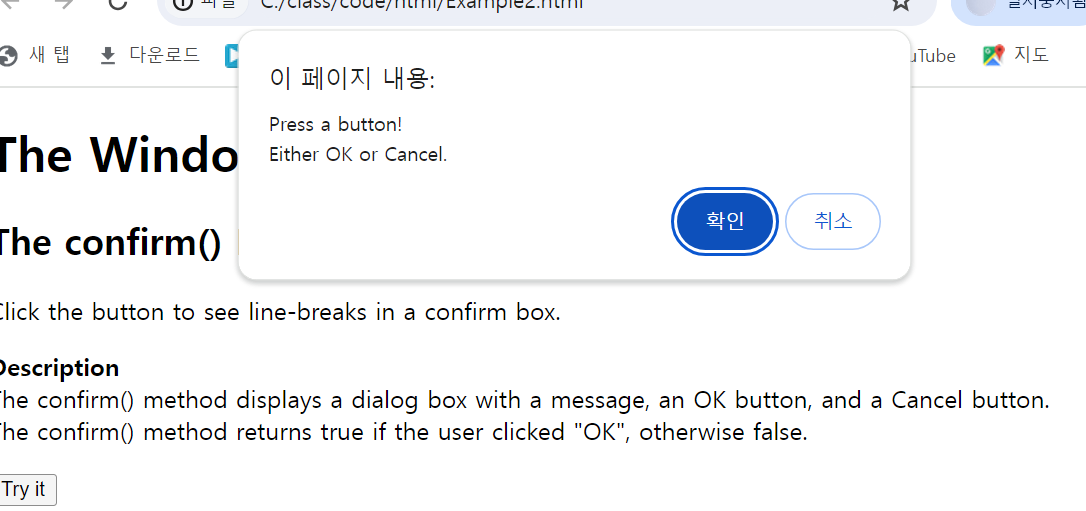
href 속성 이용 문제
<!DOCTYPE html>
<html lang="ko">
<head>
    <meta charset="UTF-8">
    <meta name="viewport" content="width=device-width, initial-scale=1.0">
    <title>Document</title>
</head>
<body>
    <button onclick="location.href='http://www.naver.com'">Naver</button>
</body>
</html>
indexOf
<!DOCTYPE html>
<html>
<body>

<h1>JavaScript Strings</h1>
<h2>The indexOf() Method</h2>

<p>indexOf() returns the position of the first occurrence of a value in a string.</p>

<p>Find "welcome":</p>

<p id="demo"></p>

<script>
let text = "Hello world, welcome to the universe.";
let result = text.indexOf("welcome");

document.getElementById("demo").innerHTML = result;
</script>-
indexOf
- 문자열을 찾았을 때는 찾은 곳의 index를 ,못 찾았을 때는 -1을 반환
사용자에게 입력받은 값을 화면에 출력
<!DOCTYPE html>
<html lang="en">
<head>
    <meta charset="UTF-8">
    <meta http-equiv="X-UA-Compatible" content="IE=edge">
    <meta name="viewport" content="width=device-width, initial-scale=1.0">
    <title>Document</title>
</head>
<body>
    <input type="button" onclick="getName()" value="이름 가져오기">
    <input type="text" id="name" placeholder="홍길동">
    <p id="demo"></p>
    <script>
        function getName()
        {
            let name = document.getElementById("name").value;
            document.getElementById("demo").innerHTML = name;
        }
    </script>
</body>
</html>
prompt()
- 두번째 인수는 default값으로 쓰인다.
<!DOCTYPE html>
<html lang="ko">
<head>
    <meta charset="UTF-8">
    <meta name="viewport" content="width=device-width, initial-scale=1.0">
    <title>Document</title>
</head>
<body>
    <script>
        //let name = prompt("당신의 이름은?");
        let name = prompt("당신의 이름은?", "아무개");
        alert(name+"입니다.");
    </script>
</body>
</html>
join예제
배열의 문자열 출력
<!DOCTYPE html>
<html>
<body>

<h1>JavaScript Arrays</h1>
<h2>The join() Method</h2>

<p>join() returns an array as a string:</p>

<p id="demo"></p>

<script>
const fruits = ["Banana", "Orange", "Apple", "Mango"];
let text = fruits.join();

document.getElementById("demo").innerHTML = text;
</script>

</body>
</html>
특정한 값으로 문자열 사이에 넣기
<!DOCTYPE html>
<html>
<body>

<h1>JavaScript Arrays</h1>
<h2>The join() Method</h2>

<p>join() returns an array as a string:</p>

<p id="demo"></p>

<script>
const fruits = ["Banana", "Orange", "Apple", "Mango"];
let text = fruits.join(" and ");

document.getElementById("demo").innerHTML = text;
</script>

</body>
</html>
split 예제
- 배열을 만들 때 쓰는 메서드 split()
공백을 기준으로 배열 생성
<!DOCTYPE html>
<html>
<body>

<h1>JavaScript Strings</h1>
<h2>The split() Method</h2>

<p>split() splits a string into an array of substrings, and returns the array:</p>

<p id="demo"></p>

<script>
let text = "How are you doing today?";
const myArray = text.split(" ");//공백을 기준으로 배열 생성

document.getElementById("demo").innerHTML = myArray;
</script>

</body>
</html>
빈 문자열 배열
<!DOCTYPE html>
<html>
<body>

<h1>JavaScript Strings</h1>
<h2>The split() Method</h2>

<p>split() splits a string into an array of substrings, and returns the array:</p>

<p id="demo"></p>

<script>
let text = "How are you doing today?";
const myArray = text.split("");

document.getElementById("demo").innerHTML = myArray;
</script>

</body>
</html>- text에 문장 스펠링 하나하나 출력..?
3개만 잘라서 배열
<!DOCTYPE html>
<html>
<body>

<h1>JavaScript Strings</h1>
<h2>The split() Method</h2>

<p>split() splits a string into an array of substrings, and returns the array:</p>

<p id="demo"></p>

<script>
let text = "How are you doing today?";
const myArray = text.split(" ", 3);

document.getElementById("demo").innerHTML = myArray;
</script>

</body>
</html>
스펠링을 기준으로 잘라서 배열
<!DOCTYPE html>
<html>
<body>

<h1>JavaScript Strings</h1>
<h2>The split() Method</h2>

<p>split() splits a string into an array of substrings, and returns the array:</p>

<p id="demo"></p>

<script>
let text = "How are you doing today?";
const myArray = text.split("o");

document.getElementById("demo").innerHTML = myArray;
</script>

</body>
</html>- o를 기준으로 잘라서 배열로 저장
split에 기준을 주지 않고 배열
<!DOCTYPE html>
<html>
<body>

<h1>JavaScript Strings</h1>
<h2>The split() Method</h2>

<p>split() splits a string into an array of substrings, and returns the array:</p>

<p id="demo"></p>

<script>
let text = "How are you doing today?";
const myArray = text.split();

document.getElementById("demo").innerHTML = myArray;
</script>

</body>
</html>
백틱`
- 백틱(`)을 사용하면 ${}를 사용해서 문자열과 변수를 적절히 같이 사용할 수 있다.
//코드상에서 큰따옴표나 작은 따옴표를 잘못 붙여 오류가 발생될 수 있다.
const num1 = 10;
const num2 = 20;
console.log(num1 + ' + ' + num2 + ' = ' + (num1 + num2) + "입니다");

//백틱 적용 >> 문자열 사이에 변수만 따로 구분해($) 더 직관적
const num1 = 10;
const num2 = 20;
console.log(`${num1} + ${num1+num2} 입니다.`);
멀티 라인 문자열
//한 줄을 띄우려는 효과를 위해 '\n'을 사용해야하고, +를 따옴표로 감싸줘야한다.
console.log('line\n' + 'line2');

//백틱 적용 >> 백틱(``)내에서 줄이 바뀌면 알아서 줄 바꿈 출력이 된다.
console.log('line1
line2`);- 이는 콘솔내에서만 적용된다.