html은 웹의 내용, css는 디자인, javasript는 웹의 동작을 구현
오전문제 1
- 자바스크립트 기본자료형에 대해 서술하시오.
- number, boolean, String, null, undifined, symbol
- 자료형의 타입을 알려주는 연산자는?
- typeof
- 콘솔창에 'Hello'를 출력할려면?
- console.log('hello');
- 크롬에 내용이 없는 빈 창을 띄울려면?
- about:blank
- 크롬에서 개발자 모드를 실행하는 단축키는?
- f12
- false로 인식되는 것에 대한 예시를 드시오.
- 비어있는 문자열, null, undefined, 숫자0
- true로 인식되는 것에 대한 예시를 드시오.
- 논리 연산자, 비교 연산자(===, !==), 값 자체가 true일 때(공백도 값)
- 값이 있는건 true이므로
if("Good") console.log("good");하면 good이 출력 if("") consol.log("hi");>> 값이 없으므로 실행결과가 나오지 않음
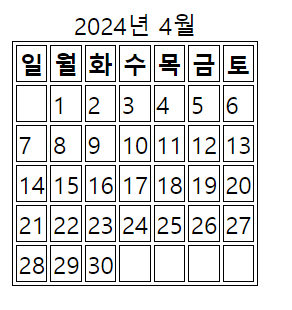
오전문제 2 - 달력 만들기(내거랑 쌤거 합침)
<!DOCTYPE html>
<html lang="ko">
<head>
    <meta charset="UTF-8">
    <meta name="viewport" content="width=device-width, initial-scale=1.0">
    <title>Calender</title>
    <style>
        table, tr, th, td{
            border: 1px solid black;
        }
    </style>
</head>
<body>
    <div id="demo"></div>
    <script>
        const now = new Date();
        const year = now.getFullYear();
        const month = now.getMonth();

                let table = '<table>';
                table += `<caption>${year}년 ${month + 1}월</caption>`;
                const dayOfTheWeek = ["일", "월", "화", "수", "목", "금", "토"];
                table += `<tr>`;
                for(let i=0;i<dayOfTheWeek.length;i++)
                {
                table += `<th>${dayOfTheWeek[i]}</th>`;//달력에 요일을 넣는 행위
                }
                table += '</tr>';
                let firstDay = new Date(year, month, 1).getDay();
                let daysInMonth = new Date(year, month+1, 0).getDate();

                let date = 1;
                let totalCells = Math.ceil(daysInMonth/dayOfTheWeek.length);
                let currentCell = 0;

                while (date <= daysInMonth || currentCell % 7 !== 0) {
                    if (currentCell % 7 === 0) {
                        table += '<tr>';
                    }

                    if (currentCell < firstDay || date > daysInMonth) {
                        table += '<td> </td>';
                    } else {
                        table += '<td>' + date + '</td>';
                        date++;
                    }

                    if (currentCell % 7 === 6) {
                        table += '</tr>';
                    }

                    currentCell++;
                    }
                // for(let i = 0; i < 6; i++){
                //     table += '<tr>';
                //     for(let j = 0; j < 7; j++){
                //         if(i === 0 && j < firstDay){
                //             table += '<td> </td>'
                //         }
                //         else if(date > daysInMonth){
                //             table += '<td> </td>';
                //         }else{
                //             table += '<td>' + date + '</td>';
                //             date++;
                //         }
                //     }
                //     table += '</tr>';
                // }
                table += '</table>';
                document.getElementById("demo").innerHTML=table;
    </script>
</body>
</html>- 주석대로 하면, 빈 공백이 아래로 한줄을 더 채우고, 그러자고 break로 끝내기에는 해당 주의 남은 일자들의 공백이 나오지 않고 뚝 끊켜서 출력
javascript 개념
javascript 출력 함수
window.alert()
-
window는 전역객체로 생략하고 alert()만 사용해 작성할 수 있다.
-
javascipt에서 사용되는 기본적인 경고창을 띄우는 함수다.
- 사용자에게 메시지를 표시하고 확인 버튼을 누를 때 까지 스크팁트의 실행이 중단된다.
window.alert("안녕하세요! 환영합니다!");사용자가 확인을 클릭하기 전까지는 다른 작업 수행 불가
document.write()
-
연습용으로만 사용하는 출력 메소드
-
로딩 시간에 영향:
document.write()를 사용하면 스크립트가 실행되는 지점에서 해당 위치에 HTML이 추가된다. 따라서 스크립트가 페이지의 모든 내용이 로드된 후에 호출되지 않으면 원하는 결과를 얻을 수 없을 수 있다. -
기존 내용 덮어씌움:
document.write()는 호출될 때마다 기존 내용을 덮어쓴다. 이것은 원치 않는 결과를 초래할 수 있으며, 예기치 않은 동작을 유발할 수 있다. -
DOM 변경에 대한 한계:
document.write()는 현재 스크립트가 있는 위치에만 동작하며, 다른 DOM 요소를 조작하는 데 유연성이 부족하다.
-
-
따라서, 동적으로 문서를 조작하려면 DOM메소드를 사용하는것이 좋다
// 새로운 div 요소 생성
var newDiv = document.createElement("div");
// 텍스트 설정
newDiv.textContent = "새로운 내용 추가";
// body 요소에 추가
document.body.appendChild(newDiv);
console.log()
- 디버깅을 위해 메서드를 호출할 수 있습니다 을 클릭하여 데이터를 표시한다.
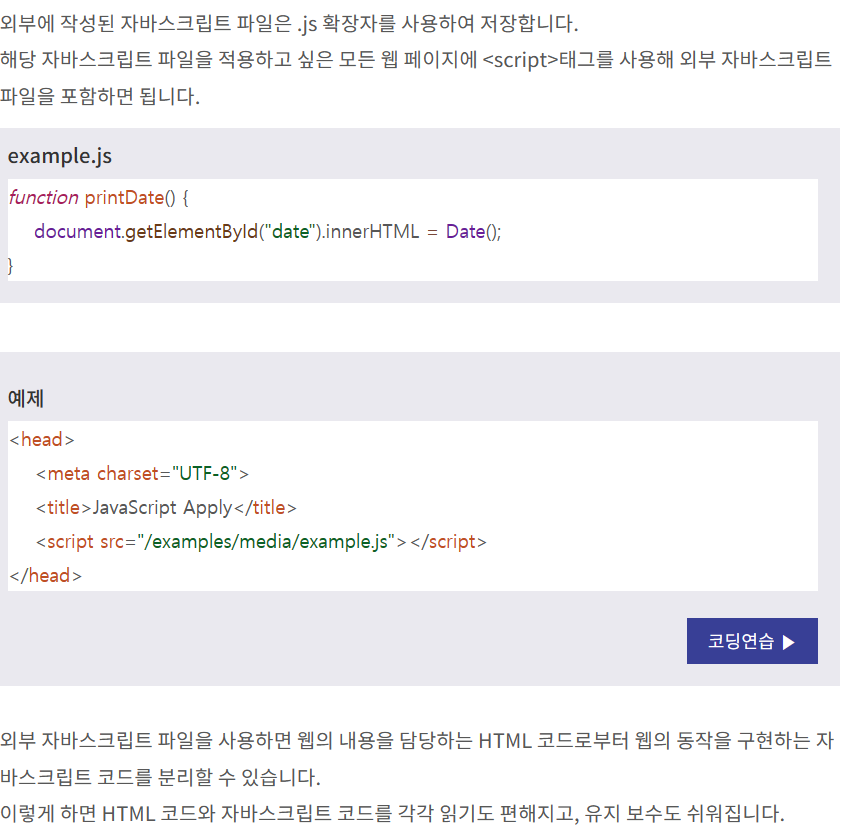
javascript 외부 파일 삽입
형변환
명시적 타입 변환 explicit type conversion
-
Number()
-
String()
-
Boolean()
-
Object()
-
parseInt()
-
parseFloat()
Number("10"); // 숫자 10

String(true); // 문자열 "true"

Boolean(0);   // 불리언 false

Object(3);    // new Number(3)와 동일한 결과로 숫자 3
숫자를 문자열로 변환
-
방법은 String() 함수를 사용하는 것
-
null과 undefined를 제외한 모든 타입의 값이 가지고 있는 toString() 메소드를 사용할 수도 있다.
-
숫자(Number) 객체는 숫자를 문자열로 변환하는 다음과 같은 메소드를 별도로 제공한다.
-
toExponential() : 정수 부분은 1자리, 소수 부분은 입력받은 수만큼 e 표기법을 사용하여 숫자를 문자열로 변환함.
-
toFixed() : 소수 부분을 입력받은 수만큼 사용하여 숫자를 문자열로 변환함.
-
toPrecision() : 입력받은 수만큼 유효 자릿수를 사용하여 숫자를 문자열로 변환함.
-
boolean 값을 문자열로 변환
- 불리언 값을 문자열로 변환하는 방법에는 String() 함수와 toString() 메소드를 사용하는 방법이 있다.
String(true);     // 문자열 "true"

false.toString(); // 문자열 "false"
boolean 값을 숫자로 변환
- Number() 함수를 사용하는 방법이 있다.
Number(true);  // 숫자 1

Number(false); // 숫자 0
날짜를 문자열이나 숫자로 변환
날짜를 문자열로 변환하는 방법에는 String() 함수와 toString() 메소드를 사용하는 방법이 있다.
자바스크립트에서 날짜(Date) 객체는 문자열과 숫자로 모두 변환할 수 있는 유일한 타입이다.
-
getDate() : 날짜 중 일자를 숫자로 반환함. (1 ~ 31)
-
getDay() : 날짜 중 요일을 숫자로 반환함. (일요일 : 0 ~ 토요일 : 6)
-
getFullYear() : 날짜 중 연도를 4자리 숫자로 반환함. (yyyy년)
-
getMonth() : 날짜 중 월을 숫자로 반환함. (1월 : 0 ~ 12월 : 11)
-
getTime() : 1970년 1월 1일부터 현재까지의 시간을 밀리초(millisecond) 단위의 숫자로 반환함.
-
getHours() : 시간 중 시를 숫자로 반환함. (0 ~ 23)
-
getMinutes() : 시간 중 분을 숫자로 반환함. (0 ~ 59)
-
getSeconds() : 시간 중 초를 숫자로 반환함. (0 ~ 59)
-
getMilliseconds() : 시간 중 초를 밀리초(millisecond) 단위의 숫자로 반환함. (0 ~ 999)
String(Date());        // Mon May 16 2016 19:35:25 GMT+0900

Date().toString();     // Mon May 16 2016 19:35:25 GMT+0900

var date = new Date(); // Date 객체 생성

date.getFullYear();    // 2016

date.getTime();        // 1463394925632 -> 1970년 1월 1일부터 현재까지의 시간을 밀리초 단위의 숫자로 반환함.
문자열을 숫자로 변환
-
문자열을 숫자로 변환하는 가장 간단한 방법은 Number() 함수를 사용하는 것이다.
-
자바스크립트는 문자열을 숫자로 변환해 주는 두 개의 전역 함수를 별도로 제공한다.
- parseInt() : 문자열을 파싱하여 특정 진법의 정수를 반환함.
Number.parseInt("12");         // 12

Number.parseInt("12.34");      // 12

Number.parseInt("12문자열");   // 12

Number.parseInt("12 34 56");   // 12

Number.parseInt("문자열 56")); // NaN- parseFloat() : 문자열을 파싱하여 부동 소수점 수를 반환함.
Number.parseFloat("12");         // 12

Number.parseFloat("12.34");      // 12.34

Number.parseFloat("12문자열");   // 12

Number.parseFloat("12 34 56");   // 12

Number.parseFloat("문자열 56")); // NaN
변수 선언과 초기화
변수 variable
- 데이터(data)를 저장할 수 있는 메모리 공간을 의미하며, 그 값이 변경될 수 있다.
자바스크립트에서는 선언되지 않은 변수를 사용하려고 하거나 접근하려고 하면 오류가 발생한다.
단, 선언되지 않은 변수를 초기화할 경우에는 자동으로 선언을 먼저 한 후 초기화를 진행한다.
- 선언된 변수는 나중에 초기화할 수도 있고, 선언과 동시에 초기화할 수도 있습니다.
var month;     // 변수의 선언

var date = 25; // 변수의 선언과 동시에 초기화

month = 12; // 변수의 초기화- 쉼표(,) 연산자를 이용하여 여러 변수를 동시에 선언하거나 초기화할 수도 있습니다.
var month, date;             // 여러 변수를 한 번에 선언

var hours = 7, minutes = 15; // 여러 변수를 선언과 동시에 초기화

month = 10, date = 5;        // 여러 변수를 한 번에 초기화
변수의 타입과 초기값
-
자바스크립트에서 선언만 되고 초기화하지 않은 변수는 undefined 값을 갖는다.
-
자바스크립트의 변수는 타입이 정해져 있지 않으며, 같은 변수에 다른 타입의 값을 다시 대입할 수도 있다. >> 그러나 한 번 선언된 변수는 재선언할 수 없다.
var num = 10;        // 변수의 선언과 함께 초기화

num = [10, 20, 30];  // 배열 대입

var num;             // 이 재선언문은 무시됨.
변수의 이름
자바스크립트에서 변수는 이름을 가지고 식별하므로, 변수의 이름은 식별자(identifier)다.
변수의 이름은 영문자(대소문자), 숫자, 언더스코어(_) 또는 달러($)로만 구성된다.
또한, 숫자와의 구분을 빠르게 하려고 숫자로는 시작할 수 없다.
이러한 변수의 이름은 대소문자를 구분하며, 자바스크립트 언어에서 예약된 키워드는 이름으로 사용할 수 없다.
연산자 operator
java와 같아서 설명은 최대한 생략
산술 연산자 arithmetic operator
-
사칙연산을 다루는 가장 기본적이면서도 많이 사용하는 연산자다.
-
산술 연산자는 모두 두 개의 피연산자를 가지는 이항 연산자이며, 피연산자들의 결합 방향은 왼쪽에서 오른쪽이다.
비교 연산자 comparison operator
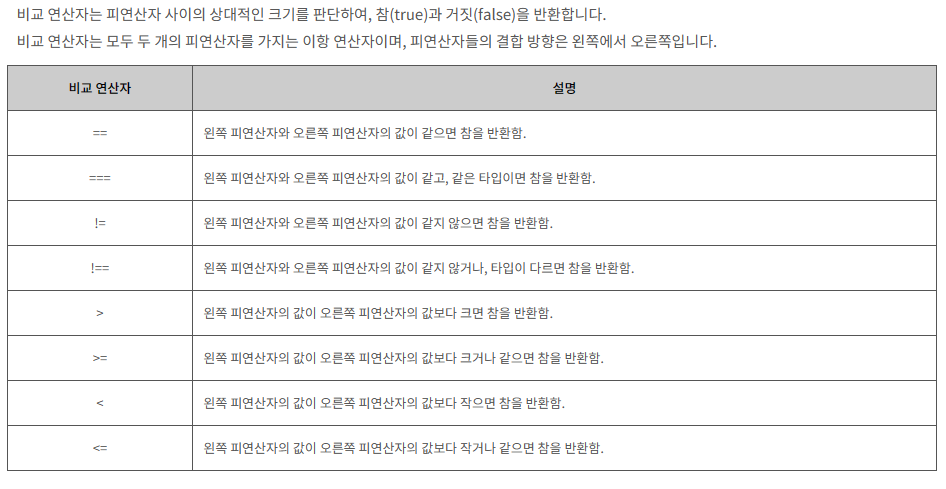
var x = 3, y = '3', z = 3;

document.write((x == y) + "<br>");  // x와 y의 타입이 서로 다르므로 타입을 서로 같게 한 후 비교를 하므로 true

document.write((x === y) + "<br>"); // x와 y의 타입이 서로 다르므로 false

document.write(x === z);            // x와 z은 값과 타입이 모두 같으므로 true
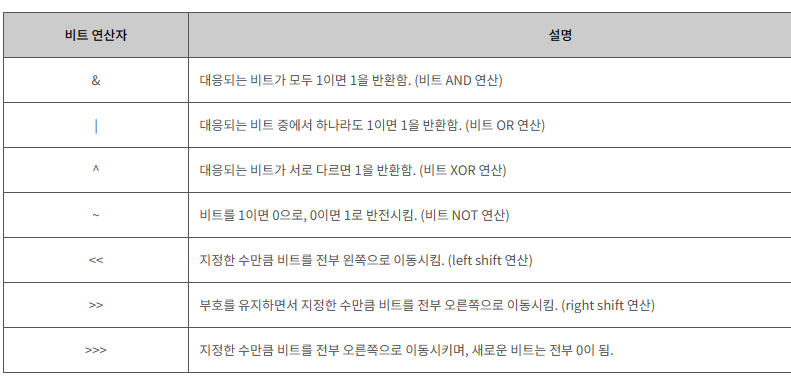
비트 연산자 bitwise operator
삼항 연산자 Ternary operator
- 물음표(?) 앞의 표현식에 따라 결괏값이 참이면 반환값1을 반환하고, 결괏값이 거짓이면 반환값2를 반환한다.
var x = 3, y = 5;

var result = (x > y) ? x : y   // x가 더 크면 x를, 그렇지 않으면 y를 반환함.

document.write("둘 중에 더 큰 수는 " + result + "입니다.");
쉼표 연산자
- 쉼표 연산자를 for 문에서 사용하면, 루프마다 여러 변수를 동시에 갱신할 수 있다.
// 루프마다 i의 값은 1씩 증가하고, 동시에 j의 값은 1씩 감소함.

for (var i = 0, j = 9; i <= j; i++, j--) {

    document.write("i의 값은 " + i + "이고, j의 값은 " + j + "입니다.<br>");

}
delete 연산자
-
피연산자인 객체, 객체의 프로퍼티(property) 또는 배열의 요소(element) 등을 삭제해 준다. >> 그러나 이보다는 splice()를 이용해 삭제한다.(완전한 삭제)
- 피연산자가 성공적으로 삭제되었을 경우에는 참(true)을 반환하고, 삭제하지 못했을 경우에는 거짓(false)을 반환한다.
var arr = [1, 2, 3];          // 배열 생성

delete arr[2];                // 배열의 원소 중 인덱스가 2인 요소를 삭제함.

document.write(arr + "<br>"); // [1, 2, ]

// 배열에 빈자리가 생긴 것으로 undefined 값으로 직접 설정된 것은 아님.

document.write(arr[2] + "<br>");

// 배열의 요소를 삭제하는 것이지 배열의 길이까지 줄이는 것은 아님.

document.write(arr.length);//3
typeof 연산자
-
피연산자의 타입을 반환한다.
-
피연산자가 단 하나뿐인 단항 연산자이며, 피연산자의 결합 방향은 오른쪽에서 왼쪽이다.
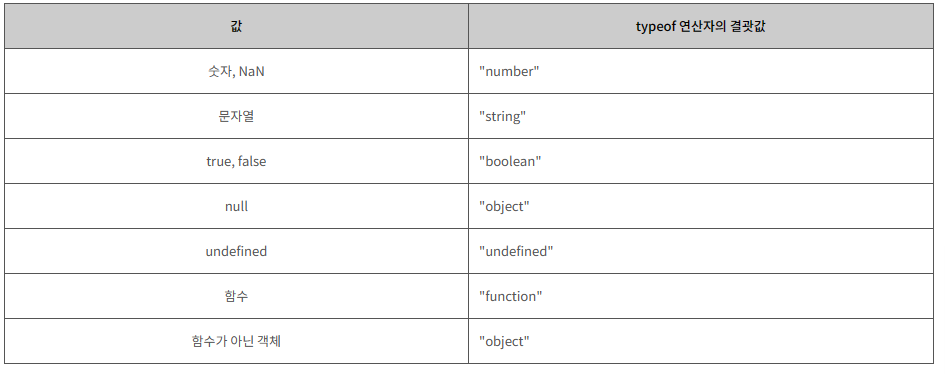
typeof "문자열"   // string

typeof 10         // number

typeof NaN        // number

typeof false      // boolean

typeof undefined  // undefined

typeof new Date() // object

typeof null       // object
instanceof 연산자
-
피연산자인 객체가 특정 객체의 인스턴스인지 아닌지를 확인해 준다.
- 특정 객체의 인스턴스이면 참(true)을 반환하고, 특정 객체의 인스턴스가 아니면 거짓(false)을 반환한다.
var str = new String("이것은 문자열입니다.");

str instanceof Object;  // true

str instanceof String;  // true

str instanceof Array;   // false

str instanceof Number;  // false

str instanceof Boolean; // false
void 연산자
-
피연산자로 어떤 타입의 값이 오던지 상관없이 언제나 undefined 값만을 반환한다.
- 피연산자가 단 하나뿐인 단항 연산자이며, 피연산자의 결합 방향은 오른쪽에서 왼쪽이다.
<a href="javascript:void(0)">이 링크는 동작하지 않습니다.</a>

<a href="javascript:void(document.body.style.backgroundColor='yellow')">

   // 이 링크도 동작하지 않지만, HTML 문서의 배경색을 바꿔줍니다.

</a>
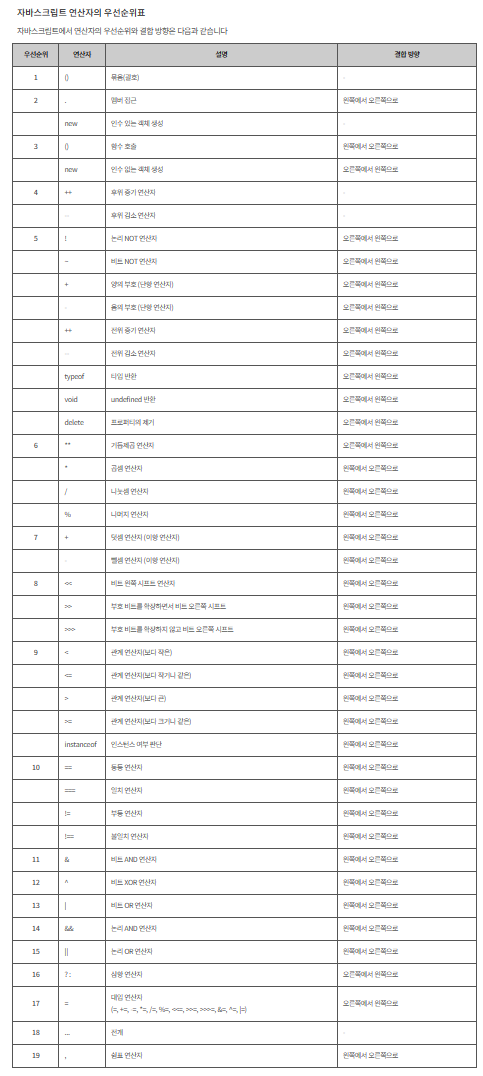
연산자 우선순위 표
조건문
if문
- 표현식의 결과가 참(true)이면 주어진 실행문을 실행하며, 거짓(false)이면 아무것도 실행하지 않는다.
var x = 5;
var y = 6;
if(x=y) consol.log("hi");- 위 예제는 출력이 된다. x에 y의 값을 대입하고 있는데 이 또한 값이므로 true로 인식되기 떄무인다.
var x = 5;
var y = 0;
if(x=y) consol.log("hi");- 위 예제는 출력결과가 없다 x에 0이 대입되었기 때문에 false로 인ㅅ기한다.
응용
var day = new Date().getDay(); // 오늘의 요일을 반환함. (일요일: 0 ~ 토요일: 6)

switch (day) {
    case 1: // 월요일인 경우
    case 2: // 화요일인 경우
    case 3: // 수요일인 경우
    case 4: // 목요일인 경우
    default: // 0부터 6까지의 값이 아닌 경우
        document.write("아직도 주말은 멀었네요... 힘내자구요!!");
        break;
    case 5: // 금요일인 경우
        document.write("오늘은 불금이네요!!");
        break;
    case 6: // 토요일인 경우
    case 0: // 일요일인 경우
        document.write("즐거운 주말에도 열심히 공부하는 당신~ 최고에요!!");
        break;
}
반복문
for/in 문
객체의 속성이나 배열의 인덱스를 가져오는 것이 목적이라면 for/in문 사용
-
해당 객체의 모든 열거가능한 속성들을 반복 해준다.
열거할 수 있는 프로퍼티란 내부적으로 enumerable 플래그가 true로 설정된 프로퍼티를 의미한다. 이러한 프로퍼티들은 for / in 문으로 접근할 수 있게 된다.
-
이 반복문은 루프마다 객체의 열거할 수 있는 프로퍼티의 이름을 지정된 변수에 대입한다.
- 이렇게 대입받은 변수를 이용하면 루프 안에서 객체의 열거할 수 있는 프로퍼티에 순차적으로 접근할 수 있다.
-
반복할 때 속성의 이름(객체의 경우) 또는 배열의 인덱스(배열의 경우)를 가져온다.
var arr = [3, 4, 5];

for (var i = 0; i < arr.length; i++) { // 배열 arr의 모든 요소의 인덱스(index)를 출력함.
    document.write(i + " ");
}

for (var i in arr) { // 위와 같은 동작을 하는 for / in 문
    document.write(i + " ");
}- arr에 있는 인덱스가 i 에 순차적으로 들어간다.
객체의 프로퍼티에 접근
var obj = { name : "이순신", age : 20 };
for (var i in obj) {
    document.write(i + "<br>");
}- i 에 name이 들어가 출력되고 다시 돌아가서 age가 들어가서 출력된다.
for / in 문은 해당 객체가 가진 모든 프로퍼티를 반환하는 것이 아닌, 오직 열거할 수 있는 프로퍼티만을 반환한다.
for / of 문
for / of 문은 익스플로러에서 지원하지 않는다.
주로 배열 또는 다른 이터러블 객체의 값을 순회할 때 사용된다.
-
이터러블 객체(iterable objects)를 순회할 수 있도록 해주는 반복문이다.
-
자바스크립트에서 반복할 수 있는 객체에는 Array, Map, Set, arguments 객체 등이 있다.
-
이 반복문은 루프마다 객체의 열거할 수 있는 프로퍼티의 값을 지정된 변수에 대입합니다.
-
-
반복할 때 해당 객체의 값(value)을 가져온다 >> 필요에 따라 인덱스도 가능
배열의 요소에 접근
var arr = [3, 4, 5];

for (var i = 0; i < arr.length; i++) { // 배열 arr의 모든 요소의 인덱스(index)를 출력함.
    document.write(arr[i] + " ");
}

for (var value of arr) { // 위와 같은 동작을 하는 for / of 문
    document.write(value + " ");
}
Set객체의 프로퍼티에 접근
- set은 중복된 값을 허용하지 않으니, 123이 출력될 것
var arr = new Set([1, 1, 2, 2, 3, 3]);

for (var value of arr) {
    document.write(value + " ");
}
값과 인덱스 가져오기 - entries()
- 배열의 entries()메서드를 사용해 인덱스와 값의 쌍을 가져온다.
let arr = ['a', 'b', 'c'];
for (let [index, value] of arr.entries()) {
    console.log(`Index: ${index}, Value: ${value}`);
}- arr.entries()는 배열의 각 요소와 해당 인덱스를 나타내는 이터레이터를 반환
- 이터레이터의 각 항목은 [index, value]형태의 배열이 된다. 이를 분해해 for of루프에서 인덱스와 값을 가져온다.
기타 제어문 - label
-
프로그램 내의 특정 영역을 식별할 수 있도록 해주는 식별자ek.
-
label 문을 사용해 continue 문과 break 문의 동작이 프로그램의 흐름을 특정 영역으로 이동시킬 수 있다. >>java와 같음
구구단 3단까지 출력
gugudan:
for (var i = 2; i <= 9; i++) {
    dan:
    for (var j = 1; j <= 9; j++) {
        if (i > 3)
            break gugudan;
        document.write(i + " * " + j + " = " + (i*j) + "<br>");
    }
}
배열에서 특정값을 가지고 있는 인덱스 출력
var lectures = ["html", "css", "자바스크립트", "php"];

var topic = "자바스크립트";

for (var i = 0; i < lectures.length; i++)
    if (lectures[i] == topic) {
        document.write(topic + " 과목은 " + (i + 1) + "번째 과목입니다.");
        break; // 원하는 값을 찾은 후에는 더 이상 for 문을 반복하지 않고 빠져나감.
    }
}
배열의 기초
-
배열(array)은 이름과 인덱스로 참조되는 정렬된 값의 집합으로 정의된다.
-
배열을 구성하는 각각의 값을 배열 요소(element)라고 하며, 배열에서의 위치를 가리키는 숫자를 인덱스(index)라고 한다.
-
특징 >> java에서는 불가능함 스크립트에서만 가능
-
배열 요소의 타입이 고정되어 있지 않으므로, 같은 배열에 있는 배열 요소끼리의 타입이 서로 다를 수도 있다.
-
배열 요소의 인덱스가 연속적이지 않아도 되며, 따라서 특정 배열 요소가 비어 있을 수도 있다.
-
자바스크립트에서 배열은 Array 객체로 다뤄진다.
-
배열의 생성
같은 결과의 배열 생성
1. var arr = [배열요소1, 배열요소2,...];          // 배열 리터럴을 이용하는 방법

2. var arr = Array(배열요소1, 배열요소2,...);     // Array 객체의 생성자를 이용하는 방법

3. var arr = new Array(배열요소1, 배열요소2,...); // new 연산자를 이용한 Array 객체 생성 방법
배열 리터럴은 [] 안에 배열 요소를 쉼표로 구분해 나열 >> 첫번째로 많이들 만듬
var arrLit = [1, true, "JavaScript"];             // 배열 리터럴을 이용하는 방법

var arrObj = Array(1, true, "JavaScript");        // Array 객체의 생성자를 이용하는 방법

var arrNewObj = new Array(1, true, "JavaScript"); // new 연산자를 이용한 Array 객체 생성 방법

document.write(arrLit + "<br>");                  // 1,true,JavaScript

document.write(arrObj + "<br>");                  // 1,true,JavaScript

document.write(arrNewObj);                        // 1,true,JavaScript
배열의 참조
-
자바스크립트에서 배열의 각 요소를 참조하고 싶을 때는 [] 연산자를동사용한다.
-
인덱스에는 음이 아닌 정수를 반환하는 임의의 표현식도 사용할 수 있다.
배열을 생성하고, 요소를 추가하고 삭제
var arr = ["JavaScript"]; // 요소가 하나뿐인 배열을 생성함.
var element = arr[0];     // 배열의 첫 번째 요소를 읽어서 대입함.

arr[1] = 10;      // 배열의 두 번째 요소에 숫자 10을 대입함. 배열의 길이는 1에서 2로 늘어남.
arr[2] = element; // 배열의 세 번째 요소에 변수 element의 값을 대입함. 배열의 길이는 2에서 3으로 늘어남.
//arr.length는 3

document.write("배열 arr의 요소에는 [" + arr + "]가 있습니다.<br>"); // 배열의 요소를 모두 출력함.
document.write("배열 arr의 길이는 " + arr.length + "입니다.<br>");   // 배열의 길이를 출력함.


delete arr[2];    // 배열의 세 번째 요소를 삭제함. 하지만 배열의 길이는 변하지 않음.

document.write("배열 arr의 요소에는 [" + arr + "]가 있습니다.<br>"); // 배열의 요소를 모두 출력함.
document.write("배열 arr의 길이는 " + arr.length + "입니다."); //3 배열의 길이를 출력함.- 배열의 길이가 동적으로 늘어난다.
배열 요소의 추가
- push() 메소드와 length 프로퍼티를 이용한 방법은 모두 배열의 제일 끝에 새로운 요소를 추가한다.
1. arr.push(추가할 요소);         // push() 메소드를 이용하는 방법

2. arr[arr.length] = 추가할 요소; // length 프로퍼티를 이용하는 방법

3. arr[특정인덱스] = 추가할 요소; // 특정 인덱스를 지정하여 추가하는 방법
var arr = [1, true, "Java"];
arr.push("Script"); // push() 메소드를 이용하는 방법 + 총 길이 출력
document.write(arr + "<br>"); // 1,true,Java,Script
arr[arr.length] = 100; // length 프로퍼티를 이용하는 방법
document.write(arr + "<br>"); // 1,true,Java,Script,100
arr[10] = "자바스크립트"; // 특정 인덱스를 지정하여 추가하는 방법
document.write(arr + "<br>"); // 1,true,Java,Script,100,,,,,,자바스크립트
document.write(arr[7]); // undefined-
위의 예제에서 배열 arr의 길이는 최종적으로 11이 된다.
- 이때 배열 요소가 존재하는 인덱스는 0, 1, 2, 3, 4, 10뿐이며, 나머지 인덱스에는 배열 요소가 존재하지 않는다.
-
인덱스에 대응하는 배열 요소가 없는 부분을 배열의 홀(hole)이라고 한다.
- 자바스크립트에서는 이러한 배열의 홀(hole)을 undefined 값을 가지는 요소처럼 취급한다.
-
따라서 위의 예제에서처럼 배열의 홀을 참조하게 되면 undefined 값을 반환하게 된다.
배열 요소의 삭제
- pop() : 배열 마지막 부분을 삭제
let arr= {1, 2, 3, 4};
arr.pop();
console.log(arr); //{1, 2, 3}
배열의 순회 iteration
- 모든 요소에 차례대로 접근하고 싶을 때는 for 문과 같은 반복문을 사용하여 접근할 수 있다.
var arr = [1, true, "JavaScript"];

var result = "<table><tr>";
for (var idx in arr) {
    result += "<td>" + arr[idx] + "</td>";
}
result += "</tr></table>";
document.write(result);- idx에 배열에 인덱스가 들어감
Array 객체
-
자바스크립트에서 배열(array)은 정렬된 값들의 집합으로 정의되며, Array 객체로 다뤄진다.
- 자바스크립트는 사용자가 배열과 관련된 작업을 손쉽게 할 수 있도록 다양한 메소드도 제공하고 있다.
typeof 연산 결과
var arr = new Array(10, "문자열", false);

document.write((typeof arr) + "<br>");    // objec
document.write((typeof arr[0]) + "<br>"); // number
document.write((typeof arr[1]) + "<br>"); // string
document.write(typeof arr[2]);            // boolean
배열의 활용
희소 배열
-
배열에 속한 요소의 위치가 연속적이지 않은 배열을 의미
- 희소 배열의 경우 배열의 length 프로퍼티 값보다 배열 요소의 개수가 언제나 적다.
var arr = new Array(); // 빈 배열 객체를 생성함.

arr[99] = "JavaScript" // 배열 arr의 100번째 위치에 문자열을 삽입함.
// 100번째 요소를 삽입했기 때문에 배열의 길이는 100으로 늘어남.
document.write("배열의 길이는 " + arr.length + "입니다.");
다차원 배열
2차원 배열의 배열 요소는 [] 연산자를 두 번 사용하여 참조할 수 있다.
-
배열 요소가 또 다른 배열인 배열을 의미한다.
-
지금까지 우리가 살펴본 배열은 1차원 배열이다.
-
2차원 배열이란 배열 요소가 1차원 배열인 배열을 의미한다.
-
3차원 배열이란 배열 요소가 2차원 배열인 배열을 의미한다.
-
var arr = new Array(3);      // 3개의 요소를 가지는 배열을 생성함.

for (var row = 0; row < 3; row++) {
    arr[row] = new Array(4); // 각각의 요소마다 또다시 4개의 요소를 가지는 배열을 생성함.
    for (var column = 0; column < 4; column++) {
        arr[row][column] = "[" + row + "," + column + "]"; // 각각의 배열 요소를 생성함.
        document.write(arr[row][column] + " ");            // 각 배열 요소에 접근함.
    }
}
연관 배열 associative array
자바 스크립트에서는 별도로 제공 x 그러나 연관 배열처럼 사용할 수 있는 객체 생성 가능
-
배열의 인덱스에는 0을 포함한 양의 정수만을 사용할 수 있다.
- 숫자로 된 인덱스 대신에 문자열로 된 키(key)를 사용하는 배열을 연관 배열(associative array)이라고 한다.
-
인덱스로 문자열을 사용하여 연관 배열처럼 사용할 수 있는 객체(object)를 만들 수 있다.
- 이렇게 생성된 배열은 자바스크립트 내부적으로 Array 객체에서 기본 객체로 재선언된다.
Array메소드와 프로퍼티가 정확하지 않은 결과값 반환
var arr = [];     // 비어있는 배열을 생성함.

arr["하나"] = 1;  // 숫자 인덱스 대신에 문자열을 인덱스로 배열 요소를 추가함.배열이 아닌 객체

arr["참"] = true;

arr["자바스크립트"] = "JavaScript";

document.write(arr["참"]);  // 문자열을 인덱스로 배열 요소에 접근할 수 있음.

document.write(arr.length); // 연관 배열은 Array 객체가 아니므로 length 프로퍼티의 값이 0임.

document.write(arr[0]); // undefined 배열이 아닌 객체 이므로 인덱스를 줘도 값이 안나옴-
위의 예제에서 연관 배열인 arr은 length 프로퍼티의 값으로 0을 반환한다.
- 이처럼 자바스크립트에서 연관 배열은 Array 객체가 아닌 기본 객체이므로, 정확히 말하면 배열이 아니다.
ECMAScript 6부터는 이러한 불편함을 해결하기 위해 새로운 데이터 구조인 Map 객체를 별도로 제공하고 있다.
문자열을 배열처럼 접근 : 유사 배열
- 문자열은 변하지 않는 값이므로, 읽기 전용 배열로서 다룰 수 있다.
- 배열처럼 [] 연산자를 사용하여 문자열을 구성하는 각 문자에 바로 접근할 수 있다.
- Array 객체가 제공하는 모든 범용 메소드도 사용할 수 있다.
- 문자열의 각 문자는 String 객체에서 제공하는 charAt() 메소드를 사용해도 접근할 수 있다.
 var str = "안녕하세요!";       // 문자열 생성
document.write(str.charAt(2)); // 하
document.write(str[2]);        // 하 >> 배열처럼 접근 가능

//주의
var str = "안녕하세요!"; // 문자열 생성
str[0] = ""; // 자바스크립트의 문자열은 읽기 전용이므로, 이 문장은 오류를 발생시킵니다.- 열을 바로 배열처럼 사용하지 말고, split() 메소드 등을 이용해 먼저 배열로 변환한 후 사용하는 것이 좋다.
배열 여부 확인
- 자바스크립트에서는 배열이라는 타입(type)을 별도로 제공하지 않는다.
- 자바스크립트 배열은 객체(object) 타입이 되며, typeof 연산자를 사용하면 'object'를 반환한다.
해당 변수가 배열인지의 여부 메소드
- Array.isArray() 메소드 >> 이를 사용하는게 제일 간단하고 직관적
- instanceof 연산자
- constructor 프로퍼티 : 객체를 생성한 생성자함수를 참조 == Array()
document.write(Array.isArray(arr));      // true
document.write(Array.isArray("문자열")); // false

document.write(arr instanceof Array); // true
document.write(123 instanceof Array); // false

//constructor 프로퍼티 사용
function Array() {[native code]}

//toString() , indexof()메소드 사용한 사용자 정의 함수
function isArray(a) {
    return a.constructor.toString().indexOf("Array") > -1;
}
var arr = [1, true, "JavaScript"];          // 배열 생성
document.write(arr.constructor);            // constructor 프로퍼티의 값 출력
document.write(arr.constructor.toString()); // function Array() {[native code]}
document.write(arr.constructor.toString().indexOf("Array")); // 10
document.write(isArray(arr)) // true- toString() 메소드를 사용하여 constructor 프로퍼티의 값을 문자열로 변환한다.
- indexOf() 메소드를 사용하여 해당 문자열에서 "Array"라는 부분 문자열이 시작하는 인덱스를 구하고 있다.
- indexOf() 메소드는 인수로 전달받은 문자열을 해당 문자열에서 찾지 못하면, 언제나 -1을 반환한다.
Math.random
<!DOCTYPE html>
<html lang="ko">
<head>
    <meta charset="UTF-8">
    <meta name="viewport" content="width=device-width, initial-scale=1.0">
    <title>Document</title>\

</head>
<body>

<p id="demo"></p>

<script>
document.getElementById("demo").innerHTML = Math.floor(Math.random()*10);
</script>

</body>
</html>
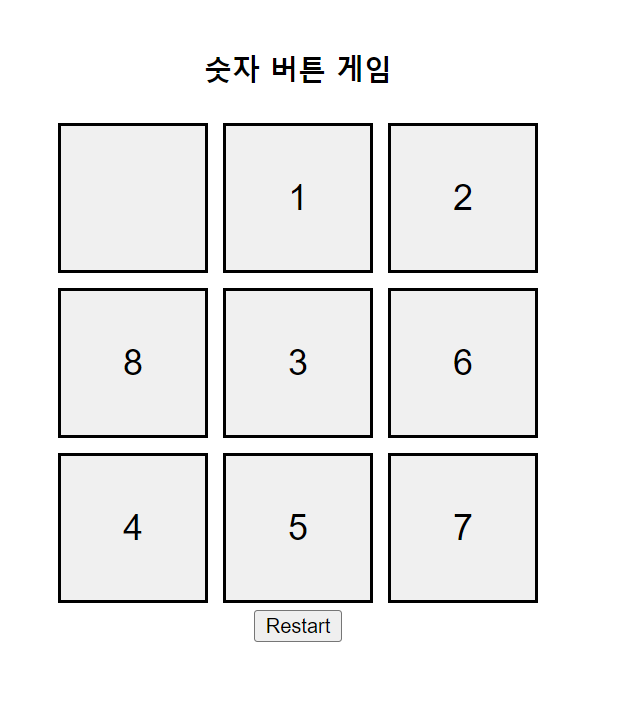
숫자 버튼 게임 만들기
<!DOCTYPE html>
<html lang="en">
<head>
    <meta charset="UTF-8">
    <meta name="viewport" content="width=device-width, initial-scale=1.0">
    <title>Number Button Game</title>
    <style>
        h3 {
            text-align: center;
        }

        .number-btn {
            padding: 20px 40px;
            font-size: 24px;
            margin: 5px;
            cursor: pointer;
            width: 100px;
            height: 100px;
            border: 2px solid black;
        }

        .button-row {
            display: flex;
        }

        #number-container {
            display: flex;
            flex-direction: column;
            align-items: center;
            margin-top: 100px;
        }
    </style>
</head>
<body>
<div id="number-container">
    <h3>숫자 버튼 게임</h3>
    <!-- 숫자 버튼들을 생성 -->
    <div class="button-row" id="buttonRow1"></div>
    <div class="button-row" id="buttonRow2"></div>
    <div class="button-row" id="buttonRow3"></div>
    <!-- 재시작 버튼 추가 -->
    <button onclick="restartGame()">Restart</button>
</div>

<script>
    let NUMBER_BTN = [];

    // 숫자 버튼을 생성하고 섞는 함수
    function createAndShuffleButtons() {
        const buttonRow1 = document.getElementById('buttonRow1');
        const buttonRow2 = document.getElementById('buttonRow2');
        const buttonRow3 = document.getElementById('buttonRow3');

        NUMBER_BTN = [];
        for (let i = 0; i < 9; i++) {
            const button = document.createElement('button');
            button.textContent = i === 0 ? '' : i;
            button.className = 'number-btn';
            button.onclick = function() { swapButton(this); };
            NUMBER_BTN.push(button);
        }

        const SHUFFLED_BTN = shuffle(NUMBER_BTN);

        for (let i = 0; i < 9; i++) {
            if (i < 3) {
                buttonRow1.appendChild(SHUFFLED_BTN[i]);
            } else if (i < 6) {
                buttonRow2.appendChild(SHUFFLED_BTN[i]);
            } else {
                buttonRow3.appendChild(SHUFFLED_BTN[i]);
            }
        }
    }

    // 배열 요소를 랜덤하게 섞는 함수
    function shuffle(array) {
        for (let i = array.length - 1; i > 0; i--) {
            let j = Math.floor(Math.random() * (i + 1));
            [array[i], array[j]] = [array[j], array[i]];
        }
        return array;
    }

    // 버튼과 0의 위치를 바꾸는 함수
    function swapButton(clickedButton) {
        const emptyButton = findEmptyButton();
        if (isAdjacent(clickedButton, emptyButton)) {
            const clickedText = clickedButton.textContent;
            clickedButton.textContent = emptyButton.textContent;
            emptyButton.textContent = clickedText;
            checkSuccess();
        }
    }

    // 비어있는 버튼을 찾는 함수
    function findEmptyButton() {
        return document.querySelector('.number-btn:empty');
    }

    // 두 버튼이 서로 인접한지 확인하는 함수
    function isAdjacent(button1, button2) {
        const button1Index = NUMBER_BTN.indexOf(button1);
        const button2Index = NUMBER_BTN.indexOf(button2);
        const rowDiff = Math.abs(Math.floor(button1Index / 3) - Math.floor(button2Index / 3));
        const colDiff = Math.abs(button1Index % 3 - button2Index % 3);
        return (rowDiff === 1 && colDiff === 0) || (rowDiff === 0 && colDiff === 1);
    }

    // 성공 여부를 확인하고 메시지를 표시하는 함수
    function checkSuccess() {
        let success = true;
        const buttonValues = NUMBER_BTN.map(button => button.textContent).join('').trim();
        if (buttonValues !== '123456780') {
            success = false;
        }
        if (success) {
            alert('성공하셨습니다!');
        }
    }

    // 게임 재시작 함수
    function restartGame() {
        const buttonRows = document.querySelectorAll('.button-row');
        buttonRows.forEach(row => row.innerHTML = ''); // 모든 버튼 제거
        createAndShuffleButtons(); // 새로운 버튼 생성 및 섞기
    }

    // 초기 게임 설정
    createAndShuffleButtons();
</script>
</body>
</html>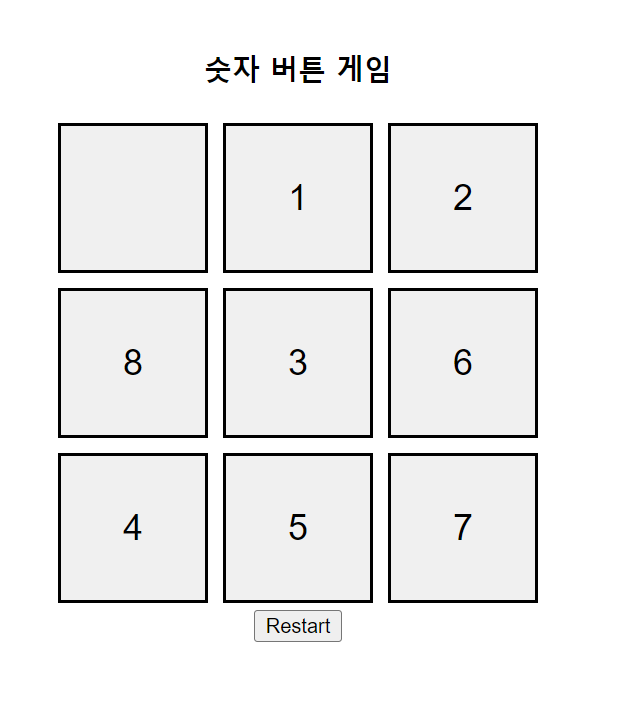
- 성공하면 성공 메시지도 뜨는데 성공을 못하는중..
5x5로
<!DOCTYPE html>
<html lang="en">
<head>
    <meta charset="UTF-8">
    <meta name="viewport" content="width=device-width, initial-scale=1.0">
    <title>Number Button Game</title>
    <style>
        h3 {
            text-align: center;
        }

        .number-btn {
            padding: 20px 40px;
            font-size: 24px;
            margin: 5px;
            cursor: pointer;
            width: 100px;
            height: 100px;
            border: 2px solid black;
        }

        .button-row {
            display: flex;
        }

        #number-container {
            display: flex;
            flex-direction: column;
            align-items: center;
            margin-top: 50px;
        }
    </style>
</head>
<body>
<div id="number-container">
    <h3>숫자 버튼 게임</h3>
    <!-- 숫자 버튼들을 생성 -->
    <div class="button-row" id="buttonRow1"></div>
    <div class="button-row" id="buttonRow2"></div>
    <div class="button-row" id="buttonRow3"></div>
    <div class="button-row" id="buttonRow4"></div>
    <div class="button-row" id="buttonRow5"></div>
</div>

<script>
    // 숫자 버튼을 랜덤하게 배치하는 함수
    function ran(array){
        for(let i = array.length - 1; i > 0; i--){
            let j = Math.floor(Math.random() * (i + 1));
            [array[i], array[j]] = [array[j], array[i]];
        }
        return array;
    }

    // 숫자 버튼을 생성
    const buttonContainer = document.getElementById('number-container');
    const buttonRows = [];
    const NUMBER_BTN = [];
    const numRows = 5;
    const numCols = 5;

    // 행과 열에 버튼을 추가
    for (let i = 0; i < numRows; i++) {
        const buttonRow = document.createElement('div');
        buttonRow.className = 'button-row';
        buttonContainer.appendChild(buttonRow);
        buttonRows.push(buttonRow);
    }

    // 버튼 생성
    for (let i = 0; i < numRows * numCols; i++) {
        const button = document.createElement('button');
        button.textContent = i === 0 ? '' : i; // 0인 경우 공백
        button.className = 'number-btn';
        button.onclick = function() { swapButton(this); };
        NUMBER_BTN.push(button);
    }

    // 랜덤하게 섞은 버튼 배치
    const SHUFFLED_BTN = ran(NUMBER_BTN);
    let row = 0;
    for (let i = 0; i < SHUFFLED_BTN.length; i++) {
        if (i > 0 && i % numCols === 0) {
            row++;
        }
        buttonRows[row].appendChild(SHUFFLED_BTN[i]);
    }

    // 버튼과 0의 위치를 바꾸는 함수
    function swapButton(clickedButton) {
        const emptyButton = findEmptyButton();
        if (isAdjacent(clickedButton, emptyButton)) {
            const clickedText = clickedButton.textContent;
            clickedButton.textContent = emptyButton.textContent;
            emptyButton.textContent = clickedText;
        }
    }

    // 비어있는 버튼을 찾는 함수
    function findEmptyButton() {
        return document.querySelector('.number-btn:empty');
    }

    // 두 버튼이 서로 인접한지 확인하는 함수
    function isAdjacent(button1, button2) {
        const button1Index = NUMBER_BTN.indexOf(button1);
        const button2Index = NUMBER_BTN.indexOf(button2);
        const rowDiff = Math.abs(Math.floor(button1Index / numCols) - Math.floor(button2Index / numCols));
        const colDiff = Math.abs(button1Index % numCols - button2Index % numCols);
        return (rowDiff === 1 && colDiff === 0) || (rowDiff === 0 && colDiff === 1);
    }
</script>
</body>
</html>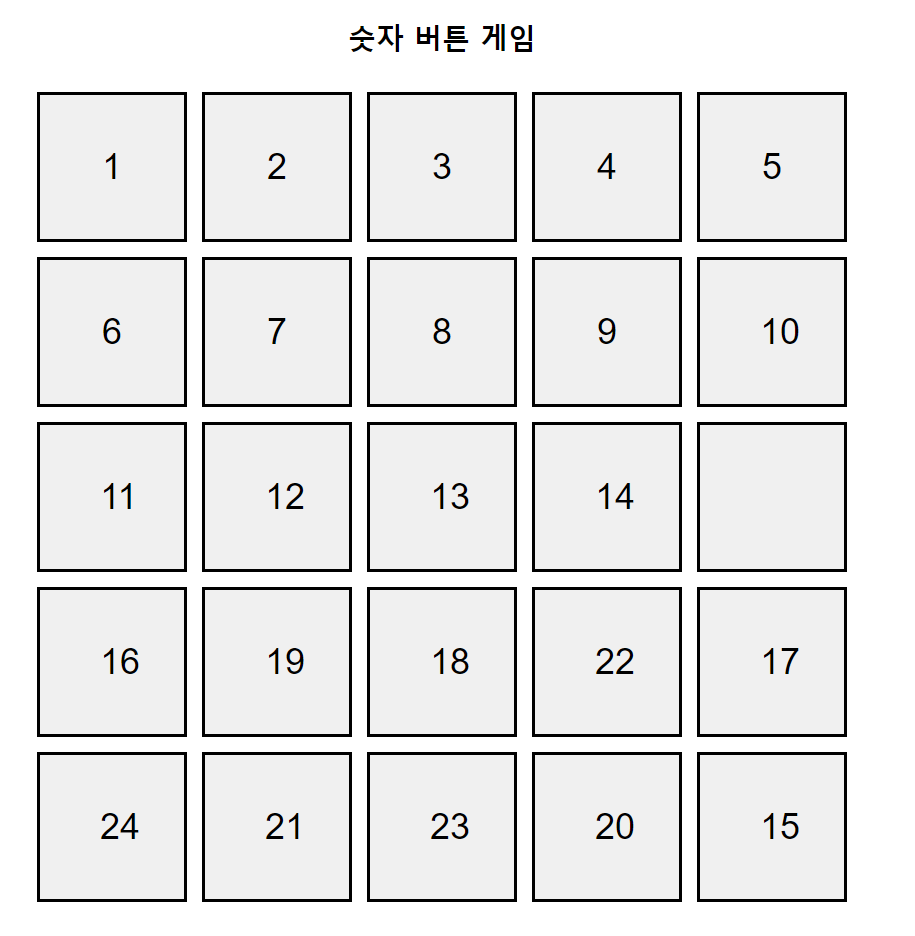
선생님 코드
-
sorted() : 정렬 >> 원본 배열자체가 정렬된다.
- 숫자배열에 sorted()하면 첫째자리 숫자로 배열을 하기떄문에 sort()인자 안에 익명함수로, 숫자를 정렬하고 싶은 방법을 줘야한다.
- ex)
.sort(function(a, b){return a- b});식으로
- ex)
- 숫자배열에 sorted()하면 첫째자리 숫자로 배열을 하기떄문에 sort()인자 안에 익명함수로, 숫자를 정렬하고 싶은 방법을 줘야한다.
-
reverse() : 해당 배열을 그냥 역순으로 출력 >> 원본 자체를 반대로 넣는거
- 알파벳 순으로 역순으로 하고싶다면 sort() 후 reverse()시켜야함
-
toSorted() : 정렬된 새로운 배열 객체를 생성해서 반환
-
toReversed() : 원본은 안바뀌고 역순으로 새로운 객체를 생성해서 반환
-
Math.random()
.sort(function(){return 0.5 - Math.random()});
    <!DOCTYPE html>
    <html>
    <head>
      <title>Button Game</title>
      <meta charset="UTF-8">
    </head>
    <body>
      <div id="game"></div>
      <script>
          let text = "";
    let num = [0, 1, 2, 3, 4, 5, 6, 7, 8];
    let answer = [1, 2, 3, 4, 5, 6, 7, 8, 0];
    const LEFT = -1, UP = -3, RIGHT = 1, DOWN = 3;

function shuffle()//1차원 배열 섞기
{    //sort() : 알파벳 순으로 정렬 // reverse()는 해당 배열을 그냥 역순으로 출력하는
          //>> 그래서 알파벳을 역순으로 정렬하고 싶다면 sort()하고, reverse()를 시켜야한다.
    num.sort(function(a,b){return 0.5 - Math.random()});
}

function display()//3x3으로 onclick기능으로 move 펑션 호출하는 button을 넣어주도록
{

    text ="";
    let idx = 0;
    for(let i=0;i<3;i++)
    {
        for(let j=0;j<3;j++)
        {
            text += `<button onclick='move(${idx}, ${num[idx]})'>${num[idx]}</button>`;
            idx++;
        }
        text += "<br>"
    }
    document.getElementById("game").innerHTML = text;

}
function move(idx, btnNum)//인덱스를 가지고 0이 어딨는지 찾는 함수
{
    let pointOfTheCompass = whereIsZero(idx, btnNum);
    if( pointOfTheCompass != -100)//-100이면 클릭한 버튼을 기준으로 상하 좌우에 0이 없다는 의미
    {
        if( pointOfTheCompass == LEFT )
        {
            num[idx+LEFT] = btnNum;
            num[idx] = 0;
        }
        else if( pointOfTheCompass == UP )
        {
            num[idx+UP] = btnNum;
            num[idx] = 0;
        }
        else if( pointOfTheCompass == RIGHT )
        {
            num[idx+RIGHT] = btnNum;
            num[idx] = 0;
        }
        else if( pointOfTheCompass == DOWN)
        {
            num[idx+DOWN] = btnNum;
            num[idx] = 0;
        }

        display();
        if( result() ) alert("정답입니다.");
    }

}
function whereIsZero(idx, btnNum)//두 버튼이 인접한지 확인하는 함수
{
    if( idx%3 != 0 )
    {
        if( num[idx+LEFT]== 0 )
            return LEFT;
    }
    if( (idx+UP)>=0 )//첫째줄에 있는 애들은 상단에 값이 없으므로 대상에서 제외
    {
        if( num[idx+UP]==0 )
            return UP;
    }
    if( idx%3 != 2 )
    {
        if( num[idx+RIGHT]==0 )
            return RIGHT;
    }
    if( (idx+DOWN) < num.length )
    {
       if( num[idx+DOWN]==0 )
            return DOWN;
    }
    return -100;
}
function init()
{
    shuffle();
    display();
}
function result()
{
    for(var i=0;i<num.length;i++)
    {
        if(num[i] != answer[i])
            return false;
    }
    return true;
}

window.onload = init;
        </script>
    </body>

</html>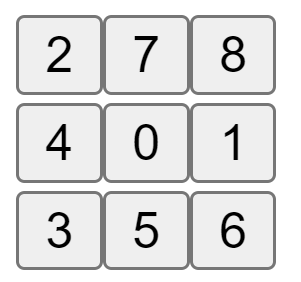
vscode 들여쓰기 단축키 ctrl + [