퀴즈 - 사과장수
class FruitSeller{

	int price, numOfApple, money;

	public FruitSeller(int price, int  numOfApple, int money){

		this.price = price;
		this. numOfApple =  numOfApple;
		this.money = money;

	}public int sell(int money){ //이 부분에

		int temp = money /  price;
		this.money += money;
		this. numOfApple -= temp;
		return temp;

	}public void printCS(){

		System.out.println("사과 가격 : " + price);
		System.out.println("남은 사과 개수 : " + numOfApple);
		System.out.println("남은 돈 : " + money);

	}
}
class Customer{

	int numOfApple, money;

	public Customer(int money){

		this.money = money;

	}public void Buy(FruitSeller buy, int money){

		this.money -= money;
		this.numOfApple += buy.sell(money);

	}public void printCS(){

		 System.out.println("구매한 사과 개수 : " + numOfApple);
		System.out.println("구매 후 남은 금액 : " + money);
	}
}
class FruitSellerMain{
	public static void main(String[]args){

		FruitSeller s1 = new FruitSeller(2000, 50, 50000);
		FruitSeller s2 = new FruitSeller(1000, 100, 100000);
		Customer c1 = new Customer(20000);

		s1.printCS();
		System.out.println("============================");
		s2.printCS();
		System.out.println("============================");
		c1.printCS();
		System.out.println("============================");
		System.out.println();

		c1.Buy(s1, 6000);
		c1.Buy(s2, 5000);

		s1.printCS();
		System.out.println("============================");
		s2.printCS();
		System.out.println("============================");
		c1.printCS();
		System.out.println("============================");
	}
}
-
처음에 값이 제대로 출력되지 않았는데, 그 이유는
-
Customer클래스에서 Buy 메소드를 생성할 때 과일장사 클래스를 호출해서 구매자 사과 개수를 추가하는 계산식에 오류가 있었다.
-
buy.sell()의 괄호 안에 아무 생각 없이 numOfApple을 넣은것이다
-
돈을 받으면 그 돈으로 과일장사 클래스의 sell메서드로 가서 계산을 하게끔 코딩해놨는데 다른 변수 이름을 넣으니 그 값을 넣지 못한것이다.
-
-
퀴즈 - 구슬치기
class Beads{

	String name;
	int beads;

	public Beads(String name, int beads){

		this.name = name;
		this.beads = beads;

	}public void win(Beads who,int beads){

		this.beads += who.lose(beads);

	}public int lose(int beads){

		if(this.beads < beads){
			int temp = this.beads;
			this.beads = 0;
			return 0;
		}
		this.beads -= beads;
		return beads;

	}public void printCS(){

		System.out.println(name + "의 현재 구슬 수 : " + beads);
	}
}
class BeadsMain{
	public static void main(String[]args){

		Beads b1 = new Beads("어린이 1 ", 15);
		Beads b2 = new Beads("어린이 2 ", 9);

		System.out.println("1차 게임에서 어린이 1은 어린이 2의 구슬 2개를 획득한다.");

		b1.win(b2, 2);
		b1.printCS();
		b2.printCS();
		System.out.println();

		System.out.println("2차 게임에서 어린이 2는 어린이 1의 구슬 7개를 획득한다.");

		b2.win(b1, 7);
		b1.printCS();
		b2.printCS();
	}
} -
문제를 잘 분석해서 뭐가 필요한지, 어디서 호출해서 어디서 return해야하는지 잘 복습한 느낌이였다.
- 한번에 성공!!!
퀴즈 - 패키지화 시키고, import를 통해 cmd에서 구현되게 하자
-
만들었던 과일 장수 코드들을 class마다 나누어서 따로 저장
-
패키지화 시킬 클래스에서 package + 원하는 파일명을 적는다.
-
하위 파일을 만들어 클래스를 저장시킬 것이라면 ex)orange.ora 식으로 . 을 넣으면 하위파일 생성
-
반드시 package가 제일 상단에 있어야 한다.(import가 제일 위에 있으면 x)
-
-
컴파일 할때 같은 파일안에서 클래스를 찾기 때문에 파일이 나누어져있는 클래스들을 함께 불러와 컴파일 시킨다면 꼭 클래스 이름 앞에 public 을 붙이고, 각 클래스들을 import해와야 한다.
-
import 해올 때 각 파일들이 패키지화 되어있다면 그 패키지한 파일들을 포함해 import해와야 한다.
-
main클래스에서 객체를 생성하고, 각 클래스들을 호출한다면 해달 Main클래스에는 필요한 파일들을 모두 import해와야 한다
- import해올 파일 명이 같다면 패키지까지 포함한 파일의 이름을 호출한곳으로 수정해서 넣어야 한다.(근데 이게 무슨말..그냥 패키지 이름은 다르니까 상관없다는건가)
-
-
-
만약 패키지화 시킨 클래스들과 Main클래스가 다른 파일에 있다면 classpath를 설정해줘야한다.
set classpath=.;.\불러올 파일;
-
컴파일을 하면 import해와야 하는 클래스 파일들은 두고 아무것도 import할 필요없는 파일들 먼저 컴파일 해준다
-
javac -d . 클래스명.java- 컴파일 순서를 맞추지 않으면 import에서 오류가 나기때문에 순서에 잘 맞춰해야한다.
-
배치파일은 아직 제대로 이해 못했다. 컴파일은 알겠는데, 한번에 컴파일 시켜서 실행시키는 순서나 개념을 제대로 이해하지 못한것같다
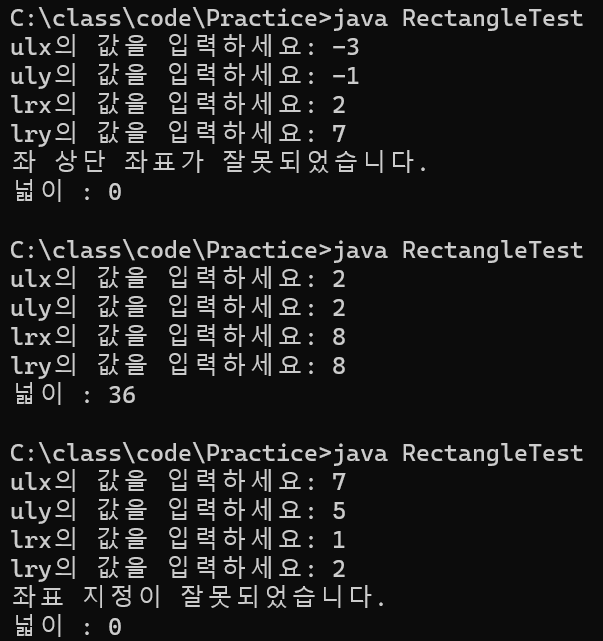
퀴즈 - 접근제어자를 이용해 적절한 값을 유도 (좌표) - 코드 수정해서
import java.util.Scanner;

class Rectangle
{
    private int ulx, uly;        // 좌 상단 x, y 좌표
    private int lrx, lry;        // 우 하단 x, y 좌표

	private boolean cardinal(int pos){

		if(0 <= pos && pos <= 100)
			return true;
		else
			return false;
	}
	public void initRectangle(int ulx, int uly, int lrx, int lry){

		if(ulx >= lrx || uly >= lry){

			System.out.println("좌표 지정이 잘못되었습니다.");
			return;

		}if(!cardinal(ulx) || !cardinal(uly)){

			System.out.println("좌 상단 좌표가 잘못되었습니다.");
			return;

		}if (!cardinal(lrx) || !cardinal(lry)){

			System.out.println("우 상단 좌표가 잘못되었습니다.");
			return;

		}

		this.ulx = ulx;
		this.uly = uly;
		this.lrx = lrx;
		this.lry = lry;
	}
	public void showArea()
    	{
       	 	int xLen = lrx-ulx;
        	int yLen = lry-uly;

		System.out.println("넓이 : " + (xLen*yLen));
	}
}

class RectangleTest
{
    public static void main(String[] args)
    {
        Scanner sc = new Scanner(System.in);

	System.out.print("ulx의 값을 입력하세요: ");
	int ulx = sc.nextInt();
	System.out.print("uly의 값을 입력하세요: ");
	int uly = sc.nextInt();
	System.out.print("lrx의 값을 입력하세요: ");
	int lrx = sc.nextInt();
	System.out.print("lry의 값을 입력하세요: ");
	int lry = sc.nextInt();

	Rectangle rec = new Rectangle();
	rec.initRectangle(ulx, uly, lrx, lry);

        rec.showArea();
    }
}-
정답을 보면서 했지만, 사용자에게 값을 받아와서 좌표를 지정하게끔 함
-
오타때문에 자꾸 오류가 났고, Scanner를 System.in해주지 않아서 오류
-
if문에서 조건 정할때 괄호로 묶어주지 않아서 오류;;;;;;