1. Django Shell 사용하기
- python shell과 겉모습은 같다
django shell 시작하기
python manage.py shellQuestion object 확인
>>> Question.objects.all() 
admin 사이트에서 Choice object 추가


Choice 제목이 choice_text로 보이도록 str() 추가
# 각 옵션을 저장
class Choice(models.Model):
    # 각 옵션(choice)은 질문에 딸려있는 것.. -> question을 FK로
    question = models.ForeignKey(Question, on_delete=models.CASCADE)
    # 선택한 텍스트 (최대 길이 200)
    choice_text = models.CharField(max_length=200)
    # 투표한 번호
    votes = models.IntegerField(default=0)

    def __str__(self):
return f"{self.choice_text}"- admin 사이트에서 확인
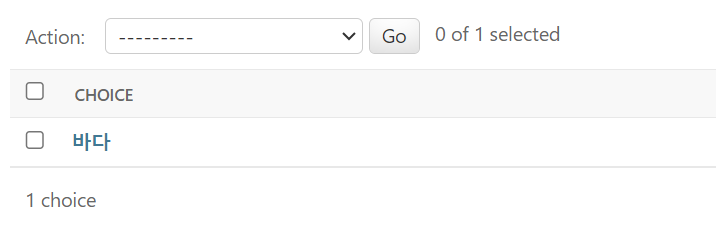
- shell에서 확인
-
장고 쉘은 웹과 다르게 자동 로딩이 안된다
→ 쉘을 다시 껐다 켜줘야 함
-
Choice와 Question 사이의 관계
-
Choice object 다루기

- choice에서 question으로 접근이 되지만 그 반대는 안된다
- choice는 FK로 question을 가리켜두었기 때문
- 여러 choice가 question에 속해있기 때문에 별도의 코드를 사용해 주어야 한다
-
Question에 속한 Choice 확인하기
>>> question.choice_set.all()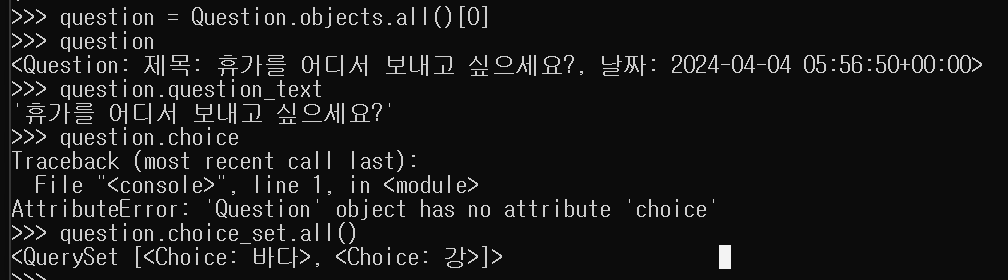
2. Django Shell - 현재 시간 구하기
- 현재 시간 구하기
>>> from datetime import datetime
>>> datetime.now()
- 장고에서 현재 시간 구하기
>>> from django.utils import timezone
>>> timezone.now()
3. Django Shell - 레코드 생성하기
Question 레코드 생성하기
>>> q1 = Question(question_text = "커피 vs 녹차")- 주의! 장고 메모리 상에서만 존재하는 것. DB에 저장해야 웹 상에서도 확인할 수 있다. →
save()메소드 사용
- 필수인 pub_date까지 채우고 저장
save(): 장고에서 모델(Model)을 데이터베이스에 저장하기 위해 사용
>>> from django.utils import timezone
>>> q1.pub_date = timezone.now()>>> q1.save()레코드 생성 시, 자동으로 현재 시간을 채워주는 옵션
>>> pub_date = models.DateTimeField(auto_now_add=True)✅ objects에서 첫 번째 원소를 가져오는 두 가지 방법
>>> q2 = Question.objects.first()
>>> q2 = Question.objects.all()[0]
Choice 레코드 생성하기
-
Question.choice_set.create()활용하기>>> q3.choice_set.create(choice_text='a') >>> q3.choice_set.create(choice_text='b') -
Choice object 생성하고
save()하기>>> choice_c = Choice(choice_text='c', question=q3) >>> choice_c.save()
4. Django Shell - 레코드 수정 및 삭제 하기
레코드 수정하기
>>> q = Question.objects.last()
>>> q.question_text
'abc'
>>> q.question_text = q.question_text + '???'
>>> q.question_text
'abc???'
>>> q.save()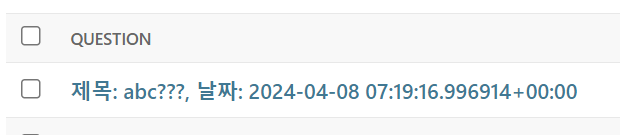
레코드 삭제하기
choice.delete()-
삭제되면 id가 사라진다
>>> choice = Choice.objects.last()
>>> choice.question.choice_set.all()
<QuerySet [<Choice: a>, <Choice: b>, <Choice: c>]>

>>> q = choice.question
>>> q.choice_set.all()
<QuerySet [<Choice: a>, <Choice: b>, <Choice: c>]>

>>> choice.delete()
(1, {'polls.Choice': 1})

>>> q.choice_set.all()
<QuerySet [<Choice: a>, <Choice: b>]>

>>> choice.choice_text
'c'
>>> choice.id
-
- 이때, 삭제한 레코드를 다시
save()하면 다시 생긴다>>> choice.save() >>> q.choice_set.all() <QuerySet [<Choice: a>, <Choice: b>, <Choice: c>]>
- q1의 모든 choice 오브젝트들을 삭제하려는 경우
>>> q1.choice_set.delete()
5. Django Shell - 모델 필터링(Model Filtering)
조건에 해당하는 오브젝트를 필터링하기
get()- id로 가져오기
>>> Question.objects.get(id=1) - text로 찾기
>>> Question.objects.get(question_text__startswith='휴가를') - date의 year에 매칭되는 값 가져오기
→ 만약 여러 개의 데이터가 조회되는 경우 오류가 발생한다 → filter() 메서드 사용>>> Question.objects.get(pub_date__year=2023)
- id로 가져오기
filter()- date의 year에 매칭되는 값 가져오기
>>> Question.objects.get(pub_date__year=2023) - 필터링 결과 개수 세기
>>> Question.objects.filter(pub_date__year=2023).count()
- date의 year에 매칭되는 값 가져오기
QuerySet
- 여러 개의 값을 반환할 경우 QuerySet이 주어진다
- question에서 choice를 반환할 때는 여러 개일 수 있으므로, QuerySet 반환
- choice에서 question을 반환할 때는 객체 하나만 반환
QuerySet의 SQL 쿼리 살펴보기
.query
-
Question.objects.filter(pub_date__year=2024): 2024년 질문 가져오기>>> print(Question.objects.filter(pub_date__year=2024).query) SELECT "polls_question"."id", "polls_question"."question_text", "polls_question"."pub_date" FROM "polls_question" WHERE "polls_question"."pub_date" BETWEEN 2024-01-01 00:00:00 AND 2024-12-31 23:59:59.999999 -
Question.objects.all(): question의 모든 object 가져오기>>> print(Question.objects.all().query) SELECT "polls_question"."id", "polls_question"."question_text", "polls_question"."pub_date" FROM "polls_question" -
Question.objects.filter(question_text__startswith='휴가를'): ‘휴가를’ 로 시작하는 질문 가져오기>>> print(Question.objects.filter(question_text__startswith='휴가를').query) SELECT "polls_question"."id", "polls_question"."question_text", "polls_question"."pub_date" FROM "polls_question" WHERE "polls_question"."question_text" LIKE 휴가를% ESCAPE '\' -
q의 choice들 가져오기
>>> q = Question.objects.get(pk=1)
>>> q.choice_set.all()
>>> print(q.choice_set.all().query)
SELECT "polls_choice"."id", "polls_choice"."question_id", "polls_choice"."choice_text", "polls_choice"."votes" FROM "polls_choice" WHERE "polls_choice"."question_id" = 1
Field lookups
🔗 [django documnet - field lookups](https://docs.djangoproject.com/en/5.0/ref/models/querysets/#field-lookups)-
filter(), exclude(), get()에서 사용할 수 있는 lookups
-
__year
-
__startswith
-
__contatins: 포함된 경우
>>> Question.objects.filter(question_text__contains='휴가') <QuerySet [<Question: 제목: 휴가를 어디서 보내고 싶으세요?, 날짜: 2024-04-04 05:56:50+00:00>, <Question: 제목: 휴가 를 가실 계획인가요?, 날짜: 2024-04-08 08:21:04.019412+00:00>]> -
__gt: Greater than, n보다 큰 경우
>>> Choice.objects.filter(votes__gt = 0)
<QuerySet [<Choice: 바다>]>
필터링 결과에 대해 작업하기
- votes가 0보다 큰 경우 votes를 0으로 수정하기
-
update()>>> Choice.objects.filter(votes__gt=0).update(votes=0) 1 >>> Choice.objects.filter(votes__gt = 0) <QuerySet []>
-
- votes가 0인 경우 삭제하기
-
delete()>>> Choice.objects.filter(votes = 0).delete() (4, {'polls.Choice': 4})
-
정규표현식으로 필터링하기
- ‘휴가’로 시작하고, ‘어디’라는 단어가 포함된 경우
>>> Question.objects.filter(question_text__regex = r'^휴가.*어디') <QuerySet [<Question: 제목: 휴가를 어디서 보내고 싶으세요?, 날짜: 2024-04-04 05:56:50+00:00>]>- sql 쿼리 확인
>>> print(Question.objects.filter(question_text__regex = r'^휴가.*어디').query) SELECT "polls_question"."id", "polls_question"."question_text", "polls_question"."pub_date" FROM "polls_question" WHERE "polls_question"."question_text" REGEXP ^휴가.*어디 - 정규표현식을 사용하지 않는 경우
→ 결과는 같지만, 정규표현식은 더욱 강력한 조건을 걸 수 있다는 장점이 있다>>> Question.objects.filter(question_text__startswith='휴가').filter(question_text__contains='어디') <QuerySet [<Question: 제목: 휴가를 어디서 보내고 싶으세요?, 날짜: 2024-04-04 05:56:50+00:00>]> >>> print(Question.objects.filter(question_text__startswith='휴가').filter(question_text__contains='어디').query) SELECT "polls_question"."id", "polls_question"."question_text", "polls_question"."pub_date" FROM "polls_question" WHERE ("polls_question"."question_text" LIKE 휴가% ESCAPE '\' AND "polls_question"."question_text" LIKE %어디% ESCAPE '\')
- sql 쿼리 확인
6. Django 모델 관계기반 필터링
Question의 필드 값을 기준으로 Choice 필터링하기
#Question의 question_text 필드 값이 '휴가'로 시작하는 모든 Choice 오브젝트를 필터링하기
>>> Choice.objects.filter(question__question_text__startswith='휴가')
<QuerySet [<Choice: [휴가를 어디서 보내고 싶으세요?]바다>, <Choice: [휴가 계획이 있나요?]아니오>, <Choice: [휴가를  가실 계획인가요?]네>, <Choice: [휴가 계획이 있나요?]네>, <Choice: [휴가를 가실 계획인가요?]아니오>, <Choice: [휴가를 어디서 보내고 싶으세요?]산>]>

>>> print(Choice.objects.filter(question__question_text__startswith='휴가').query)
SELECT "polls_choice"."id", "polls_choice"."question_id", "polls_choice"."choice_text", "polls_choice"."votes" FROM "polls_choice" INNER JOIN "polls_question" ON ("polls_choice"."question_id" = "polls_question"."id") WHERE "polls_question"."question_text" LIKE 휴가% ESCAPE '\'
exclude() 활용하여 조건에 해당하지 않는 경우 필터링하기
filter()는 조건에 맞는 경우exclude()는 조건에 맞지 않는 경우
>>> Question.objects.filter(question_text__startswith='휴가')
<QuerySet [<Question: 제목: 휴가를 어디서 보내고 싶으세요?, 날짜: 2024-04-04 05:56:50+00:00>, <Question: 제목: 휴가 를 가실 계획인가요?, 날짜: 2024-04-08 08:21:04.019412+00:00>, <Question: 제목: 휴가 계획이 있나요?, 날짜: 2024-04-08 08:31:23.274211+00:00>]>

>>> Question.objects.exclude(question_text__startswith='휴가')
<QuerySet [<Question: 제목: 가장 좋아하는 디저트는?, 날짜: 2024-04-08 05:57:13+00:00>, <Question: 제목: 커피 vs 녹차, 날짜: 2024-04-08 07:16:07.468897+00:00>, <Question: 제목: abc???, 날짜: 2024-04-08 07:19:16.996914+00:00>]>- 쿼리 비교
→ exclude()는 WHERE 절에 NOT이 추가됨>>> print(Question.objects.filter(question_text__startswith='휴가').query) SELECT "polls_question"."id", "polls_question"."question_text", "polls_question"."pub_date" FROM "polls_question" WHERE "polls_question"."question_text" LIKE 휴가% ESCAPE '\' >>> print(Question.objects.exclude(question_text__startswith='휴가').query) SELECT "polls_question"."id", "polls_question"."question_text", "polls_question"."pub_date" FROM "polls_question" WHERE **NOT** ("polls_question"."question_text" LIKE 휴가% ESCAPE '\')
7. Django Shell - 모델 메소드
- Question과 Choice를 임포트하고 save()같은 메소드를 사용할 수 있는 것은 models.Model을 상속받고 있기 때문이다
메소드 직접 만들어 활용하기
was_published_recently: pub date가 최근에 만들어 졌는가- 최근은 어제보다 최근에 만들어 졌는가
from django.utils import timezone
import datetime

# 질문들을 저장
class Question(models.Model):
    # 질문 (최대 길이 200)
    question_text = models.CharField(max_length=200)
    pub_date = models.DateTimeField(auto_now_add=True)

    def was_published_recently(self):
        # pub date가 어제보다 크면, 어제보다 더 최근에 만들어졌는지
        return self.pub_date >= timezone.now() - datetime.timedelta(days=1)

    # 자기 자신을 문자열로 표현할 때 어떻게 표현할 것인가?
    # question을 문자열로 표현할 때 question_text를 보이라는 것
    def __str__(self):
return f"제목: {self.question_text}, 날짜: {self.pub_date}">>> from polls.models import *
>>> a = Question.objects.first()
>>> a.was_published_recently()
False
>>> a = Question.objects.last()
>>> a.was_published_recently()
True
가보자고! 🔥