[React Native TIL]1. 새로고침 시 데이터가 reset되는 것을 방지하기 위해 AsyncStorage를 이용해 로컬에 데이터를 저장 / 2. Expo AppLoading => Expo SplashScreen
React Native TIL
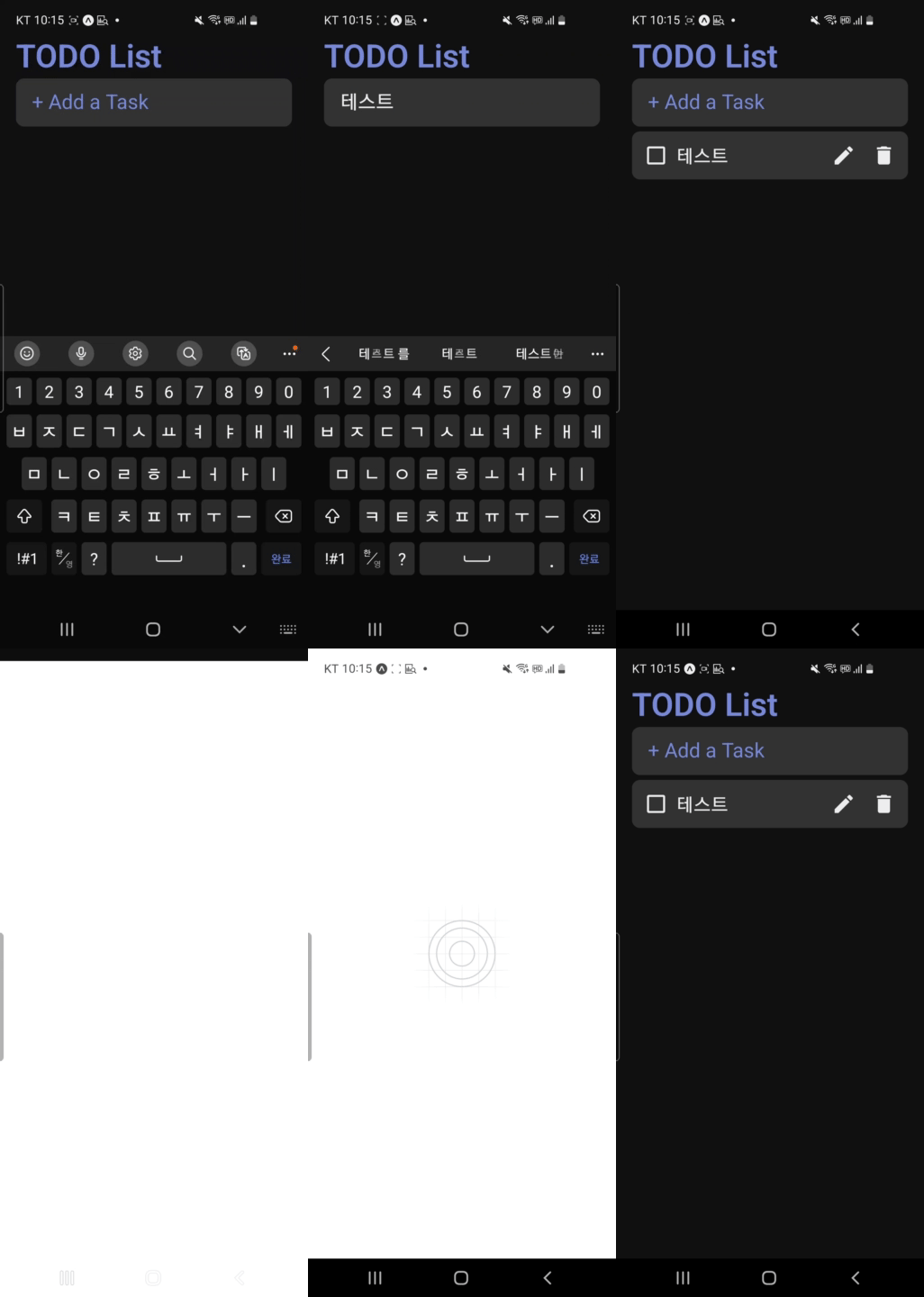
todo리스트를 만들었는데 앱을 끄면 다시 데이터들이 reset되는 문제가 발생했다. 그래서 AsyncStorage를 이용하여 로컬에 데이터를 저장하고 앱이 시작될 때 저장된 데이터를 불러오는 기능 추가하였다.
1. AsyncStorage
AsyncStorage를 이용하면 react native에서 로컬 스토리지를 이용할 수 있다. AsyncStorage는 string 타입의 키, 값 데이터를 비동기로 기기에 저장하고 불러오는 기능을 제공한다.
expo 공식 문서 : https://docs.expo.dev/versions/latest/sdk/async-storage/
1-1. 설치
$ npx expo install @react-native-async-storage/async-storage
1-2. import
import AsyncStorage from '@react-native-async-storage/async-storage';1-3. AsyncStorage.setItem : local에 데이터 저장
- 저장할 객체를 전달 받고
'task'라는 키와JSON.stringify를 활용해 전달된 객체를 문자열로 만들어서 저장.- 저장이 완료되면 전달된 데이터를 setTasks에 설정해서 최신 데이터를 유지하도록 설정
    //local 데이터 저장
    const storeData = async (tasks) => {
        try {
            await AsyncStorage.setItem('task', JSON.stringify(tasks));
            setTasks(tasks);
        } catch (e) {
            //
        }
    };
그리고 CRUD 함수에 해당 함수를 넣어준다.
1-4. AsyncStorage.getItem : local에 저장된 데이터 불러오기
- 가져온 데이터는 문자열이기에 json.parse를 통해 객체형태로 변경
- 저장된 데이터가 없으면 json.parse에서 에러가 날수 있으니 데이터가 없으면 빈객체의 string형태로 처리하도록 설정
   //local에 저장된 데이터 불러오기
   const getData = async () =>{
       try {
           const loadedData = await AsyncStorage.getItem('tasks');
           setTasks(JSON.parse(loadedData||'{}'))
       }catch (e){
           //
       }
   }
위 함수를 앱이 제일 처음 시작할 때 호출해야 한다. expo에서 제공하는 AppLoading컴포넌트를 이용하면 쉽게 구현할 수 있다.
2. Expo AppLoading 사라짐
Expo AppLoading을 설치하려고 했더니 아래 오류 문구와 함께 오류가 발생한다.
https://docs.expo.dev/versions/v48.0.0/sdk/application/
또한 홈페이지를 보면 AppLoading 컴포넌트는 사라진 것을 볼 수 있다.
AppLoading은 사라지고 SplashScreen로 바꿔 사용하는 것을 권장한다는데
xpo-app-loading is deprecated in favor of expo-splash-screen: use SplashScreen.preventAutoHideAsync() and SplashScreen.hideAsync() instead.
3. Expo SplashScreen
3-1. 설치
3-2. 코드
$ npx expo install expo-splash-screenimport * as SplashScreen from 'expo-splash-screen';
SplashScreen.preventAutoHideAsync();
//앱 로딩
const [isReady, setIsReady] = useState(false);
useEffect(() => {
async function prepare() {
try {
await getData(); // 로딩된 불러들어올 함수
//await new Promise((resolve) => setTimeout(resolve, 2000));
} catch (e) {
() => {};
} finally {
setIsReady(true);
}
}
prepare();
}, []);
return isReady ? (<컴포넌트/>):([])
But...
이렇게 해주려고 했는데 안되서.....
SplashScreen.preventAutoHideAsync();을 주석처리하고 렌더링했을 떄getDate함수를 불러오도록 설정했더니 잘된다. 나중에 SplashScreen관련해서 더 공부해봐야 겠다...ㅜㅜ