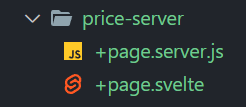
- Page Data,
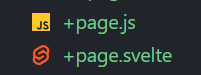
+page.svelte + +page.js
형제 요소로 서로 관여하는 파일
최종 값 객체를 반환 해야함
+page.js
** 일반 적으로 const { fetch } = loadEvent; 변수를 제어 하지 않을 시
ient.js?v=4a736c19:1956 Loading http://localhost:3000/products using
window.fetch. For best results, use thefetchthat is passed to yourloadfunction: https://kit.svelte.dev/docs/load#making-fetch-requests
// export const load = async () => {
// 	const response = await fetch('http://localhost:3000/products');
// 	const products = await response.json();

// 	return { products };
// };

export async function load(loadEvent) {
	const { fetch } = loadEvent;
	const response = await fetch('http://localhost:3000/products');
	const products = await response.json();

	return { products };
}
+page.svelte
<script>
	export let data;
	const products = data.products;

	//console.log(products);
</script>

{#each products as { id, title, description }}
	<div>
		<p>{id}</p>
		<p>{title}</p>
		<p>{description}</p>
	</div>
{/each}
- universal load function
- client, server 양쪽 모두 실행
- server load 대비 더 많은 데이터를 return 가능
- 링크 타고 실행 할시 클라이언트로 실행
- 리프래시, url 타고 들어 갈시 서버 요청후 실행
- server load function
- server 만 실행
- db에서 data 가져오거나, 외부 api 요청 할때
- server load function
+page.server.js
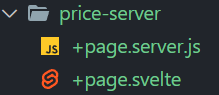
serverLoadEvent로 실행
export async function load(serverLoadEvent) {
	const { fetch } = serverLoadEvent;
	const response = await fetch('http://localhost:3000/products');
	const products = await response.json();

	return { products };
}
- Loading Data Using URL Prams
상세 페이지내 특정 요소만 추출
redirect, errror 등 상황 처리 가능
ex = [urlId] -> 다이나닉 라우트 사용
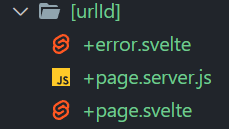
+page.svelte
<script>
	export let data;
	const { product } = data;
</script>

<h1>상세 페이지</h1>

<div>
	<h2>{product.title}</h2>
	<h3>{product.price}</h3>
	<h3>{product.description}</h3>
</div>
+page.server.js
import { error, redirect } from '@sveltejs/kit';

export const load = async ({ fetch, params, url, route }) => {
	const { urlId } = params;

	if (parseInt(urlId) > 10) {
		throw redirect(307, `/price`);
	}

	if (parseInt(urlId) > 3) {
		throw error(404, `에러페이지`);
	}

	const res = await fetch(`http://localhost:3000/products/${urlId}`);
	const product = await res.json();

	console.log(url, route);

	return { product };
};
도
