postgresql vector search 인덱스 성능

개요
postgresql에서 오픈소스 extention pgvector를 활용해 postgresql 기반 벡터 데이터 저장과 인덱싱 그리고 벡터 기반 검색을 사용할 수 있습니다
postgresql community 버전과 github의 pgvector extention 구성을 통해 이를 테스트할 수 있습니다
참고 URL : https://github.com/pgvector/pgvector-python
postgesql 구성
테스트하는 VM의 정보는 다음과 같습니다
| VM | 용도 | Shape | Private IP |
|---|---|---|---|
| test-postgre | postgresql DB 서버 | VM 2 CPU, 32GB Mem | 10.0.0.254 |
postgresql 14를 설치합니다
$ sudo dnf install https://download.postgresql.org/pub/repos/yum/reporpms/EL-8-x86_64/pgdg-redhat-repo-latest.noarch.rpm
==================================================================================================================
 Package                        Architecture         Version                     Repository                  Size
==================================================================================================================
Installing:
 pgdg-redhat-repo               noarch               42.0-43PGDG                 @commandline                15 k

Transaction Summary
==================================================================================================================
Install  1 Package

Total size: 15 k
Installed size: 15 k
Is this ok [y/N]: y
Downloading Packages:
Running transaction check
Transaction check succeeded.
Running transaction test
Transaction test succeeded.
Running transaction
  Preparing        :                                                                                          1/1
  Installing       : pgdg-redhat-repo-42.0-43PGDG.noarch                                                      1/1
  Verifying        : pgdg-redhat-repo-42.0-43PGDG.noarch                                                      1/1

Installed:
  pgdg-redhat-repo-42.0-43PGDG.noarch

Complete!

$ sudo dnf -qy module disable postgresql
Importing GPG key 0x08B40D20:
 Userid     : "PostgreSQL RPM Repository <pgsql-pkg-yum@lists.postgresql.org>"
 Fingerprint: D4BF 08AE 67A0 B4C7 A1DB CCD2 40BC A2B4 08B4 0D20
 From       : /etc/pki/rpm-gpg/PGDG-RPM-GPG-KEY-RHEL
Importing GPG key 0x08B40D20:
 Userid     : "PostgreSQL RPM Repository <pgsql-pkg-yum@lists.postgresql.org>"
 Fingerprint: D4BF 08AE 67A0 B4C7 A1DB CCD2 40BC A2B4 08B4 0D20
 From       : /etc/pki/rpm-gpg/PGDG-RPM-GPG-KEY-RHEL
Importing GPG key 0x08B40D20:
 Userid     : "PostgreSQL RPM Repository <pgsql-pkg-yum@lists.postgresql.org>"
 Fingerprint: D4BF 08AE 67A0 B4C7 A1DB CCD2 40BC A2B4 08B4 0D20
 From       : /etc/pki/rpm-gpg/PGDG-RPM-GPG-KEY-RHEL
Importing GPG key 0x08B40D20:
 Userid     : "PostgreSQL RPM Repository <pgsql-pkg-yum@lists.postgresql.org>"
 Fingerprint: D4BF 08AE 67A0 B4C7 A1DB CCD2 40BC A2B4 08B4 0D20
 From       : /etc/pki/rpm-gpg/PGDG-RPM-GPG-KEY-RHEL
Importing GPG key 0x08B40D20:
 Userid     : "PostgreSQL RPM Repository <pgsql-pkg-yum@lists.postgresql.org>"
 Fingerprint: D4BF 08AE 67A0 B4C7 A1DB CCD2 40BC A2B4 08B4 0D20
 From       : /etc/pki/rpm-gpg/PGDG-RPM-GPG-KEY-RHEL
Importing GPG key 0x08B40D20:
 Userid     : "PostgreSQL RPM Repository <pgsql-pkg-yum@lists.postgresql.org>"
 Fingerprint: D4BF 08AE 67A0 B4C7 A1DB CCD2 40BC A2B4 08B4 0D20
 From       : /etc/pki/rpm-gpg/PGDG-RPM-GPG-KEY-RHEL

$ sudo dnf install postgresql14 postgresql14-server
==================================================================================================================
 Package                          Architecture        Version                           Repository           Size
==================================================================================================================
Installing:
 postgresql14                     x86_64              14.13-2PGDG.rhel8                 pgdg14              1.5 M
 postgresql14-server              x86_64              14.13-2PGDG.rhel8                 pgdg14              5.7 M
Installing dependencies:
 postgresql14-libs                x86_64              14.13-2PGDG.rhel8                 pgdg14              282 k

Transaction Summary
==================================================================================================================
Install  3 Packages

Total download size: 7.5 M
Installed size: 32 M
Is this ok [y/N]: y
Downloading Packages:
(1/3): postgresql14-libs-14.13-2PGDG.rhel8.x86_64.rpm                             172 kB/s | 282 kB     00:01
(2/3): postgresql14-14.13-2PGDG.rhel8.x86_64.rpm                                  720 kB/s | 1.5 MB     00:02
(3/3): postgresql14-server-14.13-2PGDG.rhel8.x86_64.rpm                           1.1 MB/s | 5.7 MB     00:04
------------------------------------------------------------------------------------------------------------------
Total                                                                             1.5 MB/s | 7.5 MB     00:04
PostgreSQL 14 for RHEL / Rocky / AlmaLinux 8 - x86_64                             2.4 MB/s | 2.4 kB     00:00
Importing GPG key 0x08B40D20:
 Userid     : "PostgreSQL RPM Repository <pgsql-pkg-yum@lists.postgresql.org>"
 Fingerprint: D4BF 08AE 67A0 B4C7 A1DB CCD2 40BC A2B4 08B4 0D20
 From       : /etc/pki/rpm-gpg/PGDG-RPM-GPG-KEY-RHEL
Is this ok [y/N]: y
Key imported successfully
Running transaction check
Transaction check succeeded.
Running transaction test
Transaction test succeeded.
Running transaction
  Preparing        :                                                                                          1/1
  Installing       : postgresql14-libs-14.13-2PGDG.rhel8.x86_64                                               1/3
  Running scriptlet: postgresql14-libs-14.13-2PGDG.rhel8.x86_64                                               1/3
  Installing       : postgresql14-14.13-2PGDG.rhel8.x86_64                                                    2/3
  Running scriptlet: postgresql14-14.13-2PGDG.rhel8.x86_64                                                    2/3
  Running scriptlet: postgresql14-server-14.13-2PGDG.rhel8.x86_64                                             3/3
  Installing       : postgresql14-server-14.13-2PGDG.rhel8.x86_64                                             3/3
  Running scriptlet: postgresql14-server-14.13-2PGDG.rhel8.x86_64                                             3/3
  Verifying        : postgresql14-14.13-2PGDG.rhel8.x86_64                                                    1/3
  Verifying        : postgresql14-libs-14.13-2PGDG.rhel8.x86_64                                               2/3
  Verifying        : postgresql14-server-14.13-2PGDG.rhel8.x86_64                                             3/3

Installed:
  postgresql14-14.13-2PGDG.rhel8.x86_64                    postgresql14-libs-14.13-2PGDG.rhel8.x86_64
  postgresql14-server-14.13-2PGDG.rhel8.x86_64

Complete!
db 초기화를 진행하고 postgresql을 서비스로 등록후 기동합니다
$ sudo /usr/pgsql-14/bin/postgresql-14-setup initdb
Initializing database ... OK

$ sudo systemctl start postgresql-14
$ sudo systemctl enable postgresql-14
Created symlink /etc/systemd/system/multi-user.target.wants/postgresql-14.service → /usr/lib/systemd/system/postgresql-14.service.
psql로 접속을 테스트합니다
$ sudo su - postgres
[postgres@test-postgre ~]$ psql postgres
psql (14.13)
Type "help" for help.

postgres=# exit
pgvector extention 구성
pgvector 익스텐션을 구성합니다
$ sudo dnf install pgvector_14
==================================================================================================================
 Package                    Architecture          Version                             Repository             Size
==================================================================================================================
Installing:
 pgvector_14                x86_64                0.7.3-1PGDG.rhel8                   pgdg14                102 k

Transaction Summary
==================================================================================================================
Install  1 Package

Total download size: 102 k
Installed size: 285 k
Is this ok [y/N]: y
Downloading Packages:
pgvector_14-0.7.3-1PGDG.rhel8.x86_64.rpm                                           56 kB/s | 102 kB     00:01
------------------------------------------------------------------------------------------------------------------
Total                                                                              56 kB/s | 102 kB     00:01
Running transaction check
Transaction check succeeded.
Running transaction test
Transaction test succeeded.
Running transaction
  Preparing        :                                                                                          1/1
  Installing       : pgvector_14-0.7.3-1PGDG.rhel8.x86_64                                                     1/1
  Running scriptlet: pgvector_14-0.7.3-1PGDG.rhel8.x86_64                                                     1/1
  Verifying        : pgvector_14-0.7.3-1PGDG.rhel8.x86_64                                                     1/1

Installed:
  pgvector_14-0.7.3-1PGDG.rhel8.x86_64

Complete!
벡터 검색
posgresql 에 접속하여 extention 을 생성합니다
$ psql postgres
psql (14.13)
Type "help" for help.

postgres=# CREATE EXTENSION vector;
CREATE EXTENSION
샘플 백터 테이블을 생성한후, L2 distance 알고리즘기반 최근접 데이터를 조회합니다.
postgres=# CREATE TABLE items (id bigserial PRIMARY KEY, embedding vector(3));
CREATE TABLE

postgres=# INSERT INTO items (embedding) VALUES ('[1,2,3]'), ('[4,5,6]');
INSERT 0 2

postgres=# SELECT * FROM items ORDER BY embedding <-> '[3,1,2]' LIMIT 5;
 id | embedding
----+-----------
  1 | [1,2,3]
  2 | [4,5,6]
(2 rows)
PGVECTOR는 다음 4가지 검색 알고리즘을 지원합니다
- L1 distance ( Manhattan distance ) 쿼리예시 SELECT * FROM items ORDER BY embedding <+> '[3,1,2]' LIMIT 5
- L2 distance ( Euclidean distance ) 쿼리예시 SELECT * FROM items ORDER BY embedding <-> '[3,1,2]' LIMIT 5
- inner product 쿼리예시 SELECT * FROM items ORDER BY embedding <#> '[3,1,2]' LIMIT 5
- cosine distance 쿼리예시 SELECT * FROM items ORDER BY embedding <=> '[3,1,2]' LIMIT 5
임베딩 데이터간 거리를 조회합니다
postgres=# SELECT embedding <-> '[3,1,2]' AS distance FROM items;
     distance
-------------------
 2.449489742783178
 5.744562646538029
(2 rows)

postgres=# SELECT (embedding <#> '[3,1,2]') * -1 AS inner_product FROM items;
 inner_product
---------------
            11
            29
(2 rows)

postgres=# SELECT 1 - (embedding <=> '[3,1,2]') AS cosine_similarity FROM items;
 cosine_similarity
--------------------
 0.7857142857142857
 0.8832601106161003
(2 rows)
집계 - average를 조회합니다 (테이블 데이터 모든 임베딩의 중앙점)
postgres=# SELECT AVG(embedding) FROM items;
      avg
---------------
 [2.5,3.5,4.5]
(1 row)
벡터 인덱싱
pgvector는 HNSW와 IVFFlat 방식의 인덱싱을 제공합니다.
HNSW 인덱스
HNSW( Hierarchical Navigable Small World)는 고차원 데이터에서 근사 최근접 이웃 검색(Approximate Nearest Neighbor Search)을 매우 효율적으로 수행하기 위한 그래프 기반 알고리즘입니다. 특히 벡터 검색에서 널리 사용됩니다. HNSW 인덱스는 복잡한 데이터셋에서도 빠르고 정확한 검색을 제공하는 것이 특징입니다.
HNSW의 핵심 개념
- Small-World Property
HNSW는 Small-World Network 이론에 기초합니다. Small-World 네트워크는 대부분의 노드 쌍이 비교적 짧은 경로로 연결되는 성질을 가지며, 이는 많은 실제 네트워크에서 발견됩니다. HNSW는 이 성질을 활용하여 효율적인 탐색을 가능하게 합니다. - 계층적 그래프 구조
HNSW는 여러 레벨로 구성된 그래프를 사용합니다. 최상위 레벨에서는 소수의 노드만 존재하고, 하위 레벨로 갈수록 더 많은 노드가 존재하여 점점 더 자세한 검색이 가능합니다. 검색은 상위 레벨에서 시작하여 점점 하위 레벨로 내려가면서 점점 더 근접한 이웃을 탐색하게 됩니다. - 그래프 탐색
검색은 먼저 최상위 레벨에서 근접한 노드를 찾는 것부터 시작합니다. 그 후, 검색 대상 벡터와 가장 가까운 노드의 이웃을 탐색하면서 점진적으로 최종 레벨까지 내려가며 최종적인 근접 이웃을 찾습니다. 이 탐색 과정에서 매번 더 나은 후보를 찾으면 그 방향으로 계속 탐색을 이어가며, 탐색 경로는 주로 그리디 접근 방식을 따릅니다. (그리디 방식의 예 - 동전 거스름돈 문제에서 큰 단위 돈부터 거스르는 것. 빠르게 최적이라고 생각하는 것 순으로 선택하는 전략) - 근사성
HNSW는 엄밀한 최근접 이웃 검색이 아니라 근사적인 결과를 제공합니다. 이는 검색 속도를 비약적으로 향상시키면서도 충분히 정확한 결과를 유지할 수 있도록 합니다. 검색의 정확도는 탐색 과정에서 고려하는 후보 노드의 수(k)나 탐색 폭(M)을 조절하여 튜닝할 수 있습니다. - 삽입과 삭제
새로운 벡터의 삽입은 가장 근접한 노드를 찾아 적절한 레벨에 추가하는 방식으로 이루어지며, 동시에 기존의 노드들과의 연결이 업데이트됩니다. 삭제도 유사하게 처리되지만, 삭제로 인해 발생할 수 있는 그래프의 연결성 문제를 고려해야 합니다.
HNSW의 장점
- 높은 검색 속도: HNSW는 대규모 데이터셋에서도 매우 빠른 검색 성능을 제공합니다. 이는 특히 실시간 검색이 중요한 애플리케이션에서 유용합니다.
- 확장성: HNSW는 높은 차원에서도 효율적으로 동작하며, 대규모 데이터셋에서 확장 가능한 인덱싱을 제공합니다.
- 삽입/삭제 효율성: 동적으로 데이터를 삽입하고 삭제할 수 있어, 실시간 데이터 업데이트가 필요한 시스템에서도 활용할 수 있습니다.
HNSW의 단점
- 복잡한 구현: 다른 최근접 이웃 검색 알고리즘에 비해 구현이 복잡합니다.
- 메모리 사용량: 그래프 구조와 여러 레벨을 유지하기 위해 메모리 사용량이 상대적으로 높을 수 있습니다.
HNSW는 대규모 고차원 데이터에서 근사 최근접 이웃 검색이 필요한 상황에서 매우 강력한 도구입니다. 다차원 벡터 검색 엔진, 추천 시스템, 이미지 및 텍스트 검색 등에서 널리 사용됩니다.
IVFFlat 인덱스
IVFFlat(Inverted File with Flat) 인덱스는 고차원 데이터에서 근사 최근접 이웃 검색(Approximate Nearest Neighbor Search)을 수행하기 위한 인덱싱 기법입니다. 특히 벡터 검색에서 효율성을 높이기 위해 사용됩니다.
IVFFlat의 핵심 개념
- 군집화 기반 분할:
IVFFlat은 전체 데이터셋을 여러 개의 클러스터로 나누어 처리합니다. 이 과정에서 k-means 알고리즘을 사용해 데이터를 군집화하고, 각 클러스터의 중심(centroid)을 계산합니다. 이 중심들은 인덱스 생성 시 사용되며, 검색 속도를 높이는 데 중요한 역할을 합니다. - 역 파일(Inverted File):
각 데이터 벡터는 자신이 속한 클러스터의 인덱스에 연결됩니다. 검색할 때는, 먼저 쿼리 벡터가 가장 가까운 클러스터 중심을 찾고, 해당 클러스터 내에서만 자세히 탐색을 수행합니다. 이 방식으로 전체 데이터셋을 탐색하는 대신, 특정 클러스터에 집중하여 검색 속도를 크게 향상시킵니다. - 플랫(flat) 검색:
각 클러스터 내에서는 플랫(flat)한 브루트 포스 검색을 수행합니다. 클러스터 내 데이터 양이 줄어들기 때문에, 이 방식으로도 효율적인 검색이 가능합니다.
IVFFlat의 장점
- 높은 검색 속도: 군집화된 클러스터에서만 검색을 수행하기 때문에 검색 시간이 단축됩니다.
- 확장성: 대규모 데이터셋에서도 효과적으로 작동하며, 클러스터 수(k)를 조정하여 성능을 튜닝할 수 있습니다.
IVFFlat의 단점
- 검색 정확도: 클러스터 중심이 적절하지 않을 경우, 정확도가 떨어질 수 있습니다.
- 군집화 비용: 초기 클러스터링 과정에서 계산 비용이 발생하며, 클러스터 수와 데이터 특성에 따라 성능이 달라질 수 있습니다.
IVFFlat 인덱스는 벡터 검색에서 속도와 효율성을 위해 널리 사용되며, 대규모 데이터셋에서 근사 최근접 이웃 검색을 효과적으로 수행할 수 있습니다.
인덱스 사용 성능 비교
db를 설정 합니다. 파이썬 클라이언트 접속을 위한 패스워드를 정의합니다
$ psql
psql (14.13)
Type "help" for help.

postgres=# alter user postgres with password 'pgvector_example';
ALTER ROLE

postgres=# \q
python 가상환경을 만듭니다 (python이 설치되지 않았다면, 설치 후 진행합니다)
$ python3 -m venv pgvector 파이썬 가상환경에서 진행합니다
$ source ./pgvector/bin/activate
pip install "psycopg[binary]" pgvector
pip install tqdm, psycopg2
thelookcommerce 의 products 데이터를 임베딩한 테스트 데이터를 postgresql에 적재하여 테스트 해보겠습니다
테이블 데이터의 구조입니다

파일을 postgres 서버에 복사해 줍니다.
$ sudo cp *.json /var/lib/pgsql
$ sudo chown postgres:postgres /var/lib/pgsql/product-embs.json
insert_pg_vector.py 를 간단하게 작성합니다. jsonl 파일을 읽어 벡터 데이터를 postgresql 에 저장합니다.
import psycopg2
import json
from tqdm import tqdm

conn = psycopg2.connect(
    host="localhost",
    port="5432",
    dbname="postgres",
    user="postgres",
    password="pgvector_example"
)

cursor = conn.cursor()

cursor.execute("""
drop TABLE embeddings
""")

cursor.execute("""
CREATE TABLE IF NOT EXISTS embeddings (
    id BIGSERIAL PRIMARY KEY,
    name TEXT,
    embedding VECTOR(768)
)
""")
conn.commit()

file_path = 'product-embs.json'

with open(file_path, 'r') as file:
        for line in tqdm(file, desc="Inserting Embeddings"):
                record = json.loads(line)
                id = record['id']
                name = record['name']
                embedding = record['embedding']
                embedding_array = list(map(float, embedding))
                cursor.execute(
                        "INSERT INTO embeddings (id, name, embedding) VALUES (%s, %s, %s)",
                        (id, name, embedding_array)
                )

conn.commit()
cursor.close()
conn.close()
파이썬 코드 실행하면 5005건 적재가 됩니다
$ pip install tqdm, psycopg2
$ python3 insert_pg_vector.py
Inserting Embeddings: 5005it [00:09, 526.30it/s]
임베딩 데이터를 확인합니다.
$ psql postgres
psql (14.13)
Type "help" for help.

postgres=# \dt
           List of relations
 Schema |    Name    | Type  |  Owner
--------+------------+-------+----------
 public | embeddings | table | postgres
 public | items      | table | postgres
(2 rows)

postgres=# select count(*) from embeddings;
 count
-------
  5005
(1 row)
쿼리를 수행해 보도록 하겠습니다.
query.py를 다음과 같이 작성하였습니다. 10건의 최근접 데이터를 L2 알고리즘으로 조회합니다.
import json
import psycopg2

conn = psycopg2.connect(
    host="localhost",
    port="5432",
    dbname="postgres",
    user="postgres",
    password="pgvector_example"
)

cursor = conn.cursor()

print("=====================================================")
cursor.execute(
"SELECT id, name FROM embeddings order by random() limit 1 "
)
results = cursor.fetchall()
for row in results:
	id = row[0]
	name = row[1]
	print(f"vector search condition \n ID: {id},\n Name: {name}")

print("=====================================================\n")

cursor.execute(
"SELECT id, name FROM embeddings WHERE id != %s ORDER BY embedding <-> (SELECT embedding FROM embeddings WHERE id = %s) LIMIT 10", (id, id)
)
results = cursor.fetchall()
for row in results:
	id = row[0]
	name = row[1]
	print(f"ID: {id}, Name: {name}")

cursor.close()
conn.close()
실행하면 랜덤한 데이터를 뽑아 기준으로 잡고, 근접 벡터 데이터를 조회하여 리턴합니다.
$ python3 query.py
=====================================================
vector search condition
 ID: 1197,
 Name: ladies red long sleeve thermal top v-neck
=====================================================

ID: 19038, Name: nautica red long sleeve v-neck sweater ribbed large
ID: 607, Name: white ladies crew neck long sleeve t-shirt
ID: 1342, Name: ladies brown seamless long sleeve turtleneck top diamond pattern
ID: 473, Name: three dots red women's fit long sleeve crewneck
ID: 1475, Name: ladies yellow seamless long sleeve turtleneck top
ID: 2759, Name: lat ladies french terry v-neck pullover - white - s
ID: 2129, Name: district threads junior ladies long sleeve thermal henley hoodie
ID: 1994, Name: la t sportswear women's french terry v-neck hoodie. 3654
ID: 1125, Name: womens lambswool v neck argyle sweater
ID: 2745, Name: capezio women's turtleneck long sleeve top

$ python3 query.py
=====================================================
vector search condition
 ID: 3525,
 Name: maxandcleo women's paige cocktail dress
=====================================================

ID: 3333, Name: bcbgmaxazria women's magde strapless cocktail dress
ID: 3263, Name: cross back fitted bandage clubwear cocktail party dress
ID: 3502, Name: adrianna papell women's strapless fully beaded cocktail dress
ID: 4040, Name: joie women's maribeth lace dress
ID: 3748, Name: bcbgmaxazria women's jeisa sleeveless color block pleated dress
ID: 3910, Name: anna-kaci s/m fit black great gatsby twenty's era inspired fringe party dress
ID: 3360, Name: parker women's beaded shift dress
ID: 3924, Name: anna-kaci free size golden metallic cream dramatic elegance pleated ribbon dress
ID: 14728, Name: ripe maternity women's aphrodite cropped maxi dress
ID: 3551, Name: sofie women's cashmere a-line dress

$ python3 query.py
=====================================================
vector search condition
 ID: 16594,
 Name: las vegas casino black dress western shirt benny's
=====================================================

ID: 16769, Name: skulls guns and roses western shirt gunslinger benny's
ID: 8143, Name: le suit safari nights jacket dress
ID: 22669, Name: perry ellis neo-luxe pinstripe dress pants black
ID: 7538, Name: helene berman women's tuxedo front sequin trim blazer
ID: 760, Name: chestnut hill women's executive performance pinpoint oxford button down dress shirt ch620w
ID: 20069, Name: tuxedo vest - black with laguna beach satin windsor band tie
ID: 16677, Name: mens modena solid silver french cuff dress shirt
ID: 12001, Name: frederick's of hollywood allover lace bustier womens
ID: 3360, Name: parker women's beaded shift dress
ID: 16948, Name: geoffrey beene fitted dress shirt blue (button down)
이제 인덱스 생성 전 후 쿼리를 수행하고, 성능을 비교해 보도록 하겠습니다.
작업은 plan과 통계치를 보기위해 psql 에서 수행합니다.
아래 쿼리는 랜덤 1건을 뽑은 후, 근접 10건을 조회하는 쿼리의 실행정보를 조회합니다.
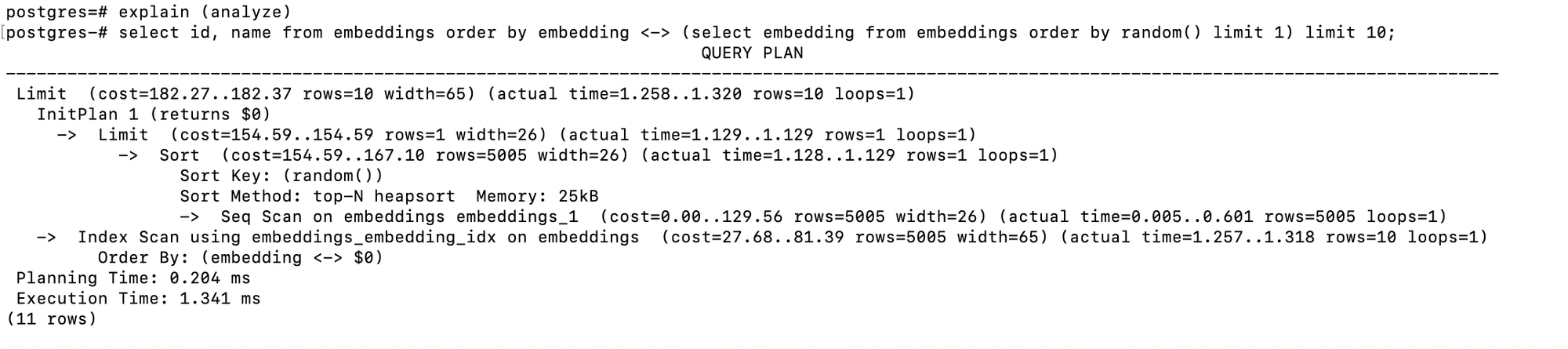
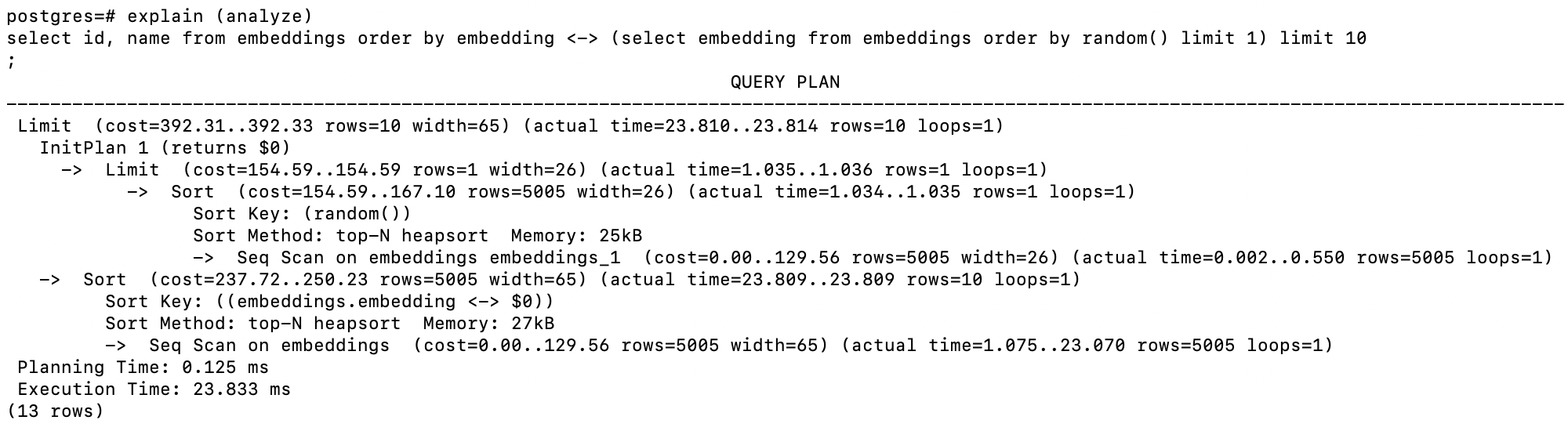
cost 가 392 정도이며, 23 ms로 실행되었습니다. 시퀀셜 스캔을 하였습니다.
explain (analyze)
select id, name from embeddings order by embedding <-> (select embedding from embeddings order by random() limit 1) limit 10;
HNSW인덱스를 생성 후 동일 쿼리를 조회합니다.
cost가 190 정도이고, 2ms로 수행되었습니다. embeddings_embedding_idx 인덱스 스캔을 사용하였습니다.
CREATE INDEX ON embeddings USING hnsw (embedding vector_l2_ops);

explain (analyze)
select id, name from embeddings order by embedding <-> (select embedding from embeddings order by random() limit 1) limit 10;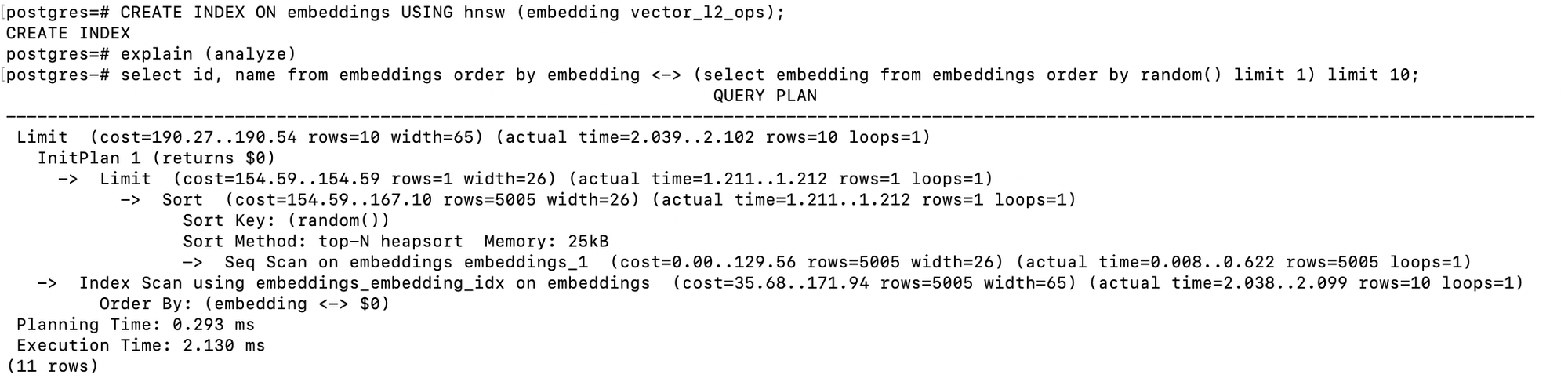
인덱스 내용을 보면 3개 컬럼으로 구성되어 있습니다.
postgres=# \di
                         List of relations
 Schema |           Name           | Type  |  Owner   |   Table
--------+--------------------------+-------+----------+------------
 public | embeddings_embedding_idx | index | postgres | embeddings
 public | embeddings_pkey          | index | postgres | embeddings
 public | items_pkey               | index | postgres | items
(3 rows)

SELECT
    A.TABLENAME
   ,A.INDEXNAME
   ,B.COLUMN_NAME
FROM  PG_CATALOG.PG_INDEXES      A
     ,INFORMATION_SCHEMA.COLUMNS B
WHERE A.TABLENAME = B.TABLE_NAME AND A.TABLENAME= 'embeddings'
ORDER BY
    A.TABLENAME ASC
   ,A.INDEXNAME ASC
   ,B.COLUMN_NAME;

postgres=# SELECT
postgres-#     A.TABLENAME
postgres-#    ,A.INDEXNAME
postgres-#    ,B.COLUMN_NAME
postgres-# FROM  PG_CATALOG.PG_INDEXES      A
postgres-#      ,INFORMATION_SCHEMA.COLUMNS B
postgres-# WHERE A.TABLENAME = B.TABLE_NAME AND A.TABLENAME= 'embeddings'
postgres-# ORDER BY
postgres-#     A.TABLENAME ASC
postgres-#    ,A.INDEXNAME ASC
postgres-#    ,B.COLUMN_NAME;
 tablename  |        indexname         | column_name
------------+--------------------------+-------------
 embeddings | embeddings_embedding_idx | embedding
 embeddings | embeddings_embedding_idx | id
 embeddings | embeddings_embedding_idx | name
 embeddings | embeddings_pkey          | embedding
 embeddings | embeddings_pkey          | id
 embeddings | embeddings_pkey          | name
(6 rows)
IVF 인덱스를 생성 후 동일 쿼리를 조회합니다.
cost는 182 정도이고, 1.3 ms만에 수행되었습니다. embeddings_embedding_idex 스캔을 수행하였습니다.
drop index embeddings_embedding_idx;

CREATE INDEX ON embeddings USING ivfflat (embedding vector_l2_ops) WITH (lists = 100);

explain (analyze)
select id, name from embeddings order by embedding <-> (select embedding from embeddings order by random() limit 1) limit 10;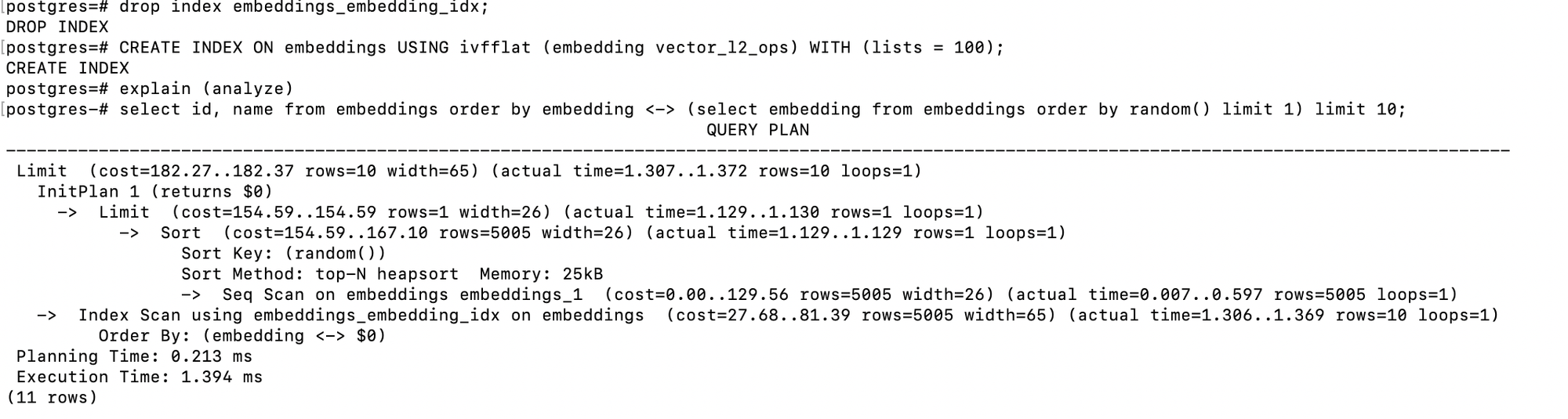
테스트로 hnsw인덱스도 다시 만들고 인덱스 상세를 조회했습니다.
두개 모두 생생되어 있습니다.
CREATE INDEX ON embeddings USING hnsw (embedding vector_l2_ops);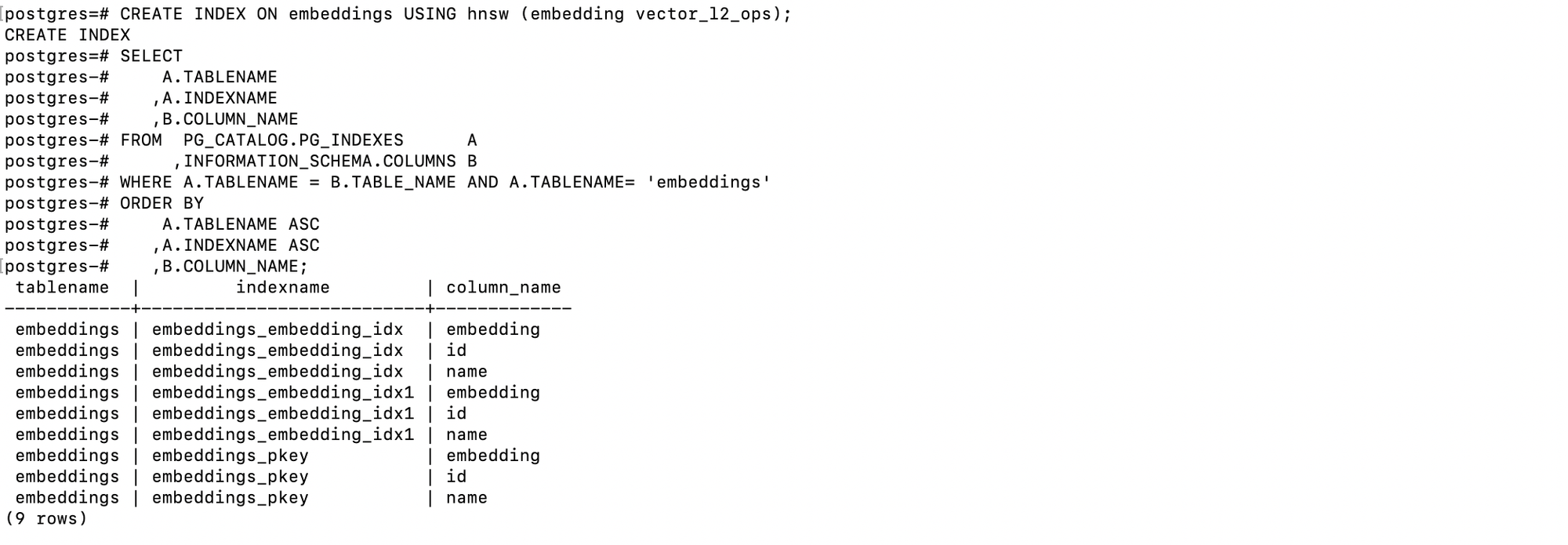
쿼리를 수행하니, IVF 인덱스를 스캔합니다.
explain (analyze)
select id, name from embeddings order by embedding <-> (select embedding from embeddings order by random() limit 1) limit 10;