✅ What Is an API Key?
To use GPT models in your code, you need an API Key.
Instead of using ChatGPT through the website,
the OpenAI API lets you bring GPT directly into your own code.
With it, you can do things like 👇
- Automatically summarize new arXiv papers every morning (e.g., arxiv-daily-plus)
- Build your own chatbot 🤖
- Generate speech or images from text 🎨
The API Key acts as the “key” that unlocks access to these models.
Here’s how you can create and use one.
1️⃣ Create an OpenAI Account
If you already have a ChatGPT account,
you can use it directly 🙌
You’ll need an OpenAI account first.
- Go to the OpenAI Sign Up Page.
- Sign in with your email, Google, or Microsoft account.
- Check your email to verify your account.
- Log in from the OpenAI Login Page.
2️⃣ Generate Your API Key
Now, let’s actually create your key 🔑
-
Go to the OpenAI Dashboard (top-right menu).

-
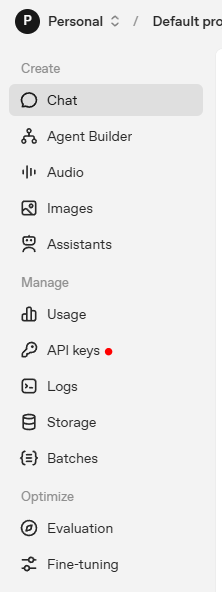
In the left sidebar, click API keys.
-
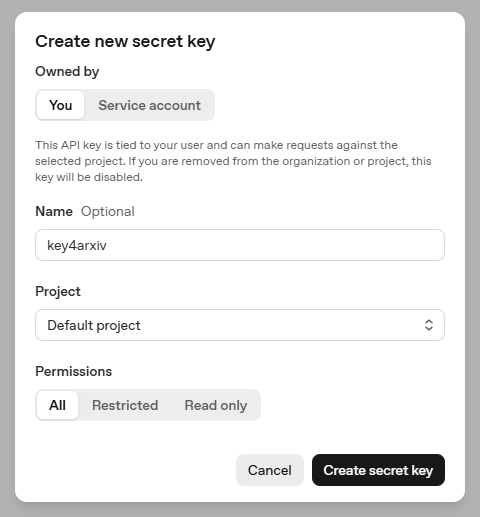
Click “Create new secret key.”

-
Choose any name you like (e.g.,
key4arxiv) and click “Create secret key.”
You’ll get a key that starts withsk-.
⚠️ The key will be shown only once!
Make sure to copy and save it securely.
(If you forget it, you’ll need to generate a new one 😅)
3️⃣ Keep Your Key Safe
This part is really important.
If someone else gets your API key, they can use GPT under your billing account — so make sure it’s secure.
- For Local Development (.env file)
OPENAI_API_KEY=sk-xxxxxxxxxxxxxxxxxxxxxxxxThen load it in your code 👇
import os
api_key = os.getenv("OPENAI_API_KEY")
- For GitHub Actions
In your GitHub repository →
Settings → Security → Secrets and variables → Actions
Add a new secret named OPENAI_API_KEY.
For example, the
arxiv-daily-plusproject
fetches new papers every day and uses this key
to summarize them with GPT.
🔒 Security Tips
- Never upload your API key to GitHub ❌
- Always add
.envto your.gitignorefile - If your key is exposed, delete it immediately from the API Keys page