Rotate with direction vectors in HelixToolkit
Transformation
Given two direction vectors v1 and v2, rotate model from v1 direction to v2 direction.
First, we can think of using quaternion.
- normalize two vectors -> v1, v2
- decide rotation axis, vector product of the two vectors
Vector3D axis = Vector3D.CrossProduct(v1,v2)
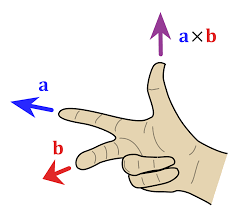
use right-handle rule to see rotation direciton
thumb = axis, curl from v1,v2, then finger curling represents rotation direction. - calculate rotation angle
double angle = Math.Acos(Vector3D.DotProduct(v1,v2)) - create quaternion
Quaternion rotation = Quaternion.AngleAxis(angle*180/Math.PI, axis) - appy rotation
MatrixTransform3D transform = new MatrixTransform3D();
transform.Rotation = new QuaternionRotation3D(rotation);
modelGroup.Transform = transform
Here, we can use RtateTransform3D instead of QuaternionRotation3D because WPF's 3D Transform handles underlying math more efficiently. Here's the code:
Input: Vector3D v1, v2

// Normalize
v1.Normalize();
v2.Normalize();

Vector3D axis = Vector3D.CrossProduct(v1, v2);
double angle = Math.Acos(Vector3D.DotProduct(v1, v2));

// Create a RotateTransform3D instead of MatrixTransform3D
AxisAngleRotation3D axisAngleRotation = new AxisAngleRotation3D(axis, angle * (180 / Math.PI));
RotateTransform3D rotateTransform = new RotateTransform3D(axisAngleRotation);

// Add the rotation transform to your transform group
transformGroup.Children.Add(rotateTransform);
Transform with Transform Group
transformGroup.Transform(Point3D)
transformGroup.Transform(Vector3D)
Inverse Transformation
Create inverse transformation matrix
Matrix3D matrix = transformGroup.Value;
Matrix3D inverseMatrix = matrix.Inverse();
Create inverse transformation group
Transform3DGroup inverseTransformGroup = new Transform3DGroup();
inverseTransformGroup.Children.Add(new MatrixTransform3D(inverseMatrix));
Use inverse transformation group
Point3D rePoint = inverseTransformGroup.Transform(Point3D)

Why don't you take a look around for a moment?