# MVC
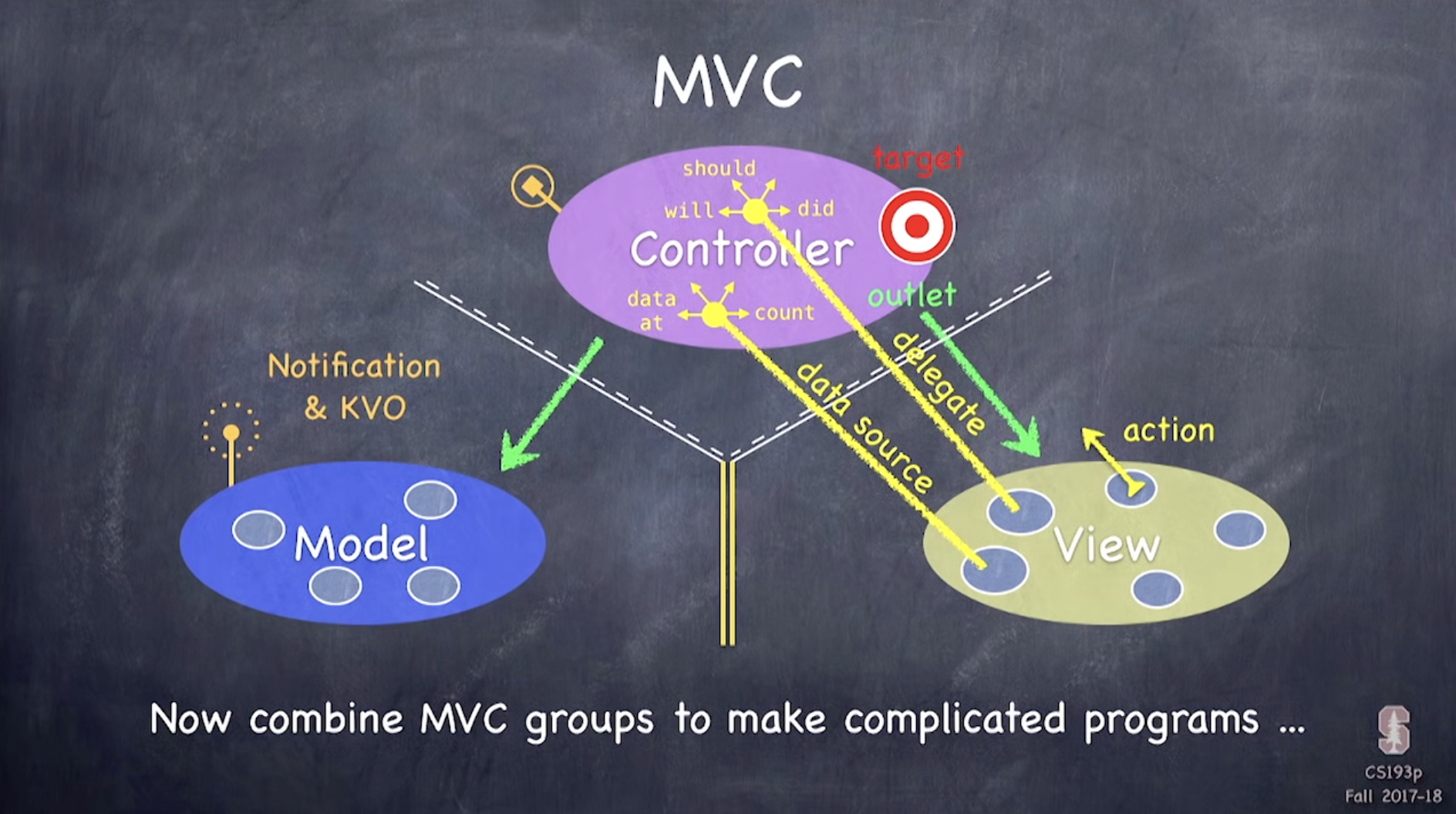
- Model : 우리의 앱이
무엇인지를 나타내는 부분으로 UI 와는 무관
- Controller : 우리의 앱이
사용자에게 어떻게 보이는지를 나타내는 부분으로 UI 로직
- View : Controller 의 미니언들
- UIButton UIViewController 등과 같은 generic 한 UI 요소들
-
Controller 는 Model 과도 직접적으로 소통할 수 있고, View 와도 (outlet 을 통해) 직접 소통 가능
-
Model 과 View 는 어떤 방법으로도 소통이 불가
-
View 는 Controller 와 소통할 수는 있으나 blind and structured 한 방식으로만 가능
- e.g. target-action
blind: View 는 generic 이므로 Controller 에 대해서 아무것도 모름structured: Controller 와 어떻게 소통할 지를 미리 정해야 함
-
View 와 Controller 간의 보다 복잡한 의사소통은 delegate 을 통해 이루어짐.
- delegate 은 안에 메시지를 보내는 객체가 들어있는 하나의 변수로, View 는 delegate 이 메세지를 보낸다는 것 외에 아무것도 알지 못함
-
View 는 Controller 로부터 데이터를 받아서 디스플레이함
-
Controller 의 역할은 Model 의 데이터를 View 에 전달하고, View 에서 발생한 사용자 상호작용을 Model 에 전달하는 것
-
Model 은 Controller 와 직접적으로 소통은 불가능하지만 라디오와 유사한 방식(KVO: Key Value Observing)을 사용해 간접적으로 소통 가능. Model 이 방송을 시작하면 Controller 가 이를 듣고 적절히 반응
-
여러개의 MVC 가 함께 협동하는 경우 하나의 MVC 는 다른 MVC 들을 자신의 View 의 일부처럼 다루기 때문에 blind and structured way 로 소통
# API : Application Programming Interface
-
해당 클래스에 포함된 모든 메서드와 프로퍼티들의 목록
-
public API : 어떤 클래스의 API 중에서 다른 클래스들이 호출할 수 있는 모든 메서드와 프로퍼티. 즉, 이 클래스의 사용 방법
# MVC 슥 보기
Model : Concentration
-
Concentration 게임을 하기 위해 필수적인 요소는 카드와 카드를 선택하는 것이므로 Model 은 cards, chooseCard(at:) 라는 2개의 public API 를 갖는다. 카드의 개수는 초기화 시 Controller 로부터 받아온다.
-
SwiftUI + MVVM 에서의 Model 과 사실상 같은데 여기서는 클래스로 선언한다는 차이가 있다.
Controller : ViewController
-
Public API : flipCountLabel, cardButtons, touchCard(_:)
-
Private : emoji(for:), updateViewFromModel(), flipCount, game
-
MVVM 에서는 Model 과 View 간의 중개자 역할이 더 강했다면 이제 View 는 minion 에 불과하므로 Controller 의 역할이 확대됐다. 이제
Model의 업데이트를View에 단순히 전달하는 게 아니라 그에 맞춰View가 어떻게 변화해야하는 지 까지 지정한다. -
SwiftUI + MVVM 이었다면
updateViewFromModel()이나flipCount는View에서 구현했을텐데 MVC 에서는 Controller 의 역할이 됐다. 전에 다른 글에서 확장성 문제 때문에 이제 MVC 는 지양되고, MVVM 이 선호된다는데 UIKit 를 사용할 때 MVVM 패턴으로 구성하면 어떤 모습일 지 아직 잘 모르겠다....뭔가 여기서의 View 는 할 수 있는게 너무 적어보인다 아직 스토리보드를 쓰고 있어서 그런가?
View
- UIButton, UILabel
- View 는 이제 정말 최소한만 할 수 있다. 사용자가 특정 반응을 하면 그걸 Controller 에게 전달하는 게 끝이다.
# 구조체와 클래스
- 구조체는 상속이 안되고, value type 이라 어딘가에 넘길 때 항상 복사본이 생성되어 넘겨진다.
- 따라서 아래와 같이 Card 의 배열을 만들 때 한 쌍씩 넣어주는 상황에서 카드 객체를 두개 만들 필요가 없이 어차피 복사본이 넘겨지므로 그냥 동일한 객체를 두 번 넣어주면 끝
class Concentration {
    init(numberOfPairsOfCards: Int) {
        for _ in 1...numberOfPairsOfCards {
            let card = Card()
            cards += [card, card]
        }
        cards.shuffle()
    }
}
# static
- type 자체에 딸린 일종의 전역 변수/함수처럼 생각할 수 있다! 절대로 인스턴스로부터 해당 프로퍼티/메서드를 호출할 수 없다.
# lazy
-
Controller 와 Model 을 연결하기 위해 Controller 내부에서 Model 을 아래와 같이 선언하면 초기화 중에 다른 프로퍼티
cardButtons.count을 사용하기 때문에 컴파일 에러가 발생한다. -
이를 해결하기 위해
lazy키워드를 사용할건데, 변수 앞에 lazy 를 덧붙이면 게을러지므로 누군가가 실제로 해당 변수를 호출하기 전까지는 초기화되지 않는다! -
다만, didset 과 같은 property observer 를 사용할 수 없다는 단점이 있다.
class ViewController: UIViewController {
    lazy private var game = Concentration(numberOfPairsOfCards: (cardButtons.count + 1) / 2)  // to protect from odd number
}
# View 의 업데이트는 Controller 에서
-
Model 에서 변화가 발생하면 View 를 해당 변화에 맞춰 업데이트 해줘야 하는 데, 이는 미니언들을 부리는 Controller 가 할 일이다. SwiftUI 를 배울 때는 그냥 View 에 ViewModel 을 넘겨줘서 View 에서 변화를 감지하고 스스로 어떻게 변할 지 결정하게 했는데 좀 낯선 부분이었다.
-
사용자가 카드를 누를 때마다 Model 에서 변화가 발생할 것이므로 updatViewFromModel() 을 호출해서 View 도 변화시킨다.
class ViewController: UIViewController {

    @IBAction func touchCard(_ sender: UIButton) {
        flipCount += 1
        if let cardNumber = cardButtons.firstIndex(of: sender) {
            game.chooseCard(at: cardNumber)
            updateViewFromModel()
        } else {
            print("choosen card was not in cardButtons")
        }
    }

    private func updateViewFromModel() {
        for index in cardButtons.indices {
            let button = cardButtons[index]
            let card = game.cards[index]
            if card.isFaceUp {
                button.setTitle(emoji(for: card), for: .normal)
                button.backgroundColor = .white
            } else {
                button.setTitle("", for: .normal)
                button.backgroundColor = card.isMatched ? .clear : .orange
            }
        }
    }
}
# 카드에 들어갈 이모지 불러오기
- 카드의 identifier 를 키로, 해당 identifier 를 갖는 한 쌍의 카드가 가질 이모지를 밸류로 하는 딕셔너리의 형태로 관리한다. 딕셔너리는 빈 상태로 시작해서 해당 카드에 최초로 접근이 있을 때 딕셔너리의 해당 키와 밸류가 업데이트 되는 방식
class ViewController: UIViewController {
        private var emojiChoices = ["🦇", "😱", "🙀", "😈", "🎃", "👻", "🍭", "🍬", "🍎"]

    private var emoji = [Int: String]()

    private func emoji(for card: Card) -> String {
        if emoji[card.identifier] == nil, !emojiChoices.isEmpty {
            let randomIndex = Int(arc4random_uniform(UInt32(emojiChoices.count)))
            emoji[card.identifier] = emojiChoices.remove(at: randomIndex)
        }
        return emoji[card.identifier] ?? "?"
    }
}
☀️ 느낀점
- 사실 아직 MVC 가 어떻게 돌아가는 건지 잘 이해가 안가지만 이건 MVVM 도 시간이 지나면서 얼추 뭔지 알겠다 싶었던 것처럼 계속 공부하다보면 나아지겠지 싶다. 일단 오늘 생각한 건 MVC 에서 Controller 는 MVVM 에서 View 와 ViewModel 이 하는 일을 둘 다 하는 것 같다고 느꼈다.
# MVC
- all about managing commuication b/w camps
- u put objects into each camp and they have kinda obey some rules when they talk to each other
the rules
-
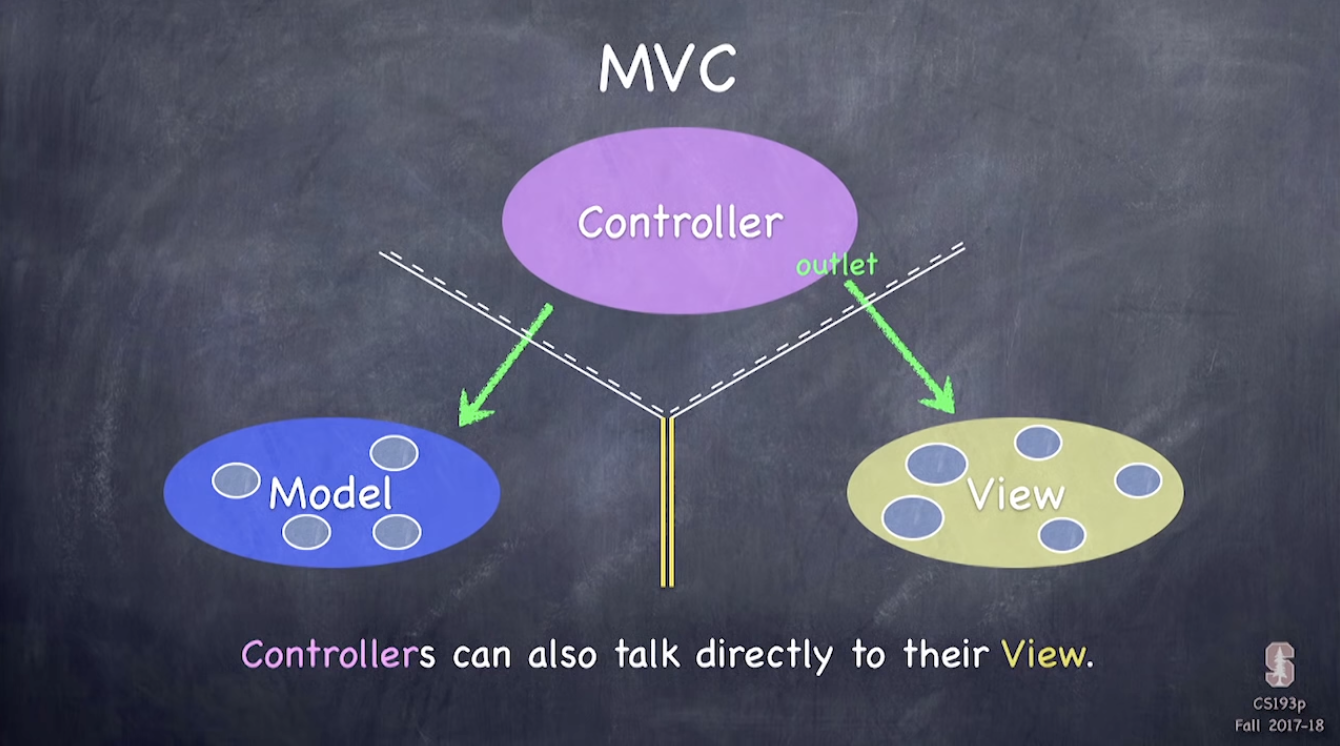
Controllers can always talk directly to their Model
-
Controllers can also talk directly to their View (eg. outlet)
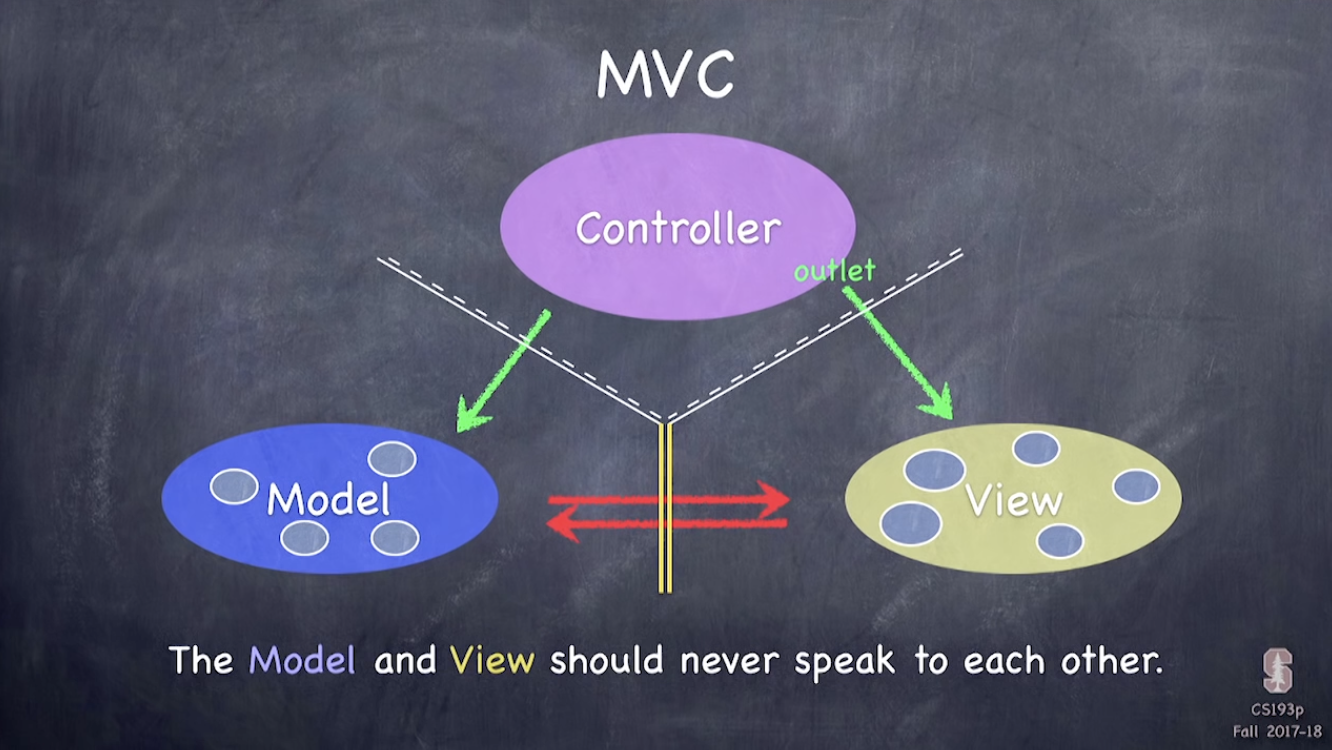
-
The Model and View should never speak to each other
-
the View can speak to its Controller but it has to be blind and structured (e.g. target(method)-action)
- blind in that Views are generics and so they don't know anything about a concentration game controller, it doesn't even know that its a concentration game controller- structured in that since we're gonna have this communication going on, a generic object has to think a little bit ahead about how it might wanna communicate with this Controller object
-
sometimes the View needs to synchronize with the Controller(e.g ScrollView(view item) may ask controller can I scroll horizontal? verticle?). complicated communications are done with predfinded methods (that the scrollView) defines as part of its delegate. a delegate is just a var in ScrollView that, and this var will have some object in it, and all we know about this object is that it responds to a certain number of messages. Most of these messages start with the words nil, should, or did. and the Controller, using a mechanism called protocols, is able to tell the scroll View, I'm ur delegate, and all the scroll View will know is that it implements will, should, and did. It doesn't know anything about it, such as it class,
-
Views do not own the data they display. they r not gonna have the data they're displaying as part of their instance variables. instead they use the same kind of protocol mechanism to have another set of special messages to get the data from the data source and Controllers are always that data source not Model. it;s Controllers get the data from the Model.
-
Controller's job in MVC is to interpret and format the model's info for the View and it interprets user interaction in the View for the model
-
Model can't communicate directly with the Controller but, it can indirectly communicate when it has info to update or sth to inform. It uses a 'radio-staion'-like broadcast mechanism(i.e. notifications, KVO(Key Value Observing), in which the model starts broadcasting on a certain known radio station, and the controller up there, it's just gonna tune in and when it hears that sth has changed on the models radio station, then it's gonna use its big green arrow, to go to the model to get the data that has changed or whatever
-
when an MVC works with another MVC, it treats other MVC's as part of its View, so it has to talk to them in a blind, structured way
Model
- UI independent
- what ur app is (but not how it is displayed)
- e.g. how to play concentraiton
Controller
- How ur Model is presented to the user(UI logic)
- e.g. how concentration looks
View
- ur Controller's minions
- generic UI elements like UIButton, UI view controller, UI label etc. that the Controller has to communicate with the Model to get your game, i.e. whatever is going on your app onto the UI
Application Programming Interface
- a list of all the methods and instacne variable in that class
- public API : all the instance vars and methods that u r gonna allow other classes to call. so it's basically how u use this class
Struct vs Class
- value type vs reference type
- inheritance
static
- sth like global or utility function that's tied to the type. u cant ask the instance for it
cards += [card, card]
lazy 41분 30초
- if u make a var lazy, it doesn't actually intialize until someone grabs it.
- cannot use property observers (didset)
Update from ViewModel func
emoji in a dictionary
for homework, make cards 80pts wide