# Autolayout 찍먹
- 지난 시간에 과제를 할 때 뷰어는 아이폰 11에서 작업하고 시뮬레이터는 아이폰 13으로 돌렸더니 레이아웃이 치우쳐 보였다. 오늘 강의에서는 모든 디바이스에 자동으로 레이아웃이 조정되도록 하는 autolayout 에 대해 가볍게 배웠다.
-
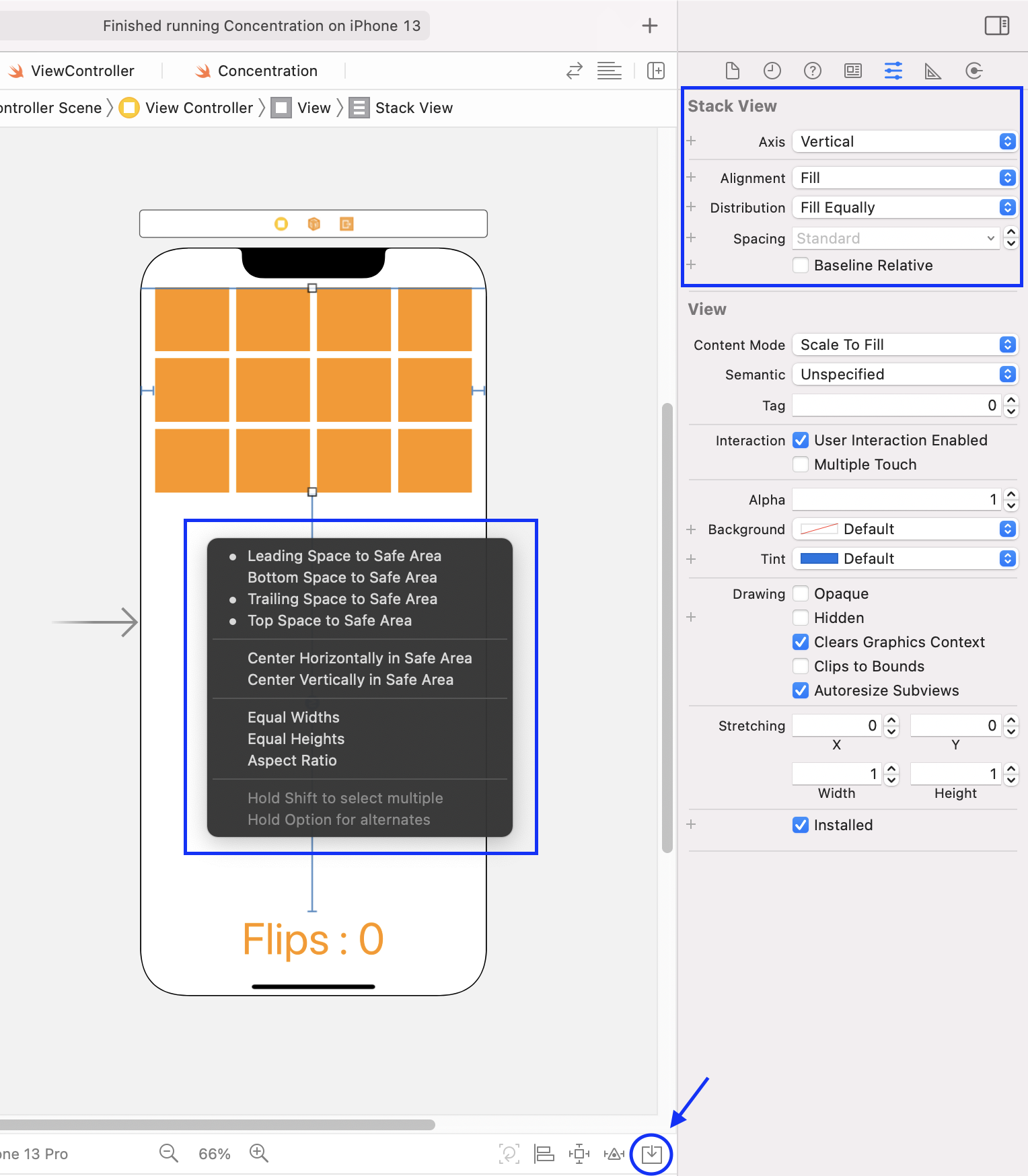
먼저 한 행씩 카드들을 드래그로 선택한 다음 하단의 동그라미로 표시해놓은 embed 버튼을 눌러서 stack 으로 embed 해주고 오른쪽 설정창처럼 설정해준다(spacing 은 standard value). 이걸 2번 더 반복하고 나서 스택 3개를 하나로 합쳐주면 스택 뷰 생성은 완료
-
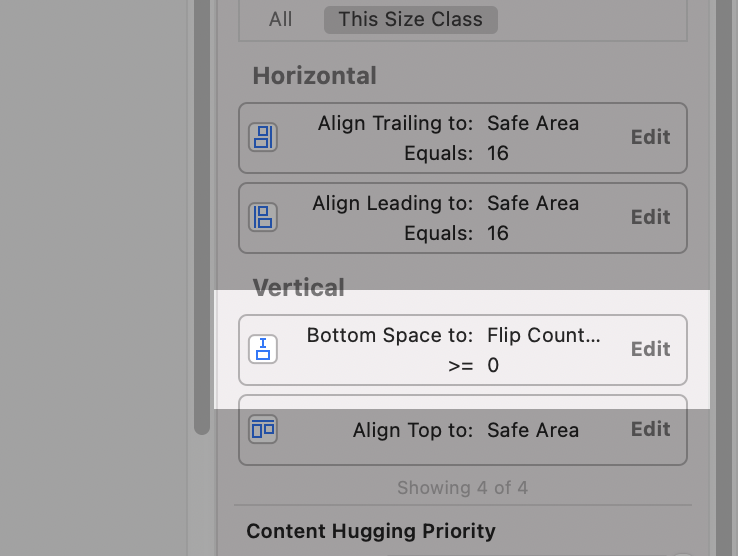
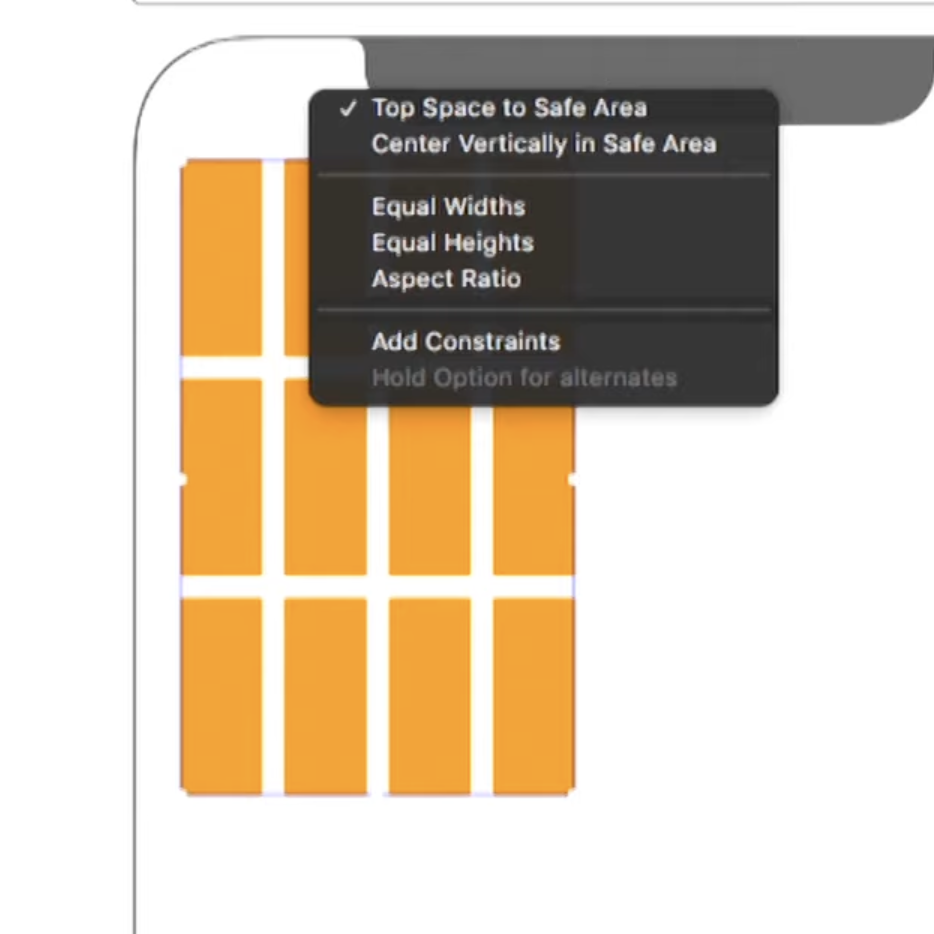
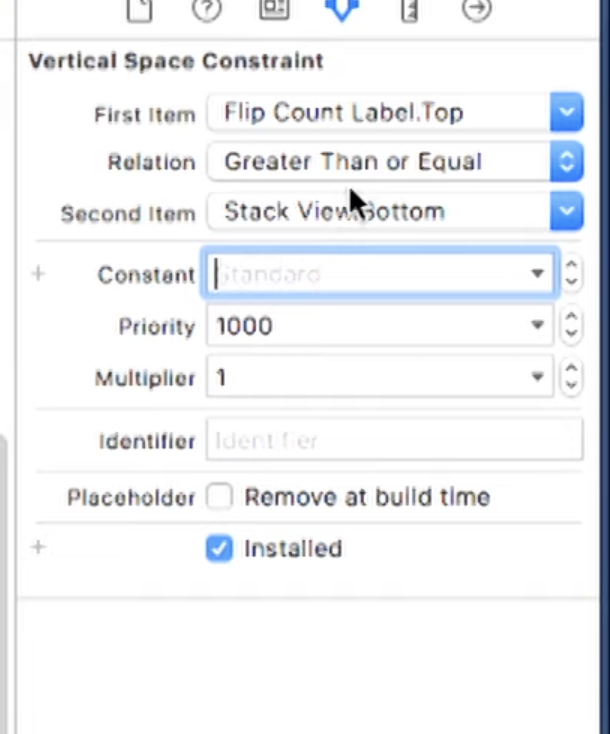
이제 위치를 잡아줄 건데, 스택뷰를 일단 왼쪽 상단에 정렬해준 다음, 스택뷰를 선택한 상태에서 ctrl 키를 누르고 전체 view 에 마우스를 끌고 가면 저 까만 팝업 창이 뜬다. 현재 설정된대로 선택해주면 끝. 하단의 경우 flipCountLabel 에 고정해주고, 셋팅을 아래 사진처럼 해줬다.
- 참고로 safe area 는 다른 UI 를 침범하지 않는 영역을 의미
- left, right 가 아니라 leading, trailing 을 쓰는 이유는 아랍어와 같은 언어는 오른쪽 -> 왼쪽으로 진행되기 때문
# Range
0.5...15.25의 경우 CountableRange 가 아니라 그냥 Range 인데, 얼마씩 이동해야할 지 모르기 때문이다.
- stride(from:through:by:) 함수를 쓰면 직접 이동 단위를 지정해서 CountableRange 로 바꿀 수 있다.
for i in stride(from: 0.5, through: 12.25, by: 0.3) {
    // do sth
}
# 튜플
- set/get 할 때 모두 요소의 이름을 다르게 정할 수 있고, 따라서 재선언도 가능하다
# Computed Property
-
어떠한 프로퍼티가 다른 프로퍼티를 기반으로 도출된다면, 연산 프로퍼티로 선언함으로써 자동으로 동기화하여 에러 가능성을 줄일 수 있다.
-
예를 들어서 Concentration 에서 indexOfOneAndOnlyFaceUpCard 프로퍼티는 get 할 때 cards 를 확인하면 알 수 있는 정보이므로 연산 프로퍼티로 만들면 더 쉽게 cards 와 동기화할 수 있다.
-
set 할 때도 현재 card의 인덱스가 newValue 와 일치하는 경우에만 isFaceup 프로퍼티를 true 로 나머지의 경우 false 로 하도록 해주면 코드도 더욱 깔끔해진다!
- 이 부분과 관련해서 수업 중 어떤 학생이 get/set 을 별도의 메서드로 분리할 수도 있을 것 같은데 연산 프로퍼티로 선언하는 것과 메서드로 선언하는 것이 각각 어떤 때 좋은지에 대한 질문을 했다. 교수님 답변은 변수처럼 보인다면 연산 프로퍼티로 사용하면 된다고 하셨다.
- 개인적으로는 이렇게 바꾸면 index 를 불러올 때 기존에는 O(1) 이었는데 이제는 O(n) 의 시간이 소요되니까 더 안 좋은 게 아닌가 라는 생각이 들었는데 이런 생각이 유효한지 모르겠다...에러 방지 > 효율성인걸까?
class Concentration {
    private var indexOfOneAndOnlyFaceUpCard: Int? {
        get {
            var foundIndex: Int?
            for index in cards.indices {
                if cards[index].isFaceUp {
                    if foundIndex == nil {
                        foundIndex = index
                    } else {
                        foundIndex = nil
                    }
                }
            }
            return foundIndex
        }
        set {
            for index in cards.indices {
                cards[index].isFaceUp = (index == newValue)
            }
        }
    }
}
# Access Control
- outlet 들과 target-action 의 경우 UI 를 구하기 위한 내부 프로퍼티/메서드이기 때문에 거의 항상 private 으로 선언한다
# Assert
-
assert(_:_:file:line:) 는 지정한 조건이 거짓일때 프로그램이 터지면서 디버거에 에러 발생 지점을 표시하는 함수로, 앱스토어에 출시하면 무시되나 개발 중에는 매우 유용하다. 특히, access control 과 같이 API 를 보호하는 용도로 쓸 수 있다.
-
chooseCard(at:) 메서드의 경우 카드의 인덱스를 인자로 받기 때문에 0보다 작은 값이 들어오면 안된다. 따라서 0보다 작은 값이 들어오면 assert(_:_:file:line:) 가 호출되게 함으로써 조건을 명확히 할 수 있다.
class Concentration {
    func chooseCard(at index: Int) {
        assert(cards.indices.contains(index), "Concentration.chooseCard(at: \(index)) : Choosen index out of range")
        if !cards[index].isMatched {
            if let matchIndex = indexOfOneAndOnlyFaceUpCard, matchIndex != index {
                cards[index].isFaceUp = true
                if cards[matchIndex].identifier == cards[index].identifier {
                    cards[matchIndex].isMatched = true
                    cards[index].isMatched = true
                }
            } else {
                indexOfOneAndOnlyFaceUpCard = index
            }
        }
    }
}
# Enum
- enum 은 if/else 문이 아닌 switch 문을 활용해서 현재 상태를 확인한다.
-
associated value 를 가질 수 있으며, 튜플과 유사하게 get/set 할 때 각각 이름을 지정할 수 있다. 단, 값 자체는 초기화할때만 지정 가능하고 이후에는 변경할 수 없다.
-
메서드와 연산 프로퍼티를 가질 수 있다
-
스스로를 변경하는 메서드를 가질 수도 있는데 앞에 mutating 을 붙여줘야 한다! mutating 키워드를 앞에 붙여줘야 하는 이유는 enum 이 copy on write(이하 c.o.w) 를 하는 value type 이므로 Swift 가 c.o.w 를 할 수 있도록 어떤 메서드들이 write 할 수 있는 지(즉, 변화를 일으키는 지) 알려줘야 하기 때문
enum FastFoodMenuItem {
    mutating func switchToBeingACookie() {
        self = .cookie
    }
}
# Memory Management
reference type 의 3가지 종류
- strong
- 디폴트 값
- weak
- 나를 제외하면 refernce count 가 0인 경우 힙에서 해당 객체를 지우고 나는 nil 로 바꾸라는 의미. nil 로 변경될 수 있어야 하므로 Optional 에만 적용할 수 있다.
- e.g. oulets (view 체계가 strong reference 를 가지므로 outlet 은 weak reference 를 가져도 됨)
- unowned
- 해당 객체가 힙에 있는지 아닌지 완벽하게 알고 있으므로 reference count 에 포함시키지 말라는 의미(없으면 알아서 힙에 접근하지 않을 것이므로)
- 없는 경우 프로그램이 터지므로 매우 위험하다
- 보통 오직 객체 간 memory cycle 을 끊기 위해 사용한다
☀️ 느낀 점
- extension 을 남용하지 말라고 하신 말씀이 기억에 남았다...정말 그 type 을 더 유용하게 만드는 경우에만 추가하고(막 Concentration 에 필요한 로직을 Int에 추가하지 말라는 것) 상속이 필요한 문제는 아닌지 생각해보라는 말씀!
- 2021 강좌는 처음부터 깔끔한 코드를 시연하셨다면 2017은 상대적으로 긴 코드를 어떻게 깔끔하게 바꿀 수 있는 지 보여주시는 것 같다. 왜 이렇게 하셨을까 궁금했던 부분이 해소되기도 하고, 바꾼 방법이 이해가 안가기도 한다...
-
ctrl + drag to pin to the top
-
safe area : area that doesn't overlap w/ other UI
-
leading space to safe area : lang like hebrew come from the right
Range
- 0.5...15.25 -> just rang, not CountableRange
- use stride(from:through:by:)
for i in stride(from: 0.5, through: 12.25, by: 0.3) {
    // do sth
}
Tuple
- u can assign names when setting or getting a tuple
- u can redeclare names
- good for return values
Computed Properties
- when a property is derived from other properties, it's better to have them be computed property, b/c it's easiser to keep in sync and thus less error prone
- e.g. indexOfOneAndOnlyFaceUpCard
36분 : when do we use computed properties instead of to methods that get and set ? A: when it looks like a var to us
Assertion
- just a function that u call where u assert sth to be true, and if it's not, ur program crashes and print out an error
- asserts are ignored when u ship to the App Store, but in developement, it'll be crashing ur program and take the debugger right to where the assertion failed.
- great way to protect ur API
enum
- only has discrete states, and u check the state with a switch statement
- never a '=' - can have assoicated values, u can name these associated values when u get/set them. but the value itself can only be set once, during initialization
- can have methods and computed vars only
- modifying self in an enum
- u can even reassign self inside an enum method- mutating is required b/c enum is a value type : value types do copy on write so it needs to knoew which funcs might write(i.e. change this) so that Swift knoew to copy and write
enum FastFoodMenuItem {
    mutating func switchToBeingACookie() {
        self = .cookie
    }
}
Memory Management
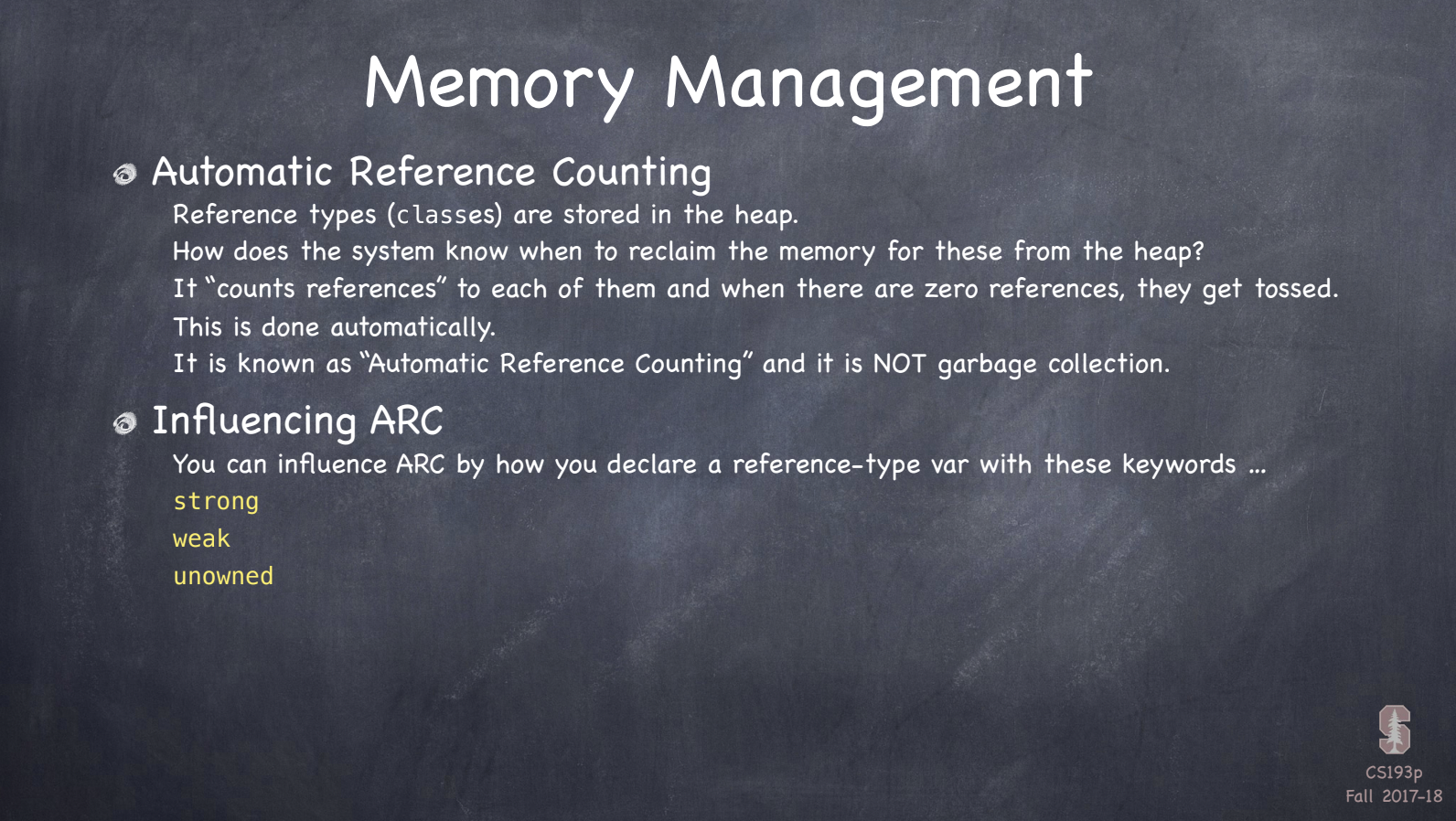
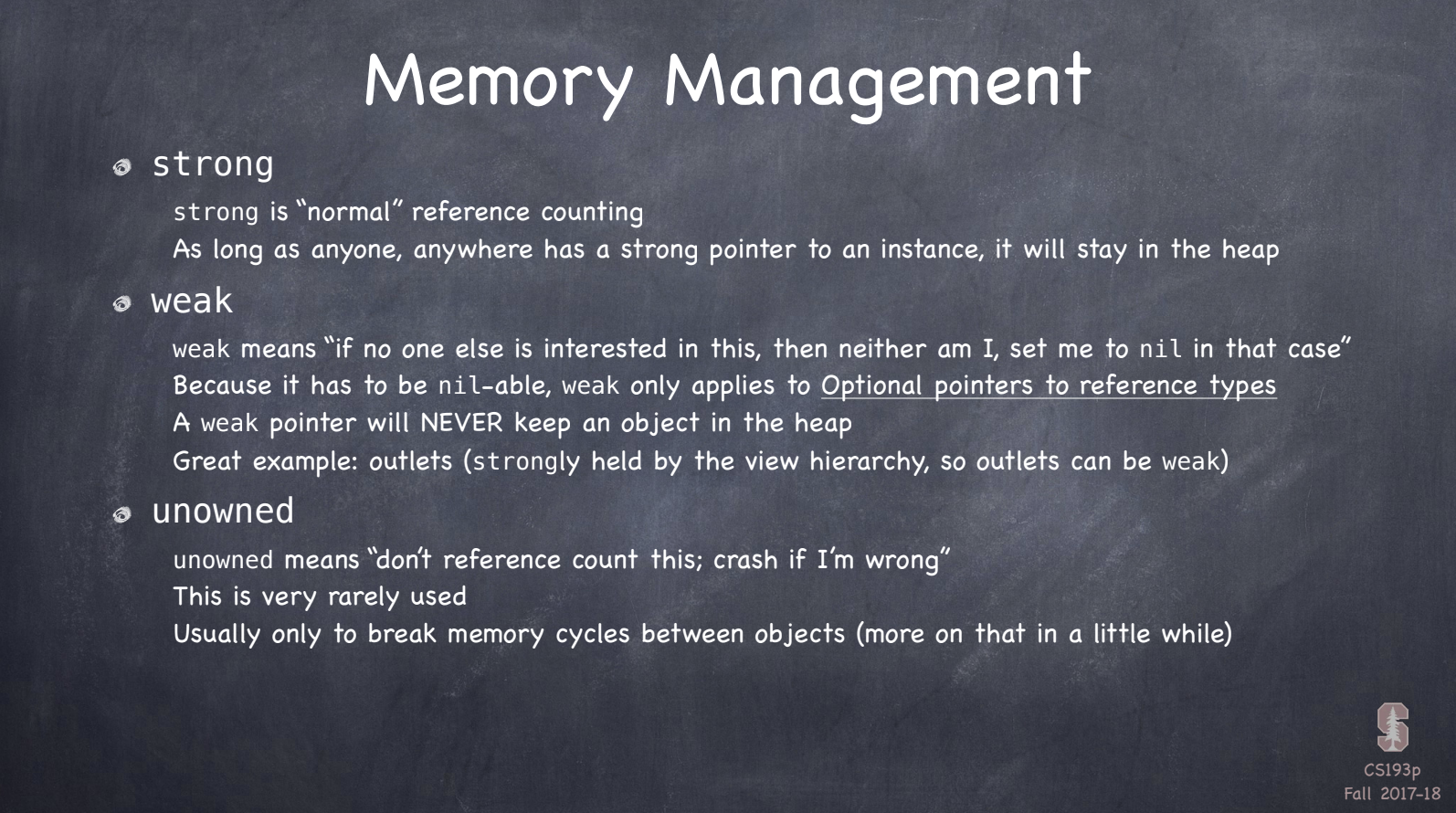
- unowned is very dangerous b/c it means I'll never access this thing when it's gone from the heap -> u think u know for sure when it's in heap or not
- avoid memory cycle
READ THE SLIDES GO OVER!!!
indexOfOneAndOnlyFaceUpCard 리팩토링
access control
- IBOutlet
- 이미 get only