Numerical Python - Numpy
Keywords
- numpy
- ndarray
- handling shape
- indexing
- slicing
- creation function
- operation functions
- array operations
- comparisons
- boolean index
- fancy index
- numpy data i/o
Numpy
numpy(numerical python)
- 파이썬의 고성능 과학 계산용 패키지
- matrix와 vector와 같은 array 연산의 사실상의 표준
- 일반 List에 비해 빠르고, 메모리 효율적
- 반복문 없이 데이터 배열에 대한 처리를 지원함
- 선형대수와 관련된 다양한 기능을 제공함
- C, C++, 포트란 등의 언어와 통합 가능
1. ndarray
import
import numpy as npArray creation
test_array = np.array([1, 4, 5, 8], float)
print(test_array)
## array([1., 4., 6., 8.])

type(test_array[3])
## numpy.float64- numpy는 np.array 함수를 이용하여 배열을 생성함 -> ndarray
- numpy는 하나의 데이터 type만 배열에 넣을 수 있음
- List와 가장 큰 차이점: Dynamic typing not supported
- C의 Array를 사용하여 배열을 생성함
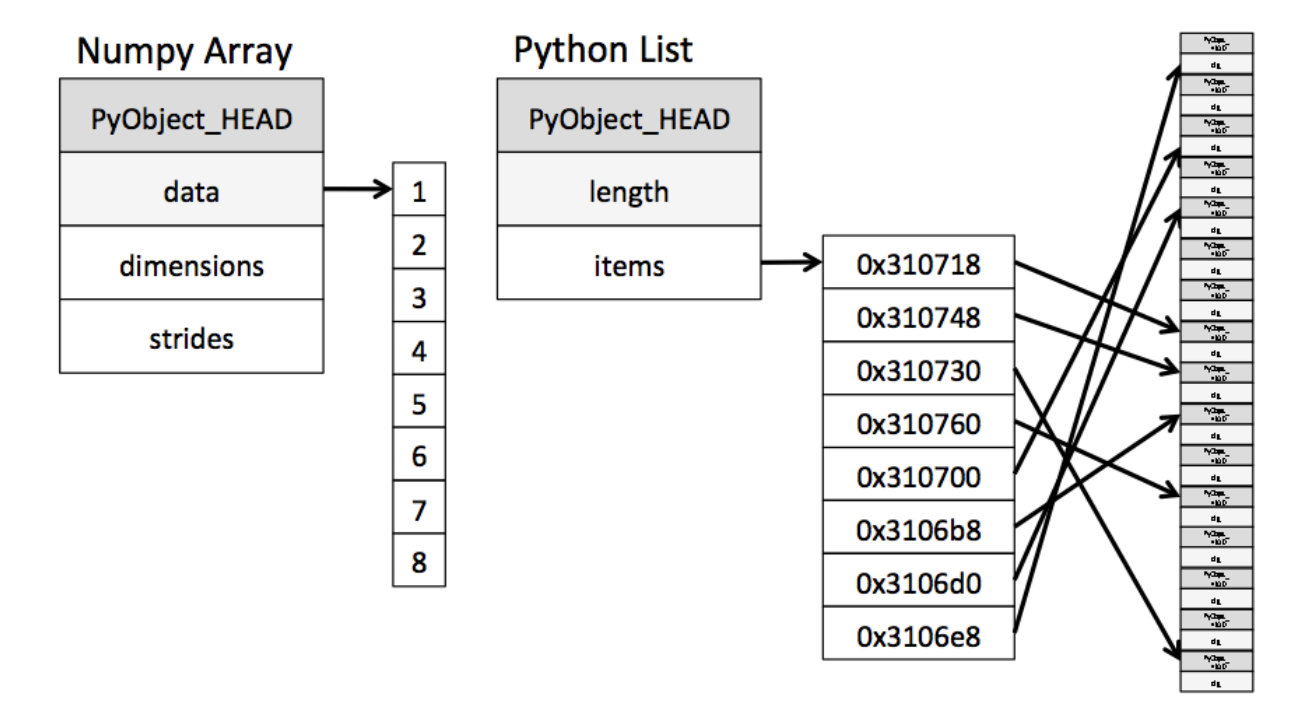
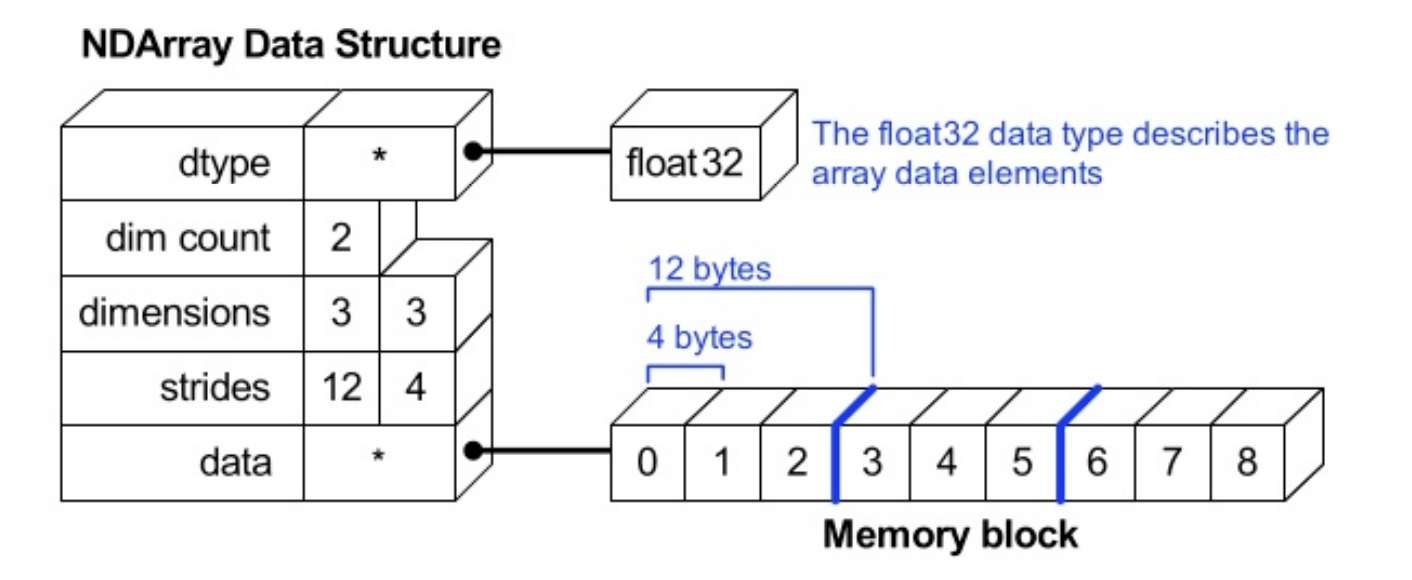
test_array = np.array([1, 4, 5, "8"], float) # String Type의 데이터를 입력해도
test_array
## array([1., 4., 5., 8.])type(test_array[3]) # Float Type으로 자동 형변환을 실시
## numpy.float64test_array.dtype # Array(배열) 전체의 데이터 Type을 반환함
## dtype('float64')test_array.shape # Array(배열)의 shape을 반환함
## (4,)Array shape
Array (vector, matrix, tensor)의 크기, 형태 등에 대한 정보
- vector
vector = np.array([1, 4, 5, 8], float)
vector.shape
## (4,)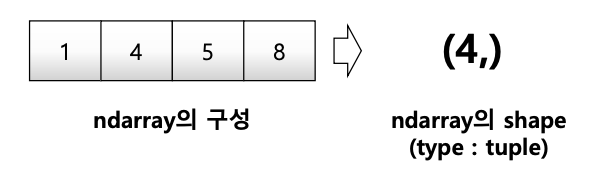
- matrix
matrix = [[1, 2, 5, 8], [1, 2, 5, 8], [1, 2, 5, 8]]
np.array(matrix, int).shape
## (3, 4)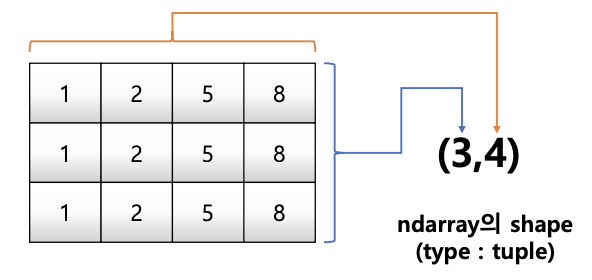
- 3rd order tensor
tensor = [[[1, 2, 5, 8], [1, 2, 5, 8], [1, 2, 5, 8]],
		  [[1, 2, 5, 8], [1, 2, 5, 8], [1, 2, 5, 8]],
		  [[1, 2, 5, 8], [1, 2, 5, 8], [1, 2, 5, 8]],
		  [[1, 2, 5, 8], [1, 2, 5, 8], [1, 2, 5, 8]]]
np.array(tensor, int).shape
## (4, 3, 4)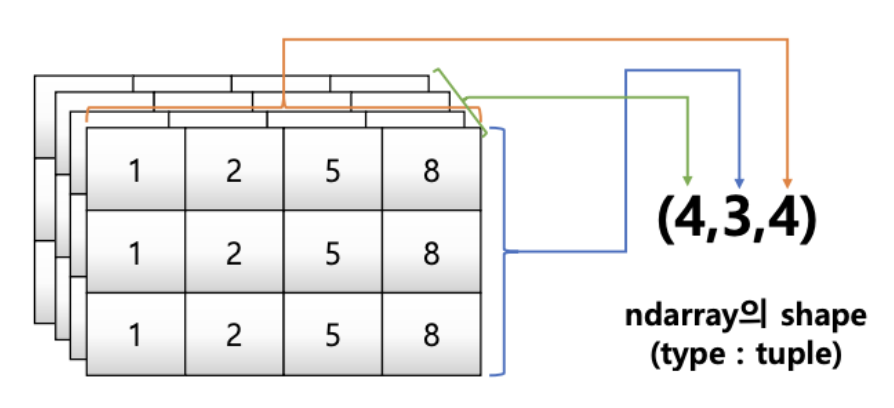
Array shape - ndim & size
ndim: number of dimension
size: data의 개수
np.array(tensor, int).ndim
np.array(tensor, int).size
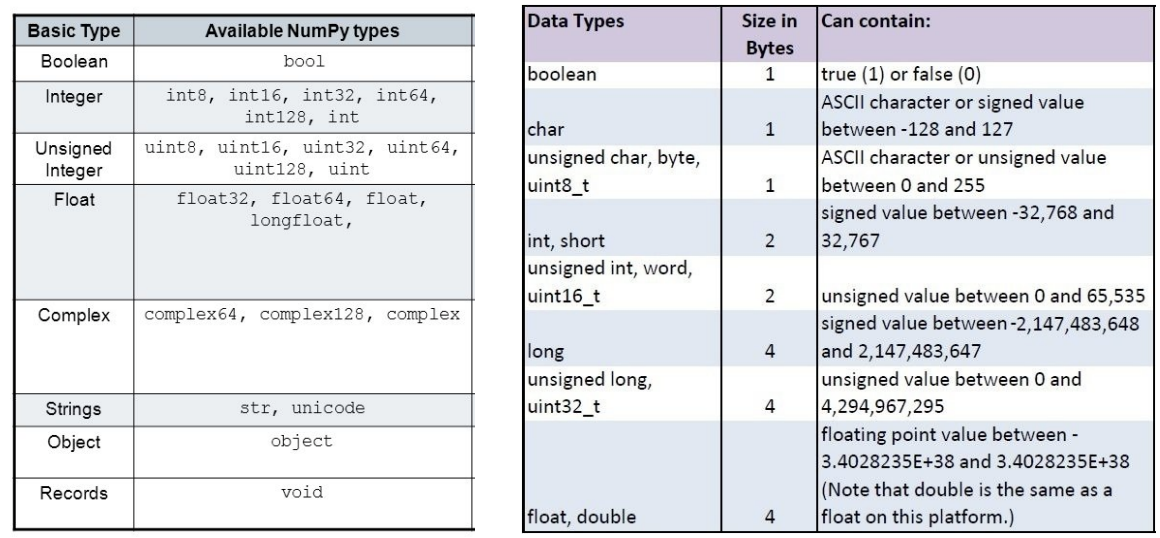
Array dtype
- ndarray의 single element가 가지는 data type
- 각 element가 차지하는 memory의 크기가 결정됨
# Data type을 integer로 선언
np.array([[1, 2, 3], [4.5, 5, 6]], dtype=int)
## array([[1, 2, 3],
##		  [4, 5, 6]])

# Data type을 float로 선언
np.array([[1, 2, 3], [4.5, "5", "6"]], dtype=np.float32)
## array([[1. ,  2. ,  3. ],
## [4.5, 5. , 6. ]], dtype=float32)-
C의 data type과 compatible
-
nbytes - ndarray object의 메모리 크기를 반환함
np.array([[1, 2, 3], [4.5, "5", "6"]], dtype=np.float32).nbytes
## 32 bits = 4 bytes -> 6 * 4 bytes
## 24np.array([[1, 2, 3], [4.5, "5", "6"]], dtype=np.int8).nbytes
## 8 bits = 1 bytes -> 6 * 1 bytes
## 6np.array([[1, 2, 3], [4.5, "5", "6"]], dtype=np.float64).nbytes
## 64 bits = 8 bytes -> 6 * 8 bytes
## 482. Handling shape
reshape
- Array의 shape의 크기를 변경함 (element의 개수는 동일)
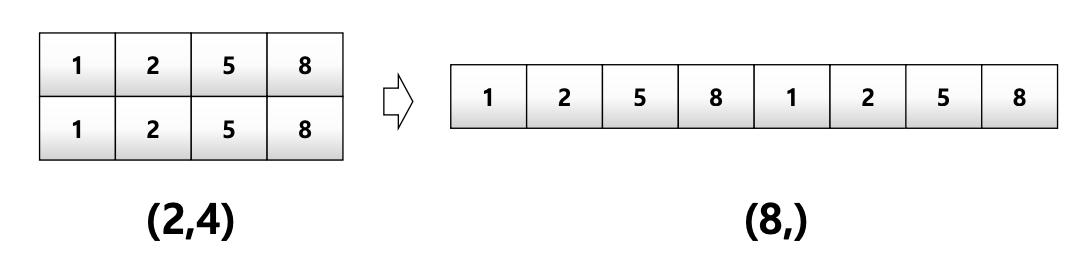
test_matrix = [[1, 2, 3, 4], [1, 2, 5, 8]]
np.array(test_matrix).shape
## (2, 4)np.array(test_matrix).reshape(8,)
## array([1, 2, 3, 4, 1, 2, 5, 8])np.array(test_matrix).reshape(8,).shape
## (8,)- Array의 size만 같다면 다차원으로 자유로이 변형가능
np.array(test_matrix).reshape(2,4).shape
## (2, 4)np.array(test_matrix).reshape(-1,2).shape
## (4, 2)np.array(test_matrix).reshape(2, 2, 2)
## array([[[1, 2],
## [3, 4]],
##
## [[1, 2],
## [5, 8]]])np.array(test_matrix).reshape(2, 2, 2).shape
## (2, 2, 2)flatten
- 다차원 array를 1차원 array로 변환
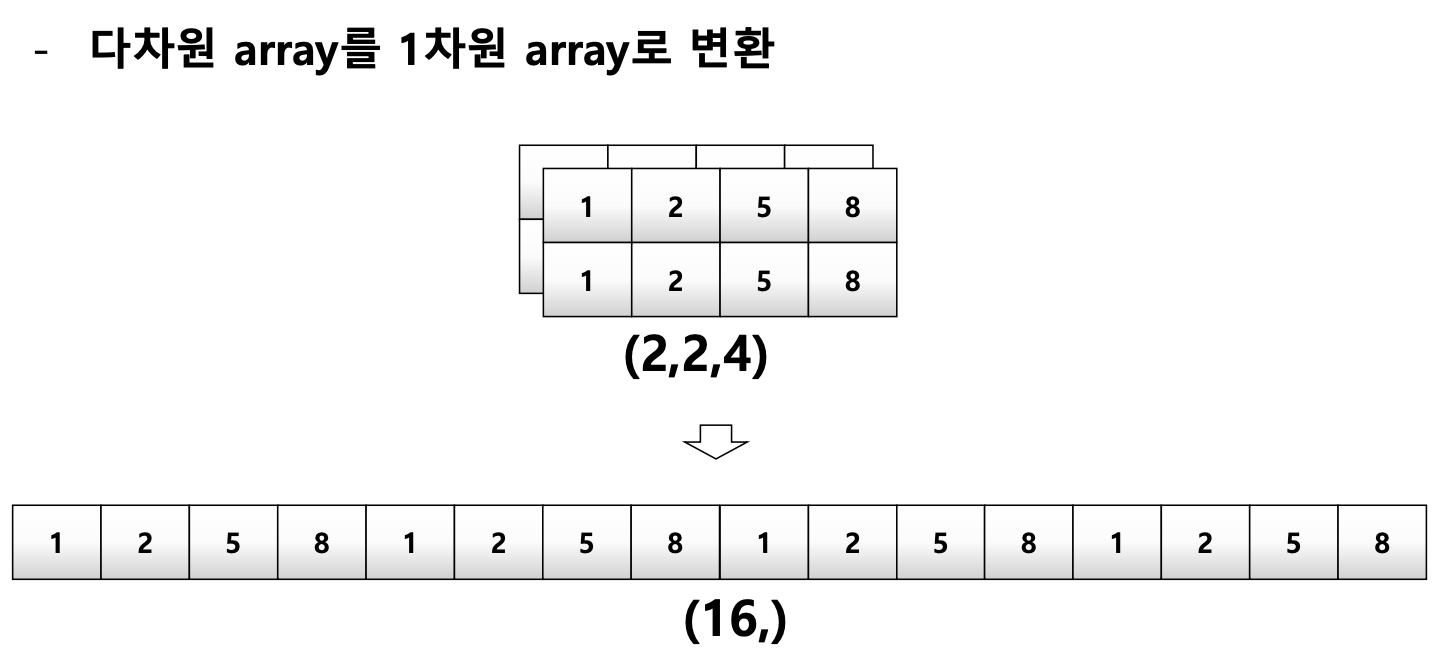
test_matrix = [[[1, 2, 3, 4], [1, 2, 5, 8], [[1, 2, 3, 4], [1, 2, 5, 8]]]
np.array(test_matrix).flatten()
## array([1, 2, 3, 4, 1, 2, 5, 8, 1, 2, 3, 4, 1, 2, 5, 8])
3. Indexing & slicing
Indexing
- List와 달리 이차원 배열에서 [0, 0] 과 같은 표기법을 제공함
- Matrix일 경우 앞은 row, 뒤는 column을 의미함
a = np.array([[1, 2, 3], [4.5, 5, 6]], int)
print(a)
## [[1 2 3]
## [4 5 6]]print(a[0, 0]) # Two dimensional array representation #1
## 1
print(a[0][0]) # Two dimensional array representation # 1
## 1a[0, 0] = 12 # Matrix 0,0에 12 할당
print(a)
## [[12 2 3]
## [ 4 5 6]]
a[0][0] = 5 # Matrix 0,0에 5 할당
print(a)
## [[5 2 3]
## [4 5 6]]Slicing
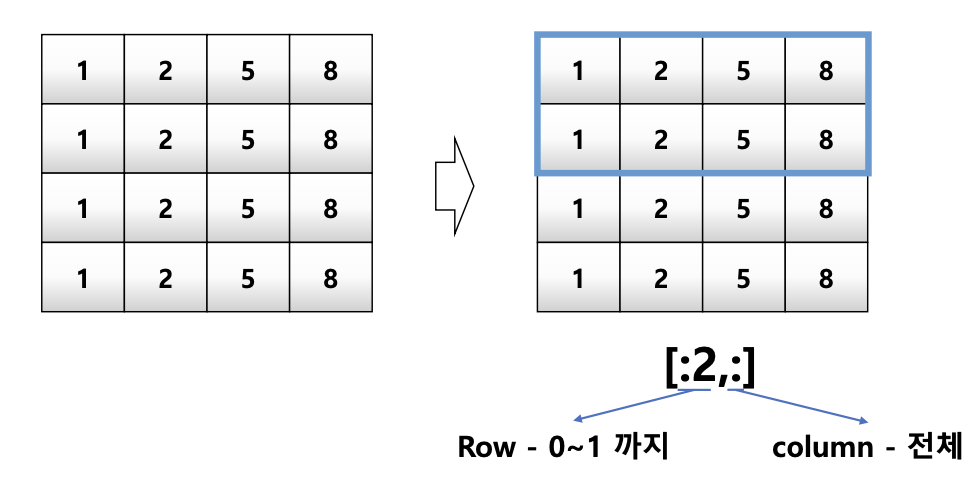
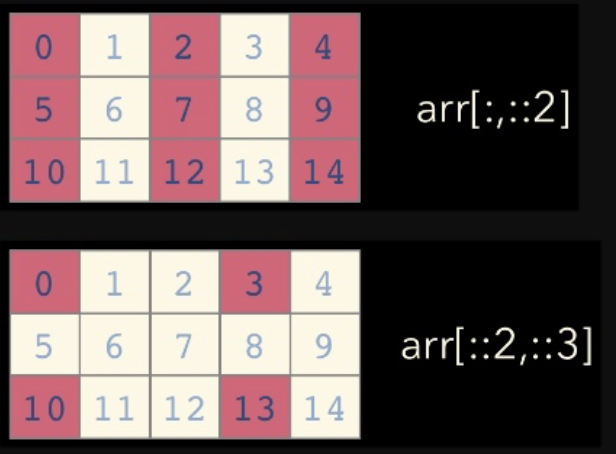
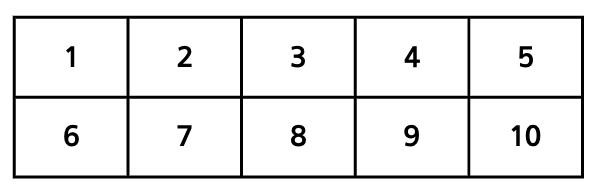
a = np.array([[1, 2, 3, 4, 5], [6, 7, 8, 9, 10]], int)
## array([[ 1,  2,  3,  4,  5],
##        [ 6,  7,  8,  9, 10]])
a[:, 2:]
a[:, 2:] # 전체 row의 2열 이상
## array([[ 3,  4,  5],
##        [ 8,  9, 10]])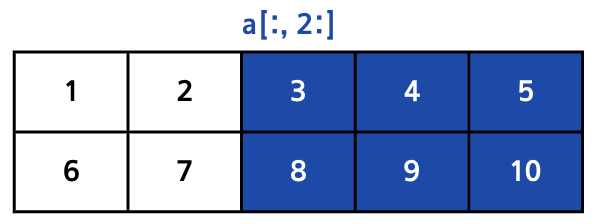
a[1, 1:3]
a[1, 1:3] # 1 row의 1열 ~ 2열
## array([7, 8])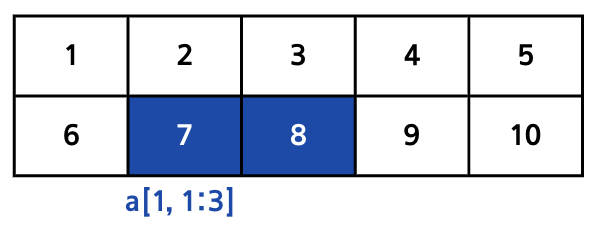
a[1:3]
a[1:3] # 1 row ~ 2 row의 전체
## array([[ 6,  7,  8,  9, 10]])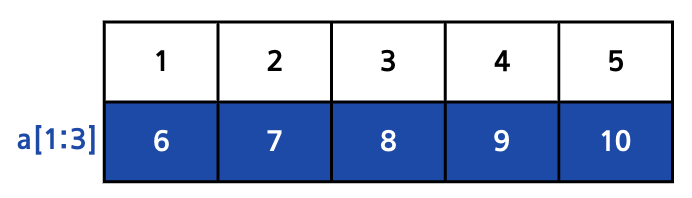
4. creation function
arange
- arange
- array의 범위를 지정하여, 값의 list를 생성하는 명령어
- List의 range와 같은 효과, integer로 0부터 29까지 배열추출
np.arange(30)
## array([ 0,  1,  2,  3,  4,  5,  6,  7,  8,  9, 10, 11, 12, 13, 14, 15, 16
## 17, 18, 19, 20, 21, 22, 23, 24, 25, 26, 27, 28, 29, 30])np.arange(0, 5, 0.5) # floating point도 표시가능함
## array([ 0. , 0.5, 1. , 1.5, 2. , 2.5, 3. , 3.5)np.arange(30).reshape(5, 6)ones, zeros and empty
something_like
identity
eye
diag
random sampling
5. operation functions
sum
axis
mean & std
mathematical functions
concatenate
6. array operations
operations b/t arrays
element-wise operations
dot product
transpose
broadcasting
numpy performance #1
numpy performance #2
7. comparisons
all & any
comparison operation #1
comparison operation #2
np.where
argmax & argmin
8. boolean & fancy index
boolean index
fancy index
9. numpy data i/o
loadtxt & savetxt
numpy object - npy
References
- cs231
- Python numpy 강좌
- 파이썬 라이브러리를 활용한 데이터 분석