1. 주문 목록 검색 및 주문 취소 기능 구현
1) 주문 목록 검색 구현
OrderSearch
package jpabook.jpashop.repository;

import jpabook.jpashop.domain.OrderStatus;
import lombok.Getter;
import lombok.Setter;

@Getter @Setter
public class OrderSearch {

    private String memberName; //회원이름
    private OrderStatus orderStatus; //주문상태[ORDER, CANCEL]

}- 주문 목록 검색의 조건을 필드로 담아놓음
- 회원 이름과 주문 상태로 검색을 할 수 있음
OrderService
package jpabook.jpashop.service;

...

@Service
@Transactional(readOnly = true)
@RequiredArgsConstructor
public class OrderService {

    private final OrderRepository orderRepository;

	...

    /**
     * 주문 목록 검색
     * @param orderSearch
     * @return List<Order>
     */
    public List<Order> findOrders(OrderSearch orderSearch){
        return orderRepository.findAllByCriteria(orderSearch);
    }

}-
findAllByCriteria: 이전에 OrderRepository에 동적 쿼리에 대한 컨디션 조합을 predicate를 활용해서 만들었던 코드를 사용해서 검색 기능 수행Criteria는 JPQL의 작성을 도와주는 빌더 클래스로 자바 코드 기반임- 자세한 내용 : 06 주문 도메인 개발 - 주문 검색 기능 개발
-
서비스 단에서 로직이 간단하면 service가 아닌 controller에서 repository에 접근해서 해당 기능을 직접 수행하도록 구현해도 괜찮음
- 위 코드처럼 단순한 조회 기능의 경우, 단순 위임인 경우 컨트롤러에서 바로 호출해도 됨
- 현재 개발건에서는 컨트롤러에 코드 라인 수가 많지 않기
때문에 직접 컨트롤러에서 해당 기능을 구현해줌
OrderController
package jpabook.jpashop.web;
...

@Controller
@RequiredArgsConstructor
public class OrderController {

    private final OrderService orderService;
    private final MemberService memberService;
    private final ItemService itemService;

	...

     /**
     * 주문 목록 검색
     */
    @GetMapping("/orders")
    public String orderList(@ModelAttribute("orderSearch") OrderSearch orderSearch, Model model){

        List<Order> orders = orderService.findOrders(orderSearch);
        model.addAttribute("orders", orders);

        return "order/orderList";

    }

}
- 주문 목록을 검색하는 검색 조건이
OrderSearch객체에 담겨서 넘어옴 findOrders메서드의 입력값으로 검색 조건으로 받은OrderSearch를 넘김order가 list 형태로 넘어오면 이를orderList화면에 뿌려줌model.addAttribute("orderSearch", orderSearch);코드를 추가하지 않아도ModelAttribute를 통해OrderSearch가 order와 동일하게 화면에 객체로 전달이 됨
2) 주문 취소 컨트롤러
package jpabook.jpashop.web;

...

@Controller
@RequiredArgsConstructor
public class OrderController {

    private final OrderService orderService;
    private final MemberService memberService;
    private final ItemService itemService;

````...

    /**
     * 주문 취소
     */
    @PostMapping("/orders/{orderId}/cancel")
    public String cancelOrder(@PathVariable("orderId") Long orderId){

        orderService.cancelOrder(orderId);

        return "redirect:/orders";

    }

}
2. 주문 목록 검색 및 주문 취소 화면 개발
order/orderList
<!DOCTYPE HTML>
<html xmlns:th="http://www.thymeleaf.org">
<head th:replace="fragments/header :: header"/>
<body>
<div class="container">
    <div th:replace="fragments/bodyHeader :: bodyHeader"/>
    <div>
        <div>
            <form th:object="${orderSearch}" class="form-inline">
                <div class="form-group mb-2">
                    <input type="text" th:field="*{memberName}" class="formcontrol" placeholder="회원명"/>
                </div>
                <div class="form-group mx-sm-1 mb-2">
                    <select th:field="*{orderStatus}" class="form-control">
                        <option value="">주문상태</option>
                        <option th:each=
                                        "status : ${T(jpabook.jpashop.domain.OrderStatus).values()}"
                                th:value="${status}"
                                th:text="${status}">option
                        </option>
                    </select>
                </div>
                <button type="submit" class="btn btn-primary mb-2">검색</button>
            </form>
        </div>
        <table class="table table-striped">
            <thead>
            <tr>
                <th>#</th>
                <th>회원명</th>
                <th>대표상품 이름</th>
                <th>대표상품 주문가격</th>
                <th>대표상품 주문수량</th>
                <th>상태</th>
                <th>일시</th>
                <th></th>
            </tr>
            </thead>
            <tbody>
            <tr th:each="item : ${orders}">
                <td th:text="${item.id}"></td>
                <td th:text="${item.member.name}"></td>
                <td th:text="${item.orderItems[0].item.name}"></td>
                <td th:text="${item.orderItems[0].orderPrice}"></td>
                <td th:text="${item.orderItems[0].count}"></td>
                <td th:text="${item.status}"></td>
                <td th:text="${item.orderDate}"></td>
                <td>
                    <a th:if="${item.status.name() == 'ORDER'}" href="#"
                       th:href="'javascript:cancel('+${item.id}+')'"
                       class="btn btn-danger">CANCEL</a>
                </td>
            </tr>
            </tbody>
        </table>
    </div>
    <div th:replace="fragments/footer :: footer"/>
</div> <!-- /container -->
</body>
<script>
    function cancel(id) {
        var form = document.createElement("form");
        form.setAttribute("method", "post");
        form.setAttribute("action", "/orders/" + id + "/cancel");
        document.body.appendChild(form);
        form.submit();
    }
</script>
</html>
코드 상세 설명
검색 Form
<form th:object="${orderSearch}" class="form-inline">
                <div class="form-group mb-2">
                    <input type="text" th:field="*{memberName}" class="formcontrol" placeholder="회원명"/>
                </div>
                <div class="form-group mx-sm-1 mb-2">
                    <select th:field="*{orderStatus}" class="form-control">
                        <option value="">주문상태</option>
                        <option th:each=
                                        "status : ${T(jpabook.jpashop.domain.OrderStatus).values()}"
                                th:value="${status}"
                                th:text="${status}">option
                        </option>
                    </select>
                </div>
                <button type="submit" class="btn btn-primary mb-2">검색</button>
</form>- 컨트롤러에서 Model에
OrderSearch가 담겨서 화면에 object로 전달됨 - 회원명과 주문상태를 입력으로 받고 있음
- form을 subimit하면
orderSearch에 입력값으로 전달 받은 회원명과 주문상태가 각각 binding됨 localhost:8000/orders?memberName=test&orderStatus=ORDER
<option th:each=
                                        "status : ${T(jpabook.jpashop.domain.OrderStatus).values()}"
                                th:value="${status}"
                                th:text="${status}">option
</option>- 위 코드는
OrderStatusEnum에 있는 값을 가져와서 화면에 셀렉트 박스 형태로 보여주는 것- OrderStatus Enum의 값인
ORDER와CANCEL중에 하나를 선택할 수 있게 됨
- OrderStatus Enum의 값인
주문 취소
<td>
                    <a th:if="${item.status.name() == 'ORDER'}" href="#"
                       th:href="'javascript:cancel('+${item.id}+')'"
                       class="btn btn-danger">CANCEL</a>
                </td>
            </tr>
            </tbody>
        </table>
    </div>
    <div th:replace="fragments/footer :: footer"/>
</div> <!-- /container -->
</body>
<script>
    function cancel(id) {
        var form = document.createElement("form");
        form.setAttribute("method", "post");
        form.setAttribute("action", "/orders/" + id + "/cancel");
        document.body.appendChild(form);
        form.submit();
    }
</script>- 주문 상태가
ORDER인 경우에만cancel버튼이 노출되도록 개발 - 활성화된
cancel버튼을 누르게 되면 하단에 작성된 javascript 코드를 호출하게 됨/orders/cacel호출
3. 테스트 수행
주문 목록 검색 테스트😊
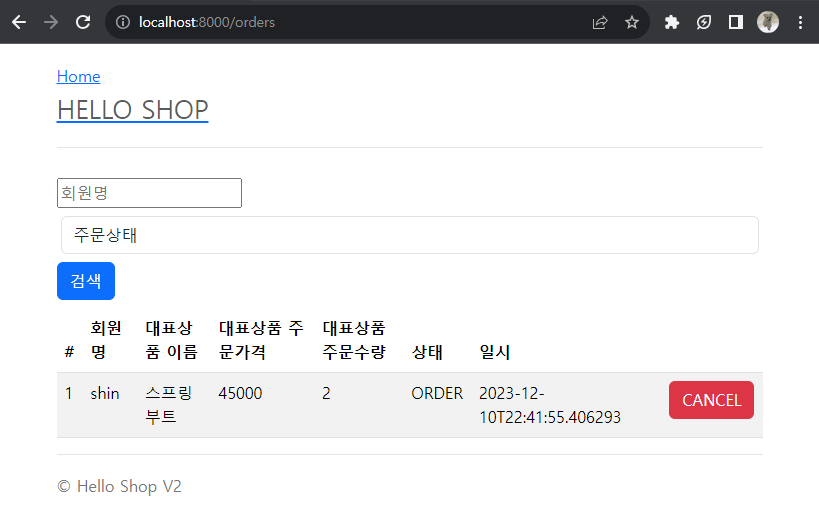
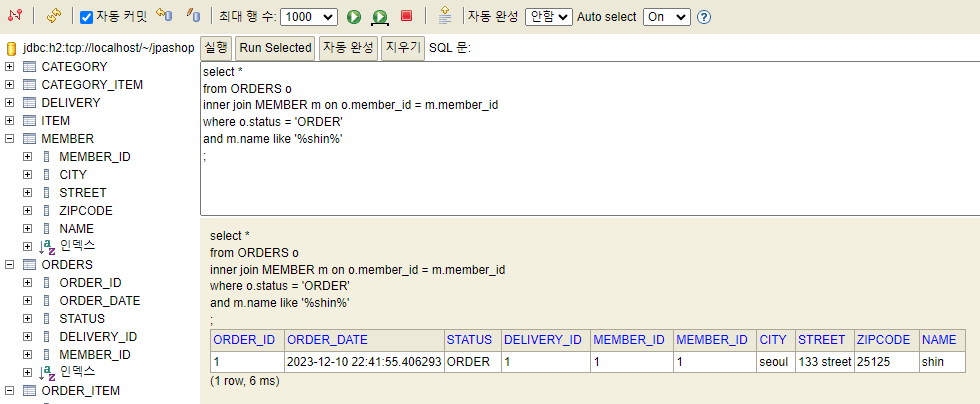
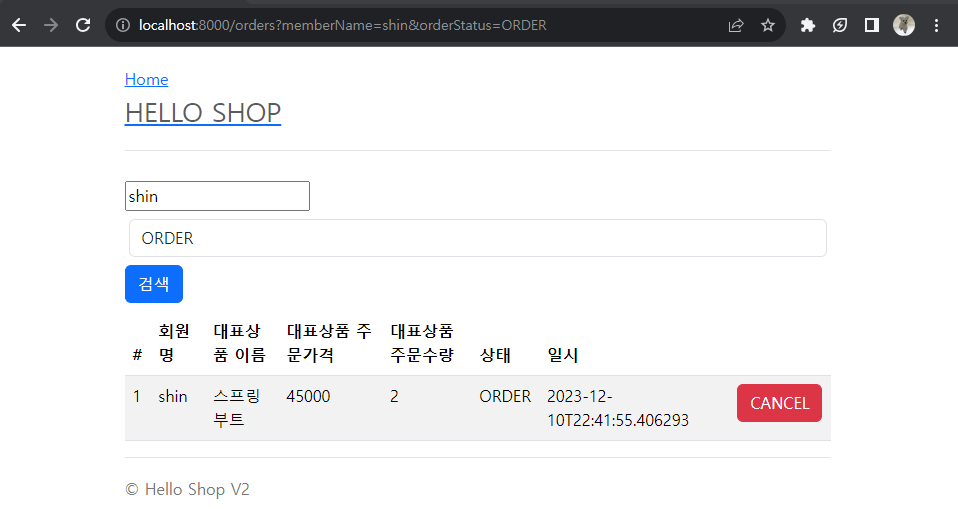
주문 취소 테스트😊
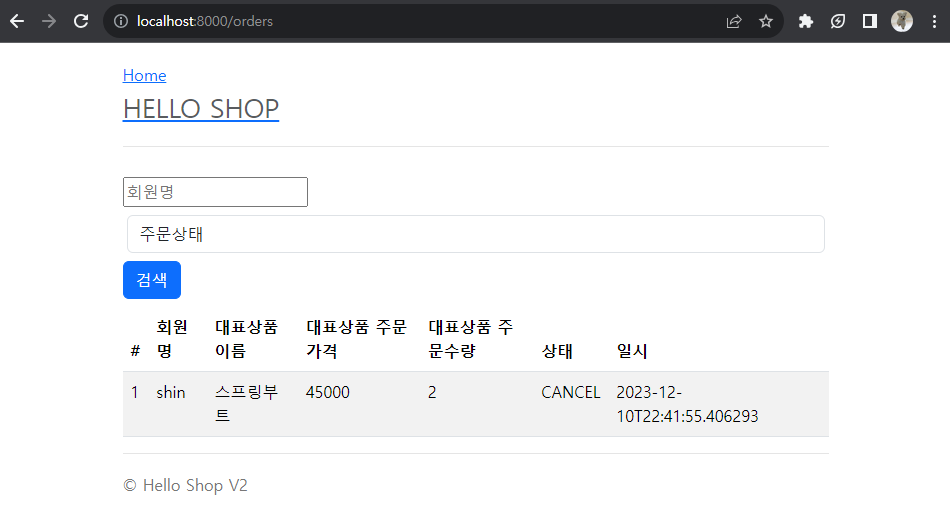

Backend development