Javascript를 활용한 벽돌깨기2
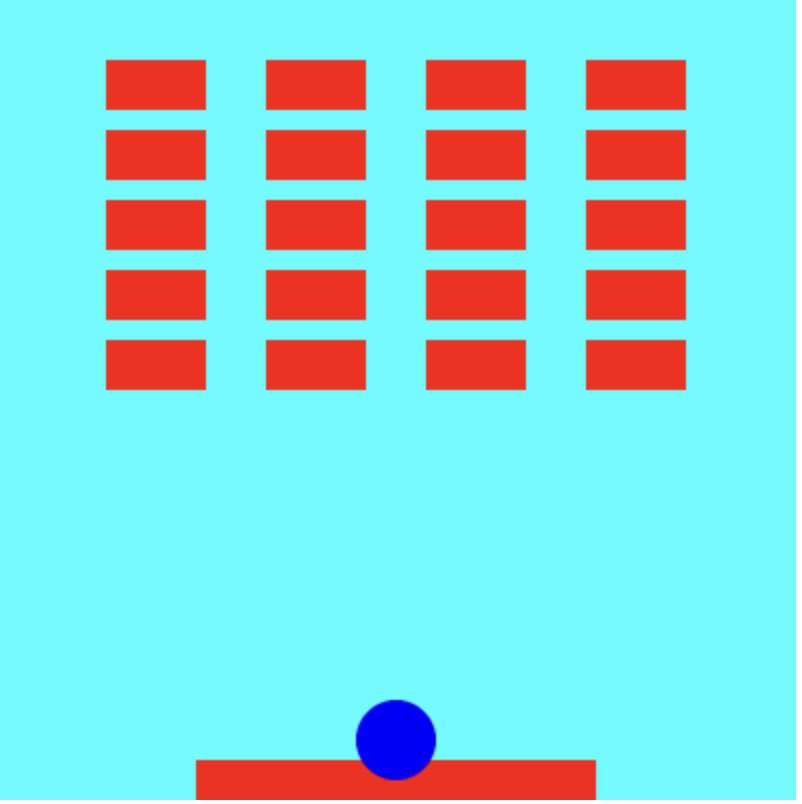
const canvas = document.getElementById('myCanvas');        //아이디를 가지고 특정 태그에 접근을 한다.
const context = canvas.getContext('2d');
canvas.style.backgroundColor = "aqua";

// 벽돌 관련
const brickWidth = 50;  // 간격은 10
const brickHeight = 25; // 간격 5
const brickColumn = 4;  // 열
const brickRow = 5;     // 행
let bricks = [];
let brickCount = brickColumn * brickRow; //

// 볼 관련
const arcRadius = 20;
// let arcPosX = canvas.width / 3  + 100;
let arcPosX = 200; // 시작 공의 위치의 x 값을 지정해준다. 400 * 400의 canvas크기 이기 때문에 200은 절반
// let arcPosY = canvas.height / 2 + 150;
let arcPosY = 370; // 시작 공의 위치의 y 값을 지정해준다.
let arcMoveDirX = -1;
let arcMoveDirY = -1;         // -1을 주면 Y가 위로 움직인다.
let arcMoveSpeed = 3;

let ball = {
    left:0, right:0, top:0, bottom:0,
};

// let brick = {
//     left:0 , right:0, top:0, bottom:0,
//     column:0, row:0, // 몇번째 열,행에 있는 것을 표현 할 수 있는 index
// }

// 패들 관련
const barWidth = 200;
const barHeight = 20;
let barPosX = canvas.width / 2 - barWidth / 2;
let barPosY = canvas.height - barHeight;
let barMoveSpeed = 20;

// 가운데가 0.0

let paddle = {
    left:0, right:0, top:0, bottom:0,
};

let getStart = true;

// 키처리 함수 추가

document.addEventListener('keydown', keyDownEventHandler);   // 이벤트가 잇을때 해당함수를 호출해준다.
document.addEventListener('keyup', keyUpEventHandler);

// 함수 모음
function keyDownEventHandler(e)
{
    if (e.key== " " && getStart){
        setInterval(update, 10);
        getStart = false
    }

    if (e.key == 'ArrowRight')
    {
        // 바를 오른쪽으로 이동
        if (barPosX + barWidth < canvas.width)
        {
            barPosX += barMoveSpeed;
            //1
        }
    }
    else if (e.key == 'ArrowLeft')
    {
        // 바를 왼쪽으로 이동
        if (barPosX > 0)
        {
            barPosX -= barMoveSpeed;
            //1
        }
    }

    //2 코드가 많이 중복되면 함수를 빼던가 연산량이 많지않으면 한번에 써주는 것이 좋다.
    paddle.left = barPosX;
    paddle.right = barPosX + barWidth;
    paddle.top = barPosY;
    paddle.bottom = barPosY + barWidth;
}

function keyUpEventHandler()
{

}

// let brickCount = brickRow * brickColumn이라는 변수를 선언해준후
// brickCount 값이 0이 되면 alert('gamewin');을 띄어준다.
function gamewin ()
{
    if(brickCount == 0)
    {
        window.location.reload(true);
        alert('gamewin');
    }
}

function gameover ()
{
    if(arcPosY > 370) // 공의 좌표 값이 370을 넘어 갔을 때 gameover라는 alert를 뛰어준다.
    {
        window.location.reload(true);
        alert('gameover');
    }
}

function update()
{
    // 데이터 수정 (도형의 위치 이동)
    if (arcPosX - arcRadius  < 0) //arcPosX - 50 원의 좌측끝
    {
        arcMoveDirX = 1;
    }
    else if (arcPosX + arcRadius > canvas.width)  // arcPosX + 50 원의 우측 끝
    {
        arcMoveDirX = -1;
    }

    if (arcPosY - arcRadius < 0)
    {
        arcMoveDirY = 1;
    }
    else if (arcPosY + arcRadius > canvas.width)
    {
        arcMoveDirY = -1;
    }
    arcPosX += arcMoveDirX * arcMoveSpeed;
    arcPosY += arcMoveDirY * arcMoveSpeed;

    ball.left = arcPosX - (arcRadius); // 위치가 계속 바낄때마다 바낀다.
    ball.right = arcPosX + (arcRadius); // 위치가 계속 바낄때마다 바낀다.
    ball.top = arcPosY - (arcRadius); // 위치가 계속 바낄때마다 바낀다.
    ball.bottom = arcPosY + (arcRadius); // 위치가 계속 바낄때마다 바낀다.

    // 충돌확인
    if (isCollisionRectToRect(ball, paddle))
    {
        arcMoveDirY = -1;
        arcPosY = paddle.top - arcRadius;
        // arcPosY = paddle + bricks;
    }

    for (let i = 0; i < brickRow; i ++)
    {
        for(let j = 0; j < brickColumn; j++)
        {
            if (bricks[i][j].isAlive && isCollisionRectToRect(ball, bricks[i][j]))
            {
                console.log('i : ', i, 'j', j); //
                bricks[i][j].isAlive = false; // 중복해서 찍히지 않게 해준다.
                arcMoveDirY = -arcMoveDirY;
                brickCount--;
                // break;

            }

        }
        gameover();
        gamewin();

    }

}
//충돌 bricks[0][0] bricks[0][1]
function isCollisionRectToRect(rectA, rectB)
{
    // a의 왼쪽과 b의 오른쪽
    // a의 오른쪾 b의 왼쪽
    // a의 아래쪽 b의 위쪽
    // a의 위쪽과 b의 아래쪽
    if (rectA.left > rectB.right ||
        rectA.right < rectB.left ||
        rectA.top > rectB.bottom ||
        rectA.bottom < rectB.top)
        {
            return false;
        }

    return true;
}

// bricks 와 ball이 충돌 했을때 없어지게 해야한다. + 2중 충돌 한번 충돌시 색상변경

function draw()
{
    // 화면 클리어
    context.clearRect(0, 0, canvas.width, canvas.height);
    drawCanvas();
    // 다른 도형 그리기
    drawRect();
    drawArc();
    drawBricks();
}

function drawCanvas() {
    context.beginPath();
    context.clearRect(0, 0, canvas.width, canvas.height);
    context.fillStyle = '#CA9B89';
    context.fill();

    context.closePath();
}

function drawArc()  // 컴파일 순간에 내용물이 정해지고 호출된 시점에 사용이 된다.
{

    context.beginPath();

    context.arc(arcPosX , arcPosY, arcRadius, 0, 2 * Math.PI);
    context.fillStyle = 'blue';
    context.fill();

    context.closePath();
}

function drawRect()
{
    context.beginPath();

    // context.rect(canvas.width / 2, canvas.height / 2, 100, 100);                         // 가운데 좌표
    context.rect(barPosX, barPosY, barWidth, barHeight);   //
    context.fillStyle = 'red';
    context.fill();

    context.closePath();
}

function setBricks()
{
    for(let i = 0; i < brickRow; i++) //  가로 5 줄
    {
        bricks[i] = [];
        for(let j = 0; j < brickColumn; j++)   // 세로 4줄
        {
            // TODO : right : left + 50 해보기
            bricks[i][j] = { //2차원 배열안의 요소에 접근을 해야 left,right,top,bottom,
                left:55 + j * (brickWidth + 30), // 시작위치(왼쪽에서 얼마나 뛰어서 시작할건가) + j  * (벽돌위치 + 각각의 간격)
                right:55 + j * (brickWidth + 30) + 50,
                top:30 + i * (brickHeight + 10),
                bottom:30 + i * (brickHeight + 10) + 25,
                column:i, row:j,
                isAlive:true
            };

        }
    }
}

// 위에는 데이터 값만 지정을 해준 것이고 그 데이터 값을 그려줘야한다. drawBricks
function drawBricks()
{
    context.beginPath();
    for(let i = 0; i < brickRow; i++)
    {
        for(let j = 0; j < brickColumn; j++)
        {
            if (bricks[i][j].isAlive) {
                context.rect(bricks[i][j].left, bricks[i][j].top, brickWidth, brickHeight);
                context.fillStyle = 'red';
                context.fill();
            }

        }
    }
    context.closePath();
}

setBricks();
   // 1000=1초, 10=0.01초 호출
setInterval(draw, 10);
학습목표
-
블록깨기 게임 작성
- 공 움직임 (자동) O
- 패들 움직임 (수동 : 키입력 처리) O
- 벽돌생성 O
- 공 - 패들, 공 - 벽돌 충돌처리 O
- 게임 클리어, 게임 오버 처리 O
- 벽돌 배치 후 스페이스 바 누르면 공 발사 방향 결정
-
게임 외부 입력 요소
- 타이틀 화면 출력 ( 페이드 인, 페이드 아웃 효과) X
- 왼쪽 혹은 오른쪽 화면 밖에서 입장하는 input, 게임 화면 X
- 행, 열 값 입력 ( input ) 값만 입력 가능함 기능 X
- 입력된 행렬 값에 따른 벽돌 배치 X
serinterval(update, 10)을 keyDownEventHandler안에 넣어주고 “ “ 값으로 스페이스를 누르면.실행 되도록 했지만 공 발사 방향은 구현 하지 못함.
꿈을 찾는 Frontend 개발자 입니다.