들어가기 전에
- 이번 주차에 학습한, 개념론적인 부분들은 아래 게시글에 정리 하였다.
[[TIL] Jungle TIL : 네트워크 관련 Keyword 정리.]
-
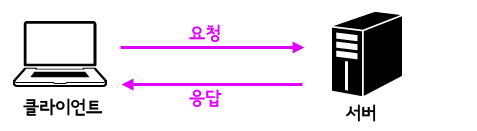
네트워크는 클라이언트가 요청을 전송하면 서버가 이에 대한 응답을 전송하는, 위와 같은
클라이언트-서버 모델을 기본으로 한다. -
이번 주차에는 c언어를 이용해 웹 서버를 구현해보며 이러한 내용에 대해 학습 한다.
00. echo 서버
echo()동작은 서버와 클라이언트의 동작을 보여줄 수 있는, 가장 간단한 형태의 동작이다.
- 클라이언트에서 서버에 특정한 문자열을 전송한다.
- 서버는 특정 문자열을 받으면,
echo()를 호출해 이를 클라이언트로 되돌려준다. - 클라이언트는 전달 받은 문자열을 출력한다.
-
이와 같은 간단한 형태의 프로그램을 작성해봄으로써
클라이언트-서버 모델이 실제로 어떤 식으로 구현되는지 확인할 수 있다. -
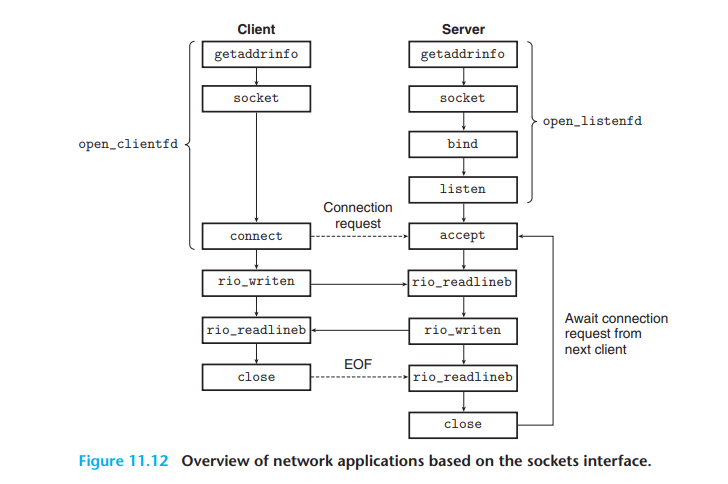
echo 서버-클라이언트를 제작하면서, 아래와 같은 소켓 인터페이스(Socket Interface)에 대해 이해할 수 있다.
0-1. echoserveri.c
#include "csapp.h"

void echo (int connfd);

int main (int argc, char ** argv)
{
    int listenfd, connfd;
    socklen_t clientlen;
    struct sockaddr_storage clientaddr; /* Enough space for any address */
    char client_hostname[MAXLINE], client_port[MAXLINE];

    if (argc != 2){
        fprintf(stderr, "usage: %s <port>\n",argv[0]);
        exit(0);
    }

    listenfd = Open_listenfd(argv[1]);
    while (1)
    {
        clientlen = sizeof(struct sockaddr_storage);
        connfd = Accept(listenfd, (SA *)&clientaddr, &clientlen);
        Getnameinfo((SA *) &clientaddr, clientlen, client_hostname, MAXLINE, client_port, MAXLINE, 0);
        printf("Connected to (%s, %s)\n", client_hostname, client_port);
        echo(connfd);
        Close(connfd);
    }
    exit(0);
}- echo 서버의 내용 자체는 간단하다.
- 사용자가 포트 번호를 붙여 해당 서버 프로세스를 실행할 것이다.
ex)127.0.0.1 8080
- 프로세스를 실행하면,
Open_listenfd()를 호출 해 서버 소켓을 연다.
while반복문 안에서 클라이언트 연결을 기다리고, 연결이 수락되면 클라이언트 주소 정보를 출력한다.
이후echo()함수를 통해 연결된 클라이언트와 데이터를 주고받고,Close()로 연결을 닫는다.
-
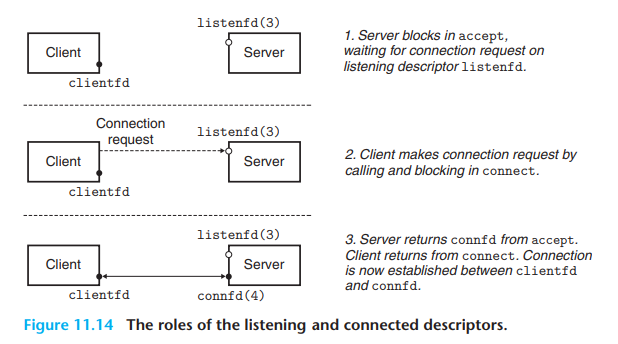
위의 내용을 이해하는데 있어 다음과 같이 서버와 클라이언트가 소켓 인터페이스를 통해 연결하는 과정에 대한 이해가 필요하다.
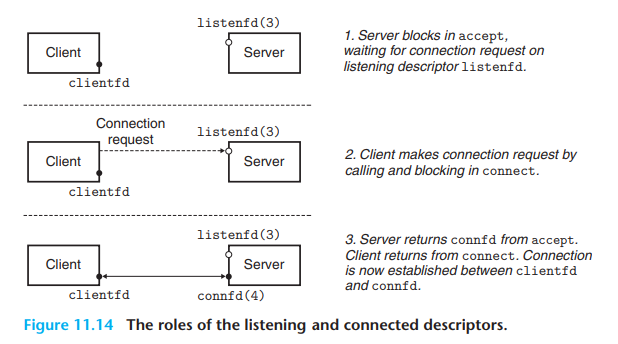
아래 그림에서 서버의 동작을 살펴보자.
-
우선,
socket()함수를 호출 해fd(파일 디스크립터: 연결 식별자, 여기서는 소켓)를 만든다. -
Server는
bind()함수를 호출 해 서버 소켓을 특정 IP 주소와 포트 번호에 연결한다. -
Server는
listen()을 호출 해 listenfd에 클라이언트 연결 요청이 들어오기를 기다린다. -
Client에서 connection 요청이 들어오면, Server는
accept()를 호출 해 연결하고,connfd(연결 식별자)를 반환한다. -
Open_listenfd()함수는 위에서 서버가 소켓을 열고listen()하는 과정(소켓을 리스닝 소켓으로 만드는 과정)까지를 하나의 함수로 래핑 해 listenfd를 반환해 준다.
/*
 * open_listenfd - Open and return a listening socket on port. This
 *     function is reentrant and protocol-independent.
 *
 *     On error, returns:
 *       -2 for getaddrinfo error
 *       -1 with errno set for other errors.
 */
/* $begin open_listenfd */
int open_listenfd(char *port)
{
    struct addrinfo hints, *listp, *p;
    int listenfd, rc, optval=1;

    /* Get a list of potential server addresses */
    memset(&hints, 0, sizeof(struct addrinfo));
    hints.ai_socktype = SOCK_STREAM;             /* Accept connections */
    hints.ai_flags = AI_PASSIVE | AI_ADDRCONFIG; /* ... on any IP address */
    hints.ai_flags |= AI_NUMERICSERV;            /* ... using port number */
    if ((rc = getaddrinfo(NULL, port, &hints, &listp)) != 0) {
        fprintf(stderr, "getaddrinfo failed (port %s): %s\n", port, gai_strerror(rc));
        return -2;
    }

    /* Walk the list for one that we can bind to */
    for (p = listp; p; p = p->ai_next) {
        /* Create a socket descriptor */
        if ((listenfd = socket(p->ai_family, p->ai_socktype, p->ai_protocol)) < 0)
            continue;  /* Socket failed, try the next */

        /* Eliminates "Address already in use" error from bind */
        setsockopt(listenfd, SOL_SOCKET, SO_REUSEADDR,    //line:netp:csapp:setsockopt
                   (const void *)&optval , sizeof(int));

        /* Bind the descriptor to the address */
        if (bind(listenfd, p->ai_addr, p->ai_addrlen) == 0)
            break; /* Success */
        if (close(listenfd) < 0) { /* Bind failed, try the next */
            fprintf(stderr, "open_listenfd close failed: %s\n", strerror(errno));
            return -1;
        }
    }


    /* Clean up */
    freeaddrinfo(listp);
    if (!p) /* No address worked */
        return -1;

    /* Make it a listening socket ready to accept connection requests */
    if (listen(listenfd, LISTENQ) < 0) {
        close(listenfd);
	return -1;
    }
    return listenfd;
}
/* $end open_listenfd */
Open_listenfd() 함수에 대한 간단한 설명
getaddrinfo함수를 이용 해 서버 주소 정보 목록을 가져와 주소 목록을 순회하면서 각 항목에 대해 소켓을 생성socket()하려고 시도한다.
(실패하면 다음 항목으로 이동하며, 서버 주소 목록은 연결 리스트 형태로 구현되어 있다.)
- 소켓이 생성되면, 소켓에
SO_REUSEADDR옵션을 설정(사용한 포트를 재사용하는 옵션)하고, 소켓을 특정 주소와 바인딩bind()한다.
(성공 시 루프를 빠져나오고, 실패 시close(listenfd)로 소켓을 닫고 다음 항목으로 이동한다.)
freeaddinfo(listp)로 할당된 메모리를 해제한다. 바인딩이 실패하면if (!p)-1을 반환한다.return -1;
listen()함수를 호출 해 소켓을 '리스닝 소켓'으로 만든다.
- 모든 과정이 성공하면 리스닝 소켓의 파일 디스크립터
listenfd를 반환한다. (실패하면 -1을 반환)
0-2. echo.c
#include "csapp.h"

void echo(int connfd)
{
    size_t n;
    char buf[MAXLINE];
    rio_t rio;

    Rio_readinitb(&rio, connfd);
    while ((n = Rio_readlineb(&rio, buf, MAXLINE)) != 0)
    {
        printf("server received %d bytes\n",(int)n);
        Rio_writen(connfd, buf, n);
    }

}echo()함수는 연결 디스크립터를 매개변수로 받고, 해당 디스크립터에서Rio_readlineb()를 통해 내용을 읽은 후 읽어들인 바이트를 출력하고,Rio_writen()을 통해 내용을 클라이언트로 전송한다.
0-3. echoclient.c
#include "csapp.h"

int main (int argc, char **argv)
{
    int clientfd;
    char *host, *port, buf[MAXLINE];
    rio_t rio;

    if (argc != 3){
        fprintf(stderr, "usage: %s <host> <port>\n",argv[0]);
        exit(0);
    }
    host = argv[1];
    port = argv[2];

    clientfd = Open_clientfd(host, port);
    Rio_readinitb(&rio, clientfd);

    while (Fgets(buf,MAXLINE,stdin) != NULL)
    {
        Rio_writen(clientfd, buf, strlen(buf));
        Rio_readlineb(&rio, buf, MAXLINE);
        Fputs(buf,stdout);
    }
    Close(clientfd);
    exit(0);

}-
클라이언트는 서버 주소와 포트 번호를 매개변수로 받아 실행한다.
-
Open_clientfd()함수를 호출해 클라이언트 소켓을 만들고, 서버에 connect 연결을 요청한다. -
서버와 소켓 연결이 설정되면,
Fgets를 통해 사용자의 입력을 버퍼buf에 읽어온다. -
Rio_writen함수는clientfd를 통해 서버로buf의 내용을 전송한다. -
Rio_readlineb는 서버의 응답을buf로 읽어들이고, 이를 표준 출력stdout으로 출력한다.
-
이번엔 아래 그림에서 클라이언트의 동작에 대해 알아보자.
-
클라이언트도
socket()함수를 이용해 클라이언트 소켓을 생성한다. -
이후
connect()함수를 호출 해 서버에게 연결 요청을 한다. -
서버에서 해당 연결 요청을 받아들이면, 연결이 완료 된다.
-
Open_clientfd()함수는 위와 같은 클라이언트 동작을 래핑 해준다.
/*
 * open_clientfd - Open connection to server at <hostname, port> and
 *     return a socket descriptor ready for reading and writing. This
 *     function is reentrant and protocol-independent.
 *
 *     On error, returns:
 *       -2 for getaddrinfo error
 *       -1 with errno set for other errors.
 */
/* $begin open_clientfd */
int open_clientfd(char *hostname, char *port) {
    int clientfd, rc;
    struct addrinfo hints, *listp, *p;

    /* Get a list of potential server addresses */
    memset(&hints, 0, sizeof(struct addrinfo));
    hints.ai_socktype = SOCK_STREAM;  /* Open a connection */
    hints.ai_flags = AI_NUMERICSERV;  /* ... using a numeric port arg. */
    hints.ai_flags |= AI_ADDRCONFIG;  /* Recommended for connections */
    if ((rc = getaddrinfo(hostname, port, &hints, &listp)) != 0) {
        fprintf(stderr, "getaddrinfo failed (%s:%s): %s\n", hostname, port, gai_strerror(rc));
        return -2;
    }

    /* Walk the list for one that we can successfully connect to */
    for (p = listp; p; p = p->ai_next) {
        /* Create a socket descriptor */
        if ((clientfd = socket(p->ai_family, p->ai_socktype, p->ai_protocol)) < 0)
            continue; /* Socket failed, try the next */

        /* Connect to the server */
        if (connect(clientfd, p->ai_addr, p->ai_addrlen) != -1)
            break; /* Success */
        if (close(clientfd) < 0) { /* Connect failed, try another */  //line:netp:openclientfd:closefd
            fprintf(stderr, "open_clientfd: close failed: %s\n", strerror(errno));
            return -1;
        }
    }

    /* Clean up */
    freeaddrinfo(listp);
    if (!p) /* All connects failed */
        return -1;
    else    /* The last connect succeeded */
        return clientfd;
}
/* $end open_clientfd */
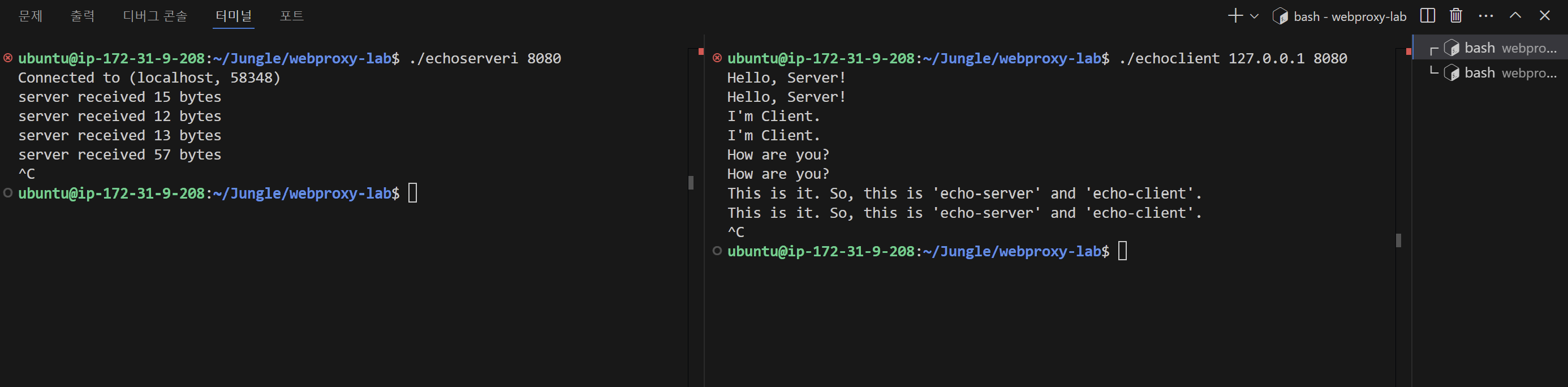
0-3. 실행 결과
- 왼쪽이 echo-server, 오른쪽이 echo-client의 동작이다.
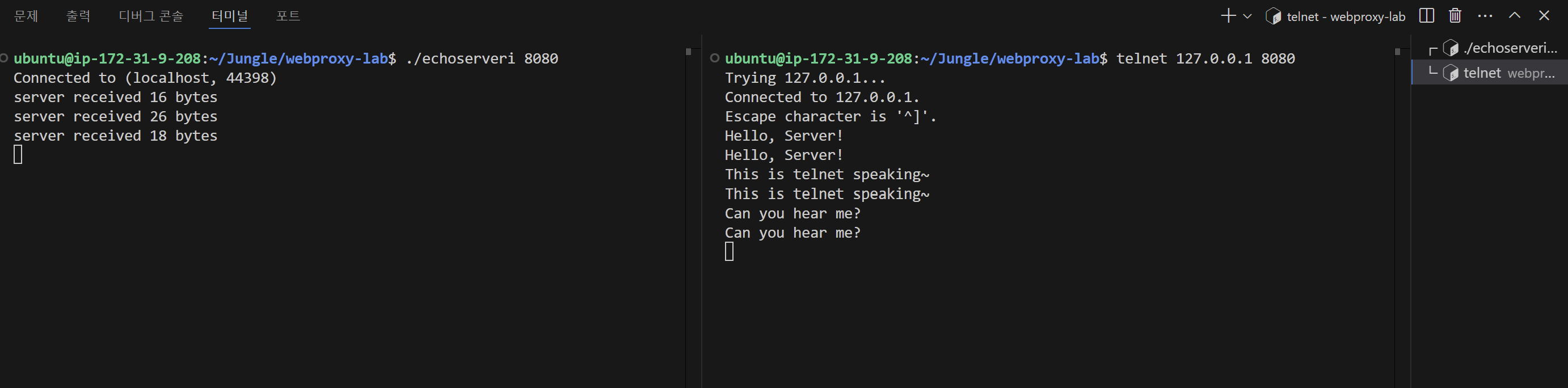
- telnet을 통해서도 위와 같이 동작 수행을 확인할 수 있었다.
01. tiny 서버
-
echo 서버와 클라이언트의 구현을 통해, 간단하게 클라이언트와 서버가 연결되는 것을 눈으로 확인했다면, 이번엔 작은 서버를 만들어 웹 서버의 기능을 실제로 구현 해 볼 차례다. -
서버의 구현은 결국
web을 통해 데이터를 컴퓨터 A에서 컴퓨터 B로 보내기 위함이다.
그리고 이는 대개html이라는 문서의 형태로 브라우저에서 화면에 뿌려주는 식으로 이루어지고 있다. -
tiny 서버의 구현은 이러한 웹 서버의 구현을 가벼운 형태로 구현하면서 우리 눈으로 확인할 수 있도록 해준다.
01-1. 코드 작성
-
우선, 전체 코드는 아래와 같다. 이를 하나 하나 뜯어보면서 차근차근 tiny 서버 동작에 대해 이해해보도록 하자.
-
아래 코드는 CS:APP 11장의 연습 문제를 해결하면서
GET,HEAD요청을 수행할 수 있도록 작성된 코드이다. -
사실,
main()의 동작은echo서버 구현에서 본 내용과 크게 다를 바 없다. 위에서 그림과 함께 클라이언트와 서버가 소켓 인터페이스 상에서 어떤 식으로 연결되는지 이해했다면, 어렵지 않게 작성할 수 있다. -
tiny서버에서는 이에 추가적으로doit()함수를 작성 해 서버 안의 자원을 핸들링 한다. -
doit()함수 내에서 주요 동작은 정적 컨텐츠, 동적 컨텐츠를 핸들링 할 수 있는serve_static(),serve_dynamic()함수를 통해 이루어진다.
/* $begin tinymain */
/*
 * tiny.c - A simple, iterative HTTP/1.0 Web server that uses the
 *     GET method to serve static and dynamic content.
 */
#include "csapp.h"

void echo(int connfd);
void doit(int fd);
void read_requesthdrs(rio_t *rp);
int parse_uri(char *uri, char *filename, char *cgiargs);
void serve_static(int fd, char *filename, int filesize);
void serve_static_head(int fd, char *filename, int filesize);
void get_filetype(char *filename, char *filetype);
void serve_dynamic(int fd, char *filename, char *cgiargs);
void clienterror(int fd, char *cause, char *errnum,
		 char *shortmsg, char *longmsg);

int main(int argc, char **argv)
{
    int listenfd, connfd;
    char hostname[MAXLINE], port[MAXLINE];
    socklen_t clientlen;
    struct sockaddr_storage clientaddr;

    /* Check command line args */
    if (argc != 2) {
        fprintf(stderr, "usage: %s <port>\n", argv[0]);
        exit(1);
    }

    listenfd = Open_listenfd(argv[1]);
    while (1) {
        clientlen = sizeof(clientaddr);
        connfd = Accept(listenfd, (SA *)&clientaddr, &clientlen); //line:netp:tiny:accept
        Getnameinfo((SA *) &clientaddr, clientlen, hostname, MAXLINE, port, MAXLINE, 0);
        printf("Accepted connection from (%s, %s)\n", hostname, port);
        // echo(connfd);
        doit(connfd);                                             //line:netp:tiny:doit
        Close(connfd);                                            //line:netp:tiny:close
    }
}
/* $end tinymain */

/*
 * doit - handle one HTTP request/response transaction
 */
/* $begin doit */
void doit(int fd)
{
    int is_static;
    struct stat sbuf;
    char buf[MAXLINE], method[MAXLINE], uri[MAXLINE], version[MAXLINE];
    char filename[MAXLINE], cgiargs[MAXLINE];
    rio_t rio;
    size_t n;

    /* Read request line and headers */
    Rio_readinitb(&rio, fd);
    Rio_readlineb(&rio, buf, MAXLINE);
    printf("Request headers:\n");
    printf("%s",buf);
    sscanf(buf, "%s %s %s", method, uri, version);       //line:netp:doit:parserequest
    if (strcasecmp(method, "GET") != 0 && strcasecmp(method, "HEAD")!=0) {                     //line:netp:doit:beginrequesterr
        clienterror(fd, method, "501", "Not Implemented",
                    "Tiny does not implement this method");
        return;
    }                                                    //line:netp:doit:endrequesterr
    read_requesthdrs(&rio);                              //line:netp:doit:readrequesthdrs

    /* Parse URI from GET request */
    is_static = parse_uri(uri, filename, cgiargs);       //line:netp:doit:staticcheck
    if (stat(filename, &sbuf) < 0) {                     //line:netp:doit:beginnotfound
	clienterror(fd, filename, "404", "Not found",
		    "Tiny couldn't find this file");
	return;
    }                                                    //line:netp:doit:endnotfound

    if (is_static) { /* Serve static content */
	if (!(S_ISREG(sbuf.st_mode)) || !(S_IRUSR & sbuf.st_mode)) { //line:netp:doit:readable
	    clienterror(fd, filename, "403", "Forbidden",
			"Tiny couldn't read the file");
	    return;
	}
    if (strcasecmp(method, "GET") == 0){
        serve_static(fd, filename, sbuf.st_size);        //line:netp:doit:servestatic
    }

    else{
        serve_static_head(fd,filename, sbuf.st_size);
    }

    }
    else { /* Serve dynamic content */
	if (!(S_ISREG(sbuf.st_mode)) || !(S_IXUSR & sbuf.st_mode)) { //line:netp:doit:executable
	    clienterror(fd, filename, "403", "Forbidden",
			"Tiny couldn't run the CGI program");
	    return;
	}
	serve_dynamic(fd, filename, cgiargs);            //line:netp:doit:servedynamic
    }
}
/* $end doit */


/*
 * read_requesthdrs - read HTTP request headers
 */
/* $begin read_requesthdrs */
void read_requesthdrs(rio_t *rp)
{
    char buf[MAXLINE];

    Rio_readlineb(rp, buf, MAXLINE);
    printf("%s", buf);
    while(strcmp(buf, "\r\n")) {          //line:netp:readhdrs:checkterm
	Rio_readlineb(rp, buf, MAXLINE);
	printf("%s", buf);
    }
    return;
}
/* $end read_requesthdrs */

/*
 * parse_uri - parse URI into filename and CGI args
 *             return 0 if dynamic content, 1 if static
 */
/* $begin parse_uri */
int parse_uri(char *uri, char *filename, char *cgiargs)
{
    char *ptr;

    if (!strstr(uri, "cgi-bin")) {  /* Static content */ //line:netp:parseuri:isstatic
	strcpy(cgiargs, "");                             //line:netp:parseuri:clearcgi
	strcpy(filename, ".");                           //line:netp:parseuri:beginconvert1
	strcat(filename, uri);                           //line:netp:parseuri:endconvert1
	if (uri[strlen(uri)-1] == '/')                   //line:netp:parseuri:slashcheck
	    strcat(filename, "home.html");               //line:netp:parseuri:appenddefault
	return 1;
    }
    else {  /* Dynamic content */                        //line:netp:parseuri:isdynamic
	ptr = index(uri, '?');                           //line:netp:parseuri:beginextract
	if (ptr) {
	    strcpy(cgiargs, ptr+1);
	    *ptr = '\0';
	}
	else
	    strcpy(cgiargs, "");                         //line:netp:parseuri:endextract
	strcpy(filename, ".");                           //line:netp:parseuri:beginconvert2
	strcat(filename, uri);                           //line:netp:parseuri:endconvert2
	return 0;
    }
}
/* $end parse_uri */

/*
 * serve_static - copy a file back to the client
 */
/* $begin serve_static */
void serve_static(int fd, char *filename, int filesize)
{
    int srcfd;
    char *srcp, filetype[MAXLINE], buf[MAXBUF];

    /* Send response headers to client */
    get_filetype(filename, filetype);       //line:netp:servestatic:getfiletype
    sprintf(buf, "HTTP/1.0 200 OK\r\n");    //line:netp:servestatic:beginserve
    sprintf(buf, "%sServer: Tiny Web Server\r\n", buf);
    sprintf(buf, "%sConnection: close\r\n", buf);
    sprintf(buf, "%sContent-length: %d\r\n", buf, filesize);
    sprintf(buf, "%sContent-type: %s\r\n\r\n", buf, filetype);
    Rio_writen(fd, buf, strlen(buf));       //line:netp:servestatic:endserve
    printf("Response headers:\n");
    printf("%s", buf);

    /* Send response body to client */
    srcfd = Open(filename, O_RDONLY, 0);    //line:netp:servestatic:open
    srcp = Mmap(0, filesize, PROT_READ, MAP_PRIVATE, srcfd, 0);//line:netp:servestatic:mmap
    Close(srcfd);                           //line:netp:servestatic:close
    Rio_writen(fd, srcp, filesize);         //line:netp:servestatic:write
    Munmap(srcp, filesize);                 //line:netp:servestatic:munmap
}

void serve_static_head(int fd, char *filename, int filesize)
{
    int srcfd;
    char *srcp, filetype[MAXLINE], buf[MAXBUF];

    /* Send response headers to client */
    get_filetype(filename, filetype);       //line:netp:servestatic:getfiletype
    sprintf(buf, "HTTP/1.0 200 OK\r\n");    //line:netp:servestatic:beginserve
    sprintf(buf, "%sServer: Tiny Web Server\r\n", buf);
    sprintf(buf, "%sConnection: close\r\n", buf);
    sprintf(buf, "%sContent-length: %d\r\n", buf, filesize);
    sprintf(buf, "%sContent-type: %s\r\n\r\n", buf, filetype);
    Rio_writen(fd, buf, strlen(buf));       //line:netp:servestatic:endserve
    printf("Response headers:\n");
    printf("%s", buf);
}

/*
 * get_filetype - derive file type from file name
 */
void get_filetype(char *filename, char *filetype)
{
    if (strstr(filename, ".html"))
	strcpy(filetype, "text/html");
    else if (strstr(filename, ".gif"))
	strcpy(filetype, "image/gif");
    else if (strstr(filename, ".png"))
	strcpy(filetype, "image/png");
    else if (strstr(filename, ".jpg"))
	strcpy(filetype, "image/jpeg");
    else
	strcpy(filetype, "text/plain");
}
/* $end serve_static */

/*
 * serve_dynamic - run a CGI program on behalf of the client
 */
/* $begin serve_dynamic */
void serve_dynamic(int fd, char *filename, char *cgiargs)
{
    char buf[MAXLINE], *emptylist[] = { NULL };

    /* Return first part of HTTP response */
    sprintf(buf, "HTTP/1.0 200 OK\r\n");
    Rio_writen(fd, buf, strlen(buf));
    sprintf(buf, "Server: Tiny Web Server\r\n");
    Rio_writen(fd, buf, strlen(buf));

    if (Fork() == 0) { /* Child */ //line:netp:servedynamic:fork
	/* Real server would set all CGI vars here */
	setenv("QUERY_STRING", cgiargs, 1); //line:netp:servedynamic:setenv
	Dup2(fd, STDOUT_FILENO);         /* Redirect stdout to client */ //line:netp:servedynamic:dup2
	Execve(filename, emptylist, environ); /* Run CGI program */ //line:netp:servedynamic:execve
    }
    Wait(NULL); /* Parent waits for and reaps child */ //line:netp:servedynamic:wait
}
/* $end serve_dynamic */

/*
 * clienterror - returns an error message to the client
 */
/* $begin clienterror */
void clienterror(int fd, char *cause, char *errnum,
		 char *shortmsg, char *longmsg)
{
    char buf[MAXLINE], body[MAXBUF];

    /* Build the HTTP response body */
    sprintf(body, "<html><title>Tiny Error</title>");
    sprintf(body, "%s<body bgcolor=""ffffff"">\r\n", body);
    sprintf(body, "%s%s: %s\r\n", body, errnum, shortmsg);
    sprintf(body, "%s<p>%s: %s\r\n", body, longmsg, cause);
    sprintf(body, "%s<hr><em>The Tiny Web server</em>\r\n", body);

    /* Print the HTTP response */
    sprintf(buf, "HTTP/1.0 %s %s\r\n", errnum, shortmsg);
    Rio_writen(fd, buf, strlen(buf));
    sprintf(buf, "Content-type: text/html\r\n");
    Rio_writen(fd, buf, strlen(buf));
    sprintf(buf, "Content-length: %d\r\n\r\n", (int)strlen(body));
    Rio_writen(fd, buf, strlen(buf));
    Rio_writen(fd, body, strlen(body));
}
/* $end clienterror */- 위의 코드에서
doit()함수를 살펴보자.
/*
 * doit - handle one HTTP request/response transaction
 */
/* $begin doit */
void doit(int fd)
{
    int is_static;
    struct stat sbuf;
    char buf[MAXLINE], method[MAXLINE], uri[MAXLINE], version[MAXLINE];
    char filename[MAXLINE], cgiargs[MAXLINE];
    rio_t rio;
    size_t n;

    /* Read request line and headers */
    Rio_readinitb(&rio, fd);
    Rio_readlineb(&rio, buf, MAXLINE);
    printf("Request headers:\n");
    printf("%s",buf);
    sscanf(buf, "%s %s %s", method, uri, version);       //line:netp:doit:parserequest
    if (strcasecmp(method, "GET") != 0 && strcasecmp(method, "HEAD")!=0) {                     //line:netp:doit:beginrequesterr
        clienterror(fd, method, "501", "Not Implemented",
                    "Tiny does not implement this method");
        return;
    }                                                    //line:netp:doit:endrequesterr
    read_requesthdrs(&rio);                              //line:netp:doit:readrequesthdrs

    /* Parse URI from GET request */
    is_static = parse_uri(uri, filename, cgiargs);       //line:netp:doit:staticcheck
    if (stat(filename, &sbuf) < 0) {                     //line:netp:doit:beginnotfound
	clienterror(fd, filename, "404", "Not found",
		    "Tiny couldn't find this file");
	return;
    }                                                    //line:netp:doit:endnotfound

    if (is_static) { /* Serve static content */
	if (!(S_ISREG(sbuf.st_mode)) || !(S_IRUSR & sbuf.st_mode)) { //line:netp:doit:readable
	    clienterror(fd, filename, "403", "Forbidden",
			"Tiny couldn't read the file");
	    return;
	}
    if (strcasecmp(method, "GET") == 0){
        serve_static(fd, filename, sbuf.st_size);        //line:netp:doit:servestatic
    }

    else{
        serve_static_head(fd,filename, sbuf.st_size);
    }

    }
    else { /* Serve dynamic content */
	if (!(S_ISREG(sbuf.st_mode)) || !(S_IXUSR & sbuf.st_mode)) { //line:netp:doit:executable
	    clienterror(fd, filename, "403", "Forbidden",
			"Tiny couldn't run the CGI program");
	    return;
	}
	serve_dynamic(fd, filename, cgiargs);            //line:netp:doit:servedynamic
    }
}
/* $end doit */-
우선,
Rio_readinitb(&rio, fd);를 통해 파일 디스크립터fd(서버의 연결 소켓)과rio(버퍼링 된 읽기 구조체)를 연결하고,Rio_readlineb(&rio, buf, MAXLINE)을 통해 요청 라인을 읽어buf에 저장한다.
밑의printf()동작들은 이 요청 라인에 대한 내용들을 출력한다. -
sscanf(buf, "%s %s %s", method, uri, version)으로buf에서 HTTP 메서드, URI, HTTP 버전을 각각 추출한다. -
strcasecmp(method, "GET") != 0 && strcasecmp(method, "HEAD") != 0: HTTP 메서드가GET이나HEAD가 아닌 경우 501 에러를 반환한다. -
read_requesthdrs(&rio)를 통해 나머지 요청 헤더를 읽는다. -
is_static = parse_uri(uri, filename, chiargs): URI를 파싱.- 정적 콘텐츠 / 동적 콘텐츠를 구분
- 요청된 파일 이름, CGI 인자 추출
stat(filename, &sbuf)에서 요청된 파일 상태 정보를sbuf에 저장하고, 만약 파일이 없다면 404 오류를 반환.
is_static을 통해 정적 콘텐츠라면serve_static()호출.
- 이 때, 요청이
HEAD요청이었다면serve_static_head()를 호출하도록 작성하였다.
is_static을 통해 동적 콘텐츠라면serve_dynamic()를 호출한다.
- serve_static 함수 中
void serve_static(int fd, char *filename, int filesize)
{
    ...

    /* Send response body to client */
    srcfd = Open(filename, O_RDONLY, 0);    //line:netp:servestatic:open
    srcp = Mmap(0, filesize, PROT_READ, MAP_PRIVATE, srcfd, 0);//line:netp:servestatic:mmap
    Close(srcfd);                           //line:netp:servestatic:close
    Rio_writen(fd, srcp, filesize);         //line:netp:servestatic:write
    Munmap(srcp, filesize);                 //line:netp:servestatic:munmap
}-
Open(filename, O_RDONLY, 0): 요청된 파일을 읽기 전용으로 열고, 파일 디스크립터를srcfd에 저장한다. -
Mmap(0, filesize, PROT_READ, MAP_PRIVATE, srcfd, 0): 파일의 내용을 메모리에 매핑하여 srcp에 포인터를 저장한다. -
Rio_writen(fd, srcp, filesize): 메모리에 매핑된 내용을 클라이언트에게 전송한다. -
serve_dynamic 함수 中
void serve_dynamic(int fd, char *filename, char *cgiargs)
{
    ...

    if (Fork() == 0) { /* Child */ //line:netp:servedynamic:fork
	/* Real server would set all CGI vars here */
	setenv("QUERY_STRING", cgiargs, 1); //line:netp:servedynamic:setenv
	Dup2(fd, STDOUT_FILENO);         /* Redirect stdout to client */ //line:netp:servedynamic:dup2
	Execve(filename, emptylist, environ); /* Run CGI program */ //line:netp:servedynamic:execve
    }
    Wait(NULL); /* Parent waits for and reaps child */ //line:netp:servedynamic:wait
}-
Fork(): 프로세스를 복제해 자식 프로세스를 생성,
자식 프로세스에서 CGI 프로그램을 실행한다. -
setenv("QUERY_STRING", cgiargs, 1): CGI 환경 변수QUERY_STRING을 설정 → CGI 프로그램이 URL에서 전달된 쿼리 매개변수들을 참조할 수 있도록 한다. -
Dup2(fd, STDOUT_FILENO): 표준 출력을 클라이언트의fd로 리디렉션. → CGI 프로그램에서 출력하는 내용이 클라이언트에게 전송된다. -
Execve(filename, emptylist, environ): 지정된 CGI 프로그램을 실행한다.
filename은 CGI 프로그램의 경로이고,emptylist는 인자 목록이다.environ은 현재 환경 변수를 나타낸다. -
Wait(NULL): 부모 프로세스는 자식 프로세스가 종료될 때까지 대기한다. → 부모가 자식 프로세스를 회수하도록 해서, 자식 프로세스가 좀비 프로세스가 되는 것을 방지한다.
에러 처리
- 501 Not Implemented: 지원하지 않는 HTTP 메서드를 요청한 경우.
- 404 Not Found: 요청된 파일이 서버에 없는 경우.
- 403 Forbidden: 요청된 파일에 대해 읽기/실행 권한이 없을 경우.
실행 결과
- tiny서버 구현의 경우
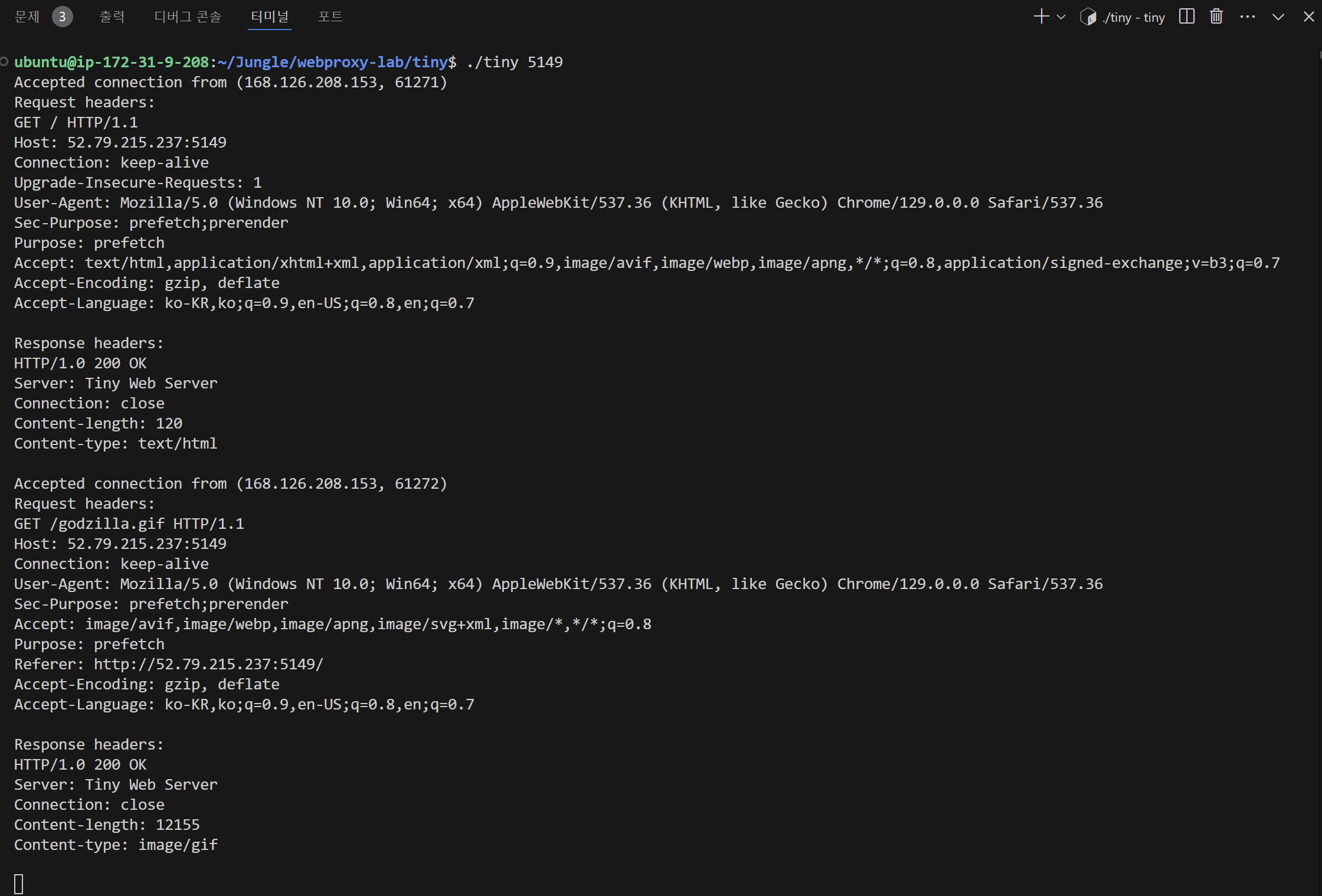
cgi/bin폴더 안에home.html문서가 있다. 브라우저를 통해 접속하는 경우 해당 문서가 브라우저에 뿌려지는 것을 확인할 수 있었다.
- 아래는 서버 측의 출력이다.
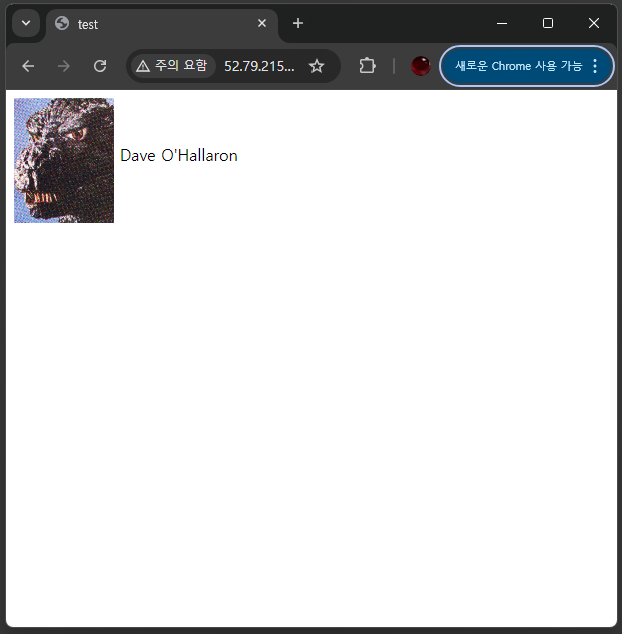
- home.html 문서를 수정해서 여러 resource들을 브라우저에 뿌려줄 수 있다.
<html>
<head><title>test</title></head>
<body>
    <img align="middle" src="godzilla.gif">
    <p>Dave O'Hallaron</p>

    <!-- Local Video Embed -->
     <video align="middle" width="560" height="315" controls>
        <source src="">
        Your browser does not support the video tag.
     </video>
</body>
</html>- 예를 들어
<video>태그를 이용하면, 아래와 같이 영상을 브라우저에서 화면에 함께 뿌려줄 수 있는 것이다. 원하는 영상을/cgi/bin폴더에 올려놓고 경로 지정을 해주면 영상이 돌아갈 것이다.
실행 결과
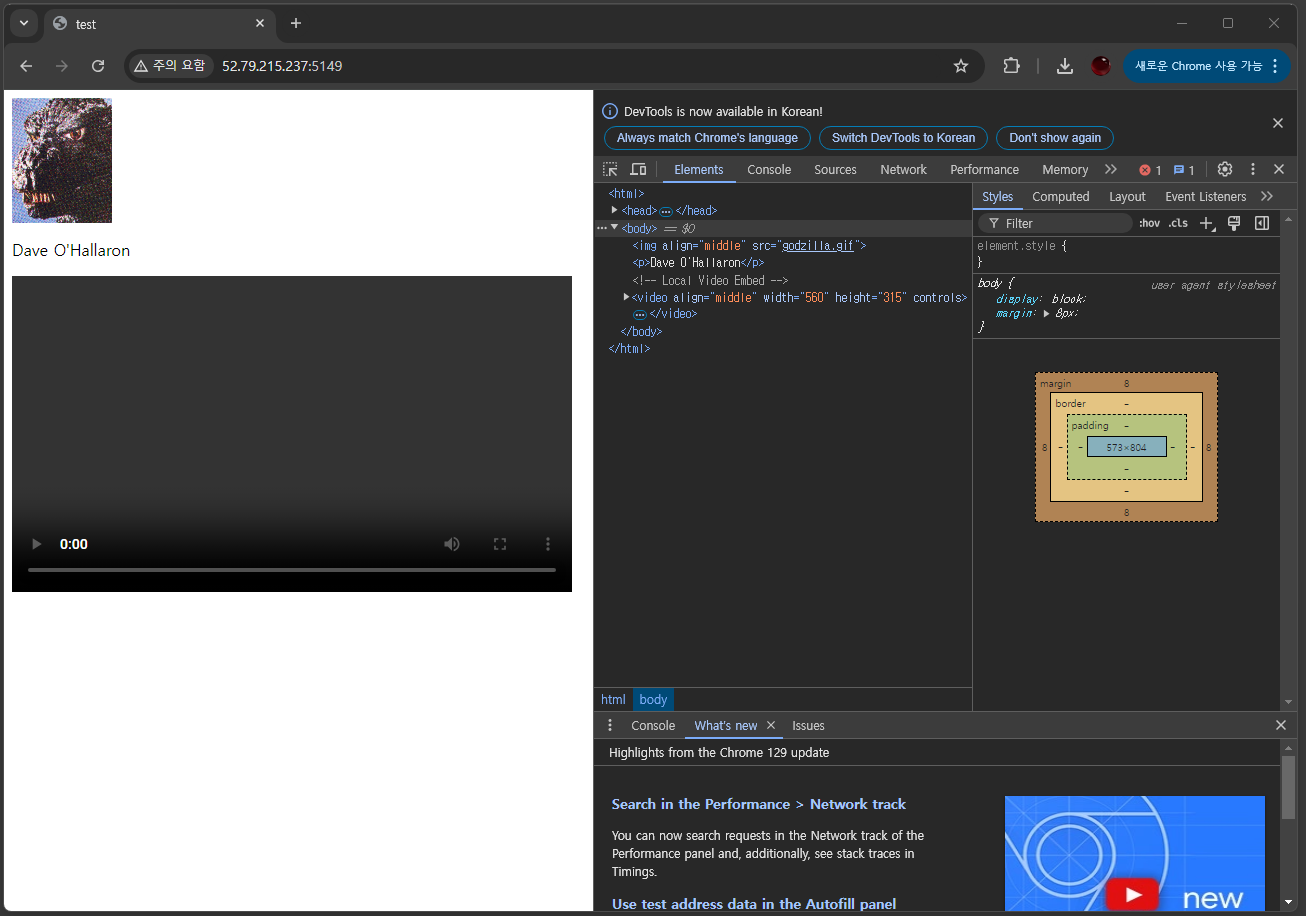
- tiny 서버에서,
/cgi-bin/폴더 안의 여러 자원들을 위처럼 html 문서에 올려 사용할 수 있다.
<CGI 프로그램의 이해>
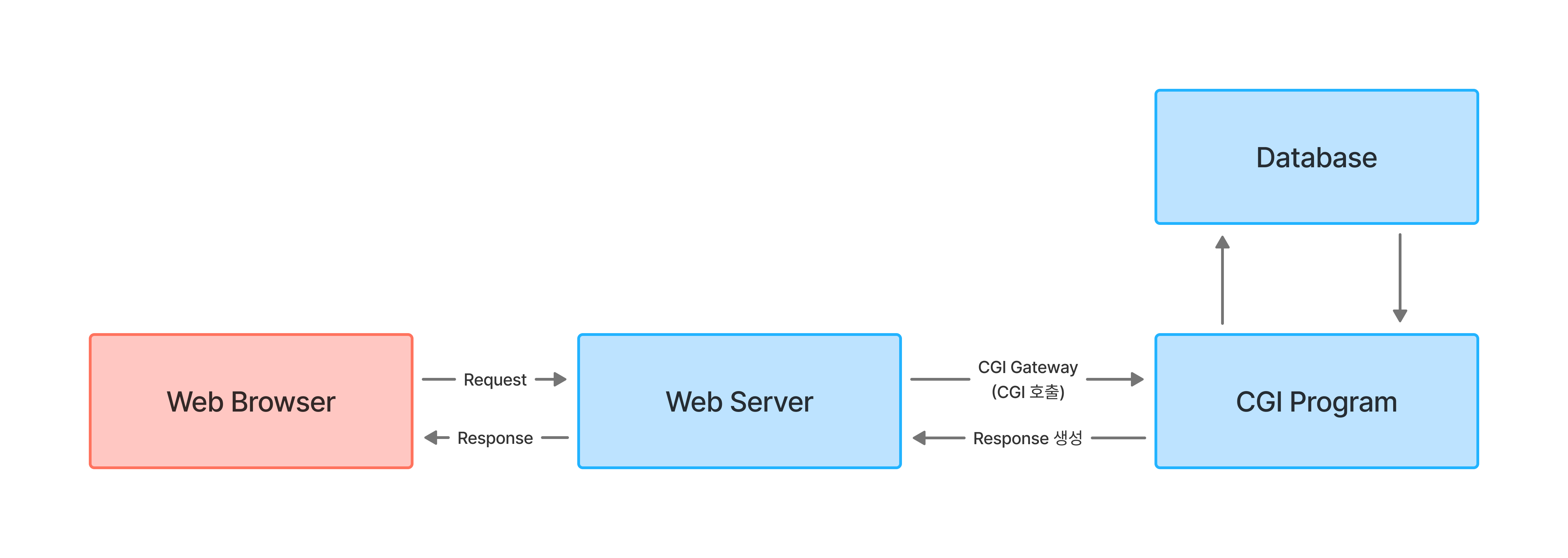
- 아래는 CGI 프로그램의 이해를 위해 간단하게 작성한
adder.c의 예시이다. 이 프로그램은/cgi/bin폴더 안에 있는adder.html을 오픈한다.
adder.c
/*
 * adder.c - a minimal CGI program that adds two numbers together
 */
/* $begin adder */
#include "csapp.h"

int main(void) {
  FILE *html_file;
  char content[MAXLINE];

  html_file = fopen("cgi-bin/adder.html","r");
  if (html_file == NULL)
  {
    sprintf(content, "Content-type: text/html\r\n\r\n");
    sprintf(content + strlen(content), "<html><body><p>Error: adder.html not found</p></body></html>");
    printf("%s",content);
    fflush(stdout);
    exit(1);
  }

  printf("Connection: closer\r\n");
  printf("Connect-type: text/html\r\n\r\n");

  while (fgets(content,MAXLINE,html_file) != NULL)
  {
    printf("%s", content);
  }

  fflush(stdout);
  fclose(html_file);
  exit(0);
}
/* $end adder */
adder.html
<!DOCTYPE html>
<html lang="en">
<head>
    <meta charset="UTF-8">
    <title>Adder test</title>
</head>
<body>
    <h2>Adder Test</h2>
    <form action="/cgi-bin/adder" method="get">
        <label for="n1">First number:</label>
        <input type="text" id="n1" name="n1">
        <br>
        <br>
        <label for="n2">First number:</label>
        <input type="text" id="n2" name="n2">

        <button type="submit">Add</button>
    </form>
</body>
</html>
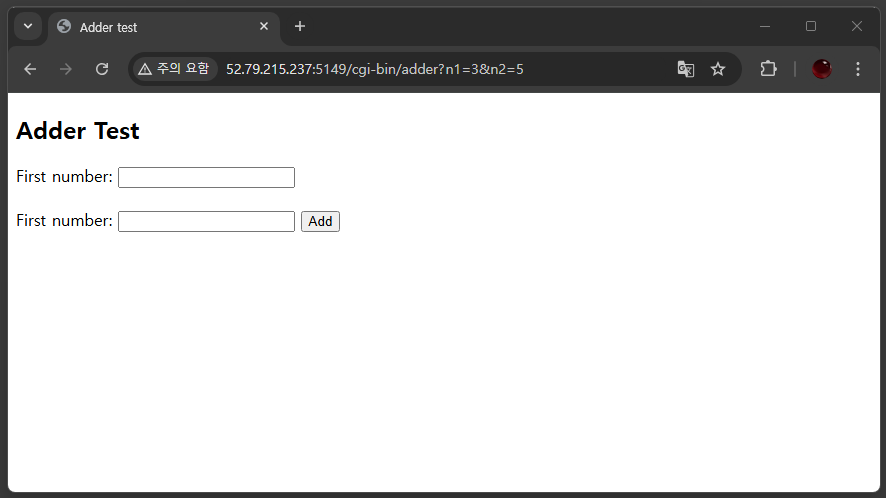
실행 결과
서버 주소:포트번호/cgi-bin/adder와 같이 입력해 접속하니, 위와 같이adder.html문서가 브라우저에 뿌려지는 것을 확인할 수 있었다.- 각
textarea에 각각 3, 5값을 입력하고Add버튼을 클릭하니, 주소창에URI로n1=3&n2=5가 추가 되는 것을 확인할 수 있었다.
Proxy 서버와 관련된 내용은 다음 글에서 다뤄보자.
* 이미지 / 참고 자료 출처