Overivew
- 여러개의 인자값들로 엔티티 데이터를 가져와야할때, 최적화에 대한 방법을 이해 할 수 있습니다
시나리오
- 클라이언트로부터 받은 파일아이디들로, 우리의 DB에 있는 파일들을 가져와야 하는 상황으로 다음 순서대로 방법에 대해 알아보자
1번째
- 클라이언트로부터 파일 id 리스트를, 각각 조회해보고 그게 자신인지 확인한다음, 다시 리스트에 하나씩 추가해주는 아주 불쌍한 코드다 (주인을 잘못만났어 미안해..)
for ( Long fileId : fileIds ) {
    Attachment attachment = attachmentRepository.findById(fileId).orElseThrow(() -> new FileException(FILE_NOT_FOUND));
    AttachmentValidator.isMe(authUser.getUserId(),attachment.getUser().getId());
    Attachment findAttachment = new Attachment(
            attachment.getId(),
            attachment.getUser(),
            attachment.getTargetId(),
            attachment.getFile_absolute_path(),
            attachment.getFile_relative_path(),
            attachment.getFile_original_name(),
            attachment.getFile_size(),
            attachment.getTarget()
    );
    attachments.add(findAttachment);
}
2번째
- findByFileIsMe라는 JQPL문을 작성하여 한번에 쿼리에 파일을 가져오고, 그 파일의 User와 로그인되있는 user가 동일한지 가져오는 쿼리를 만들었다 (하지만 아직도 부족하다)
@Query("SELECT a from Attachment a " +
        "WHERE a.id = :fileId " +
        "AND a.user.id = :userId"
)
Attachment findByFileIsMe(Long userId, Long fileId);- 사용 방식은 아래와같다 (여러개의 반복문을 통해서 쿼리를 쏘니 뭔가좀 그렇다
public List<Attachment> getFilesIsMe(AuthUser authUser, List<Long> fileIds) {
    List<Attachment> attachments = new ArrayList<>();
    for ( Long fileId : fileIds ) {
        Attachment attachment = attachmentRepository.findByFileIsMe(authUser.getUserId(),fileId);
        attachments.add(attachment);
    }
    return attachments;
}
3번째
- findAllByFileIsMe 라는 새로운 JQPL을 통하여 List형태의 fileIds를 받고 한번에 쿼리에 조건에 맞는 파일들을 가져온다
@Query("SELECT a from Attachment a " +
        "WHERE a.id IN :fileId " +
        "AND a.user.id = :userId"
)
List<Attachment> findAllByFileIsMe(Long userId, List<Long> fileId);
실제 쿼리 횟수와, 속도차이를 비교해보자
전체 테스트 코드 설정
package com.sparta.doguin.domain.query;

import com.sparta.doguin.domain.attachment.constans.AttachmentTargetType;
import com.sparta.doguin.domain.attachment.entity.Attachment;
import com.sparta.doguin.domain.attachment.repository.AttachmentRepository;
import com.sparta.doguin.domain.common.exception.FileException;
import com.sparta.doguin.domain.user.entity.User;
import com.sparta.doguin.domain.user.enums.UserRole;
import com.sparta.doguin.domain.user.enums.UserType;
import com.sparta.doguin.domain.user.repository.UserRepository;
import org.junit.jupiter.api.BeforeEach;
import org.junit.jupiter.api.DisplayName;
import org.junit.jupiter.api.Test;
import org.springframework.beans.factory.annotation.Autowired;
import org.springframework.boot.test.context.SpringBootTest;
import org.springframework.test.annotation.Rollback;

import java.util.ArrayList;
import java.util.List;

import static com.sparta.doguin.domain.common.response.ApiResponseFileEnum.FILE_NOT_FOUND;

@SpringBootTest
public class QueryTest {
    @Autowired
    AttachmentRepository attachmentRepository;

    @Autowired
    UserRepository userRepository;

    List<Long> fileIds = new ArrayList<>();

    @BeforeEach
    void setup() {
        User user = new User(
                null,                        // id
                "example@example.com",      // email
                "password123",              // password
                "john_doe",                 // nickname
                UserType.COMPANY,           // userType (예시로 REGULAR 타입 사용)
                UserRole.ROLE_USER,         // userRole (예시로 USER 역할 사용)
                "profile.jpg",              // profileImage
                "안녕하세요, 저는 John입니다.",  // introduce
                "서울시 강남구",              // homeAddress
                "https://github.com/johndoe",// gitAddress
                "https://blog.example.com"   // blogAddress
        );
        userRepository.save(user);

        for (int i = 0; i < 100; i++) {
            Attachment attachment = new Attachment(
                    null,
                    user,                          // 기존에 생성된 User 객체 사용
                    100L + i,                      // 고유한 targetId 설정
                    "/absolute/path/to/file" + i + ".jpg",   // 고유한 절대 경로
                    "/relative/path/to/file" + i + ".jpg",   // 고유한 상대 경로
                    "file" + i + ".jpg",           // 고유한 파일 이름
                    2048L + i,                     // 파일 크기 (고유하게 설정)
                    AttachmentTargetType.PORTFOLIO  // target (예시로 PORTFOLIO 타입 설정)
            );
            fileIds.add(i+1L);
            attachmentRepository.save(attachment);
        }
    }
}
1번째 쿼리횟수,속도 체크
@Transactional
@Test
@DisplayName("쿼리를 사용 하지않고, 반복문을 통하여 파일들 가져오기")
void test1(){
    Long start = System.currentTimeMillis();
    List<Attachment> attachments = new ArrayList<>();
    System.out.println("!!!!!!!!!!!!!!!!!!!! 쿼리 시작 !!!!!!!!!!!!!!!!!!!!!!");
    for ( Long fileId : fileIds ) {
        Attachment attachment = attachmentRepository.findById(fileId).orElseThrow(() -> new FileException(FILE_NOT_FOUND));
        AttachmentValidator.isMe(1L,attachment.getUser().getId());
        Attachment findAttachment = new Attachment(
                attachment.getId(),
                attachment.getUser(),
                attachment.getTargetId(),
                attachment.getFile_absolute_path(),
                attachment.getFile_relative_path(),
                attachment.getFile_original_name(),
                attachment.getFile_size(),
                attachment.getTarget()
        );
        attachments.add(findAttachment);
    }
    System.out.println("!!!!!!!!!!!!!!!!!!!! 쿼리 끝 !!!!!!!!!!!!!!!!!!!!!!");
    Long end = System.currentTimeMillis();
    System.out.println("----------------------------------------------------------------");
    System.out.println(end - start);
    System.out.println("----------------------------------------------------------------");
}- 99ms가 나온모습
- 반복문으로 100개를 돌렸으니 100개의 쿼리가 나갔을 것이다

- JPA 쿼리문은 아래와 같다
Hibernate:
    select
        a1_0.id,
        a1_0.created_at,
        a1_0.file_absolute_path,
        a1_0.file_original_name,
        a1_0.file_relative_path,
        a1_0.file_size,
        a1_0.target,
        a1_0.target_id,
        a1_0.updated_at,
        a1_0.user_id
    from
        attachment a1_0
    where
        a1_0.id=?
2번째 쿼리횟수,속도 체크
@Transactional
@Test
@DisplayName("쿼리를 사용하되, 반복문으로 파일들 가져오기")
void test2(){
    Long start = System.currentTimeMillis();
    List<Attachment> attachments = new ArrayList<>();
    System.out.println("!!!!!!!!!!!!!!!!!!!! 쿼리 시작 !!!!!!!!!!!!!!!!!!!!!!");
    for ( Long fileId : fileIds ) {
        Attachment attachment = attachmentRepository.findByFileIsMe(1L, fileId);
        attachments.add(attachment);
    }
    System.out.println("!!!!!!!!!!!!!!!!!!!! 쿼리 끝 !!!!!!!!!!!!!!!!!!!!!!");
    Long end = System.currentTimeMillis();
    System.out.println("----------------------------------------------------------------");
    System.out.println(end - start);
    System.out.println("----------------------------------------------------------------");

}- 140ms가 나온모습
- 이것역시 반복문으로 100개를 돌렸으니 100개의 쿼리가 나갔을것이다
- 다소 의외인게 첫번째 쿼리보다 느렸다
- 아무래도 쿼리에서 user인지 확인하는 것떄문에 더 느린것같다

- JPA 쿼리문은 아래와 같다
Hibernate:
    select
        a1_0.id,
        a1_0.created_at,
        a1_0.file_absolute_path,
        a1_0.file_original_name,
        a1_0.file_relative_path,
        a1_0.file_size,
        a1_0.target,
        a1_0.target_id,
        a1_0.updated_at,
        a1_0.user_id
    from
        attachment a1_0
    where
        a1_0.id=?
        and a1_0.user_id=?
3번째 쿼리횟수,속도체크
- 사실 제일 기대되는 쿼리문이다 한번 확인해보자
@Transactional
@Test
@DisplayName("온전한 쿼리를 사용하여 거져오기")
void test3(){
    Long start = System.currentTimeMillis();
    System.out.println("!!!!!!!!!!!!!!!!!!!! 쿼리 시작 !!!!!!!!!!!!!!!!!!!!!!");
    attachmentRepository.findAllByFileIsMe(1L,fileIds);
    System.out.println("!!!!!!!!!!!!!!!!!!!! 쿼리 끝 !!!!!!!!!!!!!!!!!!!!!!");
    Long end = System.currentTimeMillis();
    System.out.println("----------------------------------------------------------------");
    System.out.println(end - start);
    System.out.println("----------------------------------------------------------------");
} - 69ms

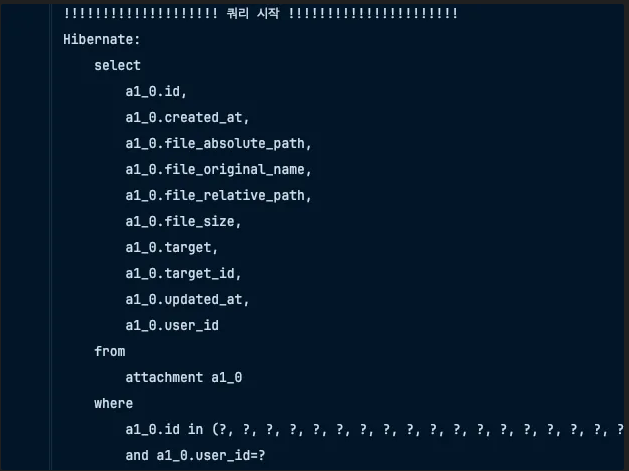
- 여태까지 보았던 쿼리문들중에 가장 빨랐다
- 심지어 한번의 쿼리로 끝났다
오늘 난 무엇을 알았는가?
- List로 여러개를 찾아야할때 IN절을 사용하여 가능하다

테러대응전문가