언리얼에서 제공하는 플러그인 인터페이스에 맞춰 구조를 변경하였다.
오디오 플러그인 인터페이스
언리얼 엔진에서 플러그인 제작자를 위한 인터페이스를 제공해주고 있었다. 크게 4가지 인터페이스를 제공한다.
- Spatializer(공간화): 소리의 방향과 거리에 따른 효과
- Occlusion(차폐): 장애물에 가려졌을 때에 따른 효과
- Reverb(잔향): 공간에 따른 잔향 효과...라고는 하지만 실제론 채널 믹스로 쓰이는 듯하다.
- Source Data Override: WaveInstance의 데이터를 오버라이딩
각각 인터페이스와 인터페이스 구현체를 제공하는 Factory 인터페이스가 있다.
IAudioSpatialization,IAudioSpatializationFactoryIAudioOcclusion,IAudioOcclusionFactoryIAudioReverb,IAudioReverbFactoryIAudioSourceDataOverride,IAudioSourceDataOverrideFactory
- 참고: 언리얼 공식 가이드
- 참고: UE5.6
/Engine/Source/Runtime/AudioExtensions/Public/IAudioExtensionPlugin.h
Factory 구현
우선 Factory 클래스가 필요한데, 이름과 실제 구현체를 제공하는 함수 정도만 필요하다.
class FPluginSpatializerFactory : public IAudioSpatializationFactory
{
public:
    virtual FString GetDisplayName() override
    {
        return FString(TEXT("Spatializer Name"));
    }

    virtual bool SupportsPlatform(const FString& PlatformName) override
    {
        return PlatformName == FString(TEXT("Windows"));
    }

    virtual TAudioSpatializationPtr CreateNewSpatializationPlugin(FAudioDevice* OwningDevice) override;

};CreateNew...Plugin(...)가 실제 구현체를 제공해주는 함수인데, 이때 반환 타입인TAudio...Ptr는 다음과 같다.
// IAudioExtensionPlugin.h c57~
using TAudioSpatializationPtr = TSharedPtr<IAudioSpatialization, ESPMode::ThreadSafe>;
using TAudioSourceDataOverridePtr = TSharedPtr<IAudioSourceDataOverride, ESPMode::ThreadSafe>;
using TAudioOcclusionPtr      = TSharedPtr<IAudioOcclusion, ESPMode::ThreadSafe>;
using TAudioReverbPtr         = TSharedPtr<IAudioReverb, ESPMode::ThreadSafe>;
따라서 다음과 같이 구현하면 된다.
TAudioSpatializationPtr FPluginSpatializerFactory::CreateNewSpatializationPlugin(FAudioDevice* OwningDevice)
{
	return MakeShared<FPluginSpatializer, ESPMode::ThreadSafe>();
}
플러그인 모듈 클래스에 해당 Factory 클래스를 멤버 변수로 넣고, StartupModule()에서 Factory를 통해 Register해주면 된다.
class FPluginModule : public IModuleInterface
{
public:
    /** IModuleInterface implementation */
    virtual void StartupModule() override;
    virtual void ShutdownModule() override;

    FPluginSpatializerFactory PluginSpatializerFactory;
}
void FPluginModule::StartupModule()
{
    IModularFeatures::Get().RegisterModularFeature(FPluginSpatializerFactory::GetModularFeatureName(), &PluginSpatializerFactory);
}
여기까지 진행하고 컴파일하면 프로젝트 세팅에서 만든 플러그인을 선택할 수 있다.
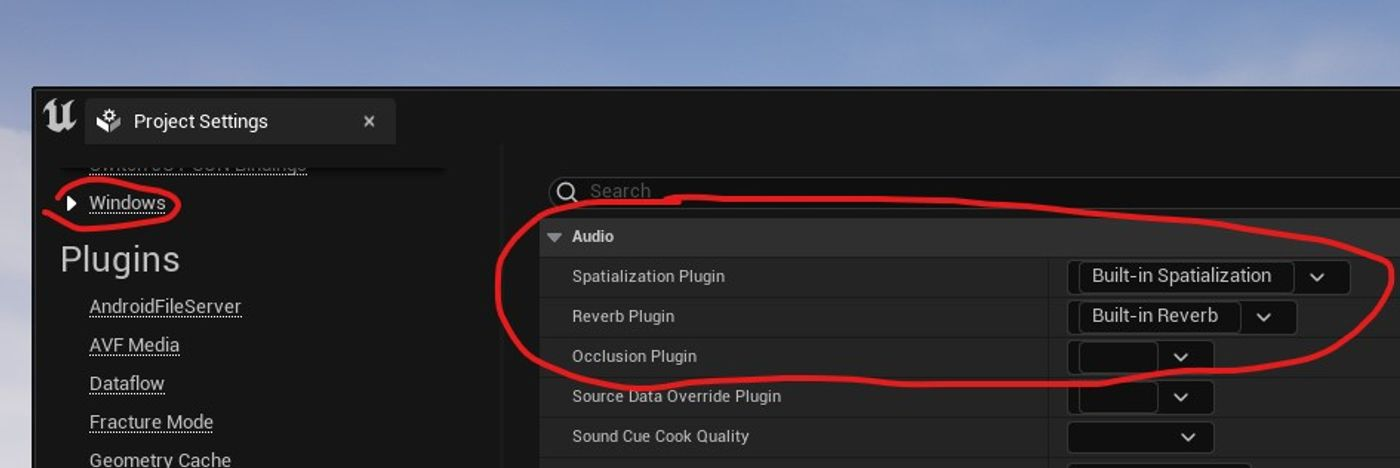
Spatializer는 GetMaxSupportedChannels()가 필요할 수 있다. 기본적으로 1을 반환하게 돼 있는데 Stereo를 출력하려면 2를 반환시켜야 한다.
virtual int32 FPluginSpatializerFactory::GetMaxSupportedChannels() override
{
    return 2;
}
처리 순서
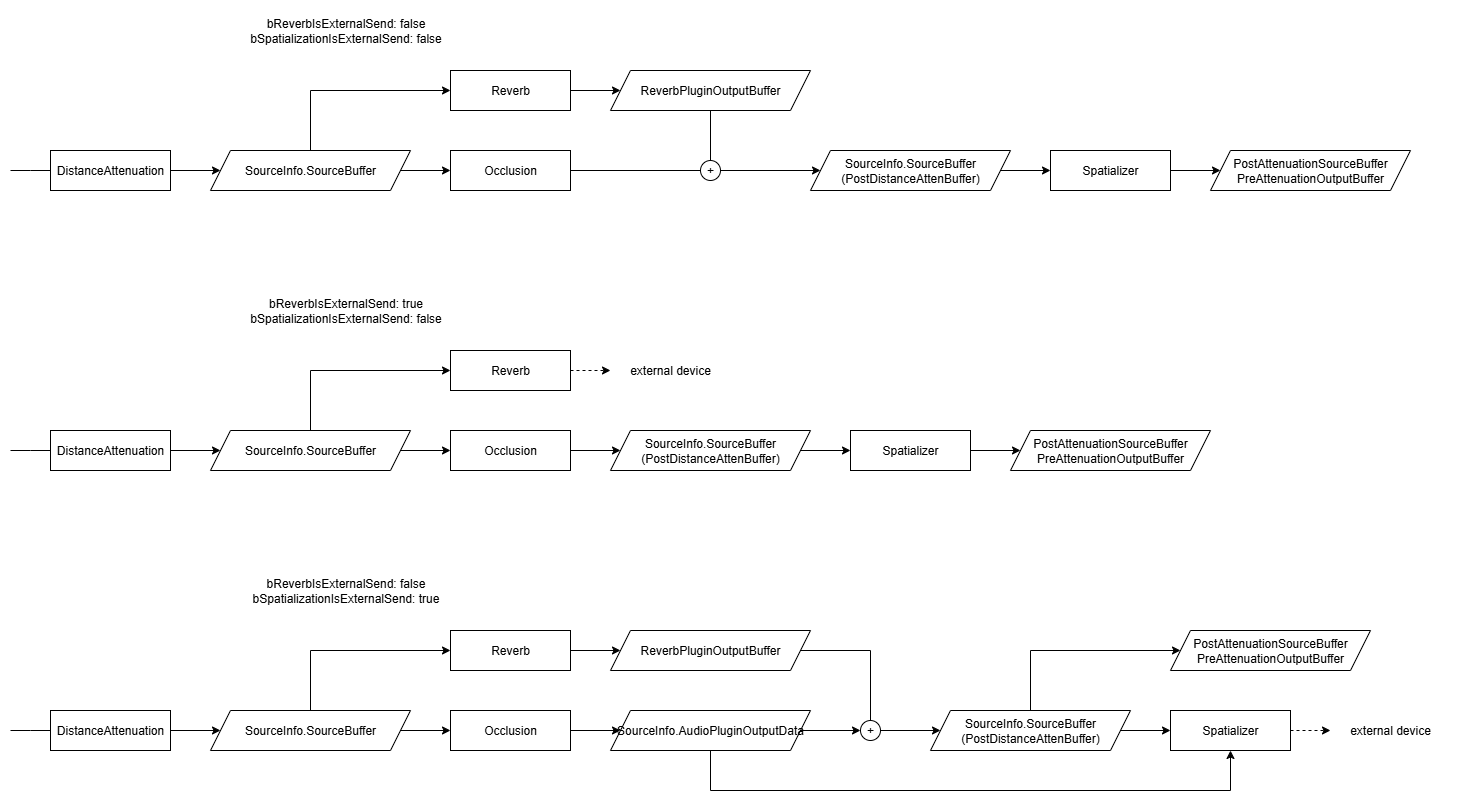
재생될 오디오에 대해 함수가 호출되면 Game Thread에서 AudioSourceDataOverride가 가장 먼저 실행되고, 이후 Audio Mixer Thread에서 Distance Attenuation 적용 후 Reverb, Occlusion, Spatializer 순으로 실행된다.
이때 플래그 bReverbIsExternalSend와 bSpatializationExternalSend에 따라서 분기가 나뉜다. (이 플래그는 팩토리 클래스의 IsExternalSend() 함수로 결정된다) 변수명대로 플래그가 켜져 있으면 각 단계의 Output 데이터를 반영하지 않게 된다.
특이하게 bSpatializationExternalSend가 켜져 있으면 Occlusion까지 처리된 데이터가 Spatializer의 Output Data로 들어온다. 쓸모 있을지는 모르겠다.
- 참고: UE5.6
\Engine\Source\Runtime\AudioMixer\Private\AudioMixerSourceManager.cppc2737~
구현
제작중인 플러그인에서는 Spatializer와 Source Data Override만 사용하기로 했다.
이름만 보면 Reverb를 써야 할 거 같은데, Reverb 플러그인이 이름이 무색하게 소리가 끝난 뒤에는 호출되지 않는 문제점이 있어 잔향을 주기 난감해 보였다.
참고한 다른 플러그인(Resournance Audio, Project Acoustic)들에서도 Reverb를 이름처럼 쓰지 않고 서라운드 채널에 대응하기 위한 역할로 사용하고 있었다.
Reverb 효과는 Source Data Override에서 Submix로 전달해서 효과를 주고 있었다.
우리 역시 Reverb를 Submix Effector로 구현하기로 하였다.
Reverb
Decay Time이 서로 다른 Reverb 이펙터를 하나씩 가진 Submix 3개 정도를 준비해서 Source Data Override에서 불러온다.
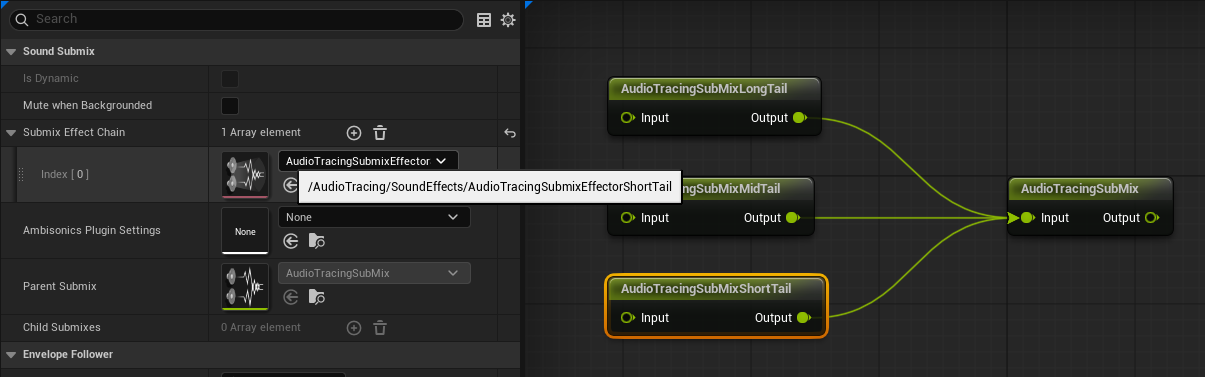
TObjectPtr<USoundSubmix> ShortReverbSubmix = Cast<USoundSubmix>(ATSettings->ShortReverbSubmixPath.TryLoad());
TObjectPtr<USoundSubmix> MediumReverbSubmix = Cast<USoundSubmix>(ATSettings->MediumReverbSubmixPath.TryLoad());
TObjectPtr<USoundSubmix> LongReverbSubmix = Cast<USoundSubmix>(ATSettings->LongReverbSubmixPath.TryLoad());
Source Data Override의 GetSourceDataOverrides(...)에서 파라미터로 받은 RT60을 통해 각 Submix에 전달할 SendLevel을 계산한다.
if (RT60Avg < ShortReverbRT60)
{
    ShortSubmixSend.SendLevel = ReverbGainAvg * (RT60Avg / ShortReverbRT60);
}
else if ( ShortReverbRT60 < RT60Avg && RT60Avg < MidReverbRT60 )
{
    float Weight = CalculateSendReverbInterpolation(RT60Avg, ShortReverbRT60, MidReverbRT60);
    ShortSubmixSend.SendLevel = ReverbGainAvg * Weight;
    MediumSubmixSend.SendLevel = ReverbGainAvg * (1 - Weight);
}
else if ( MidReverbRT60 < RT60Avg && RT60Avg < LongReverbRT60 )
{
    float Weight = CalculateSendReverbInterpolation(RT60Avg, MidReverbRT60, LongReverbRT60);
    MediumSubmixSend.SendLevel = ReverbGainAvg * Weight;
    LongSubmixSend.SendLevel = ReverbGainAvg * (1 - Weight);
}
else if ( LongReverbRT60 < RT60Avg )
{
    LongSubmixSend.SendLevel = ReverbGainAvg;
}
이때 가중치 Weight는 아래와 같이 계산한다.
float CalculateSendReverbInterpolation(const float TargetTime, const float PivotTime, const float OtherTime)
{
    auto DecayOnTargetTime = [TargetTime](const float RT60)
    {
        return FMath::Pow(10, -6 * TargetTime / RT60);
    };
    return (DecayOnTargetTime(TargetTime) - DecayOnTargetTime(OtherTime)) / (DecayOnTargetTime(PivotTime) - DecayOnTargetTime(OtherTime));
}
Spatializer
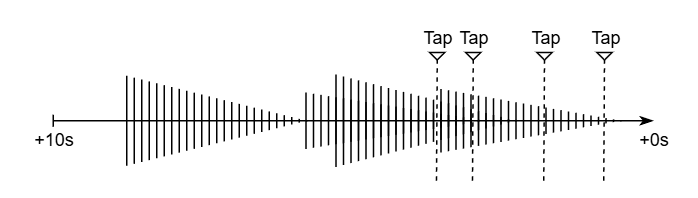
직접음과 초기 반사음은 Spatializer에서 Tap Delay를 통해 구현하였다. 기존 Tap Delay는 Submix Effector로만 있었기 때문에 직접 만들어 주었다.
기본적인 원리는 기존 Tap Delay와 같이, 마지막으로 재생된 오디오 데이터를 몇 초동안 캐싱해 두고 그 위에서 여러 탭이 각자의 딜레이 위치에서 오디오를 재생시키는 방식이다.
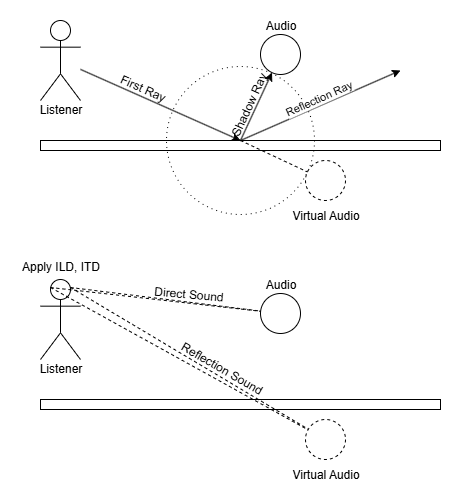
또한 Tap을 업데이트할 때 Virtual Sound의 위치(각도, 거리)를 통해 ILD, ITD를 계산해 준다.
그리고 기존 방식은 Output Sample 하나를 계산하는데 모든 Tap에 재생될 Sample을 더해서 계산하는데, Tap이 많아질수록 성능에 지장이 가서 SIMD를 활용할 수 있는 방식으로 바꿔 주었다.
아래 코드 중 Audio::ArrayMixIn(...)과 AudioTracing::ArrayInterpolate(...)가 내부적으로 SIMD를 사용하는 코드이다.
void FAudioTracingSpatialTapDelay::ProcessAudioOptimized(const FAudioPluginSourceInputData& InputData, FAudioPluginSourceOutputData& OutputData)
{
    const int32 InputChannelNum = InputData.NumChannels;
    const int32 OutputChannelNum = NumChannel;
    const int32 InputBufferNum = InputData.AudioBuffer->Num();
    const int32 OutputBufferNum = OutputData.AudioBuffer.Num();
    const int32 OutputBufferNumByChannel = OutputBufferNum / OutputChannelNum;

    const FVector EmitterLocation = InputData.SpatializationParams->EmitterWorldPosition;
    const FVector ListenerLocation = InputData.SpatializationParams->ListenerPosition;

    // Write Input to DelayBuffer
    TArray<float> InputBuffer;
    InputBuffer.AddZeroed(InputBufferNum / InputChannelNum);
    for ( int32 InputBufferIndex = 0; InputBufferIndex < InputBufferNum / InputChannelNum; ++InputBufferIndex )
    {
        if ( InputBufferIndex < InputBufferNum )
        {
            float Input = 0.f;
            for ( int32 InputChannel = 0; InputChannel < InputChannelNum; ++InputChannel )
            {
                Input += (*InputData.AudioBuffer)[InputChannelNum * InputBufferIndex + InputChannel];
            }
            InputBuffer[InputBufferIndex] = Input / InputChannelNum;
        }
    }
    SimpleDelayLine.Write(InputBuffer);

    // Read DelayBuffer from Taps and Mix to Output
    TArray<TArray<float>> OutputBuffers;
    const float BlockInterval = static_cast<float>(OutputBufferNumByChannel) / SampleRate;
    const float InterpolationMargin = 4;

    for ( int32 OutputChannelIdx = 0; OutputChannelIdx < NumChannel; ++OutputChannelIdx )
    {
        TArray<uint32> TapIndices;
        ChannelTaps[OutputChannelIdx].GetKeys(TapIndices);

        TArray<float> OutputBuffer;
        OutputBuffer.AddZeroed(OutputBufferNumByChannel);

        for ( const uint32 TapIndex : TapIndices )
        {
            FAudioTracingSpatialTapDelayInfo& ChannelTap = ChannelTaps[OutputChannelIdx][TapIndex];

            const float StartDelay = ChannelTap.GetDelayValue(1.f / SampleRate);
            const float EndDelay = ChannelTap.GetDelayValue(BlockInterval);
            const float StartGain = ChannelTap.GetGainValue(1.f / SampleRate);
            const float EndGain = ChannelTap.GetGainValue(BlockInterval);

            // because delay write cursor is incremented, add BlockInterval
            // because interpolation, read margin more sample
            float ReadStartSecond = StartDelay / 1000.f + BlockInterval + InterpolationMargin / SampleRate;
            float ReadEndSecond = EndDelay / 1000.f - InterpolationMargin / SampleRate;

            int32 ReadCount = FMath::RoundToInt32(FMath::Abs(ReadEndSecond - ReadStartSecond) * SampleRate);
            TArray<float> DelayedBuffer = SimpleDelayLine.ReadFrom(ReadStartSecond, ReadCount);

            // if sample length predicted is not equal read count
            // (cause samples are extends or shirinks by doppler effect)
            // Interpolate samples
            if ( DelayedBuffer.Num() != OutputBufferNumByChannel + 2 * InterpolationMargin)
            {
                int32 NumDelayedBuffer = DelayedBuffer.Num();
                TArray<float> InterpBuffer;
                InterpBuffer.AddZeroed(OutputBufferNumByChannel + 2 * InterpolationMargin);

                DelayedBuffer.AddZeroed();
                AudioTracing::ArrayInterpolate(DelayedBuffer.GetData(), InterpBuffer.GetData(), DelayedBuffer.Num() - 1, OutputBufferNumByChannel + 2 * InterpolationMargin);

                TArrayView<float> InterpBufferView = TArrayView<float>(&InterpBuffer[InterpolationMargin], OutputBufferNumByChannel);
                Audio::ArrayMixIn(InterpBufferView, OutputBuffer, StartGain, EndGain);

            // else just mix samples
            } else
            {
                TArrayView<float> DelayedBufferView = TArrayView<float>(&DelayedBuffer[InterpolationMargin], OutputBufferNumByChannel);
                Audio::ArrayMixIn(DelayedBufferView, OutputBuffer, StartGain, EndGain);
            }
        }

        OutputBuffers.Add(OutputBuffer);
    }

    for ( int32 OutputBufferIndex = 0; OutputBufferIndex < OutputBufferNumByChannel; ++OutputBufferIndex )
    {
        for ( int32 OutputChannelIdx = 0; OutputChannelIdx < NumChannel; ++OutputChannelIdx )
        {
            OutputData.AudioBuffer[NumChannel * OutputBufferIndex + OutputChannelIdx] = OutputBuffers[OutputChannelIdx][OutputBufferIndex];
        }
    }
}
SIMD를 적용하기 전/후 성능 차이이다. 설정값 최대치에서 10ms 내외가 나오던 것을 1ms 내까지 줄일 수 있었다.


UE에서 제공하는 Audio::ArrayInterpolate(...) 함수는 고쳐야 할 부분이 있어서 AudioTracing::ArrayInterpolate(...)을 새로 만들게 되었다.
기존과 달리 부동소수점 오차 누적을 방지하고, 거꾸로 적용돼 있던 보간식을 수정하였다.
void AudioTracing::ArrayInterpolate(const float* InBuffer, float* OutBuffer, const int32 NumInSamples, const int32 NumOutSamples)
{
    if ( NumOutSamples <= 0 || NumInSamples <= 0 )
    {
        return;
    }

    const float SampleStride = (float)NumInSamples / (float)NumOutSamples;

    const int32 NumToSimd = NumOutSamples & 0xFFFFFFFC;
    const int32 NumNotToSimd = NumOutSamples & 0x00000003;

    if ( NumToSimd )
    {
        VectorRegister4Float Indices = VectorSet(
            0.f * SampleStride,
            1.f * SampleStride,
            2.f * SampleStride,
            3.f * SampleStride
        );

        for ( int32 OutputIndex = 0; OutputIndex < NumToSimd; OutputIndex += AUDIO_NUM_FLOATS_PER_VECTOR_REGISTER )
        {
            // prevent accumulation of floating point error
            Indices = VectorSet(
                (OutputIndex + 0.f) * SampleStride,
                (OutputIndex + 1.f) * SampleStride,
                (OutputIndex + 2.f) * SampleStride,
                (OutputIndex + 3.f) * SampleStride
            );

            alignas(16) int32 LeftIndecesRaw[4];
            alignas(16) int32 RightIndecesRaw[4];

            VectorRegister4Float LeftIndeces = VectorFloor(Indices);
            VectorRegister4Float Fractions = VectorSubtract(Indices, LeftIndeces);
            VectorRegister4Float InvFractions = VectorSubtract(GlobalVectorConstants::FloatOne, Fractions);

            VectorRegister4Int LeftIndecesInt = VectorFloatToInt(LeftIndeces);

            // Lookup samples for interpolation
            VectorIntStoreAligned(LeftIndecesInt, LeftIndecesRaw);
            VectorIntStoreAligned(VectorIntAdd(LeftIndecesInt, GlobalVectorConstants::IntOne), RightIndecesRaw);

            VectorRegister4Float LowerSamples = VectorSet(
                InBuffer[LeftIndecesRaw[0]],
                InBuffer[LeftIndecesRaw[1]],
                InBuffer[LeftIndecesRaw[2]],
                InBuffer[LeftIndecesRaw[3]]
            );
            VectorRegister4Float UpperSamples = VectorSet(
                InBuffer[RightIndecesRaw[0]],
                InBuffer[RightIndecesRaw[1]],
                InBuffer[RightIndecesRaw[2]],
                InBuffer[RightIndecesRaw[3]]
            );

            // LeftSample * Frac + RightSample * (1.f - Frac)
            // => LeftSample * (1.f - Frac) + RightSample * Frac
            VectorRegister4Float VOut = VectorMultiplyAdd(
                UpperSamples,
                Fractions,
                VectorMultiply(LowerSamples, InvFractions));
            VectorStore(VOut, &OutBuffer[OutputIndex]);
        }
    }

    if ( NumNotToSimd )
    {
        float SampleIndex = (float)(NumToSimd)*SampleStride;

        for ( int32 OutputIndex = NumToSimd; OutputIndex < NumOutSamples; OutputIndex++ )
        {
            const int32 LeftSample = FMath::FloorToInt32(SampleIndex);
            int32 RightSample = FMath::CeilToInt32(SampleIndex);

            const float Frac = SampleIndex - LeftSample;
            OutBuffer[OutputIndex] = (Frac * InBuffer[RightSample]) + ((1.f - Frac) * InBuffer[LeftSample]);

            SampleIndex += SampleStride;
        }
    }
}
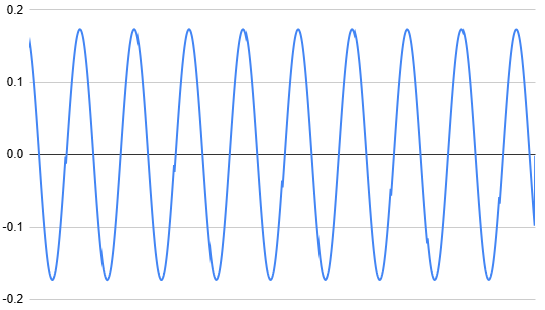
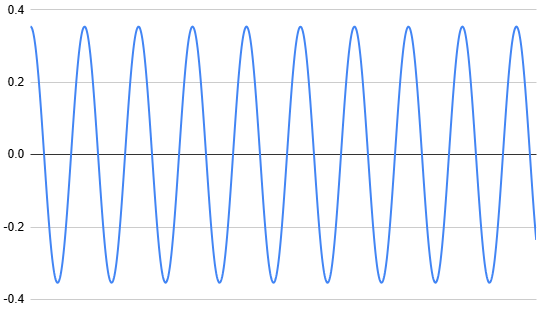
기존 Audio::ArrayInterpolate(...)는 아래와 같이 일정 구간마다 튀는 곳이 일어나 노이즈가 발생하는 데 비해 새 방식은 깔끔해진 것을 볼 수 있다.