'정석준님 (https://github.com/sjjeong)'께서 주관하는 Kotlin Coroutine 스터디 진행 과정
코틀린 코루틴의 정석 책을 읽고 이해한 내용을 바탕으로 정리하여 글을 작성하였습니다. 부족한 부분이나, 틀린 부분이 있다면 반영할 수 있도록 하겠습니다.
8장 - 예외처리
애플리케이션은 여러 예외(Exception)에 노출됩니다. 이러한 예외를 적절히 처리하지 못한다면 애플리케이션이 예측하지 못한 방향으로 동작 하거나 심하게는 비정상 종료될 수 있습니다. 따라서 안정적인 애플리케이션을 위해서는 예외를 적절하게 처리하는 것이 중요합니다.
비동기 작업을 수행하는 코루틴의 예외 처리 또한 중요합니다. 특히 코루틴의 비동기 작업은네트워크 요청,데이터 베이스같은 입출력(IO) 작업을 수행하는데 쓰이는 경우가 많아 예측할 수 없는 예외가 발생할 가능성이 높으므로 코루틴에 대한 적절한 예외 처리는 안정적인 애플리케이션을 만드는 데 필수적입니다.
8-1. 코루틴의 예외 전파
1. 코루틴에서 예외가 전파되는 방식
코루틴 실행 도중 예외가 발생하면 예외가 발생한 코루틴은 취소되고 부모 코루틴으로 예외가 전팝니다. 만약 부모 코루틴에서도 예외가 적절히 처리되지 않으면 부모 코루틴도 취소되고 예외는 다시 상위 코루틴으로 전파 됩니다. 이것이 반복 되면 최상위 코루틴인 루트 코루틴까지 예외가 전파 될 수 있습니다.
코루틴이 예외를 전파 받아서 취소가 된다면 하위(자식) 코루틴에게 취소가 전파 됩니다. 따라서 예외가 적절히 처리되지 않아서 루트 코루틴까지 예외가 전파 된다면 하위의 모든 코루틴에 취소가 전파 됩니다.

위 그림과 같이 구조화된 코루틴 있을 때 예외가 전파 되는 방식을 설명 해보겠습니다.
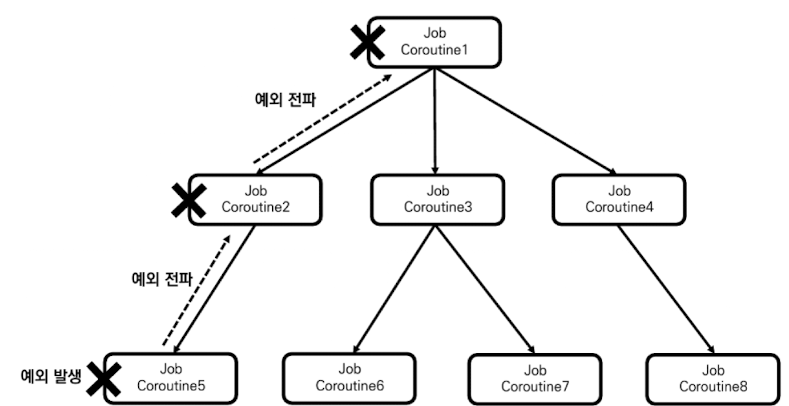
만약 Coroutine5 코루틴에서 예외가 발생하면 Coroutine2 코루틴으로 예외가 전파 되며, Coroutine2 코루틴에서 예외가 처리되지 않으면 Coroutine1 코루틴까지 예외가 전파됩니다. 만약 Coroutine1 코루틴에서도 예외가 적절히 처리되지 않으면 Coroutine1 코루틴은 취소 됩니다.
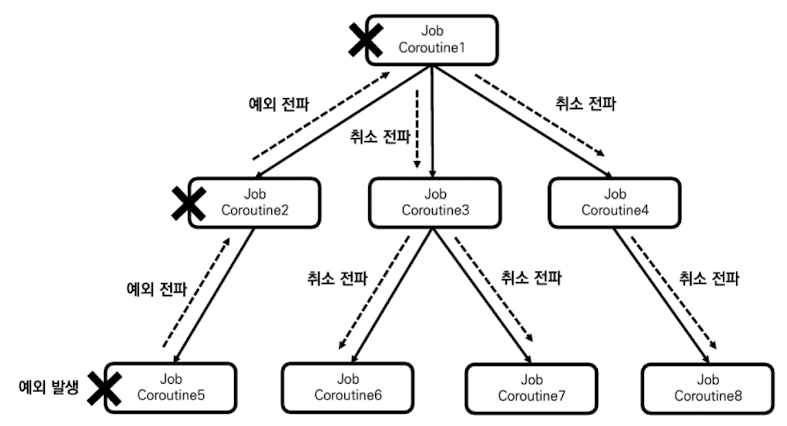
코루틴이 취소 되면 자식 코루틴에게도 취소가 전파 되므로, 코루틴의 예외를 제대로 막지 못하여 루트 코루틴이 취소되면 구조화된 코루틴 모두 취소 될 수 있습니다.
2. 예제로 알아보는 예외 전파
fun main() = runBlocking<Unit> {
    launch(CoroutineName("Coroutine1")) {
        launch(CoroutineName("Coroutine3")) {
            throw Exception("예외 발생")
        }
        delay(100L)
        println("[${Thread.currentThread().name}] 코루틴 실행")
    }

    launch(CoroutineName("Coroutine2")) {
        delay(100L)
        println("[${Thread.currentThread().name}] 코루틴 실행")
    }

    delay(1000L)
}

/** 결과:
    Exception in thread "main" java.lang.Exception: 예외 발생
    ...
    종료 코드 1(으)로 완료된 프로세스
**/
runBlocking을 루트 코루틴으로 자식 코루틴인 Coroutine1과 Coroutine2 코루틴을 생성하며, Coroutine1코루틴의 자식인 Coroutine3 코루틴에서 예외가 발생하는 코드를 작성 해보았습니다.
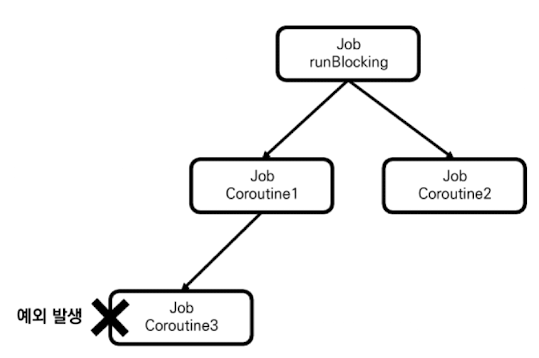
위 코루틴의 구조화를 그림으로 표현하면 위와 같습니다.
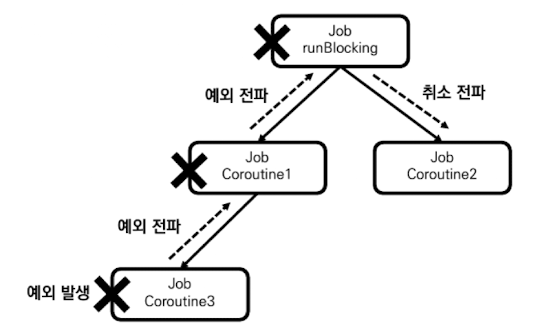
Coroutine3 코루틴에서 발생하는 예외는 처리되는 부분이 없기 때문에 부모 코루틴인 Coroutine1을 거쳐 runBlocking 루트 코루틴까지 예외가 전파 됩니다. 따라서 루트 코루틴의 자식들까지 취소 되기에 Coroutine2 코루틴에도 취소가 전파 됩니다.
/** 결과:
    Exception in thread "main" java.lang.Exception: 예외 발생
    ...
    종료 코드 1(으)로 완료된 프로세스
**/
위 코드를 실행하면 나오는 결과는 예외가 발생했다는 결과 로그만 나옵니다. 이를 통해 Coroutine3 코루틴에서 발생한 예외가 구조화된 모든 코루틴을 취소 시킨것을 알 수 있습니다.
코루틴의 구조화는 큰 작업을 연관된 작은 작업으로 나누는 방식으로 이뤄진다는 점을 기억합시다! 만약 작은 작업에서 발생한 예외로 인해 큰 작업이 취소되면 애플리케이션의 안정에서 문제가 생길 수 있습니다. 이런 문제 해결을 위해 코루틴은 예외 전파를 제한하는 여러 장치를 가집니다.
8-2. 예외 전파 제한
코루틴의 예외 전파를 제한하는 데는 다양한 방법을 사용할 수 있으므로 그 방법들에 대해서 살펴봅니다.
1. Job 객체를 사용한 예외 전파 제한
1) Job 객체를 사용해 예외 전파 제한하기
코루틴의 예외 전파를 제한하기 위한 첫 번째 방법은 코루틴의 구조화를 깨는 것입니다. 구조화된 코루틴의 특징 중 하나인 예외가 발생하면 부모 코루틴으로 전파 되는 것이 있습니다. 여기에서 구조화를 깬다면 예외가 전파되지 않으므로 예외 전파를 제한할 수 있습니다.
2) Job 객체를 사용한 예외 전파 제한의 한계
Job 객체를 생성해 코루틴의 구조화를 깨는 것은 예외 전파를 제한하는 것 뿐만 아니라 취소 전파도 제한시킵니다. 일반적으로 코루틴의 구조화는 큰 작업을 연관된 작은 작업으로 나누는 과정을 통해서 일어납니다 만약 작은 작업의 구조화가 깨진다면 큰 작업에 취소가 요청되더라도 작은 작업은 취소되지 않으며 이는 비동기 작업을 불안정하게 만듭니다.
일반적으로 코루틴의 구조화는 큰 작업을 연관된 작은 작업으로 나누는 방식으로 일어나기 때문에 안정적으로 동작하기 위해서는 루트 코루틴이 취소 되면 자식 코루틴도 함께 취소돼야 한다. 하지만 예외 전파 방지를 위해 새로운 Job 객체를 사용하면 구조화가 깨져 버려 루트 코루틴에 취소가 요청이 되어도 취소가 전파 되지 않아 새로운 Job 객체를 사용해 만든 코루틴은 정상 실행이 되버립니다.
그렇다면 구조화를 깨지 않으면서 예외 전파를 제한 할 수 없을까?
코루틴 라이브러리는 구조화를 꺠지 않으면서 예외 전파를 제한할 수 있도록 SupervisorJob 객체를 제공합니다.
2. SupervisorJob 객체를 사용한 예외 전파 제한
1) SupervisorJob 객체를 사용해 예외 전파 제한하기
SupervisorJob 객체는 자식 코루틴으로부터 예외를 전파받지 않는 특수한 Job 객체로 하나의 자식 코루틴에게서 발생한 예외가 다른 자식 코루틴에게 영향을 미치지 못하도록 만드는 데 사용됩니다. 일반적인 Job 객체는 자식 코루틴에서 예외가 발생하면 예외를 전파 받아 취소되지만 SupervisorJob 객체는 예외를 전파 받지 않아 취소 되지 않습니다.
public fun SupervisorJob(parent: Job? = null) : CompletableJob = SupervisorJobImpl(parent)SupervisorJob 생성 함수를 parent 인자 없이 사용하면 SupervisorJob 객체를 루트 Job으로 만들 수 있으며, parent 인자로 Job 객체를 넘기면 부모 Job이 있는 SupervisorJob 객체를 만들 수 있습니다.
fun main() = runBlocking<Unit> {
    val supervisorJob = SupervisorJob()
    launch(CoroutineName("Coroutine1") + supervisorJob) {
        launch(CoroutineName("Coroutine3")) {
            throw Exception("예외 발생")
        }
        delay(100L)
        println("[${Thread.currentThread().name}] 코루틴 실행")
    }

    launch(CoroutineName("Coroutine2") + supervisorJob) {
        delay(100L)
        println("[${Thread.currentThread().name}] 코루틴 실행")
    }

    delay(1000L)
}

/** 결과:
    Exception in thread "main @Coroutine1#3" java.lang.Exception: 예외 발생
    ...
    [main @Coroutine2#3] 코루틴 실행
**/
새로 생성한 supervisorJob 객체로 Coroutine1, Coroutine2 코루틴을 생성하였고, Coroutine1 코루틴의 자식인 Coroutine3 코루틴에서 예외가 발생하는 코드 입니다.
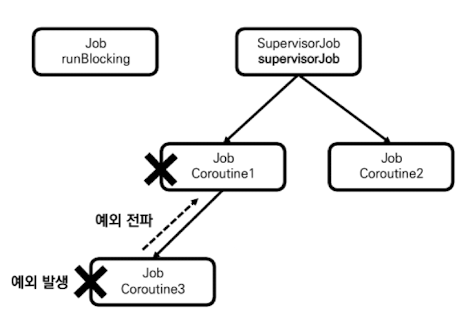
위 그림과 같이 구조화 되었으며, SupervisorJob 객체를 통해 만들어진 코루틴 이므로 Coroutine2 코루틴은이 정상 실행 되는 것을 확인할 수 있습니다.
이렇게 SupervisorJob 객체는 자식 코루틴의 예외를 전파받지 않는 특성을 가집니다. 하지만 여전히 이 코드에는 문제가 하나 있습니다. SupervisorJob 객체가 runBlocking이 호출돼 만들어진 Job 객체와의 구조화를 깬다는 점 입니다.
2) 코루틴의 구조화를 깨지 않고 SupervisorJob 사용하기
구조화를 깨지 않고 SupervisorJob을 사용하기 위해서는 SupervisorJob의 인자로 부모 Job 객체를 넘기면 됩니다.
fun main() = runBlocking<Unit> {
    val supervisorJob = SupervisorJob(parent = this.coroutineContext[Job])
    launch(CoroutineName("Coroutine1") + supervisorJob) {
        launch(CoroutineName("Coroutine3")) {
            throw Exception("예외 발생")
        }
        delay(100L)
        println("[${Thread.currentThread().name}] 코루틴 실행")
    }

    launch(CoroutineName("Coroutine2") + supervisorJob) {
        delay(100L)
        println("[${Thread.currentThread().name}] 코루틴 실행")
    }
    supervisorJob.complete()
}

/** 결과:
    Exception in thread "main @Coroutine1#3" java.lang.Exception: 예외 발생
    ...
    [main @Coroutine2#3] 코루틴 실행
**/
SupervisorJob()을 통해 생성된 객체는 Job()을 통해 생성된 객체와 같이 자동으로 완료 처리 되지 않습니다.
이 코드에서 this.coroutineContext[Job]을 사용해 runBlocking이 호출돼 만들어진 Job 객체를 가져오며, SupervisorJob 생성 함수 인자로 이 Job 객체를 넘깁니다. 따라서 runBlocking과의 구조화를 깨지 않을 수 있었습니다.
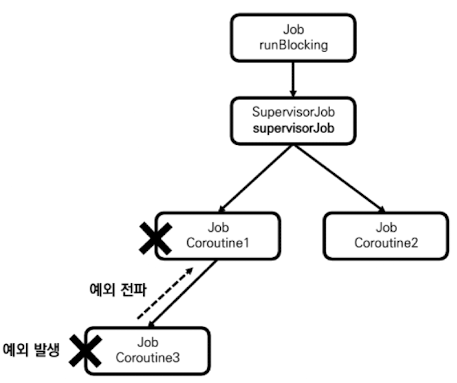
3) SupervisorJob을 CoroutineScope와 함께 사용하기
fun main() = runBlocking<Unit> {
    val coroutineScope = CoroutineScope(SupervisorJob())
    coroutineScope.apply {
        launch(CoroutineName("Coroutine1")) {
            launch(CoroutineName("Coroutine3")) {
                throw Exception("예외 발생")
            }
            delay(100L)
            println("[${Thread.currentThread().name}] 코루틴 실행")
        }

        launch(CoroutineName("Coroutine2")) {
            delay(100L)
            println("[${Thread.currentThread().name}] 코루틴 실행")
        }
    }

    delay(1000L)
}

/** 결과:
    Exception in thread "main @Coroutine1#3" java.lang.Exception: 예외 발생
    ...
    [DefaultDispatcher-worker-1 @Coroutine2#3] 코루틴 실행
**/
이 코드에서는 CoroutineScope 생성 함수의 인자로 SupervisorJob()이 들어가 SupervisorJob 객체를 가진 CoroutineScope 객체가 생성되는데 coroutineScope는 이 객체를 가리킵니다. 따라서 coroutineScope를 사용해 실행되는 Coroutine1, Coroutine2 코루틴은 SupervisorJob 객체를 부모 코루틴으로 가집니다.
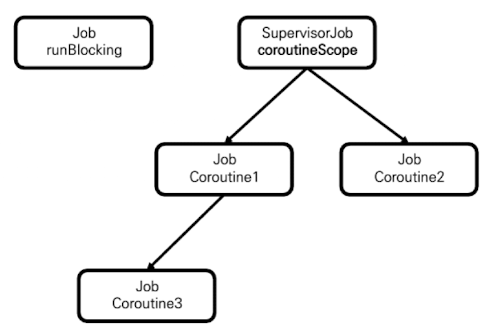
4) SupervisorJob을 사용할 때 흔히 하는 실수
SupervisorJob 사용 시 흔히 하는 실수는 예외 전파 방지를 위해 코루틴 빌더 함수의 context 인자에 SupervisorJob()을 넘기고, 코루틴 빌더 함수가 호출돼 생성되는 코루틴의 하위에 자식 코루틴들을 생성하는 것 입니다.
fun main() = runBlocking<Unit> {
    launch(CoroutineName("Parent Coroutine") + SupervisorJob()) {
        launch(CoroutineName("Coroutine1")) {
            launch(CoroutineName("Coroutine3")) {
                throw Exception("예외 발생")
            }
            delay(100L)
            println("[${Thread.currentThread().name}] 코루틴 실행")
        }

        launch(CoroutineName("Coroutine2")) {
            delay(100L)
            println("[${Thread.currentThread().name}] 코루틴 실행")
        }
    }

    delay(1000L)
}
이 코드에서 Parent Coroutine 코루틴을 생성하는 launch 함수를 호출하고 launch 함수의 context 인자로 SupervisorJob()을 넘깁니다. 이후 이 코루틴의 자식 코루틴으로 Coroutine1, Coroutine2 코루틴을 생성합니다. 이 코드를 얼핏 보기에는 문제가 없어 보이지만 아주 큰 문제를 내포하고 있습니다.
문제가 생기는 이유는 launch 함수는 context 인자에 Job 객체가 입력될 경우 해당 Job 객체를 부모로 하는 새로운 Job 객체를 만들기 때문입니다.
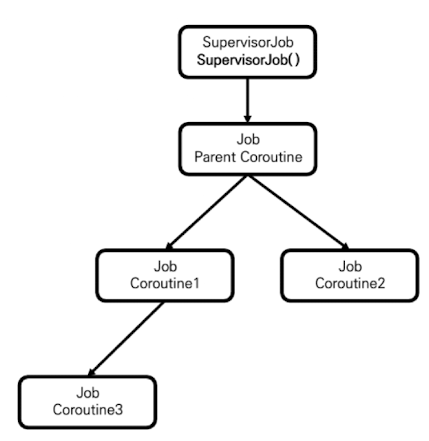
위 그림과 같이 launch 함수에 SupervisorJob()을 인자로 넘기면 SupervisorJob()을 통해 만들어지는 SupervisorJob 객체를 부모로 하는 새로운 Job 객체가 만들어집니다.
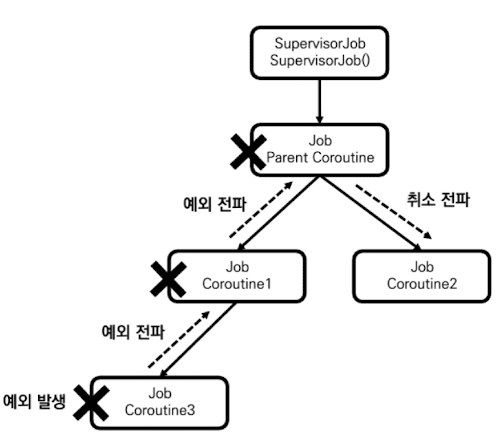
만약 이런 구조에서 Coroutine3 코루틴에 예외가 발생하면 위 그림과 같이 예외가 전파 됩니다. Coroutine3 코루틴에서 발생한 예외가 Coroutine1 코루틴을 통해 Parent Coroutine 코루틴까지 전파돼 Parent Coroutine 코루틴이 취소되며, 동시에 자식 코루틴인 Coroutine2 코루틴도 취소 됩니다. Parent Coroutine 코루틴의 예외가 SupervisorJob 객체로 전파되지는 않지만 이는 아무런 역할을 하지 못합니다.
SupervisorJob 객체는 강력한 예외 전파 방지 도구이지만 잘못 사용하면 그 기능을 제대로 수행하지 못할 수 있다. 따라서 SupervisorJob 객체를 생성할 때 SupervisorJob 객체가 Job 계층 구조의 어떤 위치에 있어야 하는지 충분히 고민하고 사용해야한다
3. supervisorScope를 사용한 예외 전파 제한
코루틴의 예외 전파를 제한하기 위한 세 번째 방법은 supervisorScope() 함수를 사용하는 것 입니다. supervisorScope 함수는 SupervisorJob 객체를 가진 CoroutineScope 객체를 생성하며, 이 SupervisorJob 객체는 supervisorScope 함수를 호출한 코루틴의 Job 객체를 부모로 가진다. supervisorScope를 사용하면 복잡한 설정 없이도 구조화를 깨지 않고 예외 전파를 제한할 수 있습니다. 또한 supervisorScope 내부에서 실행되는 코루틴은 SupervisorJob과 부모-자식 관계로 구조화되는데 supervisorScope의 SupervisorJob 객체는 코드가 모두 실행되고 자식 코루틴도 모두 실행 완료되면 자동으로 완료 처리 됩니다.
fun main() = runBlocking<Unit> {
    supervisorScope {
        launch(CoroutineName("Coroutine1")) {
            launch(CoroutineName("Coroutine3")) {
                throw Exception("예외 발생")
            }
            delay(100L)
            println("[${Thread.currentThread().name}] 코루틴 실행")
        }

        launch(CoroutineName("Coroutine2")) {
            delay(100L)
            println("[${Thread.currentThread().name}] 코루틴 실행")
        }
    }
}

/** 결과:
    Exception in thread "main @Coroutine1#3" java.lang.Exception: 예외 발생
    ...
    [main @Coroutine2#3] 코루틴 실행
**/
이 코드에서는 runBlocking을 호출하여 Job 객체가 생성되고, Job 객체는 자식 코루틴으로 supervisorScope 함수에 의해 생성된 SupervisorJob 객체를 가집니다.
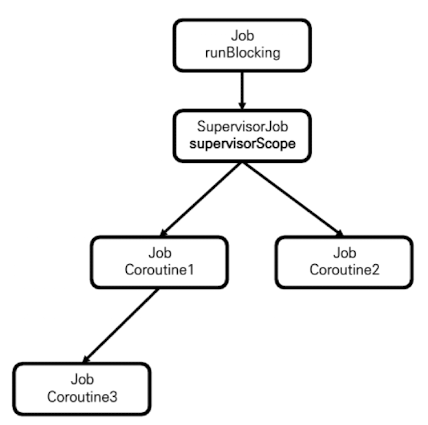
그림으로 구조화를 설명하면 위 그림과 같이 설명 됩니다. 8-2.2.4 구조에서 보았던 구조에서는 Coroutine1, Coroutine2 코루틴의 부모 Job 객체가 Coroutine Parent 코루틴의 Job 객체인것과 다르게 이 그림에서는 supervisorScope의 SupervisorJob 객체를 가리킵니다.
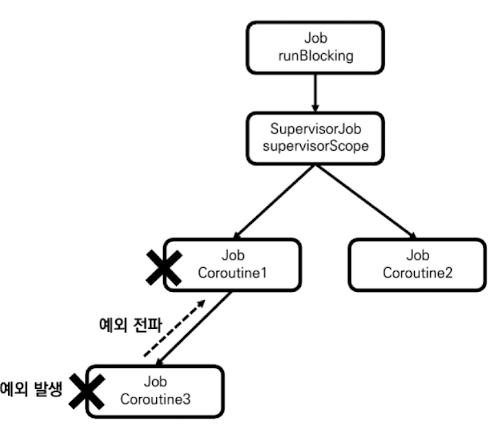
따라서 Coroutine3 코루틴에서 예외가 발생한다면 Coroutine1 코루틴에게만 예외가 전파되어 취소되고, Coroutine2 코루틴까지는 전파되지 않는 것을 볼 수 있습니다.
8-3. CoroutineExceptioneHandler를 사용한 예외 처리
구조화된 코루틴들에 공통적인 예외 처리기를 설정해야 할 경우도 있습니다. 코루틴은 이를 위해 CoroutineContext 구성 요소로 CoroutineExceptioneHandler라고 하는 예외 처리기를 지원 합니다.
1. CoroutineExceptionHanlder 생성
CoroutineExceptionHanlder 객체는 CoroutineExceptionHanlder 함수를 통해 생성할 수 있습니다.
public inline fun CoroutineExceptionHandler(crossinline handler: (CoroutineContext, Throwable) -> Unit): CoroutineExceptionHandler =
    object : AbstractCoroutineContextElement(CoroutineExceptionHandler), CoroutineExceptionHandler {
        override fun handleException(context: CoroutineContext, exception: Throwable) =
            handler.invoke(context, exception)
    }
CoroutineExceptionHandler 함수는 예외를 처리하는 람다식인 handler를 매개변수로 가집니다. handler는 CoroutineContext와 Throwable 타입의 매개변수를 갖는 람다식으로 이 람다식에 예외가 발생했을 때 어떤 동작을 할지 입력해 예외를 처리할 수 있습니다.
2. CoroutineExceptionHandler 사용
생성된 CoroutineExceptionHanlder 객체는 CoroutineContext 객체의 구성요소로 포함될 수 있습니다.
fun main() = runBlocking<Unit> {
    val exceptionHandler = CoroutineExceptionHandler { coroutineContext, throwable ->
        println("[예외 발생] ${throwable}")
    }

    CoroutineScope(exceptionHandler).launch(CoroutineName("Coroutine1")) {
        throw Exception("Coroutine1에 예외가 발생했습니다.")
    }
    delay(1000L)
}

/** 결과:
    [예외 발생] java.lang.Exception: Coroutine1에 예외가 발생했습니다.
**/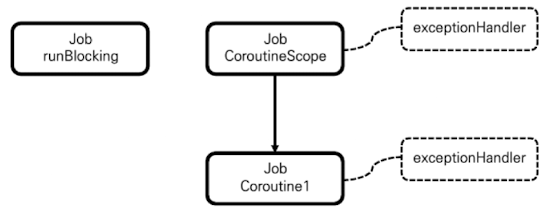
위 코드의 구조화를 그림으로 표현하면 위와 같습니다. CoroutineScope로 인해 runBlocking과 구조화가 깨지게 되며, CoroutineScope와 자식 코루틴인 Coroutine1은 CoroutineContext 제공받아서 같은 exceptionHandler를 갖게 됩니다.
위 그림에서 볼 수 있듯이 exceptionHanlder는 CoroutineScope 객체에도 설정돼 있고, Coroutine1 코루틴에도 설정돼 있습니다. 둘 중 어디에서 설정된 exceptionHanlder가 예외를 처리한 것일까요? 바로 알아보도록 하겠습니다.
3. 처리되지 않은 예외만 처리하는 CoroutineExceptionHandler
CoroutineExceptionHandler 객체는 처리되지 않은 예외만 처리합니다. 만약 자식 코루틴이 부모 코루틴으로 예외를 전파하면 자식 코루틴에서는 예외가 처리된 것으로 봐 자식 코루틴에 설정된 CoroutineExceptionHandler 객체는 동작하지 않습니다.
fun main() = runBlocking<Unit> {
    val exceptionHandler = CoroutineExceptionHandler { coroutineContext, throwable ->
        println("[예외 발생] ${throwable}")
    }

    launch(CoroutineName("Coroutine1") + exceptionHandler) {
        throw Exception("Coroutine1에 예외가 발생했습니다.")
    }
    delay(1000L)
}

/** 결과:
    Exception in thread "main" java.lang.Exception: Coroutine1에 예외가 발생했습니다.
    ...
**/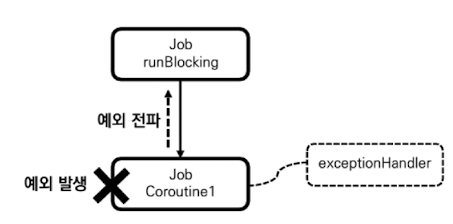
위 코드를 보면 exceptionHandler에 설정된 예외 처리가 되지 못한 것을 볼 수 있습니다. 이유는 Coroutine1 코루틴에서 예외가 발생하여, 부모 코루틴으로 예외가 전파 되어 처리가 완료 된것으로 보기 때문입니다.
구조화된 코루틴상에 여러 CoroutineExceptionHandler 객체가 설정돼 있더라도 마지막으로 예외를 전파받는 위치에 설정된 CoroutineExceptionHandler 객체만 예외를 처리합니다. 이런 특징 때문에 CoroutineExceptionHandler 객체는 '공통 예외 처리기'로서 동작할 수 있습니다.
따라서 CoroutineExceptionHandler 객체가 동작하도록 만들기 위해서는 CoroutineExceptionHandler 객체가 설정된 위치를 오류가 처리되는 위치로 만들어야 합니다.
4. CoroutineExceptionHandler가 예외를 처리하도록 만들기
코루틴에서 예외 처리는 예외가 마지막으로 전파되는 위치에 CoroutineExceptionHandler 객체를 설정하면 예외 처리가 동작하도록 만들 수 있습니다.
1) Job과 CoroutineExceptionHandler 함께 설정하기
CoroutineExceptionHandler 객체가 예외를 처리하게 하는 가장 간단한 방법은 CoroutineExceptionHandler 객체를 루트 Job과 함께 설정하는 것 입니다. Job()을 호출하면 새로운 루트 Job을 만들 수 있으므로 이를 사용하면 CoroutineExceptionHandler 객체가 설정되는 위치를 코루틴에서 오류가 처리되는 위치로 만들 수 있습니다.
fun main() = runBlocking<Unit> {
    val coroutineContext = Job() + CoroutineExceptionHandler { coroutineContext, throwable ->
        println("[예외 발생] ${throwable}")
    }

    launch(CoroutineName("Coroutine1") + coroutineContext) {
        throw Exception("Coroutine1에 예외가 발생했습니다.")
    }
    delay(1000L)
}

/** 결과:
    [예외 발생] java.lang.Exception: Coroutine1에 예외가 발생했습니다.
**/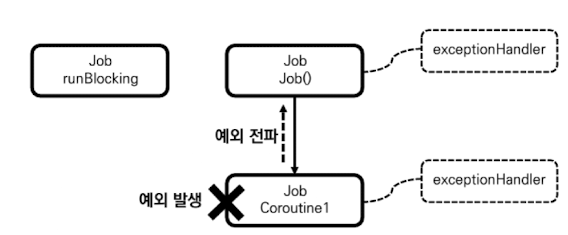
위 코드에서는 coroutineContext 객체에 Job() 이 함께 설정 된것을 볼 수 있습니다. 즉 새로운 루트 코루틴이 되므로 루트 코루틴에서 예외를 처리할 수 있도록 한 것 입니다.
2. SupervisorJob과 CoroutineExceptionHandler 함께 사용하기
SupervisorJob은 자식 코루틴으로부터 예외를 전파 받지 않으므로 SupervisorJob 객체를 CoroutineExceptionHandler 객체와 함께 사용하면 예외 처리기가 동작하지 않을 것이라고 생각 할 수 있으나 SupervisorJob 객체는 예외를 전파 받지 않을 뿐, 어떤 예외가 발생했는지에 대한 정보를 자식 코루틴으로부터 전달 받는다. 따라서 SupervisorJob 객체와 CoroutineExceptionHandler 객체가 함께 설정되면 예외가 처리 된다.
fun main() = runBlocking<Unit> {
    val exceptionHandler = CoroutineExceptionHandler { coroutineContext, throwable ->
        println("[예외 발생] ${throwable}")
    }

    val supervisedScope = CoroutineScope(SupervisorJob() + exceptionHandler)
    supervisedScope.apply {
        launch(CoroutineName("Coroutine1")) {
            throw Exception("Coroutine1에 예외가 발생했습니다.")
        }

        launch(CoroutineName("Coroutine2")) {
            delay(100L)
            println("[${Thread.currentThread().name}] 코루틴 실행")
        }
    }
    delay(1000L)
}

/** 결과:
    [예외 발생] java.lang.Exception: Coroutine1에 예외가 발생했습니다.
    [DefaultDispatcher-worker-2] 코루틴 실행
**/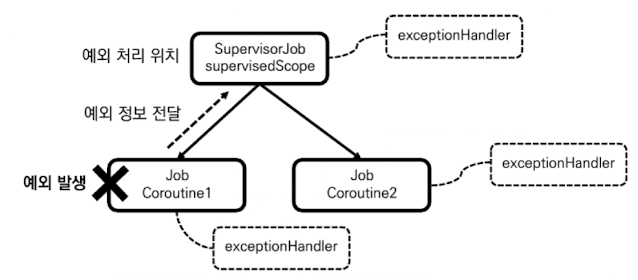
자식 코루틴이 부모 코루틴으로 예외를 전파하지 않고 전달만 하더라도 자식 코루틴에서 예외는 처리된 것으로 본다.
5. CoroutineExceptionHandler는 예외 전파를 제한하지 않는다.
CoroutineExceptionHandler 사용 시 많이 하는 실수는 CoroutineExceptionHandler가 try catch문처럼 동작해 예외 전파를 제한한다고 생각하는 것 입니다. 하지만 CoroutineExceptionHandler는 예외가 마지막으로 처리되는 위치에서 예외를 처리할 뿐, 예외 전파를 제한하지 않습니다.
fun main() = runBlocking<Unit> {
    val exceptionHandler = CoroutineExceptionHandler { coroutineContext, throwable ->
        println("[예외 발생] ${throwable}")
    }

    launch(CoroutineName("Coroutine1") + exceptionHandler) {
        throw Exception("Coroutine1에 예외가 발생했습니다.")
    }
}

/** 결과:
    [예외 발생] java.lang.Exception: Coroutine1에 예외가 발생했습니다.
**/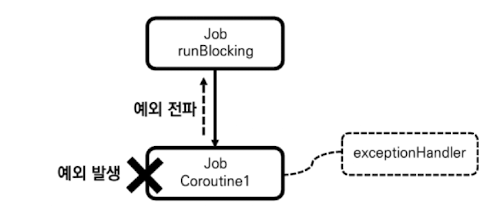
위 코드에서는 앞서 설명 했듯이 마지막으로예외 전파된 위치에서 예외를 처리하는 코드 예시 입니다. runBlocking 코루틴의 자식 코루틴인 Coroutine1 에서 exceptionHandler가 설정 되어 있어서 예외 전파를 제한 할 것 처럼 보이지만 runBlocking으로 예외가 전파 되는 것을 볼 수 있습니다.
8-4. try catch문을 사용한 예외 처리
1. try catch문을 사용해 코루틴 예외 처리하기
코루틴에서 예외가 발생했을 때 코틀린에서 일반적으로 예외를 처리하는 방식과 같이 try catch문을 통해 예외를 처리할 수 있습니다.
fun main() = runBlocking<Unit> {
    launch(CoroutineName("Coroutine1")) {
        try {
            throw Exception("Coroutine1에 예외가 발생했습니다.")
        } catch (e: Exception) {
            println(e.message)
        }
    }
    launch(CoroutineName("Coroutine2")) {
        delay(100L)
        println("Coroutine2 실행 완료")
    }
}

/** 결과:
    Coroutine1에 예외가 발생했습니다.
    Coroutine2 실행 완료
**/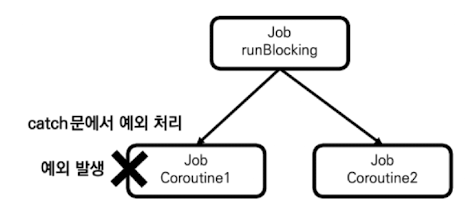
위 코드의 결과를 보면 Coroutine1 코루틴에서 예외가 발생 했지만 try catch문으로 처리가 되었기에 부모 코루틴으로 예외가 전파 되지 않고 정상적으로 실행 되는것을 볼 수 있습니다.
2. 코루틴 빌더 함수에 대한 try catch문은 코루틴의 예외를 잡지 못한다
try catch문 사용 시 많이 하는 실수는 try catch문을 코루틴 빌더 함수에 사용하는 것 입니다. 코루틴 빌더 함수에 try catch문을 사용하면 코루틴에서 발생한 예외가 잡히지 않습니다.
fun main() = runBlocking<Unit> {
    try {
        launch(CoroutineName("Coroutine1")) {
            throw Exception("Coroutine1에 예외가 발생했습니다.")
        }
    } catch (e: Exception) {
    	println(e.message)
    }

    launch(CoroutineName("Coroutine2")) {
        delay(100L)
        println("Coroutine2 실행 완료")
    }
}

/** 결과:
    Exception in thread "main" java.lang.Exception: Coroutine1에 예외가 발생했습니다.
**/
위 코드에서는 Coroutine1 코루틴 빌더를 try catch문으로 감쌋지만 Coroutine1 코루틴에서 발생한 예외가 runBlocking 코루틴까지 전파되어 구조화된 코루틴 모두가 취소 되는 것을 볼 수 있습니다.
8-5. async의 예외 처리
1. async의 예외 노출
async 코루틴 빌더 함수는 다른 코루틴 빌더 함수와 달리 결괏값을 Deferred 객체로 감싸고 await 호출 시점에 결괏값을 노출 합니다. 이런 특성 때문에 코루틴 실행 도중 예외가 발생해 결괏값이 없다면 Deferred에 대한 await 호출 시 예외가 노출 됩니다.
fun main() = runBlocking<Unit> {
    supervisorScope {
        val deferred: Deferred<String> = async(CoroutineName("Coroutine1")) {
            throw Exception("Coroutine1에 예외가 발생했습니다.")
        }

        try {
            deferred.await()
        } catch (e: Exception) {
            println(e.message)
        }
    }
}

/** 결과:
    Coroutine1에 예외가 발생했습니다.
**/
위 코드에서는 async 코루틴 빌더 내부에서 try catch문을 사용하는 것이 아닌 await() 함수를 호출할 시점에서 try catch문을 사용하여 예외를 처리 하는것을 확인할 수 있습니다.
2. async의 예외 전파
async 코루틴 빌더 함수 사용 시 많이 하는 실수 중 하는 await 함수 호출부에서만 예외 처리를 하는 것 입니다. async 코루틴 빌더 함수도 예외가 발생하면 부모 코루틴으로 예외를 전파하는데 이를 적절하게 처리 해야합니다.
fun main() = runBlocking<Unit> {
    async(CoroutineName("Coroutine1")) {
        throw Exception("Coroutine1에 예외가 발생했습니다.")
    }
    launch(CoroutineName("Coroutine2")) {
        delay(100L)
        println("[${Thread.currentThread().name}] 코루틴 실행")
    }
}

/** 결과:
    Exception in thread "main" java.lang.Exception: Coroutine1에 예외가 발생했습니다.
**/
위 코드에서 runBlocking 코루틴의 자식 코루틴으로 Coroutine1 코루틴과 Coroutine2 코루틴이 만들어지면 async를 사용해 만들어진 Coroutine1 코루틴이 예외를 발생 시킵니다. 결과를 보면 await() 함수를 호출하는 곳이 없음에도 예외 로그가 나오는 것을 볼 수 있습니다.
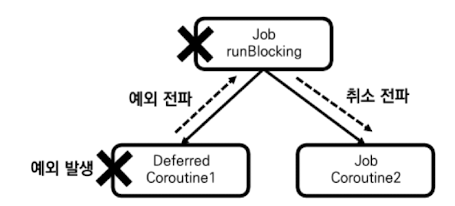
그 이유는 Coroutine1 코루틴에서 발생한 예외가 부모 코루틴으로 전파돼 부모 코루틴을 취소 시키기 떄문입니다.
이를 해결하기 위해서는 Coroutine1 코루틴에서 발생한 예외가 부모 코루틴으로 전파되지 않도록 앞서 배운 예외 전파 방지를 위한 3가지 방법을 사용하여 만들어야합니다.
8-6. 전파되지 않는 예외
1. 전파되지 않는 CancellationException
코루틴은 CancellaitonException 예외가 발생해도 부모 코루틴으로 전파되지 않습니다.
fun main() = runBlocking<Unit>(CoroutineName("runBlocking 코루틴")) {
    launch(CoroutineName("Coroutine1")) {
        launch(CoroutineName("Coroutine2")) {
            throw CancellationException()
        }
        delay(100L)
        println("[${Thread.currentThread().name}] 코루틴 실행")
    }
    delay(100L)
    println("[${Thread.currentThread().name}] 코루틴 실행")
}

/** 결과:
    [main @runBlocking 코루틴#1] 코루틴 실행
    [main @Coroutine1#2] 코루틴 실행
**/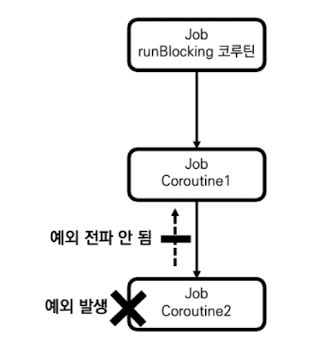
위 코드를 보면 Coroutine1 코루틴에서 예외가 발생 했음에도 부모 코루틴인 Coroutine1과 runBlocking이 실행 된것을 확인 할 수 있습니다.
2. 코루틴 취소 시 사용되는 JobCancellationException
그렇다면 코루틴은 왜 CancellationException을 부모 코루틴으로 전파하지 않는것일까? 바로 CancellationException은 코루틴의 취소에 사용되는 특별한 예외이기 때문입니다. Job 객체에 대해 cancel 함수를 호출하면 CancellationException의 서브 클래스인 JobCancellationException을 발생시켜 코루틴을 취소 시킵니다.
fun main() = runBlocking<Unit> {
    val job = launch {
        delay(1000L)
    }

    job.invokeOnCompletion { exception ->
        println(exception)
    }
    job.cancel()
}

/** 결과:
    kotlinx.coroutines.JobCancellationException: StandaloneCoroutine was cancelled; job=StandaloneCoroutine{Cancelled}@3cd1f1c8
**/
코드를 실행하면 JobCancellationException이 발생해 코루틴이 취소 되는것을 확인할 수 있습니다.
3. withTimeOut 사용해 코루틴의 실행 시간 제한하기.
코루틴 라이브러리는 제한 시간을 두고 작업을 실행할 수 있도록 만드는 withTimeOut 함수를 제공 합니다.
public suspend fun <T> withTimeout(timeMillis: Long, block: suspend CoroutineScope.() -> T): TwithTimeOut 함수는 매개변수로 실행 제한 시간을 밀리초 단위로 표현하는 timeMillis와 해당 시간내에 실행돼야 할 작업인 block을 가집니다. 이 함수는 주어진 시간 내에 완료되지 않으면 TimeoutCancellationException을 발생시키며, 이는 부모 코루틴으로 전파되지 않고 해당 예외가 발생한 코루틴만 취소 시킵니다.
fun main() = runBlocking<Unit>(CoroutineName("Parent Coroutine")) {
    launch(CoroutineName("Child Coroutine")) {
        withTimeout(1000L) {
            delay(2000L)
            println("[${Thread.currentThread().name}] 코루틴 실행")
        }
    }

    delay(2000L)
    println("[${Thread.currentThread().name}] 코루틴 실행")
}

/** 결과:
    [main @Parent Coroutine#1] 코루틴 실행
**/
Child Coroutine 내부에서 withTimeOut를 1초 제한으로 호출 하였으나, 2초의 delay로 인해서 TimeOutCancellationException을 발생 시켜 Child Coroutine 코루틴이 취소된 것을 확인할 수 있습니다. 하지만 구조화된 코루틴 전체가 취소되지 않았기에 Parent Coroutine 코루틴이 정상적으로 실행 된것 또한 확인 할 수 있습니다.
withTimeOut은 코루틴 빌더 함수와 다르게 발생하는 예외를 try catch문으로 감싸서 처리할 수 있습니다.
fun main() = runBlocking<Unit>(CoroutineName("Parent Coroutine")) {
    launch(CoroutineName("Child Coroutine")) {
        try {
            withTimeout(1000L) {
                delay(2000L)
                println("[${Thread.currentThread().name}] 코루틴 실행")
            }
        } catch (e: Exception) {
            println(e)
        }
    }

    delay(2000L)
    println("[${Thread.currentThread().name}] 코루틴 실행")
}

/** 결과:
    kotlinx.coroutines.TimeoutCancellationException: Timed out waiting for 1000 ms
    [main @Parent Coroutine#1] 코루틴 실행
**/