들어가기 전에..
- 프리프로젝트때 너무 정신이 없어서 블로그 정리를 못해서 메인프로젝트 기간에 틈틈히 블로깅하고자 한다.
- 질문 작성 페이지에 에디터를 넣어야 해서 우리 팀은
한국어 지원이 되고, 지속적인 유지보수가 가능한 TOAST UI Editor 적용하기로 결정했다.
화면 구현
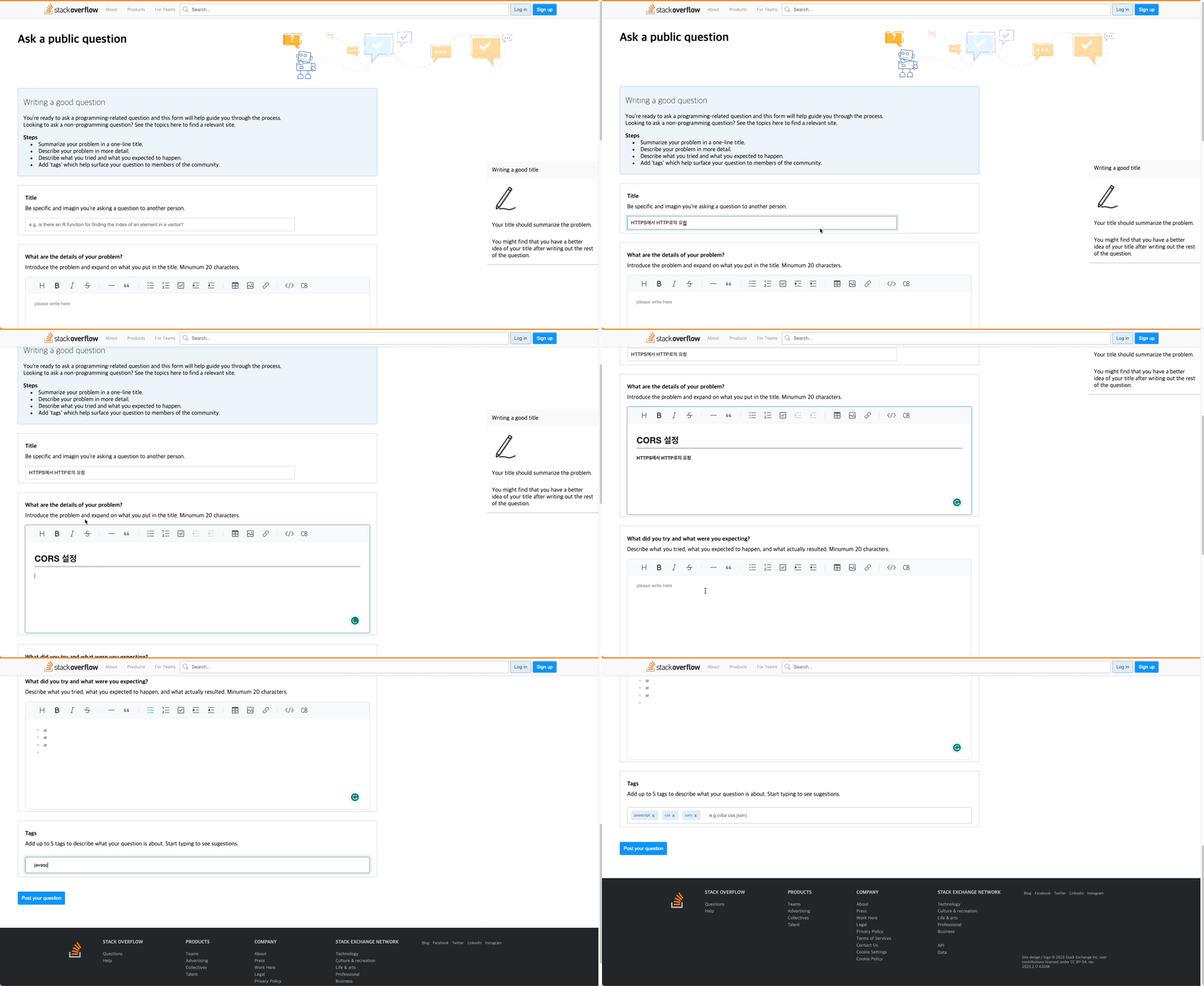
코드 구현
-
처음에는 Editor 코드 부분를 따로 컴포넌트로 만들었는데, Editor 입력값을 다른컴포넌트로 넘기는데 구현이 어려워서..컴포넌트 두개 코드를 합쳤다..🥲
시간이 없어서 급하게 개발하느라 코드를 합쳤지만, 프리프로젝트가 끝나면 두개의 컴포넌트로 나눠 Editor 코드를 재사용하는 것으로 리팩토링해야 겠다. -
useRef를 사용하여 Editor DOM 선택하고, getMarkdown 메서드를 사용하여 작성된 글을 마크다운 형태로 가져와 서버에 보내는 방법으로 코드 작성
-
Ask.js
// import 생략
// Toast 에디터
import { Editor } from '@toast-ui/react-editor';
import '@toast-ui/editor/dist/toastui-editor.css';

import { useRef, useState } from "react";

//스타일드 컴포넌트 코드 생략

function Ask() {
  const [title, setTitle] = useState('');
  const [problemBody, setProblemBody] = useState('');
  const [tryBody, setTryBody] = useState('');
  const [tags, setTags] = useState([]);

   //Dom선택
  const problemRef = useRef();
  const tryRef = useRef();

  const submitClickHandler = () => {
    let newData = {
      title,
      content: problemBody + tryBody,
      tag: tags,
      id: 53,
    };
    const postData = async () => {
      try {
        await axios({
          url: 'https://siglee.site/questions',
          method: 'post',
          data: newData,
        });
      } catch (error) {
        console.log(error);
      }
    };
    postData();
    window.location.href = 'https://urban-adventure-ovr7jln.pages.github.io/';
  };

  // 에디터에 입력된 내용을 MarkDown 형태로 취득
  const onChangeProblem = () => {
    const problemdata = problemRef.current.getInstance().getMarkdown();
    setProblemBody(problemdata);
  };

  const onChangeTry = () => {
    const trydata = tryRef.current.getInstance().getMarkdown();
    setTryBody(trydata);
  };

  return (
    <>
      <Header />
      <Sidebar>
        <ul>Writing a good title</ul>
        <img src="/img/Ask-sidebar.png" alt="ask sidebar"></img>
        <li>Your title should summarize the problem.</li>
        <li>
          You might find that you have a better idea of your title after writing
          out the rest of the question.
        </li>
      </Sidebar>
      <AllContainer>
        <AskHeader>
          <h1>Ask a public question</h1>
          <img alt="header" src="img/background.svg" />
        </AskHeader>
        <Guide>
          <h2>Writing a good question</h2>
          <p>
            You're ready to ask a programming-related question and this form
            will help guide you through the process.
            <br />
            Looking to ask a non-programming question? See the topics here to
            find a relevant site.
            <br />
          </p>
          <ul>
            <strong>Steps</strong>
            <li>Summarize your problem in a one-line title.</li>
            <li>Describe your problem in more detail.</li>
            <li>Describe what you tried and what you expected to happen.</li>
            <li>
              Add tags which help surface your question to members of the
              community.
            </li>
          </ul>
        </Guide>
        <TitleForm>
          <h4>Title</h4>
          <p>
            Be specific and imagin you're asking a question to another
            person.
          </p>
          <input
            type="text"
            placeholder="e.g. is there an R function for finding the index of an element in a vector?"
            value={title}
            onChange={(event) => setTitle(event.target.value)}
          ></input>
        </TitleForm>
        <Container className="problem">
          <h4>What are the details of your problem?</h4>
          <p>
            Introduce the problem and expand on what you put in the title.
            Minumum 20 characters.
          </p>
          <EditorWrapper>
            <Editor
              ref={problemRef}
              placeholder={'please write here'}
              initialValue={' '}
              previewStyle="tap" // 미리보기 스타일 지정
              height="300px" // 에디터 창 높이
              initialEditType="wysiwyg" //초기값
              toolbarItems={[
                // 툴바 옵션 설정
                ['heading', 'bold', 'italic', 'strike'],
                ['hr', 'quote'],
                ['ul', 'ol', 'task', 'indent', 'outdent'],
                ['table', 'image', 'link'],
                ['code', 'codeblock'],
              ]}
              autofocus={false}
              hideModeSwitch={true}
              onChange={onChangeProblem}
            ></Editor>
          </EditorWrapper>
        </Container>
        <Container className="try">
          <h4>What did you try and what were you expecting?</h4>
          <p>
            Describe what you tried, what you expected to happen, and what
            actually resulted. Minumum 20 characters.
          </p>
          <EditorWrapper>
            <Editor
              ref={tryRef}
              placeholder={'please write here'}
              initialValue={' '}
              initialEditType="wysiwyg" //초기값
              previewStyle="tap" // 미리보기 스타일 지정
              height="300px" // 에디터 창 높이
              toolbarItems={[
                // 툴바 옵션 설정
                ['heading', 'bold', 'italic', 'strike'],
                ['hr', 'quote'],
                ['ul', 'ol', 'task', 'indent', 'outdent'],
                ['table', 'image', 'link'],
                ['code', 'codeblock'],
              ]}
              autofocus={false}
              hideModeSwitch={true}
              onChange={onChangeTry}
            ></Editor>
          </EditorWrapper>
        </Container>
        <TagForm>
          <h4>Tags</h4>
          <p>
            Add up to 5 tags to describe what your question is about. Start
            typing to see sugestions.
          </p>
          <TagAdd tags={tags} setTags={setTags} />
        </TagForm>
        <Form>
          <SendBtn onClick={submitClickHandler}> Post your question</SendBtn>
          {/* <Button className="discard">Discard draft</Button> */}
        </Form>
      </AllContainer>
      <Footer />
    </>
  );
}

export default Ask;
함께 일하는 프론트엔드 개발자 이성은입니다🐥