배열
- 실제 게임의 경우 플레이어나 몬스터가 한 필드에서 하나만 존재하지 않기 때문에 배열이 필요하다
- 일종의 바구니 역할
- 배열 또한 형태를 설정해야 한다.
- int[] array = new int[5]; 형태로 배열을 생성하고 배열 크기는 결정되면 변경할 수 없다.
using System;

namespace CSarp
{
    class Progrma
    {
        static void Main(string[] args)
        {
            int[] scores = new int[5];

            scores[0] = 10;
            scores[1] = 20;
            scores[2] = 30;
            scores[3] = 40;
            scores[4] = 50;

            for (int i = 0; i < scores.Length; i++)
            {
                Console.WriteLine(scores[i]);
            }
        }
    }
}-
하나의 변수로 다양한 변수를 다룰 수 있다.
-
foreach문을 활용할 수도 있다.
-
배열 하나씩 순회해 가며 변수들을 탐색할 수 있다.
using System;

namespace CSarp
{
    class Progrma
    {
        static void Main(string[] args)
        {
            int[] scores = new int[5] { 10, 20, 30, 40, 50 };

            for (int i = 0; i < scores.Length; i++)
            {
                Console.WriteLine(scores[i]);
            }

            foreach (int score in scores)
            {
                Console.WriteLine(score);
            }
        }
    }
}- 직접 인덱스에 접근하여 입력해도 되고 배열 크기에 맞게 데이터를 넣어도 된다.
using System;

namespace CSarp
{
    class Progrma
    {
        static void Main(string[] args)
        {
            int[] scores = new int[] { 10, 20, 30, 40, 50 };

            for (int i = 0; i < scores.Length; i++)
            {
                Console.WriteLine(scores[i]);
            }

            foreach (int score in scores)
            {
                Console.WriteLine(score);
            }
        }
    }
}- 동적으로 할당될 수 있다. (참조 타입)
다차원 배열
-
다층 구조 건물 같은 개념
-
층 / 호실을 표시하는 느낌
-
상하좌우 움직임을 맵 타일을 2차원 배열로 표현하여 이동시키면 편함
using System;
namespace CSarp
{
class Progrma
{
static void Main(string[] args)
{
int[] scores = new int[5] { 10, 20, 30, 40, 50 };
        int[,] arr = new int[2, 3] { { 1, 2, 3 }, { 4, 5, 6 } };

        for (int i = 0; i < 2; i ++)
        {
            for (int j = 0; j < 3; j++)
            {
                Console.WriteLine(arr[i, j]);
            }
        }
    }
}
}
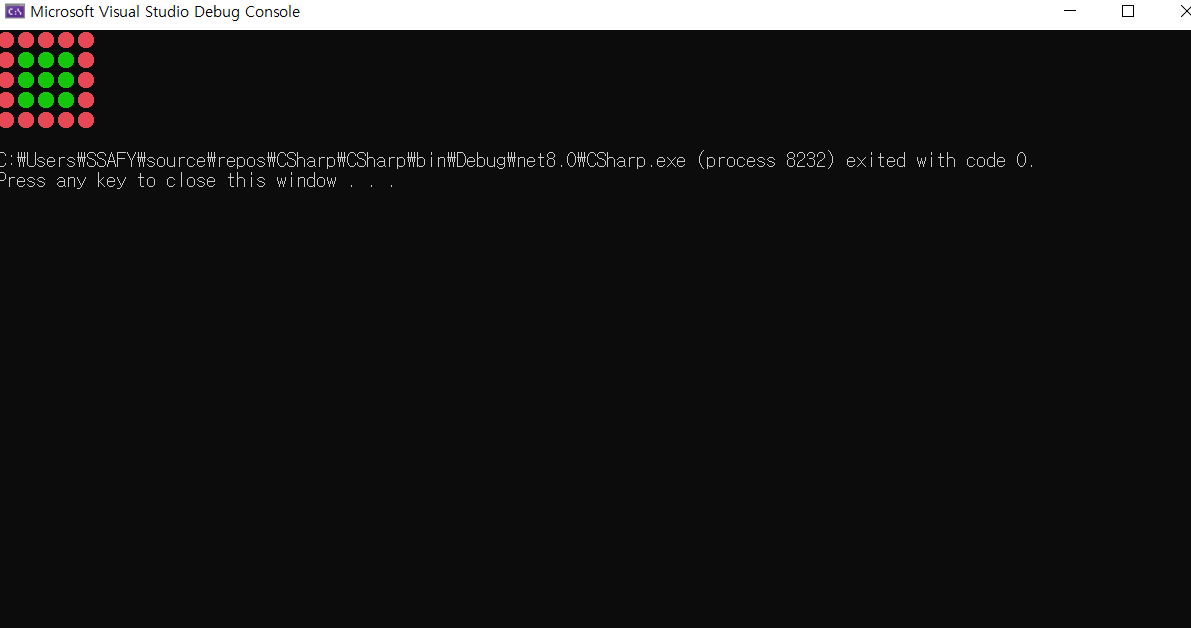
- 1이 적힌 곳은 못가고 0이 적힌 곳만 이동할 수 있는 맵 간단하게 구현

```C#
using System;

namespace CSarp
{
    class Map
    {
        int[,] tiles = {
            { 1, 1, 1, 1, 1 },
            { 1, 0, 0, 0, 1 },
            { 1, 0, 0, 0, 1 },
            { 1, 0, 0, 0, 1 },
            { 1, 1, 1, 1, 1 },
        };

        public void Render()
        {
            ConsoleColor defaultColor = Console.ForegroundColor;

            for (int y = 0; y < tiles.GetLength(1); y++)
            {
                for (int x = 0; x < tiles.GetLength(0); x++)
                {
                    if (tiles[x, y] == 1)
                    {
                        Console.ForegroundColor = ConsoleColor.Red;
                    }
                    else
                    {
                        Console.ForegroundColor= ConsoleColor.Green;
                    }
                    Console.Write("\u25cf");
                }
                Console.WriteLine();
            }

            Console.ForegroundColor = defaultColor;
        }
    }
    class Progrma
    {
        static void Main(string[] args)
        {
            Map map = new Map();
            map.Render();
        }
    }
}
List
- 배열은 크기가 고정된다는 한계점이 있음
- 배열의 크기를 크게 만들 수도 있지만 메모리 낭비의 가능성이 있음
- 동적 배열인 List를 활용하는 방안이 있다.
- using System.Collections.Generic; 을 통해 사용
using System;
using System.Collections.Generic;

namespace CSarp
{
    class Progrma
    {
        static void Main(string[] args)
        {
            List<int> list = new List<int>();

            for (int i = 0; i < 5; i++)
            {
                list.Add(i);
                Console.WriteLine(list[i]);
            }
        }
    }
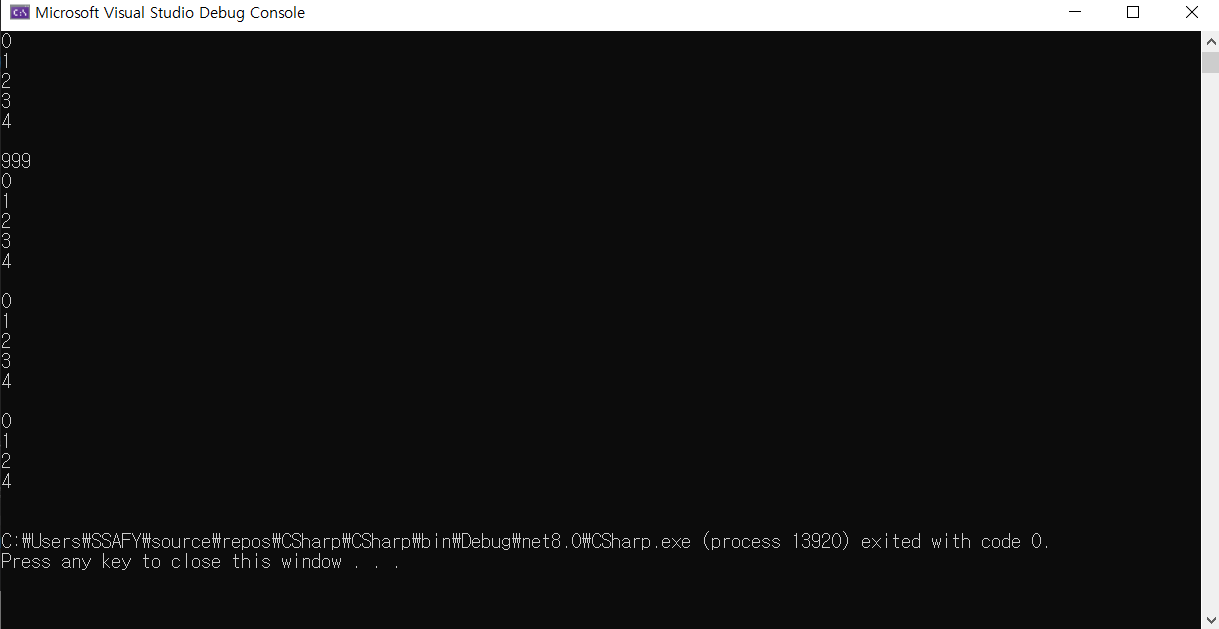
}- 삽입은 Insert / list의 크기는 Count로 측정 가능
- 제거는 Remove 등을 사용 가능
using System;
using System.Collections.Generic;

namespace CSarp
{
    class Progrma
    {
        static void Main(string[] args)
        {
            List<int> list = new List<int>();

            for (int i = 0; i < 5; i++)
            {
                list.Add(i);
                Console.WriteLine(list[i]);
            }
            Console.WriteLine();

            // 삽입
            list.Insert(0, 999);

            for (int i = 0; i < list.Count; i++)
            {
                Console.WriteLine(list[i]);
            }
            Console.WriteLine();

            // 값 삭제
            list.Remove(999);

            for (int i = 0; i < list.Count; i++)
            {
                Console.WriteLine(list[i]);
            }
            Console.WriteLine();

            // 인덱스 접근 삭제
            list.RemoveAt(3);
            for (int i = 0; i < list.Count; i++)
            {
                Console.WriteLine(list[i]);
            }
            Console.WriteLine();

            // 전체 삭제
            list.Clear();
            for (int i = 0; i < list.Count; i++)
            {
                Console.WriteLine(list[i]);
            }
        }
    }
}
- 단, 중간에 값을 수정하거나 추가하는 건 메모리, 시간 복잡도 등의 이유로 비효율적이다.
Dictionary
- 리스트로만 데이터를 관리할 경우 특정 자료를 찾는 것은 어렵다
- Key Value 값을 가진 Dictionary를 통해서 관리 가능
using System;
using System.Collections.Generic;

namespace CSarp
{
    class Monster
    {
        public int id;
        private int i;

        public Monster(int i)
        {
            this.i = i;
        }
    }
    class Progrma
    {
        static void Main(string[] args)
        {
            Dictionary<int, Monster> dic = new Dictionary<int, Monster>();

            for (int i = 0; i < 10000; i++)
            {
                dic.Add(i, new Monster(i));
            }

            Monster mon;
            bool found = dic.TryGetValue(7777, out mon);

            dic.Remove(7777);
            dic.Clear();
        }
    }
}- HashTable 기법으로 이루어진 dictionary

상상을 구현하는 개발자