문제
대량의 데이터를 한 번에 모두 가져와 화면에 렌더링하면,
- 불필요한 네트워크 사용량 증가
- 초기 렌더링 속도 저하
- 브라우저 성능 저하 및 사용자 경험 악화
와 같은 문제가 발생한다.
특히 피드, 커뮤니티, 상품 목록 등 리스트가 길어질수록 이슈가 커진다.
이를 해결하기 위해 무한스크롤(Infinite Scroll) 패턴을 사용한다.
- 사용자가 스크롤하여 하단에 도달할 때마다 필요한 데이터만 분할해서 불러오고
- 뷰포트에 보이는 데이터만 효율적으로 렌더링할 수 있다.
이렇게 하면
- UX가 부드러워지고, 서버 클라이언트 모두에서 리소스 사용을 줄일 수 있다.
이 글에서는 React 환경에서 Tanstack Query의 useInfiniteQuery를 활용해, 효율적이고 확장성 높은 무한스크롤 패턴을 구현하는 방법을 다룬다.
실행 전략
-
클라이언트에서 useInfiniteQuery 사용
➡️ TanStack Query의 useInfiniteQuery로 페이지 단위 데이터를 관리 -
스크롤 이벤트 또는 트리거 감지로 추가 데이터 요청
➡️ 사용자가 리스트 하단에 도달할 때만 다음 데이터를 요청 -
불러온 데이터를 누적해서 렌더링
➡️ 기존 데이터와 새로운 데이터를 합쳐서 화면에 보여줌 -
모든 데이터 로딩이 끝나면 더이상 서버에 요청을 보내지 않음.
구현 방식
1. API 요청: useInfiniteQuery를 통한 페이지네이션 데이터 패칭
useInfiniteQuery란?
먼저 useInfiniteQuery에 대해 간략하게 설명하자면,
useInfiniteQuery는 TanStack Query(react-query)에서 제공하는 훅으로,
스크롤 기반 페이지네이션(무한 스크롤) 데이터 요청을 쉽게 관리할 수 있다.
- 클라이언트는 한 번에 모든 데이터를 요청하지 않고,
- '필요할 때마다' 추가 데이터를 받아와
- 기존 데이터와 합쳐서 렌더링을 할 수 있다.
API 요청
const {
  data: recommendCommunityList,
  fetchNextPage,
  hasNextPage,
  isFetchingNextPage
} = useRecommendListInfiniteQuery(recommendListRequest);- 커스텀 훅으로 useInfiniteQuery 기반 API 요청
- fetchNextPage: 다음 페이지 데이터를 요청하는 함수
- hasNextPage: 더 불러올 데이터가 남아 있는지 여부를 나타내는 boolena 값
- isFetchingNextPage: 다음 페이지 데이터를 현재 페칭 중인지를 나타내는 boolean 값 (로딩 스피너 등 UI에 활용)
useRecommendListInfiniteQuery
const getRecommendList = async (request: RecommendListRequest): Promise<RecommendListResponse> => {
  const res = await customAxios.post<RecommendListResponse>('community/recommend/list', request);
  return res.data;
};

export const useRecommendListInfiniteQuery = (
  baseRequest: RecommendListRequest
): UseSuspenseInfiniteQueryResult<InfiniteData<RecommendListResponse>, Error> => {
  return useSuspenseInfiniteQuery<RecommendListResponse, Error>({
    queryKey: ['recommendList', baseRequest.searchKeyword],
    queryFn: ({ pageParam }) =>
      getRecommendList({
        ...baseRequest,
        pageable: {
          page: pageParam as number,
          size: PAGE_SIZE,
          sort: []
        }
      }),
    getNextPageParam: (lastPage) => {
      return lastPage.isLast ? undefined : lastPage.currentPage + 1;
    },
    initialPageParam: 1
  });
};
전체 동작 요약
-
쿼리가 처음 실행될 떄 initialPageParam=1로 첫 페이지 요청
-
이후 추가 데이터가 필요할 때마다 getNextPageParam에서 계산된 pageParam 값을 사용해 queryFn을 통해 다음 페이지 데이터를 페칭
-
isLast가 true가 될 때까지, 즉 더이상 받아올 데이터가 없을 때까지 반복
1. queryFn
역할:
실제 데이터 페칭(서버 통신)을 담당하는 함수
동작:
PageParam(현재 요청할 페이지 번호) 값을 받아 API 요청 파라미터에 반영
여기서는 getRecommendList()가 실제 서버에 POST 요청을 보내고, 받은 데이터를 반환
2. getNextPageParam
역할:
다음 페이지를 요청할 떄 사용할 pageParam 값을 반환하는 함수
동작:
마지막으로 받아온 페이지(lastPage)의 정보를 참고하여
lastPage.isLast가 true면 undefined 반환(추가 요청 중단)
아니라면 현재 페이지 번호 + 1을 반환하여 다음 페이지 요청
3. initialPageParam
역할:
쿼리 최초 시행 시 사용할 초기 페이지 번호
동작:
첫 요청은 1페이지로 지정함
2. 아이템 렌더링: 누적 데이터 flat map으로 리스트 출력
{recommendCommunityList?.pages.map((page, i) => (
  <div key={i}>
    {page.content.map((community) => (
      <RecommendItem key={community.communityId} {...community} />
    ))}
  </div>
))}- 받아온 각 페이지의 데이터를 flat하게 map 순회
- 각 아이템을 별도 컴포넌트로 렌더링
Infinite Query의 응답 형태, flat하게 map 순회하는 이유
useInfiniteQuery를 사용할 때의 응답 데이터 구조
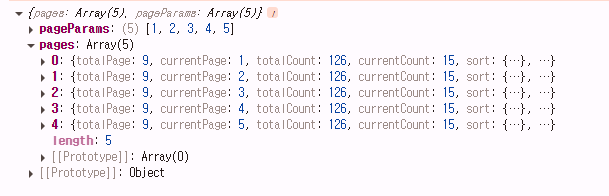
{
  pageParams: [1, 2, ...], // 각 페이지 요청 파라미터
  pages: [
    { // 1페이지 응답
      content: [ ... ], // 아이템 배열
      currentPage: 1,
      totalPage: false,
      ...
    },
    { // 2페이지 응답
      content: [ ... ], // 아이템 배열
      currentPage: 2,
      totalPage: false,
      ...
    },
    ...
  ]
}
즉, pages 배열 안에 각 페이지별 응답이 누적 저장된다.
서버에서 여러 페이지의 데이터를 분할해서 보내주기 때문에, 클라이언트는 pages 배열을 반복적으로 순회해서 각 페이지의 content들을 전부 이어붙여 렌더링해야 한다.
요약
- infiniteQuery 응답: 각 페이지별로 쪼개져 누적 저장됨
- flat 순회 이유: 실제 UI에서는 '페이지별이 아니라 전체 리스트'가 필요하기 때문에 모든 페이지의 content를 합쳐서 한 번에 map 돌려 렌더링
3. 트리거 감지: InfiniteScrollTrigger로 추가 데이터 패칭
<InfiniteScrollTrigger
  hasNextPage={hasNextPage}
  isFetchingNextPage={isFetchingNextPage}
  onLoadMore={fetchNextPage}
/>- 리스트 하단에 배치해, 사용자가 스크롤을 내릴 때 트리거가 뷰포트에 들어오면 자동으로 다음 페이지 데이터를 요청함
InfiniteScrollTrigger
export const InfiniteScrollTrigger = ({ hasNextPage, isFetchingNextPage, onLoadMore }: Props) => {
  const { ref, inView } = useInView({
    threshold: 0,
    rootMargin: '350px'
  });

  useEffect(() => {
    if (inView && hasNextPage && !isFetchingNextPage) {
      onLoadMore();
    }
  }, [inView, hasNextPage, isFetchingNextPage, onLoadMore]);

  if (!hasNextPage) return null;

  return (
    <div ref={ref} className="leading-10 h-10 text-center">
      <Typography variant="caption-medium">Loading more...</Typography>
    </div>
  );
};
1. useInView 훅 사용
- useInView는 특정 DOM 요소가 화면에 들어오는지 자동으로 감지하는 훅
const { ref, inView } = useInView({
  threshold: 0,
  rootMargin: '350px'
});-
ref : 감지하고 싶은 DOM에 붙이는 참조 객체
-
inView : 그 DOM이 화면 안에 들어오면 true, 아니면 false
-
rootMargin: 350px
➡️ 실제로는 화면 아래에서 350px 전에 미리 감지해서 true가 된다 -
threshold: 0
➡️ 트리거의 아주 일부만 화면에 들어와도 감지하겠다는 뜻
2. 데이터 요청 트리거
useEffect(() => {
  if (inView && hasNextPage && !isFetchingNextPage) {
    onLoadMore();
  }
}, [inView, hasNextPage, isFetchingNextPage, onLoadMore]);- inView가 true (트리거가 뷰포트 내 진입)
- hasNextPage(불러올 데이터가 남아있음)
- isFetchingNextPage(로딩 중이 아님)
위의 세 조건이 모두 충족될 때만 onLoadMore() 실행 -> 다음 페이지 요청
3. 로딩 UI
return (
  <div ref={ref} className="leading-10 h-10 text-center">
    <Typography variant="caption-medium">Loading more...</Typography>
  </div>
);- 트리거가 화면에 보이면 Loading more... 안내와 함께 Intersection Observer에 감지됨
- ref 속성에 DOM 참조 바인딩하여 inView 감지
전체 코드
// API 요청
  const {
    data: recommendCommunityList,
    fetchNextPage,
    hasNextPage,
    isFetchingNextPage
  } = useRecommendListInfiniteQuery(recommendListRequest);

  return (
    <div>
      <header className="px-4 py-2.5 flex gap-2">
        <button className="w-6 " onClick={() => navigate(-1)}>
          <img src={arrowLeft} alt="arrow Left" />
        </button>

        <SearchInput keyword={keyword} setKeyword={setKeyword} onReset={() => setKeyword('')} />
      </header>

      <main className="h-full">
        {keyword.length < 1 && (
          <Typography variant="h6" className="text-[18px] leading-[26px] pt-5 pb-3.5 px-4 text-start">
            Recommended Open Community
          </Typography>
        )}
        <>
          {/* 아이템 렌더링: 누적 데이터 flat map으로 리스트 출력 */}
          {recommendCommunityList?.pages.length && recommendCommunityList?.pages[0]?.content.length ? (
            recommendCommunityList?.pages?.map((page, i) => (
              <div key={i}>
                {page.content.map((community) => (
                  <RecommendItem
                    key={`${community.communityType}-${community.communityName}-${community.communityId}`}
                    communityType={community.communityType}
                    communityId={community.communityId}
                    circleCommunityId={community.circleCommunityId}
                    logoImageUrl={community.logoImageUrl}
                    memberCount={community.memberCount}
                    communityName={community.communityName}
                    contents={community.contents}
                  />
                ))}
              </div>
            ))
          ) : (
            <Empty />
          )}
        </>

        {/* 트리거 감지 */}
        <InfiniteScrollTrigger
          hasNextPage={hasNextPage}
          isFetchingNextPage={isFetchingNextPage}
          onLoadMore={fetchNextPage}
        />
      </main>
    </div>
  );
};