
문제
- Youtube, Facebook 등 외부 영상 소스를 iframe으로 렌더링할 때 화면에 노출되는 것만으로도 내부적으로 수십~수백개의 네트워크 요청이 발생함
- 실제 영상 재생 여부와 상관없이 iframe이 렌더링되기만 해도 썸네일, 광고, 추적, API, 권한 등 다양한 리소스가 요청됨
원인 분석
👇🏻 실제 영상이 재생되지 않고 렌더링만 될 때 발생하는 리소스 요청
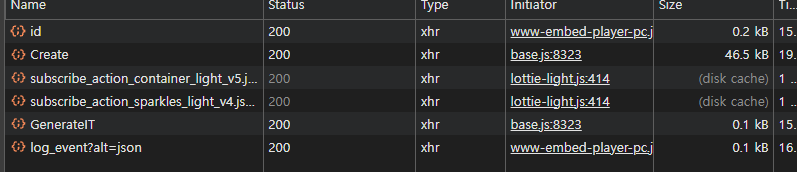
- 비디오(iframe)이 실제로 재생되지 않아도 외부 플랫폼의 모든 리소스 요청이 즉시 발생함
- React에서 여러 비디오를 한 번에 렌더하거나, 좌우 슬라이드 등에서 여러 개가 동시에 mount되면 그만큼 중복 요청도 기하급수적으로 늘어남
해결 방법: 썸네일 Lazy-load 패턴 적용
- 최초에는 비디오 썸네일(이미지)만 보여주고 사용자가 클릭하여 실제로 비디오가 재생되어야할 때만 iframe을 렌더링
👉🏻 네트워크 요청 횟수와 리소스 사용을 최소화
구현 단계
- 썸네일 이미지 URL 추출 (youtube라면 공식 패턴 활용)
- 비활성 상태에서는 썸네일 + 플레이 버튼 오버레이만 보여주기
- 플레이 버튼 클릭 시, iframe을 mount하고 autoplay로 즉시 재생
- 좌우 슬라이드에서는 현재 슬라이드(isShown=true)일 때만 재생 가능하도록 관리
개선 전 코드
👇🏻 문제점: isShown이 true가 되는 순간 바로 iframe이 렌더링되어 불필요한 요청이 모두 발생
const YoutubeVideo = ({
  embedUrl,
  isShown,
}: {
  embedUrl: string
  isShown?: boolean
}) => {
  if (!isShown) {
    return (
      <div className="flex relative justify-center items-center w-full bg-black aspect-video">
        <div className="text-center text-white">
          <p>Loading video...</p>
        </div>
      </div>
    )
  }

  return (
    <div
      className="relative w-full aspect-video"
      style={{ touchAction: "pan-y" }}
    >
      <iframe
        className="w-full h-full"
        src={embedUrl}
        title="YouTube video"
        allow="accelerometer; autoplay; clipboard-write; encrypted-media; gyroscope; picture-in-picture"
        allowFullScreen
        style={{ pointerEvents: "auto" }}
      ></iframe>
    </div>
  )
}

export default YoutubeVideo
isShown은 슬라이드에서 "현재 화면에 보이는 비디오만 렌더링/재생"하도록 만드는 상태값
이를 통해 불필요한 네트워크·메모리 낭비를 막고, 슬라이드 UX를 자연스럽게 만든다.
예를 들어, 좌우로 넘기는 슬라이드(Swiper, Carousel 등)에서 여러 개의 동영상 카드가 있을 때 항상 “딱 한 개(현재 인덱스)”만 isShown=true가 되고 나머지는 모두 false가 된다.
개선 후 코드 (썸네일 Lazy-load 패턴)
const getYoutubeThumbnailFromEmbed = (embedUrl: string) => {
  // /embed/ 뒤 11자 추출
  const match = embedUrl.match(/embed\/([\w-]{11})/)
  return match ? `https://img.youtube.com/vi/${match[1]}/hqdefault.jpg` : null
}- getYoutubeThumbnailFromEmbed 함수는 유튜브 임베드 링크에서 영상 ID(11자리)를 추출해서 공식 썸네일 URL로 만들어줌
- 실패 시에는 null을 반환해서, 잘못된 링크나 예외 상황에서도 안전하게 처리할 수 있음
실사용 예시
const embedUrl = "https://www.youtube.com/embed/AbCdEfG1234"
const thumbnailUrl = getYoutubeThumbnailFromEmbed(embedUrl)
// 결과: "https://img.youtube.com/vi/AbCdEfG1234/hqdefault.jpg"
import { useEffect, useState } from "react"
interface Props {
embedUrl: string
isShown?: boolean
}
const YoutubeVideo = ({ embedUrl, isShown }: Props) => {
const [localActive, setLocalActive] = useState(false)
useEffect(() => {
if (!isShown) setLocalActive(false)
}, [isShown])
const isActive = !!isShown && localActive
const thumbnailUrl = getYoutubeThumbnailFromEmbed(video)
if (!isActive) {
return (
<button
type="button"
className="flex relative justify-center items-center w-full bg-black aspect-video group"
onClick={() => setLocalActive(true)}
style={{ cursor: "pointer" }}
>
{thumbnailUrl ? (
<>
<img
src={thumbnailUrl}
alt="YouTube Thumbnail"
className="object-cover absolute inset-0 w-full h-full transition-opacity group-hover:opacity-80"
/>
<span className="absolute p-4 text-white rounded-full bg-black/60">
<svg
width="48"
height="48"
fill="currentColor"
viewBox="0 0 24 24"
>
<path d="M8 5v14l11-7z" />
</svg>
</span>
</>
) : (
<div className="z-10 text-center text-white">
<p>Loading video...</p>
</div>
)}
</button>
)
}
return (
<div
className="relative w-full aspect-video"
style={{ touchAction: "pan-y" }}
>
<iframe
className="w-full h-full"
src={embedUrl + (embedUrl.includes("?") ? "&" : "?") + "autoplay=1"}
title="YouTube video"
allow="accelerometer; autoplay; clipboard-write; encrypted-media; gyroscope; picture-in-picture"
allowFullScreen
style={{ pointerEvents: "auto" }}
></iframe>
</div>
)
}
export default YoutubeVideo
동작 흐름
1. 최초 렌더링
- isShown=true, localActive=false
- 썸네일(이미지) + 플레이 버튼만 노출
2. 플레이 버튼 클릭
- isShown=true, localActive=true
- iframe이 mount, autoplay로 즉시 영상 재생
3. 슬라이드 이동
- 이전 슬라이드: isShown=false ➡ localActive도 false로 초기화 ➡ 썸네일 상태로 복귀
- 새 슬라이드: isShown=true ➡ localActive=false ➡ 썸네일만
개선 후 동작
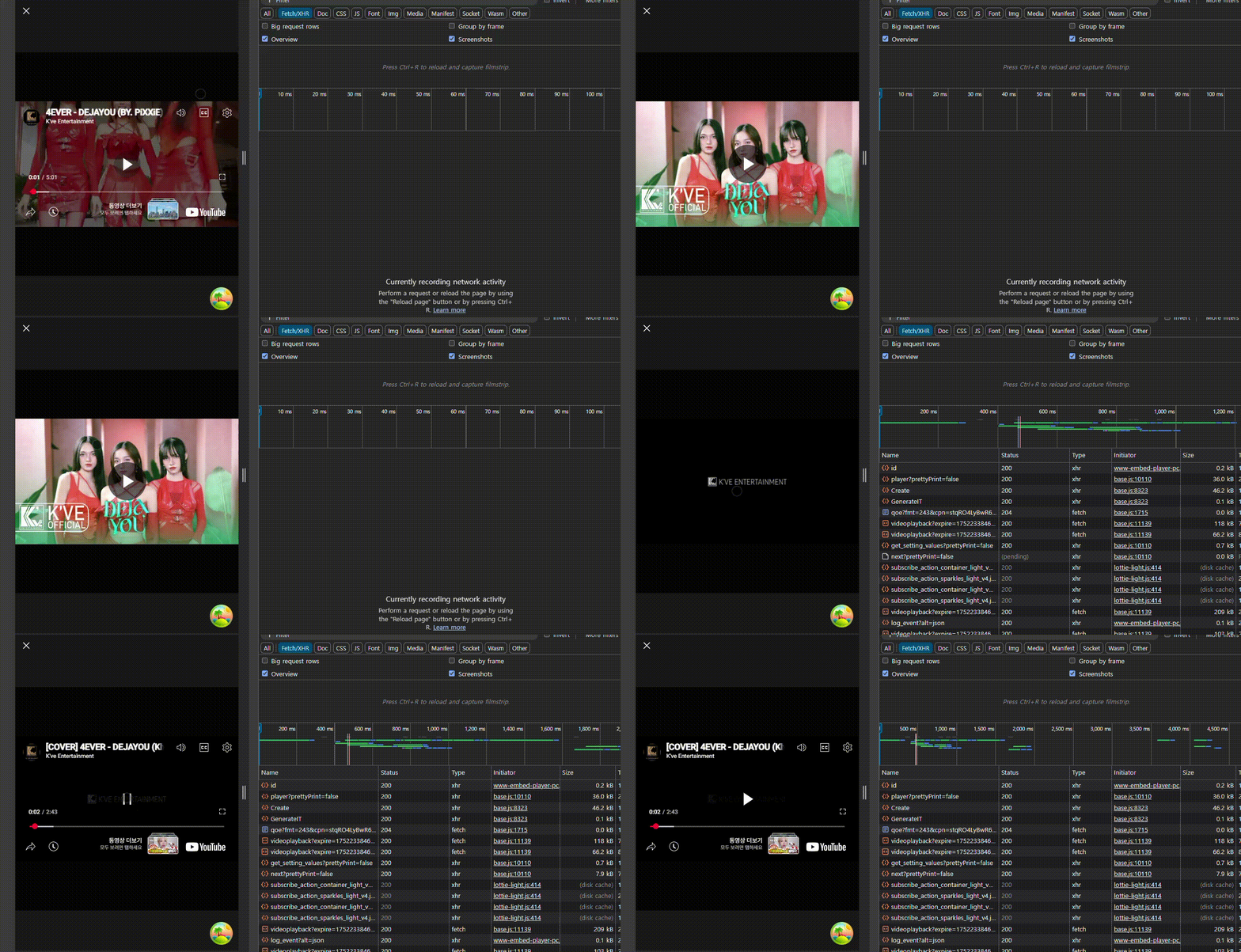
사용자가 플레이버튼을 누르기 전 단순 렌더링 시에는 썸네일이 보이며 네트워크 요청이 발생하지 않음
➡ 클릭 시 iframe이 렌더링되어 영상 자동 재생과 리소스 요청이 시작
최종 요약
iframe으로 유튜브, 페이스북 등 외부 영상을 렌더링할 때,
처음부터 iframe을 바로 띄우면 불필요한 네트워크 요청이 과도하게 발생한다.
이를 해결하기 위해서 최초에는 썸네일과 플레이 버튼만 보여주고,
사용자가 재생을 원하는 순간에만 iframe을 동적으로 렌더링하여
실제로 네트워크 요청과 영상 재생이 시작되도록 개선했다.
참고✨
위 코드는 유튜브 임베드 영상을 기준으로 작성되었습니다.
(페이스북 등 다른 플랫폼의 경우 썸네일 추출/iframe URL 패턴만 다르게 적용하면 동일한 방식으로 사용할 수 있습니다.)

Web Developer