
🌈클래스 생성
📃AnnotationBean.java(클래스)
※ xyz.itwill04.bean 패키지에 AnnotationBean.java 클래스 생성
package xyz.itwill04.bean;
//
public class AnnotationBean {
	public AnnotationBean() {
		// TODO Auto-generated constructor stub
		System.out.println("### AnnotationBean 클래스의 기본 생성자 호출 ###");
	}
	public void display() {
		System.out.println("*** AnnotationBean 클래스의 display() 메소드 호출 ***");
	}
}
🌈프로그램 생성
📃AnnotationBeanApp.java(클래스)
※ xyz.itwill04.bean 패키지에 AnnotationBeanApp.java 클래스 생성
package xyz.itwill04.bean;
//
import org.springframework.context.ApplicationContext;
import org.springframework.context.support.ClassPathXmlApplicationContext;
//
public class AnnotationBeanApp {
	public static void main(String[] args) {
		System.out.println("============== Spring Container 초기화 전 ==============");
		ApplicationContext context=new ClassPathXmlApplicationContext("04-3_beanAnnotation.xml");
		System.out.println("============== Spring Container 초기화 후 ==============");
		AnnotationBean bean=context.getBean("annotationBean", AnnotationBean.class);
		bean.display();
		System.out.println("================================================================");
		((ClassPathXmlApplicationContext)context).close();
	}
}
🌈환경설정 파일 생성(XML)
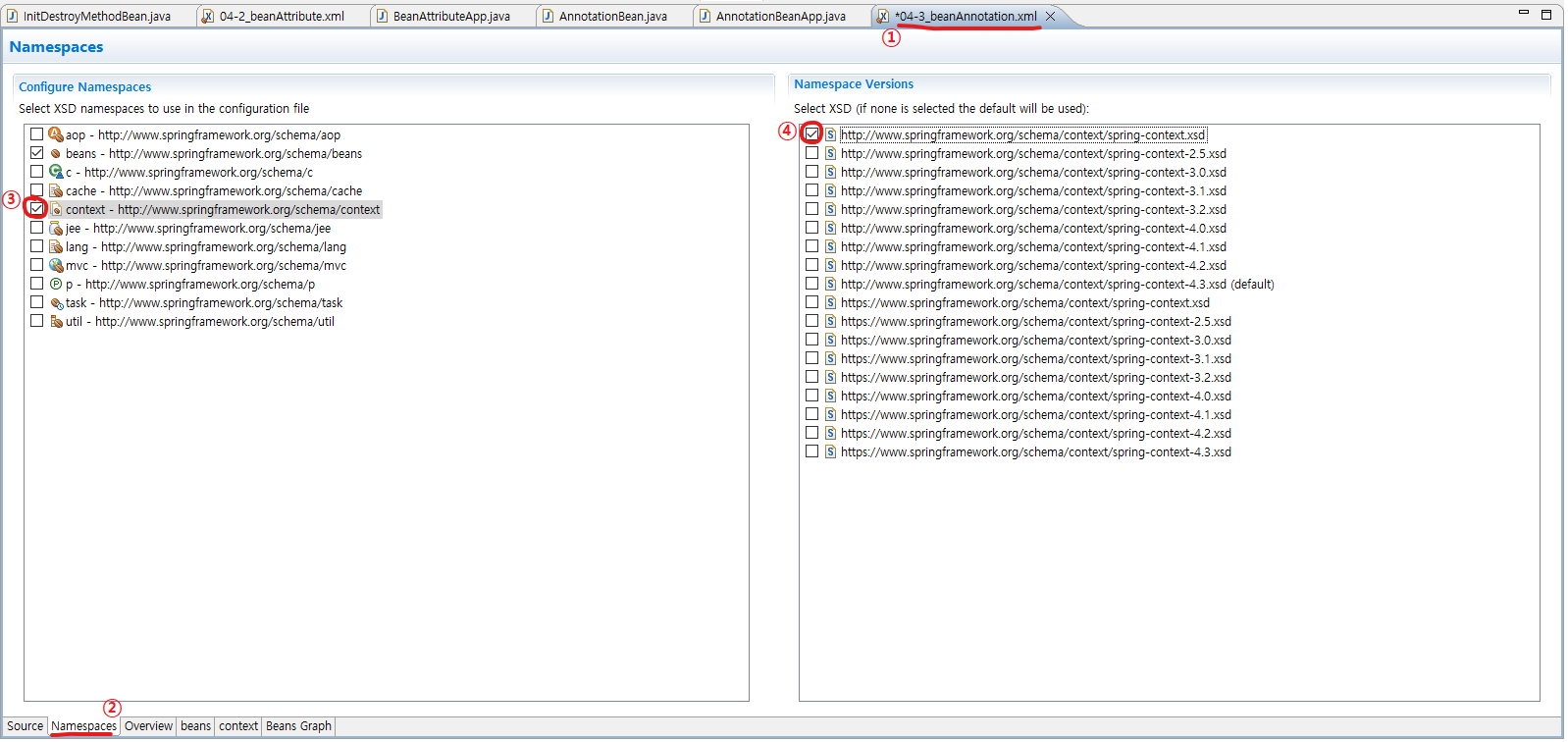
📢component-scan : 스프링 어노테이션(Spring Annotation)을 스프링 컨테이너가 검색하여 처리할 수 있도록 설정하는 엘리먼트
→ context 네임스페이스의 spring-context.xsd 파일에 의해 제공되는 엘리먼트
📌base-package 속성 : 스프링 컨테이너가 스프링 어노테이션을 사용한 클래스를 검색하기 위한 패키지를 속성값으로 설정📃04-3_beanAnnotation.xml
※ src/main/resources 폴더에 04-3_beanAnnotation.xml 생성
<?xml version="1.0" encoding="UTF-8"?>
<beans xmlns="http://www.springframework.org/schema/beans"
	xmlns:xsi="http://www.w3.org/2001/XMLSchema-instance"
	xmlns:context="http://www.springframework.org/schema/context"
	xsi:schemaLocation="http://www.springframework.org/schema/beans https://www.springframework.org/schema/beans/spring-beans.xsd
		http://www.springframework.org/schema/context http://www.springframework.org/schema/context/spring-context.xsd">
	<!-- ================================================================================ -->
	<!-- 기존에 사용하던 방법 -->
	<!-- <bean class="xyz.itwill04.bean.AnnotationBean" id="annotationBean"/> -->
	<!-- ================================================================================ -->
	<!-- component-scan : 스프링 어노테이션(Spring Annotation)을 스프링 컨테이너가 검색하여 처리할 수 있도록 설정하는 엘리먼트 -->
	<!-- → context 네임스페이스의 spring-context.xsd 파일에 의해 제공되는 엘리먼트 -->
	<!-- base-package 속성 : 스프링 컨테이너가 스프링 어노테이션을 사용한 클래스를 검색하기 위한 패키지를 속성값으로 설정 -->
	<context:component-scan base-package="xyz.itwill04.bean"/>
</beans>
🌈어노테이션 생성
📌@Configuration : 스프링 컨테이너에 의해 관리될 객체(Spring Bean)을 생성하여 반환하는 메소드를 작성하기 위한 클래스를 설정하기 위한 어노테이션
→ Spring Bean Configuration File과 유사한 기능을 제공하는 클래스로 설정하기 위해 사용
〓〓〓〓〓〓〓〓〓〓〓〓〓〓〓〓〓〓〓〓〓〓〓〓〓〓〓〓〓〓〓〓〓〓〓〓〓〓〓〓〓〓〓
📌@Bean : Spring Bean으로 등록하기 위한 메소드에 설정하는 어노테이션
→ @Bean 어노테이션을 사용한 메소드는 클래스를 객체로 생성하여 반환하는 - Spring Bean
→ bean 엘리먼트와 유사한 기능을 제공하는 어노테이션
→ 기본적으로 메소드의 이름을 Spring Bean의 식별자(beanName)으로 사용
→ @Bean 어노테이션의 name 속성을 사용하여 식별자 변경 가능📃AbbotationConfigurationBean.java(클래스)
※ xyz.itwill04.bean 패키지에 AbbotationConfigurationBean.java 클래스 생성
package xyz.itwill04.bean;
//
import org.springframework.context.annotation.Bean;
import org.springframework.context.annotation.Configuration;
//
//@Configuration : 스프링 컨테이너에 의해 관리될 객체(Spring Bean)을 생성하여 반환하는 메소드를 작성하기 위한 클래스를 설정하기 위한 어노테이션
//→ Spring Bean Configuration File과 유사한 기능을 제공하는 클래스로 설정하기 위해 사용
@Configuration
public class AbbotationConfigurationBean {
	//@Bean : Spring Bean으로 등록하기 위한 메소드에 설정하는 어노테이션
	//→ @Bean 어노테이션을 사용한 메소드는 클래스를 객체로 생성하여 반환하는 - Spring Bean
	//→ bean 엘리먼트와 유사한 기능을 제공하는 어노테이션
	//→ 기본적으로 메소드의 이름을 Spring Bean의 식별자(beanName)으로 사용
	//→ @Bean 어노테이션의 name 속성을 사용하여 식별자 변경 가능
	@Bean
	public AnnotationBean annotationBean() {
		return new AnnotationBean();
	}
}
🐧조금 더 간단한 방법
🌈클래스 생성
📌@Component : 클래스를 스프링 컨테이너가 관리하는 Spring Bean으로 등록하는 어노테이션
→ 기본적으로 클래스의 이름을 Spring Bean의 식별자(beanName)으로 사용 - 첫번째 문자는 소문자로 변환
→ @Component 어노테이션의 value 속성을 사용하여 식별자 변경 가능
→ @Component 어노테이션에 value 속성외 다른 속성이 없는 경우 속성값만 설정 가능📃ComponentAnnotationBean.java(클래스)
※ xyz.itwill04.bean 패키지에 ComponentAnnotationBean.java 클래스 생성
package xyz.itwill04.bean;
//
import org.springframework.stereotype.Component;
//
//@Component : 클래스를 스프링 컨테이너가 관리하는 Spring Bean으로 등록하는 어노테이션
//→ 기본적으로 클래스의 이름을 Spring Bean의 식별자(beanName)으로 사용 - 첫번째 문자는 소문자로 변환
//→ @Component 어노테이션의 value 속성을 사용하여 식별자 변경 가능
//→ @Component 어노테이션에 value 속성외 다른 속성이 없는 경우 속성값만 설정 가능
@Component("bean")
public class ComponentAnnotationBean {
	public ComponentAnnotationBean() {
		// TODO Auto-generated constructor stub
		System.out.println("### ComponentAnnotationBean 클래스의 기본 생성자 호출 ###");
	}
	public void display() {
		System.out.println("*** ComponentAnnotationBean 클래스의 display() 메소드 호출 ***");
	}
}
🌈프로그램 생성
📃ComponentAnnotationBeanApp.java(클래스)
※ xyz.itwill04.bean 패키지에 ComponentAnnotationBeanApp.java 클래스 생성
package xyz.itwill04.bean;
//
import org.springframework.context.ApplicationContext;
import org.springframework.context.support.ClassPathXmlApplicationContext;
//
public class ComponentAnnotationBeanApp {
	public static void main(String[] args) {
		System.out.println("================== Spring Container 초기화 전 ==================");
		ApplicationContext context=new ClassPathXmlApplicationContext("04-3_beanAnnotation.xml");
		System.out.println("================== Spring Container 초기화 후 ==================");
		//ComponentAnnotationBean bean=context.getBean("componentAnnotationBean",ComponentAnnotationBean.class);
		ComponentAnnotationBean bean=context.getBean("bean",ComponentAnnotationBean.class);
		bean.display();
		System.out.println("================================================================");
		((ClassPathXmlApplicationContext)context).close();
	}
}
