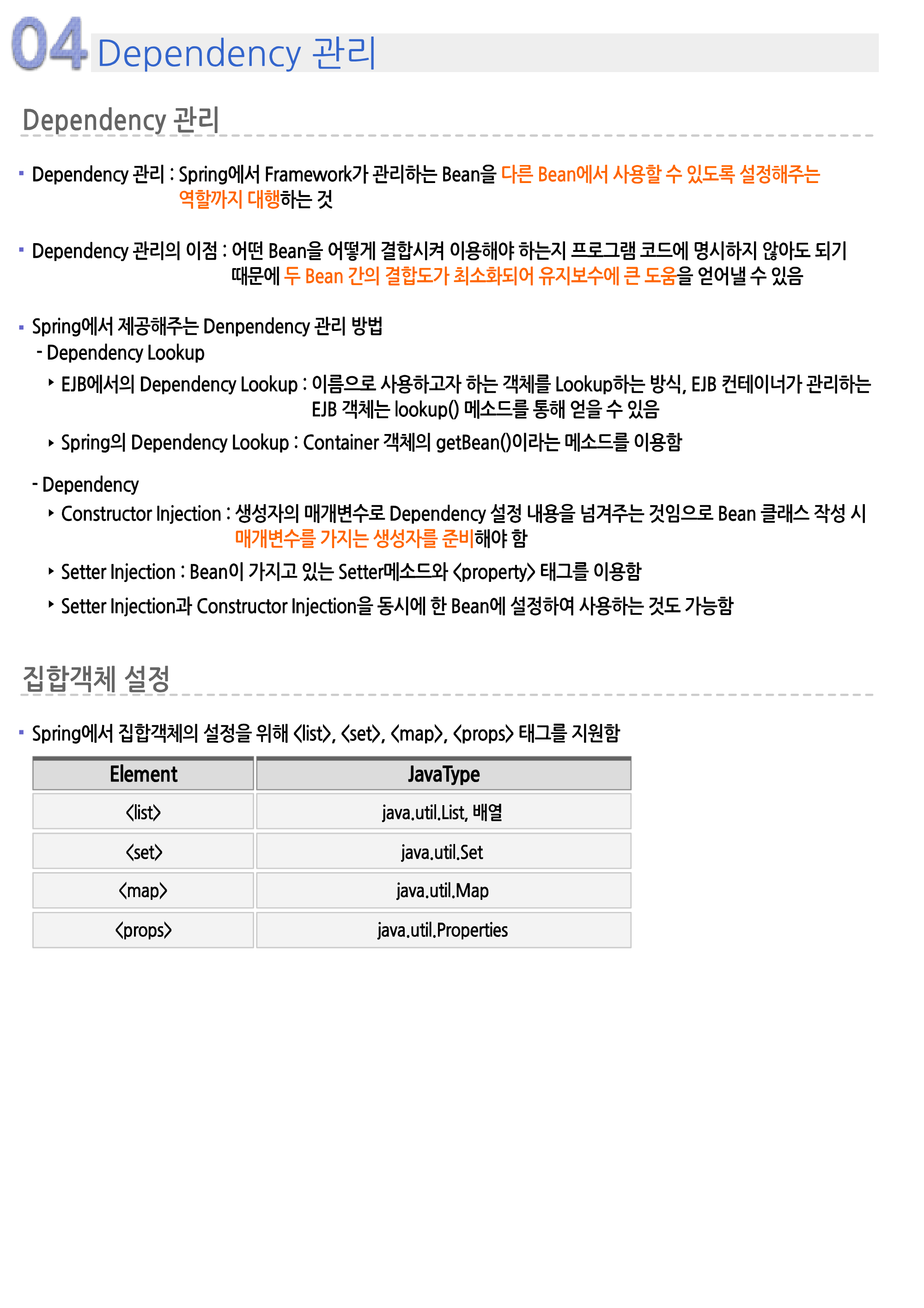
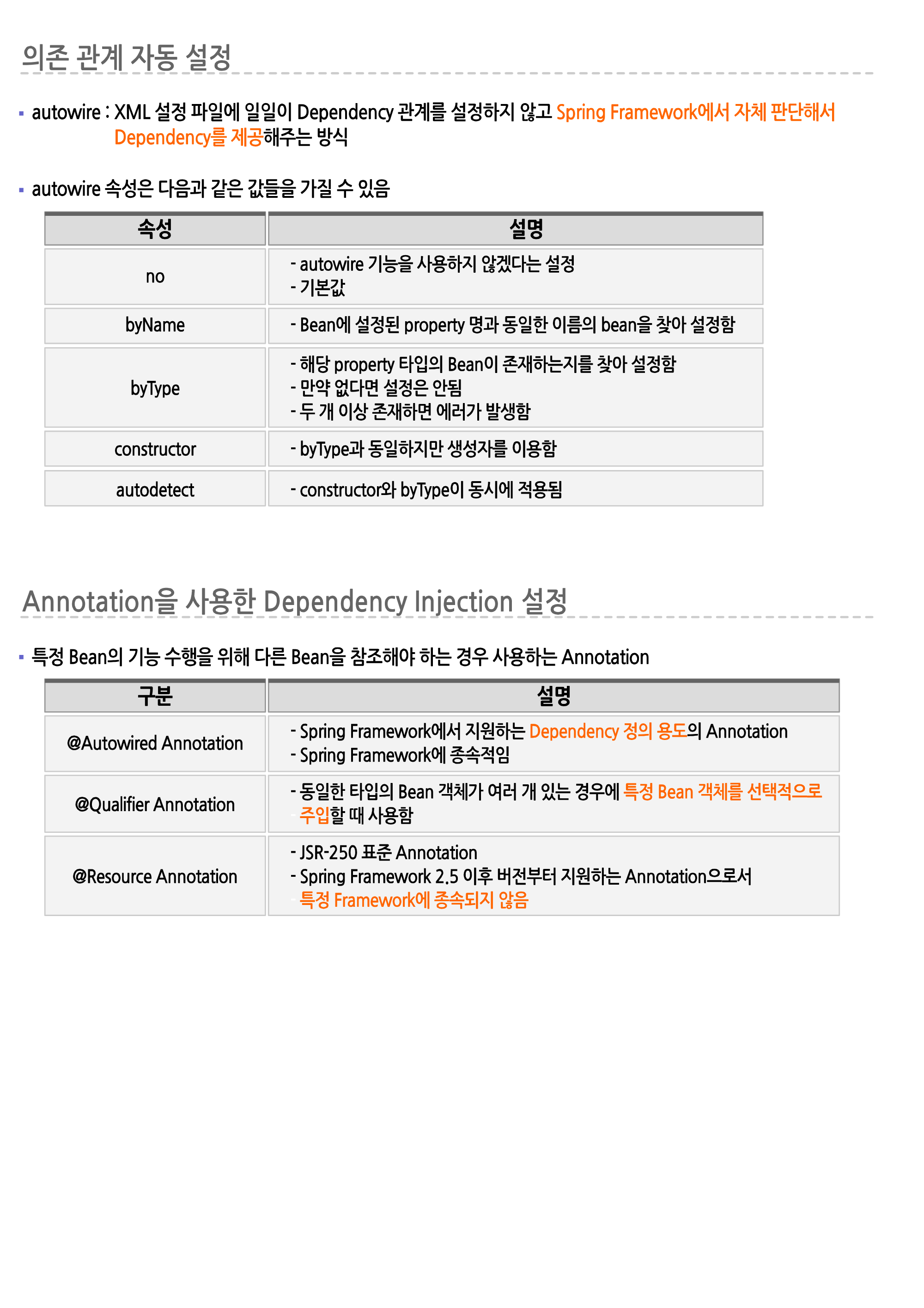
※ src/main/java 폴더에 xyz.itwill05.di 패키지 생성
🌈클래스 생성
📃Student.java
※ xyz.itwill05.di 패키지에 Student.java 클래스 생성
package xyz.itwill05.di;
//학생정보를 저장하기 위한 클래스 - VO 클래스(DTO 클래스)
public class Student {
	private int num;
	public String name;
	public String email;
	//
	public Student() {
		System.out.println("### Student 클래스의 기본 생성자 호출 ###");
	}
	public Student(int num) {
		super();
		this.num = num;
		System.out.println("### Student 클래스의 매개변수(학번)가 선언된 생성자 호출 ###");
	}
	/*
	public Student(String name) {
		super();
		this.name = name;
		System.out.println("### Student 클래스의 매개변수(이름)가 선언된 생성자 호출 ###");
	}
	*/
	public Student(int num, String name) {
		super();
		this.num = num;
		this.name = name;
		System.out.println("### Student 클래스의 매개변수(학번,이름)가 선언된 생성자 호출 ###");
	}
	public Student(int num, String name, String email) {
		super();
		this.num = num;
		this.name = name;
		this.email = email;
		System.out.println("### Student 클래스의 매개변수(학번,이름,이메일)가 선언된 생성자 호출 ###");
	}
	public int getNum() {
		return num;
	}
	public void setNum(int num) {
		this.num = num;
		System.out.println("*** Student 클래스 setNum(int num) 메소드 호출 ***");
	}
	public String getName() {
		return name;
	}
	public void setName(String name) {
		this.name = name;
		System.out.println("*** Student 클래스 setName(String name) 메소드 호출 ***");
	}
	public String getEmail() {
		return email;
	}
	public void setEmail(String email) {
		this.email = email;
		System.out.println("*** Student 클래스 setEmail(String email) 메소드 호출 ***");
	}
	@Override
	public String toString() {
		return "학번 = "+num+", 이름 = "+name+", 이메일 = "+email;
	}
}
🌈프로그램 생성
📃StudentApp.java
※ xyz.itwill05.di 패키지에 StudentApp.java 클래스 생성
package xyz.itwill05.di;
//
import org.springframework.context.ApplicationContext;
import org.springframework.context.support.ClassPathXmlApplicationContext;
//
public class StudentApp {
	public static void main(String[] args) {
		System.out.println("================== Spring Container 초기화 전 ==================");
		ApplicationContext context=new ClassPathXmlApplicationContext("05-1_di.xml");
		System.out.println("================== Spring Container 초기화 후 ==================");
		Student student1=context.getBean("student1",Student.class);
		//참조변수 출력시 Student 클래스의 toString() 메소드 자동 호출 - 객체의 필드값 확인
		System.out.println(student1);
		System.out.println("================================================================");
		Student student2=context.getBean("student2",Student.class);
		System.out.println(student2);
		System.out.println("================================================================");
		Student student3=context.getBean("student3",Student.class);
		System.out.println(student3);
		System.out.println("================================================================");
		Student student4=context.getBean("student4",Student.class);
		System.out.println(student4);
		System.out.println("================================================================");
		Student student5=context.getBean("student5",Student.class);
		System.out.println(student5);
		System.out.println("================================================================");
		Student student6=context.getBean("student6",Student.class);
		System.out.println(student6);
		System.out.println("================================================================");
		((ClassPathXmlApplicationContext)context).close();
	}
}
🌈환경설정 파일 생성(XML)
📢Spring Bean으로 등록된 클래스의 기본 생성자를 이용하여 객체 생성
→ 객체의 필드에는 기본값(숫자형 : 0, 논리형 : false, 참조형 : null) 저장
〓〓〓〓〓〓〓〓〓〓〓〓〓〓〓〓〓〓〓〓〓〓〓〓〓〓〓〓〓〓〓〓〓〓〓〓〓〓〓〓〓〓〓
📢Spring Bean으로 등록된 클래스의 매개변수가 선언된 생성자를 이용하여 객체 생성
→ bean 엘리먼트의 하위 엘리먼트를 사용하여 생성자 매개변수에 값을 전달하여 필드값으로 저장
→ Constructor Injection : 생성자를 이용하여 객체 필드 초기화 작업 실행
〓〓〓〓〓〓〓〓〓〓〓〓〓〓〓〓〓〓〓〓〓〓〓〓〓〓〓〓〓〓〓〓〓〓〓〓〓〓〓〓〓〓〓
📢constructor-arg : Spring Bean으로 등록된 클래스의 생성자 매개변수에 값(객체)을 전달하기 위한 엘리먼트
📢엘리먼트의 갯수만큼 매개변수가 선언된 생성자를 반드시 작성
📌value 속성 : 매개변수에 전달하기 위한 값을 속성값으로 설정
→ Spring Bean으로 등록된 클래스가 객체로 생성될 때 필드에 전달값 저장
→ Value Injection : 객체의 필드에 값이 저장되도록 초기화 작업 실행 - 값 주입
→ 전달값은 기본적으로 문자열(String 객체)로 전달 - 매개변수의 자료형에 의해 자동 형변환
→ 매개변수의 자료형에 의해 자동 형변환될 경우 NumberFormatException 발생 가능
〓〓〓〓〓〓〓〓〓〓〓〓〓〓〓〓〓〓〓〓〓〓〓〓〓〓〓〓〓〓〓〓〓〓〓〓〓〓〓〓〓〓〓
📢constructor-arg 엘리먼트의 작성순서에 의해 매개변수에 값(객체)이 전달되어 객체 초기화
📌index 속성 : 매개변수에 값(객체)을 전달하기 위한 순서를 속성값으로 설정
→ index 속성값은 0부터 1씩 증가되는 정수값 사용
〓〓〓〓〓〓〓〓〓〓〓〓〓〓〓〓〓〓〓〓〓〓〓〓〓〓〓〓〓〓〓〓〓〓〓〓〓〓〓〓〓〓〓
📢클래스의 기본 생성자를 이용하여 객체 생성 - 객체 필드에는 기본값 저장
→ 하위 엘리먼트 사용하여 Setter 메소드를 호출하여 필드값 변경 - Setter Injection
📌property : 객체의 Setter 메소드를 호출하여 필드값을 변경하는 엘리먼트
📍name 속성 : 필드값을 변경하기 위한 필드명을 속성값으로 설정 - 자동 완성 기능 사용
→ name 속성값으로 설정된 필드에 대한 Setter 메소드를 호출하여 필드값 변경
→ 필드에 대한 Setter 메소드가 없거나 잘못 선언된 경우 예외 발생
📍value 속성 : 필드에 저장된 값을 속성값으로 설정 - 값 주입
〓〓〓〓〓〓〓〓〓〓〓〓〓〓〓〓〓〓〓〓〓〓〓〓〓〓〓〓〓〓〓〓〓〓〓〓〓〓〓〓〓〓〓📃05-1_di.xml
※ src/main/resources 폴더에 05-1_di.xml 생성
<?xml version="1.0" encoding="UTF-8"?>
<beans xmlns="http://www.springframework.org/schema/beans"
	xmlns:xsi="http://www.w3.org/2001/XMLSchema-instance"
	xsi:schemaLocation="http://www.springframework.org/schema/beans http://www.springframework.org/schema/beans/spring-beans.xsd">
	<!-- ================================================================================ -->
	<!-- Spring Bean으로 등록된 클래스의 기본 생성자를 이용하여 객체 생성 -->
	<!-- => 객체의 필드에는 기본값(숫자형 : 0, 논리형 : false, 참조형 : null) 저장 -->
	<bean class="xyz.itwill05.di.Student" id="student1"/>
	<!-- ================================================================================ -->
	<!-- Spring Bean Injection : 스프링 컨테이너에 의해 Spring Bean Configuration File에 등록된
		클래스로 객체(Spring Bean) 생성시 필드에 원하는 값 또는 객체를 저장되도록 설정 -->
	<!-- → 생성자(Constructor Injection) 또는 Setter 메소드(Setter Injection)를 이용하여 값 또는 객체를 필드에 저장 -->
	<!-- ================================================================================ -->
	<!-- Spring Bean으로 등록된 클래스의 매개변수가 선언된 생성자를 이용하여 객체 생성 -->
	<!-- => bean 엘리먼트의 하위 엘리먼트를 사용하여 생성자 매개변수에 값을 전달하여 필드값으로 저장 -->
	<!-- => Constructor Injection : 생성자를 이용하여 객체 필드 초기화 작업 실행 -->
	<bean class="xyz.itwill05.di.Student" id="student2">
		<!-- constructor-arg : Spring Bean으로 등록된 클래스의 생성자 매개변수에 값(객체)을
		전달하기 위한 엘리먼트 -->
		<!-- => 엘리먼트의 갯수만큼 매개변수가 선언된 생성자를 반드시 작성 -->
		<!-- value 속성 : 매개변수에 전달하기 위한 값을 속성값으로 설정 -->
		<!-- => Spring Bean으로 등록된 클래스가 객체로 생성될 때 필드에 전달값 저장 -->
		<!-- => Value Injection : 객체의 필드에 값이 저장되도록 초기화 작업 실행 - 값 주입 -->
		<!-- => 전달값은 기본적으로 문자열(String 객체)로 전달 - 매개변수의 자료형에 의해 자동 형변환 -->
		<!-- => 매개변수의 자료형에 의해 자동 형변환될 경우 NumberFormatException 발생 가능 -->
		<constructor-arg value="1000"/>
	</bean>
	<!-- ================================================================================ -->
	<!-- constructor-arg 엘리먼트의 작성순서에 의해 매개변수에 값(객체)이 전달되어 객체 초기화 -->
	<!--
	<bean class="xyz.itwill05.di.Student" id="student3">
		<constructor-arg value="2000"/>
		<constructor-arg value="홍길동"/>
		<constructor-arg value="abc@itwill.xyz"/>
	</bean>
	-->
	<bean class="xyz.itwill05.di.Student" id="student3">
		<!-- index 속성 : 매개변수에 값(객체)을 전달하기 위한 순서를 속성값으로 설정 -->
		<!-- → index 속성값은 0부터 1씩 증가되는 정수값 사용 -->
		<constructor-arg value="홍길동" index="1"/>
		<constructor-arg value="abc@itwill.xyz" index="2"/>
		<constructor-arg value="2000" index="0"/>
	</bean>
	<!-- ================================================================================ -->
	<!-- 클래스의 기본 생성자를 이용하여 객체 생성 - 객체 필드에는 기본값 저장 -->
	<!-- → 하위 엘리먼트 사용하여 Setter 메소드를 호출하여 필드값 변경 - Setter Injection -->
	<bean class="xyz.itwill05.di.Student" id="student4">
		<!-- property : 객체의 Setter 메소드를 호출하여 필드값을 변경하는 엘리먼트 -->
		<!-- name 속성 : 필드값을 변경하기 위한 필드명을 속성값으로 설정 - 자동 완성 기능 사용 -->
		<!-- → name 속성값으로 설정된 필드에 대한 Setter 메소드를 호출하여 필드값 변경 -->
		<!-- → 필드에 대한 Setter 메소드가 없거나 잘못 선언된 경우 예외 발생 -->
		<!-- value 속성 : 필드에 저장된 값을 속성값으로 설정 - 값 주입 -->
		<property name="num" value="3000"/>
		<property name="name" value="임꺽정"/>
		<property name="email" value="xyz@itwill.xyz"/>
	</bean>
	<!-- ================================================================================ -->
	<!-- 생성자(Constructor Injection)와 Setter 메소드(Setter Injection)를 같이 사용하여 객체 초기화 작업 가능 -->
	<bean class="xyz.itwill05.di.Student" id="student5">
		<constructor-arg value="4000"/>
		<constructor-arg value="전우치"/>
		<property name="email" value="opq@itwill.xyz"/>
	</bean>
	<!-- ================================================================================ -->
	<!-- PropertyPlaceholderConfigurer 클래스 : Properties 파일을 제공받아 파일에 설정된 값을 Spring Bean Configuration File에서 사용할 수 있도록 제공하는 클래스 -->
	<!-- → locations 필드에 Properties 파일의 경로를 전달하여 저장 -->
	<!-- → Properties 파일에 의해 제공되는 값은 Spring Bean Configuration File에서 ${이름}으로 사용 가능  -->
	<!--
	<bean class="org.springframework.beans.factory.config.PropertyPlaceholderConfigurer">
		<property name="locations" value="xyz/itwill05/di/student.properties"></property>
	</bean>
	-->
	<!-- Spring 5.2 이상에서는 PropertySourcesPlaceholderConfigurer 클래스를 사용하여 Properties 파일을 제공받아 Spring Bean Configuration File에서 사용할 수 있도록 변경 -->
	<bean class="org.springframework.context.support.PropertySourcesPlaceholderConfigurer">
		<property name="locations" value="xyz/itwill05/di/student.properties"></property>
	</bean>
	<!-- Properties 파일에 의해 제공되는 값을 사용하여 객체 필드 초기화 작업 -->
	<bean class="xyz.itwill05.di.Student" id="student6">
		<property name="num" value="${num}"/>
		<property name="name" value="${name}"/>
		<property name="email" value="${email}"/>
	</bean>
</beans>
🌈properties 파일 생성
📃student.properties
※ xyz.itwill05.di 패키지에 student.properties 파일 생성
