📕 likeStore.ts 파일에서의 Zustand를 이용한 상태 관리
- useLikeStore 상태 정의 및 생성
interface LikeState {
  liked: boolean;
  fetchLikeStatus: (postId: string, userId: string) => Promise<void>;
  toggleLike: (postId: string, userId: string) => Promise<void>;
}
export const useLikeStore = create<LikeState>((set) => ({
  liked: false,
useLikeStore 상태 정의 : 사용자가 특정 게시물에 '좋아요'를 눌렀는지 여부를 관리하는 상태 liked는 사용자가 게시물을 '좋아요'했는지를 나타내는 boolean 값으로 초기값은 false LikeState 인터페이스는 liked 상태와 두 개의 비동기 함수 fetchLikeStatus와 toggleLike를 정의
- fetchLikeStatus 함수
  fetchLikeStatus: async (postId: string, userId: string) => {
    try {
      const response = await axios.get(`/api/detail/likes/${postId}`, {
        headers: { 'user-id': userId }
      });
      set({ liked: response.data.exists });
    } catch (error) {
      console.error('Error fetching like status:', error);
    }
  },
fetchLikeStatus 함수 : 특정 게시물에 대해 사용자가 '좋아요'를 눌렀는지 확인하는 함수 postId와 userId를 매개변수로 받아 서버로부터 현재 '좋아요' 상태를 가져옴 서버 응답에서 '좋아요' 상태가 존재하면 liked 상태를 true로 설정 오류 발생 시, 콘솔에 오류 메시지를 출력
- toggleLike 함수
  toggleLike: async (postId: string, userId: string) => {
    try {
      const { liked } = useLikeStore.getState();
      if (liked) {
        await axios.delete(`/api/detail/likes/${postId}`, {
          data: { userId }
        });
        set({ liked: false });
      } else {
        await axios.post(`/api/detail/likes/${postId}`, { userId });
        set({ liked: true });
      }
    } catch (error) {
      console.error('Error toggling like:', error);
    }
  }
}));
toggleLike 함수 : 사용자가 특정 게시물에 '좋아요'를 추가하거나 제거하는 함수 현재 liked 상태를 확인하여 '좋아요'가 이미 눌린 상태면 '좋아요'를 취소하고, 아니라면 '좋아요'를 추가 '좋아요' 상태가 변경되면 liked 상태를 업데이트 오류 발생 시, 콘솔에 오류 메시지를 출력
📕결제 요청 함수 및 옵션 설정
- Likes 컴포넌트 내부 상태 설정 및 useEffect 사용
const Likes = ({ isWeb }: WebProps) => {
  const { id: postId } = useParams<{ id: string }>();
  const user = useAuthStore((state) => state.user);
  const { post } = usePostStore((state) => ({
    post: state.post
  }));
  const { liked, fetchLikeStatus, toggleLike } = useLikeStore((state) => ({
    liked: state.liked,
    fetchLikeStatus: state.fetchLikeStatus,
    toggleLike: state.toggleLike
  }));
  useEffect(() => {
    if (postId && user?.id) {
      fetchLikeStatus(postId, user.id);
    }
  }, [postId, user?.id, fetchLikeStatus]);
컴포넌트 내부 상태 설정 및 useEffect 사용 : postId, user, liked, fetchLikeStatus, toggleLike 상태와 메서드를 Zustand 스토어에서 가져옴 useEffect를 사용하여 컴포넌트가 렌더링될 때 postId와 user.id가 존재하면 fetchLikeStatus를 호출해 현재 '좋아요' 상태를 가져옴
- handleLike 함수
  const requireLogin = useRequireLogin();
  const handleLike = () => {
    if (!user) {
      requireLogin();
      return;
    }
    toggleLike(postId, user.id);
    const primaryColor = '#B95FAB'; // primary-300 색상의 HEX 코드
    if (liked) {
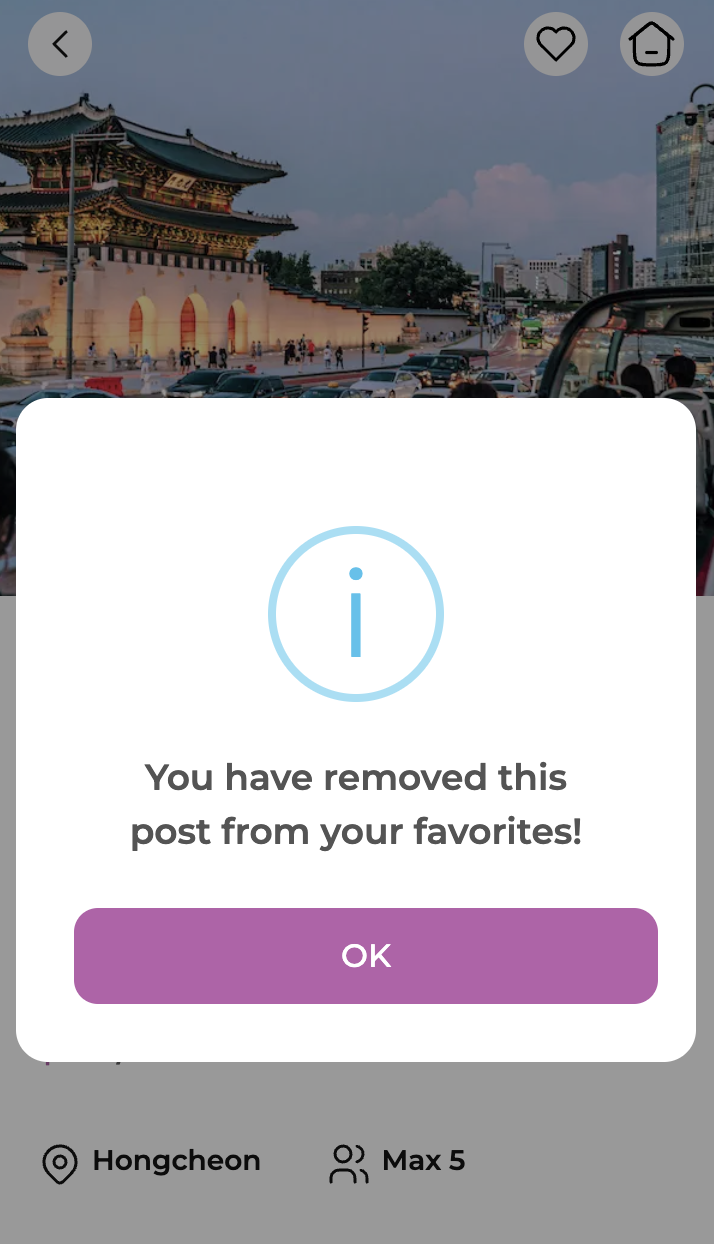
      Swal.fire({
        title: 'You have removed this post from your favorites!',
        icon: 'info',
        confirmButtonText: 'OK',
        confirmButtonColor: primaryColor, // 버튼 색상 설정
        customClass: {
          actions: 'flex flex-col gap-[8px] w-full',
          title: 'font-semibold text-[18px]',
          htmlContainer: 'text-grayscale-500 text-[14px]',
          popup: 'rounded-[16px] p-[24px]',
          confirmButton: 'bg-primary-300 text-white w-full text-[16px] p-[12px] rounded-[12px]'
        }
      });
    } else {
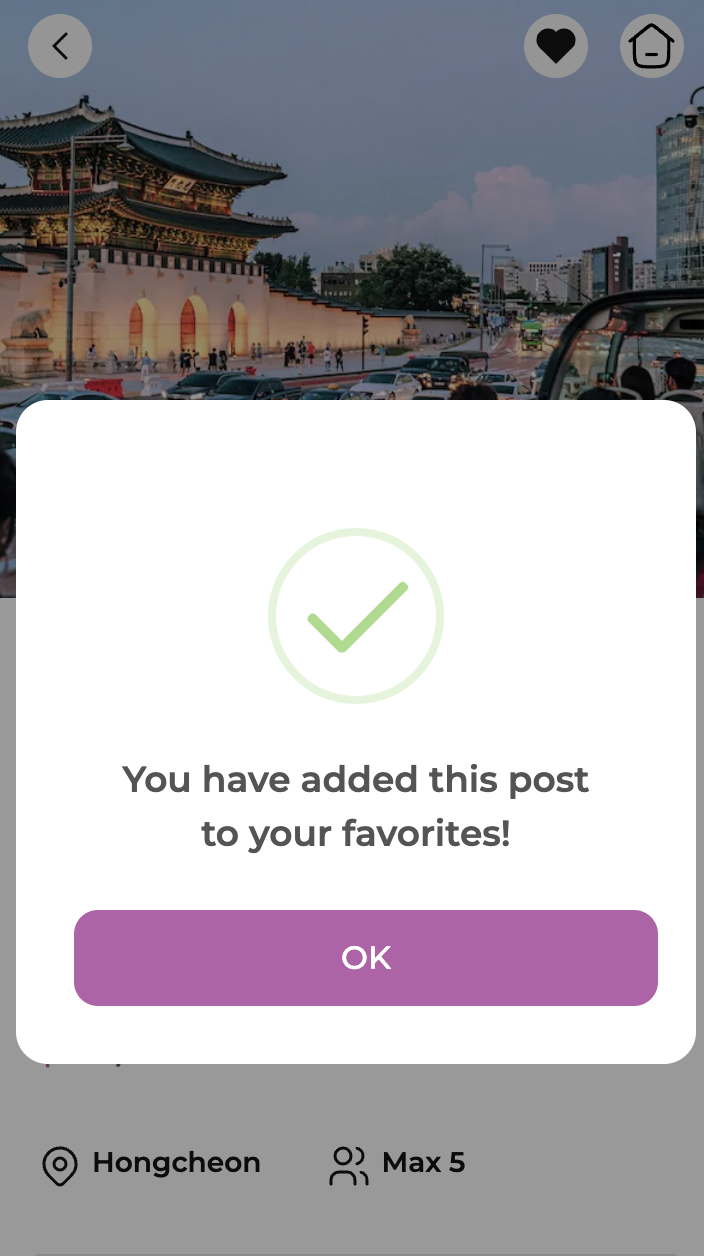
      Swal.fire({
        title: 'You have added this post to your favorites!',
        icon: 'success',
        confirmButtonText: 'OK',
        confirmButtonColor: primaryColor, // 버튼 색상 설정
        customClass: {
          actions: 'flex flex-col gap-[8px] w-full',
          title: 'font-semibold text-[18px]',
          htmlContainer: 'text-grayscale-500 text-[14px]',
          popup: 'rounded-[16px] p-[24px]',
          confirmButton: 'bg-primary-300 text-white w-full text-[16px] p-[12px] rounded-[12px]'
        }
      });
    }
  };
handleLike 함수 : 사용자가 좋아요 버튼을 클릭했을 때 처리하는 함수 로그인 여부를 확인하고, 로그인되지 않은 경우 로그인 요구 팝업을 표시 toggleLike를 호출하여 좋아요 상태를 변경하고, 변경된 상태에 따라 '좋아요 추가' 또는 '좋아요 제거' 팝업을 표시 Swal.fire를 사용해 사용자에게 알림 팝업을 보여주며, 팝업 스타일을 설정
🖥️ 결과물

프론트 개발자 꿈꾸는 중