📕 결제 취소 요청 처리 함수
const handleCancelRequest = async () => {
  try {
    const response = await axios.post(`/api/detail/payment/${txId || id}`, {
      reason: 'User requested cancel',
      requester: 'CUSTOMER'
    });
    // 성공 시 알림
    if (response.data.success) {
      Swal.fire({
        title: 'Cancellation Successful',
        text: response.data.message,
        icon: 'success',
        confirmButtonText: 'OK'
      }).then(() => {
        setSelectedComponent('Reservations');
        router.push(`/${user?.id}/mypage`);
      });
    } else {
      Swal.fire({
        title: 'Cancellation Failed',
        text: response.data.message,
        icon: 'error',
        confirmButtonText: 'OK'
      });
    }
  } catch (error) {
    console.error('Error requesting cancel:', error);
    Swal.fire({
      title: 'Error',
      text: 'The refund is not possible as it has been more than a day.',
      icon: 'error',
      confirmButtonText: 'OK'
    });
  }
};
handleCancelRequest 함수 : 결제 취소 요청을 처리하는 함수 axios.post를 사용해 결제 취소 요청을 서버로 전송 서버 응답에 따라 취소 성공 여부를 Swal.fire로 사용자에게 알림 성공 시, 사용자를 마이페이지로 리디렉션 실패하거나 오류 발생 시, 오류 메시지를 출력하고 사용자에게 알림
📕 결제 취소 클릭 처리 함수
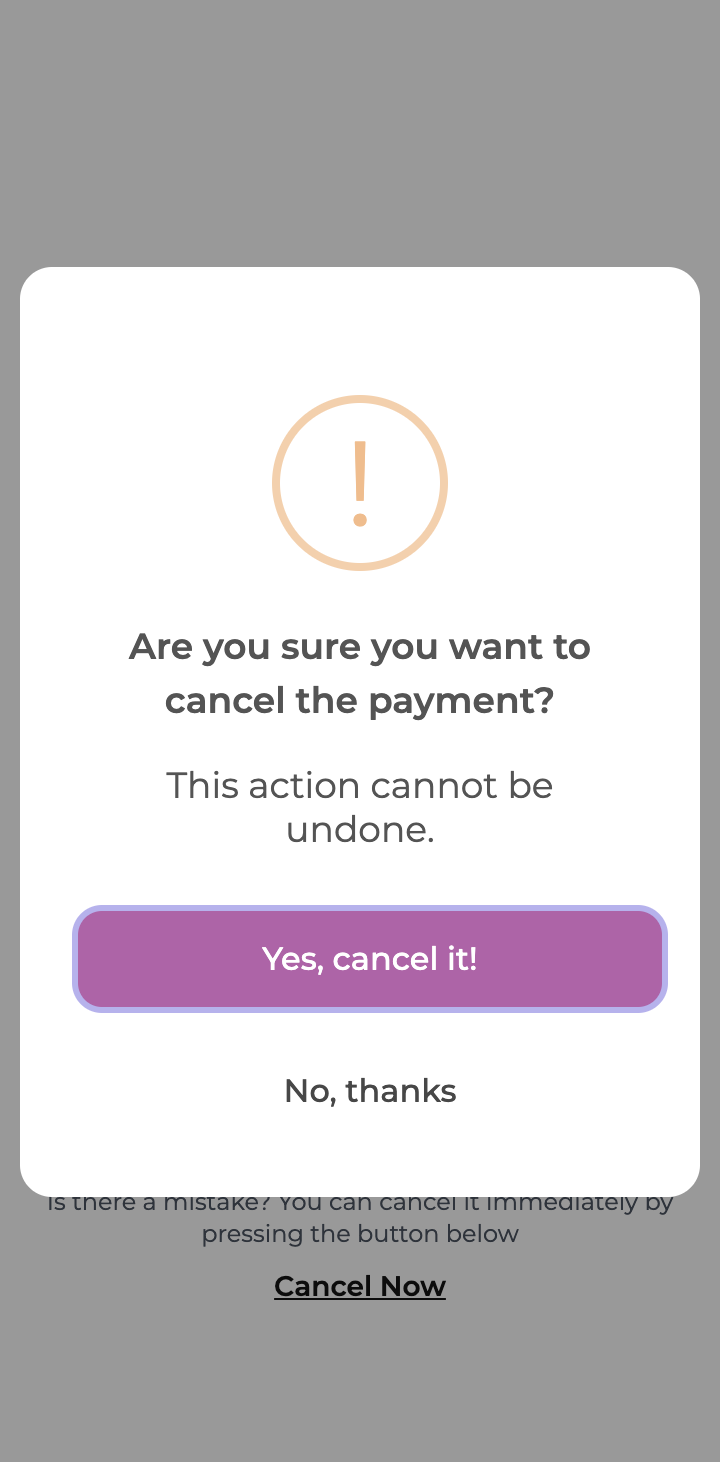
const handleCancelClick = () => {
  Swal.fire({
    title: 'Are you sure you want to cancel the payment?',
    text: 'This action cannot be undone.',
    icon: 'warning',
    showCancelButton: true,
    cancelButtonColor: 'white',
    confirmButtonText: 'Yes, cancel it!',
    cancelButtonText: 'No, thanks',
    customClass: {
      actions: 'flex flex-col gap-[8px] w-full',
      title: 'font-semibold text-[18px]',
      htmlContainer: 'text-grayscale-500 text-[14px]',
      popup: 'rounded-[16px] p-[24px]',
      confirmButton: 'bg-primary-300 text-white w-full text-[16px] p-[12px] rounded-[12px]',
      cancelButton: 'bg-white text-[16px] p-[12px] w-full rounded-[12px] text-grayscale-700'
    }
  }).then((result) => {
    if (result.isConfirmed) {
      handleCancelRequest();
    }
  });
};
handleCancelClick 함수 : 결제 취소를 확인하는 팝업을 표시하는 함수 Swal.fire를 사용해 경고 팝업을 표시 사용자가 취소를 확인하면 handleCancelRequest 함수를 호출 팝업의 스타일과 텍스트는 customClass를 사용해 맞춤 설정
🖥️ 결과물

프론트 개발자 꿈꾸는 중