문제 상황
펫스타그램 포스트 부분의 사용자 프로필 이미지를 구현하면서 문제가 생겼다. 먼저 구현 목표는 userData에 profile_url이 설정되어 있으면 해당 이미지를 프로필로 보여주고, profile_url이 설정되지 않았을 경우에는 기본 프로필 이미지를 보여주도록 하는 것이었다.
profile_url에 따라 img를 렌더링해주는 함수 renderProfile를 다음과 같이 작성했다.
// components/PostCard/PostCard.tsx

const renderProfile = (postUserData: User | undefined) => {
  if (
    postUserData &&
    postUserData.profile_url &&
    postUserData.profile_url != ''
  ) {
    return <img src={postUserData.profile_url} alt='프로필 사진' />;
  }
  // 기본 프로필 이미지의 경로가 'src/public/profile.jpg'이다.
  return <img src='@/public/profile.jpg' alt='프로필 사진' />;
};
그런데 img 태그에 src로 로컬이미지의 경로를 넣으면 이미지를 인식하지 못하는 문제가 발생했다.

해결방안1 - 실패
next.js에서는 asset 파일을 불러올 때 자동으로 public 폴더로부터 경로를 잡기 때문에 public 폴더부터의 절대경로를 src로 넣어줘야 한다는 해결방법이 있었다.
// components/PostCard/PostCard.tsx

// 기본 프로필 이미지의 경로가 'src/public/profile.jpg'이다.
  return <img src='/profile.jpg' alt='프로필 사진' />;
코드를 다음과 같이 수정했지만 똑같이 이미지를 인식하지 못했다.
나름대로 해결되지 않는 이유를 생각해 보았는데, 이 방법은 pages 폴더 안에있는 html 파일에서 public 폴더 안에 있는 이미지를 사용하려 할 때 사용하는 방법이기 때문에 내 코드에서는 적용이 되지 않은 것 같다.
+2023.05.12) next에서 인식하는 public 폴더는 root 경로에 있는 public 폴더인데 필자는 src 폴더 안에 따로 public 폴더를 만들어서 이미지를 넣었었기 때문에 nextjs가 인식하지 못한 것이었다.
해결방안2 - 성공
따라서 로컬 이미지의 경로를 문자열로 넣는 것이 아니라 이미지를 import해서 사용하는 방법을 찾아보았다. next.js에서 이미지를 import하도록 하는 것은 next-images 라이브러리를 통해서 할 수 있다.
1. next-images 라이브러리 설치
npm install --save next-images
2. next.config.js 설정
NEXT에서 webpack 설정을 하는 next.config.js 파일을 프로젝트의 root 위치에 생성하고 다음과 같이 작성하여야 한다.
const withImages = require('next-images')
module.exports = withImages()
필자의 경우에는 next.config.js에 이미 다른 설정이 있었기 때문에 module.exports를 할 때 코드를 합쳤다.
/** @type {import('next').NextConfig} */
const nextConfig = {
  reactStrictMode: true,
  // firebase에서 받아오는 이미지 - 도메인 설정
  images: {
    domains: ['firebasestorage.googleapis.com'],
  },
};

const withImages = require('next-images');

module.exports = withImages(nextConfig);
이렇게 하면 이제 로컬 이미지 경로로 이미지를 import해올 수 있다.
3. image import 하기
import baseProfile from '@/public/profile.jpg';

const renderProfile = (postUserData: User | undefined) => {
  // ...

  return <img src={baseProfile} alt='프로필 사진' />;
};
그런데 이번엔 다음과 같은 typescript 오류가 발생했다.
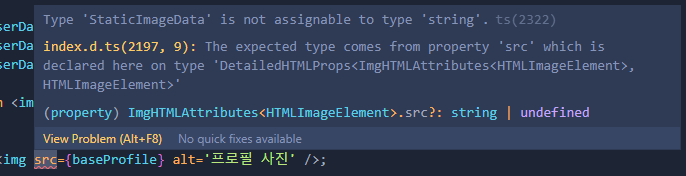
img 태그의 src 속성은 string이나 undefined 값이 들어와야 하는데 지금 import해서 가져온 이미지는 'StaticImageData' type이라는 오류이다.
이를 해결하는 방법은 간단하다. import한 StaticImageData 이미지의 src를 불러오면 된다.
(추후에 StaticImageData가 어떻게 구성되어있는지 더 알아봐야겠다. )
import baseProfile from '@/public/profile.jpg';

const renderProfile = (postUserData: User | undefined) => {
  // ...

  return <img src={baseProfile.src} alt='프로필 사진' />;
};
기본 프로필 불러오기 성공!!