Background
- 쿠버네티스 학습 환경 세팅하기 에서 로컬에 쿠버네티스 단일 노드 환경을 세팅 했다.
- 이번에는 파드(Pod) 개념과 파드 정보를 조회할 수 있는 몇 가지 명령어를 정리하고 파드 안에서 실행 되는 컨테이너는 어떻게 관리 되는지 정리해보자.
1. 파드(Pod) 란?
1-1. 파드 특징
- 파드는 쿠버네티스에서 생성하고 관리할 수 있는 배포 가능한 가장 작은 컴퓨팅 단위이다.
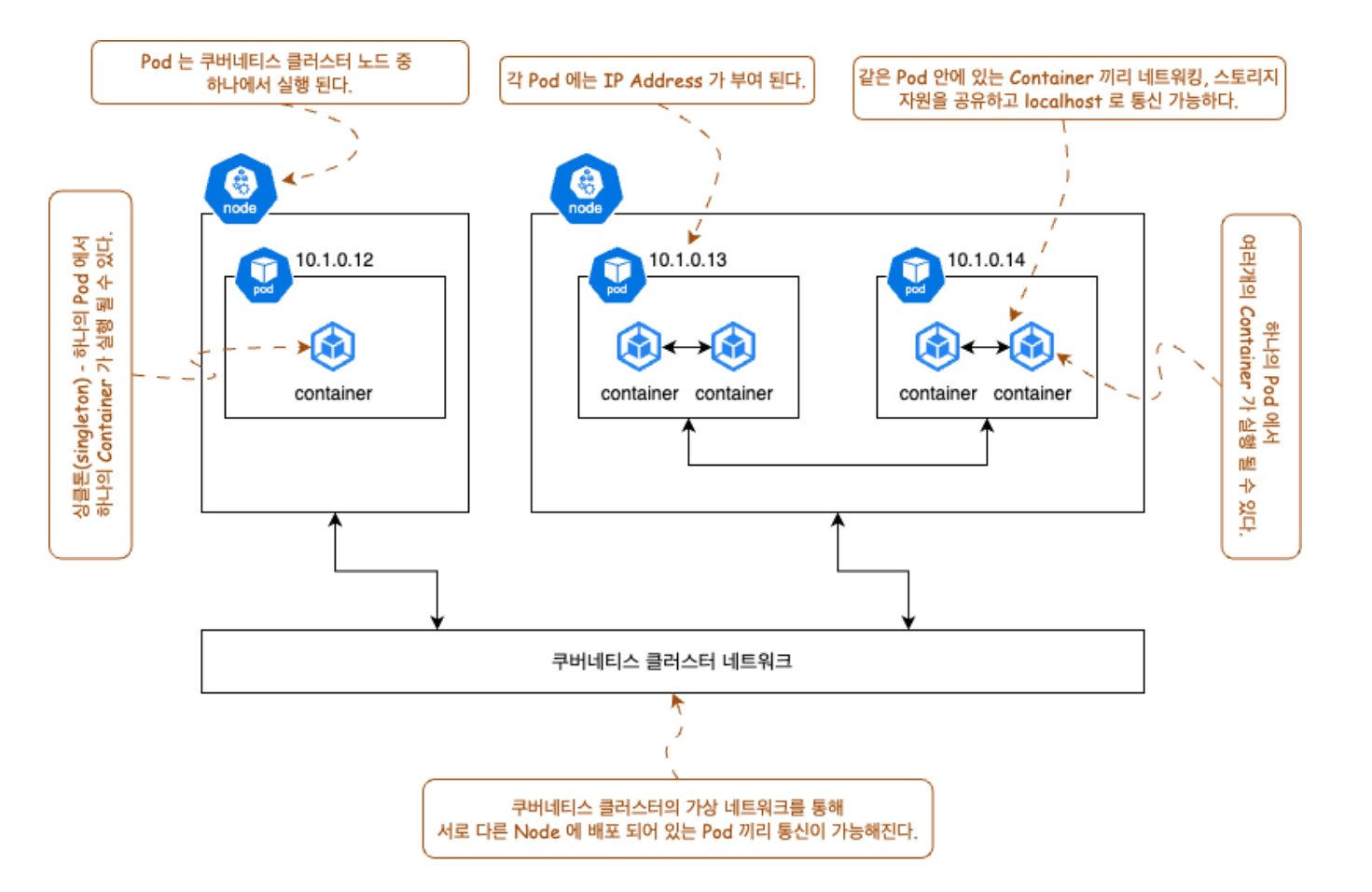
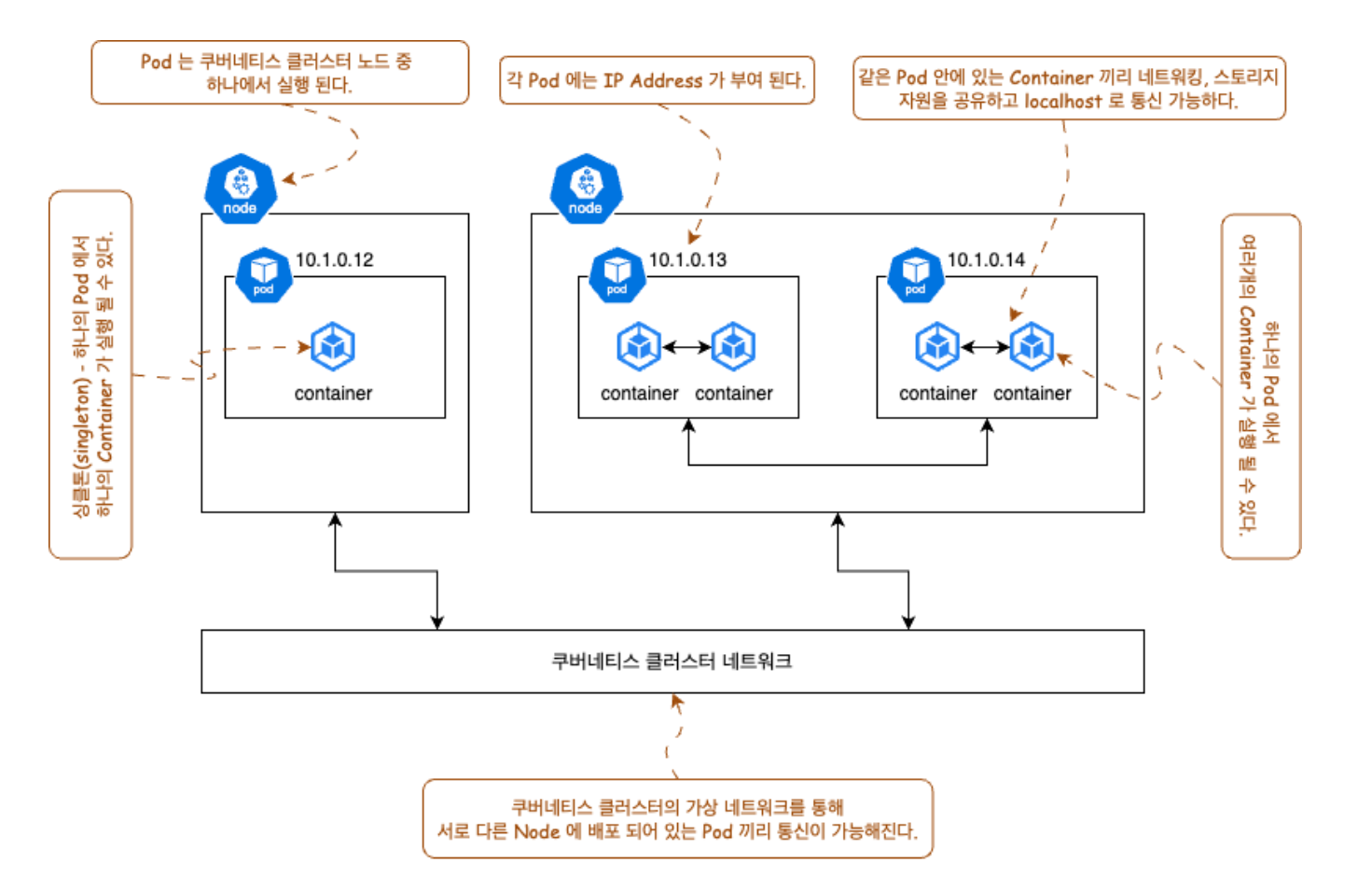
- 하나의 파드 안에서는 하나 또는 여러개의 컨테이너가 실행 될 수 있다.
- 하나의 파드 안에서 하나의 컨테이너가 실행 되는 것은 싱글톤(singleton) 이라고 한다.
- 하나의 파드에서 실행 되는 컨테이너 끼리는 같은 가상 환경에 포함 되어 네트워크, 스토리지를 공유한다.
그래서 같은 파드에 포함 되어 있는 컨테이너 끼리 localhost 로 통신 가능하며 스토리지를 공유하기 때문에 데이터를 쉐어할 수 있다. - 파드는 쿠버네티스 클러스터에 구성 되어 있는 노드 중 하나에서 실행(배포) 된다.
- 일반적으로 복잡한 로직을 수행하는 경우가 아니라면, 하나의 파드에 하나의 컨테이너가 실행 되는 경우가 많은 것 같다.(개인적인 생각)
- 사용자가 쿠버네티스에서 직접 개별 파드를 배포 하는 경우는 거의 없다.
대부분 디플로이먼트, 스테이트풀셋 등과 같은 워크로드 리소스(컨트롤러) 를 이용하여 파드를 관리한다.
(이번에 컨트롤러 개념은 다루지 않는다.) - 각 파드는 각 네트워크 패밀리 내에서 고유한 IP 를 갖는다.
- 파드는 쿠버네티스가 관리하는 가상 네트워크에 연결 되어 서로 다른 노드에 있어도, 파드간 네트워크 통신이 가능하게 된다.
1-2. 그래서 파드는?
정확한 설명은 아니지만, 파드는
쿠버네티스가 컨테이너를 실행하는 수단이라고 생각해도 괜찮다고 한다.
1-3. 파드 네트워크 구성도 (요약)
- 1-1. 파드 특징을 요약할 수 있도록 구성도를 그려 보았다.
- 여기서 node 는 쿠버네티스 클러스터를 구성하는 실제 서버 중 하나를 의미한다.
2. 파드 관련 명령어 실습
2-1. 파드 생성하기
# Docker hub 에 있는 'kiamol/ch02-hello-kiamol' 이미지를 'hello-kiamol' 라는 이름의 Pod 로 배포하는 명령어 이다.
$ kubectl run hello-kiamol --image=kiamol/ch02-hello-kiamol

# 아래와 같이 pod 가 created 되었다는 메시지를 반환 받을 수 있다.
>> pod/hello-kiamol created
2-2. 파드 목록 및 상태 정보 확인하기
# 쿠버네티스 클러스터에 배포 되어 있는 Pod 목록을 가져올 수 있다.
$ kubectl get pods

# 아직 Pod 에서 실행 될 Container 1개 중 0개가 READY상태임을 확인할 수 있다.
# 그리고 STATUS 를 통해 Container 가 생성 되고 있는 중임을 알 수 있다.
>>
NAME           READY   STATUS              RESTARTS   AGE
hello-kiamol   0/1     ContainerCreating   0          6s
2-3. 파드 상태 조건 기다리기
# Pod 가 Ready 상태일 때까지 기다린다.
$ kubectl wait --for=condition=Ready pod hello-kiamol

# 기다리다가 Pod 상태가 Ready 가 되면 아래와 같이 메시지를 출력하고 명령이 종료된다.
>> pod/hello-kiamol2 condition met

# 이후 다시 get 명령어를 사용하면 아래와 같은 상태를 확인할 수 있다.
$  kubectl get pods

# AGE: Pod 가 배포 된 시간
# RESTARTS: Pod 가 재시작 된 횟수
>>
NAME            READY   STATUS    RESTARTS   AGE
hello-kiamol    1/1     Running   0          10s
2-4. 파드 의 상세 정보 확인하기
$ kubectl describe pod hello-kiamol

# 아래와 같이 Pod 관련 많은 정보를 확인할 수 있다.
# 위에서 Pod 를 배포할 때 Pod 이름 외에 설정한 파라미터가 없기 때문에 나머지 설정 값들은 쿠버네티스의 기본 값이 적용 되어 있다.
>>
Name:             hello-kiamol
Namespace:        default
Priority:         0
Service Account:  default
Node:             docker-desktop/192.168.65.4
Start Time:       Sun, 01 Sep 2024 01:26:25 +0900
Labels:           run=hello-kiamol
Annotations:      <none>
Status:           Running
IP:               10.1.2.47
IPs:
  IP:  10.1.2.47
Containers:
  hello-kiamol:
    Container ID:   docker://51d39ec4cc8b7da1b52ae00a49df0541bf582a4b92c200531f2c60329604e65a
    Image:          kiamol/ch02-hello-kiamol
    Image ID:       docker-pullable://kiamol/ch02-hello-kiamol@sha256:8a27476444b4c79b445f24eeb5709066a9da895b871ed9115e81eb5effeb5496
    Port:           <none>
    Host Port:      <none>
    State:          Running
      Started:      Sun, 01 Sep 2024 01:26:31 +0900
    Ready:          True
    Restart Count:  0
    Environment:    <none>
    Mounts:
      /var/run/secrets/kubernetes.io/serviceaccount from kube-api-access-lrl4x (ro)
Conditions:
  Type              Status
  Initialized       True
  Ready             True
  ContainersReady   True
  PodScheduled      True
Volumes:
  kube-api-access-lrl4x:
    Type:                    Projected (a volume that contains injected data from multiple sources)
    TokenExpirationSeconds:  3607
    ConfigMapName:           kube-root-ca.crt
    ConfigMapOptional:       <nil>
    DownwardAPI:             true
QoS Class:                   BestEffort
Node-Selectors:              <none>
Tolerations:                 node.kubernetes.io/not-ready:NoExecute op=Exists for 300s
                             node.kubernetes.io/unreachable:NoExecute op=Exists for 300s
Events:
  Type    Reason     Age   From               Message
  ----    ------     ----  ----               -------
  Normal  Scheduled  12m   default-scheduler  Successfully assigned default/hello-kiamol to docker-desktop
  Normal  Pulling    12m   kubelet            Pulling image "kiamol/ch02-hello-kiamol"
  Normal  Pulled     12m   kubelet            Successfully pulled image "kiamol/ch02-hello-kiamol" in 5.941591169s (5.941595252s including waiting)
  Normal  Created    12m   kubelet            Created container hello-kiamol
  Normal  Started    12m   kubelet            Started container hello-kiamol
2-5. 파드 상세 정보(describe)를 다양한 포맷(json, yaml)으로 출력하기
$ kubectl get pod hello-kiamol --output json
$ kubectl get pod hello-kiamol --output yaml

# 그 외 출력 가능한 --output 옵션 값을 확인하려면 help 로 조회해보자.
$ kubectl get pod hello-kiamol --output --help
2-6. jsonpath 로 파드의 특정 정보만 조회하기
# Pod 에서 실행 중인 컨테이너 중 0번째 인덱스에 위치한 컨테이너의 컨테이너 ID 조회
# jsonpath 경로 지정하는 게 헷갈리다면 --output 을 json 으로 출력하여 json 구조를 파악하면 쉽다.
$ kubectl get pod hello-kiamol --output jsonpath='{.status.containerStatuses[0].containerID}'

# 아래와 같이 Container Runtime 이 Docker 이면 ID prefix 로 docker 가 붙는다고 한다.
>> docker://51d39ec4cc8b7da1b52ae00a49df0541bf582a4b92c200531f2c60329604e65a%

# Pod 안에서 실행 중인 모든 컨테이너 spec 조회하기
$ kubectl get pod hello-kiamol -o jsonpath='{.spec.containers[*]}'

>> {"image":"kiamol/ch02-hello-kiamol","imagePullPolicy":"Always","name":"hello-kiamol","resources":{},"terminationMessagePath":"/dev/termination-log","terminationMessagePolicy":"File","volumeMounts":[{"mountPath":"/var/run/secrets/kubernetes.io/serviceaccount","name":"kube-api-access-lrl4x","readOnly":true}]}
2-7. 파드의 더 많은 컬럼 정보 조회하기
$ kubectl get pod hello-kiamol --output wide

# IP: Pod 의 IP 정보
# NODE: 해당 Pod 가 배포 되어 있는 노드 이름
>>
NAME           READY   STATUS    RESTARTS   AGE   IP          NODE             NOMINATED NODE   READINESS GATES
hello-kiamol   1/1     Running   0          68m   10.1.2.47   docker-desktop   <none>           <none>
2-8. 파드 포트 포워딩 하기
# 실습에서 사용중인 파드는 간단한 웹 앱플리케이션이다.
# 파드 배포 시 따로 포트 접근 가능하도록 설정하지 않았기 때문에,
# 해당 명령어와 같이 파드에 포트 포워딩 명령을 직접 해줄 수 있다.
$ kubectl port-forward pod/hello-kiamol 8080:80
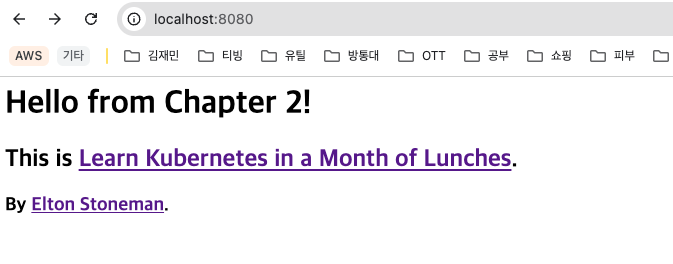
: 위 명령어 이후 localhost:8080 으로 접속 하면 파드의 80 포트와 연동 되어 아래와 같은 웹 사이트를 확인할 수 있다.
3. 쿠버네티스에서 컨테이너는 어떻게 관리 되는가?
- 나는 파드 실행 명령어만 사용하여 파드를 실행 시켰는데, 내부에 컨테이너가 실행 중인 것도 확인 했다.
- 로컬 환경에서 컨테이너 런타임으로 도커를 사용중이기 때문에 해당 컨테이너는 도커 런타임에서 실행 되고 있는 것이다.
- 즉, 파드 생성 명령을 하면 쿠버네티스는 해당 파드가 어떤 노드에서 실행 될 지 결정하고
- 해당 노드의 컨테이너 런타임에서 컨테이너가 실행 되도록 명령 하는 것이다.
- 이 때, 컨테이너 런타임은 도커 외에도 여러 종류가 있기 때문에 CRI(Container Runtime Interface) 라는 공통 API 규격을 사용하여 어떤 런타임에서든 실행 시킬 수 있도록 한다고 한다.
3-1. 컨테이너를 모니터링 하는 주체는 무엇인가?
- 컨테이너를 모니터링하고 관리하는 주체는
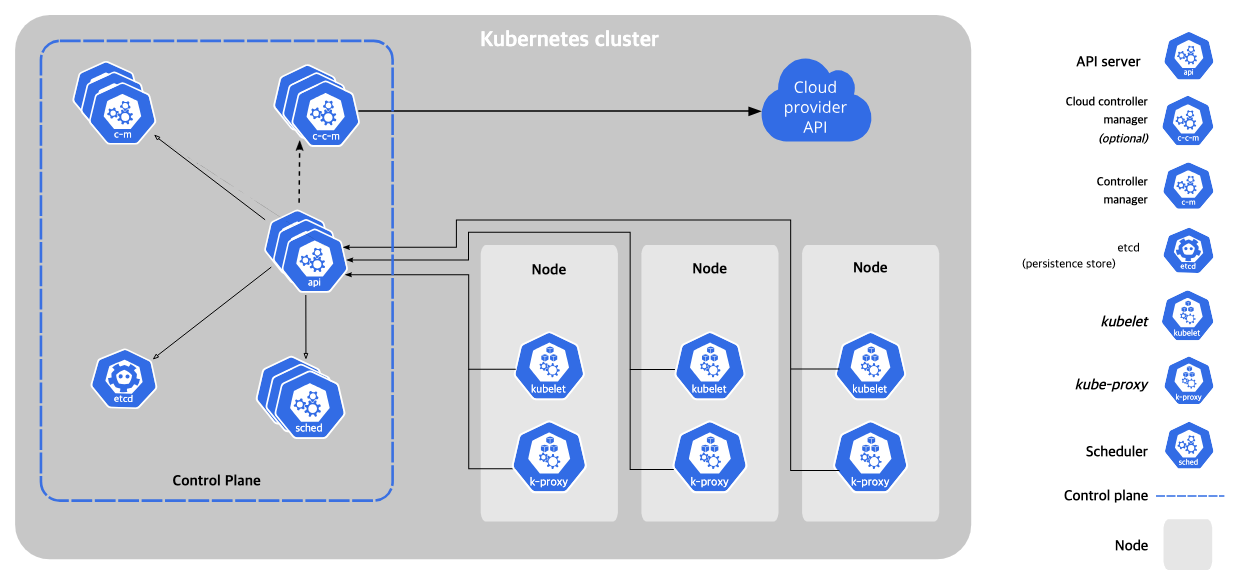
kubelet이다.- kubelet 은 각 노드에서 실행 되어 파드와 컨테이너의 상태를 모니터링 한다.
3-2. kubelet 이 컨테이너를 모니터링 하고 관리하는 플로우 (요약)
- 파드 배포 시 파드, 컨테이너 관련
spec정보(생명 주기 등)가Control Plane의etcd에 저장 된다.- 각 노드에서 실행 되고 있는
kubelet이 주기적으로 Control Plane 의api를 통해서 etcd 에 저장 되어 있는 컨테이너 상태 정보를 Polling- kubelet 이 etcd 의 컨테이너 상태정보와 노드의 컨테이너 런타임에서 실행 중인 컨테이너 상태와 비교 하고 상태를 유지(삭제, 생성 등) 시킨다.
(이 때, kubelet 이 컨테이너 런타임과 통신할 때 CRI 를 이용하여 통신 한다고 한다.)
3-3. 컨테이너 상태 유지 테스트
강제로 컨테이너를 삭제하고 kubelet 이 컨테이너를 알아서 상태 유지 시켜주는 지 테스트 해보자.
# docker runtime 에서 실행 중인 컨테이너의 이름 확인
$ docker ps

>>
CONTAINER ID   IMAGE                       COMMAND                   CREATED        STATUS        PORTS     NAMES
51d39ec4cc8b   kiamol/ch02-hello-kiamol    "/docker-entrypoint.…"   11 hours ago   Up 11 hours             k8s_hello-kiamol_hello-kiamol_default_d8cf3c1e-db9f-4a36-93b8-78522c4b83e7_0
쿠버네티스에서 컨테이너를 만들 때 파드 이름을 컨테이너 레이블에 추가한다고 한다.
컨테이너 레이블 정보를 필터링 해서 도커 런타임에서 컨테이너를 삭제해 보려 한다.
(그냥 docker ps 명령어로 확인 했던 CONTAINER ID 로 바로 삭제 해도 된다.)
# kiamol 컨테이너의 레이블 정보 확인
$ docker container inspect --format '{{json .Config.Labels}}' k8s_hello-kiamol_hello-kiamol_default_d8cf3c1e-db9f-4a36-93b8-78522c4b83e7_0 | jq

>>>
{
  "annotation.io.kubernetes.container.hash": "d53cd85b",
  "annotation.io.kubernetes.container.restartCount": "0",
  "annotation.io.kubernetes.container.terminationMessagePath": "/dev/termination-log",
  "annotation.io.kubernetes.container.terminationMessagePolicy": "File",
  "annotation.io.kubernetes.pod.terminationGracePeriod": "30",
  "io.kubernetes.container.logpath": "/var/log/pods/default_hello-kiamol_d8cf3c1e-db9f-4a36-93b8-78522c4b83e7/hello-kiamol/0.log",
  "io.kubernetes.container.name": "hello-kiamol",
  "io.kubernetes.docker.type": "container",
  "io.kubernetes.pod.name": "hello-kiamol",
  "io.kubernetes.pod.namespace": "default",
  "io.kubernetes.pod.uid": "d8cf3c1e-db9f-4a36-93b8-78522c4b83e7",
  "io.kubernetes.sandbox.id": "50c151eb3760ecd4710437a8c1908964c63a10fe264b60e891d24f795bac2a06",
  "maintainer": "NGINX Docker Maintainers <docker-maint@nginx.com>"
}

# io.kubernetes.container.name 키 값이 hello-kiamol 인 컨테이너의 식별자(id) 정보 조회
$ docker container ls -q --filter label=io.kubernetes.container.name=hello-kiamol

>> 51d39ec4cc8b

# 컨테이너 식별자(id) 정보와 매칭 되는 컨테이너 삭제
$ docker container rm -f $(docker container ls -q --filter label=io.kubernetes.container.name=hello-kiamol)
도커 런타임에서 컨테이너를 삭제 하였다.
이후 파드 상태를 조회해보면 아래와 같이 여전히 컨테이너 1개 중 1개가 READY 상태이고 정상적으로 Running 중인 것을 볼 수 있다.
kubectl get pod
NAME           READY   STATUS    RESTARTS   AGE
hello-kiamol   1/1     Running   1          10h
하지만, 지금 실행 중인 컨테이너는 조금 전에 삭제한 컨테이너와 식별자(id) 값이 다르다.
$ docker container ls -q --filter label=io.kubernetes.container.name=hello-kiamol

>> 8ca55a5326dc

# 삭제 전 컨테이너 ID 는 51d39ec4cc8b
안녕하세요. 데이터 엔지니어 김재민 입니다.