아키텍처
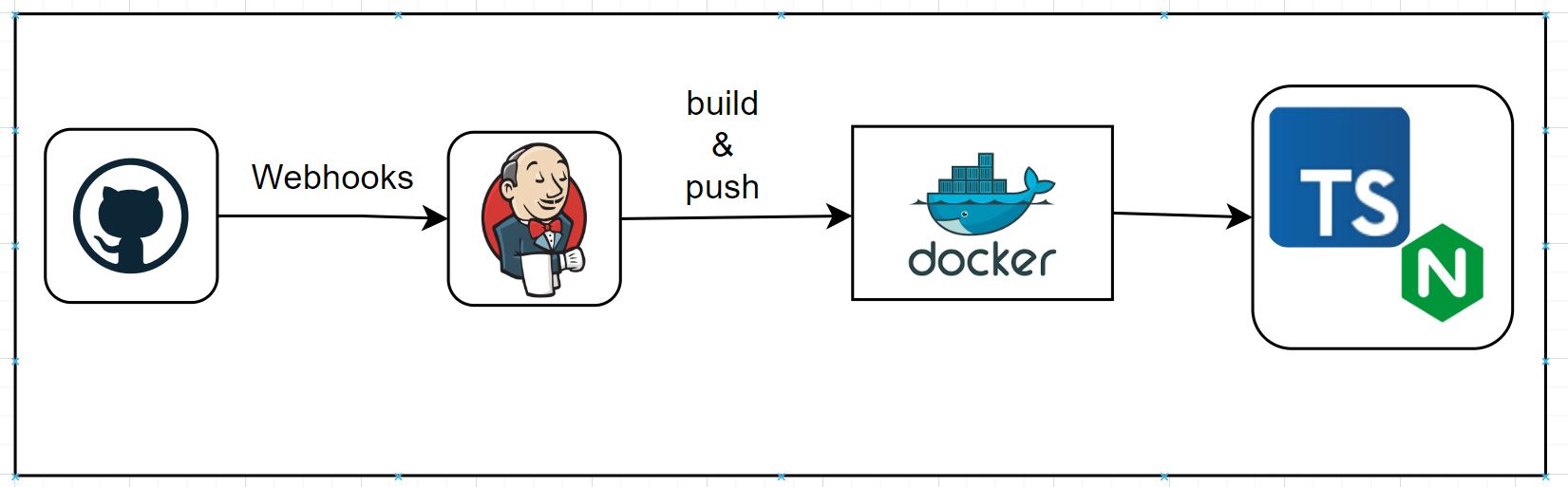
- 깃허브에서 프로젝트를 커밋한다
- 웹훅으로 젠킨스에 알린다
- 젠킨스에서 프론트엔드 프로젝트를 nginx를 통해 배포하는 도커 이미지로 만든다
- 젠킨스가 도커 이미지를 도커 허브에 올린다
- 도커 허브에서 이미지를 pull해서 실행한다 (추후 아르고 cd로 전환 예정)
젠킨스 설치
docker pull jenkins/jenkins:lts
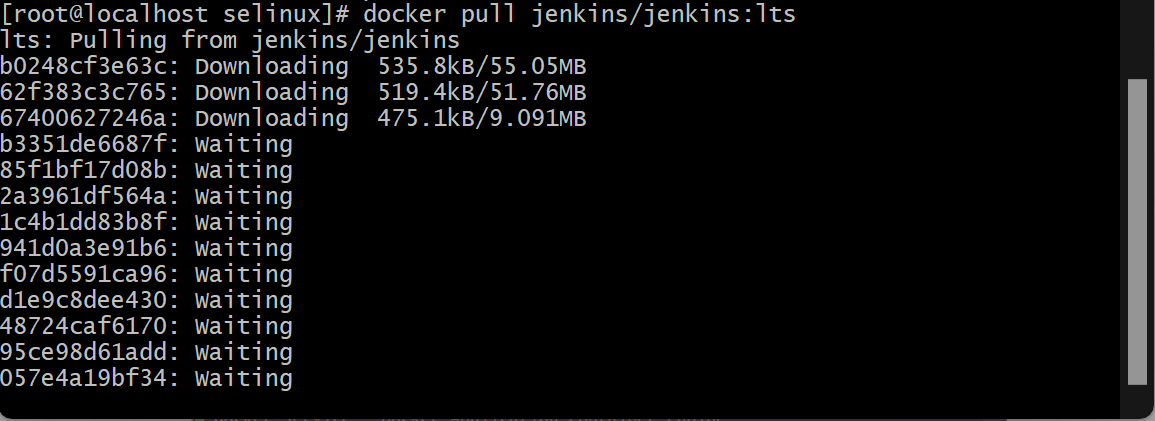
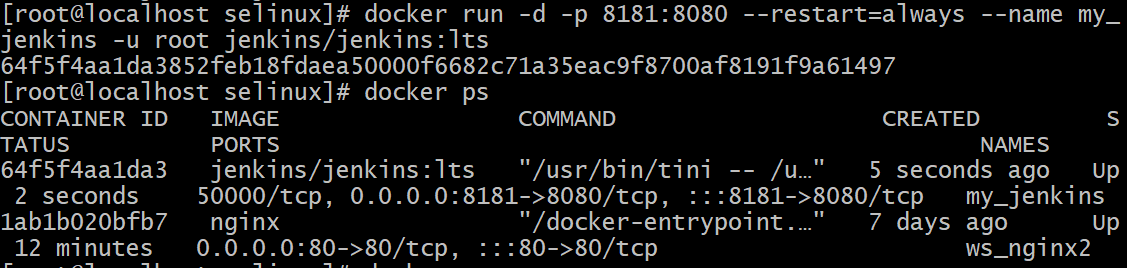
다운로드 받은 이미지를 이용하여 jenkins 실행
docker run -d --restart=always --name jenkins -u root -p 8181:8080 -p 50000:50000 -v /var/run/docker.sock:/var/run/docker.sock jenkins/jenkins:lts
jenkins 안에서도 docker를 사용해야 하기 때문에 위의 명령어로 실행 (설명은 하단에 있음)
public-ip:8181접속
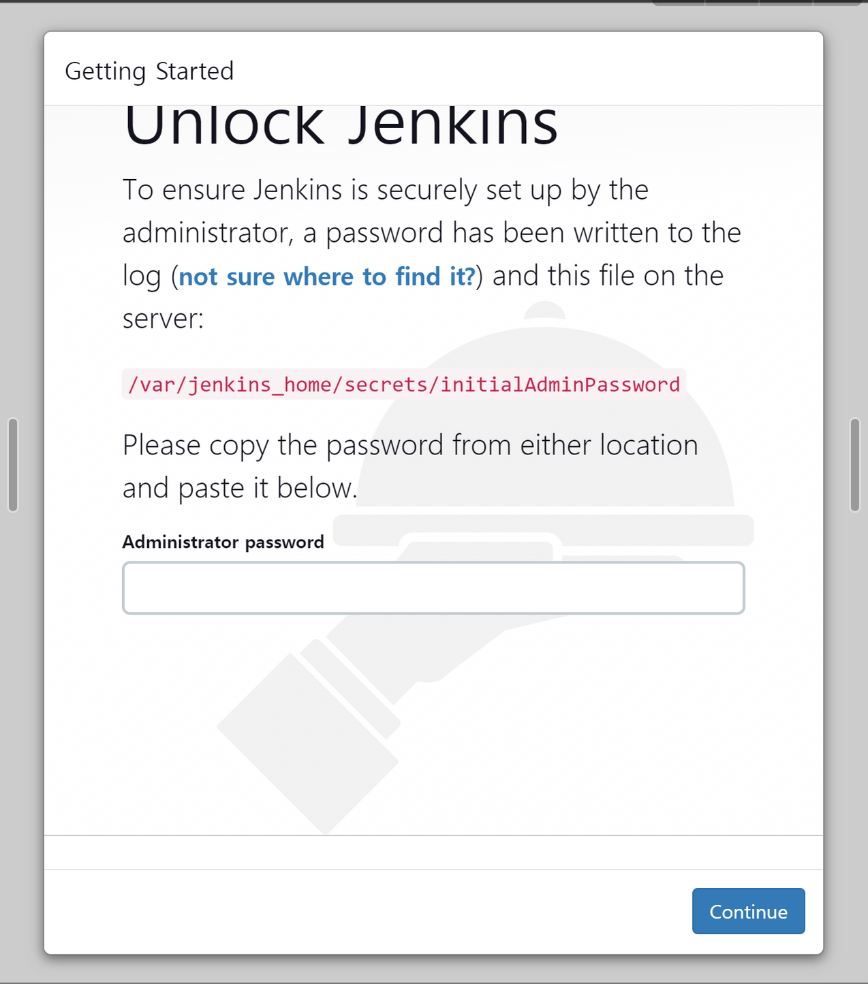
- docker의 jenkins bash로 접속하여 해당 경로의 암호파일을 열어 접속한다.
-
초기 암호 확인
-
Bash mode에서 먼저 패키지 업데이트를 해주고 vim 설치
- apt-get update
- apt-get install vim
-
vi 편집기로 열어 복사

-
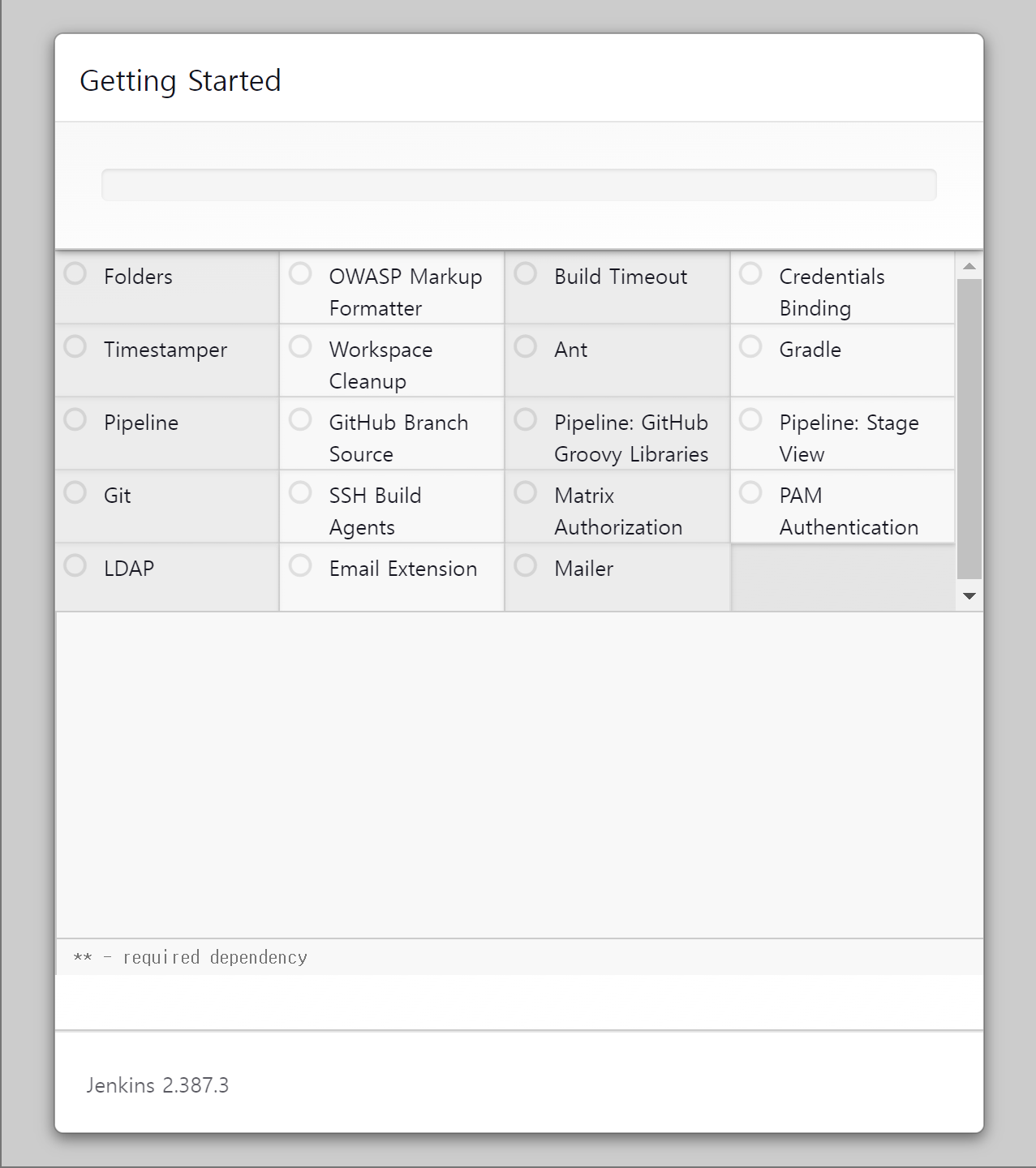
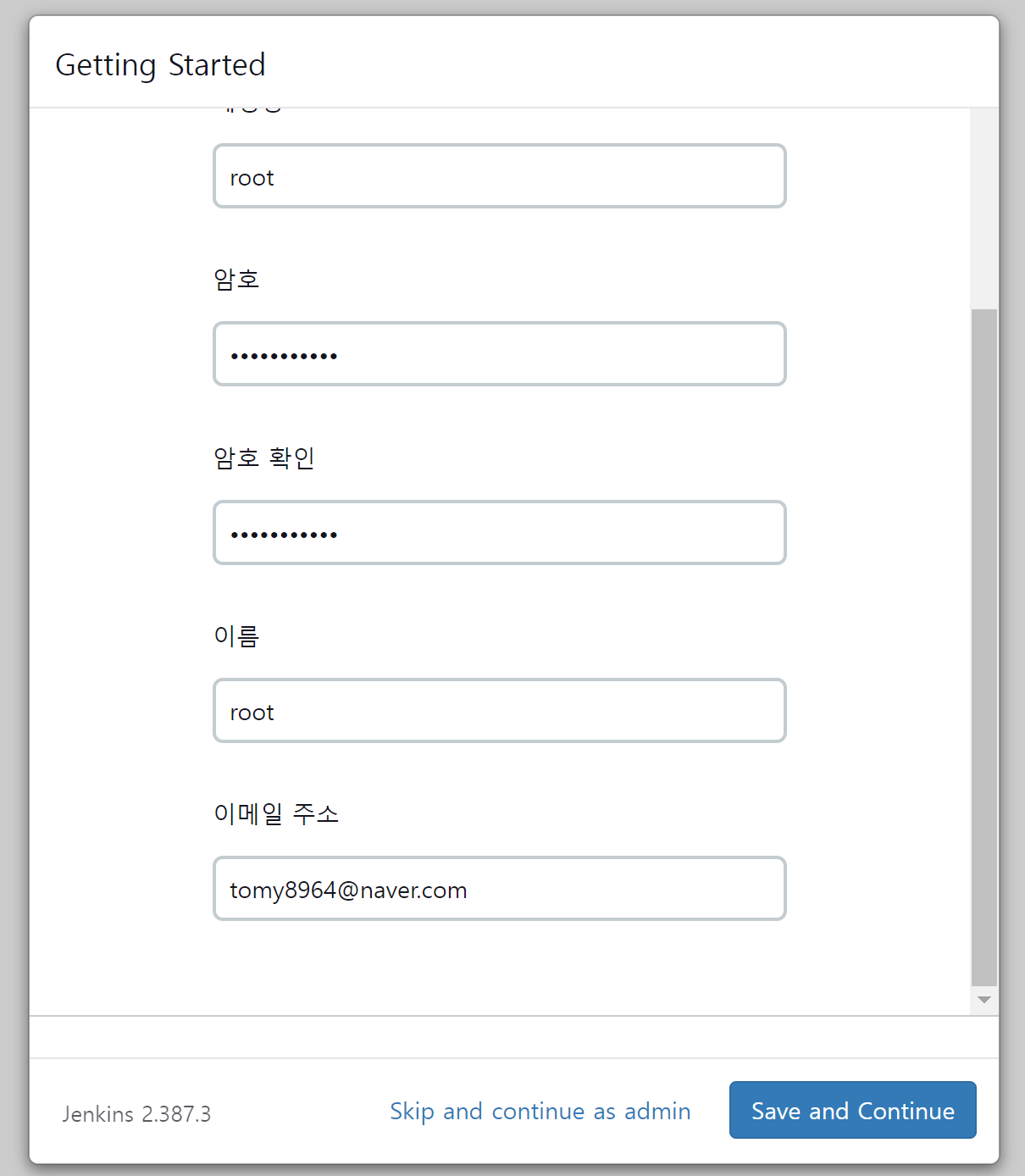
- 초기 설정 후 처음 관리자(root) 설정
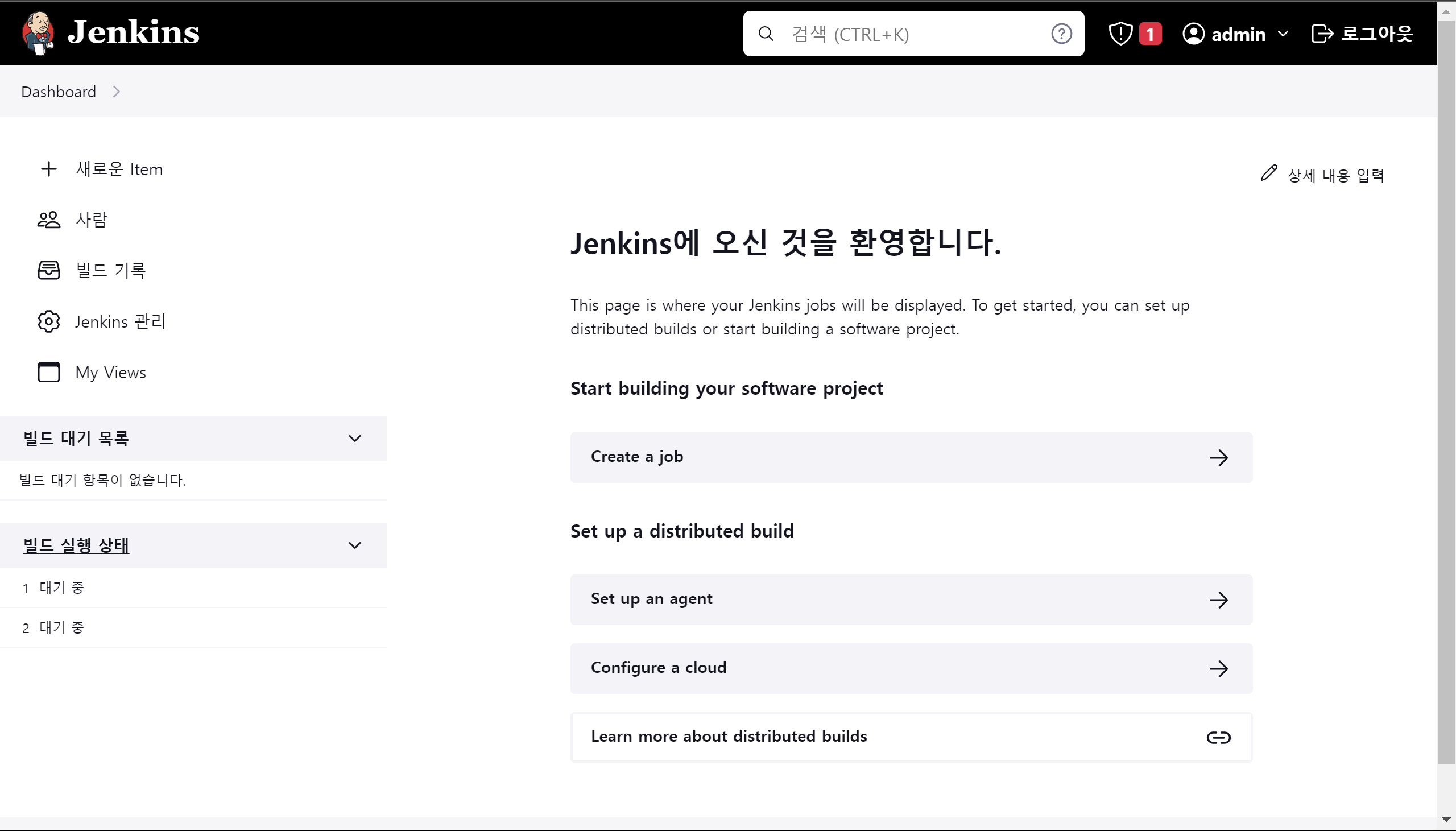
젠킨스 설정
- 프로젝트를 생성하고 구성을 들어간다
General
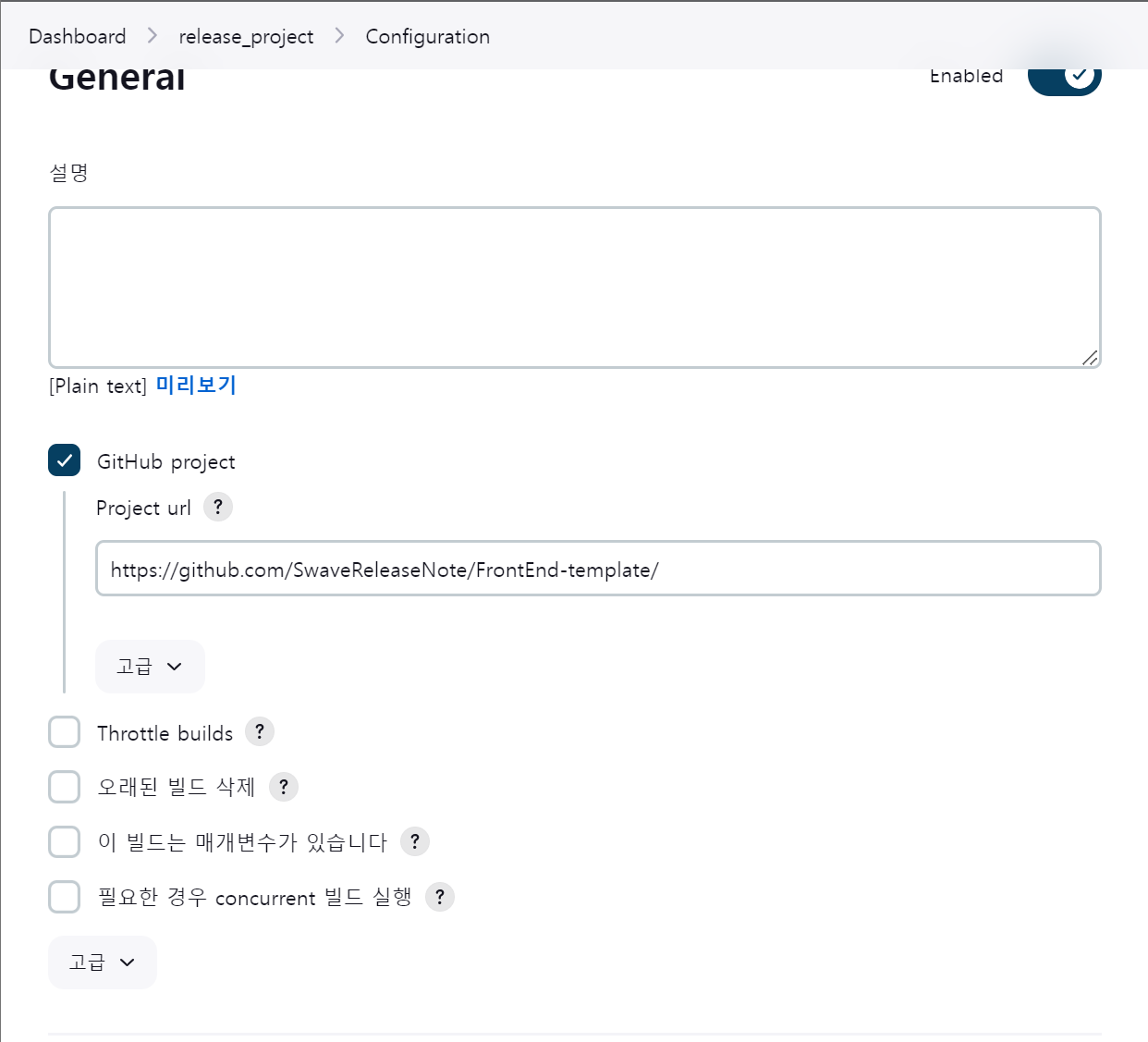
- 깃허브 프로젝트를 선택하고 레포 주소를 입력한다
소스 코드 관리
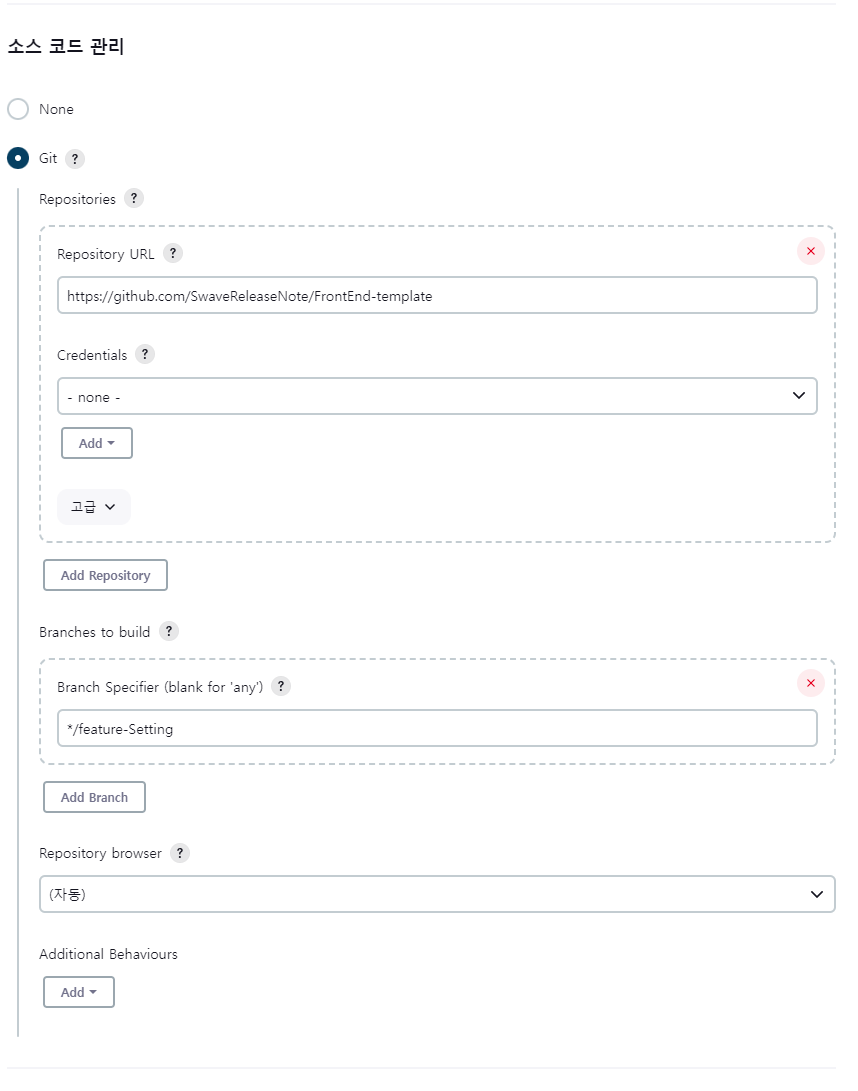
- 깃을 선택하고 레포 주소를 넣고 테스트할 브랜치를 선택한다
빌드 유발
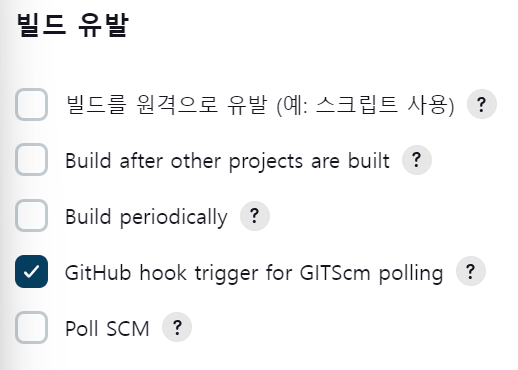
- 깃허브 웹훅을 사용한다.
Build Steps
- Execute shell
- 스크립트를 보면 현재 존재하는react-container를 중지한다
- 도커 허브에 로그인하고
- 프로젝트의 Dockerfile을 통해 도커 허브에 푸쉬한다
- nginx 폴더를 만들고 nginx 설정을 복사 붙여 넣기를 해서 수정한다
- Dockerfile.nginx 를 사용해서 도커 이미지를 만들고 도커 허브에 올린다.
# 셀 시작
echo "Execute shell start"

# Stop and delete the container on the old server
docker stop react-container || true
docker rm -f react-container || true

# Login to Docker Hub using Jenkins credentials
docker login -u 도커허브-아이디 -p 도커허브-패스워드

# Build and push the frontend Docker image with a specific tag and use cache
docker build -t 도커허브/레포 .
docker push 도커허브/레포

# Create the 'nginx' folder and copy 'nginx.conf' to it
mkdir -p nginx
cp nginx.conf nginx/default.conf

# Build the Nginx Docker image with the custom configuration
docker build -t hamgeonwook/nginx -f Dockerfile.nginx .
docker push hamgeonwook/nginx

echo "Execute shell end"
이때 젠킨스 컨테이너 안에서 도커 명령어를 실행해야 하기 때문에 젠킨스 컨테이너에 접속해서 도커를 설치해야한다
- 이때 도커를 설치하는 방법으로 Docker in Docker와 Docker out of Docker 방식이 있는데 후자의 방식을 추천한다.(보안 등의 이유)
- 도커 소켓을 마운트 해주면서 젠킨스 컨테이너를 실행한다
docker run -d --name jenkins_dood -p 8181:8181 -p 50000:50000 -v /var/run/docker.sock:/var/run/docker.sock jenkins/lts- 젠킨스 컨테이너에 접속한다
- 도커를 설치한다.
curl -fsSL https://get.docker.com -o get-docker.sh
sh get-docker.sh
이때 이 과정을 자동화 하기 위해 jenkins 파일을 도커 이미지화 해서 도커 허브에 올려 놓으면 편하다
도커 파일을 만들고 젠킨스 이미지를 불러와서 안에서 실행할 스크립트를 작성하였다.
# Use the official Jenkins LTS (Long-Term Support) base image
FROM jenkins/jenkins:lts

# Switch to the root user to install packages
USER root

# Allow Jenkins user to write to /var/jenkins_home directory
RUN chown -R jenkins:jenkins /var/jenkins_home

# Install dependencies and the Docker CLI
RUN apt-get update && apt-get install -y apt-transport-https ca-certificates curl gnupg lsb-release
RUN curl -fsSL https://get.docker.com -o get-docker.sh
RUN sh get-docker.sh

# Add the Jenkins user back with the same ID as the official Jenkins image
# This step is necessary to revert to the Jenkins user and avoid running Jenkins as root
RUN usermod -u 1000 jenkins

# Give the Jenkins user permission to access the Docker socket
RUN usermod -aG docker jenkins

# Switch back to the Jenkins user
USER jenkins
이 젠킨스를 도커 이미지화 해서 도커 허브에 올려 놓고 나중에 클라우드 서버에 배포할 때 사용하면 편할 것이다.
깃허브 설정
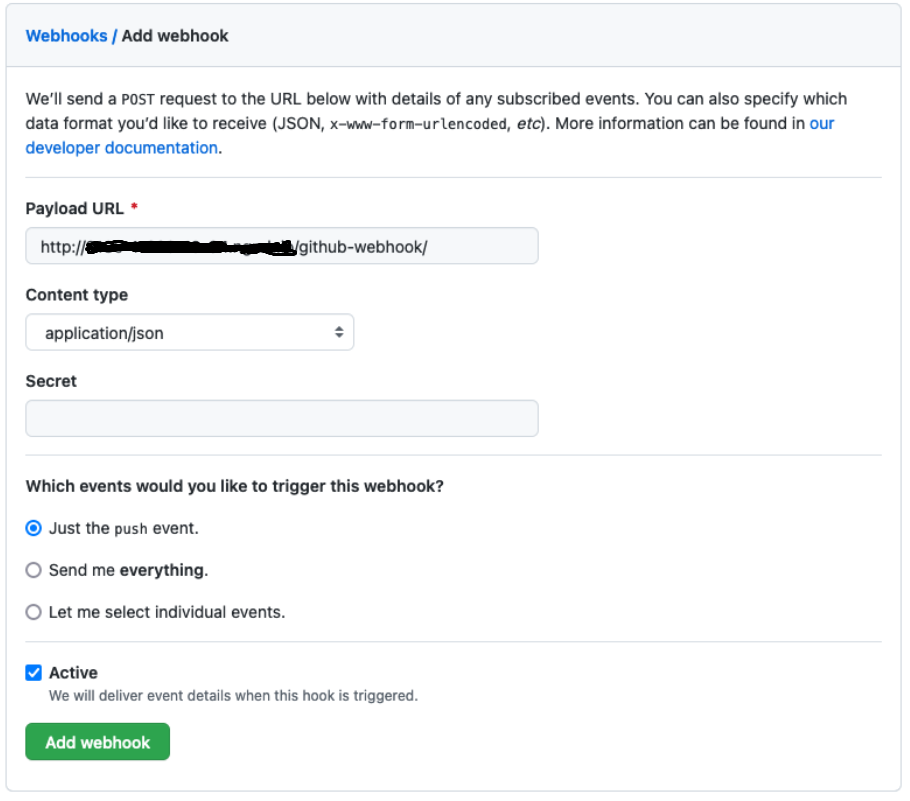
webhooks 설정
- 레포 - 세팅 - webhooks
- Payload URL - 젠킨스 서버 주소에
/github-webhook/경로를 추가하여 입력합니다. - Content type -
application/json타입을 사용합니다. Add webhook버튼을 누릅니다.
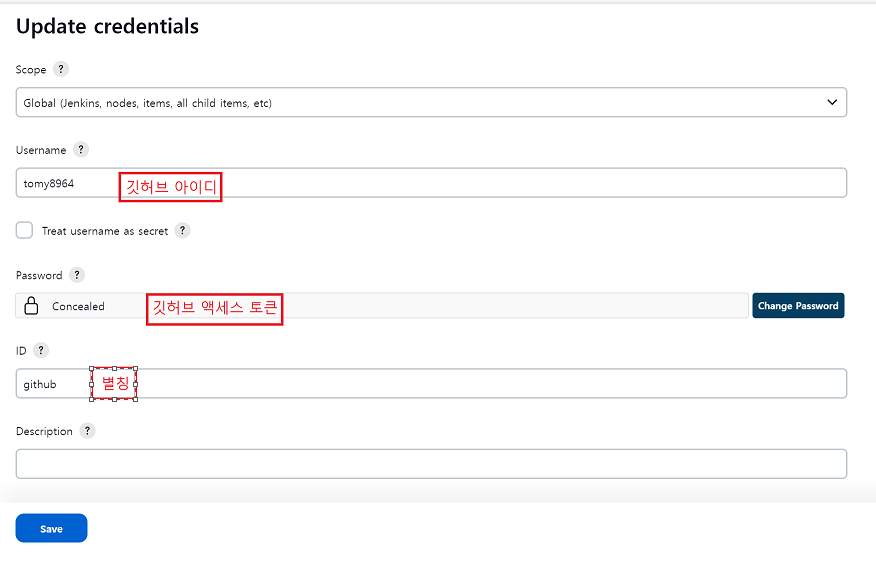
젠킨스에서 Credentials 추가
프로젝트 도커 파일
- Dockerfile
- npm을 통해 pnpm을 설치하고 pnpm install을 한다
- pnpm build를 한다
# 1. Using the node image as the base image
FROM node:16-alpine

# 2. Install pnpm globally (you can remove this step if you already installed pnpm locally)
RUN npm install -g pnpm

# 3. Set the working directory inside the container
WORKDIR /usr/src/app

# 4. Copy the package.json and package-lock.json (or pnpm-lock.yaml) to the working directory
COPY package*.json ./

# 5. Install dependencies using pnpm
RUN pnpm install

# 6. Copy the rest of the source code to the container's working directory
COPY . .

# 7. Build your TypeScript code
RUN pnpm build

# 8. Expose the port your application is listening on (if applicable)
EXPOSE 3000

# 9. Set the command to run your application
CMD ["pnpm", "start"]- Dockerfile.nginx
- nginx 설정 파일을 수정한다
- 프로젝트 빌드 파일을 nginx html 폴더로 이동한다
# Use the official Nginx base image
FROM nginx:latest

# Remove the default Nginx configuration
RUN rm /etc/nginx/conf.d/default.conf

# Copy your custom Nginx configuration
COPY nginx.conf /etc/nginx/conf.d/

# Copy your frontend build files into the Nginx HTML directory
COPY build /usr/share/nginx/html

# Expose the port Nginx will listen on
EXPOSE 80

# Start Nginx when the container is run
CMD ["nginx", "-g", "daemon off;"]- nginx.conf
server {
    listen 80;
    server_name mydomain.com;
    root /usr/share/nginx/html;
    index index.html;

    location / {
        try_files $uri $uri/ /index.html;
    }
    location /api {
            proxy_pass         http://localhost:8080;
            proxy_redirect     off;
            proxy_set_header   Host $host;
            proxy_set_header   X-Real-IP $remote_addr;
            proxy_set_header   X-Forwarded-For $proxy_add_x_forwarded_for;
        }
}
테스트
깃 허브에 커밋 푸쉬 → 젠킨스 빌드
Started by user Ham Geonwook
Running as SYSTEM
Building in workspace /var/jenkins_home/workspace/release_project
The recommended git tool is: NONE
No credentials specified
 > git rev-parse --resolve-git-dir /var/jenkins_home/workspace/release_project/.git # timeout=10
Fetching changes from the remote Git repository
 > git config remote.origin.url https://github.com/SwaveReleaseNote/FrontEnd-template # timeout=10
Fetching upstream changes from https://github.com/SwaveReleaseNote/FrontEnd-template
 > git --version # timeout=10
 > git --version # 'git version 2.30.2'
 > git fetch --tags --force --progress -- https://github.com/SwaveReleaseNote/FrontEnd-template +refs/heads/*:refs/remotes/origin/* # timeout=10
 > git rev-parse refs/remotes/origin/feature-Setting^{commit} # timeout=10
Checking out Revision 7f7564daed34564fb908ed2b48beb7771a2eacc1 (refs/remotes/origin/feature-Setting)
 > git config core.sparsecheckout # timeout=10
 > git checkout -f 7f7564daed34564fb908ed2b48beb7771a2eacc1 # timeout=10
Commit message: "nginx.conf location/api 백엔드로 보내지는 지 테스트"
 > git rev-list --no-walk 596d726e1c4bbc98764e7bf1fcbe63479e65c2db # timeout=10
[release_project] $ /bin/sh -xe /tmp/jenkins15073152418763728661.sh
+ echo Execute shell start
Execute shell start
+ docker stop react-container
Error response from daemon: No such container: react-container
+ true
+ docker rm -f react-container
Error response from daemon: No such container: react-container

Login Succeeded
+ docker build -t hamgeonwook/release .
#0 building with "default" instance using docker driver

#1 [internal] load .dockerignore
#1 transferring context: 113B done
#1 DONE 0.0s

#2 [internal] load build definition from Dockerfile
#2 transferring dockerfile: 811B done
#2 DONE 0.0s

#3 [internal] load metadata for docker.io/library/node:16-alpine
#3 DONE 0.7s

#4 [1/7] FROM docker.io/library/node:16-alpine@sha256:6c381d5dc2a11dcdb693f0301e8587e43f440c90cdb8933eaaaabb905d44cdb9
#4 DONE 0.0s

#5 [internal] load build context
#5 transferring context: 15.32MB 0.2s done
#5 DONE 0.2s

#6 [2/7] RUN npm install -g pnpm
#6 CACHED

#7 [3/7] WORKDIR /usr/src/app
#7 CACHED

#8 [4/7] COPY package*.json ./
#8 CACHED

#9 [5/7] RUN pnpm install
#9 CACHED

#10 [6/7] COPY . .
#10 DONE 0.2s

#11 [7/7] RUN pnpm build
#11 0.853
#11 0.853 > URNR@1.0.0 build /usr/src/app
#11 0.853 > react-scripts build
#11 0.853
#11 2.709 Creating an optimized production build...
#11 78.18 Compiled with warnings.
#11 78.18
#11 78.18 [eslint]
#11 78.18 src/components/card/index.tsx
#11 78.18   Line 6:29:  Unexpected any. Specify a different type  @typescript-eslint/no-explicit-any
#11 78.18   Line 7:17:  Unexpected any. Specify a different type  @typescript-eslint/no-explicit-any
#11 78.18
#11 78.18 src/components/charts/BarChart.tsx
#11 78.18   Line 4:34:   Unexpected any. Specify a different type  @typescript-eslint/no-explicit-any
#11 78.18   Line 6:14:   Unexpected any. Specify a different type  @typescript-eslint/no-explicit-any
#11 78.18   Line 7:17:   Unexpected any. Specify a different type  @typescript-eslint/no-explicit-any
#11 78.18   Line 11:35:  Unexpected any. Specify a different type  @typescript-eslint/no-explicit-any
#11 78.18   Line 11:56:  Unexpected any. Specify a different type  @typescript-eslint/no-explicit-any
#11 78.18
#11 78.18 src/components/charts/LineChart.tsx
#11 78.18   Line 4:34:   Unexpected any. Specify a different type  @typescript-eslint/no-explicit-any
#11 78.18   Line 6:14:   Unexpected any. Specify a different type  @typescript-eslint/no-explicit-any
#11 78.18   Line 7:17:   Unexpected any. Specify a different type  @typescript-eslint/no-explicit-any
#11 78.18   Line 11:35:  Unexpected any. Specify a different type  @typescript-eslint/no-explicit-any
#11 78.18   Line 11:56:  Unexpected any. Specify a different type  @typescript-eslint/no-explicit-any
#11 78.18
#11 78.18 src/components/charts/PieChart.tsx
#11 78.18   Line 4:34:   Unexpected any. Specify a different type  @typescript-eslint/no-explicit-any
#11 78.18   Line 6:14:   Unexpected any. Specify a different type  @typescript-eslint/no-explicit-any
#11 78.18   Line 7:17:   Unexpected any. Specify a different type  @typescript-eslint/no-explicit-any
#11 78.18   Line 11:35:  Unexpected any. Specify a different type  @typescript-eslint/no-explicit-any
#11 78.18   Line 11:56:  Unexpected any. Specify a different type  @typescript-eslint/no-explicit-any
#11 78.18
#11 78.18 src/components/checkbox/index.tsx
#11 78.18   Line 20:16:  Unexpected any. Specify a different type  @typescript-eslint/no-explicit-any
#11 78.18
#11 78.18 src/components/comments/CommentIndex.tsx
#11 78.18   Line 5:45:  Unexpected any. Specify a different type  @typescript-eslint/no-explicit-any
#11 78.18
#11 78.18 src/components/fixedPlugin/FixedPlugin.tsx
#11 78.18   Line 4:40:  Unexpected any. Specify a different type  @typescript-eslint/no-explicit-any
#11 78.18
#11 78.18 src/components/label/LabelIndex.tsx
#11 78.18   Line 11:43:  Unexpected any. Specify a different type  @typescript-eslint/no-explicit-any
#11 78.18
#11 78.18 src/components/navbar/index.tsx
#11 78.18   Line 21:16:  Expected property shorthand  object-shorthand
#11 78.18
#11 78.18 src/components/sidebar/components/SidebarList.tsx
#11 78.18   Line 17:29:  Unexpected any. Specify a different type  @typescript-eslint/no-explicit-any
#11 78.18
#11 78.18 src/components/sidebar/components/SidebarNote.tsx
#11 78.18   Line 11:44:  Unexpected any. Specify a different type  @typescript-eslint/no-explicit-any
#11 78.18
#11 78.18 src/components/sidebar/components/SidebarProject.tsx
#11 78.18   Line 7:18:  Unexpected any. Specify a different type  @typescript-eslint/no-explicit-any
#11 78.18
#11 78.18 src/layouts/admin/index.tsx
#11 78.18   Line 11:53:  Unexpected any. Specify a different type  @typescript-eslint/no-explicit-any
#11 78.18   Line 50:46:  Unexpected any. Specify a different type  @typescript-eslint/no-explicit-any
#11 78.18
#11 78.18 src/layouts/auth/index.tsx
#11 78.18   Line 14:45:  Unexpected any. Specify a different type  @typescript-eslint/no-explicit-any
#11 78.18
#11 78.18 src/views/admin/default/components/CheckTable.tsx
#11 78.18   Line 22:41:  Unexpected any. Specify a different type  @typescript-eslint/no-explicit-any
#11 78.18   Line 32:20:  Unexpected any. Specify a different type  @typescript-eslint/no-explicit-any
#11 78.18
#11 78.18 src/views/admin/default/components/ComplexTable.tsx
#11 78.18   Line 26:58:  Unexpected any. Specify a different type  @typescript-eslint/no-explicit-any
#11 78.18
#11 78.18 src/views/admin/default/pages/ManageProject.tsx
#11 78.18   Line 121:74:  Unexpected any. Specify a different type  @typescript-eslint/no-explicit-any
#11 78.18   Line 129:75:  Unexpected any. Specify a different type  @typescript-eslint/no-explicit-any
#11 78.18
#11 78.18 src/views/admin/tables/components/CheckTable.tsx
#11 78.18   Line 22:41:  Unexpected any. Specify a different type  @typescript-eslint/no-explicit-any
#11 78.18   Line 32:20:  Unexpected any. Specify a different type  @typescript-eslint/no-explicit-any
#11 78.18
#11 78.18 src/views/admin/tables/components/ColumnsTable.tsx
#11 78.18   Line 21:43:  Unexpected any. Specify a different type  @typescript-eslint/no-explicit-any
#11 78.18   Line 31:20:  Unexpected any. Specify a different type  @typescript-eslint/no-explicit-any
#11 78.18
#11 78.18 src/views/admin/tables/components/ComplexTable.tsx
#11 78.18   Line 26:58:  Unexpected any. Specify a different type  @typescript-eslint/no-explicit-any
#11 78.18
#11 78.18 src/views/admin/tables/components/DevelopmentTable.tsx
#11 78.18   Line 18:9:   Unexpected any. Specify a different type  @typescript-eslint/no-explicit-any
#11 78.18   Line 23:41:  Unexpected any. Specify a different type  @typescript-eslint/no-explicit-any
#11 78.18   Line 44:20:  Unexpected any. Specify a different type  @typescript-eslint/no-explicit-any
#11 78.18
#11 78.18 src/views/auth/SignIn.tsx
#11 78.18   Line 153:46:  Unexpected any. Specify a different type  @typescript-eslint/no-explicit-any
#11 78.18
#11 78.18 src/views/auth/cookie.tsx
#11 78.18   Line 5:48:   Unexpected any. Specify a different type  @typescript-eslint/no-explicit-any
#11 78.18   Line 5:62:   Unexpected any. Specify a different type  @typescript-eslint/no-explicit-any
#11 78.18   Line 9:42:   Unexpected any. Specify a different type  @typescript-eslint/no-explicit-any
#11 78.18   Line 13:53:  Unexpected any. Specify a different type  @typescript-eslint/no-explicit-any
#11 78.18
#11 78.18 Search for the keywords to learn more about each warning.
#11 78.18 To ignore, add // eslint-disable-next-line to the line before.
#11 78.18
#11 78.18 File sizes after gzip:
#11 78.18
#11 78.24   360.52 kB (-13 B)  build/static/js/main.a0e0777d.js
#11 78.24   12.37 kB (-5 B)    build/static/css/main.6a9c6397.css
#11 78.24
#11 78.24 The project was built assuming it is hosted at /.
#11 78.24 You can control this with the homepage field in your package.json.
#11 78.24
#11 78.24 The build folder is ready to be deployed.
#11 78.24 You may serve it with a static server:
#11 78.24
#11 78.24   npm install -g serve
#11 78.24   serve -s build
#11 78.24
#11 78.24 Find out more about deployment here:
#11 78.24
#11 78.24   https://cra.link/deployment
#11 78.24
#11 DONE 78.5s

#12 exporting to image
#12 exporting layers
#12 exporting layers 0.3s done
#12 writing image sha256:91138b47b94e6c04f3d6d1bac9baa60e7e8ba1130c04a419d67ee962cef4acf0 done
#12 naming to docker.io/hamgeonwook/release done
#12 DONE 0.3s
+ docker push hamgeonwook/release
Using default tag: latest
The push refers to repository [docker.io/hamgeonwook/release]
ac57d5d4fe7f: Preparing
829c79c14e12: Preparing
268eb87c9ecf: Preparing
6743c47145a6: Preparing
8a5eee26aba0: Preparing
5790ee5b441c: Preparing
7b71a9bb851a: Preparing
323c772d0cd8: Preparing
87820ee0191d: Preparing
78a822fe2a2d: Preparing
5790ee5b441c: Waiting
7b71a9bb851a: Waiting
78a822fe2a2d: Waiting
323c772d0cd8: Waiting
87820ee0191d: Waiting
8a5eee26aba0: Layer already exists
268eb87c9ecf: Layer already exists
6743c47145a6: Layer already exists
5790ee5b441c: Layer already exists
7b71a9bb851a: Layer already exists
323c772d0cd8: Layer already exists
87820ee0191d: Layer already exists
78a822fe2a2d: Layer already exists
ac57d5d4fe7f: Pushed
829c79c14e12: Pushed
latest: digest: sha256:aa51171247097fcc5b8dc383d7e4da871c792ab1f8fddfad10e2829a40c5d8bb size: 2421
+ mkdir -p nginx
+ cp nginx.conf nginx/default.conf
+ docker build -t hamgeonwook/nginx -f Dockerfile.nginx .
#0 building with "default" instance using docker driver

#1 [internal] load build definition from Dockerfile.nginx
#1 transferring dockerfile: 538B done
#1 DONE 0.0s

#2 [internal] load .dockerignore
#2 transferring context: 113B done
#2 DONE 0.0s

#3 [internal] load metadata for docker.io/library/nginx:latest
#3 DONE 0.6s

#4 [1/4] FROM docker.io/library/nginx:latest@sha256:67f9a4f10d147a6e04629340e6493c9703300ca23a2f7f3aa56fe615d75d31ca
#4 DONE 0.0s

#5 [internal] load build context
#5 transferring context: 2.98kB 0.0s done
#5 DONE 0.0s

#6 [2/4] RUN rm /etc/nginx/conf.d/default.conf
#6 CACHED

#7 [3/4] COPY nginx.conf /etc/nginx/conf.d/
#7 DONE 0.0s

#8 [4/4] COPY build /usr/share/nginx/html
#8 DONE 0.1s

#9 exporting to image
#9 exporting layers 0.1s done
#9 writing image sha256:8f32acbb73190ee686fc9bb798bdbf5658bf9e5b780f26d6041e19a256a2c9da done
#9 naming to docker.io/hamgeonwook/nginx done
#9 DONE 0.1s
+ docker push hamgeonwook/nginx
Using default tag: latest
The push refers to repository [docker.io/hamgeonwook/nginx]
234c2c2429fe: Preparing
ef7f2b087d0c: Preparing
a1ea933bed87: Preparing
922d16116201: Preparing
abc3beec4b30: Preparing
c88d3a8ff009: Preparing
8aedfcd777c7: Preparing
4deafab383fa: Preparing
24ee1d7d6a62: Preparing
c6e34807c2d5: Preparing
c88d3a8ff009: Waiting
8aedfcd777c7: Waiting
4deafab383fa: Waiting
c6e34807c2d5: Waiting
24ee1d7d6a62: Waiting
a1ea933bed87: Layer already exists
922d16116201: Layer already exists
abc3beec4b30: Layer already exists
234c2c2429fe: Layer already exists
c88d3a8ff009: Layer already exists
4deafab383fa: Layer already exists
8aedfcd777c7: Layer already exists
24ee1d7d6a62: Layer already exists
c6e34807c2d5: Layer already exists
ef7f2b087d0c: Pushed
latest: digest: sha256:c88df6f50fd98f941944cded6755b0684b788011cd3b62df47eb4dc125bea220 size: 2403
+ echo Execute shell end
Execute shell end
nginx is disabled. Triggering skipped
Finished: SUCCESS- 젠킨스는 프로젝트를 빌드하고 프로젝트 빌드된 파일을 nginx html 폴더로 이동시키며 nginx 수정 파일을 변경한 도커 이미지로 만들어서 도커 허브에 올린다.
작동 테스트
- 이후 도커 허브에서 이미지를 pull 해서 nginx에서 설정한 포트로 들어가면 nginx를 통해 배포된 프로젝트가 렌더링 된다.
이후 아르고 cd도 연동해서 배포를 자동화 해야한다

가오리의 개발 이야기
저도 공부하면서 linux 서버를 구성하고, jenkins를 이용한 CI/CD환경 구성을 연습하고 있었는데, Execute Shell을 어떤식으로 작성해야할지 고민중이었는데, 좋은 참고가 되었습니다! 감사합니다 ㅎㅎ