Prefab
프리팹은 미리 만들어 놓은 게임 오브젝트, 템플릿
재사용 가능한 게임 오브젝트 템플릿
⚙️ 프리팹 생성
-
Scene에 오브젝트 생성
-
프리팹으로 저장
- 프리팹화 하려는 오브젝트를 Assets 폴더 혹은 자신이 원하는 폴더에 드래그 앤 드롭.
- 씬의 오브젝트를 프로젝트 창으로 드래그 하면 파란색 아이콘으로 표시되는 프리팹이 생성된다.
-
프리팹 인스턴스화
- Hierarchy 혹은 Scene창에 프리팹 드래그 앤 드롭.
- 코드에서는 Instantiate라는 함수를 사용하여 프리팹을 오브젝트로 찍어내기.
프리팹을 인스턴스화하여 Hierarchy에 여러개의 오브젝트가 생긴후에 프리팹 자체의 속성들을 수정하면 그 수정한 값들이 일괄적으로 존재하고 있는 오브젝트(프리팹으로 생성한)에 적용된다.
Prefab Overriding
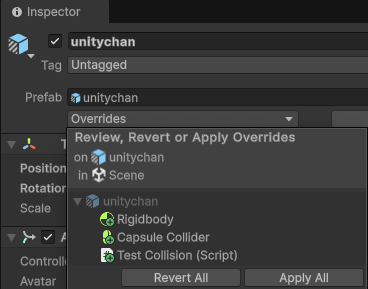
사진과 같이 프리팹을 인스턴스화한 오브젝트에 이것저것 수정을 하고 난 뒤 Inspector에서 Overrides를 누르면 기존에 있던 Prefab원본에서 어떤 것들이 수정되었는지 즉, 어떤 것들이 Override되었는지 확인할 수 있다.
그리고 그 아래 항목들을 클릭하면 어떤 것들이 수정되었는지 더 자세하게 알 수 있다.
- Revert all : 기존의 프리팹 기본값으로 적용.
- Apply all : Override한 내용을 프리팹과 모든 오브젝트(프리팹을 인스턴스화 시킨)에 적용.
Nested Prefab
프리팹 안에 다른 프리팹이 들어가 있는 구조
- 다른 프리팹 내에 프리팹 인스턴스를 포함할 수 있다.
Prefab Variant
프리팹의 자식 개념
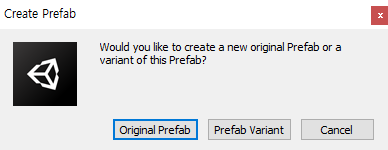
이미 프리팹으로 만들어져있는 오브젝트를 다시 프리팹화 시키려고 하면 위와 같은 창이 나온다.
- Original Prefab
- 지금 자신의 모습으로 새로운 프리팹을 만든다.
- Prefab Variant
- 자기 자신을 찍어낸 그 프리팹을 상속받는 새로운 프리팹으로 만든다.
- 추후 오버라이드를 할 수 있고 새로운 기능을 더 붙힐 수 있지만 기존의 프리팹 성질은 다 물려받은 새로운 자식 프리팹을 생성하는 것과 같다.
두개로 나누어진 프리팹에 같은 걸 추가하고 싶을 때 둘다 다시 작업을 해줘야하지만 Prefab Variant를 사용하면 부모 프리팹을 수정하면 자식 프리팹도 수정되게 된다.
프리팹을 인스턴스로 찍어내는 방법
유니티 에디터에서 직접 할당
using System.Collections;
using System.Collections.Generic;
using UnityEngine;

public class PrefabTest : MonoBehaviour
{
    public GameObject prefab;

    void Start()
    {
        Instantiate(prefab);
    }
}
Instantiate
- 인수로 넘겨받은 프리팹을 인스턴스화 한다.
- 찍어낸 그 게임 오브젝트를 리턴.
코드 상으로 Resources폴더에 존재하는 프리팹 지정
using System.Collections;
using System.Collections.Generic;
using UnityEngine;

public class PrefabTest : MonoBehaviour
{
    private GameObject prefab;

    GameObject tank;

    void Start()
    {
        prefab = Resources.Load<GameObject>("Prefabs/Tank");
        tank = Instantiate(prefab);

        Destroy(tank, 3.0f);
    }
}
Resources.Load(“Prefabs/Tank”);
-
Resources.Load<에셋타입>(string에셋경로)
-
불러오려는 에셋의 타입과 에셋의 경로를 지정해주면 해당 에셋을 로컬 환경(📂Resources)에서 찾아 GameObject로서 불러오고 이를 리턴하는 함수다.
-
📂Assets/Resources 로컬 폴더에서 에셋을 가져온다.
- 그러니 위의 예에선 📂Assets/Resources/Prefabs 폴더에 있는 “Tank” 프리팹을 가져오게 되는 것이다.
- 📂Resources가 없다면 만들어주자.
-
-
프리팹을 직접 유니티 에디터에서 일일이 변수에 할당해줄 필요 없이 게임 중에 코드상으로 불러올 에셋이 있다면 📂Resources 폴더 안에 넣어두고 Resources.Load 함수를 ㅅ ㅏ용하자.
ResourceManager.cs
오로지 에셋을 불러오는 작업만 하는 스크립트
using System.Collections;
using System.Collections.Generic;
using UnityEngine;


public class ResourceManager
{
    public T Load<T>(string path) where T : Object
    {
        return Resources.Load<T>(path);
    }

    public GameObject Instantiate(string path, Transform parent = null)
    {
        GameObject prefab = Load<GameObject>($"Prefabs/{path}");
        if (prefab == null)
        {
            Debug.Log($"Filed to load prefab : {path}");
            return null;
        }

        return Object.Instantiate(prefab, parent);
    }

    public void Destroy(GameObject go)
    {
        if (go == null)
            return;

        Object.Destroy(go);
    }
}- Load 제네릭 사용자 지정 함수 정의
- where T : Object 👉 부모 클래스가 Object 인 타입만 받을 수 있도록 제약을 걸음 (C# 문법)
- Resources.Load(path)
- 👉 📂Resource 폴더를 시작 위치로 한 “path”에 해당하는 T 타입의 에셋 파일을 불러오고 이를 리턴한다.
- Instantiate 사용자 지정 함수 정의
- Load 를 사용해 prefab에 path 에 해당하는 GameObject 타입의 에셋을 할당한다.
- 📂Resource의 📂Prefab 에서 찾아 온다. ($”Prefabs/{path}”)
- 성공적으로 찾았다면 Object.Instantiate(prefab, parent) 리턴
- ✨그냥 Instantiate이 아닌 Object.Instantiate 이라고 명시해준 이유 ✨
- 그냥 Instantiate 라고 명시하면 지금 정의하고 있는 이 사용자 지정 함수 Instantiate 라고 인식되서 재귀호출 되므로.
- ✨그냥 Instantiate이 아닌 Object.Instantiate 이라고 명시해준 이유 ✨
- 못 찾았다면 null 리턴
- Load 를 사용해 prefab에 path 에 해당하는 GameObject 타입의 에셋을 할당한다.
- Destroy 사용자 지정 함수 정의
- 마찬가지로 재귀를 막기 위해 Object. 까지 붙여서 Object.Destroy 호출
Manager.cs
게임 전반적인 부분을 총괄하는 싱글톤.
using System.Collections;
using System.Collections.Generic;
using UnityEngine;

public class Managers : MonoBehaviour
{
    static Managers s_instace;
    static Managers Instance { get { Init(); return s_instace; } }

    InputManager _input = new InputManager();
    ResourceManager _resource = new ResourceManager();

    public static InputManager Input { get { return Instance._input; } }
    public static ResourceManager Resource { get { return Instance._resource; } }


    void Start()
    {
        Init();
    }

    void Update()
    {
        _input.OnUpdate();
    }

    static void Init()
    {
        if (s_instace == null)
        {
            GameObject obj = GameObject.Find("@Managers");
            if (obj == null)
            {
                obj = new GameObject { name = "@Managers" };
                obj.AddComponent<Managers>();
            }

            DontDestroyOnLoad(obj);
            s_instace = obj.GetComponent<Managers>();
        }
    }
}
ResourceManager.cs
using System.Collections;
using System.Collections.Generic;
using UnityEngine;

public class PrefabTest : MonoBehaviour
{
    private GameObject prefab;

    GameObject tank;

    void Start()
    {
        Managers.Resource.Instantiate("Tank");
        Managers.Resource.Destroy(tank);
    }
}
참조
https://ansohxxn.github.io/unity%20lesson%202/ch3/
https://programing-note.tistory.com/entry/unity-Prefab-Variants
https://lake0989.tistory.com/187