import 'package:flutter/material.dart';

// void main() : 코드 실행을 시작하는 명령어!
void main() {
  runApp(const MyApp());
}

class MyApp extends StatelessWidget {
  const MyApp({super.key});

  // StatelessWidget 클래스를 물려받으면 받드시 생성해야 하는 메소드!
  @override
  Widget build(BuildContext context) {
    return MaterialApp(
      // home -> 어플 시작시 어떤 화면부터 시작하고 싶은지 지정할 수 있는 key
      home: Exhome(),
    );
  }
}

// 우리만의 새로운 화면 만들기!
// 1. 화면 생성시 stl 단축키로 기본틀 가져오기!
class Exhome extends StatelessWidget {
  const Exhome({super.key});

  @override
  Widget build(BuildContext context) {
    // Scaffold() : 화면을 만들수 있는 작업대
    // 구조 -> appbar,body, navigator
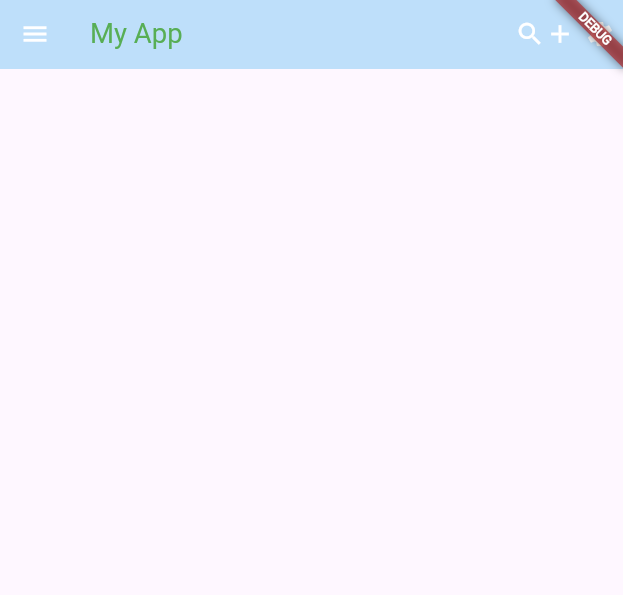
    return Scaffold(
      appBar: AppBar(
        // 1. AppBar의 컬러 지정
        backgroundColor: Colors.blue[100],
        title: Text("My App",
          style: TextStyle(color: Colors.green),),
        leading: Icon(Icons.menu),
        actions: [
          Icon(Icons.search),
          Icon(Icons.add),
          IconButton(onPressed: (){
            // button 이 눌렸을때 처리하고자 하는 실행문장을 입력하는 공간
          }, icon: Icon(Icons.settings)),
        ],
        // AppBar 요소들의 색상을 한번에 설정하는 속성!
        foregroundColor: Colors.white,
      ),
    );
  }
}

개발자