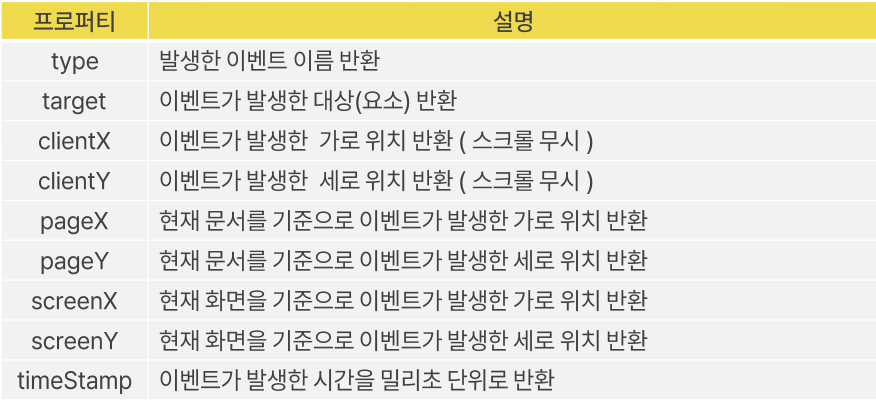
Event 객체 : 웹 페이지에서 발생한 이벤트 정보를 저장하고 있는 객체
- 이벤트가 발생했을 때 어떤 요소에서 이벤트가 발생했는지 어떤 종류의 이벤트가 발생했는지 등의 정보를 포함
Event 객체
- 웹 페이지에 발생하는 이벤트 정보를 저장하고 있는 객체
<!DOCTYPE html>
<html lang="en">
<head>
    <meta charset="UTF-8">
    <meta name="viewport" content="width=device-width, initial-scale=1.0">
    <title>Document</title>
</head>
<body>
    <button id="btn_event">이벤트 객체용 버튼</button>

    <script>
        // 이벤트 객체
        // 이벤트가 발생하는 주체, 종류 등을 알 수 있다
        // 매개변수에 event, e 객체 전달

        let btn_event = document.getElementById('btn_event');

        // 버튼에 이벤트를 연결하기
        btn_event.addEventListener('click', (event) => {
            console.log(event);
            console.log(event.target);
            console.log(event.target.innerText);

        })

    </script>
</body>
</html>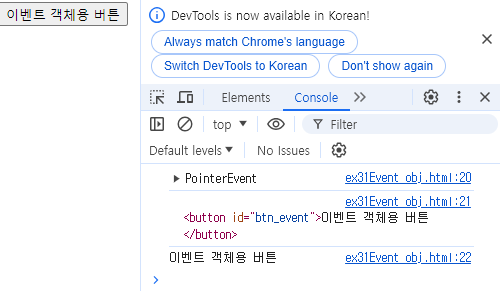
'mouse over' 'mouseout'
<!DOCTYPE html>
<html lang="en">
<head>
    <meta charset="UTF-8">
    <meta name="viewport" content="width=device-width, initial-scale=1.0">
    <title>Document</title>
</head>
<body>
    <button id="btn">클릭</button>

    <script>
        // 버튼의 요소 정보를 가져오기 (id값을 통해서)
        let btn = document.getElementById('btn');

        const handler = (event) => {
            switch (event.type) {
                case 'click':
                    console.log('click');
                    break;
                case 'mouseover':
                    event.target.style.backgroundColor = 'red';
                    break;
                case 'mouseout':
                    event.target.style.backgroundColor = 'yellow';
                    break;
            }
        }

        btn.onclick = handler;
        btn.onmouseover = handler;
        btn.onmouseout = handler;
    </script>
</body>
</html>
개발자