LinearLayout
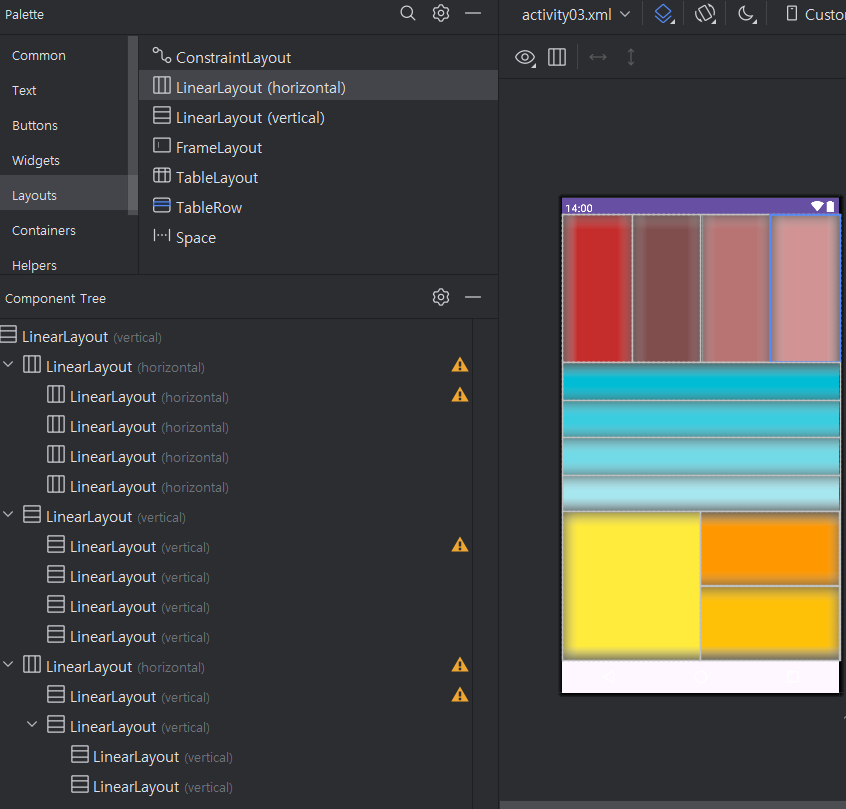
마지막것만 코드
<?xml version="1.0" encoding="utf-8"?>
<LinearLayout xmlns:android="http://schemas.android.com/apk/res/android"
    android:layout_width="match_parent"
    android:layout_height="match_parent"
    android:orientation="vertical" >

    <LinearLayout
        android:layout_width="match_parent"
        android:layout_height="match_parent"
        android:layout_weight="1"
        android:orientation="horizontal">

        <LinearLayout
            android:layout_width="match_parent"
            android:layout_height="match_parent"
            android:layout_weight="1"
            android:background="#C52D2D"
            android:orientation="horizontal"></LinearLayout>

        <LinearLayout
            android:layout_width="match_parent"
            android:layout_height="match_parent"
            android:layout_weight="1"
            android:background="#814E4E"
            android:orientation="horizontal"></LinearLayout>

        <LinearLayout
            android:layout_width="match_parent"
            android:layout_height="match_parent"
            android:layout_weight="1"
            android:background="#B87373"
            android:orientation="horizontal"></LinearLayout>

        <LinearLayout
            android:layout_width="match_parent"
            android:layout_height="match_parent"
            android:layout_weight="1"
            android:background="#D19393"
            android:orientation="horizontal"></LinearLayout>
    </LinearLayout>

    <LinearLayout
        android:layout_width="match_parent"
        android:layout_height="match_parent"
        android:layout_weight="1"
        android:orientation="vertical">

        <LinearLayout
            android:layout_width="match_parent"
            android:layout_height="match_parent"
            android:layout_weight="1"
            android:background="#00BCD4"
            android:orientation="vertical"></LinearLayout>

        <LinearLayout
            android:layout_width="match_parent"
            android:layout_height="match_parent"
            android:layout_weight="1"
            android:background="#3ACDE0"
            android:orientation="vertical"></LinearLayout>

        <LinearLayout
            android:layout_width="match_parent"
            android:layout_height="match_parent"
            android:layout_weight="1"
            android:background="#72DAE7"
            android:orientation="vertical"></LinearLayout>

        <LinearLayout
            android:layout_width="match_parent"
            android:layout_height="match_parent"
            android:layout_weight="1"
            android:background="#A5E6EF"
            android:orientation="vertical"></LinearLayout>
    </LinearLayout>

    <LinearLayout
        android:layout_width="match_parent"
        android:layout_height="match_parent"
        android:layout_weight="1"
        android:orientation="horizontal">

        <LinearLayout
            android:layout_width="match_parent"
            android:layout_height="match_parent"
            android:layout_weight="1"
            android:background="#FFEB3B"
            android:orientation="vertical"></LinearLayout>

        <LinearLayout
            android:layout_width="match_parent"
            android:layout_height="match_parent"
            android:layout_weight="1"
            android:orientation="vertical">

            <LinearLayout
                android:layout_width="match_parent"
                android:layout_height="match_parent"
                android:layout_weight="1"
                android:background="#FF9800"
                android:orientation="vertical"></LinearLayout>

            <LinearLayout
                android:layout_width="match_parent"
                android:layout_height="match_parent"
                android:layout_weight="1"
                android:background="#FFC107"
                android:orientation="vertical"></LinearLayout>
        </LinearLayout>
    </LinearLayout>
</LinearLayout>
MainActivity.kt
package com.example.ex_layout

import android.os.Bundle
import android.widget.TextView
import androidx.activity.enableEdgeToEdge
import androidx.appcompat.app.AppCompatActivity
import androidx.core.view.ViewCompat
import androidx.core.view.WindowInsetsCompat

// 화면을 만들기 위해서는, 화면이라고 하는 것 자체를 가지고 있어야 함
// 해당하는 모든 내용을 AppCompatActivity() 가 전부 가지고 있고,
// 이걸 물려받아서 클래스 구현
class MainActivity : AppCompatActivity() {
    override fun onCreate(savedInstanceState: Bundle?) {
        super.onCreate(savedInstanceState)
        // 어플이 실행될 때 어떤 디자인 화면을 띄울건지 지정하는 부분!
        setContentView(R.layout.activity04)

        // 클래스에서 각각의 기능들을 사용하려면
        // 가장 먼저 사용하고자 하는 기능의 위치부터 찾아와야 한다!
    }
}
개발자 공부중