import 'package:flutter/material.dart';

class ExLogin extends StatefulWidget {
  const ExLogin({super.key});

  @override
  State<ExLogin> createState() => _ExLoginState();
}

class _ExLoginState extends State<ExLogin> {
  @override
  Widget build(BuildContext context) {
    return Scaffold(
      appBar: AppBar(
        title: Center(
            child: Text(
          '로그인 화면',
          style: TextStyle(fontWeight: FontWeight.bold),
        )),
        backgroundColor: Colors.yellowAccent,
      ),
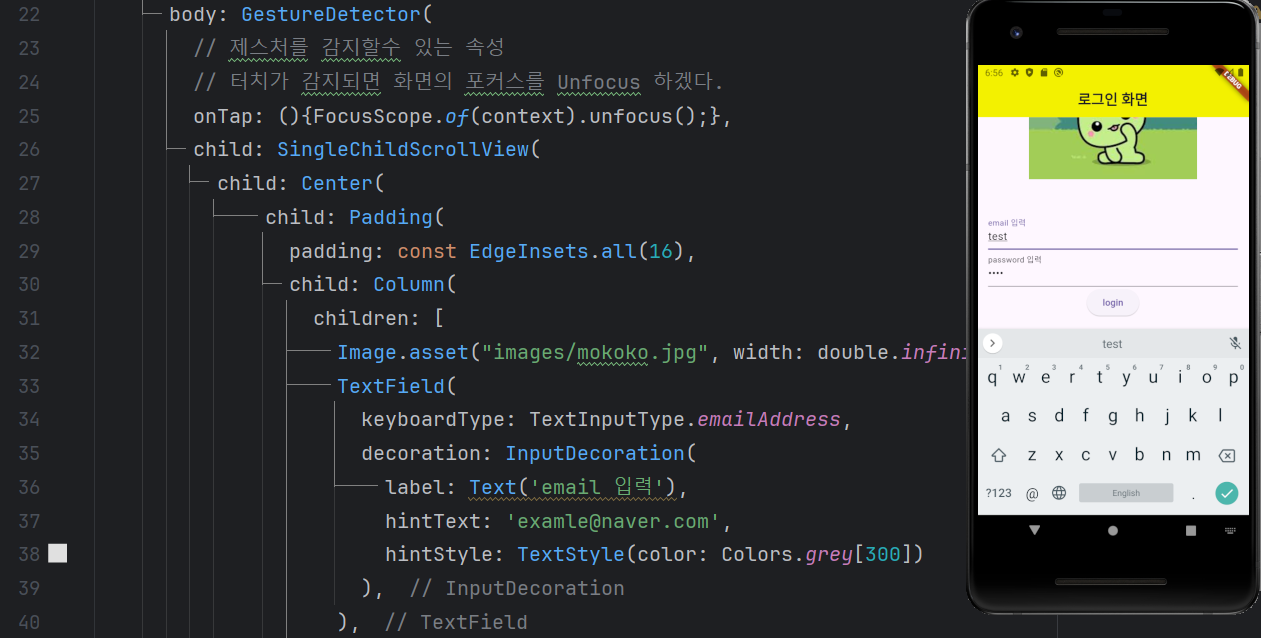
      body: GestureDetector(
        // 제스처를 감지할수 있는 속성
        // 터치가 감지되면 화면의 포커스를 Unfocus 하겠다.
        onTap: (){FocusScope.of(context).unfocus();},
        child: SingleChildScrollView(
          child: Center(
              child: Padding(
                padding: const EdgeInsets.all(16),
                child: Column(
                  children: [
                    Image.asset("images/mokoko.jpg", width: double.infinity, height: 300,),
                    TextField(
                      keyboardType: TextInputType.emailAddress,
                      decoration: InputDecoration(
                        label: Text('email 입력'),
                        hintText: 'examle@naver.com',
                        hintStyle: TextStyle(color: Colors.grey[300])
                      ),
                    ),

                    TextField(
                      keyboardType: TextInputType.text,
                      obscureText: true,
                      decoration: InputDecoration(
                          label: Text('password 입력'),
                      ),
                    ),

                    ElevatedButton(onPressed: (){}, child: Text('login'))
                  ],
                ),
              )),
        ),
      )
    );
  }
}

개발자