일전에 간략히 짚고 넘어갔던 디자인 패턴이다. UI에서 자주 쓰이는 디자인 패턴
유니티 러닝 - 모듈러식 코드베이스
유니티 - MVP
ASP.NET - MVC
유니티 - UI 최적화 팁MVP, MVC, MVVM
- 셋 다 아키텍처의 한 종류지만, 굳이 나눠서 생각할 필요없이 개념만 챙겨가서 설계에 쓰면 된다
MVC
Model,View,Controller- 프로그램의
논리 부분,데이터,출력을 분리하는 디자인 패턴 - 이름에서 알 수 있듯이
MVC패턴은 프로그램을 다음 세 개의 레이어로 분할한다 - 모델 : 데이터를 저장. 로직이나 계산을 수행하지 않는다
- 뷰 : 인터페이스. 데이터의 그래픽 표현을 형식화하고 화면에 렌더링한다.
- 컨트롤러 : 로직을 처리.
두뇌. 컨트롤러는 게임 데이터를
처리하며 값이 런타임에 어떻게 변경되는지 산출합니다.
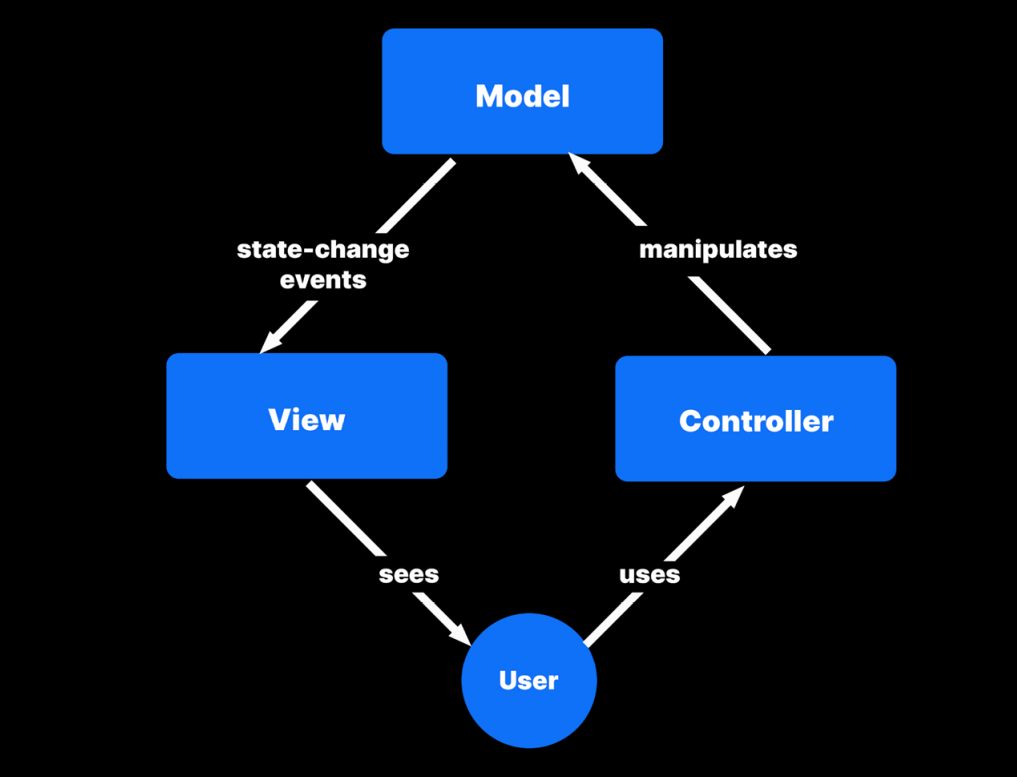
- 사용자는 뷰로 게임의 상황을 보고, 컨트롤러로 상호작용 한다
- 컨트롤러로 입력과 관련된 수행 내용을 가지고
Model의 정보를 토대로 연산 수행한다 - 연산 수행된 내용이 모델의 값이 변경된다
- 변경된 모델의 값을 기준으로 뷰의 출력이 달라진다
- 새로 출력된 뷰의 정보를 기준으로 사용자가 컨트롤러로 상호작용한다. ( 1 ~ 4 반복)
장점
- 이렇게 역할을 나누어 관리하면, 문제가 생겼을 때 어디서 잘못이 일어난 것인지 쉽게 파악이 가능하다
- 데이터가 이상하면
모델, 조작이 제대로 안되면컨트롤러, 출력된 정보가 잘못되었다면뷰를 확인하면 된다 - 웹 개발에 있어서는 아주 유용하지만, 게임에서는 그 정도까지 효용성이 있는 것은 아니라서,
MVP모델을 더 많이 쓴다
플레이어 예시
- 모델에는 플레이어 데이터인 플레이어모델
public class PlayerModel { public class PlayerModel : MonoBehaviour { [SerializeField] int hp; public int HP { set { hp = value; OnHpChanged?.Invoke(hp); } get { return hp; } } public event Action<int> OnHpChanged; [SerializeField] int maxHP; public int MaxHP { set { maxHP = value; OnMaxHPChanged?.Invoke(maxHP); } get { return maxHP; } } public event Action<int> OnMaxHPChanged; [SerializeField] Rigidbody rigid; public Vector3 Velocity { set { rigid.velocity = value; OnVelocityChanged?.Invoke(rigid.velocity); } get { return rigid.velocity; } } public Action<Vector3> OnVelocityChanged; } } - 컨트롤러에는 플레이어컨트롤러
public class PlayerController : MonoBehaviour
{
    [SerializeField] PlayerModel model;

    private void Update()
    {
        if (Input.GetKeyDown(KeyCode.Space))
        {
            model.HP -= 1;
        }

        Move();
    }

    private void Move()
    {
        float xInput = Input.GetAxis("Horizontal");
        float zInput = Input.GetAxis("Vertical");

        Vector3 dir = new Vector3(xInput, 0, zInput);
        if (dir.sqrMagnitude > 1)
        {
            dir = dir.normalized;
        }

        model.Velocity = Vector3.MoveTowards(model.Velocity, dir * 5, 10 * Time.deltaTime);
    }
}- 뷰는 UI들이다
public class MVCPlayerHPView : MonoBehaviour
{
    [SerializeField] TMP_Text textUI;

    public void Settext(int curHP, int maxHP)
    {
        textUI.text = $"HP : {curHP} / {maxHP}";
    }
}
public class MVCPlayerHPBarView : MonoBehaviour
{
[SerializeField] Slider slider;
public void SetHP(int curHP)
{
slider.value = curHP;
}
public void SetMaxHP(int maxHP)
{
slider.maxValue = maxHP;
}
}체력바 예시
- 캐릭터 컨트롤러로 사용자의 입력을 받아 캐릭터 모델의 값을 변화시킨다. 변화된 값에 맞게 UI로 뷰를 표현해 사용자에게 다시 정보를 전달한다
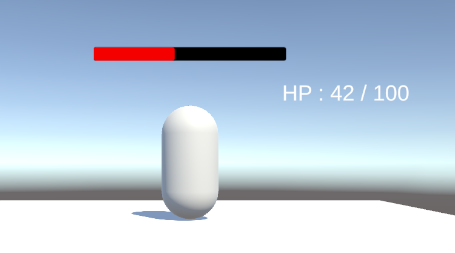
- 플레이어
컨트롤러
public class PlayerController : MonoBehaviour
{
    [SerializeField] PlayerModel model;
    [SerializeField] int damage;

    void Update()
    {
        if (Input.GetKeyDown(KeyCode.A))
        {
            TakeHit(damage);
        }
    }
    void TakeHit(int damage)
    {
        model.HP -= damage;
    }
}- 플레이어
모델
public class PlayerModel : MonoBehaviour
{
    [SerializeField] PlayerHPView hpView;
    [SerializeField] PlayerHPBarView hpBarView;

    [SerializeField] int hp;
    public int HP
    {
        set
        {
            hp = value;
            hpView.Settext(hp, maxHP);
            hpBarView.SetHP(hp);
        }
        get
        {
            return hp;
        }
    }
    [SerializeField] int maxHP;

    public int MaxHP { set { maxHP = value; } get { return maxHP; } }

    private void Start()
    {
        hpView.Settext(hp, maxHP);
        hpBarView.SetHP(hp);
        hpBarView.SetMaxHP(maxHP);
    }

}- 플레이어 HPText
뷰
public class PlayerHPView : MonoBehaviour
{
    [SerializeField] TMP_Text textUI;

    public void Settext(int curHP, int maxHP)
    {
        textUI.text = $"HP : {curHP} / {maxHP}";
    }
}- 플레이어 HPBar
뷰
public class PlayerHPBarView : MonoBehaviour
{
    [SerializeField] Slider slider;
    public void SetHP(int curHP)
    {
        slider.value = curHP;
    }

    public void SetMaxHP(int maxHP)
    {
        slider.maxValue = maxHP;
    }
}- 뷰를 UI 요소마다 만들어야 되는 문제가 있다
MVP
Model,View,Presenter
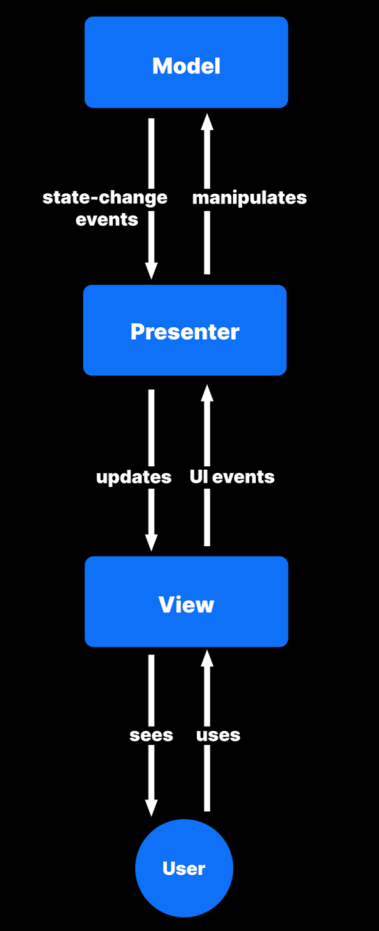
- MVC에서 뷰를 담당하는 UI가 유니티에서는 기능이 구현되어 있다. 즉, 굳이 뷰를 만들 필요가 없다
- 이 방식이 유효하기는 하나, 많은 Unity 개발자는 주로 컨트롤러가
중개자역할을 하는 MVC의 배리에이션을 사용한다. MVP는 뷰가 직접 모델을 관찰하지 않는다
유니티에서는 MVP를 권장한다. MVP에서도 서로 구분되는 세 가지의 애플리케이션
레이어를 분리합니다. 하지만 각 부분이 맡은 책임은 조금씩 다릅니다 - MVP 패턴의 핵심은 뷰와 모델의 값이 같게 하는 것!
프레젠터 (MVC의 컨트롤러)
- 모델로부터 데이터를 검색한 다음 뷰에 표시할 수 있도록 형식을 지정
- 컨트롤러가 아니라 뷰에서 사용자 입력을 처리
이벤트와관찰자 패턴이 사용된다- 사용자는
Unity UI의Button,Toggle,Slider컴포넌트와 상호작용할 수 있다
뷰
뷰에서 UI 이벤트를 통해 받은 입력을 프레젠터에 되돌려 보내고, 프레젠터는 모델을 조작한다모델의 상태 변경 이벤트는 데이터가 업데이트 되었음을 프레젠터에 알린다- 프레젠터가 수정된 데이터를 뷰로 전달하면 UI가 업데이트 된다
예시 플레이어 피격, 힐
- 플레이어 프레젠터
public class MVPPlayerPresenter : MonoBehaviour
{
    [Header("Model")]
    [SerializeField] MVPPlayerModel model;
    [Header("View")]
    [SerializeField] TMP_Text playerHPTextUI;
    [SerializeField] TMP_Text playerMaxHPTextUI;
    [SerializeField] Slider playerHPBar;

    // 이벤트 구독
    private void OnEnable()
    {
        model.OnHPChanged += SetHP;
        model.OnMaxHPChanged += SetMaxHP;
        SetMaxHP(model.MaxHP);
        SetHP(model.HP);
    }
    // 이벤트 구독해지
    private void OnDisable()
    {
        model.OnHPChanged -= SetHP;
        model.OnMaxHPChanged -= SetMaxHP;

    }

    public void SetHP(int hp)
    {
        playerHPTextUI.text = $"HP : {hp}";
        playerHPBar.value = hp;
    }
    public void SetMaxHP(int maxHP)
    {
        playerMaxHPTextUI.text = $"{maxHP}";
        playerHPBar.maxValue = maxHP;
    }
}- 플레이어 모델
public class MVPPlayerModel : MonoBehaviour
{
    [SerializeField] TMP_Text hpView;
    [SerializeField] Slider hpBarView;

    [SerializeField] int hp;
    public int HP { set { hp = value; OnHPChanged?.Invoke(hp); } get { return hp; } }
    public event Action<int> OnHPChanged;
    [SerializeField] int maxHP;

    public int MaxHP { set { maxHP = value; OnMaxHPChanged?.Invoke(maxHP); } get { return maxHP; } }
    public event Action<int> OnMaxHPChanged;


}
예시2 플레이어 스피드
- 영상 다시 보기
- 플레이어 컨트롤러
public class PlayerController : MonoBehaviour
{
    [SerializeField] PlayerModel model;

    private void Update()
    {
        if (Input.GetKeyDown(KeyCode.Space))
        {
            model.HP -= 1;
        }

        Move();
    }

    private void Move()
    {
        float xInput = Input.GetAxis("Horizontal");
        float zInput = Input.GetAxis("Vertical");

        Vector3 dir = new Vector3(xInput, 0, zInput);
        if (dir.sqrMagnitude > 1)
        {
            dir = dir.normalized;
        }

        model.Velocity = Vector3.MoveTowards(model.Velocity, dir * 5, 10 * Time.deltaTime);
    }
}- 플레이어 프레젠터
public class PlayerPresenter : MonoBehaviour
{
    [Header("Model")]
    [SerializeField] PlayerModel model;

    [Header("View")]
    [SerializeField] TMP_Text playerHPTextUI;
    [SerializeField] TMP_Text playerMaxTextUI;
    [SerializeField] Slider playerHPSliderUI;
    [SerializeField] TMP_Text playerSpeedTextUI;

    private void OnEnable()
    {
        model.OnHpChanged += SetHP;
        model.OnMaxHPChanged += SetMaxHP;
        SetMaxHP(model.MaxHP);
        SetHP(model.HP);
    }

    private void OnDisable()
    {
        model.OnHpChanged -= SetHP;
        model.OnMaxHPChanged -= SetMaxHP;
    }

    private void Update()
    {
        SetSpeed(model.Velocity);
    }

    public void SetHP(int hp)
    {
        playerHPTextUI.text = $"{hp}";
        playerHPSliderUI.value = hp;
    }

    public void SetMaxHP(int maxHP)
    {
        playerMaxTextUI.text = $"{maxHP}";
        playerHPSliderUI.maxValue = maxHP;
    }

    public void SetSpeed(Vector3 velocity)
    {
        playerSpeedTextUI.text = $"{velocity.magnitude}";
    }
}- 플레이어 모델
public class PlayerModel : MonoBehaviour
{
    [SerializeField] int hp;
    public int HP { set { hp = value; OnHpChanged?.Invoke(hp); } get { return hp; } }
    public event Action<int> OnHpChanged;

    [SerializeField] int maxHP;
    public int MaxHP { set { maxHP = value; OnMaxHPChanged?.Invoke(maxHP); } get { return maxHP; } }
    public event Action<int> OnMaxHPChanged;


    [SerializeField] Rigidbody rigid;
    public Vector3 Velocity { set { rigid.velocity = value; OnVelocityChanged?.Invoke(rigid.velocity); } get { return rigid.velocity; } }
    public Action<Vector3> OnVelocityChanged;
}- 속도의 경우, 업데이트마다 변경될 값이기 때문에 차라리 이벤트 말고 업데이트마다 하는 것이 나을 수 있다
- 단, 이동이 없는 경우에도 업데이트를 하는 문제가 생길 수 있으니 이전 값과 동일할 경우 수행하지 않는다는 조건을 추가해서 설계한다
장점
- 프로젝트가 커질 수록 유리해지는 패턴이다
원활한 업무 분배: 뷰를 프리젠터에서 분리했으므로, 사용자 인터페이스 개발과
업데이트를 나머지 코드 베이스와 거의 독립적으로 수행할 수 있다. 그로 인해 업무 분담이 원활함MVP 및 MVC로 간소화된 유닛 테스팅: 게임플레이 로직과 사용자 인터페이스를 분리한다. 그렇기 때문에 에디터에서 플레이 모드를 사용하지 않아도 오브젝트를 코드와 연동해 시뮬레이션할 수 있으며, 시간이 상당히 단축됨유지 가능하며 가독성이 높은 코드: 비교적 작은 클래스를 만들게 되므로 코드의 가독성이 높아진다. 종속 관계가 적을수록 오류, 버그 가능성이 줄어든다.
단점
- 규모가 커지기 전까지는 장점을 보기 힘들다
- 미리 계획해야 합니다. 책임에 따라 클래스를 나눠야 하며, 이 과정에서 약간의 정리 및 사전 작업이 필요
- Unity 프로젝트의 모든 요소가 패턴에 적합하지는 않다. '순수한' MVC 또는 MVP
구현에서 화면에 렌더링되는 요소는 모두 실제 뷰의 한 부분. 데이터, 로직, 인터페이스로 쉽게 분리되지 않는 Unity 컴포넌트도 있다(예: MeshRenderer) - 간단한 스크립트에서는 MVC/MVP가 크게 도움이 되지 않기도 한다
- 패턴의 이점을 가장 크게 활용할 수 있는 부분이 어디인지 판단할 수 있어야 한다
- 보통은 유닛 테스트 결과가 도움이 된다
- MVC/MVP로 쉽게 테스트할 수 있다면 해당되는 부분에 활용해 볼 수 있다
실습
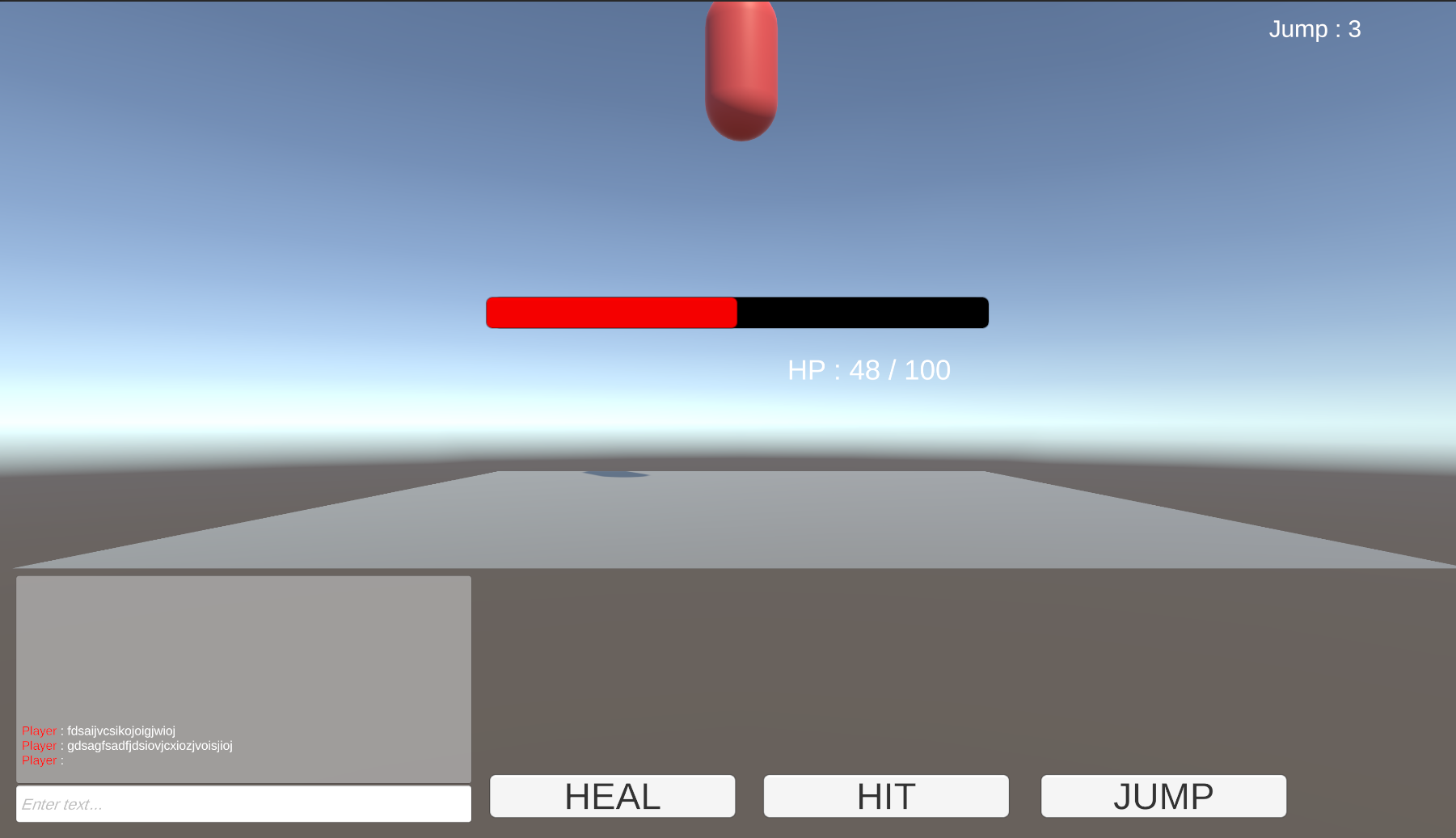
채팅 기능 구현
Input Field와Scroll View로 채팅을 치면, 한 줄씩 아래에서부터 업데이트 되고 오래된 채팅은 위로 올라가는 기능을 구현한다
public class PracticeChatLog : MonoBehaviour
{
    [SerializeField] RectTransform parent;
    [SerializeField] TMP_Text chatPrefab;
    private TMP_Text chatText;

    public void MakeChatLog(string chat)
    {
        chatText = Instantiate(chatPrefab);
        chatText.text = $"<color=red>Player</color> : {chat}";
        chatText.transform.SetParent(parent,false);
    }
}- 생성된 새로운 채팅 텍스트가
Content의 자식으로 들어갈 수 있게SetParent()로 설정한다. 매개변수로False가 들어가는 것은World기준transform을 가지게 하는 설정이다. 이걸 안해주면Scale이0.25로 줄어들어서 글씨가 안보인다
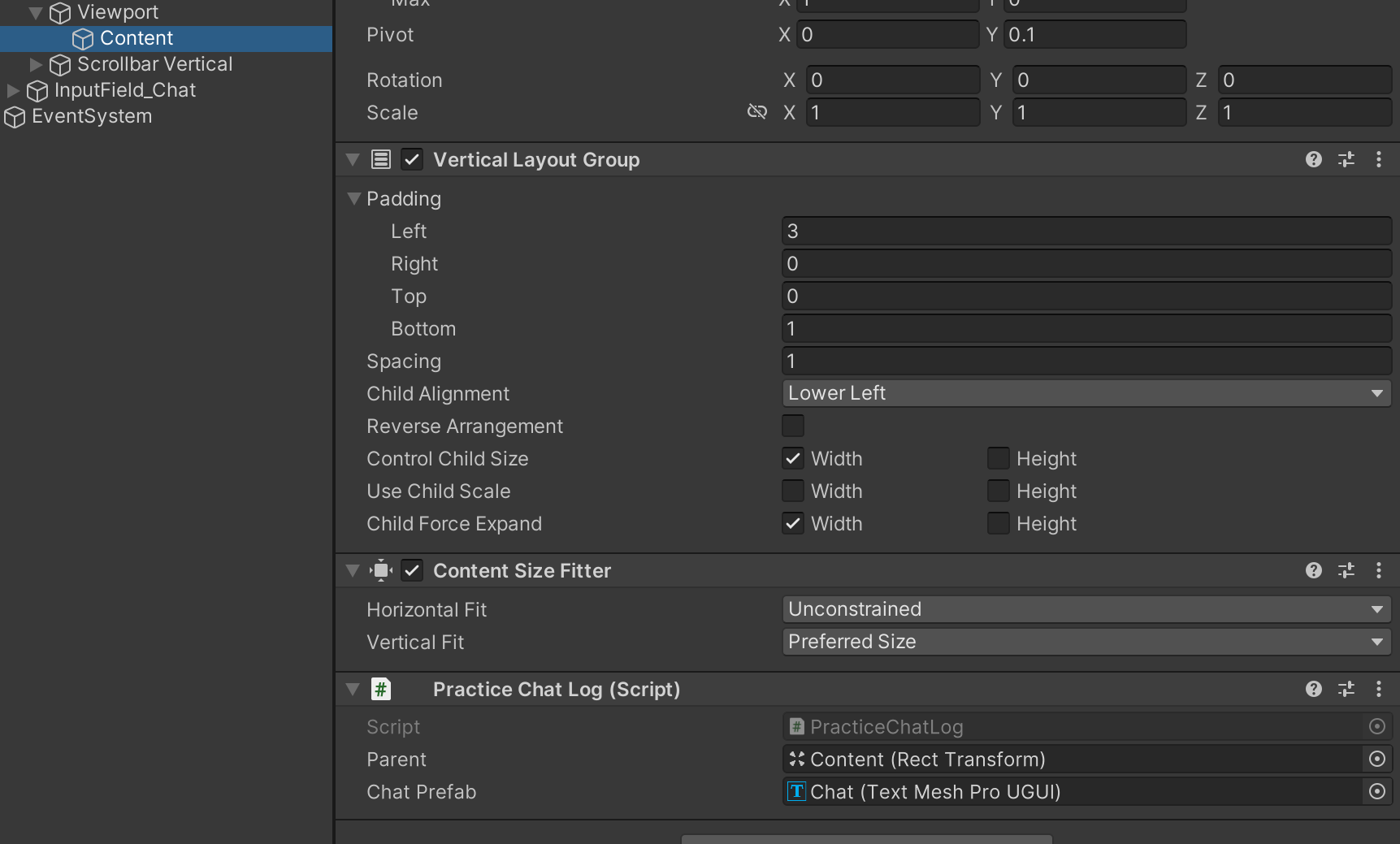
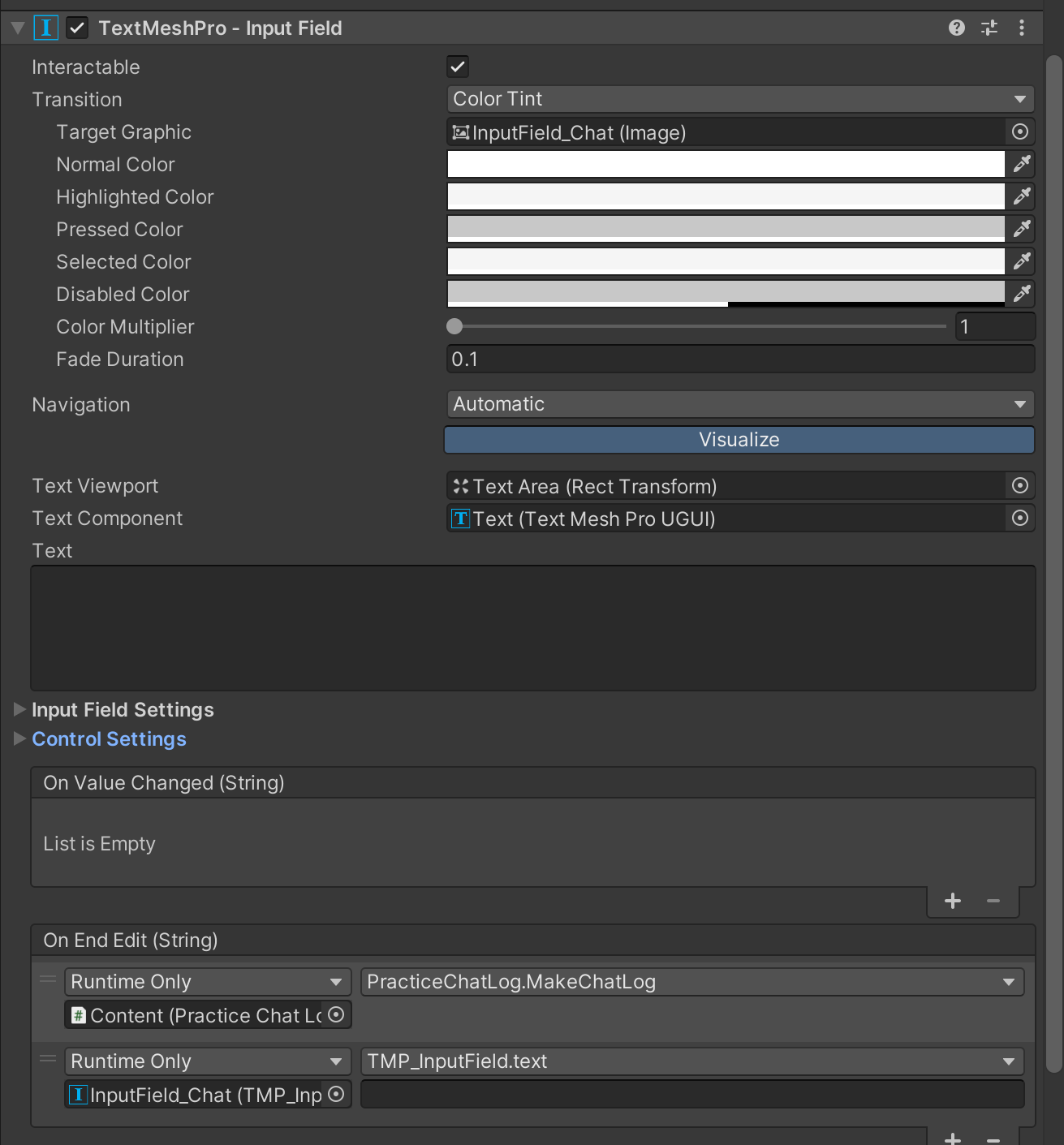
Input Field의Edit이 끝날 경우에 수행되는 이벤트로 함수를 추가한다. 이러면 입력창에서 엔터키나 다른곳으로 마우스 클릭을 하면 텍스트가 추가된다
플레이어 컨트롤러
public class PracticePlayerController : MonoBehaviour
{
    [SerializeField] private PracticePlayerModel model;

    private void Start()
    {
        model = GetComponent<PracticePlayerModel>();
    }
    void Update()
    {
        if (Input.GetKeyDown(KeyCode.S))
        {
            if (model.playerPosition == PracticePlayerModel.PlayerPosition.Ground)
            {
                model.JumpCount++;
            }
        }
        if (Input.GetKeyDown(KeyCode.A))
        {
            model.CurHP++;
        }
        if (Input.GetKeyDown(KeyCode.D))
        {
            model.CurHP--;
        }
    }
}- 플레이어의 동작에 관련해서 입력을 받기 위한 컨트롤러.
UI이외의 입력을 받기위해 어쩔 수 없이 추가한다 - 플레이어가 연속으로 점프하는 경우를 막기 위해,
상태 패턴을 추가. 조건으로 사용한다
플레이어 모델
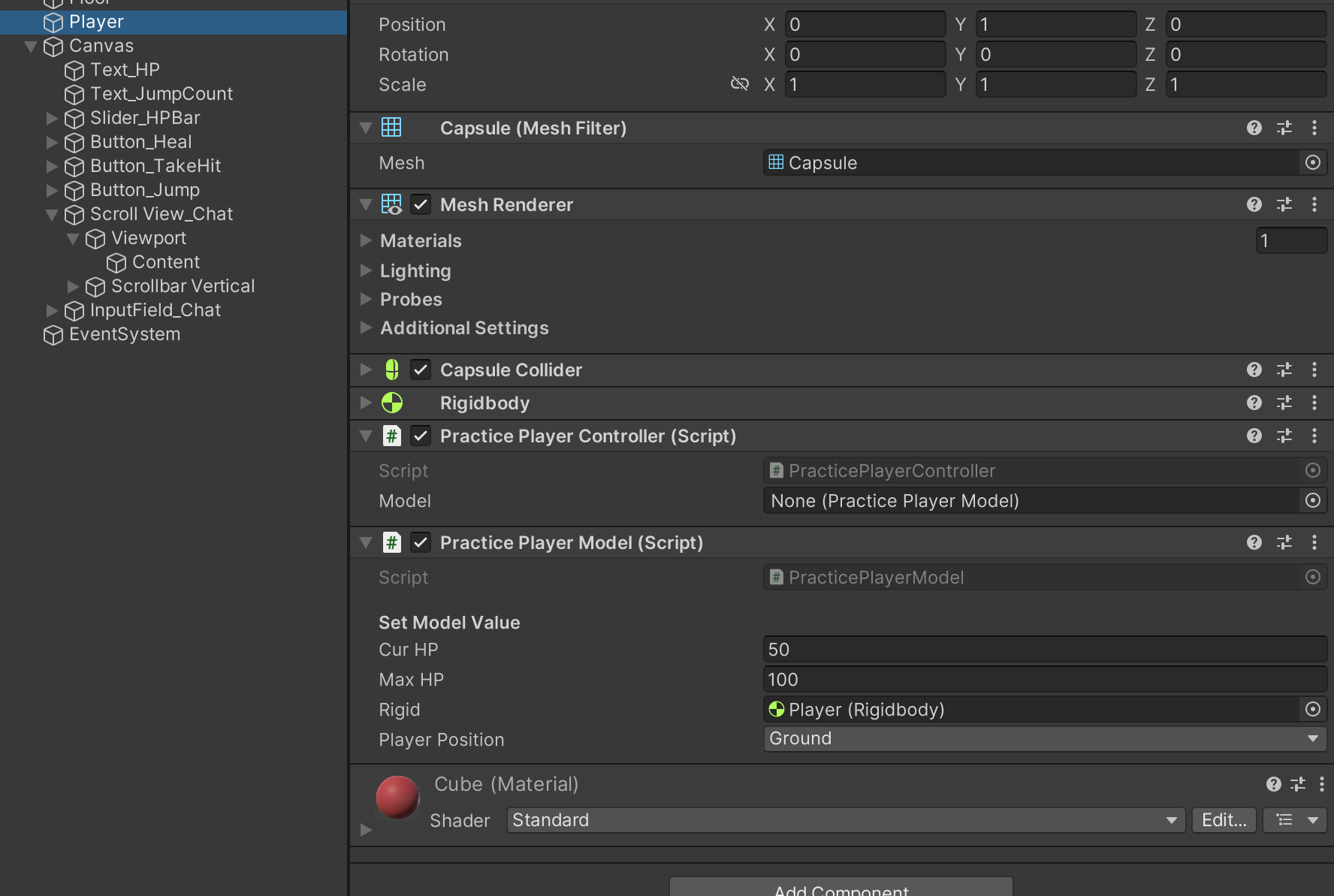
- 콜백으로 플레이어의 정보가 변경 될 시에만 내용을 수행할 수 있게 작성한다. 최적화 작업이다
- 점프를 하기 위해
Rigidbody컴포넌트를 추가한다
public class PracticePlayerModel : MonoBehaviour
{
    [Header("Set Model Value")]
    [SerializeField] int curHP = 50;
    [SerializeField] int maxHP = 100;
    [SerializeField] Rigidbody rigid;
    private int jumpCount = 0;

    public enum PlayerPosition { Ground, Air}
    public PlayerPosition playerPosition = PlayerPosition.Ground;
    private void Start()
    {
        rigid = GetComponent<Rigidbody>();
    }
    private void OnCollisionEnter(Collision collision)
    {
        if(1<<collision.gameObject.layer == 1<<6)
        {
            playerPosition = PlayerPosition.Ground;
        }
    }
    private void OnCollisionExit(Collision collision)
    {
        if (1 << collision.gameObject.layer == 1 << 6)
        {
            playerPosition = PlayerPosition.Air;
        }
    }
    public event Action<int> OnHPChanged;
    public int CurHP { get { return curHP; } set { curHP = value; OnHPChanged?.Invoke(curHP); } }

    public event Action<int> OnMaxHPChanged;
    public int MaxHP { get { return maxHP; } set { maxHP = value;OnMaxHPChanged?.Invoke(MaxHP); } }

    public event Action OnJumpCountChanged;
    public int JumpCount { get { return jumpCount; } set { jumpCount = value; OnJumpCountChanged?.Invoke(); } }

    public Rigidbody Rigid { get { return rigid; } set { rigid = value; } }
}
플레이어 프레젠터
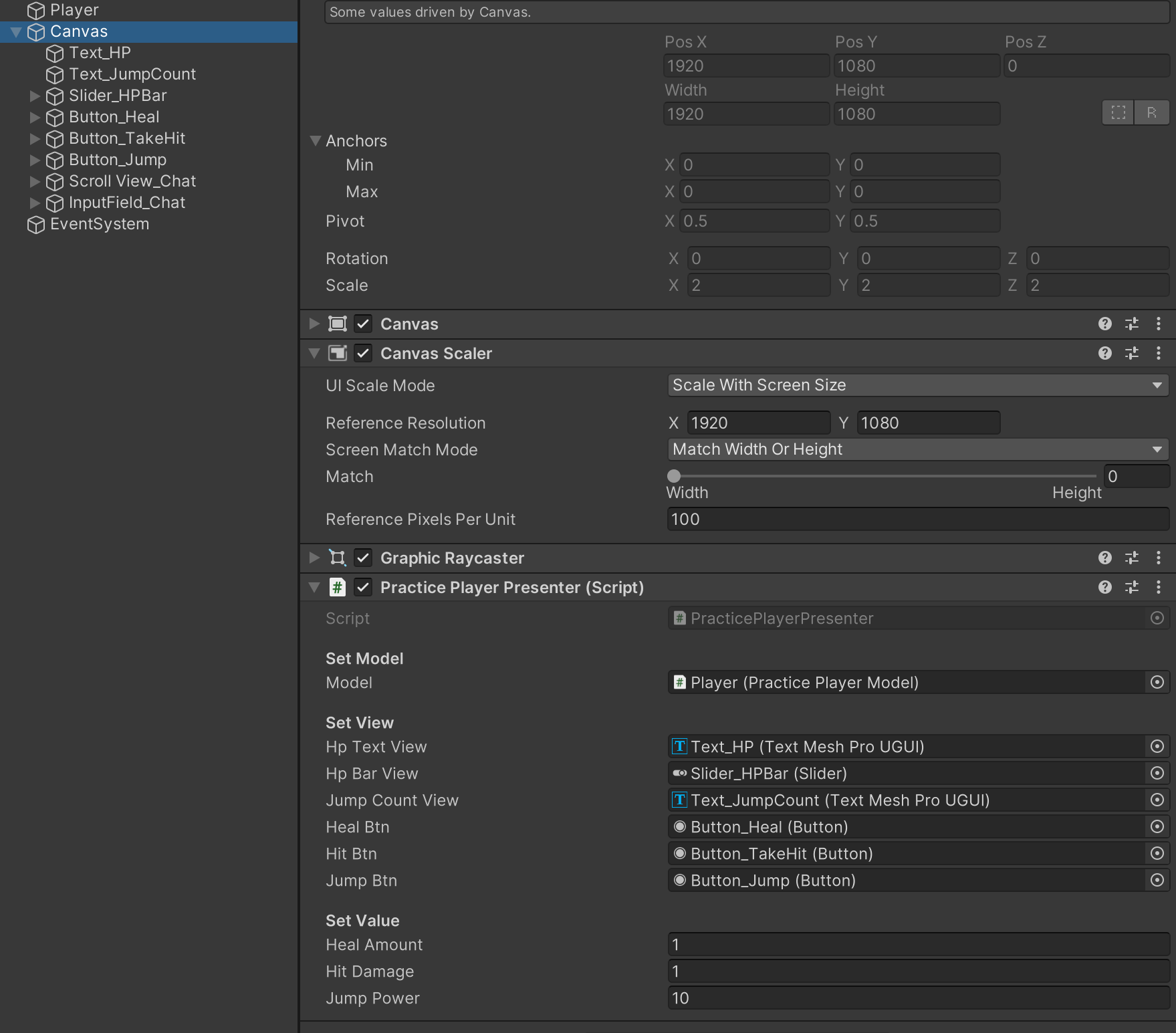
- 뷰에 해당하는 UI들을 참조한다
- 옵저버 패턴으로, 주시대상인 플레이어 모델을 구독한다. 버튼에도 기능들을 할당한다
- 이벤트로 수행되는 내용들은 이곳에 작성한다
public class PracticePlayerPresenter : MonoBehaviour
{
    [Header("Set Model")]
    [SerializeField] private PracticePlayerModel model;

    [Header("Set View")]
    [SerializeField] private TMP_Text hpTextView;
    [SerializeField] private Slider hpBarView;
    [SerializeField] private TMP_Text jumpCountView;
    [SerializeField] private Button healBtn;
    [SerializeField] private Button hitBtn;
    [SerializeField] private Button jumpBtn;

    [Header("Set Value")]
    [SerializeField] private int healAmount = 1;
    [SerializeField] private int hitDamage = 1;
    [SerializeField] private float jumpPower = 10;

    void OnEnable()
    {
        model.OnHPChanged += SetHP;
        model.OnMaxHPChanged += SetMaxHP;
        model.OnJumpCountChanged += Jump;
        SetHP(model.CurHP);
        SetMaxHP(model.MaxHP);
        healBtn.onClick.AddListener(HealHP);
        hitBtn.onClick.AddListener(LoseHP);
        jumpBtn.onClick.AddListener(CountJump);
    }
    private void OnDisable()
    {
        model.OnHPChanged -= SetHP;
        model.OnMaxHPChanged -= SetMaxHP;
        model.OnJumpCountChanged -= Jump;
    }
    public void SetHP(int curHP)
    {
        hpTextView.text = $"HP : {curHP} / {model.MaxHP}";
        hpBarView.value = curHP;
    }
    public void SetMaxHP(int maxHP)
    {
        hpTextView.text = $"HP : {model.CurHP} {maxHP}";
        hpBarView.maxValue = maxHP;
    }
    public void HealHP()
    {
        model.CurHP += healAmount;
    }
    public void LoseHP()
    {
        model.CurHP -= hitDamage;
    }
    public void Jump()
    {
        model.Rigid.AddForce(Vector3.up * jumpPower, ForceMode.Impulse);
        jumpCountView.text = $"Jump : {model.JumpCount}";
    }
    public void CountJump()
    {
        if (model.playerPosition == PracticePlayerModel.PlayerPosition.Ground)
        {
            model.JumpCount++;
        }
    }
}
개발 박살내자