ChatGPT의 도움을 받아 코드를 작성했습니다. 환경은 구글 코랩에서 진행했고, 패키지를 설치하지 않아도 다 깔려있어서 편했다.
인증하기
import google.auth
from google.oauth2.credentials import Credentials
from googleapiclient.errors import HttpError
from googleapiclient.discovery import build

import os
import google.oauth2.credentials
import google_auth_oauthlib.flow
import googleapiclient.discovery
import googleapiclient.errors

client_secret_path = '/content/drive/MyDrive/YouTube_Playlist/client_secret.json'

# 유튜브 데이터 API 클라이언트 생성
def get_authenticated_service():
    scopes = ["https://www.googleapis.com/auth/youtube.force-ssl"]
    flow = google_auth_oauthlib.flow.InstalledAppFlow.from_client_secrets_file(
        client_secret_path, scopes
    )
    credentials = flow.run_console()
    youtube = googleapiclient.discovery.build("youtube", "v3", credentials=credentials)
    return youtube

# 새로운 재생목록 생성
def create_playlist(youtube):
    request = youtube.playlists().insert(
        part="snippet,status",
        body={
          "snippet": {
            "title": "Test4",
            "description": "내 재생목록 설명"
          },
          "status": {
            "privacyStatus": "public"
          }
        }
    )
    response = request.execute()
    print("새로운 재생목록 생성 완료! ID:", response["id"])
    return response["id"]

# 인증 및 클라이언트 생성
youtube = get_authenticated_service()

# 새로운 재생목록 생성
playlist_id = create_playlist(youtube)
해당 코드는 인증을 하고, 재생목록을 생성하고, 생성한 재생목록의 ID를 얻는 코드입니다.
Please visit this URL to authorize this application: https://accounts.google.com/o/oauth2......
와 같이 인증하라고 뜨는데 가서 인증하고 코드 나오는데, 코드입력하면 플레이리스트가 생긴다.
데이터
초기 데이터를 설정한 것은 다음과 같이 시간 가수-제목 형식으로 되어있는 댓글을 긁어와서 플레이리스트로 만들기로 하였다. 처음 시작한 동영상은 [Playlist] 이쯤에서 중간 결산 가보자고ㅣ2022 상반기 결산 특집, 놓쳐선 안될 팝 50ㅣ50 best pop songs in first half of 2022 이다.
0:01 GAYLE-abcdefu
2:49 Charlie puth-that's hilarious
5:15 Justin bieber-off my face
7:52 Charlie puth-light switch
10:58 Ed sheeran-shivers
14:25 The weeknd-out of time
18:00 Adele-easy on me
21:45 Lauv-all 4 nothing
24:48 Harry Styles-as it was
...
이런 식으로 시간 가수-제목 형식으로 되어있어 이를 분리하는 코드를 작성하였다.
timeline_path = '/content/drive/MyDrive/YouTube_Playlist/timeline.txt'
with open(timeline_path, 'r') as file:
    text = file.read()
results = []
for line in text.split('\n'):
    if line.strip() != '':
        time, song = line.split(' ', 1)
        results.append(song)
검색하기
가수-제목으로 유튜브 api를 이용해서 검색하는 코드
# 음악 검색하여 ID 리스트 반환
def search_music(youtube, query, max_results=10):
    request = youtube.search().list(
        part="id",
        q=query + " official audio",
        type="video",
        videoDefinition="high",
        maxResults=1
    )
    response = request.execute()
    video_id = response["items"][0]["id"]["videoId"]
    return video_id
    video_id_list = []
for i in range(len(results)):
    # 검색할 동영상의 검색어 입력
    query = results[i] # 검색어로 교체


    # 음악 검색하여 ID 리스트 반환
    video_id = search_music(youtube, query)

    # 검색된 동영상 ID 출력
    print(f"검색어 '{query}'에 해당하는 동영상 ID: {video_id}")
    video_id_list.append(video_id)
검색을 할 때, 가수-제목만 검색하면 music video가 먼저 뜨는 경우가 많았다. 뮤직비디오에는 노래 앞 뒤 중간에 스토리가 나오는 경우가 있다보니 검색어에 "official audio"를 추가해 audio를 얻으려고 하였다.
return 값으로 video ID를 얻는다.
검색어 'GAYLE-abcdefu'에 해당하는 동영상 ID: NaFd8ucHLuo
검색어 'Charlie puth-that's hilarious'에 해당하는 동영상 ID: F3KMndbOhIc
검색어 'Justin bieber-off my face'에 해당하는 동영상 ID: AeZxDcjXbzE
검색어 'Charlie puth-light switch'에 해당하는 동영상 ID: pGdxftEY2Fg
검색어 'Ed sheeran-shivers'에 해당하는 동영상 ID: z2_Lrg6rRks
...
결과값
Playlist에 비디오 추가
# 단일 재생목록에 동영상 추가
def add_video_to_playlist(youtube, video_id, playlist_id):
    request = youtube.playlistItems().insert(
        part="snippet",
        body={
            "snippet": {
                "playlistId": playlist_id,
                "resourceId": {
                    "kind": "youtube#video",
                    "videoId": video_id
                }
            }
        }
    )
    response = request.execute()
    return response

for i in range(1, len(video_id_list)):
    add_video_to_playlist(youtube, video_id_list[i], playlist_ID)
성공하였다.
결과
유튜브에 들어가서 결과를 확인해보았다.
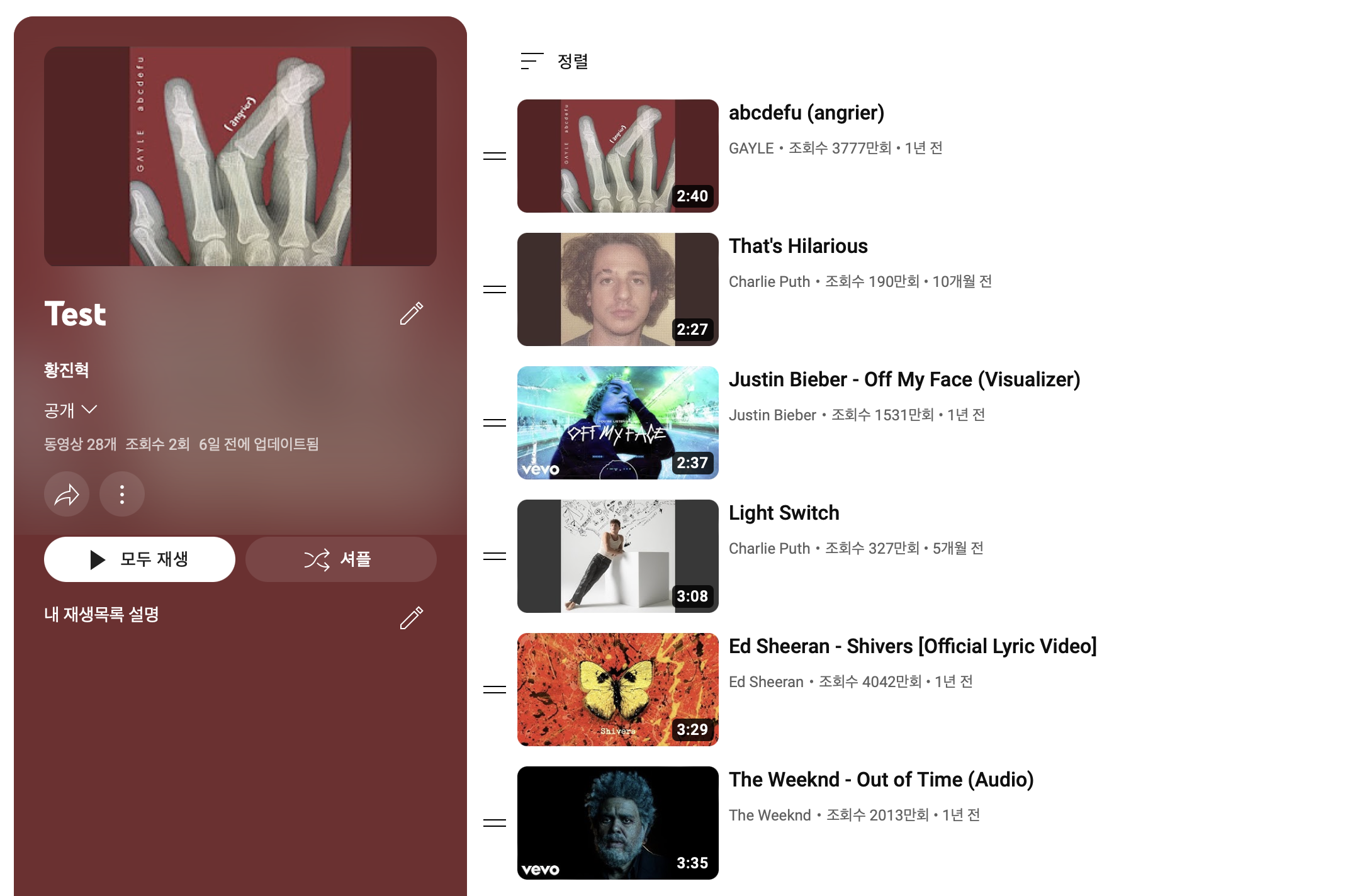
만족할만한 결과가 나왔습니다.