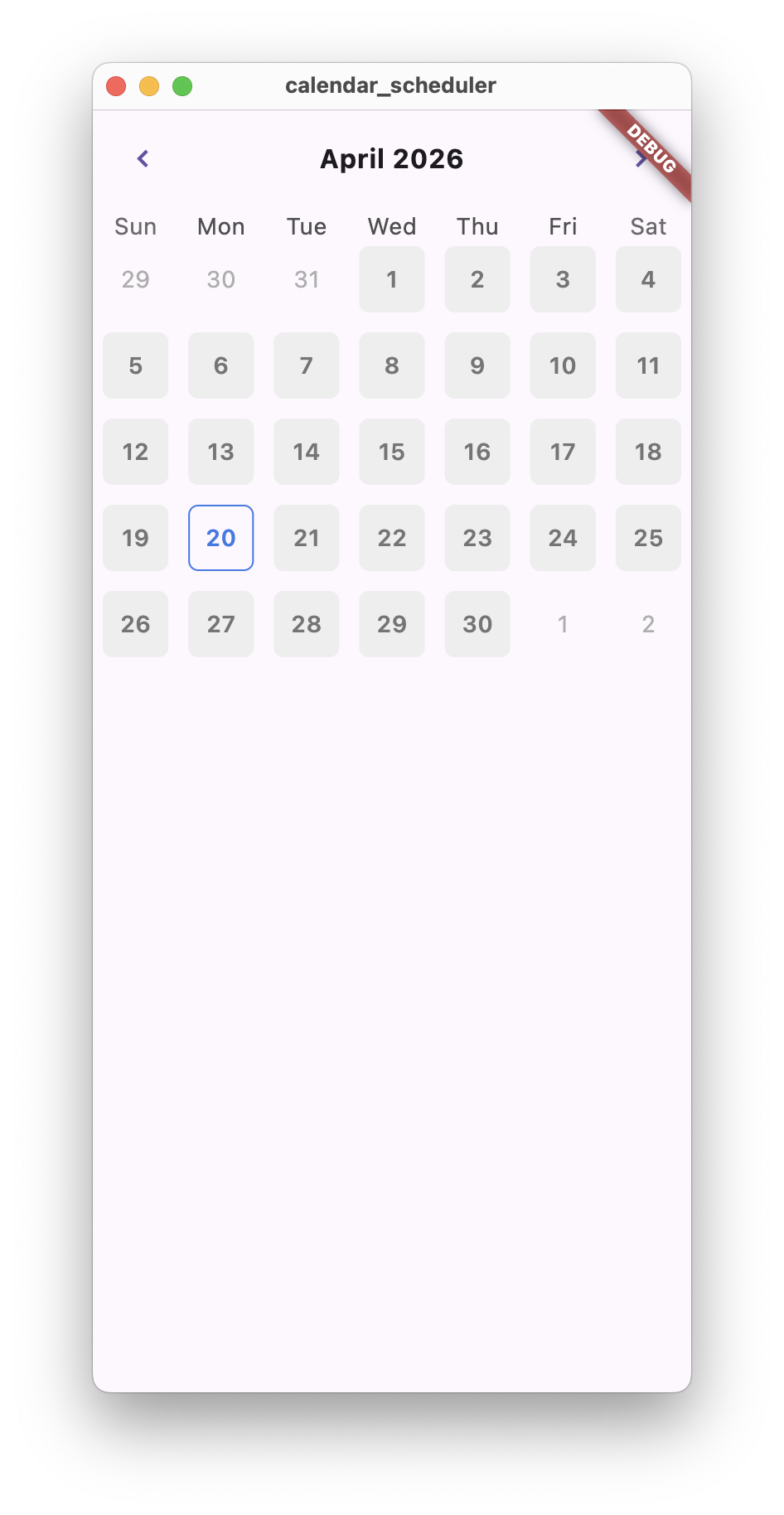
수업 주제 : table_calendar 플러그인 활용
전체 코드
/screen/main.dart
import 'package:calendar_scheduler/screen/home_screen.dart';
import 'package:flutter/material.dart';


void main() {
  runApp(
    MaterialApp(
      home: HomeScreen()
    ),
  );
}
/screen/home_screen.dart
import 'package:flutter/material.dart';
import 'package:calendar_scheduler/component/main_calendar.dart';


class HomeScreen extends StatefulWidget {
  const HomeScreen({Key? key}) : super(key: key);

  @override
  State<HomeScreen> createState() => _HomeScreenState();
}

class _HomeScreenState extends State<HomeScreen>{
  DateTime selectedDate = DateTime.utc(
    DateTime.now().year,
    DateTime.now().month,
    DateTime.now().day,
  );

  @override
  Widget build(BuildContext context) {
    return Scaffold(
      body: SafeArea(
          child: Column(
            children: [
              MainCalendar(
                selectedDate: selectedDate,
                //선택된 날짜 전달 코드

                onDaySelected: onDaySelected,
              ),
            ],
          )
      ),
    );
  }

  void onDaySelected(DateTime selectedDate, DateTime focusedDate) {
    // 날짜 선택될 때마다 실행할 함수
    setState(() {
      this.selectedDate = selectedDate;
    });

  }
}
/component/main_calendar.dart
import 'package:flutter/material.dart';
import 'package:table_calendar/table_calendar.dart';
import 'package:calendar_scheduler/const/colors.dart';
class MainCalendar extends StatelessWidget{
final OnDaySelected onDaySelected; //날짜 선택시 실행
final DateTime selectedDate; //선택된 날짜
const MainCalendar({
required this.onDaySelected,
required this.selectedDate,
});
Widget build(BuildContext context) {
return TableCalendar(
onDaySelected: onDaySelected,
selectedDayPredicate: (date)=> //선택 된 날짜 구분 로직
date.year == selectedDate.year&&
date.month == selectedDate.month&&
date.day == selectedDate.day,
firstDay: DateTime(1800, 1, 1), //첫째날
lastDay : DateTime(3000, 1, 11), //마지막 날
focusedDay: DateTime.now(), //화면에 보여지는 날
headerStyle: HeaderStyle(
titleCentered: true,
formatButtonVisible: false,
titleTextStyle: TextStyle(
fontWeight: FontWeight.w700,
fontSize: 16.0,
),
),
calendarStyle:CalendarStyle(
isTodayHighlighted: false,
defaultDecoration: BoxDecoration(
borderRadius: BorderRadius.circular(6.0),
color:LIGHT_GREY_COLOR
),
weekendDecoration: BoxDecoration(
borderRadius: BorderRadius.circular(6.0),
color:LIGHT_GREY_COLOR
),
selectedDecoration: BoxDecoration(
borderRadius: BorderRadius.circular(6.0),
border: Border.all(
color: PRIMARY_COLOR,
width: 1.0,
),
),
defaultTextStyle: TextStyle(
fontWeight: FontWeight.w600,
color: DARK_GREY_COLOR,
),
weekendTextStyle: TextStyle(
fontWeight: FontWeight.w600,
color: DARK_GREY_COLOR,
),
selectedTextStyle: TextStyle(
fontWeight: FontWeight.w600,
color: PRIMARY_COLOR,
),
),
);
}
}/const/color.dart
import 'package:flutter/material.dart';

const PRIMARY_COLOR = Color(OxFFFE3977E9);
final LIGHT_GREY_COLOR = Colors.grey[200]!;
final DARK_GREY_COLOR = Colors.grey[600]!;
final TEXTFIELD_FILL_COLOR = Colors.grey[300]!;
코드 분석
home_screen.dart
DateTime selectedDate = DateTime.utc(
    DateTime.now().year,
    DateTime.now().month,
    DateTime.now().day,
  );

 void onDaySelected(DateTime selectedDate, DateTime focusedDate) {
    // 날짜 선택될 때마다 실행할 함수
    setState(() {
      this.selectedDate = selectedDate;
});| 코드 | 역할 | 비고 |
|---|---|---|
| selectedDate | 오늘 날짜를 기본값으로 설정 | |
| utc | 시간 영향을 제거, 날짜만 비교하기 위해 사용 | 전 세계가 기준으로 사용하는 표준 시간 |
| onDaySelected | 날짜 클릭될 때마다 실행 |
main_calendar.dart
const MainCalendar({
    required this.onDaySelected,
    required this.selectedDate,
  });

  return TableCalendar(
      onDaySelected: onDaySelected,
      selectedDayPredicate: (date)=> //선택 된 날짜 구분 로직
      date.year == selectedDate.year&&
      date.month == selectedDate.month&&
      date.day == selectedDate.day,

      firstDay: DateTime(1800, 1, 1), //첫째날
      lastDay : DateTime(3000, 1, 11), //마지막 날
      focusedDay: DateTime.now(), //화면에 보여지는 날

      headerStyle: HeaderStyle(
        titleCentered: true,
        formatButtonVisible: false,
        titleTextStyle: TextStyle(
          fontWeight: FontWeight.w700,
          fontSize: 16.0,
        ),

      ),
      calendarStyle:CalendarStyle(
        isTodayHighlighted: false,
        defaultDecoration: BoxDecoration(
          borderRadius: BorderRadius.circular(6.0),
          color:LIGHT_GREY_COLOR
        ),
          weekendDecoration: BoxDecoration(
              borderRadius: BorderRadius.circular(6.0),
              color:LIGHT_GREY_COLOR
          ),
          selectedDecoration: BoxDecoration(
              borderRadius: BorderRadius.circular(6.0),
              border: Border.all(
                color: PRIMARY_COLOR,
                width: 1.0,
              ),
          ),
        defaultTextStyle: TextStyle(
          fontWeight: FontWeight.w600,
          color: DARK_GREY_COLOR,
        ),
        weekendTextStyle: TextStyle(
          fontWeight: FontWeight.w600,
          color: DARK_GREY_COLOR,
        ),
        selectedTextStyle: TextStyle(
          fontWeight: FontWeight.w600,
          color: PRIMARY_COLOR,
        ),
      ),

    );
| 코드 | 역할 | 비고 |
|---|---|---|
| MainCalendar | 캘린더 UI 컴포넌트 | 재사용 가능 |
| TableCalendar | 캘린더 위젯 | 외부 패키지 |
| onDaySelected | 날짜 클릭될 때마다 실행 | 부모에서 전달받는 콜백함수 |
| selectedDayPredicate | 선택된 날짜인지 구분하는 로직 | 날짜 비교 로직 |
| calendarStyle | 폰트 사이즈, 컬러 변경 | 캘린더 디자인 설정 |
color.dart
import 'package:flutter/material.dart';

const PRIMARY_COLOR = Color(OxFFFE3977E9);
final LIGHT_GREY_COLOR = Colors.grey[200]!;
final DARK_GREY_COLOR = Colors.grey[600]!;
final TEXTFIELD_FILL_COLOR = Colors.grey[300]!;| 코드 | 역할 | 비고 |
|---|---|---|
| PRIMARY_COLOR | 앱의 대표 색상 | 주요 강조 색 |
| LIGHT_GREY_COLOR | 밝은 회색 배경 색 | 기본 UI 배경 |
| DARK_GREY_COLOR | 어두운 회색 텍스트 색 | 가독성 |
| TEXTFIELD_FILL_COLOR | 입력창 배경 색 | TextField 등에 사용 |
새로 알게된 것
table_calendar 플러그인을 처음 사용해보았다.
쪽지시험 공부를 하면서 콜백함수가 이해가 가지 않았는데 이번 프로젝트에서 한번 더 사용하면서 콜백함수를 어떤 상황에서 사용할 수 있는지 알게되었다.
콜백함수는 부모가 함수를 전달하고 자식에서 예를 들어 클릭이 발생했을 때 부모 함수를 실행하는 것이라고 이해했다.
코드를 보면서 생각보다 짧은 코드로 달력을 구현했다는 것이 신기했다.
- TableCalendar를 사용하여 간단하게 캘린더 UI 구현 가능
- DateTime.utc : 시간대 영향을 제거하고 날짜만 정확하게 비교하기 위해 사용
헷갈리는 부분
언제 어떤 함수를 사용해야 적절할지가 헷갈린다.
그리고 플러터에서 들여쓰기할 때 쉼표를 쓰기도 하고 세미콜론으로 마치는 경우도 있는데 그것이 헷갈린다
결과물