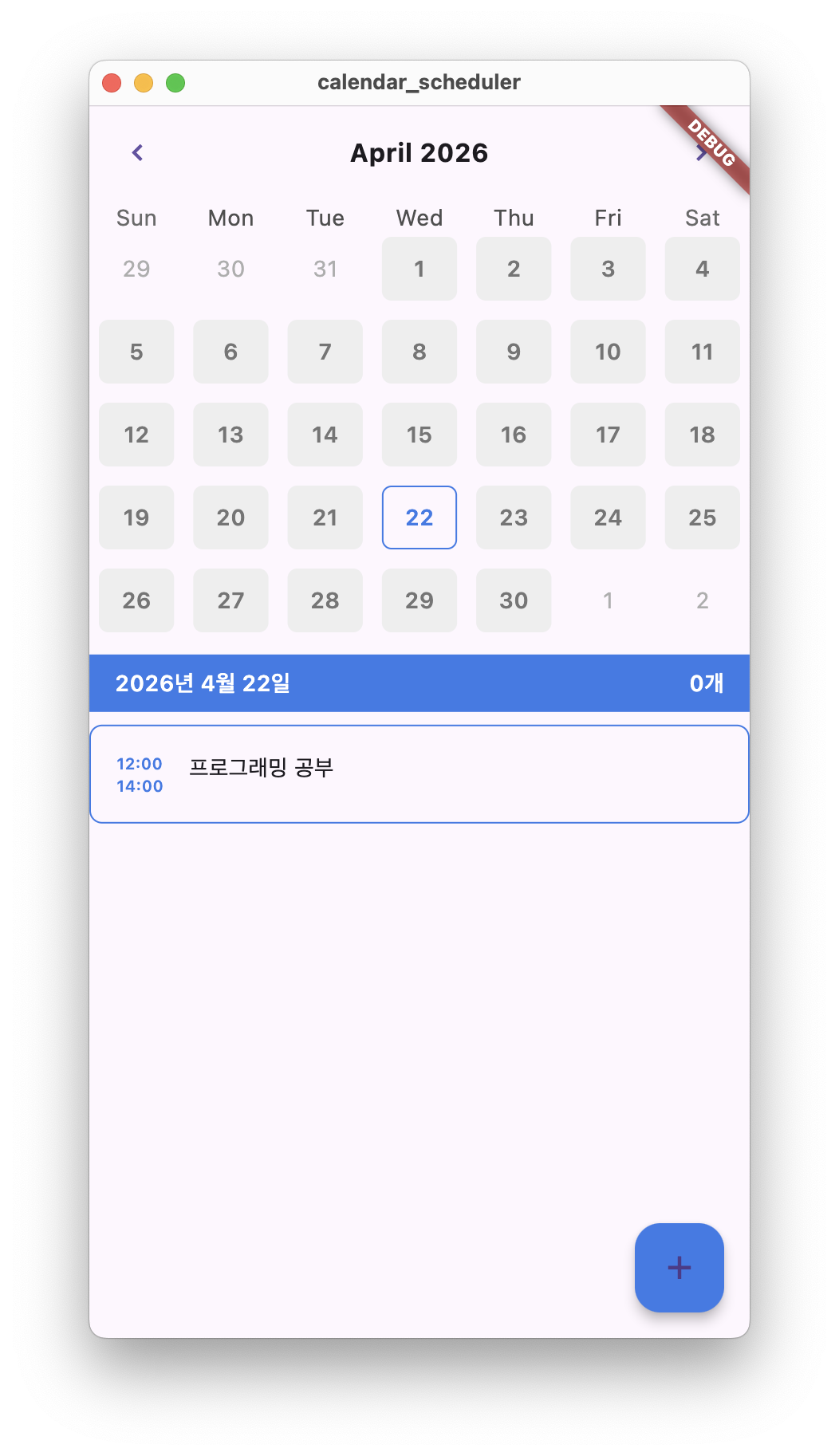
수업 주제 : calendar_scheduler 프로젝트 일정 추가하기 기능 넣기
수업 코드
/component/custom_text_field.dart
import 'package:calendar_scheduler/const/colors.dart';
import 'package:flutter/material.dart';
import 'package:flutter/services.dart';
class CustomTextField extends StatelessWidget {
final String label;
final bool isTime;
const CustomTextField({
required this.label,
required this.isTime,
Key? key,
}) : super(key: key);
Widget build(BuildContext context) {
return Column(
crossAxisAlignment: CrossAxisAlignment.start,
children: [
Text(
label,
style: TextStyle(
color: PRIMARY_COLOR,
fontWeight: FontWeight.w600,
),
),
Expanded(
flex: isTime ? 0 : 1,
child: TextFormField(
cursorColor: Colors.grey,
maxLines: isTime ? 1 : null,
expands: !isTime,
keyboardType:
isTime ? TextInputType.number : TextInputType.multiline,
inputFormatters: isTime
? [FilteringTextInputFormatter.digitsOnly]
: [],
decoration: InputDecoration(
border: InputBorder.none,
filled: true,
fillColor: Colors.grey[300],
suffixText: isTime ? '시' : null,
),
),
),
],
);
}
}/component/main_calendar.dart
import 'package:flutter/material.dart';
import 'package:table_calendar/table_calendar.dart';
import 'package:calendar_scheduler/const/colors.dart';
class MainCalendar extends StatelessWidget{
final OnDaySelected onDaySelected; //날짜 선택시 실행
final DateTime selectedDate; //선택된 날짜
const MainCalendar({
required this.onDaySelected,
required this.selectedDate,
});
Widget build(BuildContext context) {
return TableCalendar(
onDaySelected: onDaySelected,
selectedDayPredicate: (date)=> //선택 된 날짜 구분 로직
date.year == selectedDate.year&&
date.month == selectedDate.month&&
date.day == selectedDate.day,
firstDay: DateTime(1800, 1, 1), //첫째날
lastDay : DateTime(3000, 1, 11), //마지막 날
focusedDay: DateTime.now(), //화면에 보여지는 날
headerStyle: HeaderStyle(
titleCentered: true,
formatButtonVisible: false,
titleTextStyle: TextStyle(
fontWeight: FontWeight.w700,
fontSize: 16.0,
),
),
calendarStyle:CalendarStyle(
isTodayHighlighted: false,
defaultDecoration: BoxDecoration(
borderRadius: BorderRadius.circular(6.0),
color:LIGHT_GREY_COLOR
),
weekendDecoration: BoxDecoration(
borderRadius: BorderRadius.circular(6.0),
color:LIGHT_GREY_COLOR
),
selectedDecoration: BoxDecoration(
borderRadius: BorderRadius.circular(6.0),
border: Border.all(
color: PRIMARY_COLOR,
width: 1.0,
),
),
defaultTextStyle: TextStyle(
fontWeight: FontWeight.w600,
color: DARK_GREY_COLOR,
),
weekendTextStyle: TextStyle(
fontWeight: FontWeight.w600,
color: DARK_GREY_COLOR,
),
selectedTextStyle: TextStyle(
fontWeight: FontWeight.w600,
color: PRIMARY_COLOR,
),
),
);
}
}/component/schedule_bottom_sheet.dart
import 'package:flutter/material.dart';
import 'package:calendar_scheduler/component/custom_text_field.dart';
class ScheduleBottomSheet extends StatefulWidget{
const ScheduleBottomSheet({Key? key}) : super(key:key);
State<ScheduleBottomSheet> createState() => _ScheduleBottomSheetState();
}
class _ScheduleBottomSheetState extends State<ScheduleBottomSheet> {
Widget build(BuildContext context) {
return SafeArea(
child: Container(
// MediaQuery : SafeArea에 화면의 반 차지하는 컨테이너 위젯을 배치
height: MediaQuery.of(context).size.height/2,
color: Colors.white,
child: CustomTextField(label: '시작시간', isTime: true,)
),
);
}
}/component/schedule_card.dart
//schedule_card.dart
import 'package:calendar_scheduler/const/colors.dart';
import 'package:flutter/material.dart';
class ScheduleCard extends StatelessWidget{
final int startTime;
final int endTime;
final String content;
const ScheduleCard({
required this.startTime,
required this.endTime,
required this.content,
Key ? key,
}) : super(key:key);
Widget build(BuildContext context) {
// 바깥 박스
return Container(
decoration: BoxDecoration(
// 테두리
border: Border.all(
width: 1.0,
color: PRIMARY_COLOR,
),
// 테두리 둥글기정도
borderRadius: BorderRadius.circular(8.0),
),
child: Padding(
// 텍스트가 테두리에 붙지 않게
padding: const EdgeInsets.all(16),
// Intrinsic : 본질적인
// 최대 크기만큼 내부 높이를 최대로 맞춰줌
child: IntrinsicHeight(
child: Row(
crossAxisAlignment: CrossAxisAlignment.stretch,
children: [
_Time(startTime: startTime, endTime: endTime,),
SizedBox(width: 16,), // 여백
_Content(content: content),
SizedBox(width: 16,)
],
),
)
),
);
}
}
//파일 내부에서만 사용하는 프라이빗 클래스 (_)
class _Time extends StatelessWidget{
final int startTime; //값 재할당 불가 -> final
final int endTime; //값 재할당 불가 -> final
// 성능 최적화, 재할당 불가 -> const
const _Time({
required this.startTime,
required this.endTime,
Key? key,
}) : super(key:key);
Widget build(BuildContext context) {
// 텍스트 스타일 정의
final textStyle = TextStyle(
fontWeight: FontWeight.w600, //약간 굵은 글씨
color:PRIMARY_COLOR, //저번에 지정함
fontSize: 16.0,
);
//세로방향 위젯 배치
return Column(
crossAxisAlignment: CrossAxisAlignment.start, //왼쪽 정렬
children: [
Text(
'${startTime.toString().padLeft(2, '0')}:00',
style: textStyle.copyWith(
fontSize: 10.0
),
),
Text(
'${endTime.toString().padLeft(2, '0')}:00',
style: textStyle.copyWith(
fontSize: 10.0,
),
),
],
);
}
}
class _Content extends StatelessWidget {
final String content;
const _Content({
required this.content,
Key ? key,
}) : super(key : key);
Widget build(BuildContext context) {
return Expanded(
child: Text(
content,
),
);
}
}
/component/today_banner.dart
import 'package:calendar_scheduler/const/colors.dart';
import 'package:flutter/material.dart';
class TodayBanner extends StatelessWidget {
final DateTime selectedDate;
final int count;
const TodayBanner({
required this.selectedDate,
required this.count,
Key? key,
}) : super(key: key);
Widget build(BuildContext context) {
final textStyle = TextStyle(
fontWeight: FontWeight.w600,
color: Colors.white,
);
return Container(
color: PRIMARY_COLOR,
child: Padding(
padding: EdgeInsets.symmetric(horizontal: 16, vertical: 8),
child: Row(
mainAxisAlignment: MainAxisAlignment.spaceBetween,
children: [
Text(
'${selectedDate.year}년 ${selectedDate.month}월 ${selectedDate.day}일',
style: textStyle,
),
Text(
'$count개',
style: textStyle,
),
],
),
),
);
}
}/const/colors.dart
import 'package:flutter/material.dart';

const PRIMARY_COLOR = Color(0xFFFE3977E9);
final LIGHT_GREY_COLOR = Colors.grey[200]!;
final DARK_GREY_COLOR = Colors.grey[600]!;
final TEXTFIELD_FILL_COLOR = Colors.grey[300]!;
/screen/home_screen.dart
import 'package:flutter/material.dart';
import 'package:calendar_scheduler/component/main_calendar.dart';
import 'package:calendar_scheduler/component/schedule_card.dart';
import 'package:calendar_scheduler/component/today_banner.dart';
import 'package:calendar_scheduler/component/schedule_bottom_sheet.dart';
import 'package:calendar_scheduler/const/colors.dart';
class HomeScreen extends StatefulWidget {
const HomeScreen({Key? key}) : super(key: key);
State<HomeScreen> createState() => _HomeScreenState();
}
class _HomeScreenState extends State<HomeScreen>{
DateTime selectedDate = DateTime.utc(
DateTime.now().year,
DateTime.now().month,
DateTime.now().day,
);
Widget build(BuildContext context) {
return Scaffold(
floatingActionButton: FloatingActionButton(
backgroundColor: PRIMARY_COLOR,
onPressed: (){
showModalBottomSheet(
context: context,
isDismissible : true,
builder: (_) =>ScheduleBottomSheet(),
);
},
child: Icon(
Icons.add,
),
),
body: SafeArea(
child: Column(
children: [
MainCalendar(
selectedDate: selectedDate,
//선택된 날짜 전달 코드
onDaySelected: onDaySelected,
),
SizedBox(height:8),
TodayBanner(
selectedDate: selectedDate,
count: 0
),
SizedBox(height:8),
ScheduleCard(startTime: 12,
endTime: 14,
content: '프로그래밍 공부'
),
],
)
),
);
}
void onDaySelected(DateTime selectedDate, DateTime focusedDate) {
// 날짜 선택될 때마다 실행할 함수
setState(() {
this.selectedDate = selectedDate;
});
}
}main.dart
import 'package:calendar_scheduler/screen/home_screen.dart';
import 'package:flutter/material.dart';


void main() {
  runApp(
    MaterialApp(
      home: HomeScreen()
    ),
  );
}
코드 분석
/component/custom_text_field.dart
Expanded(
          flex: isTime ? 0 : 1,
          child: TextFormField(
            cursorColor: Colors.grey,
            // isTime = true : 한 줄 입력
            maxLines: isTime ? 1 : null,
            // isTime = false : 여러 줄 입력 (박스 형태로 늘어남)
            expands: !isTime,
            keyboardType:
            isTime ? TextInputType.number : TextInputType.multiline,
            // TextInputType.number : 숫자 키보드
            // TextInputType.multiline : 일반 키보드
            inputFormatters: isTime
                ? [FilteringTextInputFormatter.digitsOnly] // 숫자만 입력가능하게 함
                : [],
            decoration: InputDecoration(
              border: InputBorder.none,
              filled: true,
              fillColor: Colors.grey[300],
              //
              suffixText: isTime ? '시' : null,
            ),
          ),
),| 코드 | 역할 | 비고 |
|---|---|---|
| final bool isTime | 입력창 종류 결정 | true : 한 줄 입력, false : 여러 줄 입력 |
| keyboardType | 키보드 종류 결정 | TextInputType.number : 숫자 키보드, TextInputType.multiline : 일반키보드 |
| FilteringTextInputFormatter.digitsOnly | 입력창에 숫자만 들어오게 막는 필터 역할 | |
| suffixText: isTime ? '시' : null | 입력창 오른쪽 끝에 붙는 텍스트 | isTime이 true -> 입력받은 텍스트 오른쪽에 '시'붙임, false -> null |
/component/schedule_bottom_sheet.dart
return SafeArea(
        child: Container(
          // MediaQuery : SafeArea에 화면의 반 차지하는 컨테이너 위젯을 배치
          height: MediaQuery.of(context).size.height/2,
          color: Colors.white,
          child: CustomTextField(label: '시작시간', isTime: true,)
        ),
);| 코드 | 역할 |
|---|---|
| SafeArea | 폰 화면에서 잘리는 부분을 피해서 배치해주는 위젯 |
| MediaQuery | 화면의 크기를 알려줌 |
| MediaQuery.of(context).size.height/2 | 화면의 반을 차지하는 컨테이너 위젯 |
/component/schedule_card.dart
Widget build(BuildContext context) {
    // 바깥 박스
    return Container(
      decoration: BoxDecoration(
        // 테두리
        border: Border.all(
          width: 1.0,
          color: PRIMARY_COLOR,
        ),
        // 테두리 둥글기정도
        borderRadius: BorderRadius.circular(8.0),
      ),
      child: Padding(
        // 텍스트가 테두리에 붙지 않게
        padding: const EdgeInsets.all(16),
        // Intrinsic : 본질적인
        // 최대 크기만큼 내부 높이를 최대로 맞춰줌
        child: IntrinsicHeight(
          child: Row(
            crossAxisAlignment: CrossAxisAlignment.stretch,
            children: [
              _Time(startTime: startTime, endTime: endTime,),
              SizedBox(width: 16,), // 여백
              _Content(content: content),
              SizedBox(width: 16,)
            ],
          ),
        )
      ),
    );

//세로방향 위젯 배치
    return Column(
      crossAxisAlignment: CrossAxisAlignment.start, //왼쪽 정렬
      children: [
        Text(
          '${startTime.toString().padLeft(2, '0')}:00',
          style: textStyle.copyWith(
            fontSize: 10.0
          ),
        ),
        Text(
          '${endTime.toString().padLeft(2, '0')}:00',
          style: textStyle.copyWith(
            fontSize: 10.0,
          ),
        ),
      ],
);| 코드 | 역할 | 비고 |
|---|---|---|
| Container | 바깥 테두리 박스 | |
| BorderRadius.circular() | 테두리 둥글기 정도 | |
| padding: EdgeInsets.all(16) | 테두리 붙지않게 만듦 | |
| IntrinsicHeight() | 내부 요소 높이를 가장 큰 기준에 맞춰줌 | |
| Row(crossAxisAlignment: CrossAxisAlignment.stretch,) | 가로 배치 | Row : 가로 (행) -> crossAxisAlignment : 세로 (열) |
| startTime.toString().padLeft(2, '0') | 한자리 숫자 코드 -> 왼쪽에 '0'붙여 두자리 만듦 |
/component/today_banner.dart
return Container(
      color: PRIMARY_COLOR,
      child: Padding(
        padding: EdgeInsets.symmetric(horizontal: 16, vertical: 8),
        child: Row(
          mainAxisAlignment: MainAxisAlignment.spaceBetween,
          children: [
            Text(
              '${selectedDate.year}년 ${selectedDate.month}월 ${selectedDate.day}일',
              style: textStyle,
            ),
            Text(
              '$count개',
              style: textStyle,
            ),
          ],
        ),
      ),
);| 코드 | 역할 | 비고 |
|---|---|---|
| Padding(padding: EdgeInsets.symmetric(horizontal: 16,vertical: 8),) | 안쪽 여백 | 좌우 : 16, 상하 : 8 |
| Row(mainAxisAlignment: MainAxisAlignment.spaceBetween,) | 가로 배치, 양끝 정렬 |
새로 알게된 것
오늘 나간 진도중에서 기본 틀 코드빼고는 거의다 새로 알게되었다.
keyboardType : isTime의 값에 따라 키보드 형태 결정
FilteringTextInputFormatter.digitsOnly : 숫자만 거르는 필터 역할
MediaQuery : 화면의 사이즈
IntrinsicHeight() : 내부 요소 높이를 최대로 맞춰줌
padding: EdgeInsets.all(16) : 안쪽 여백 맞추기
++ MainAxisAlignment, CrossAxisAlignment는 완벽 이해된 것 같다.
결과물