-
47) 스프링 IoC 컨테이너
👉 저희는 앞에서 DI 를 사용했을 때의 장점을 살펴 보았습니다.
그런데 DI 를 사용하기 위해서는 객체 생성이 우선 되어야 했습니다. 과연 어디서 객체 생성을 해야 할까요? 바로 스프링 프레임워크가 필요한 객체를 생성하여 관리하는 역할을 대신해 줍니다.
-
빈 (Bean): 스프링이 관리하는 객체
-
스프링 IoC 컨테이너: '빈'을 모아둔 통
👉 그럼 스프링 IoC 컨테이너에 어떻게 빈을 등록하고 사용하는지 확인해 보겠습니다.
-
-
48) 스프링 '빈' 등록 방법
-
@Component
- 클래스 선언 위에 설정
@Component
public class ProductService { ... }
- 스프링 서버가 뜰 때 스프링 IoC 에 '빈' 저장
- @Component 클래스에 대해서 스프링이 해 주는 일
// 1. ProductService 객체 생성 ProductService productService = new ProductService(); // 2. 스프링 IoC 컨테이너에 빈 (productService) 저장 // productService -> 스프링 IoC 컨테이너 - 스프링 '빈' 이름: 클래스의 앞글자만 소문자로 변경
- public class ProductServcie → productServcie
- @Component 클래스에 대해서 스프링이 해 주는 일
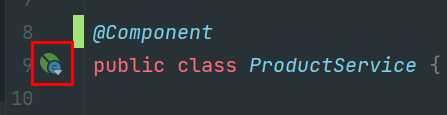
- '빈' 아이콘 확인 → 스프링 IoC 에서 관리할 '빈' 클래스라는 표시
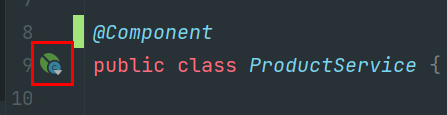
-
@Component 적용 조건
-
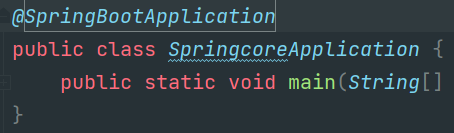
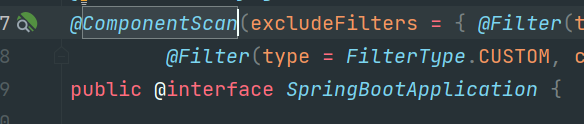
@ComponentScan 에 설정해 준 packages 위치와 하위 packages 들
@Configuration @ComponentScan(basePackages = "com.sparta.springcore") class BeanConfig { ... } -
@SpringBootApplication 에 의해 default 설정이 되어 있음
com.sparta.springcore/SpringcoreApplication.java
-
테스트 코드
package com.sparta.abc;

import org.springframework.stereotype.Component;

@Component
public class TestClass {

}
-
- 클래스 선언 위에 설정
-
@Bean
- 직접 객체를 생성하여 빈으로 등록 요청
- [코드스니펫] BeanConfiguration
import org.springframework.context.annotation.Bean;
import org.springframework.context.annotation.Configuration;

@Configuration
public class BeanConfiguration {

    @Bean
    public ProductRepository productRepository() {
        String dbUrl = "jdbc:h2:mem:springcoredb";
        String dbId = "sa";
        String dbPassword = "";

        return new ProductRepository(dbUrl, dbId, dbPassword);
    }
}
- [코드스니펫] BeanConfiguration
- 스프링 서버가 뜰 때 스프링 IoC 에 '빈' 저장
// 1. @Bean 설정된 함수 호출 ProductRepository productRepository = beanConfiguration.productRepository(); // 2. 스프링 IoC 컨테이너에 빈 (productRepository) 저장 // productRepository -> 스프링 IoC 컨테이너- 스프링 '빈' 이름: @Bean 이 설정된 함수명
- public ProductRepository productRepository() {..} → productRepository
- 스프링 '빈' 이름: @Bean 이 설정된 함수명
- '빈' 아이콘 확인 → 스프링 IoC 에 '빈' 에 등록될 것이라는 표시
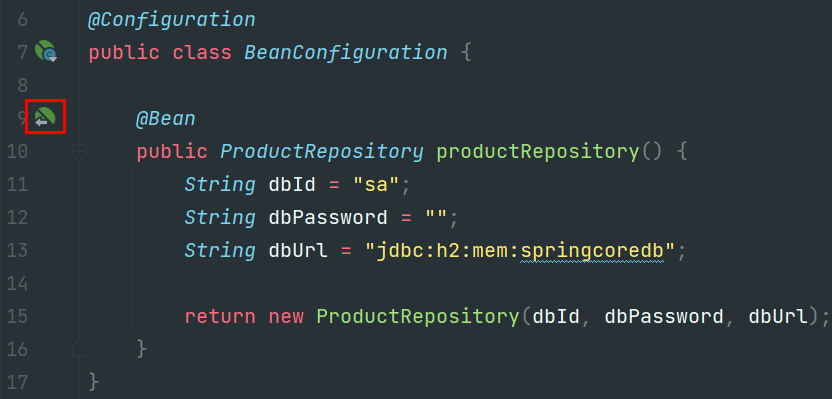
- 직접 객체를 생성하여 빈으로 등록 요청
-
-
49) 스프링 '빈' 사용 방법
-
@Autowired
- 멤버변수 선언 위에 @Autowired → 스프링에 의해 DI (의존성 주입) 됨
@Component public class ProductService { **@Autowired** private ProductRepository productRepository; // ... } - '빈' 을 사용할 함수 위에 @Autowired → 스프링에 의해 DI 됨
@Component public class ProductService { private final ProductRepository productRepository; **@Autowired** public ProductService(ProductRepository productRepository) { this.productRepository = productRepository; } // ... } - @Autowired 적용 조건
- 스프링 IoC 컨테이너에 의해 관리되는 클래스에서만 가능
- 스프링 IoC 컨테이너에 의해 관리되는 클래스에서만 가능
- @Autowired 생략 조건
- Spring 4.3 버젼 부터 @Autowired 생략가능
- 생성자 선언이 1개 일 때만 생략 가능
-
파라미터가 다른 생성자들
public class A {
	@Autowired // 생략 불가
	public A(B b) { ... }

	@Autowired // 생략 불가
	public A(B b, C c) { ... }
}
-
- Lombok 의 @RequiredArgsConstructor 를 사용하면 다음과 같이 코딩 가능
**@RequiredArgsConstructor** // final로 선언된 멤버 변수를 자동으로 생성합니다.
@RestController // JSON으로 데이터를 주고받음을 선언합니다.
public class ProductController {

    private final ProductService productService;

    // 생략 가능
		// @Autowired
		// public ProductController(ProductService productService) {
		//     this.productService = productService;
		// }
}
- 멤버변수 선언 위에 @Autowired → 스프링에 의해 DI (의존성 주입) 됨
-
ApplicationContext
- 스프링 IoC 컨테이너에서 빈을 수동으로 가져오는 방법
@Component
public class ProductService {
    private final ProductRepository productRepository;

    @Autowired
    public ProductService(ApplicationContext context) {
        // 1.'빈' 이름으로 가져오기
        ProductRepository productRepository = (ProductRepository) context.getBean("productRepository");
        // 2.'빈' 클래스 형식으로 가져오기
        // ProductRepository productRepository = context.getBean(ProductRepository.class);
        this.productRepository = productRepository;
    }

		// ...
}
- 스프링 IoC 컨테이너에서 빈을 수동으로 가져오는 방법
-