-
26) Controller 와 HTTP Request 메시지
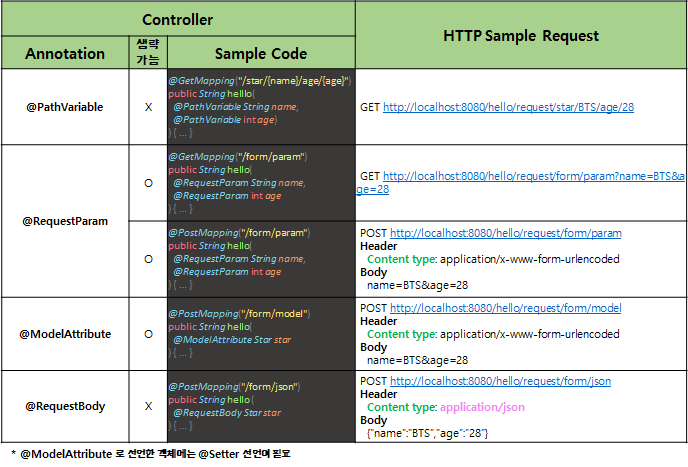
- [코드스니펫] HelloRequestController.java
import org.springframework.stereotype.Controller; import org.springframework.web.bind.annotation.*; @Controller @RequestMapping("/hello/request") public class HelloRequestController { @GetMapping("/form/html") public String helloForm() { return "hello-request-form"; } // [Request sample] // GET http://localhost:8080/hello/request/star/BTS/age/28 @GetMapping("/star/{name}/age/{age}") @ResponseBody public String helloRequestPath(@PathVariable String name, @PathVariable int age) { return String.format("Hello, @PathVariable.<br> name = %s, age = %d", name, age); } // [Request sample] // GET http://localhost:8080/hello/request/form/param?name=BTS&age=28 @GetMapping("/form/param") @ResponseBody public String helloGetRequestParam(@RequestParam String name, @RequestParam int age) { return String.format("Hello, @RequestParam.<br> name = %s, age = %d", name, age); } // [Request sample] // POST http://localhost:8080/hello/request/form/param // Header // Content type: application/x-www-form-urlencoded // Body // name=BTS&age=28 @PostMapping("/form/param") @ResponseBody public String helloPostRequestParam(@RequestParam String name, @RequestParam int age) { return String.format("Hello, @RequestParam.<br> name = %s, age = %d", name, age); } // [Request sample] // POST http://localhost:8080/hello/request/form/model // Header // Content type: application/x-www-form-urlencoded // Body // name=BTS&age=28 @PostMapping("/form/model") @ResponseBody public String helloRequestBodyForm(@ModelAttribute Star star) { return String.format("Hello, @RequestBody.<br> (name = %s, age = %d) ", star.name, star.age); } // [Request sample] // POST http://localhost:8080/hello/request/form/json // Header // Content type: application/json // Body // {"name":"BTS","age":"28"} @PostMapping("/form/json") @ResponseBody public String helloPostRequestJson(@RequestBody Star star) { return String.format("Hello, @RequestBody.<br> (name = %s, age = %d) ", star.name, star.age); } } - [코드스니펫] hello-request-form.html
<!DOCTYPE html>
<html>
<head>
    <title>Hello Request</title>
</head>
<body>
    <h2>GET /star/{name}/age/{age}</h2>
    <form id="helloPathForm">
        <div>
            이름: <input name="name" type="text">
        </div>
        <div>
            나이: <input name="age" type="text">
        </div>
    </form>
    <div>
        <button id="helloPathFormSend">전송</button>
    </div>
    <br>

    <h2>GET /hello/request/form/param</h2>
    <form method="GET" action="/hello/request/form/param">
        <div>
            이름: <input name="name" type="text">
        </div>
        <div>
            나이: <input name="age" type="text">
        </div>
        <button>전송</button>
    </form>

    <br>

    <h2>POST /hello/request/form/param</h2>
    <form method="POST" action="/hello/request/form/param">
        <div>
            이름: <input name="name" type="text">
        </div>
        <div>
            나이: <input name="age" type="text">
        </div>
        <button>전송</button>
    </form>
    <br>

    <h2>POST /hello/request/form/model</h2>
    <form method="POST" action="/hello/request/form/model">
        <div>
            이름: <input name="name" type="text">
        </div>
        <div>
            나이: <input name="age" type="text">
        </div>
        <button>전송</button>
    </form>
    <br>

    <h2>POST /hello/request/form/json</h2>
    <form id="helloJsonForm">
        <div>
            이름: <input name="name" type="text">
        </div>
        <div>
            나이: <input name="age" type="text">
        </div>
    </form>
    <div>
        <button id="helloJsonSend">전송</button>
    </div>
    <div>
        <div id="helloJsonResult"></div>
    </div>
    </body>
    <script>
        // GET /star/{name}/age/{age}
        const helloPathForm = document.querySelector("#helloPathFormSend")
        helloPathForm.onclick = (e) => {
            const form = document.querySelector("#helloPathForm");
            const name = form.querySelector('input[name="name"]').value;
            const age = form.querySelector('input[name="age"]').value;
            const relativeUrl = `/hello/request/star/${name}/age/${age}`;
            window.location.href = relativeUrl;
        }

        // POST /hello/request/form/json
        const helloJson = document.querySelector("#helloJsonSend")
        helloJson.onclick = async (e) => {
            const form = document.querySelector("#helloJsonForm");

            const data = {
                name: form.querySelector('input[name="name"]').value,
                age: form.querySelector('input[name="age"]').value
            }

            const response = await fetch('/hello/request/form/json', {
                method: 'POST',
                headers: {
                    'Content-Type': 'application/json',
                },
                body: JSON.stringify(data),
            })

            const text = await response.text(); // read response body as text
            document.querySelector("#helloJsonResult").innerHTML = text;
        };
    </script>
</html>
- [코드스니펫] HelloRequestController.java