Apache Sqoop이란

sqoop은 일반적으로 사용하는 RDBMS(MySQL, Oracle)와 HDFS(Hive, HBase)간 데이터를 전송하기 위해 사용하는 툴이다.
HDFS 저장소를 기준으로 import(RDBMS -> HDFS), export(HDFS -> RDBMS) 기능을 제공하며, MapReduce방식으로 동작한다.
Sqoop download

환경변수 및 환경설정
1. 경로 설정
- gedit ~/.bashrc
- source ~/.bashrc
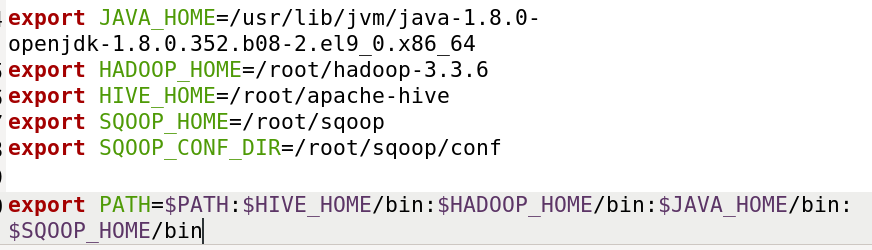
2. sqoop 환경설정
- cp sqoop/conf/sqoop-env-template.sh sqoop-env.sh를 통해 환경설정파일 카피
- gedit sqoop/conf/sqoop-env.sh
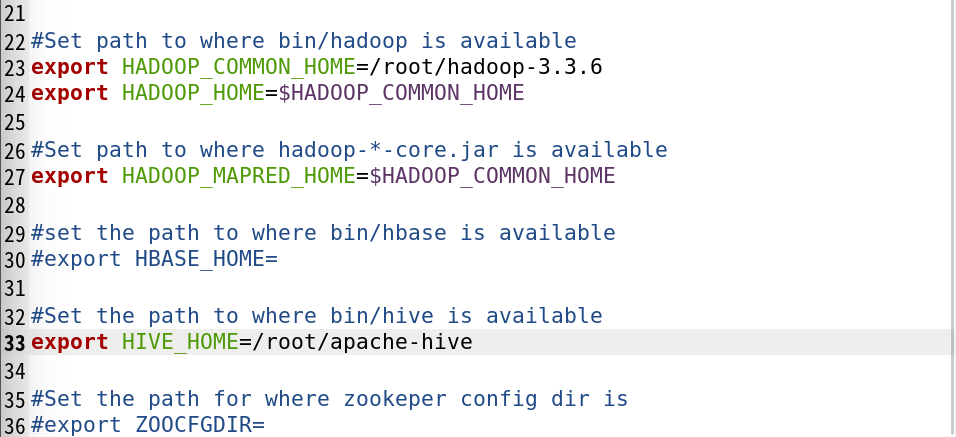
- gedit sqoop/conf/sqoop-env.sh
MySQL DB 설정
1. MySQL 설치
mysql 설치 후 필요한 설정 및 진행 단계를 다음 명령어를 통해 진행
dnf install mysql-server
systemctl start mysqld.service
systemctl enable mysqld
systemctl status mysqld
mysql_secure_installation
- mysql user 생성
CREATE USER ''@'localhost' IDENTIFIED BY >'';
GRANT ALL PRIVILEGES ON . TO ''@'localhost';
FLUSH PRIVILEGES;
systemctl restart mysqld
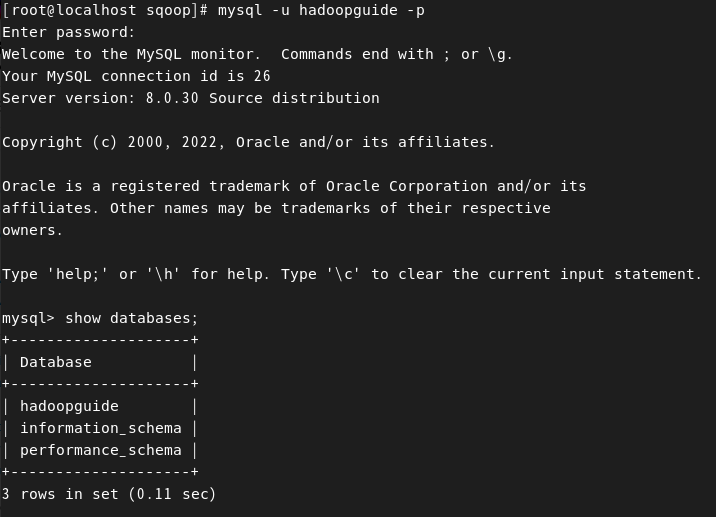
2. MySQL 접속
- Mysql 접속
mysql -u root -p
# 접속 예시

[sshuser@m-001-example-1fx8-hd ~]$ mysql -u example -p
Enter password:
Welcome to the MySQL monitor.  Commands end with ; or ㅓ\g.
Your MySQL connection id is 37
Server version: 5.6.35-log MySQL Community Server (GPL)
Copyright (c) 2000, 2018, Oracle and/or its affiliates. All rights reserved.

Oracle is a registered trademark of Oracle Corporation and/or its affiliates. Other names may be trademarks of their respective owners.

Type 'help;' or '\h' for help. Type '\c' to clear the current input statement.

mysql>
3. MySQL 데이터 스키마 생성 및 확인
create database hadoopguide;
GRANT ALL PRIVILEGES ON hadoopguide.* TO 'username'@'localhost' IDENTIFIED BY 'password';
# 권한 부여 : 로컬 사용자가 해당 db를 보고 수정할 수 있도록 권한 부여
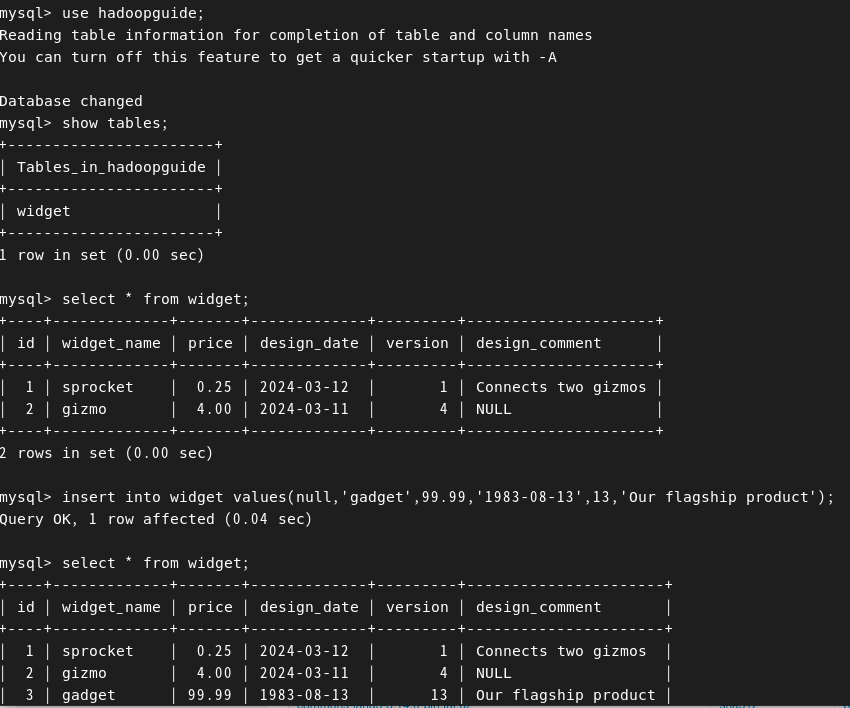
- sqoop 설정 정리
Sqoop 1.4.7 환경 설정 후 ,
-
commons-lang-2.6.jar 다운(기존에 있던 commons-lang은 전부 지우거나 파일 다른곳으로 이동)
-
CREATE USER 계정명입력@localhost identified by '비밀번호';
-
GRANT ALL PRIVILEGES ON 데베명입력.* TO 계정명입력@localhost;
-
flush privileges;
-
SHOW GRANTS FOR 계정명@localhost;
-
Sqoop 활용
1. 커넥터 설치 및 압축해제 (connector/J)
Sqoop은 관계형 데이터베이스 시스템과 Hadoop의 상호 작용을 용이하게 하기 위해 설계되었는데, 이 때 다양한 데이터베이스 시스템과의 연결은 Sqoop connector를 통해 이루어짐
wget https://downloads.mysql.com/archives/get/p/3/file/mysql-connector-java-5.1.46.tar.gz
tar xvfz mysql-connector-java-5.1.46.tar.gz
error : java.lang.NoClassDefFoundError: org/apache/commons/lang/StringUtils
해당 오류는 commons-lang 파일이 있어야 해결된다.
2. commons-lang 파일 다운로드

wget https://dlcdn.apache.org//commons/lang/binaries/commons-lang3-3.14.0-bin.tar.gz
3. Sqoop import
Sqoop 명령어 import를 사용하여 특정 데이터베이스, 특정 테이블, 쿼리 수행 결과 등 가져올 수 있다.
# Sqoop import

sqoop import --connect jdbc:mysql://[마스터 노드 Private IP]:3306/[데이터베이스이름] --username [클러스터 관리자 계정명] --password [클러스터 관리자 패스워드] --table [대상테이블]

ex1.
  sqoop import \
  --connect jdbc:mysql://localhost/hadoopguide \
  --table test2 \
  --target-dir /user/root/test2 \
  --username hadoopguide \
  --P \
  -m 1

ex2.
  #스쿱으로 가져온 데이터의 순서가 틀어지면 임의로 query문을 추가하여 정렬해서 가져온다
  #이때 주의할 점은 , where $CONDITIONS를 반드시 작성해야 error가 발생하지 않는다는 점이다. 해당절을 작성하지 않고 order by를 작성하면 오류가 발생한다.

  sqoop import
  --connect jdbc:mysql://localhost/hadoopguide \
  --target-dir widget \
  --username hadoopguide \
  --P  \
  --query "select * from widget where \$CONDITIONS order by id" \
  -m 1
실습>

Warning: /root/sqoop/../hbase does not exist! HBase imports will fail.
Please set $HBASE_HOME to the root of your HBase installation.
Warning: /root/sqoop/../hcatalog does not exist! HCatalog jobs will fail.
Please set $HCAT_HOME to the root of your HCatalog installation.
Warning: /root/sqoop/../accumulo does not exist! Accumulo imports will fail.
Please set $ACCUMULO_HOME to the root of your Accumulo installation.
Warning: /root/sqoop/../zookeeper does not exist! Accumulo imports will fail.
Please set $ZOOKEEPER_HOME to the root of your Zookeeper installation.
2024-03-12 14:04:32,758 INFO sqoop.Sqoop: Running Sqoop version: 1.4.7
Enter password:
2024-03-12 14:04:36,680 INFO manager.MySQLManager: Preparing to use a MySQL streaming resultset.
2024-03-12 14:04:36,684 INFO tool.CodeGenTool: Beginning code generation
Tue Mar 12 14:04:37 KST 2024 WARN: Establishing SSL connection without server's identity verification is not recommended. According to MySQL 5.5.45+, 5.6.26+ and 5.7.6+ requirements SSL connection must be established by default if explicit option isn't set. For compliance with existing applications not using SSL the verifyServerCertificate property is set to 'false'. You need either to explicitly disable SSL by setting useSSL=false, or set useSSL=true and provide truststore for server certificate verification.
2024-03-12 14:04:38,549 INFO manager.SqlManager: Executing SQL statement: select * from widget where  (1 = 0)  order by id
2024-03-12 14:04:38,567 INFO manager.SqlManager: Executing SQL statement: select * from widget where  (1 = 0)  order by id
2024-03-12 14:04:38,635 INFO manager.SqlManager: Executing SQL statement: select * from widget where  (1 = 0)  order by id
2024-03-12 14:04:38,677 INFO orm.CompilationManager: HADOOP_MAPRED_HOME is /root/hadoop-3.3.6
Note: /tmp/sqoop-root/compile/a1649ef2c28b7580e54d7c867471195d/QueryResult.java uses or overrides a deprecated API.
Note: Recompile with -Xlint:deprecation for details.
2024-03-12 14:04:44,725 INFO orm.CompilationManager: Writing jar file: /tmp/sqoop-root/compile/a1649ef2c28b7580e54d7c867471195d/QueryResult.jar
2024-03-12 14:04:44,801 INFO mapreduce.ImportJobBase: Beginning query import.
2024-03-12 14:04:44,802 INFO Configuration.deprecation: mapred.job.tracker is deprecated. Instead, use mapreduce.jobtracker.address
2024-03-12 14:04:45,328 INFO Configuration.deprecation: mapred.jar is deprecated. Instead, use mapreduce.job.jar
Tue Mar 12 14:04:45 KST 2024 WARN: Caught while disconnecting...

EXCEPTION STACK TRACE:


** BEGIN NESTED EXCEPTION **

javax.net.ssl.SSLException
MESSAGE: closing inbound before receiving peer's close_notify

STACKTRACE:

javax.net.ssl.SSLException: closing inbound before receiving peer's close_notify
	at sun.security.ssl.SSLSocketImpl.shutdownInput(SSLSocketImpl.java:740)
	at sun.security.ssl.SSLSocketImpl.shutdownInput(SSLSocketImpl.java:719)
	at com.mysql.jdbc.MysqlIO.quit(MysqlIO.java:2249)
	at com.mysql.jdbc.ConnectionImpl.realClose(ConnectionImpl.java:4221)
	at com.mysql.jdbc.ConnectionImpl.close(ConnectionImpl.java:1464)
	at org.apache.sqoop.manager.GenericJdbcManager.discardConnection(GenericJdbcManager.java:78)
	at org.apache.sqoop.manager.GenericJdbcManager.close(GenericJdbcManager.java:88)
	at org.apache.sqoop.mapreduce.DataDrivenImportJob.configureInputFormat(DataDrivenImportJob.java:335)
	at org.apache.sqoop.mapreduce.ImportJobBase.runImport(ImportJobBase.java:262)
	at org.apache.sqoop.manager.SqlManager.importQuery(SqlManager.java:748)
	at org.apache.sqoop.tool.ImportTool.importTable(ImportTool.java:522)
	at org.apache.sqoop.tool.ImportTool.run(ImportTool.java:628)
	at org.apache.sqoop.Sqoop.run(Sqoop.java:147)
	at org.apache.hadoop.util.ToolRunner.run(ToolRunner.java:82)
	at org.apache.sqoop.Sqoop.runSqoop(Sqoop.java:183)
	at org.apache.sqoop.Sqoop.runTool(Sqoop.java:234)
	at org.apache.sqoop.Sqoop.runTool(Sqoop.java:243)
	at org.apache.sqoop.Sqoop.main(Sqoop.java:252)


** END NESTED EXCEPTION **


2024-03-12 14:04:47,676 INFO Configuration.deprecation: mapred.map.tasks is deprecated. Instead, use mapreduce.job.maps
2024-03-12 14:04:48,032 INFO client.DefaultNoHARMFailoverProxyProvider: Connecting to ResourceManager at /0.0.0.0:8032
2024-03-12 14:04:51,141 INFO mapreduce.JobResourceUploader: Disabling Erasure Coding for path: /tmp/hadoop-yarn/staging/root/.staging/job_1710213620221_0002
Tue Mar 12 14:04:57 KST 2024 WARN: Establishing SSL connection without server's identity verification is not recommended. According to MySQL 5.5.45+, 5.6.26+ and 5.7.6+ requirements SSL connection must be established by default if explicit option isn't set. For compliance with existing applications not using SSL the verifyServerCertificate property is set to 'false'. You need either to explicitly disable SSL by setting useSSL=false, or set useSSL=true and provide truststore for server certificate verification.
2024-03-12 14:04:58,150 INFO db.DBInputFormat: Using read commited transaction isolation
2024-03-12 14:04:58,815 INFO mapreduce.JobSubmitter: number of splits:1
2024-03-12 14:04:59,609 INFO mapreduce.JobSubmitter: Submitting tokens for job: job_1710213620221_0002
2024-03-12 14:04:59,609 INFO mapreduce.JobSubmitter: Executing with tokens: []
2024-03-12 14:05:00,579 INFO conf.Configuration: resource-types.xml not found
2024-03-12 14:05:00,581 INFO resource.ResourceUtils: Unable to find 'resource-types.xml'.
2024-03-12 14:05:01,366 INFO impl.YarnClientImpl: Submitted application application_1710213620221_0002
2024-03-12 14:05:01,491 INFO mapreduce.Job: The url to track the job: http://localhost:8088/proxy/application_1710213620221_0002/
2024-03-12 14:05:01,493 INFO mapreduce.Job: Running job: job_1710213620221_0002
2024-03-12 14:05:27,705 INFO mapreduce.Job: Job job_1710213620221_0002 running in uber mode : false
2024-03-12 14:05:27,724 INFO mapreduce.Job:  map 0% reduce 0%
2024-03-12 14:05:45,264 INFO mapreduce.Job:  map 100% reduce 0%
2024-03-12 14:05:46,355 INFO mapreduce.Job: Job job_1710213620221_0002 completed successfully
2024-03-12 14:05:46,910 INFO mapreduce.Job: Counters: 33
	File System Counters
		FILE: Number of bytes read=0
		FILE: Number of bytes written=283653
		FILE: Number of read operations=0
		FILE: Number of large read operations=0
		FILE: Number of write operations=0
		HDFS: Number of bytes read=87
		HDFS: Number of bytes written=130
		HDFS: Number of read operations=6
		HDFS: Number of large read operations=0
		HDFS: Number of write operations=2
		HDFS: Number of bytes read erasure-coded=0
	Job Counters
		Launched map tasks=1
		Other local map tasks=1
		Total time spent by all maps in occupied slots (ms)=14246
		Total time spent by all reduces in occupied slots (ms)=0
		Total time spent by all map tasks (ms)=14246
		Total vcore-milliseconds taken by all map tasks=14246
		Total megabyte-milliseconds taken by all map tasks=14587904
	Map-Reduce Framework
		Map input records=3
		Map output records=3
		Input split bytes=87
		Spilled Records=0
		Failed Shuffles=0
		Merged Map outputs=0
		GC time elapsed (ms)=340
		CPU time spent (ms)=2970
		Physical memory (bytes) snapshot=141488128
		Virtual memory (bytes) snapshot=2946174976
		Total committed heap usage (bytes)=28442624
		Peak Map Physical memory (bytes)=141488128
		Peak Map Virtual memory (bytes)=2946174976
	File Input Format Counters
		Bytes Read=0
	File Output Format Counters
		Bytes Written=130
2024-03-12 14:05:46,954 INFO mapreduce.ImportJobBase: Transferred 130 bytes in 59.1995 seconds (2.196 bytes/sec)
2024-03-12 14:05:46,978 INFO mapreduce.ImportJobBase: Retrieved 3 records.

4. Sqoop export
Sqoop export는 Hadoop 파일 시스템에 저장된 데이터를 외부 데이터베이스나 데이터 웨어하우스로 내보내는 작업을 수행하는 Sqoop 명령어
Sqoop import : 외부 DB의 데이터를 Hadoop 내부로 갖고오기
Sqoop export : Hadoop 내부의 데이터를 외부 DB로 내보내기
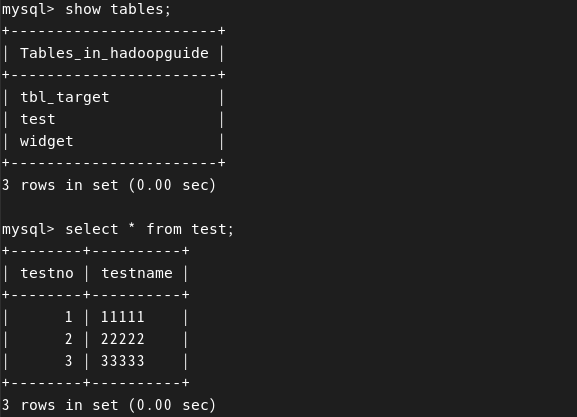
위 그림은 mysql로 형성한 test 테이블이며 테이블 내용은 사진과 같다. 해당 테이블은 Sqoop import를 통해 /user/root/test/으로 import를 한 상태이다. Hadoop 경로로 들어간 해당 테이블의 내용과 export를 사용하여 다시 mysql의 빈 테이블인 tbl_test 테이블로 갖고오는 작업을 진행하였다.
- export 기본 구조
# mysql -u hadoopguide -p를 통해 mysql 접속후 빈 테이블을 하나 형성한다. 이 과정은 설명 생략한다
# Hadoop 내부에 저장되어 있는 /user/root/test/part-m-0000 파일을 MySQL DB로 내보내기


sqoop export --connect jdbc:mysql://localhost/hadoopguide --table tbl_target --export-dir /user/root/test/part-m-00000 --username hadoopguide --password password
mysql을 확인해보면 hadoop 내부의 /user/root/test 에 있는 part-m-0000의 내용이 tbl_target에 들어간 것을 알 수 있다.