Service
- 백그라운드에 오래 실행되는 작업
- 서비스도 액티비티처럼 안드로이드 컴포넌트이기 때문에 manifest에 선언한다
<manifest xmlns:android="http://schemas.android.com/apk/res/android" ...>

    <service
        android:name=".MyMediaPlaybackService"
        android:foregroundServiceType="mediaPlayback"
        android:exported="false">
    </service>
</manifest>
permission
- API 29이상 부터는 foreground service를 사용할 때 권한을 받아야 한다. normal permission이기 때문에 manifest에 선언하기만 하면 자동으로 권한을 얻을 수 있다.
- API 34이상일 때는 foreground service의 구체적 타입을 명시해야 한다.
<manifest xmlns:android="http://schemas.android.com/apk/res/android" ...>

  	//29이상일 때
    <uses-permission android:name="android.permission.FOREGROUND_SERVICE"/>

  	// 34 이상일 때
    <uses-permission android:name="android.permission.FOREGROUND_SERVICE_CAMERA"/>

    <application ...>
        ...
    </application>
</manifest>
Foreground Service
-
서비스는 백그라운에서 실행된다는데 포그라운드?
-
status notification을 통해서 사용자에게 서비스가 작동하고 있다는 걸 알린기 때문에 foreground이다.
ex. 뮤직 재생 중인 상태바 플레이어, 사용자 위치나 건강상태 측정 중.. 같은 것 -
어떤 foreground service를 사용하는지 알려줘야 한다.
<manifest xmlns:android="http://schemas.android.com/apk/res/android" ...>

    <service
        android:name=".MyMediaPlaybackService"
        android:foregroundServiceType="mediaPlayback"
        android:exported="false">
    </service>
</manifest>- startForegroundService(intent)로 포그라운드 서비스를 시작하자마자 바로 notification을 띄워줄 수 있다.
stopForeground()로 종료
onStartCommand
- 일반 서비스는 OnStartCommand를 통해 서비스를 시작한다.
- 리턴값은 Integer인데 시스템이 서비스를 종료할 경우 어떻게 다시 서비스를 시작할 것인지를 나타낸다
START_NOT_STIKCY
- onStartCommand이후 서비스가 종료되어도 다시 생성하지 않고 재시작한다.
START_STICKY
- onStartCommand이후 서비스가 종료되면 새로 서비스를 시작한다.
- 하지만 마지막 intent는 전달되지 않는다.
- 미디어 플레이처럼 바로 동작 (플레이)는 하지 않지만 바로 준비하고 기다려야 하는 작업에 적합
START_REDELIVER_INTENT
- onStartCommand이후 서비스가 종료되면 새로 서비스를 시작한다.
- 마지막 intent가 전달된다.
- 파일 다운로드처럼 바로 실행되어야 하는 서비스에 적합
Background Service
- background에서 실행되는 service로 사용자가 알지 못한다.
- Android API 26 이상부터는 앱이 foreground상태일 때만 background service를 실행할 수 있다.
- 앱이 background일때도 background 작업하고 싶으면 WorkManager를 사용해라.
Bound Service
- 일반적으로 서비스를 호출하고 나면 서비스는 독립적인 lifecycle을 가지고 실행된다.
- 하지만, 만약 서비스와 통신을 하고 싶은 경우,호출한 compoenent가 서비스에 bind되어서 호출한 compoenent가 클라이언트, Service가 서버 구조로 통신을 할 수 있다.
ex. 상단바의 music player의 버튼을 누르면 앱의 music player의 노래가 정지 - 이게 bound Service이고 일반적인 Service와 다른 lifecycle을 가진다.
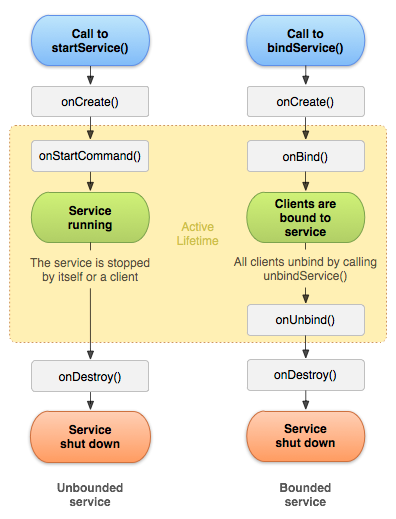
- 일반 서비스는 독립적인 lifecycle을 가지기 때문에 꼭 종료를 해줘야 한지만 bound service는 호출한 component에 bind되기 때문에 호출한 component가 종료되면 서비스도 종료된다.
IBinder
- onBind()의 리턴값으로 IBinder를 리턴하는데 호출한 component는 이 IBinder를 가지고 통신을 할 수 있다.
service로 오디오를 재생하는데 액티비티에서 button으로 호출할 수 있는 기능을 만들어본다면
class AudioService : Service() {
    // Binder given to clients.
    private val audioBinder by lazy { AudioBinder() }

    // Random number generator.
     private var mediaPlayer: MediaPlayer? = null


    /** Method for clients.  */
    var isPlaying: Boolean = false

    fun play() {
        if (isPlaying) return

        mediaPlayer?.start()
        isPlaying = true
    }

    fun pause() {
        if (isPlaying.not()) return

        mediaPlayer?.pause()

        isPlaying = false
    }

    /**
     * Class used for the client Binder. Because we know this service always
     * runs in the same process as its clients, we don't need to deal with IPC.
     */
    iinner class AudioBinder : Binder() {
        // Return this instance of LocalService so clients can call public methods.
        fun getService(): AudioService = this@AudioService
    }

    override fun onBind(intent: Intent): IBinder {
        return audioBinder
    }

    override fun onDestroy() {
        super.onDestroy()
        mediaPlayer?.stop()
        mediaPlayer?.release()
        mediaPlayer = null
    }
}
binding Component
class BindingActivity : Activity() {
    private lateinit var audioService: AudioService
    private var isBound: Boolean = false


    /** Defines callbacks for service binding, passed to bindService().  */
    private val connection = object : ServiceConnection {

        override fun onServiceConnected(className: ComponentName, service: IBinder) {
            // We've bound to AudioService, cast the IBinder and get LocalService instance.
            val binder = service as AudioService.AudioBinder
            audioService = binder.getService()
            isBound = true
        }

        override fun onServiceDisconnected(arg0: ComponentName) {
            isBound = false
        }
    }

    override fun onCreate(savedInstanceState: Bundle?) {
        super.onCreate(savedInstanceState)
        setContentView(R.layout.main)
    }

    override fun onStart() {
        super.onStart()
        Intent(this, AudioService::class.java).also { intent ->
            bindService(intent, connection, Context.BIND_AUTO_CREATE)
        }
    }

    override fun onStop() {
        super.onStop()
        unbindService(connection)
        isBound.value = false
    }

    /** Called when a button is clicked (the button in the layout file attaches to
     * this method with the android:onClick attribute).  */
    private fun onButtonClick() {
        if (isBound.value) {
            if (audioService.isPlaying) audioService.pause()
            else {
                audioService.play()
            }
        } else {
            audioService.play()
        }
    }
}
ServiceConnection
- Service와의 connection을 모니터링하고 있는 클래스
Service 시작하기
started service
- startService(intent)
bound service
- bindService(intent)
Service와 Thread
- 서비스는 main thread에서 실행된다.
- 따라서, 서비스 작업이 오래걸리거나 스레드를 blocking할 것 같으면 coroutine이나 새로운 스레드를 생성해서 실행해야 한다.
링크
https://developer.android.com/develop/background-work/background-tasks
https://developer.android.com/develop/background-work/services/foreground-services
https://developer.android.com/develop/background-work/services/bound-services

Frontend Developer