Task
- 앱은 동시에 여러 일을 할 수 있다.
- 메인 작업 외에 진행하는 작업들을 실행시키는 방법은 다양한데 어떻게 실행시키냐에 따라서 앱의 성능에 영향을 끼칠 수 있다.
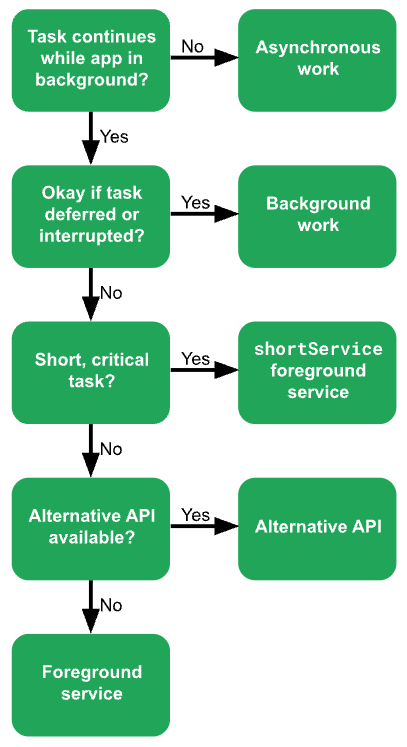
- 서브 작업을 실행시키는 방법은 asynchronous work, background work, foreground service가 존재한다.
Asynchronous work
- 앱이 foreground 상태일 때 동시에 비동기적으로 진행해야 하는 작업
- 보통 coroutine이나 thread를 사용
- 앱이 foreground 상태에서 벗어나게 된다고 종료가 되는게 아니기 때문에 lifecycle에 맞춰서 종료해줘야 한다.
- 그래서 앱이 foreground든, background든 지속적으로 작업이 실행될 때는 비추
Background work
- app이 foreground 상태가 아닐 때도 진행할 수 있는 작업
ex. 주기적으로 서버와 통신하거나 데이터 수집 - 대부분 WorkManager 사용. Background Service는 안드로이드 sdk 26부터 앱이 백그라운드에 있을때는 실행이 제한됨.
Foreground services
- 오래 실행될 작업을 즉시 실행해주는 작업
- notification으로 유저에게 알려줘야 하며 앱이 background에 있을 때는 실행시킬 수 없다.
어떤 걸 사용해야 할까?
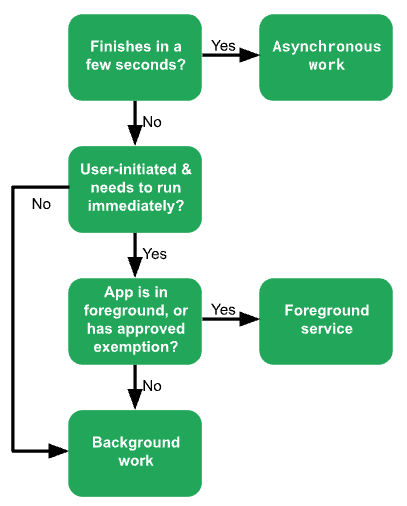
사용자가 시작한 경우
이벤트에 의한 트리거
- 브로드캐스트, 알람, FCM 같은 이벤트에 의해 트리거된 작업을 background에서 작업해야할 수도 있다.
WorkManager
- 지속적인 작업에 대한 API (사용자와 상호작용 하지 않아도 실행되는 작업)
- 보통 background 작업이 지속적인 작업이다보니 WorkManager가 Background 작업만 할 수 있는 건 아니지만 Background 작업에 가장 많이 쓰인다.
- 코루틴은 사용자가 해당 화면을 떠나면 취소되기 때문에 지속적인 작업에 적합하지 않음
ex. 로그 서버에 전송, 서버와 데이터 동기화 작업
- build.gradle에 implementation 해야 사용가능
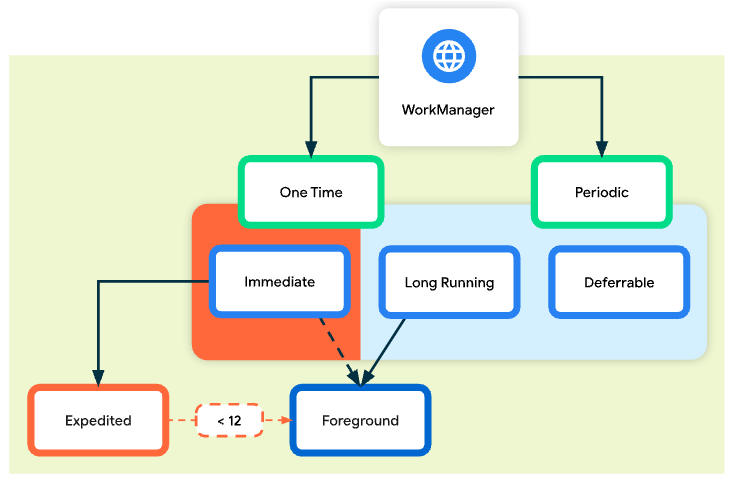
implementation("androidx.work:work-runtime-ktx:$work_version")지속적인 작업의 종류
Immediate
- 빨리 실행되고 종료.
- 한 번만 실행
Expedited
- 즉시 실행되어야 하고 빠르게 끝나는 작업
- 유저한테 중요한 작업
ex. 채팅 이미지 보내기, 결제 작업 - quotas, 즉 할당 시간을 미리 배정받아서 그 시간동안만 실행가능
- 앱이 background 상태일 때만 해당
Long Running
- 10분 이상 진행되는 작업
- setForeground()로 notification 제공할 수 있음
- 한 번만 실행되거나 주기적으로 실행될 수 있음
Deferrable
- 나중에 실행되고 주기적으로 실행될 수 있는
스케줄된 작업 - 한 번만 실행되거나 주기적으로 실행될 수 있음
특징
Work constraints
- 작업이 실행되기 좋은 조건에서 실행되도록 선언할 수 있음
ex. 네트워크나 배터리 상태가 좋을 때만 실행
Robust scheduling
- 한 번 또는 주기적으로 실행되도록 스케줄링 할 수 있음
Expedited work
- 즉시 실행되고 빨리 종료되어야 하는 작업을 실행할 수 있음
Flexible retry policy
- 실패했을 때 다시 유연하게 재시도하는 정책이 있음
Work Chaining
- 여러 작업을 연결하여 복잡한 작업을 순차적으로 또는 병렬적으로 실행할 수 있음
val continuation = WorkManager.getInstance(context)
    .beginUniqueWork(
        Constants.IMAGE_MANIPULATION_WORK_NAME,
        ExistingWorkPolicy.REPLACE,
        OneTimeWorkRequest.from(CleanupWorker::class.java)
    ).then(OneTimeWorkRequest.from(WaterColorFilterWorker::class.java))
    .then(OneTimeWorkRequest.from(GrayScaleFilterWorker::class.java))
    .then(OneTimeWorkRequest.from(BlurEffectFilterWorker::class.java))
    .then(
        if (save) {
            workRequest<SaveImageToGalleryWorker>(tag = Constants.TAG_OUTPUT)
        } else /* upload */ {
            workRequest<UploadWorker>(tag = Constants.TAG_OUTPUT)
        }
    )
Worker 사용하기
이미지를 다운로드를 받으면서 알림으로 다운로드 시작 알리는 기능을 구현해보자.
Worker Class
class ImageDownloader(
    private val context: Context,
    params: WorkerParameters,
) : CoroutineWorker(context, params) {

    private val notificationManager by lazy {
        context.getSystemService(Context.NOTIFICATION_SERVICE) as NotificationManager
    }

    override suspend fun doWork(): Result {

        createNotificationChannel()

        return withContext(Dispatchers.IO) {
            try {
                val imageUrl = ""
                imageUrl.let {

                    notificationManager.notify(NOTIFICATION_ID, createNotification())
                    val inputStream = BufferedInputStream(URL(imageUrl).openStream())
                    val bitmap = BitmapFactory.decodeStream(inputStream)
                    val file = saveBitmapToFile(bitmap)
                    val outputData = workDataOf(KEY_IMAGE_FILE_PATH to file.toString())
                    Result.success(outputData)
                }
            } catch (e: Exception) {
                Log.e(TAG, "Error downloading image", e)
                Result.failure()
            }
        }
    }

    private fun saveBitmapToFile(bitmap: Bitmap): Uri {
        val fileName = "image_${System.currentTimeMillis()}.png"
        val file = File(applicationContext.filesDir, fileName)
        val outputStream = FileOutputStream(file)
        bitmap.compress(Bitmap.CompressFormat.PNG, 100, outputStream)
        outputStream.close()
        return FileProvider.getUriForFile(
            applicationContext,
            "${applicationContext.packageName}.fileprovider",
            file
        )
    }

    private fun createNotificationChannel() {
        if (Build.VERSION.SDK_INT >= Build.VERSION_CODES.O) {
            val channel = NotificationChannel(
                NOTIFICATION_CHANNEL_ID,
                "WorkManager Start Channel",
                NotificationManager.IMPORTANCE_DEFAULT
            )
            notificationManager.createNotificationChannel(channel)
        }
    }

    private fun createNotification(): Notification {
        return NotificationCompat.Builder(context, NOTIFICATION_CHANNEL_ID)
            .setContentTitle("다운로드")
            .setContentText("이미지 다운로드를 시작합니다.")
            .setSmallIcon(R.drawable.baseline_notifications_24)
            .build()
    }

    companion object {
        private const val TAG = "ImageDownloadWorker"
        const val KEY_IMAGE_URL = "image_url"
        const val KEY_IMAGE_FILE_PATH = "image_file_path"
        const val NOTIFICATION_CHANNEL_ID = "MyForegroundServiceChannel"
        const val NOTIFICATION_ID = 12345
    }
}-
에뮬레이터에서 파일이 저장되었는지 확인하고 싶으면 /data/data/packageName/files 를 찾아가면 볼 수 있다.
-
Worker 클래스를 상속해서 doWork() 메서드 안에 백그라운드에서 해야 할 작업을 명시하고 Result를 반환
Result.success() - 성공
Result.failure() - 실패
Result.retry() - 실패했고 재시도해야 함
WorkRequest
- Worker를 정의했으면 WorkRequest로 스케줄링을 해야 함
- Worker는 어떤 작업을 할 것인지 명시하는 것이라면 WorkRequest는 그것을 어떻게 언제 실행할 것인지를 명시하는 것
- one-time work 와 periodical work가 있음
private val constraints = Constraints.Builder()
        .setRequiredNetworkType(NetworkType.CONNECTED)
        .build()

    val imageDownloadRequest = OneTimeWorkRequestBuilder<ImageDownloader>()
        .setConstraints(constraints)
.build()- 이미지 다운로드는 네트워크가 필요하기 때문에 네트워크가 연결된 상태에서만 실행하라고 제약을 걸 수 있음
Periodical Work
- 정확히 설정한 시간에 실행되는 건 아님
- 정확한 시간을 원하면 AlarmManager 사용
val myUploadWork = PeriodicWorkRequestBuilder<SaveImageToFileWorker>(
       1, TimeUnit.HOURS, // repeatInterval (the period cycle)
       15, TimeUnit.MINUTES) // flexInterval
    .build()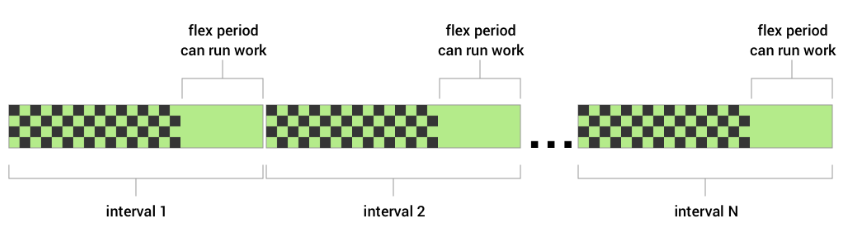
WorkManager
- 어떤 일을 어떻게 실행할 것인지까지 명시한 WorkRequest를 WorkManager에게 전달하면 이제 실행 준비 완료!
WorkManager.getInstance(context).enqueue(imageDownloadRequest)Worker 종류
Worker
- 간단하게 백그라운드 작업 만들 때 사용
CoroutineWorker
- 코틀린 유저 추천
- 백그라운드 작업에 대한 suspend 제공
- Worker 클래스의 doWork 함수는 동기함수
- 하지만 CoroutineWorker의 doWork 함수는 suspend함수로 Disparchers.Default로 실행된다.
- 그래서 위 예시 코드에서도 네트워크 요청을 위해 withContext로 Dispatcher를 변경
- doWork 안에서 비동기 작업을 해야할 때 추천
RxWorker
- RxJava 유저 추천
ListenableWorker
- Worker, CoroutineWorker, RxWorker 클래스의 Base Class
- callback 기반으로 비동기 작업을 구현한 자바 유저를 위함
링크
https://developer.android.com/develop/background-work/background-tasks
https://developer.android.com/develop/background-work/background-tasks/persistent/getting-started
https://developer.android.com/develop/background-work/background-tasks/persistent/threading

Frontend Developer